Tag Archives: Android

Creators of Dubsmash 2 Android Malware Strike Again

Malware Writers Can’t Keep Their Hands Off Porn

In April, we reported on a porn clicker app that slipped into Google Play posing as the popular Dubsmash app. It seems that this malware has mutated and once again had a short-lived career on Google Play, this time hidden in various “gaming” apps.

For your viewing pleasure

The original form of this porn clicker ran completely hidden in the background, meaning victims did not even notice that anything was happening. This time, however, the authors made the porn a bit more visible to their victims.

The new mutation appeared on Google Play on July 14th and was included in five games, each of which was downloaded by 5,000-10,000 users. Fortunately, Google reacted quickly and has already taken down the games from the Play Store.

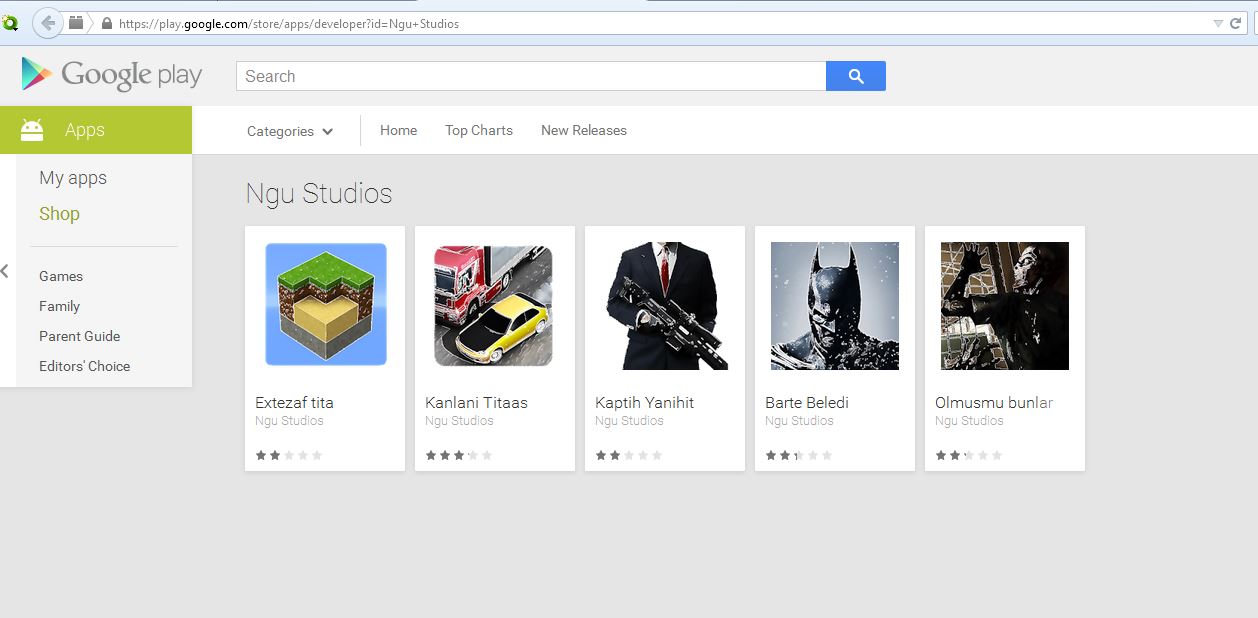
The selection of "gaming" apps affected by Clicker-AR malware on the Google Play Store.

The selection of “gaming” apps affected by Clicker-AR malware on the Google Play Store.

Once the app was downloaded, it did not really seem to do anything significant when opened by the user. However, once the unsuspecting victim opened his/her browser or other apps, the app began to run in the background and redirect the user to porn sites. Users may not have necessarily understood where these porn redirects were coming from, since it was only possible to stop them from happening once the app was killed.

May I?

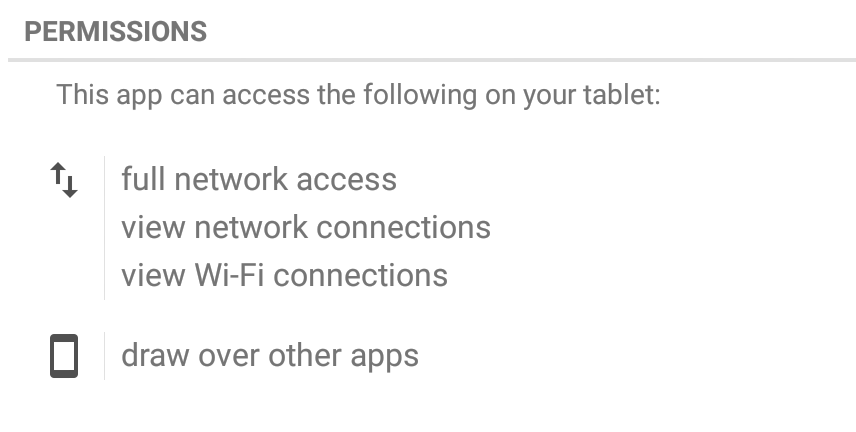
This new mutation, which Avast detects as Clicker-AR, requested one important permission that played a vital role in helping the app do its job. The app requested permission to “draw over other apps”, meaning it could interfere with the interface of any application or change what victims saw in other applications. This helped the malware put its adult content in the forefront of users’ screens.

Let’s play “Clue”

We did not immediately realize that the group behind Clicker-AR was comprised of the same folks  from Turkey behind the fake Dubsmash app. Then, our colleague Nikolaos Chrysaidos dug a bit deeper and was able to connect some clues to figure out who was behind this piece of malware. He noticed that the fake Dubsmash app and the new apps shared the same decryption base64 code for the porn links. We then noticed that they shared the same function with the same name “bilgiVer”, which means “give information” in Turkish. Finally, the old and new apps used the same DNS from Turkey. Not only did they have a server in Turkey, but they also now made use of an additional server in the U.S. – it seems they made some investments using their financial gain from April!

Bye bye, porn!

As mentioned above, these malicious apps have already been removed from Google Play and Avast detects the malware as Clicker-AR. The following games are infected with Clicker-AR: Extezaf tita, Kanlani Titaas, Kapith Yanihit, Barte Beledi, and Olmusmi bunlar. If you have any of these apps installed on your device, we suggest you remove them (unless you, um, enjoy them) and make sure you have an antivirus app, like Avast Mobile Security, installed to protect yourself from mobile malware.

Follow Avast on Twitter where we keep you updated on cybersecurity news every day.

Android malware Fobus now targeting users in the U.S., Germany and Spain

Mid January we informed you of a data-stealing piece of Android malware called Fobus. Back then Fobus mainly targeted our users in Eastern Europe and Russia. Now, Fobus is also targeting our users in the USA, United Kingdom, Germany, Spain and other countries around the world.

Fobus can cost its unaware victims a lot of money, because it sends premium SMS, makes calls without the victims’ knowledge and can steal private information. More concerning is that Fobus also includes hidden features that can remove critical device protections. The app tricks users into granting it full control of the device and that is when this nasty piece of malware really begins to do its work. You can find some more technical details and analysis of Fobus in our previous blog post from January.

Today, we decided to look back and check on some of the data we gathered from Fobus during the last six months. We weren’t surprised to find out that this malware family is still active and spreading, infecting unaware visitors of unofficial Android app stores and malicious websites.

The interesting part of this malware is the use of server-side polymorphism, which we suspected was being used back in January but could not confirm. We have now confirmed that server-side polymorphism is being used by analyzing some of the samples in our database. Most of these have not only randomly-generated package names, but it also seems that they have randomly-generated signing certificates.
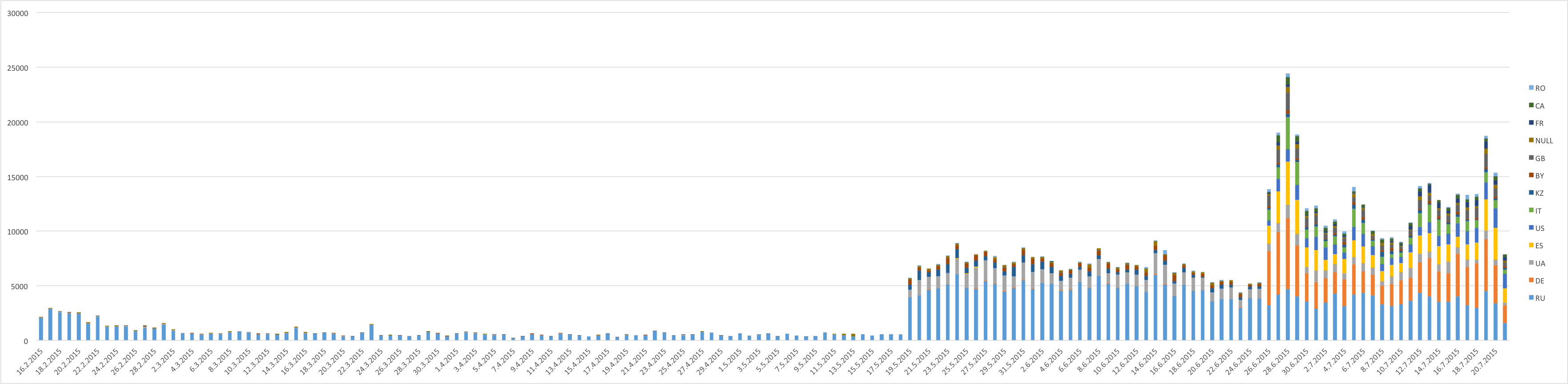
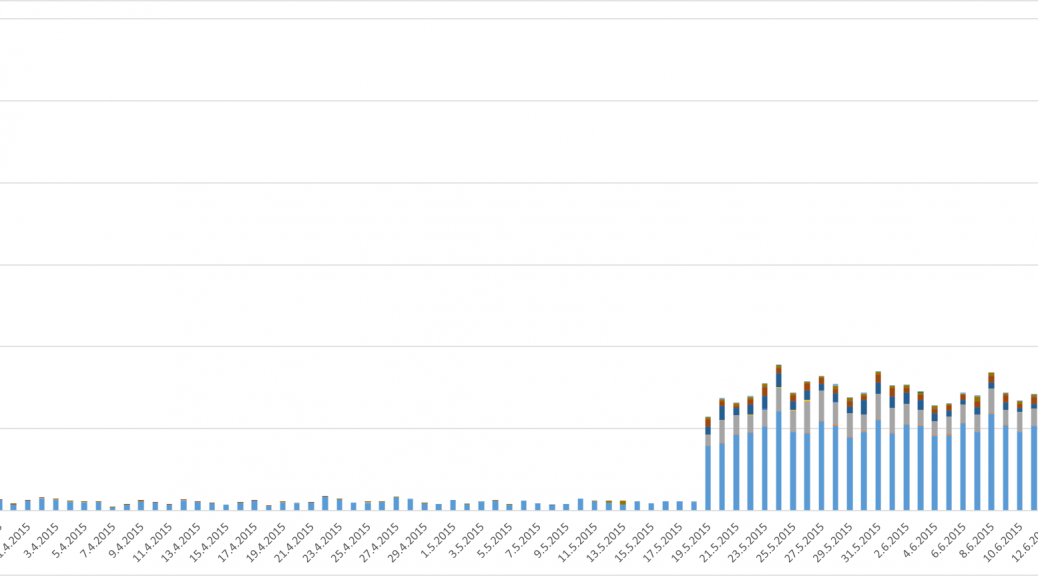
Number of users who have encountered Fobus

Number of users who have encountered Fobus

Geographical reach expanded from the East to the West

Previously, we predicted that we would probably see a steady growth in the number of encounters users have with this malicious application. A review of the results, however, beats all of our predictions. At the beginning, this malware mainly targeted mobile users in Russian speaking countries. As our detections got smarter and we discovered new mutations of Fobus, we discovered that many other countries are affected as well. Now Fobus, although it still mainly targets users in Eastern Europe and Russia, is also targeting our users in the USA, Germany, United Kingdom, Spain, and other countries around the world.

The above graph shows the number of unique users (user IDs) encountering Fobus per day. The graph is also geologically divided by country codes as reported by the users’ connection location.

Number of times users encountered Fobus by country (as of July 21, 2015):

  • Russia: 87,730
  • Germany: 25,030
  • Spain: 12,140
  • USA: 10,270
  • UK:  6,260
  • Italy: 5,910

There are two great leaps visible in the graph, which mark the days when new versions of Fobus were discovered and new detections protecting our users were released. These three detections seem to be particularly effective at their task. The high impact in countries outside of Russia and English speaking regions, which can be seen in the graph, is a little surprising. Especially considering that the malware typically is only in Russian and English and even the English version contains some strings in Russian. Seems like the authors were too lazy to translate their own app properly…
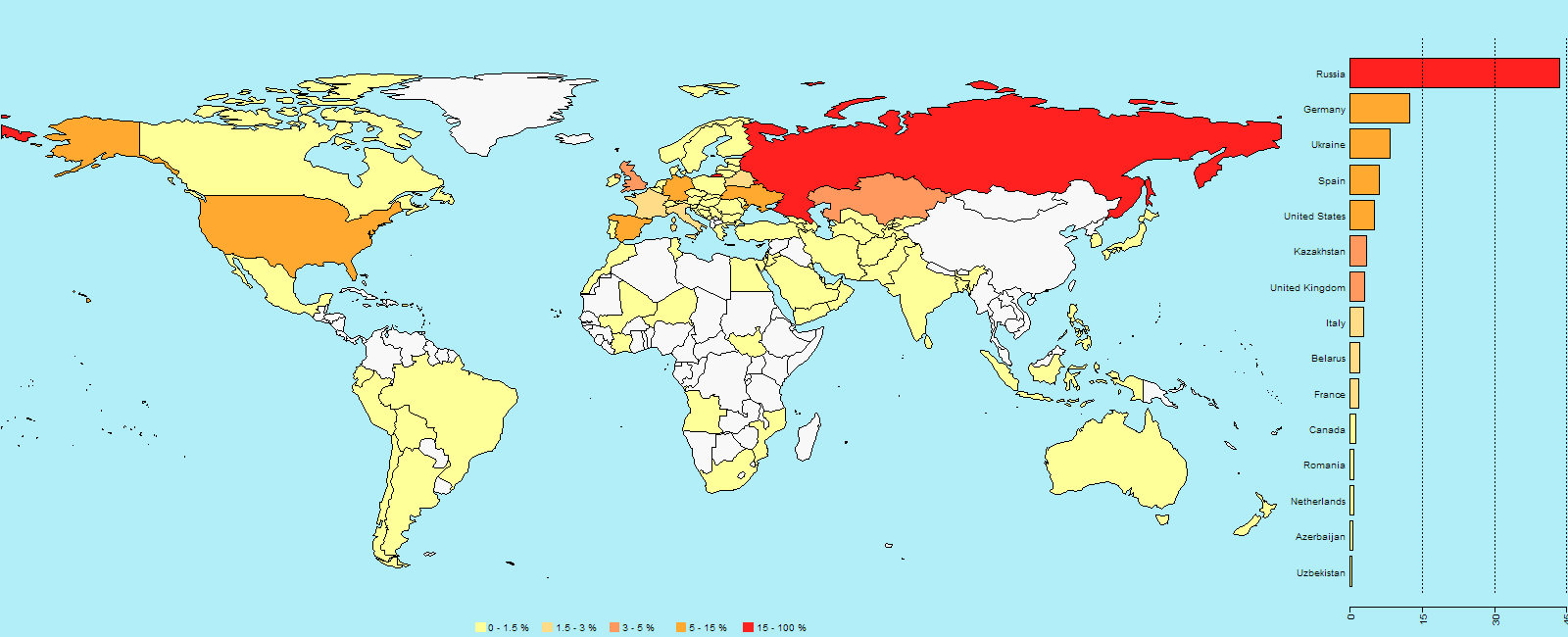
World map showing the percentage of users who encountered Fobus

World map showing the percentage of users who encountered Fobus

An app, built just for you

Now, let’s dig into the analysis. We will look at the certificates used to sign some of the Fobus samples. We already mentioned the problems connected with generating unique applications for each victim (server-side polymorphism). This does not only apply to rebuilding, repackaging and obfuscating each instance of the app itself, but also extends to their signing certificates. To back this up, we analyzed around 4,000 samples and data and inspected the usage of these certificates. We verified that each build of the malicious app is typically seen by one user only, even though its signing certificate can be used to sign multiple apps. Virtually all of the samples we have are very low prevalent, meaning that different users only very rarely see an app instance multiple times. As for the signing certificates, we believe that they are being regenerated on a timely basis. We were able to pick a few examples of such certificates from our statistics.
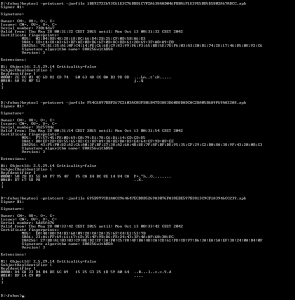
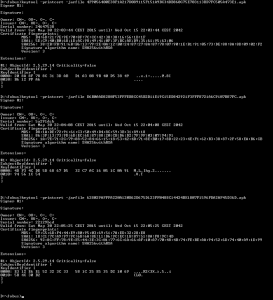
certs_may_28certs_may_30


As you can see from the screenshots above, these certificates are dated the 28th and 30th May 2015 and the time differences in the beginning of the validity period between these certificates are in the order of minutes, sometimes even seconds. We have also found some samples that have certificates with randomly generated credentials altogether.
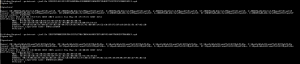
certs_random

The above provided screenshot is an example of such randomly generated certificates.

To conclude, we would like to encourage you to think twice about the apps you install on your phone. Especially if the apps you download are from third party stores and unknown sources. If you download apps from the Google Play Store you’re on the safe side. Requiring nonstandard permissions – especially permissions that don’t seem necessary for the app to properly function – may be a sign that something fishy going on. You should be very suspicious of an app that requests device administrator access and think twice before downloading it.

Acknowledgement

Special thanks to my colleague, Ondřej David, for cooperation on this analysis.

How to thoroughly wipe your phone before selling it

Make sure your Android phone is wiped clean before you sell it.

Every day, tens of thousands of people sell or give away their old mobile phones. We decided to buy some of these used phones to test whether they had been wiped clean of their data. What we found was astonishing: 40,000 photos including 750 photos of partially nude women and more than 250 male nude selfies, 750 emails and texts, 250 names and addresses, a collection of anime porn, a complete loan application, and the identity of four of the previous phone owners.

How did we recover so much personal data?

The problem is that people thought they deleted files but the standard features that came with their operating system did not do the job completely. The operating system deleted the corresponding pointers in the file table and marked the space occupied by the file as free. But in reality, the file still existed and remained on the drive.

With regular use of the device, eventually new data would overwrite the old data but since the person was selling the phone, that never happened and the files were still intact.

It works the same way on your PC. I used free software to recover deleted photos that I thought were missing forever because they had not been overwritten yet.

You can permanently delete data with Avast Anti-Theft

Avast’s free app for Android, Avast Anti-Theft, actually deletes and overwrites all of your personal files. All you do is follow these steps to delete personal data from your smartphone before you sell it or give it away.

1. Install Avast Anti-Theft on your Android device. The app is free from the Google Play Store.
2. Configure Avast Anti-Theft to work with your My Avast account. This gives you remote access to your phone through your PC.
3. Turn on the thorough wipe feature within the app.
4. Log in to your My Avast account from a PC to wipe your phone. This will delete and overwrite all of your personal data.

Follow Avast on FacebookTwitter, YouTube, and Google+ where we keep you updated on cybersecurity news every day.

App developers still need to win the trust of older generations

It is, perhaps, natural to think about apps as a young person’s playground.

Though much research shows that 50+ are one of the fastest growing markets for mobile devices, there is a dearth of mobile apps for our generation.

This may soon change as the number of apps offering real value to the 50+ age group continues to grow. This was underscored by news from the recent AARP 50+ Live Pitch event, held in May in Miami Beach. Entrepreneurs were more focused than ever on mobile apps to help 50+ generations.

Not surprisingly, a key focus in mobile app development for Seniors was health. Nearly half of the 15 products presented at the AARP 50+ Live pitch were in the mobile health category.

In terms of physical health, most of us are aware there are a large array of mobile health apps that can help all of us (regardless of age) track our health – ranging from Fitbits to apps with more serious medical applications.

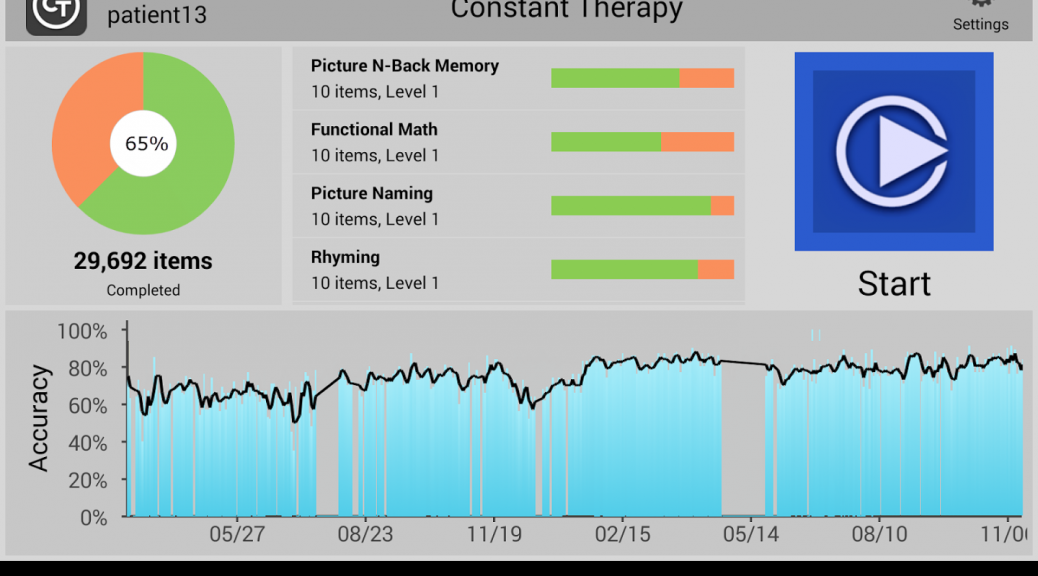
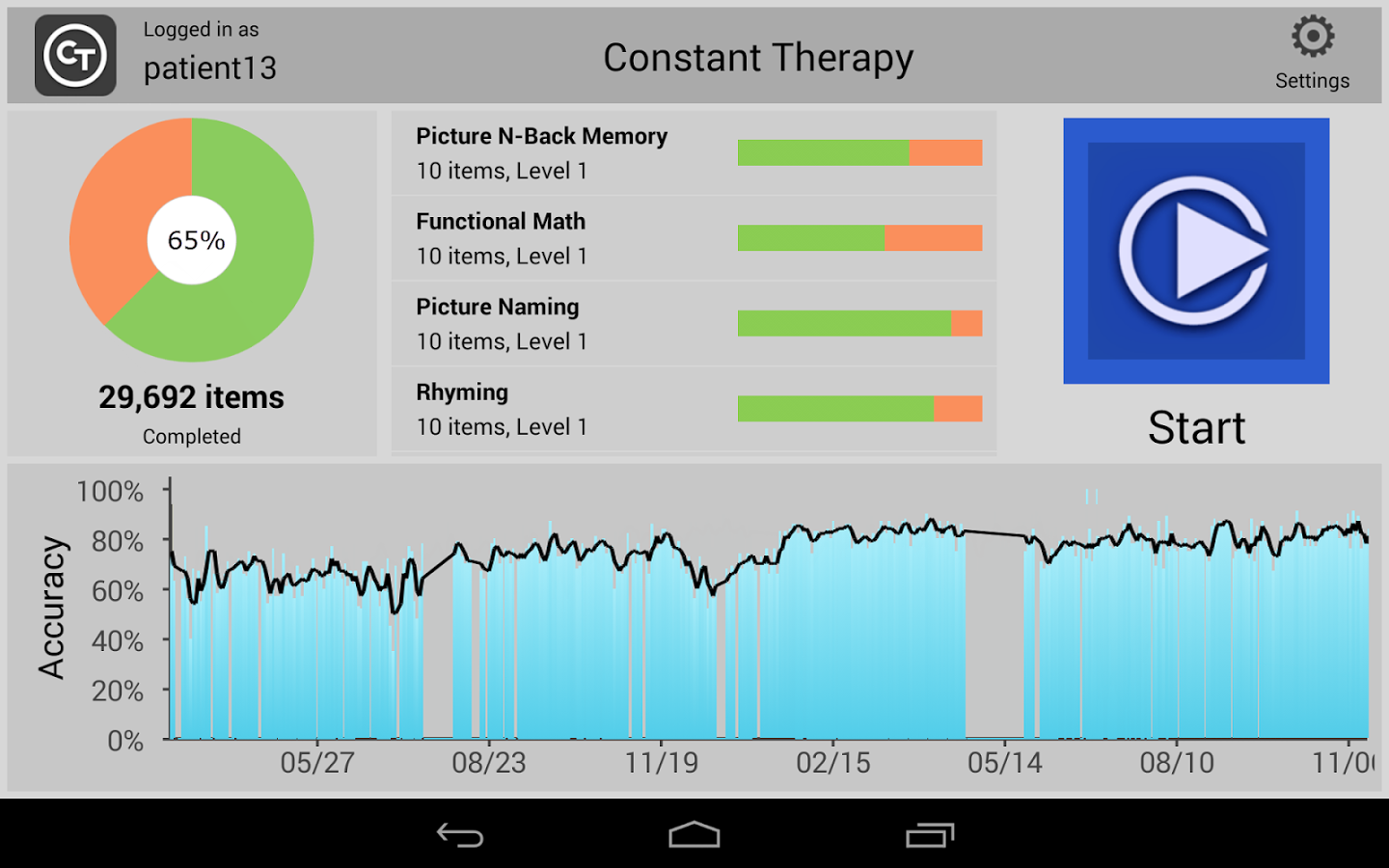
There is a growing number of apps are out there that can help Seniors stay mentally sharp. In fact, the winner of the audience award at the AARP 50+ Live Pitch entrepreneurs’ event was Constant Therapy, a brain game app for those suffering from strokes or dementia.

Constant Therapy


Most people have heard of apps like Lumosity that train your memory and attention with games, but this new class of apps like Constant Therapy and clevermind are aimed to help at those who have already begun experiencing medical problems.

Independent living is another important area that apps can add real value to seniors. I recently ran across Seniorly, a product of a San Francisco startup, which allows seniors to find affordable and like-minded independent or assisted living housing, when people aren’t able to live by themselves anymore.

(I also think this start-up is admirable because it was started by two Millennials, and it’s a great sign that the younger generation has its eye on our market.  After all, all of us are aging, and it’s nice to know that there will be apps to help us along the way!)


Seniors don’t download as many apps

All of this positivity and development is fantastic but there’s a major hurdle that the app industry needs to overcome – seniors are less likely to download apps than others.

There are many reasons for this, but research (including ours) points to concerns about privacy and security, as being chief among them.

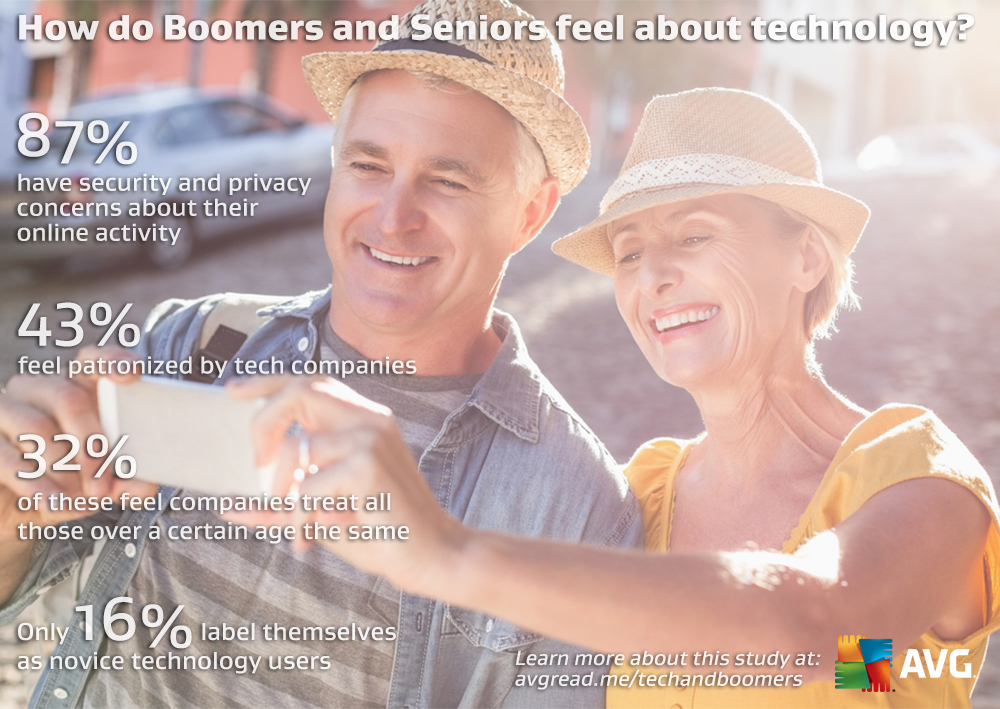
Our own recent AVG surveys show that 50+ generations have concerns about

  • Security of data and files (70%)
  • Keeping data private (48%)


Boomers and Tech


In general, our AVG research also found nearly 50% of consumers surveyed say a lack of trust limits the amount of apps they download. More than one-in-seven mobile media users are uncomfortable sharing personal data, such as location or contact details…

Is it little wonder that Seniors are concerned? We’ve all seen the rise in security breaches in the news in the past year (impacting major brands we use like Target and Sony to name a few), where millions of people’s credit card info has been put risk… But this is particularly troubling with healthcare info breaches such as those experienced Anthem and several BlueCross providers.  Healthcare data is among our most sensitive information.

As I noted in my recent AVG blog on the topic, IT security has to be a priority for all businesses, but particularly when it comes healthcare, where the stakes are so high and the impact has the potential to go well beyond financial!

Do third-party app stores pose a threat to mobile security?

Android Malware

Malware detected on Android

Over time, we’ve noticed the presence of some fairly heated user debates disputing the necessity of security or antivirus apps for Android devices. This could have been sparked by our recent post which argues that you can’t always rely on the security of Google Play or because of the myth that antivirus companies create viruses to sell more software.

Certain security gurus claim that if users stick to downloading and purchasing apps using only the Google Play Store, nothing bad will happen to their devices. However, we found that this line of thinking is not 100% correct, as was demonstrated through the discovery of a rogue Dubsmash app or in the infamous case of apps on Google Play posing as games and infecting millions of users with adware. Despite these findings, there are some users who still feel that they’re safe whenever using Google Play. This feeling of false security could have negative consequences; for example, when your data or financial information is stolen or when you have to resort to resetting your device in order to cleanse it of malware.

So, we know we can’t rely on the Google Play Store all the time, but are third-party stores more secure? Of course not. In this case, how is it still possible that it’s not a problem to use third-party stores? First of all, it’s necessary to point out that there are certain legitimate and clean third-party stores, such as Amazon and FDroid. At the same time, there are tons of shady stores and even more black market .apk files promising to deliver you the latest features of a cracked app.

With these things in mind, how can users navigate the world of third-party stores?

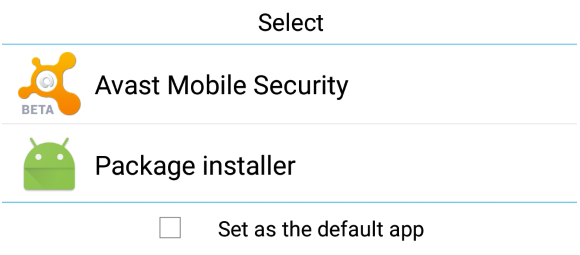
Android's default .apk handler

Android default apk handler

Besides the well known (and default) security options of Android, there is another useful feature that remains more or less unknown by average users: the default app feature. When Android (and also Windows) is about to open a file, it looks into its database to determine which application should be used and launches it. If you set Avast Mobile Security to be run at this preliminary stage of an app’s installation, it will scan the .apk file before it is opened and the installation process has begun. If any mistake or bug is detected, the process is halted and you’ll be given the option to uninstall the app.

If you have already installed Avast in your Android smartphone or tablet and this option is no longer shown, the easiest option will be to uninstall it, reboot and install it again. When the dialog pops up, choose Avast as your default handler for .apk files. As mobile malware reached the one million Android sample mark last year, the Avast database continues to grow exponentially. Avast Mobile Security also performs very well with new and unknown malware, as independent tests show us.

You can be safer and have a complete peace of mind while using third-party stores if you keep Avast Mobile Security running as your default installation package app. Download Avast Mobile Security for free on the Google Play Store.

How to set up your smartphone killswitch

With over 3 million smartphones stolen annually in the USA, and more than 300 each day on the streets of London, smartphone theft is sadly now an everyday occurrence.

These days, losing a smartphone means costs us so much more than the device itself. Our personal information, messages, emails, contacts and social networking profiles are all at stake. When you add banking and shopping apps, the financial costs can also escalate.

One of the most effective defenses against stealing and misusing your device and data is a killswitch functionality with reports suggesting killswitches can halve the number of smartphone thefts. It is so effective, that starting on July 1 2015, the state of California has ruled that all new smartphones must be shipped with killswitch functionality.

Once activated, a killswitch prevents a smartphone from being used or reprogrammed through a factory reset, making it very difficult for phone thieves to sell-on a working device.

The good news is that both Google and Apple rolled integrated killswitches for their smartphones in 2014, meaning that most smartphone users have access to basic level of protection.

Working with Qualcomm, AVG is developing a much more robust solution that is integrated directly into the hardware making it resistant to any number of attacks including factory resets or a SIM swap.


How to activate kill switch on Android

Step One: Set up remote access

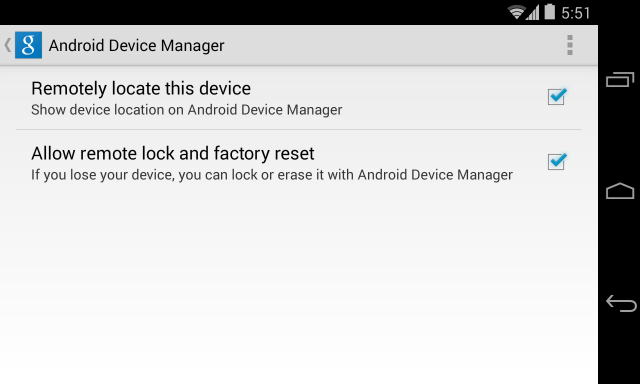
  • Go to Google Settings > Android Device Manager
  • Grant permission to both ‘Remotely locate this device’ and ‘Allow remote lock and factory reset’
Android Device Manager


Step Two:

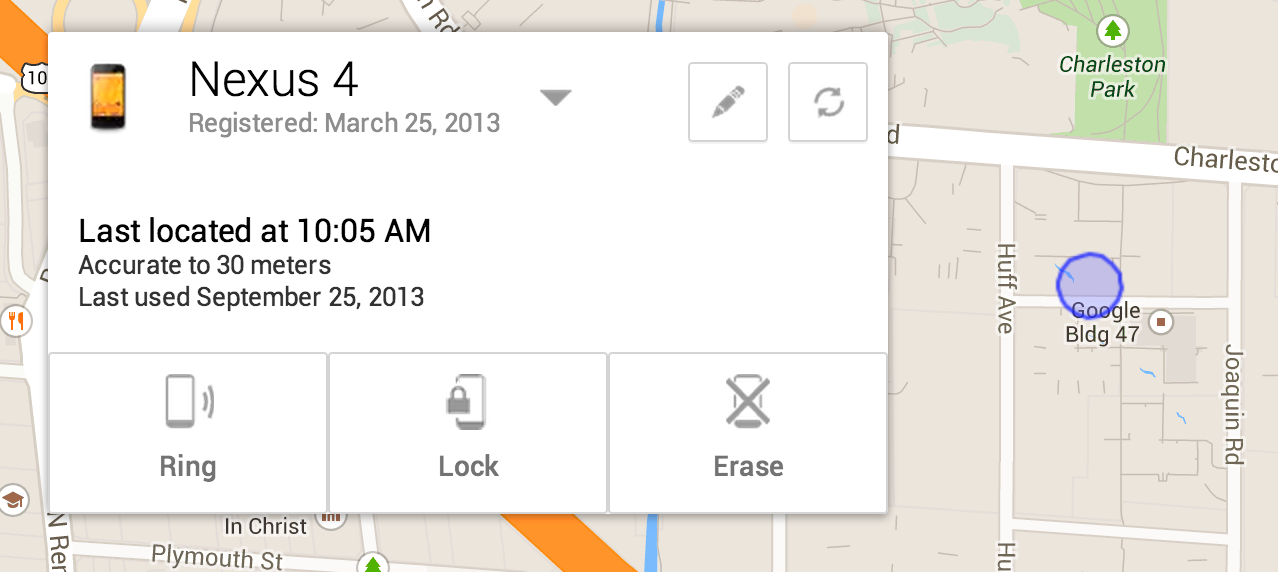
If your device is lost or stolen, go to any web enable device, log into Google and access the Android Device Manager Panel.

You will now see your device location on a map and have options to ring, lock and erase.

Nexus 4


How to activate kill switch on iOS.

Step One: Enable Find My iPhone

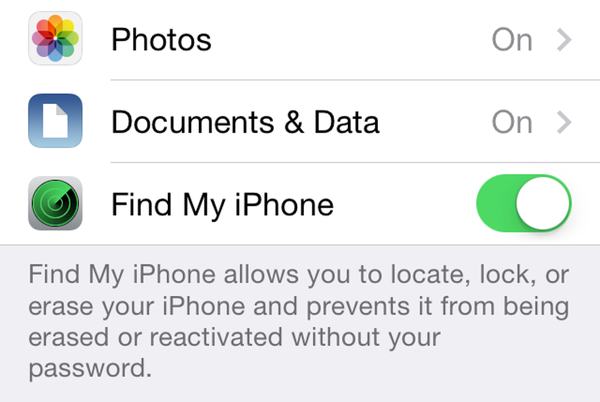
  • Go to Settings>iCloud
  • Sign in with your Apple ID
  • Enable Find My iPhone

Lost My iPhone


Step Two: Enabling Lost Mode

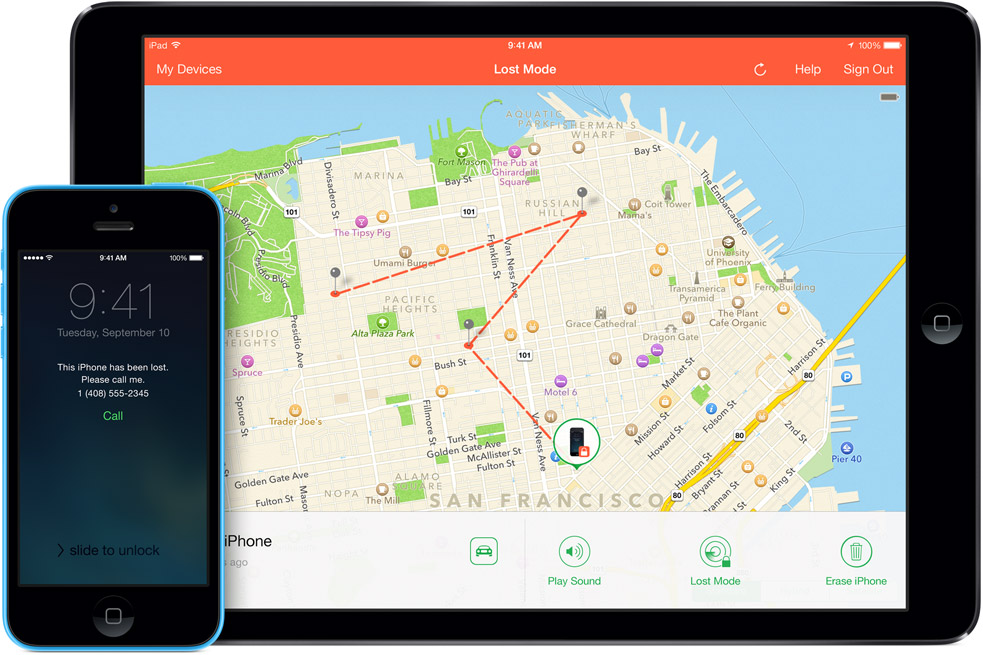
If you believe your device is lost or stolen you can activate the killswitch known as “Lost Mode”.

To do this, go to icloud.com/find from a Mac or PC, or alternatively you can use the Find My iPhone iOS app from another device.

This will bring up the Lost Mode dashboard which should pinpoint where your device is on a map and also give you the option to make it ring, lock it down or erase the data.

There is an option to customise the lock with a contact number for the safe return of your device. If you retrieve the device, you can safely return it to normal using your Apple ID login.

iOS Lost Mode

What data do you protect on your phone?

With over 100 million installs of AVG AntiVirus for Android, we help a huge number of people protect their devices and their data. One of the popular tools in our app is the “App Locker”.

By analyzing a sample of anonymized user data, we’ve learned which information users want to protect the most and have discovered how app updates actually make us more aware of our privacy than before.


Messaging Apps come out on top

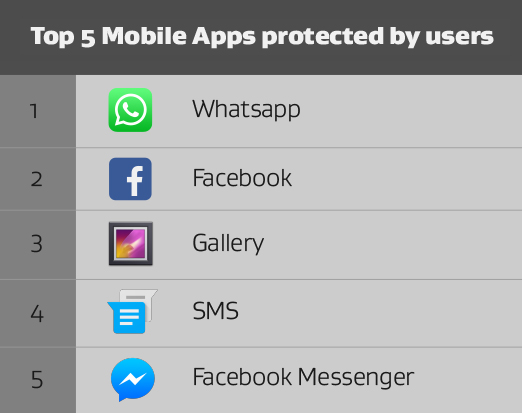
When it comes to data that people want to keep private, nothing beats personal messages. Four of the top five most locked apps were messaging apps with WhatsApp the most popular.

Top 5


Personal data

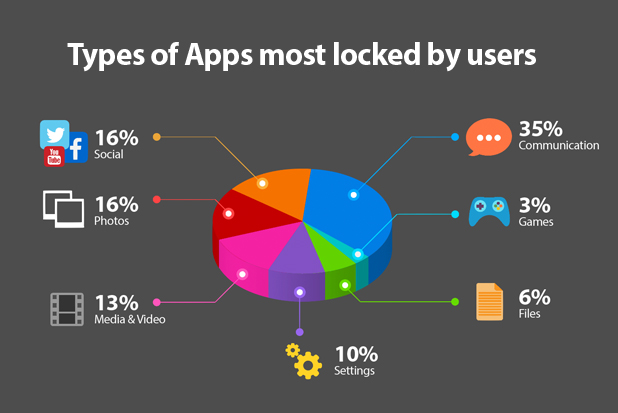
As one might expect, after messaging apps, social networking and photo apps were the next most locked. People have a clear understanding that they want to keep their personal life private and take steps to the data stored within these apps

App Categories


The Privacy Window

Once installed, it’s easy to forget how an app may have access to sensitive data or personal files. We’ve seen that one thing that causes us to remember these permissions are updates. We understood this to mean that there is privacy window in which we all think about apps and their permissions.

Our apps allow us to turn our smartphones into incredibly powerful devices that do everything for us. In return though, we give apps, and their developers access to our data and our lives. To use Instagram, for example, we must first allow it access to our pictures.

This means that each app carefully creates a unique and personal experience for each user, they also become private things that perhaps we don’t want to share.

That’s the idea behind the App Locker feature in AVG AntiVirus for Android. Available as part of the PRO product, App Locker is designed to help you decide what you would like to keep private and password protected.

It could be your messages or even, an app that you don’t want your child to use when they have your device, it’s entirely up to you.

Download AVG AntiVirus for Android today.