Tag Archives: Facebook

Facebook increases security for users

Don’t ignore Facebook  alerts and take your time to improve your security

Don’t ignore Facebook alerts and take your time to improve your security

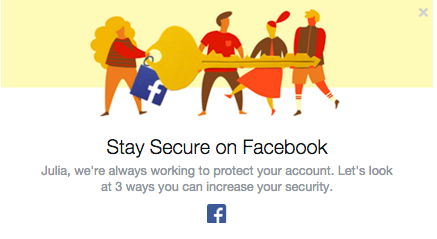
Facebook has become more concerned about its users’ security. The social giant understands that education is the key to providing users with a secure experience. We have already seen the Facebook “dinosaur” guiding us via privacy settings. Now Facebook pops out a short guide to improve the security of our profiles. We strongly recommend not to ignore it and take those steps to ensure that your profile is properly protected.

Step 1. Take control over your login
Don’t ignore Facebook  alerts and take your time to improve your security

Don’t ignore Facebook alerts and take your time to improve your security

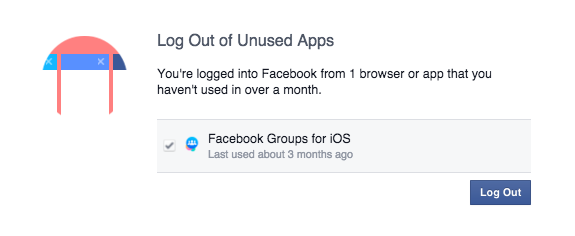
We check our Facebook profile on multiple devices: Our smartphones, tablets and via different apps (Facebook group, messenger, Facebook app). Sometimes we don’t even realize it! ‘Log Out of Unused Apps’ will show you all the apps that you use to log in, but haven’t used for a long period of time. From a security perspective that can create a vulnerable situation. If you don’t use the app, better log out!

We have also a solution for that. If you don’t want to be bother with constant login into your social account, we recommend Avast Passwords available for all your mobile devices for FREE. Check it out for Android and iOS. With one password you can safely log in into your all social apps, without remembering multiple passwords!

Step 2. Set up login alerts
Get login alerts

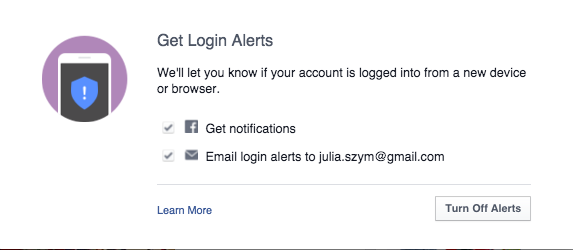
Login alerts will notify you about unauthorized login attempts into your account

Facebook will let you know when there is an attempt to log into your account via a new device or browser. You can set up both – Facebook notifications as well as email alerts. In this way you have better control over who, when, and where someone tries to login into your profile. You will receive a notification and if it is a hacking attempt, you can block it. We recommend to chose both options, in order to increase your chances to discover a hacker, before he cracks your account.

 Step 3: Protect your Password
Follow Facebook rules to protect your password

Follow Facebook rules to protect your password

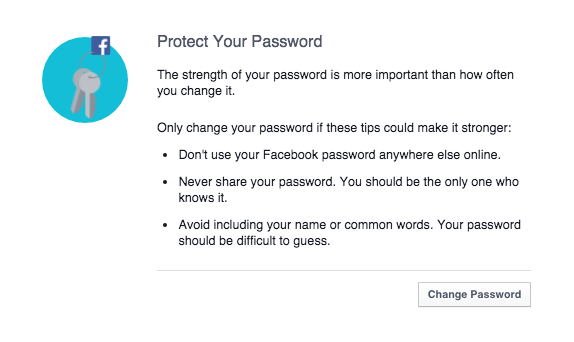
Follow simple security rules:

  1. 1. Set up unique password to your account (don’t use the same password to all your social profiles).
  2. 2. Don’t share it with anyone else.
  3. 3. Make sure your password is strong: it should contain small and big characters, numbers and special signs. We recommend minimum 16 characters.
  4. 4. Change passwords regularly and always, if any of your accounts or websites that you use is compromised.
  5. 5. Last but not least, use Password management system, to protect all your accounts requiring logins, not only Facebook. For example the free Avast Passwords.
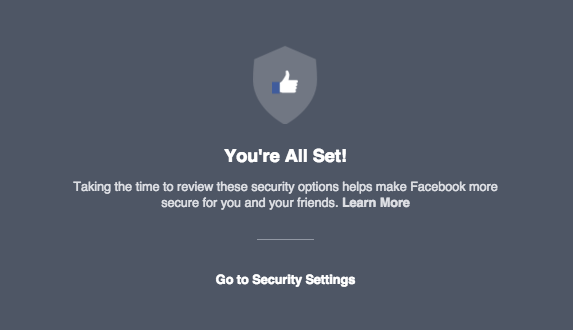
Secure Facebooking!

Secure Facebooking!


Follow Avast on FacebookTwitterYouTube, and Google+ where we keep you updated on cybersecurity news every day.

Facebook increases security for users

Don’t ignore Facebook  alerts and take your time to improve your security

Don’t ignore Facebook alerts and take your time to improve your security

Facebook has become more concerned about its users’ security. The social giant understands that education is the key to providing users with a secure experience. We have already seen the Facebook “dinosaur” guiding us via privacy settings. Now Facebook pops out a short guide to improve the security of our profiles. We strongly recommend not to ignore it and take those steps to ensure that your profile is properly protected.

Step 1. Take control over your login

Don’t ignore Facebook  alerts and take your time to improve your security

Don’t ignore Facebook alerts and take your time to improve your security

We check our Facebook profile on multiple devices: Our smartphones, tablets and via different apps (Facebook group, messenger, Facebook app). Sometimes we don’t even realize it! ‘Log Out of Unused Apps’ will show you all the apps that you use to log in, but haven’t used for a long period of time. From a security perspective that can create a vulnerable situation. If you don’t use the app, better log out!

We have also a solution for that. If you don’t want to be bother with constant login into your social account, we recommend Avast Passwords available for all your mobile devices for FREE. Check it out for Android and iOS. With one password you can safely log in into your all social apps, without remembering multiple passwords!

Step 2. Set up login alerts

Get login alerts

Login alerts will notify you about unauthorized login attempts into your account

Facebook will let you know when there is an attempt to log into your account via a new device or browser. You can set up both – Facebook notifications as well as email alerts. In this way you have better control over who, when, and where someone tries to login into your profile. You will receive a notification and if it is a hacking attempt, you can block it. We recommend to chose both options, in order to increase your chances to discover a hacker, before he cracks your account.

 Step 3: Protect your Password

Follow Facebook rules to protect your password

Follow Facebook rules to protect your password

Follow simple security rules:

  1. 1. Set up unique password to your account (don’t use the same password to all your social profiles).
  2. 2. Don’t share it with anyone else.
  3. 3. Make sure your password is strong: it should contain small and big characters, numbers and special signs. We recommend minimum 16 characters.
  4. 4. Change passwords regularly and always, if any of your accounts or websites that you use is compromised.
  5. 5. Last but not least, use Password management system, to protect all your accounts requiring logins, not only Facebook. For example the free Avast Passwords.
Secure Facebooking!

Secure Facebooking!


Follow Avast on FacebookTwitterYouTube, and Google+ where we keep you updated on cybersecurity news every day.
‘Secret Sister’ gift exchange is a scam

Tis’ the season for scams to circulate on Facebook and other social sites.

It sounds like great fun! Join your friends for a “Secret Santa” type gift exchange, and invite lots of others to the party. Only problem is that it’s a hoax.

Secret Sisters scam on Facebook

Don’t wait by your mailbox for gifts from this exchange

Watch out if you get a message on your Facebook Newsfeed (also spotted on Reddit) inviting you to join a ‘Secret Sister’ gift exchange. And don’t pass it on, either. It’s a scam, it’s against Facebook’s Terms of Service for sharing personal information, and it could very well be illegal.

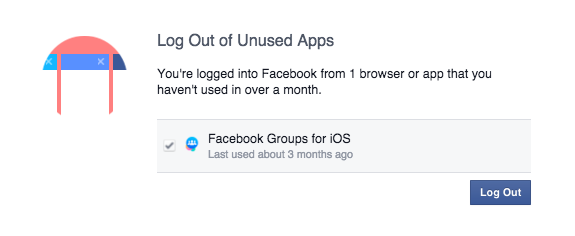
Recent messages shared on Facebook

Recent messages shared on Facebook

The invitation describes the way it works; you send one present valued at $10 or more to one person and list six other women’s names to continue the process. You are promised to receive up to 36 gifts in return. Sounds fun and lots of women are falling for it. The messages above were sent this weekend, and one of them only 2 hours ago!

What this gift exchange really looks like is a social media version of the old Chain Letter people used to get in their mail boxes. It’s also known as a Pyramid or Ponzi scheme. The recipient of a chain letter was instructed to copy the letter and send it to a bunch of their friends in order not to “break the chain”.

The United States Postal Inspection Service (USPIS) describes a chain letter as “a get-rich-quick scheme that promises that your mailbox will soon be stuffed full of cash if you decide to participate.”

A typical chain letter includes names and addresses of several individuals whom you may or may not know. You are instructed to send a certain amount of money–usually $5–to the person at the top of the list, and then eliminate that name and add yours to the bottom. You are then instructed to mail copies of the letter to a few more individuals who will hopefully repeat the entire process. The letter promises that if they follow the same procedure, your name will gradually move to the top of the list and you’ll receive money — lots of it.

If you don’t think about it too carefully, it sounds like it could work. The problem is that it doesn’t work, and it’s illegal. USPIS says,

They’re illegal if they request money or other items of value and promise a substantial return to the participants. Chain letters are a form of gambling, and sending them through the mail (or delivering them in person or by computer, but mailing money to participate) violates Title 18, United States Code, Section 1302, the Postal Lottery Statute.

Why do people fall for these scams?

When you receive a message over and over again by friends that you have learned to trust, you automatically think that the information they share is trustworthy. Because these scams exist (read about The Tiffany & Co scam), it’s better to stop and think about it, even do a quick search for the topic, so you don’t become a victim,too.

If you receive a message like this, do not participate in it. You may also want to inform the sender of the scam by sharing this blog with them.


Follow Avast on FacebookTwitterYouTube, and Google+ where we keep you updated on cybersecurity news every day.
Government and misuse of technology are most feared by Americans

Americans don’t trust that technology will be kept out of the hands of bad guys.

Forget about zombies, vampires, and ghosts. Americans don’t fear things that go bump-in-the-night as much as they do their own government. The annual Survey of Fear conducted by Chapman University asked Americans about their level of fear in 88 different topics ranging from crime, the government, disasters, personal anxieties, technology, and others.  The majority of Americans said that they are “afraid” or “very afraid” of the corruption of government officials.

Hacker stealing password

One of American’s greatest fears is government-sponsored spying

The misuse of technology, financial crime, and privacy-related issues took up half of the Top 10 fears of 2015. After two years of high-profile data breaches and the revelations of government spying from the Edward Snowden leaks, it’s not too surprising. Here’s the list:

  • Corruption of government officials (58.0%)
  • Cyber-terrorism (44.8%)
  • Corporate tracking of personal information (44.6%)
  • Terrorist attacks (44.4%)
  • Government tracking of personal information (41.4%)
  • Bio-warfare (40.9%)
  • Identity theft (39.6%)
  • Economic collapse (39.2%)
  • Running out of money in the future (37.4%)
  • Credit card fraud (36.9%)

From this survey, it’s apparent that Americans’ awareness and concern about guarding their personal privacy is growing. An interesting topic that was further down the list is “Technology I don’t understand,” feared by 19% of Americans surveyed. At least that is something that individuals can control – just watch some videos or read this blog and you will learn about technology and how you can minimize your risks of these other things happening to you. For example, here’s how to secure your Facebook login and protect your personal privacy and identity.

Facebook announces government spying alert

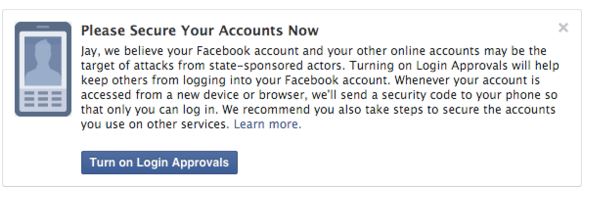
The fears of government spying don’t go unwarranted. Facebook has reason to believe that it’s an important issue “because these types of attacks tend to be more advanced and dangerous than others.” These are the words of Facebook’s Chief Security Officer, Alex Stamos, in a recent announcement telling if the social media network suspects that a user is being targeted by government-sponsored hackers, they will issue an alert advising them to “take the actions necessary to secure all of their online accounts” such as “rebuild or replace these systems [your computer or mobile device] if possible.”

FB govt intruder warning


Follow Avast on FacebookTwitterYouTube, and Google+ where we keep you updated on cybersecurity news every day.

 

No, Tiffany is not giving away diamond rings on Facebook

Diamond rings and an Audi R8 can be mine just for the simple actions of liking and sharing on Facebook. NOT!

In the past week, three fake giveaways have come across my Facebook newsfeed – two of them today! These were shared by otherwise intelligent friends, so that makes me think all kinds of other people are falling for the scam. I’m sharing these with you, so you’ll know what to look out for.

Each scam promises that you could win a valuable prize just by liking and sharing the post. This one is for an Audi R8 V8, and every time I’ve seen it, it’s originates from a different page. The instructions are always the same – for a chance to win, you must like the page, request your desired color in the comments, and share the post with your friends.

Audi R8 Facebook like-farming scam


This type of social engineering scam is called like-farming. It is designed to gather many page likes and shares in a short amount of time, and since Facebook’s algorithms give a high weight to those posts that are popular, they have a high probability of showing up in people’s newsfeeds. Scammers go to all this trouble for two purposes: The pages can later be repurposed for survey scams and other types of trickery that can be served to a large audience. And pages with large numbers of fans can be sold on the black market to other scammers with creative ideas.

All that glitters…

Two posts for beautiful jewelry appeared in my newsfeed just today. One was from the famous jewelry company, Tiffany & Co. The post shows a video of a sparkling diamond band and asks for a like, share, and comment to win this ring.

Tiffany Facebook like-farming scam

Click on the link and it takes you to a fake Tiffany & Co Facebook page.

There are two things to notice about the page; one, the Co in the name of the company does not have a period at the end. And two, the page does not have the blue Verified Page check mark beside the name. That mark is Facebook’s way of guaranteeing the authenticity of the company.

fake Tiffany Facebook page


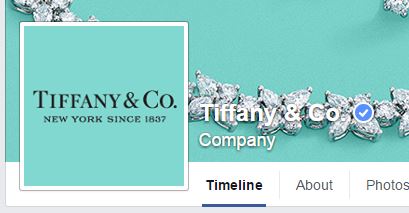
Here is the real Tiffany & Co. Facebook page with the verified page check mark.

real Tiffany & Co. Facebook  page


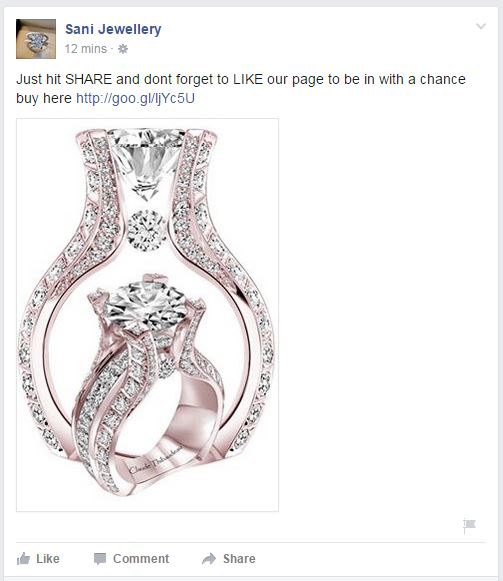
The other jewelry scam came from a page called Sani Jewellery. The scam is the same as the one from the fake Tiffany page; users can win just for liking and sharing the post on their Facebook page.

Sani Jewellery Facebook scam


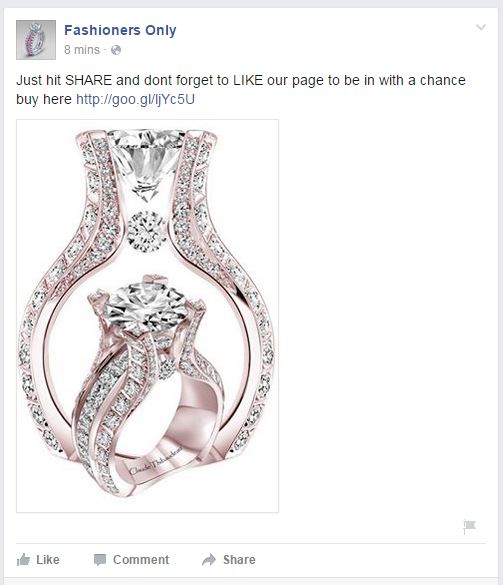
These scammers own another Facebook page called Fashioners Only, and run identical like-farming scams.

Fashioners Only Facebook scam

How to avoid like-farming scams on Facebook

  • If you suspect that someone has shared a fake page with you, do not click on it or participate in the giveaway.
  • Politely inform the person who posted it that the Facebook page they shared is a like-farming scam. You can even send them to this post.
  • Report the page to Facebook by hovering over the top right corner of the post. Click the arrow and choose Report post.


Follow Avast on FacebookTwitterYouTube, and Google+ where we keep you updated on cybersecurity news every day.
How to keep your Facebook business page secure

Managing the security of your Facebook business page is important to maintain a good reputation.

Nowadays we can hardly imagine a successful business functioning without digital marketing. When we say digital marketing Facebook comes to mind immediately. The most popular social platform with more than one billion users all over the world is a massive communication platform not only for the individuals, but also for brands and their consumers.

Community managers update Facebook for their company

Everyone working with your company Facebook page should know how to keep it protected.

Freelancers, owners of small local businesses, and large corporations; all of them use Facebook to promote their products and talk with their customers. In this blog post we will show you how to keep your Facebook page safe from the bad guys.

Manage the managers

Even if you are a small business, managing all your social media efforts by yourself can be difficult. Don’t try to control everything, it’s impossible and you will end up with micromanagement overload with unnecessary work. Instead, control the roles of your co-workers and educate them!

Follow our tips to avoid basic security mistakes:

  1. 1. Make sure that you have always more than one admin. In case you are the admin and your Facebook account has been blocked, you can lose control over your page.
  2. 2. Control the level of rights. For example, your support person doesn’t need publishing rights and colleague from the Business Intelligence department will be perfectly fine with only Analytical rights. Check out what kind of levels are available and manage your managers accordingly!
  3. 3. Update section Page roles regularly. You might forget that you once gave page access  to a graphic designer to upload a new cover image, or that your community manager who has left the company six months ago still has access to your page. Make sure that your Facebook page managers are always up-to-date.
  4. 4. Educate your staff members about secured login into their personal accounts. At the end of the day they use their profile to access your Facebook page.
  5. 5. If you cooperate with an agency or freelancers, use third party applications to moderate Facebook conversations. In this way no one will have direct access to your Facebook page and you can better control what kind of content is being published on your behalf.

Manage the apps

As Facebook grows in popularity, competition among brands grows. Everyone wants to attract more fans and engage with more potential consumers. One of the ways is to offer different kinds of contests. You can also connect your social media profiles, such as Twitter, Instagram, Pinterest or others using a special app. All those apps require access to your Facebook page. Make sure you use only well known, secure applications. Regularly go to your page Settings – Apps and check which one should still have access to your page. Learn more about apps security directly on Facebook.

Content is a king

Producing and distributing good content is a key to success. You want to avoid the unpleasant surprise of discovering posts on your Facebook page that should not appear there. Consider using one of many publishing platforms that allows you to control and filter outgoing content. If you can’t afford a third party social media management tool, then regularly monitor your page. Pay attention to who is posting on your page behalf (Facebook shows the author of the post to the admins) and use pre-scheduling options. If you plan your communication ahead, not only you will save some time, but you can control it better.

Secure your mobile social apps

If, like millions of other Facebook users, you and your team access your page via mobile, you should consider installing an application that will block access to Facebook. This is handy in case your mobile is lost or for simply preventing your friends from joking around and posting something on your behalf, while you leave your smartphone unattended. Avast Mobile Security protects your Facebook for free with a security code.

Stay tuned for more social media security and privacy tips!


Follow Avast on FacebookTwitterYouTube, and Google+ where we keep you updated on cybersecurity news every day.