Tag Archives: featured1

It only took a few photos to copy the fingerprint of the Minister of Defense: Could the same happen to you?

smartphone fingerprintThe papillary ridges of our fingers define us as unique in the universe. That is why our fingerprints are being used more in the biometric security field; our finger conceals a password that is difficult to steal.

Computers and smartphones are already adopting this technology. The iPhone 6 and Samsung Galaxy S5 incorporate a fingerprint scanner so that you are the only one who can unlock your phone. With this system, you can supposedly rest easy in the knowledge that if your phone is stolen, the thief will be left flabbergasted when he realizes that he cannot access the valuable data stored on it.

However, we are sorry to tell you that there is a way of getting your fingerprint and don’t think that we are going to talk about amputating one of your limbs. A few photos of your finger can now be used to copy every tiniest detail of your fingerprint and impersonate you, as demonstrated by security expert Jan Krissler, alias “Starburg”, in a conference organized by the Chaos Computer Club, one of Europe’s largest hacker communities.

Last year, the Chaos Computer Club announced that it had managed to hack the iPhone 5S fingerprint scanner. Now, they have moved on from hacking the security of the device to hacking the security of a finger, without even needing to have physical contact.

Krissler explained that he had copied the fingerprint of German Defense Minister, Ursula von der Leyen, without needing an object that the politician had touched. All he needed was a few photos taken with a standard camera (one of them from her press office) to discover all of the data that the minister has in her fingerprint. In order to carry out the experiment, he combined various images showing von der Leyen’s finger from different angles.

German Defense Minister

This hacker used Verifinger, a commercial fingerprint identification software, to clone the minister’s thumbprint using the photos. A simple method for getting the fingerprint of anyone you want.

“After this talk, politicians will presumably wear gloves when talking in public,” said the hacker during the presentation. We do not know if the minister will be as happy about this cloning and will now be obsessed with hiding her hands in future public appearances.

Jan Krissler, who has researched weakness in biometric security systems at the Technical University of Berlin, demonstrated the effectiveness of his method during the conference. This is not the first time that the hacker has demonstrated that the famous biometric techniques, which base their security on unique features of our body (the fingerprint, retina, iris or facial features), are not as secure as we thought. This hacker reproduced in 2008 the fingerprint of the German Minister of the Interior at the time, now Minister of Finance, Wolfgang Schäuble.

fingerprint

According to Krissler, iris, facial and fingerprint scanners can be fooled easily. “I consider my password safer than my fingerprint… My password is in my head, and if I’m careful when typing, I remain the only one who knows it”. 

Even our body is no longer a safe place if a hacker has the brilliant idea of copying our features. So, if you have an iPhone, perhaps the next time you use the fingerprint sensor, you will bear in mind that someone could copy your beautiful finger using a few Facebook pictures that show your fingers from different angles. However, you can rest more easily knowing that your data is not as interesting as that of a politician and no hacker is going to take the trouble to copy your fingerprint. Anyone who is not content with that does not want to be.

The post It only took a few photos to copy the fingerprint of the Minister of Defense: Could the same happen to you? appeared first on MediaCenter Panda Security.

How to access accounts protected by two-factor authentication if you lose your phone

howto asian guy newQuestion of the week: I use two-factor authentication when logging into my accounts to keep them safe, but what happens if I lose my phone? Can I still access my accounts?

Security-minded individuals know the benefits of using two-factor authentication to keep their online accounts safe. For those of you who are not familiar with it, two-factor authentication is a security process which uses a combination of two different components, like something that you know, a master password or PIN, for instance, and something that you possess, like a token which can generate a number code or, more conveniently, your smartphone.

Using these two things in combination can provide unique identification when entering a site because you provide the password as well as a one-time use security code generated by your security token.  If someone learns your password, your accounts are still protected because they need the security code too. Two-factor authentication can reduce the incidence of identity theft and phishing, and we suggest the use of it.

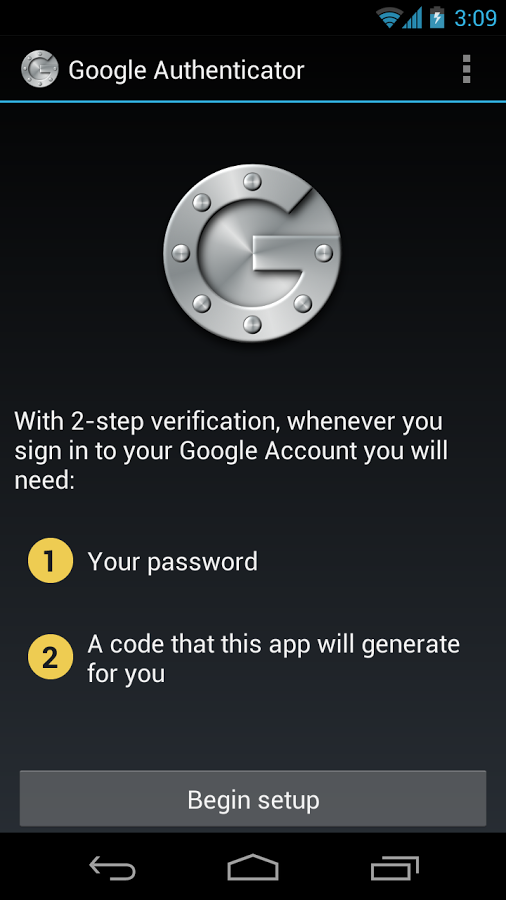
Google Authenticator

Google Authenticator gives you a security token to use with your own password.

There are a number of authenticator apps made for Android smartphones. For example, Google Authenticator lets you use a security code and your own password for sites and services like Facebook, Dropbox, Evernote, and WordPress. The app creates a link between your account and your device.

I lost my phone. How do I access my accounts?

If you are so security-minded that you use two-factor authentication to begin with, then you have probably taken precautions before you lose your phone. The majority of authenticator services allow a way to recover your access and remove the authorized device from your account. That is, if you change your mobile device, then you can disable the two-factor authentication from your account before doing so. Most commonly, you would use backup codes, send the codes via SMS to a trusted backup phone, or use a trusted computer. Sometimes, the service providers take several business days to verify your identity and, if possible, grant you access again.

But, if you failed to plan ahead and you lose your phone or if you buy a new smartphone without disabling the account, to use two-factor authentication again, you’ll need to install an authenticator app on your new device. The old device and the old backup codes won’t work anymore. Some of the sites you have synced to may also have their own procedure, for example, Dropbox.

Recently, an app is making the use of this security measure much more convenient. Authy is an app that manages your two-factor accounts on Android devices, iPhones, and even your PC. Any of these devices could be used to generate tokens and sync with each other. One authorized device could de-authorize a stolen one. A master password could block the access to Authy in these multiple devices and your settings are all kept encrypted locally. Neither Authy’s developers nor hackers would be able to access the tokens.

Anti-theftMaybe this complex recovery process is what does not make two-factor authentication omnipresent. But, after all, you just need to take a few precautions to increase your security a lot.

What to do before your smartphone is lost

Of course, it’s better not to lose your devices and for this, you should install and configure Avast Anti-Theft, which can help you find a lost device and even recover a stolen one with its tracking features. It can be downloaded and used for free from the Google Play Store.

Security tools that are safe from the NSA

U.S. Intelligence services have shown on numerous occasions how adept they are at accessing our data without permission. Nevertheless, there is still hope that you can keep your confidential information safe from the prying eyes of the NSA: Its expert spies still haven’t been able to crack all encryption systems.

Security tools NSA

Encryption tools are frequently used to safeguard the privacy of all types of confidential information, from simple chats to personal data. Yet no matter how careful we are with the data we transmit across the Internet, it is important to bear in mind that a supposedly private conversation may not be quite so private (whether you like it or not), particularly if your chat touches upon certain delicate issues.

Skype is a good example. Despite their reassurances that their video calls were the most secure, the documents leaked by Edward Snowden confirmed that the NSA had been accessing this tool since before 2011.

Luckily for many, or perhaps for everyone, a recent report published by Der Spiegel thanks to the Snowden leaks has revealed that, at least two years ago, there were still programs and security tools that could resist the technological weapons of the US security agency. Tools like Zoho, TOR, TrueCrypt and Off-the-Record are some of those causing headaches for the NSA, which has been unable to crack their encryption or at least encountered major problems in doing so.

zoho NSA

According to the German newspaper, US spies normally classify attempts to breach the security of a program from “trivial” to “catastrophic”. Decrypting email messages sent with Zoho is defined by the NSA as a “major” task, and users can rest assured as the agency has not yet been able to crack its security.

The US spy agency also found it difficult to break TOR encryption, the free and open source software that allows users to surf the Web through a network of thousands of linked volunteer computers. One of the benefits offered by TOR is that it is difficult to trace the location of a user visiting a specific website, making it an essential tool for activists in countries with strong censorship.

tor NSA

TrueCrypt on the other hand is a useful program for encrypting and hiding data and files. It uses algorithms like AES, Serpent and Twofish -either on their own or in combination- keeping it safe, according to Der Spiegel, from the prying eyes of the NSA.

While the NSA rated the breaking of the encryption of these tools as a “major” task, it defined as “catastrophic” its attempts to crack the combination of TOR with the CSpace secure instant messaging system, and a system for Internet telephony (voice over IP) called SRTP (a security protocol that adds confidentiality to voice messages).

Security tools that are safe from the NSA

The Pretty Good Privacy (PGP) program is also NSA-proof. This program was developed in 1991 to ensure secure conversations between its creator (Phil Zimmermann) and other intellectuals of a similar political leaning. Given it has now been twenty years since the creation of the program, it’s quite a surprise that experts from one of the world’s most advanced security agencies are yet to penetrate its defenses.

Although the information in this report talks about the data analyzed in 2012, experts believe that it is unlikely that the spies have progressed much since then, and that it is quite possible that these tools are yet to be breached.

For the moment, if you use any of these programs, you can breathe easy. If not, perhaps now is a good time to think again about your security.

The post Security tools that are safe from the NSA appeared first on MediaCenter Panda Security.
A new strain of ransomware is on the loose! Watch out!

Our colleagues at PandaLabs have detected a new strain of ransomware: Trj/RansomCrypt.B. Known as CTB-Locker, what is different about this example is that if you pay, you can access all the locked files.

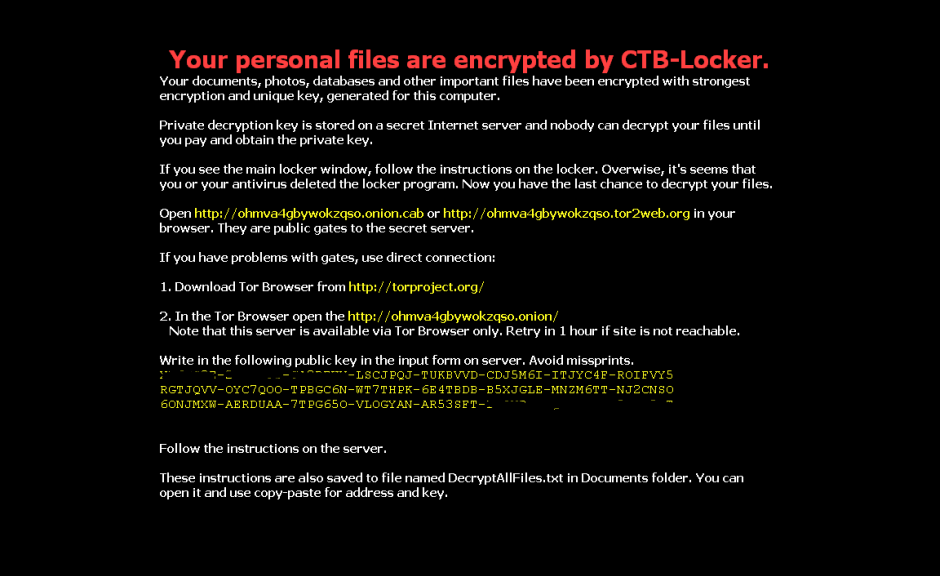
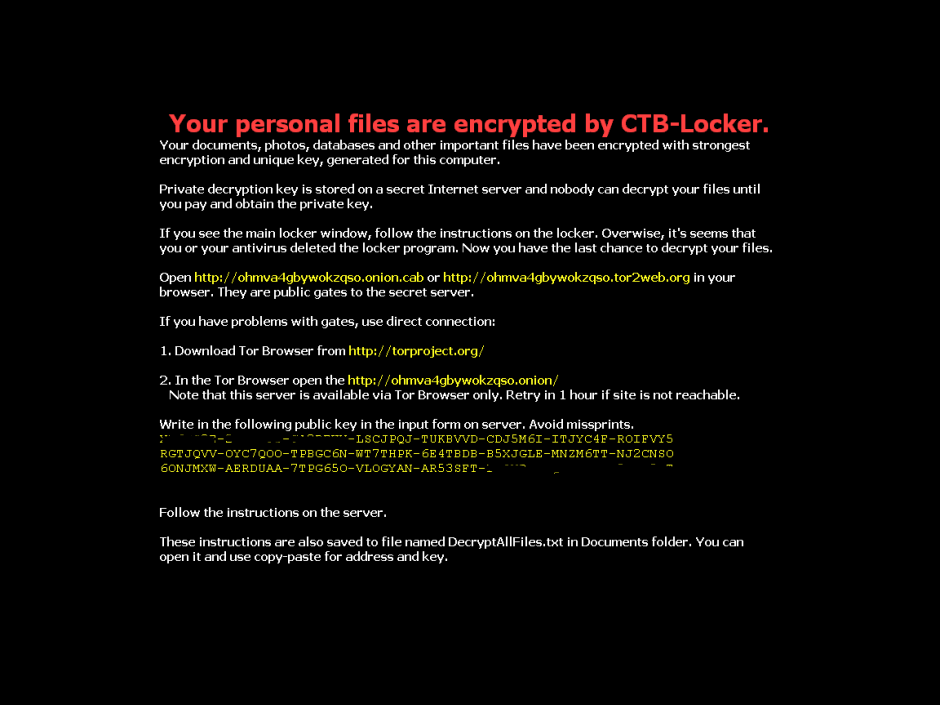
This type of malware normally reaches users via email, convincing the user that it’s a legitimate message and getting them to run the file. When run, the malware encrypts image files and documents on the victim’s computer and changes the desktop wallpaper for the following image. It also creates a text file with the same information.

However, if you have any of our Internet security software, you can rest assured, as Panda Security detects and blocks this threat.

RansomCryptB

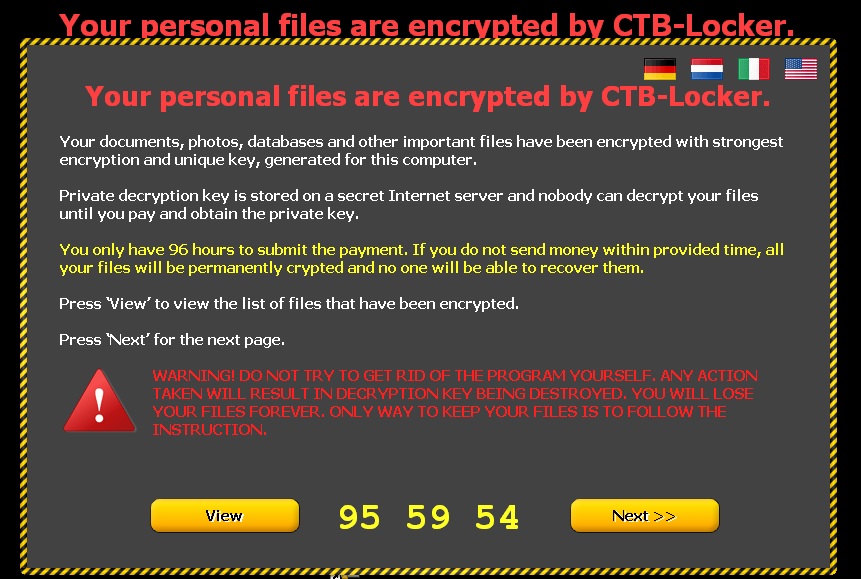
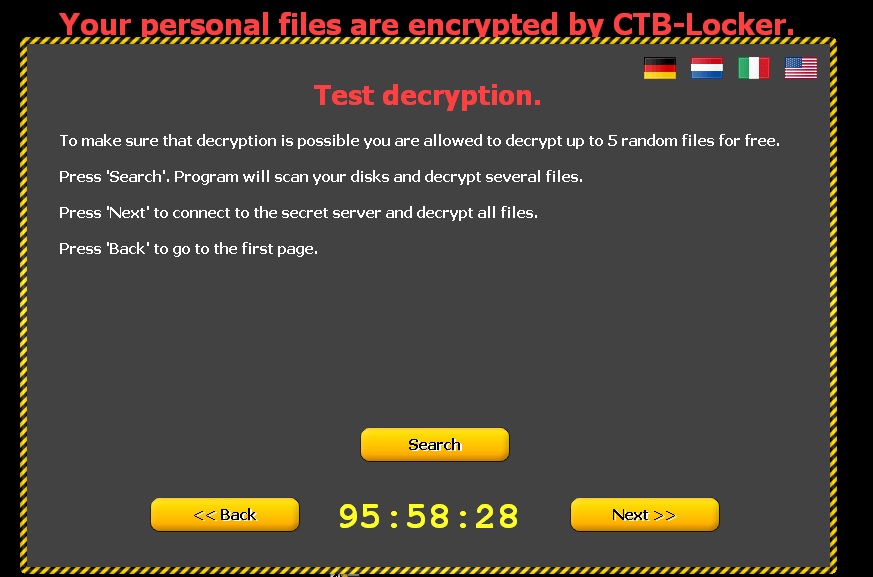
The following screen then appears, demanding a ransom before the specified time. If the ransom is not paid in time, the amount of money demanded increases.

files encrypted

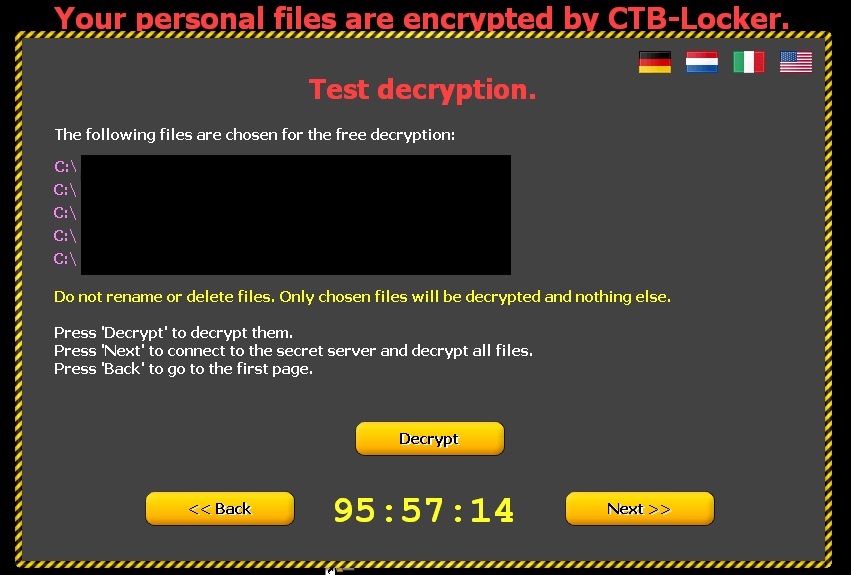
Clicking ‘Next’ leads to the following window informing victims that if they pay, the files will be unlocked. To demonstrate that this is true, five documents are released.

CTB Locker ransomware

personal file encrypted

How to recognize CTB-Locker?

  • This malware comes in an email with an attachment. This is either a Word file with a .doc or .rtf extension, or a compressed file (.zip) containing a .scr file.
  • Some variants, in addition to encrypting files on the computer, also steal the address book to identify new potential victims. Worse still, they fake the address of the sender so the message may appear to have been sent from a known contact.
  • You can see some examples of these emails here.

How to avoid Ransomware?

  • Keep your operating system up-to-dateto prevent security flaws.

Make sure you have antivirus software installed and up-to-date.

  • Don’t open emails or files from unknown sources.
  • Don’t browse suspect web pagesor those with unverified content.

The post A new strain of ransomware is on the loose! Watch out! appeared first on MediaCenter Panda Security.
Do Not Disturb: How to disable messages, popups, and alerts in Avast

Make Avast quiet when you are playing games or giving presentations.

We know you love Avast, but when you are giving a presentation to the big boss, or concentrating on playing an important game, it may not be the best time for a popup that says your computer is running slowly to appear. That’s why we made it easy for you to silence Avast.

Avast silent/gaming mode for presentations

This is NOT a good time for an Avast notification to appear. Learn how to silence Avast when you need to.

Silent/gaming mode

Activate the Silent/gaming mode when don’t want to be interrupted. This will cause Avast to run in silent mode when a full-screen application is running. This means your games or other full-screen applications will not be interrupted with annoying popups or other messages.

Turn this mode on quickly by clicking on the orange Avast icon located in your computer’s system tray. Right-click on the Avast icon and a short menu will appear. Click on Silent/gaming mode to turn it on.

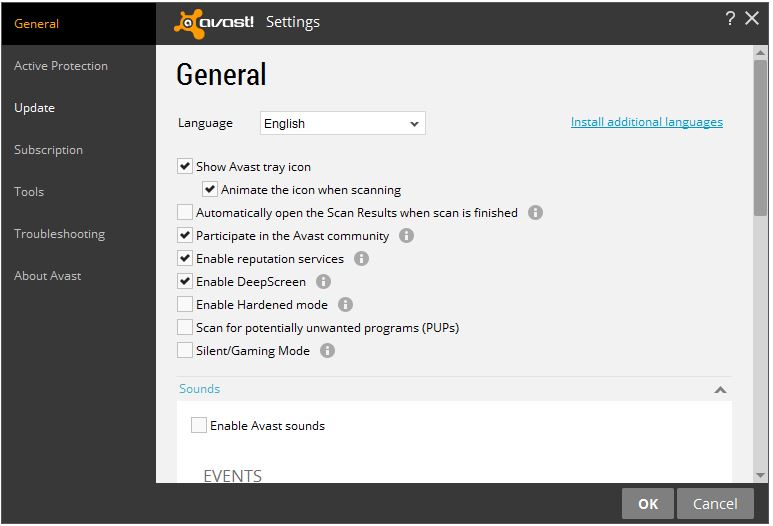
You can also access this option within the main user interface. Go to Settings>General and check the box for Silent/gaming mode. This will disable messages, popups, and alerts in Avast.

Avast sounds

Turn off sounds

Silence notifications: Open the Avast user interface. Click Settings>General>Sounds and uncheck the Enable Avast sounds box. You can also uncheck the Voiceovers within the Sounds settings.

Choose the notifications you want to silence: Avast has six “events” that have notifications associated with them.. These events are Threat detected, Suspicious item detected (we suggest you keep these two on), Potentially unwanted program (PUP) detected, Scan complete, Automatic update, and Firewall query. You have the option to uncheck these boxes as well.

Turn off popups

Occasionally, we offer our users great products like GrimeFighter but we understand if you don’t need to see the notifications anymore. Our customers who have a paid-for version of Avast, have an option for you to turn those off completely.

Once again, open the Avast user interface and go to Settings>General. Scroll down a bit, and you’ll find a heading called Popups. Expand that and you’ll see all kinds of options. You can discontinue seeing all popups, but you might miss a warning or alert, so we don’t suggest that. Instead, you can tweak the duration (how many seconds the popup appears) of the different types of popups. It’s all laid out for you, so you can adjust all you want.

Users of our free product have the option to change the duration of the popups.

Turn off GrimeFighter

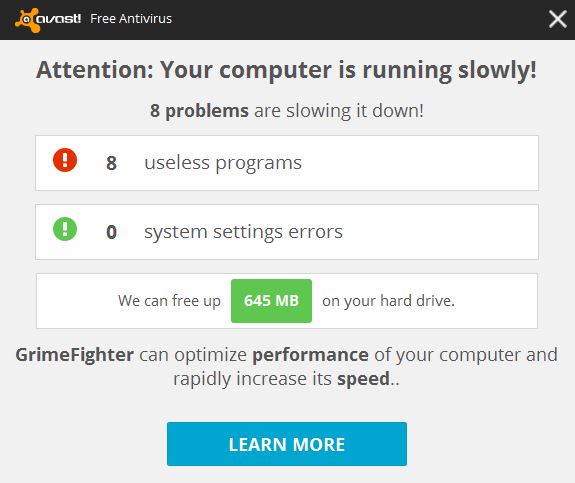
GrimeFighter is a standalone optimization tool that cleans and speeds up your system by removing bloatware, trialware, adware, and other unwanted ‘Grime’ so that your computer is running in its most optimal state. If you have an old laptop like I do, you may have seen a popup similar to this.

popup example 2

Instead of turning it totally off, we suggest that you modify the settings. For example, you can tell GrimeFighter to notify you only if it finds a certain amount of issues or after a specific amount of time, say, once a month.

But if you want to turn off GrimeFighter pop-ups, then open your Avast interface and go to Settings>Tools>GrimeFighter and click the Customize button. Uncheck the box that says Always test this computer for Grime. You can also turn off GrimeFighter completely in Settings>Tools. Move the slider to the OFF position.

Turn off Software Updater

Software Updater is an extremely useful feature because it notifies you about outdated software that needs your attention. You can, however, check for outdated software manually by opening the user interface. So if you want to disable the notices, then go to Settings>Tools>Software Updater and click on Customize. Uncheck the option Notifications (popups) enabled.

You can also turn off Software Updater completely in Settings>Tools. Move the slider to the OFF position.

WhatsApp blocks WhatsApp Plus users

whatsapp plus

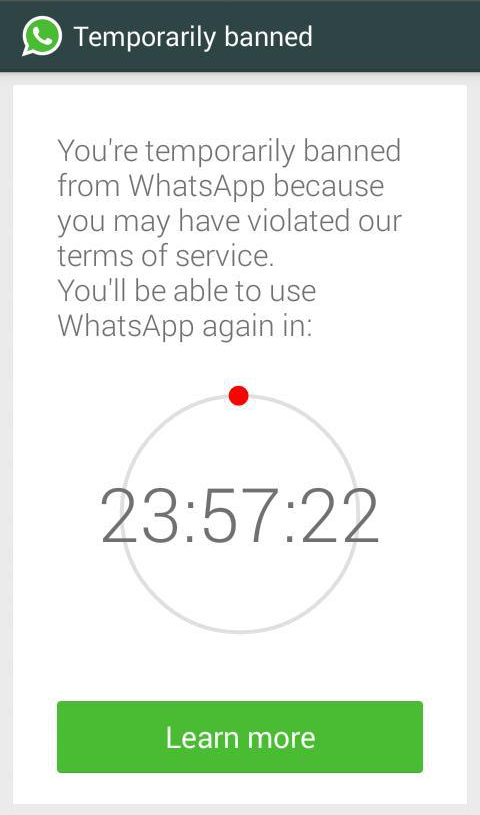
“You’re temporarily banned from WhatsApp because you may have violated our terms of service. You’ll be able to use WhatsApp again in:” Maybe this text sound you familiar…

WhatsApp has blocked the accounts of all WhatsApp Plus users. The reason? It cannot guarantee the security of the service.

The block will last 24 hours and WhatsApp explains it as follows:

whatsapp banned

WhatsApp Plus is an Android app developed by a Spanish programmer, based on WhatsApp but unofficial and unauthorized by it. It allows users to access WhatsApp and customize the look, use other emoticons, send songs…

However, WhatsApp warned that using unauthorized apps was a violation of its Terms of Service, and those who use them will be banned and that is what has happened.

The post WhatsApp blocks WhatsApp Plus users appeared first on MediaCenter Panda Security.
Selling or giving away your old smartphone or tablet?

Take these steps to ensure you don’t give away your data when you sell your old smartphone!

Remove your data beofre selling your smartphone

You got a new device for Christmas and have finally finished migrating the data and apps from your old one to the new one. Now you’re thinking about what you can do with your old smartphone or tablet, and you come up with two alternatives: Sell it or give it away.

You’ve heard about some sites on the internet where you can sell your phone, so you do some research and decide on a fair price for your used device. Register yourself at the site and… Wait. Something suddenly occurred to you.

Will the new owner be able to see my personal stuff on my old phone?


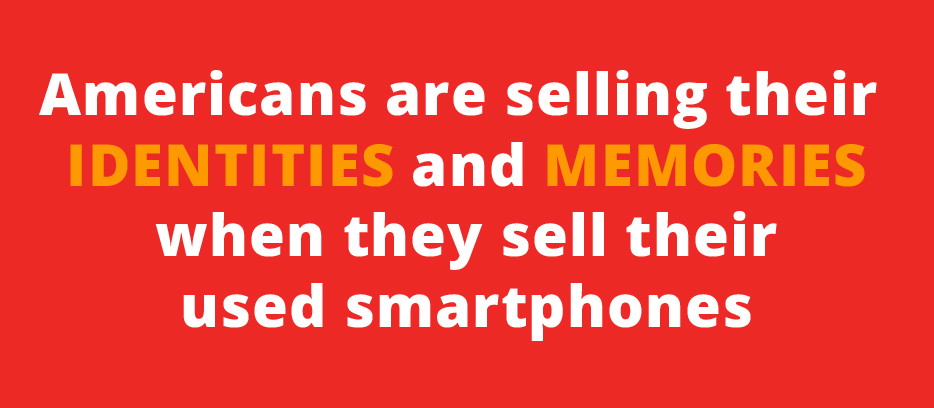
You’re right to think about that because Tens of thousands of Americans sell themselves online every day. Not only do they sell the devices, they sell themselves as all the personal data could be recovered.

eBay infograph June 2014If you don’t want a stranger to see your selfies, discover your bank account details and your credit card numbers, and even some problematic Snapchats and SMSs… you need to do something. Do you remember the celebrities photos scandal?

So what to do? Use a hammer? Well, there are other options.

1. Backup your important data

Much of our lives are stored in our smartphones: Photos, music, videos, personal and professional contacts, call logs and SMSs. And you want all this stuff in your new device, don’t you? Avast Mobile Backup was specially designed to make this easier for you. It makes a backup in your Avast account (or in your Google Drive storage) and then allows you to recover them in a new device: All your paid apps and games (with their data) will be restored.

If you have a MicroSD card, remove it from your device and insert it into your PC, making a full copy and paste operation for all files. Remember that many Android devices store photos and other media files in the DCIM folder of the internal memory. Back it up, too.

Make sure your contacts are being synced with your Google account in order to restore them automatically in the new device: Check Settings > Accounts> Google> your email address and verify if “Contacts” is checked and already synced.

2. Disconnect your smartphone from your wireless carrier

This is especially important to allow the buyer to activate his/her own service. If you don’t do that, the phone will be linked to your services and you’ll need to inform the buyer of your email address or your new number so he/she can set up their own account. So, do it now, after you backup your data.

3. Unlink your smartphone from two-factor authentication services

If you set a two-factor authentication in your online accounts, be sure to unlink your device from the online accounts before wiping it (see next step) or selling it. We will post about this next Tuesday, so come back to our blog.

4. Wipe your device

It’s not enough to delete the photos and files from your phone. They will remain there and specialized tools are able to recover them. You need to wipe. But, remember, it’s not enough. Even going for it, you need to use an app or service that deeply wipes, so the files are unrecoverable on your device. Avast Anti-Theft does this for you. You just need to go to your Avast account and send the command to wipe your phone.

Android also offers a factory reset (Settings > Backup & reset > Factory data reset). This step is a no-return one. Make sure you have followed Step 1 consciously.

Of course, it will be good if after that, you remove your SIM card and keep it with you, without selling or passing it away. That allows you to keep your phone number, too.

5. Wipe your memory card

Along with the internal memory of your phone or tablet, many of them allow you to use an external card. To clean it, turn off your phone, remove the card, and use Avast Data Shredder to wipe all the files. If you have our Premier product in your PC, you have access to the data shredder. Put your card in your computer, open Avast, then go for Tools > Data Shredder > Shred whole partition. Choose your card and then click on Shred. If you have Avast Free Antivirus, you can find other free tools on the internet that does the wiping job for you.

6. Inform which accessories and batteries will be sold or passed away

Choose what accessories you will keep with you and inform the buyer exactly what you’re selling, so the buyer knows it prior to the sale.

7. Do some cleaning

Last but not least, cleaning is a nice gesture and rewards the buyer for his purchase. But take care so you don’t harm internal parts by removing dust!


10 Tips for protecting your company’s email

Practically all important information that we work with nowadays reaches us via corporate email. That’s why email security is so important for companies. Here we offer some advice to bear in mind to prevent unauthorized people from accessing your email – and the information it contains.

keys

10 Tips for protecting your company’s email

Many of the cyber-attacks that target large companies can be traced back to email. When all’s said and done, this is the place where a company’s most useful information can be found; where employees chat; where credit card details -even passwords- are sent. Read on if you want to know how to look after this information.

  1. The first thing you should be thinking about as a company owner is training your staff in IT security, to eliminate dangerous behavior when using company email.
  2. Employees can counter risks by deleting old emails. You accumulate hundreds (even thousands) of messages in the belief that the information is really important (it could be for a cyber-criminal!). If you genuinely regard the information as vital, you could always save it to an external hard drive or data base and then delete the original emails.smartphone email
  3. Encrypt your email. One of the main features of corporate email is that it gives companies control over sensitive information, and prevents it from being circulated through employees’ personal email accounts. The best way to ensure such control and keep it from falling into the wrong hands is to encrypt it.
  4. When you have to create a password make sure it’s complex and that nobody could guess it. That said, make sure you can easily remember it too.
  5. You should also be careful when starting a corporate email session from public computers in libraries, Internet cafes and the like. Make sure you close the session before leaving the computer, though even then you can leave traces of your activity that are easily detected by cyber-criminals. Better only to access your company email on trusted networks.
  6. Don’t give your email address to everyone, and don’t post it on public Internet sites, remember that scammers are always on the lookout for new victims. inbox
  7. Careful with fake emails that try to trick you into resetting passwords as part of a supposed security check. These are normally scams designed to steal your passwords and access your email account. If you really need to change your password, go to your email provider’s website and make any changes from there, but don’t click on links sent to you via email.
  8. On a similar note: don’t even open emails sent from unknown sources.
  9. And of course don’t forget that company email is a working tool, it’s not for exchanging messages with friends and family. Remembering this will also help keep information from falling into the wrong hands.
  10. Last but not least, a good tool for protecting email from malware and other dangerous content is Panda GateDefender, which can prevent unwanted files from entering into contact with your company’s most sensitive data. This software filters spam to safeguard employee productivity, and also enables the secure and centralized storage and administration of your network’s users’ messages, ensuring flexibility and complete connectivity.


The post 10 Tips for protecting your company’s email appeared first on MediaCenter Panda Security.
Careful with FileZilla! There is malware that imitates it perfectly

filezilla

Anyone who has a website will be familiar with the term FTP (File Transfer Protocol), a protocol for transferring files over the Internet. When designing a website, you will have to use this quick method for storing the files that you want users to see (pages, pictures, documents, etc.) on a server.

There are also various types of programs for transporting data: these are called FTP clients, which connect your computer to the machine on which the information will be stored. One of the most widely-used is FileZilla, open and free software used by amateurs to professional web developers.

The first program, developed by Tim Kosse, was launched in 2001. Now it can be run on the most common operating systems (Windows, Linux and Mac OS X).

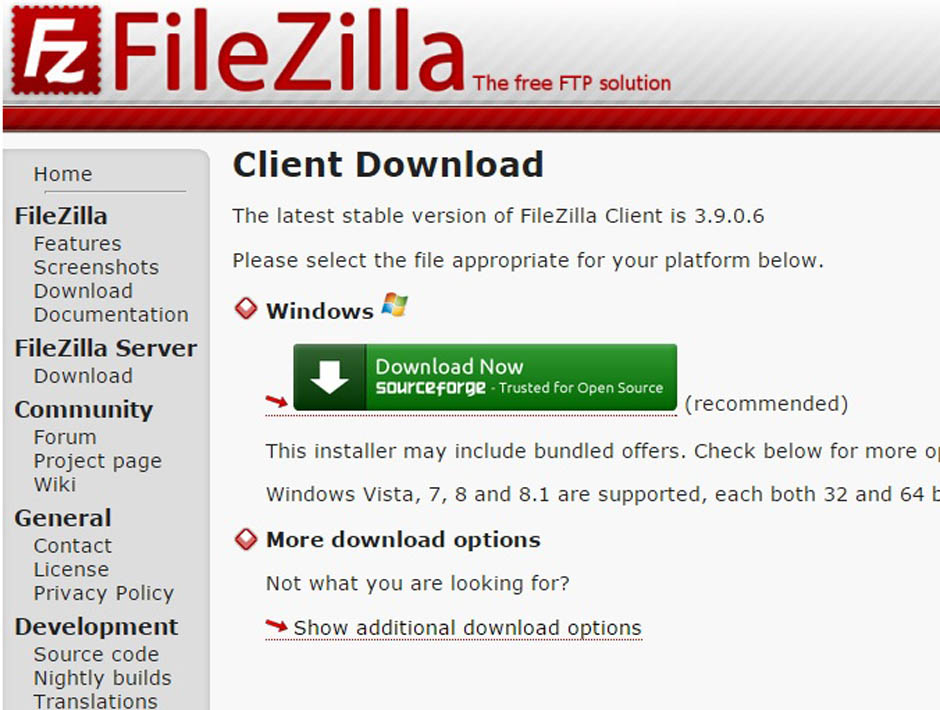
If you use this tool regularly, be on the lookout: malware has been detected in some versions (Filezilla v3.5.3 and Filezilla v3.7.3). The false application is installed in exactly the same way as the official version; it simulates the wizard interface perfectly and runs without any hitches.

The functioning of programs like FileZilla is simple: they allow web files to be arranged as if they were just another directory on your computer. In fact, you are managing a space in the memory of another computer (or several, if you work with various servers). You can save the data in different folders and arrange them as you please.

filezilla-malware

As you add more documents, they are transferred to this hard drive, which could be located in another country. This is where the activity of the malicious software comes in, which acts like a Trojan. It identifies each connection you establish with your server and communicates with another computer to which it sends the address where the information is housed and your FTP account login credentials.

Some addresses have been detected to which the malware transfers the stolen data, both with a Russian domain. These are ‘aliserv2013.ru’ and ‘go-upload.ru’, created in the domain register Naunet.ru, associated to fraudulent activity such as spamming. This platform hides its customers’ details and ignores demands to suspend its illegal domains.

Although this fraudulent version seems to work like the secure programs, certain characteristics give it away.

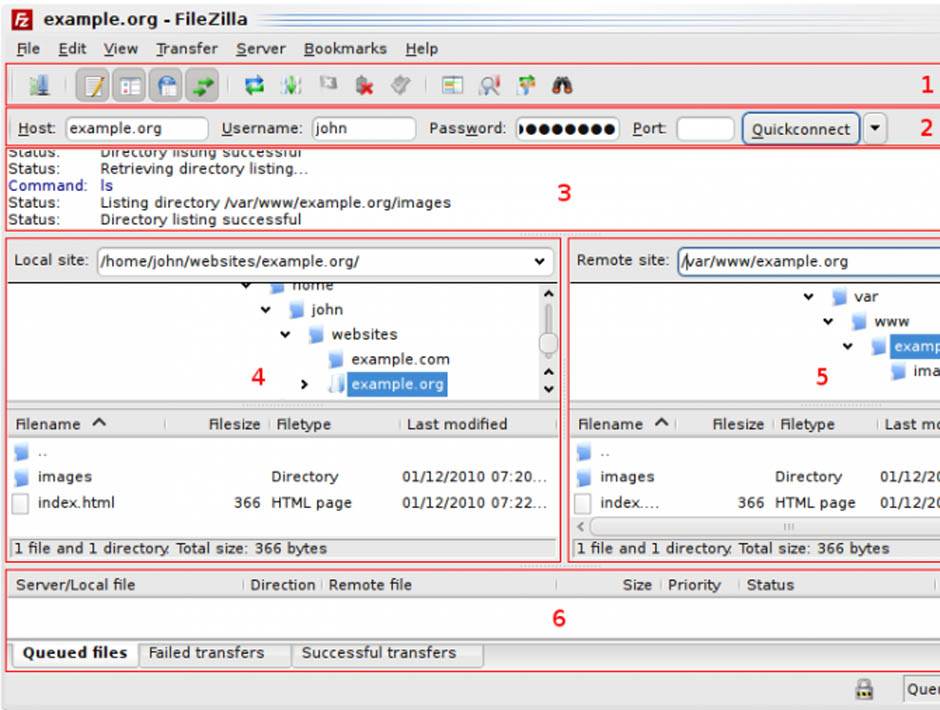
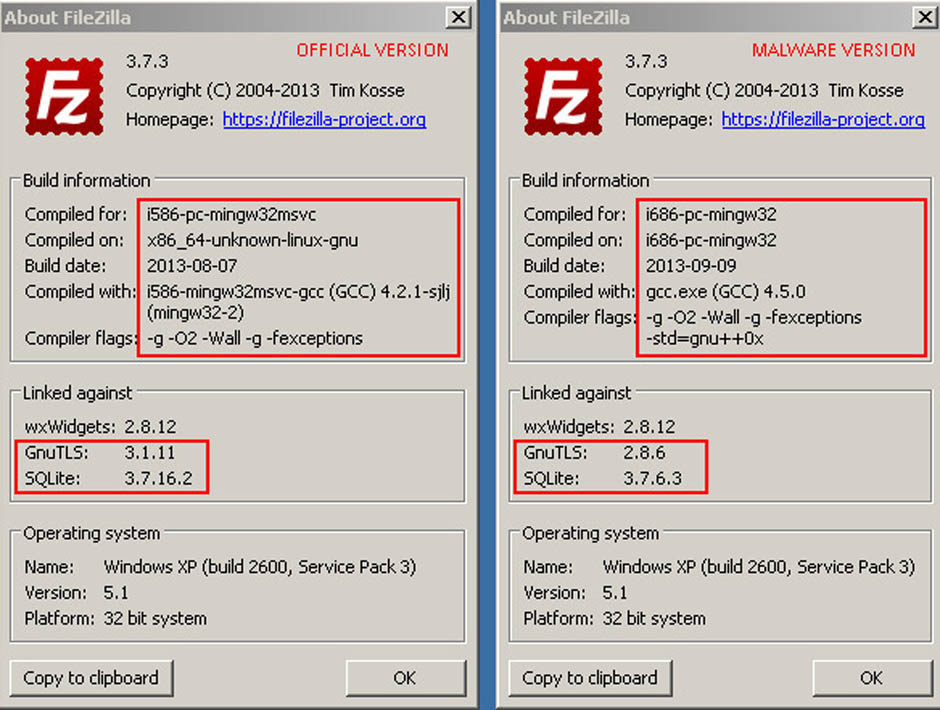
The main difference lies in the information in the About window in the program’s menu.

malware-filezilla

In this section you will find different references in the ‘Linked against’ option. In the malformed software, the versions of GnuTLS and SQLite are earlier versions than in the official program. In addition, you will find that the program does not allow you to update them.

GnuTLS (GNU Transport layer Security Library) and SQLite are two systems that guarantee that an application uses a secure transport layer (encrypted) to send data. These two systems are also open and free.

By using an outdated version of these programs, you risk a cybercriminal being able to monitor the login credentials used by FileZilla and decrypt the supposedly secure connections established.

Another difference with the flaw-free version is the presence of two additional libraries (ibgcc_s_dw2-1.dll and libstdc++-6.dll), although these do not seem to have any malicious effects.

Just follow these clues in order to check if the version you have installed is a spoof or the official program. In any case, make sure that you only download freeware like FileZilla from a website that offers security guarantees.

The post Careful with FileZilla! There is malware that imitates it perfectly appeared first on MediaCenter Panda Security.
An old threat is back: Ramsonware CriptoWall 3.0. Get Avast for protection.

The nightmare is back! Your security could be seriously compromised if you do not act now. Install and update your Avast for PC before is too late. The original version of CryptoWall was discovered in November 2013, but a new and improved variant of the CryptoWall ransomware starts to infect computers all over the world last days. It’s the CryptoWall 3.0. Some sources estimate that it has already infected over 700,000 computers up to version 2.0.

Ransomware

CryptoWall is a malware that encrypts certain files in your computer (and secure delete the original ones) and, once activated, demands a fine around $500 as a ransom to provide the decryption key. You’re asked to pay in digital Bitcoins in about 170 hours (almost a full week). After that period, the fee is raised to $1000.

You could be asking why haven’t the authorities blocked the financial funding of them? They use unique wallet ID for each victim into their own TOR anonymity servers. For the user to be able to pay the ransom, he needs to use a TOR-like connection called Web-to-TOR. Each TOR gateway redirects the victim to the same web page with the payment instructions. The commands and communication control is now done using Invisible Internet Project (I2P) instead of Tor.

Infection could reach you in various ways. The most common is as a phishing attack, but it also comes in email attachments and PDF files. The malware kit also abuses various vulnerabilities in unpatched – read non up-to-date – Flash, Java, browsers and other applications to drop the CryptoWall ransomware.

How Avast prevents the infection

1. Avast Antispam and antiphishing protection prevents some vectors distribution.

2. Virus signature block all known ransomwares versions. Remember that Avast automatic streaming updates releases hundreds of daily updates for virus definitions.

3. Community IQ intelligence and sensors of our more than 220 million users that detects malware behavior all over the world. See how it works in this YouTube video.

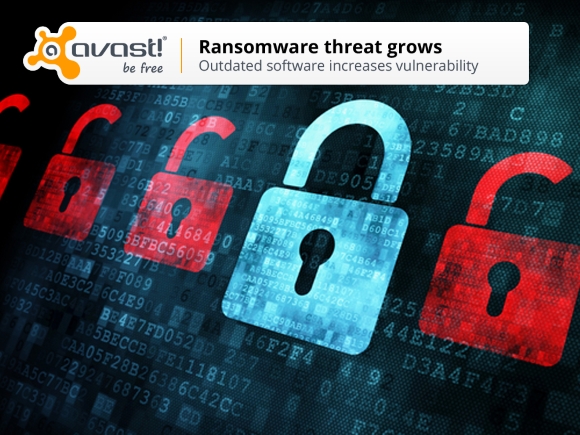
4. Keeping your software updated is another security measure that prevents the exploit of their vulnerabilities. Learn how Avast Software Updater can help you with this job.

What more can I do?

Avast also helps in prevention of this disaster through its Avast Backup that allows you to keep all your important files in a secure and encrypted way. We also recommend local backup, as the new malware could also attack other drives and even cloud storage. Did you know that Avast Backup also performs local copies of the files? You can enable it at Settings > Options > Local backup, and configure the backup location (better an external drive) and also versioning of the files. Remember to disconnect the external drive from the computer (and the network) to prevent infection of the backups by CryptoWall and further encryption of the files.

Avast Software’s security applications for PC, Mac, and Android are trusted by more than 200-million people and businesses. Please follow us on Facebook, Twitter and Google+.