Tag Archives: featured1

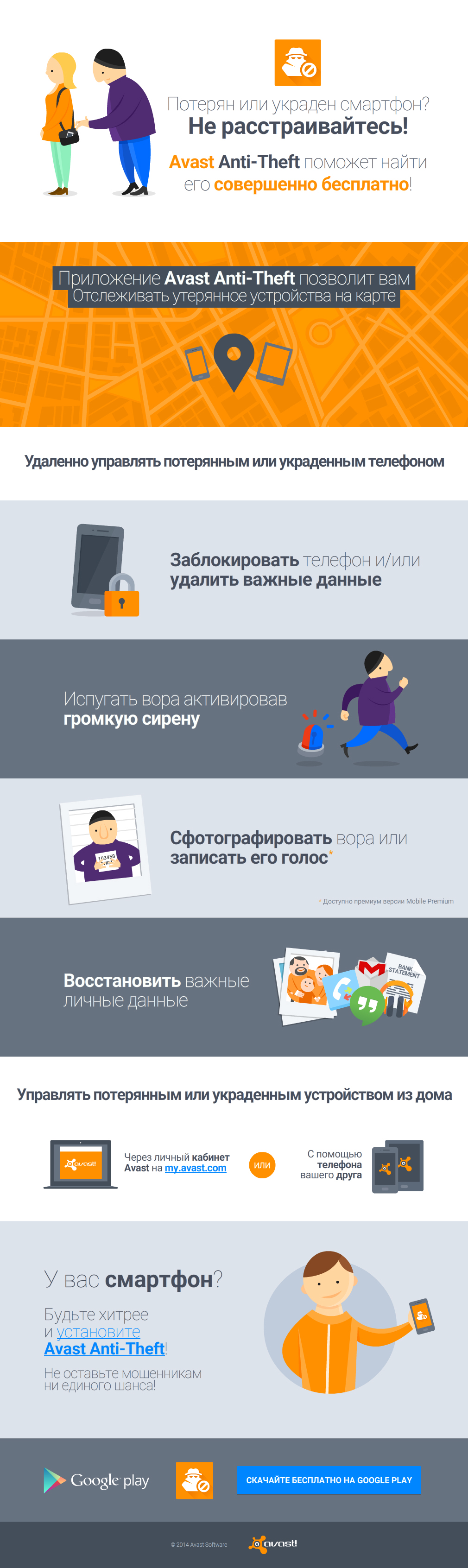
Не дайте мошенникам ни единого шанса! Установите на Avast Anti-Theft.

Если вы случайно потеряете Android смартфон или планшет, или кто-то его украдет, не отчаивайтесь, умное приложение Avast Anti-Theft поможет вам найти и поймать вора.

Что такое Avast Anti-Theft?

Anti-theftAvast Anti-Theft отдельное бесплатное приложение для смартфонов и планшетов с операционной системой Android, которое поможет вам найти потерянное или украденное мобильное устройство, позволит вам отслеживать его на карте и управлять им дистанционно. Avast Anti-Theft является отдельным приложением, как только приложение запущено, оно маскируется и делается невидимым в телефоне для потенциальных воров.

Какие команды можно выполнить удаленно на потерянном мобильном устройстве?

Приложение позволит вам:

  • Заблокировать телефон
  • Активировать громкую настраиваемую сирену, которая возвращается к максимальной громкости, если воры попытаются заглушить ее
  • Удалить все ваши важные личные данные, прежде чем кто доберется до них
  • Отправить уведомление с новым номером телефона и данными геолокации на другое устройство
  • Установить отображение настраиваемого сообщения на экране телефона (например, о вознаграждении за возврат) независимо от того, заблокирован ли телефон
  • Удаленно прослушивать звонки. Телефон может набрать ваш другой номер (экран будет заблокирован, и воры не увидят статус звонка и не узнают, что вы их слушаете)
  • Перенаправить звонки и SMS на другой телефон
  • Блокировать доступ к параметрам телефона (блокировка диспетчера приложений и/или настроек телефона)

at-ig-ru

И это еще не все! Весь список функций, которыми можно управлять дистанционно и абсолютно бесплатно, можно найти здесь.

Премиум-функции позволят вам:

  • Сфотографировать вора и записать его голос
  • Восстановить все данные (списки вызовов, SMS-сообщений, и т.д.) и без телефона
  • Отправить SMS с вашего телефона
  • Автоматически заблокировать устройство после трех неудачных попыток ввода пароля

Приложение доступно на Google Play совершенно бесплатно

at-ig-ru


Your video guide to Avast 2015 features

Only four and half minutes of your time, and you’ll know the highlights of Avast 2015.


Avast 2015 is very easy to use, and many people just install it and let it do its job silently in the background. We designed it that way, but for those of you who want to know more about the features of Avast, we created a video guide to help you get the most out of your security protection.

The core of Avast Antivirus is real-time active protection comprised of the Web, Mail, and File System Shields. These can be accessed from the user interface. Open Settings and go to Active protection.

Avast 2015 includes our new, unique Home Network Security (HSN) which scans for home router security problems. Avast is the only security company to offer a tool to help you secure this neglected area.

To save you time, Avast 2015 has an efficient 4-in-1 Smart Scan which combines scans for malware and HSN’s router vulnerabilities, missing software updates and patches with Software Updater, and performance issues with GrimeFighter. GrimeFighter requires a separate license to fully optimize your PC.

Guess what’s here? Here again? A new version of Avast Mobile Security is here, tell a friend!

In November, we called on our awesome advanced mobile beta testers to test the latest version of Avast Mobile Security. We listened to their feedback carefully and are proud to announce that the latest version of Avast Mobile Security is now available to everyone!

Screenshot_2014-11-21-15-28-58

What’s new in Avast Mobile Security?

First and foremost, we have completely redesigned the virus scanner, making it faster than ever (up to 50% faster!). Then we improved support for Intel-based devices, optimizing the virus scanner for the best performance possible.

Finally, we added a referral program, so you can recommend Avast Mobile Security to your friends and family. Not only can you recommend the best mobile security app available on Google Play, but you will be rewarded for doing so; you can earn up to three months of Avast Mobile Premium for free!

Here is how it works: For every five friends you send an SMS to recommending Avast, you get one free month of Avast Mobile Premium.

In summary:

 The new features in Avast Mobile Security are:

  • A redesigned and faster than ever virus scanner (50% faster!)
  • Improved support for Intel-based devices
  • An awesome new referral program that rewards you for spreading the word about Avast Mobile Security!

How can I get the latest version of Avast Mobile Security?

If you don’t already have Avast Mobile Security, what are you waiting for?! Download it on Google Play now! Already have Avast Mobile Security? If you have enabled automatic updates in your Google Play settings, you are all set :) If you don’t have automatic updates enabled in your Google Play settings, you can visit our app on Google Play and upgrade manually!

Have fun using Avast Mobile Security – we look forward to hearing your feedback!

We would like to extend a special thanks to our beta testers, your feedback plays an extremely important role in developing our products!

Avast Software’s security applications for PC, Mac, and Android are trusted by more than 200-million people and businesses. Please follow us on FacebookTwitter and Google+.


Fobus, the sneaky little thief that could

One small Android application shows lots of determination and persistence. Too bad it’s evil.

Mobile malware, Fobus, acts like this famous little engine. "I think I can, I think I can!"

Mobile malware, Fobus, acts like this famous little engine. “I think I can, I think I can!”


The year 2014 was significant with a huge rise in mobile malware. One of the families impacting our users was malware Fobus, also known as Podec. This malware poses as a more or less useful application, but for sure it won’t be what the user expects. This malware usually has two language versions, English and Russian, and applications seem to be generated automatically.

All that, and a bag of chips

From the permissions in the manifest, we can see that once Fobus is installed on the victim’s device it cannot only send SMS and call premium numbers, which may cost a lot of money, but it also works as  Spyware and can steal personal data from the infected device. That’s a lot of bad stuff packed into one small application.
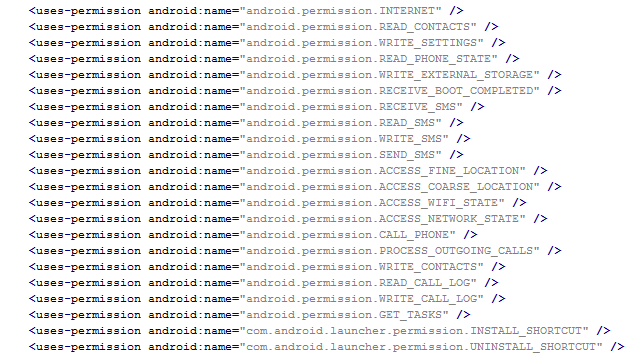
Permission

Next up is a bit more technical stuff. If you are really eager, skip to Me thinks that something is amiss section to see how it works.

Inspecting the manifest file provides the clues of the automatic modification of the application files. As you can see in the following picture, service names are randomly generated. Going through samples in our database we were able to identify some similarities, which helped us categorize this malware as the Fobus family.
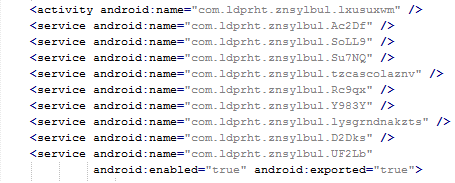
Service

The manifest also includes several receivers which are indicators that the malware is able to spy on the device.  It can also protect itself against uninstallation.

This receiver provides persistence of Fobus.

Boot

These receivers are able to check the outgoing calls and received SMS.

Call SMS
The receiver pictured here helps to protect the malware against removal.
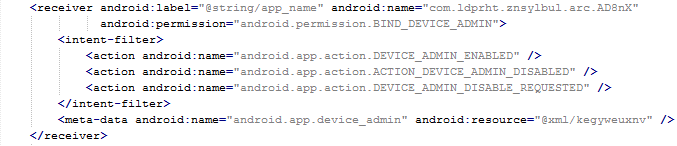
Admin

Me thinks that something is amiss

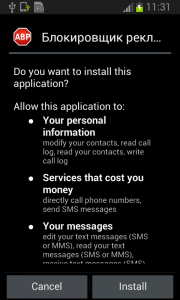
During installation, the Fobus permissions already show that something might not be in order. But, we all know, that most people fly through this step without much thought.
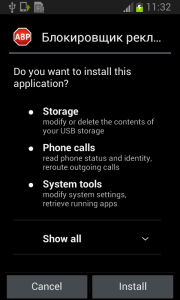
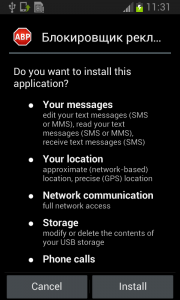
device-2015-01-13-094436 device-2015-01-13-094428 device-2015-01-13-094352

The Great Pretender

Fobus pretends to be an Ad Block but permissions to make phone calls, send messages, system tools, and services that cost money should not really be needed for an Ad Block application,  nor for most legitimate applications. That is,  unless you hope it will block unsolicited calls and marketing SMSs. Our advice: The user should always take great care when an application requires these types of permissions and try to link them to the expected app functionality. Inadequate permission requirements are often the first indicator of something fishy.

When the user accepts all these permissions nevertheless, Fobus installs as any other application would.
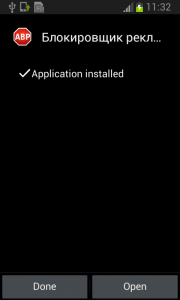
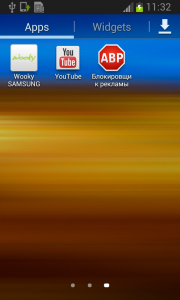
device-2015-01-13-094455 device-2015-01-13-094521

Here comes trouble!

The real trouble, however, begins when the user runs this application and grants Fobus device administrator privileges.
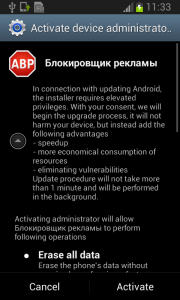
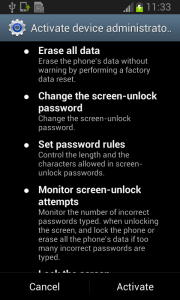
device-2015-01-13-094553 device-2015-01-13-094603

Once the user activates the device administrator, the application icon disappears from the device.
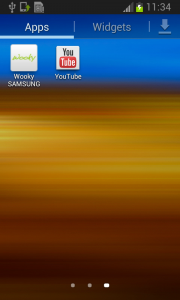
device-2015-01-13-094628

But in fact, Fobus is still in the device and starts doing what it was build for – SPYING on the device! The user is not able to Stop or Uninstall this application by standard means. Why? Because they gave permission for the app to do all these things in the previously accepted device administrator policy!
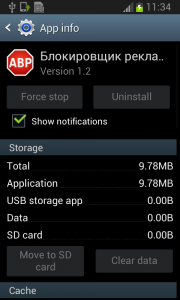
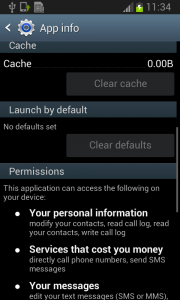
device-2015-01-13-094658 device-2015-01-13-094704

Well, just deactivate the device administrator and uninstall this application… That shouldn’t be so hard, right? But it is! The application is easily visible in the device administrator along with the deactivation button. So what is the problem?
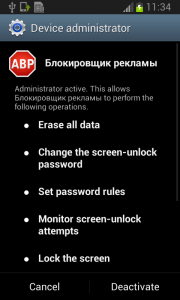
device-2015-01-13-094721

Blink and you’ll miss it…

The sneaky Fobus has a receiver which checks for calls on device_admin_disable_request. The moment the user tries to deactivate the device administrator, this receiver catches the request and forces the device to lock the screen with a call to the Lock Now function. This function prevents the user from confirming the deactivation.

Afterwards, the application attempts to relock the screen with any unlock attempt. The confirmation box is visible for just a moment before the application forces the lock screen, however the user will never be able to confirm it in time because the device is not able to capture the user click on screen. The screen locking usually lasts for a while until the confirmation box simply disappears. Sometimes users are required to push one of the hardware buttons on their device to activate the screen. When they finally manage to unlock the device the application is still there and happily running. By now, the person who installed this sneaky little thief, is not a happy camper.

device-2015-01-13-094726

Empty threats

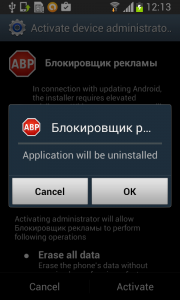
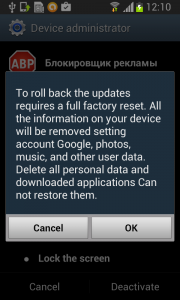
Should the user have lightening-fast reflexes and be able to get past the locking screen mechanism, the authors have another trick up their sleeves. This time, they try to scare the users from disabling the device administrator privilege by threatening to perform a full factory reset.
device-2015-01-13-121013

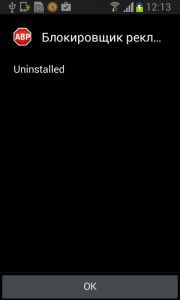
Fobus shows the user a fake warning about a full factory reset during which the user will lose all data stored on their device. “Heavens, NO!”, most users will say, as they choose the cancel button. But when user is brave and pushes the OK button,  the device administrator privilege will be successfully removed and theuser will also able to uninstall the malicious application from the mobile device.

This is a pretty strong uninstall prevention, isn’t it?

It can be very difficult to circumvent this type of protection, especially, since the application cannot be uninstalled by any other means, like ADB or the safe-mode. In ADB, the uninstalling operation finishes as failure and even though the safe-mode disables user-installed applications, in this case the malicious application is still protected by the device administrator privileges and therefore cannot be uninstalled.

How to remove this persistent malware

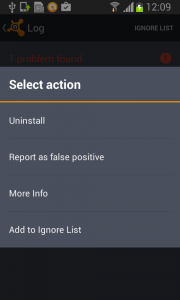
Affected victims can use third party software to remove this malicious application from their mobile device or actually perform the suggested factory reset.

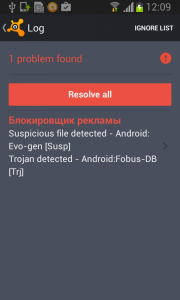
The removal itself is a two-phase process.

First, you need to deactivate the device administrator privilege.
device-2015-01-13-120918 device-2015-01-13-120944 device-2015-01-13-121024

Then,  uninstall Fobus itself.

device-2015-01-13-121316 device-2015-01-13-121326

The little malware that could…

What makes the Fobus so special is not that it can spy on victims devices, send SMSs,  or call on premium numbers; there are loads of malicious apps that can do that. Just like The Little Engine That Could, Fobus never gives up.  Usually users are able to remove bad apps from their devices easily by themselves by simply uninstalling them. Fobus, though, doesn’t give up so easily, it’s strong removal protection can frustrate even the most experienced users.

Acknowledgement

Thanks to my colleague, Ondřej David, for cooperation on this analysis.

The Litttle Engine That Could image is from Hero Wikia.

Source

Here is a sample connected with the analysis


011a379b3f81dbfb4f6fb4f5c80b5ba4cf9f0677f0ee30c3a8d41711ade2d226
What to do before your smart phone is lost

Avast Anti-theft tracks lost phones remotelyBe prepared.

That’s good advice for hosting a Super Bowl party, going to a job interview, or if you lose your phone.

Not being prepared could prove disastrous in all three of those examples, but most people would agree that losing their phone with all the contacts, text messages, photos, and other irreplaceable data is worse than forgetting the Doritos or not answering an interview question well.

If you happen to lose your Android smart phone or tablet, or if someone steals it from you, do not despair. Our clever, FREE app, Avast Anti-theft, will help you find your phone and even, catch the thief.antitheft infographic

What is Avast Anti-Theft?


Avast Anti-Theft is a free standalone application designed for Android smart phones and tablets. It’s main purpose is to help you locate your lost or stolen mobile device, allowing you to track it on a map and control it remotely. Since Anti-Theft is a separate application from Avast Mobile Security & Antivirus, it is completely invisible when it is running so that thieves don’t even know it’s there.

This infographic explains what you can do with your phone if you discover that it’s missing.


Locate your device on a map

Remotely locate your phone via GPS, Wi-Fi, or mobile network – for maximum accuracy.


Remotely lock your phone

Remotely lock your phone to prevent access to your personal data and settings.


Activate a siren remotely

Activate a loud, customizable siren, which reverts to maximum volume if thieves try to silence it.


If you spring for the paid version of Avast Anti-Theft, you get some additional, powerful features.


Take a photo of a would-be thief

You can set your device to lock access and take a picture of the person attempting to unlock it after three failed tries.


Remote data retrieval from your device

Retrieve call logs, SMS messages, and other personal data from your phone.

Avast Anti-Theft is available on Google Play, where it can be downloaded for free.

Lizard Squad hackers use unsecured home routers in DDoS attacks

This Lizard is out to get your home router.

This Lizard is out to get your home router.

Your home router could be part of a network used to knock sites like Sony PlayStation network offline.

During Christmas we reported that a hacker group calling themselves the Lizard Squad, took responsibility for ruining the day for Sony PlayStation and Microsoft Xbox users by taking the gaming networks offline. This and previous attacks, which included a bomb threat directed at an American Airlines flight with Sony Entertainment president John Smedley on board, have been revealed to be a marketing campaign to advertise a new product available for rent to anyone who wants to cause a Denial-of-Service (DDoS) attack to the target of their choice.

I’m not a hacker. Why should I care?

You may not be a hacker, but the power for this service could be coming from your home office! Security blogger, Brian Krebs, whose own site was attacked, found out that the network of infected devices that powers the Product-That-Must-Not-Be-Named (that’s because Lizard Squad gleefully thanked Brian for the publicity on their Twitter account) is made up mostly of compromised home routers. On that same Twitter account, Lizard Squad said that they are using 250-500k infected routers.

These are the devices in everyone’s home that we warned you about in our blog, Your home network is at risk of cybersecurity attacks. Most people neglect the security of these devices by using the default user name and password that comes from the manufacturer out-of-the-box.

Our research determined that nearly 80% of all home routers in use today are thinly protected by common, easily hacked passwords, making routers an easy entry point to the home network for hackers,” said Avast Software’s CEO, Vincent Steckler.

Lizard Squad has just proven that point.

Today’s router security situation is very reminiscent of PCs in the 1990s, with lax attitudes towards security combined with new vulnerabilities being discovered every day creating an easily exploitable environment, “ Steckler said. “The main difference is people have much more personal information stored on their devices today than they did back then. Consumers need strong yet simple-to-use tools that can prevent attacks before they happen.”

How to protect your home router

Start by scanning you home network with Avast’s Home Network Security Solution.

Open the Avast user interface, click Scan from the menu on the left, then choose Scan for network threats. Avast will take a look at your router and report back any issues. In most cases, if there is an issue to be addressed, then it will direct you to your router manufacturer’s website.

The Home Network Security Solution is available in free and paid versions of Avast 2015. Get it at www.avast.com.

For more steps you can take to protect your home router, please see our blog post, 12 ways to boost your router’s security.

Be careful if you use Linux in your company: It is not immune

linux malware

The most common open operating systems are often seen, and not without its reasons, as a good option for companies. Unlike Windows, installation is free or costs very little and they do not need constant upgrading.

Another benefit is security. Viruses often target Windows computers and there is no place for them on devices running this software. Therefore, many IT departments choose open operating systems. However, despite their many strong points, they are not immune (if anyone thought otherwise).

2014 was not a good year for Linux. During the year, different types of malware and vulnerabilities affecting this software were detected, ending its reputation as unbreachable and giving its followers something else to worry about; from now on, they will have to pay more attention to the security of their computers.

Linux

One of these concerns comes in the form of Turla, malicious software that is also known as Snake or Ouroboros. It is believed to have come from Russia but it has been infecting Windows computers worldwide for years. Recently, a version of this Trojan targeting Linux was also detected.

Turla uses a backdoor to give cyber-criminals access to the computer, as if they were just another user, without needing to use the ‘root’ account (the account that has all rights and permissions). As a result, the restrictions that the operating system puts on this type of entry are bypassed.

Home users, in principle, do not need to worry, but the same does not apply to companies. Those who use the aforementioned malware usually do so for corporate espionage or surveillance, not for stealing credit card numbers.

In addition, X.org, a server on which open-source graphic interfaces can be run (including Linux), is also vulnerable. Several vulnerabilities have been published that make its users an easy target for cybercriminals.

Another security flaw that has been on the operating system for years is Shellshock, which does not affect Windows. The bug lies in the program that parses the open software commands (Bash). When a Linux device connects to an insecure Wi-Fi network, this window allows a Trojan to get into the device without any problems. Fortunately, the security patches released have fixed the hole.

But security flaws and malware are not the only headaches of open operating system users. It is not always easy to get the security patches prepared by developers. Whereas access to modifications to search engines and other important programs is guaranteed, the same does not occur with other components.

Linux-firefox

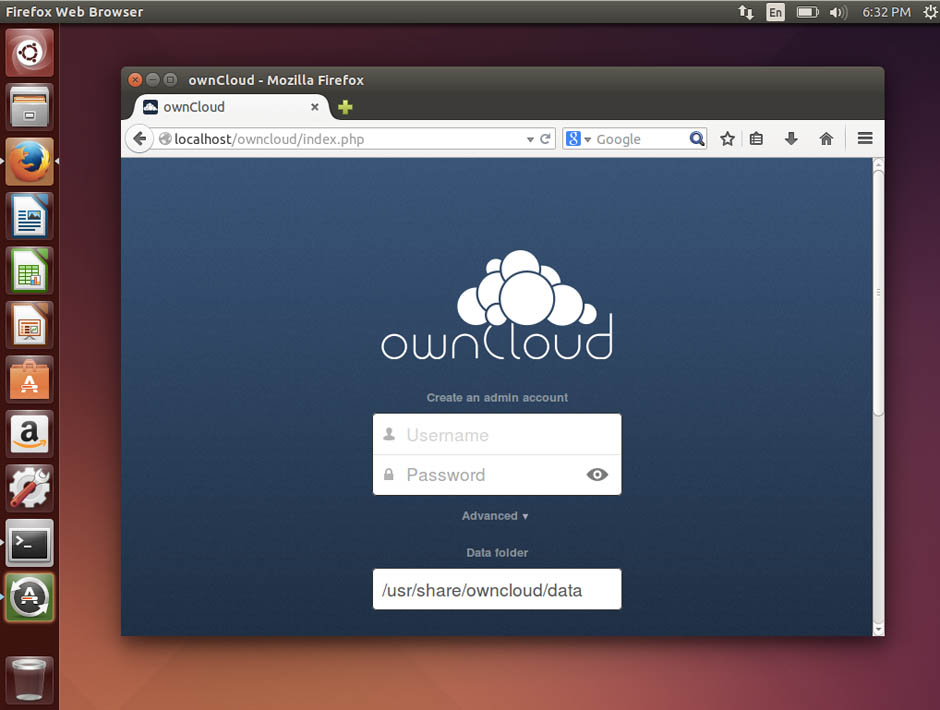
An example is what happened with Owncloud, an application for storing files online in open format (an alternative to the well-known Dropbox). When installed under Ubuntu, one of the most popular Linux distributions, it did not execute any security updates. The developer had stopped working on the tool, leaving it at the mercy of cyber-criminals.

Something similar happens with other open-source programs that are not widely used or distributed, such as the user interface Manjaro, which has not received any security modification for a long time either.

Do you use Linux at home or on your computer at work?

The post Be careful if you use Linux in your company: It is not immune appeared first on MediaCenter Panda Security.

Posting a privacy notice on Facebook is useless

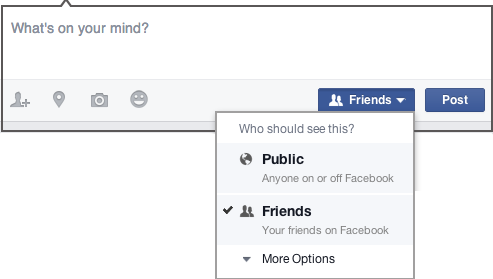
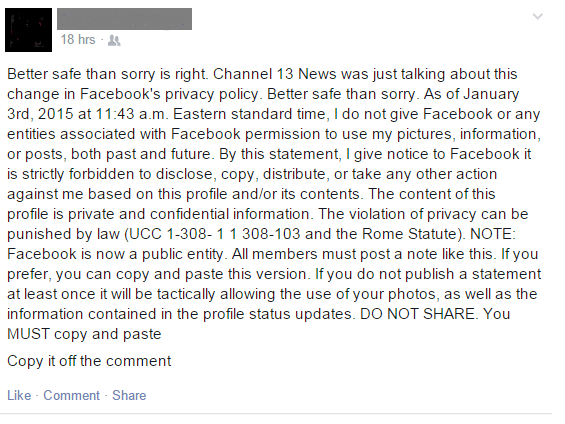
An old hoax has been resurrected after Facebook made a recent announcement about its updated privacy policy. The copyright message claims to protect users’ pictures, information, and posts under UCC 1-308- 1 1 308-103 and the Rome Statute. It’s seems so official; it just must be true, right? Here is an example that I saw on my newsfeed this morning.

Facebook privacy permission statement is useless

Other variations have come through in the past few days with legal-sounding statements, like this:

“In response to the new Facebook guidelines, I hereby declare that my copyright is attached to all of my personal details, illustrations, comics, paintings, professional photos and videos, etc. (as a result of the Berner Convention)….”

The good news is that Facebook users are becoming more aware of privacy issues, and they seek a way to control their own shared media. The bad news is that this notification has no legal standing at all, you are bound to the terms and conditions that you agreed to when you signed up with Facebook, and you are annoying your friends.

The truth is that YOU own all of the content and information you post on Facebook, and YOU can control how it is shared through your privacy and application settings. If you neglect to look at those settings, you grant Facebook a non-exclusive, transferable, sub-licensable, royalty-free, worldwide license to use any content that you post on or in connection with Facebook.

In tomorrow’s blog, we will share the top 3 areas in Facebook where you need to make sure the privacy is set to your liking.

Who are the Guardians of Peace? A new hacker group is on the loose

Are you familiar with the name ‘Guardians of Peace’? This is a new hacker group that has been gaining notoriety over the last few weeks.

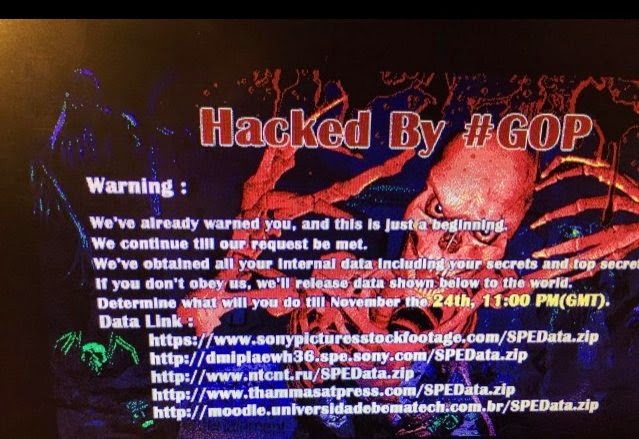
Everything began when the hacking group sent Sony a disturbing message threatening the company with leaking large amounts of confidential data unless a series of requests were met.

guardians of peace

Shortly after this, the Guardians of Peace started publishing all sorts of documents, files and confidential data belonging to Sony. Unreleased movies, information about executive salaries, emails from the company’s lawyers, employee workplace complaints, movie scripts and even the phone numbers of Hollywood celebrities were among the nearly 100 terabytes of data stolen by the hacker collective through a piece of malware called Destover.

The mystery has since grown larger…  Who is behind the Sony attack? Who are the so-called Guardians of Peace and what’s their reason for attacking Sony?

North Korea, prime suspect of the attack

US authorities believe the attacks originated from North Korea. One of the group’s demands was the cancellation of the planned release of the film ‘The Interview‘, a comedy about a plot to assassinate North Korean leader Kim Jong-un.

However, North Korea has repeatedly denied any involvement in the hack attack, and the Guardians of Peace have posted new messages mocking the FBI’s investigation.

Various theories are emerging surrounding the attack. Despite North Korea is still the prime suspect, there is also speculation linking the attack to a possible Sony insider, a group of disgruntled former employees or even a marketing campaign orchestrated by Sony itself to promote ‘The Interview’.

the-interview

Some theories even claim that this is nothing but a campaign designed by the US government to find itself a new enemy and thus justify the mass spy operations carried out through agencies such as the NSA

Incidents like this, combined with the alleged hack of the Play Station and Xbox online services during Christmas, and the constant rumors of Internet leaks, certainly make you wonder if we are not really in the middle of a cyber-war between powers…

Despite the mystery surrounding the attack, the truth is that Sony decided to cancel the premiere of ‘The Interview’ for security reasons (after receiving threats against the company’s employees and their families), and the cyber-attacks have exposed the frailties of the security measures implemented by one of the largest entertainment companies in the world.

The post Who are the Guardians of Peace? A new hacker group is on the loose appeared first on MediaCenter Panda Security.