Tag Archives: featured1

Fake Chrome browser replaces real thing and serves up unwanted ads

Is something not right with your browser, but you can't quite figure out what?

Is something not right with your browser, but you can’t quite figure out what?

Does your Chrome browser seem a little “off”, but you can’t figure out why? Maybe it’s eFast.


Here’s another reason to slow down when installing software, especially free software. A new Potentially Unwanted Program (PUP) disguised as the Google Chrome browser is sneaking onto users computers bundled with legitimate software, hidden deep within the ‘Custom’ or ‘Advanced’ settings that most people skip over. Once installed, eFast, as it has been called, serves up ads and tracks your online activities and sells personally identifiable information to advertisers.

“Read the installer screens to make sure what they actually install,” warns Michal Salat, researcher in the Avast Virus Lab. ” The Next->Next->Next->Done approach is exactly why we deal with PUPs daily. If there isn’t an option not to install some additional software, terminate the installer immediately. Better safe then sorry.”

Researchers at Malwarebytes says that eFast actually installs a new browser rather than hijacking your existing one. If you already have Chrome installed, it will replace it making itself the default browser. The fake browser uses the same source code for the user interface as the real thing making it difficult to tell the difference. It is so tricky that it even replaces shortcuts on your desktop that look similar to Google Chrome.

In addition to all that, eFast hijacks some file associations, so that it can open as many times as possible therefore having the opportunity to show you more ads! If you open a file like JPEG, PDF, or PNG, it will be opened with eFast, resulting in pop-ups, more ads in your searches, and other adware. You can see the list of file associations on Malwarebytes security blog.

How to find out if eFast is on your computer

Open your browser and type in chrome://chrome. The authentic Chrome browser will take you to the ‘About’ section and check if your browser software is up-to-date. It looks like this.
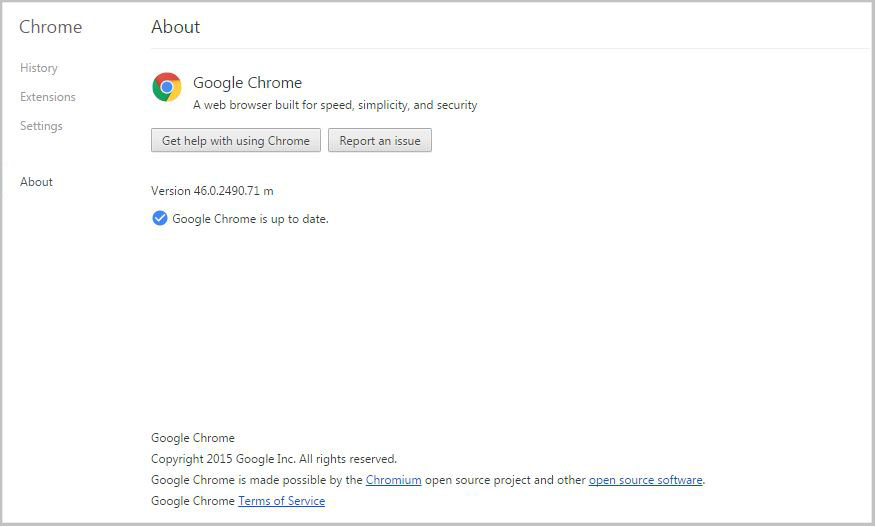
About Chrome frame

If you have a fake version of Chrome, then you will be taken to a fake About page, get an error, or the link won’t work. In that case, check out the removal instructions on PCrisk.

eFast is classified as a Potentially Unwanted Program, also known as a PUP. PUPs are annoyances like search bars, intrusive adware, etc. that Avast does not detect by default. However, the option can be enabled.

How to turn on PUP detection in Avast

  • Open the Avast program and go to settings
  • Open Active Protection
  • Click Customize next to Web Shield
  • Go to Sensitivity and put a check mark beside PUP and suspicious files

Follow Avast on FacebookTwitterYouTube, and Google+ where we keep you updated on cybersecurity news every day.


Business owners across the world have the same security concerns

“We want to keep our clients and servers in a secure environment.”

startup business, woman working on laptop

Employees at Caritas Design were using different security software making it difficult to manage.

Business owners in every part of the world have the same concerns. Scott Quinn from Montana-based Caritas Design, a small web-design firm run by Scott and his wife Kate, said, “There are lots of viruses out there you need to be protected from. In today’s world we have to protect personal information.”

Echoing that sentiment from clear across the globe is Levent Sılay, a business development executive from Login Business Solutions, a Management Information Systems solution provider based in Istanbul, Turkey. He says their biggest concern is, “to keep our clients and servers in a secure environment.”

Cobbling together a security solution

Both businessmen have tried different solutions in order to create that secure environment. But as many smaller businesses have experienced, the setup was disorganized with people in the company using different solutions simultaneously like McAfee, Symantec, Microsoft Security Essentials, and F-Secure. This cobbling together of security programs meant that management was difficult and disordered. In evaluating better solutions, Silay said, “We wanted a security system which can easily be monitored and managed from a web portal.”

Silay was a long time Avast Free Antivirus user, so once he found out about the free Avast for Business option he didn’t turn back. Quinn had a similar experience. He found Avast Free Antivirus when he was a poor college student. “I was in college looking for the cheapest option, and it had to have boot time scan. So through internet searches, I found Avast.”

Free isn’t always the biggest benefit

Many businesses already have a budget set aside for security, so sometimes free software isn’t the main benefit. Both Quinn and Silay had additional needs. The primary one: “Simple management”.

The advantages of Avast’s cloud-based business security according to Silay are “the quick and easy installation, the monitoring screen that helps in the visualization of all the computers on the network, the online management that can be utilized from anywhere, and the fact that it’s simple and there is no need for training.”

screen-easy-management

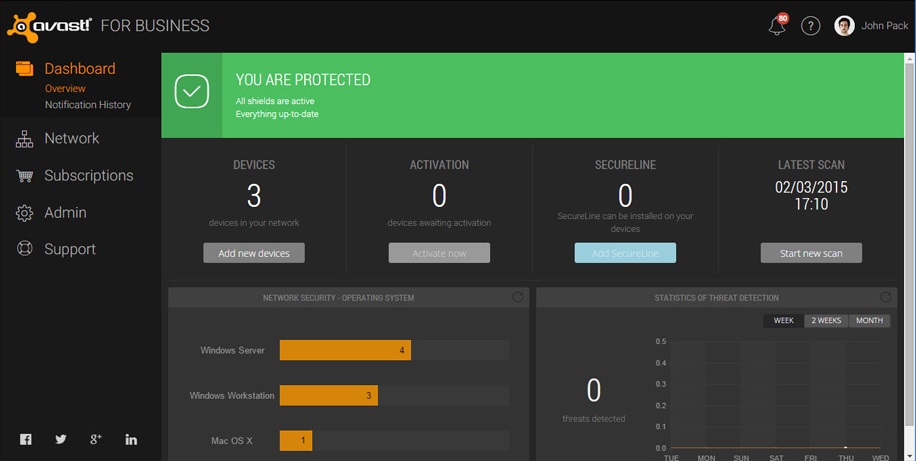
Avast for Business management console

Quinn’s Caritas Design is a startup company, so “Any savings are huge for us.” Because of the years of trust using Avast Free Antivirus, Quinn’s decision was simple. “I’ve been using Avast for my personal and business machines for over 10 years now, and when they released their new online free business portal, I had to sign up.”

“Avast for Business has been outstanding to work with as an enterprise-level solution for my customers,” said Quinn. “I can email silent deployments, manage tasks and scans, and categorize clients by organization or location.”

What’s the catch?

For a free business-grade security solution, the question often comes up about support. Quinn says, “Their support has been amazing on the rare occasions I’ve needed to utilize them. I would, and will, recommend Avast and Avast for Business to everyone I encounter.”


Avast for Business is a free cloud-based security solution available to business owners around the world. Learn more and sign up today.


10 easy-to-follow online safety tips for grandparents

grandparents security

Online security has no age limits and we can all protect ourselves from cybercriminals without being experts in the field. All you need to do is adopt the traditional “don’t speak to strangers” advice and apply it to your online habits.

Here we’ll recap ten simple steps that all of the family, including your grandparents, can follow to ensure safety while online.

10 easy-to-follow online safety tips for grandparents

1. Don’t trust every email that you receive

Some cybercriminals can pass themselves off as another person with the aim of stealing your personal information. So, how do you know when you’re being tricked? The easy way to stop this is to avoid conversations with people you don’t know. You should also avoid clicking on links sent by an unknown source and never give your personal information to a website that doesn’t begin with https:// (you’ll see a lock in the browser). Also, your bank will never ask for your email address, so don’t give it away.

2. Be wary of downloading attachments

If you receive an email from an unknown source with an attachment that is either ‘.zip’, ‘.rar’, ‘.exe’, a Word document, or a seemingly innocent photo, don’t download it. These could all contain malware that could infect your computer also be wary of emails from friends, as unwittingly, they could send you malware. It’s best to check with them before opening it, if you weren’t expecting to receive an email from them.

3. Surf the web safely

Don’t just give away your personal information to any website without thinking why they demand it. You should also trust your browser, as if there is anything suspicious it will inform you that the website is potentially dangerous. It’s best to pay attention.

4. Use different passwords and change them frequently

If you want to register yourself on trusted website, be sure to use a password with a mix of letters, numbers, and symbols (although a few websites will ask you for this anyway). Never use the same password for all of your accounts and make sure you change them every so often. Also, don’t send your password to anyone or leave it written down anywhere. It might seem a little extreme, but you need to stop others from accessing your network.

grandparents computer

5. Eliminate annoying ads

You never know what an innocent click can do until your browser is filled up with annoying banners, pop-ups, and ads that you don’t want to see. To avoid them, install a blocking service such as Adblock.

6. Be careful of SMS

Cyberattackers are now using this messaging service to carry out attacks, so you should also be wary of what these messages contain. A few months back there was a malware that was spread by this medium which simply asked “is this your photo? – Once the victim clocked on the link, an app was installed onto the device which was able to spy on their contacts.

7. Install an antivirus on all your devices

Leave the experts to worry about your computer or smartphone by letting the antivirus software look after and protect your device from malware. They help to ensure that you are safe when buying online and allow you piece of mind when surfing the net.

8. Exert caution with public Wi-Fi zones

Many is a time that you arrive at the train station, the café, or the hotel and have connected to the Wi-Fi that is offered freely. Although it is convenient, keep in mind that it is a public connection and you should be extra careful about what you do while connected. While browsing, make sure that the lock symbol is present and avoid carrying out bank transactions.

9. Remove your tracks when using other computers

If you log in to a personal email account or another service while using a different computer, be sure to delete all browsing history, including cookies. If you aren’t sure of where to find out how to delete your tracks, follow this simple tutorial from Chrome.

10. Allow updates to your software and operating system

The old saying “better the devil you know” doesn’t really apply to the internet. If your operating system or any of the apps that you have installed is saying that there are updates available, read it carefully and install it. Even if you need to adapt to a few changes, it’s better to have the most up-to-date version as it will be the one that the developers have installed the latest security updates for.

The post 10 easy-to-follow online safety tips for grandparents appeared first on MediaCenter Panda Security.

How to set up your household router to protect yourself from attack

set up router

To keep your electronic devices secure, it isn’t just important to be aware of cyberattacks that could arrive via emails or false links. You need to keep an eye on your router, which provides you with your Internet access, which has become a target for the cybercriminals.

Using these apparatuses as a way to launch attacks is becoming more and more popular and it has been brought to light by two Spanish organizations – the Instituto Nacional de Ciberseguridad (INCIBE) and the Oficina de Seguridad del Internauta (OSI).

They base their warnings on information registered by the INCIBE during the past few weeks. The experts at the organization have detected that the number of daily attacks targeted at routers have increased, reaching nearly 5,000. What the cybercriminals try to do is to install a type of malware on the device and make it form part of a network in which they carry out a denial of service attack (DDoS).

denial service attack

DDoS attacks use a series of computers and other devices with Internet access to saturate server requests where files are stored on a web page, which then stops working and remains inaccessible to others.

  • Each router that was compromised had activated the option of remote administration, which permits access to users outside of the network, allowing any IP address to control its settings.
  • Also, the INCIBE has indicated that the owners of these devices hasn’t modified the access details from the default settings (user name and password). By keeping the original default settings, it was very easy to access them remotely.
  • These factors allow cybercriminals to modify the working options of the router and set up access to a local network. Later, they would only have to install the malware which makes it work as if it were a bot, carrying out massive attacks.

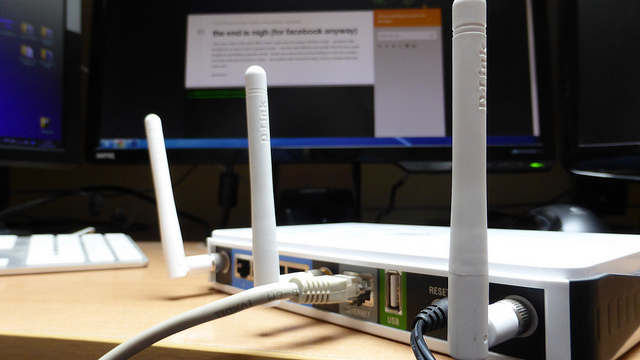
router

  • One of the measures put forward by the OSI to avoid your router being attacked is to change the administrator details and to use better passwords.
  • Also, it isn’t advisable to activate the remote administration unless it is necessary and, in this case, do it during as short a period as possible, so as not to give the attackers a chance to detect its vulnerability.
  • Every router is configured the same, although the interface where you do it and the access options vary slightly depending on the brand. Changes are carried out from the web browser by entering the IP of the device (it comes in the manual, on the tags that are attached to it, or you can find it in the connection settings within the Control Panel).

Finally, if these tips reach you too late and your device is already infected, the best option is to reinstall the firmware (the program that controls the router) from a security copy.

The post How to set up your household router to protect yourself from attack appeared first on MediaCenter Panda Security.

Panda Antivirus for Mac, compatible with El Capitan

el capitan

September 30 saw the launch of El Capitan, Apple’s new operating system for its computers.

So, if you already have Panda Antivirus for Mac installed on your computer, or you’re thinking about getting an antivirus for Mac, we’ve got you covered – Panda Antivirus for Mac is compatible with El Capitan!

mac antivirus

Advantages of Panda Antivirus for Mac

  • Blocks both malware for Mac OS X and malware for Windows.
  • It scans both files and emails.
  • It quarantines infected files.
  • It offers two kinds of scans: a real-time scan that continuously analyzes Mac files, and another that performs monthly, on-demand scans.
  • You can even scan iPhones, iPads and iPod touch for malware.

Remember that Apple and its devices aren’t invincible. To avoid any nasty surprises such as XcodeGhost, you should always update the operating system, download apps from the official store, and use security software.

Are you ready to try our antivirus for Mac?

The post Panda Antivirus for Mac, compatible with El Capitan appeared first on MediaCenter Panda Security.

Kemoge: Google Play faces new app attack

Android users will be well aware of the fact that the Google Play store, and their Android device, are constantly under the watchful eye of cybercriminals. Thanks to the wide usage of the Android operating system, these criminals use this in the favor and use the Google Play store to help spread their malware to unsuspecting victims.

android malware

The latest case is called Kemoge and, similar to another recent malware that affected iOS users, has its roots in China. This follows Google removing many apps from the online store that disguised themselves as legitimate applications but actually began to push out adware and, eventually, more malicious things. Some of the popular apps that were disguised as Kemoge include Smart Touch, Calculator, Talking Tom, Light Browser, Privacy Lock, Easy Locker and others including adult apps. The malware then collects information from the infected device and starts sending ads in an aggressive manner. The eight root exploits are more worrisome because the attackers can use them to download, install and launch apps on the infected device.

Once the campaign was discovered, Google set about deleting the infected applications from its online store and issued warnings to users. The infection covered a large spectrum of devices, but the root exploits are not one-to-one mapping. Furthermore, some of the root exploits are device oriented, like motochopper which targets Motorola devices, but some others are general root, like the put_user exploit, which can root unpatched devices from Samsung, HTC or Motorola.

Once the device is infected, Kemoge beings to install different components which help it gain root access. It, for example, registers MyReceiver in the AndroidManifest which invokes another component called MyService, both of which are disguised as legitimate Google code because they include Google’s com.google component prefix. This means that the device is under constant control without the victim realizing it.

As always, the best way to avoid being the victim of malware, regardless of what device you are using, is to be protected with an antivirus for Android. As we have seen before, there are many different ways that you could have your or your loved ones’ privacy or information compromised, and prevention is the best form of protection.

The post Kemoge: Google Play faces new app attack appeared first on MediaCenter Panda Security.

Big things are in store: Become a beta tester for Avast Mobile Security!

Become one of our beta testers for Avast Mobile Security today!

Become one of our beta testers for Avast Mobile Security today!

Have you ever served as a beta tester for one of our mobile apps? The release of the latest and greatest Avast Mobile Security is right around the corner, and we want YOU to help us make our mobile security app the very best it can be.

It’s important to emphasize that the beta version of Avast Mobile Security isn’t available to everyone quite yet – the latest version of the app will make its way onto your device as soon as it’s released.

Becoming a beta tester for Avast Mobile Security now only requires three easy steps

Getting the latest news and updates about our app is easy as pie. Here’s what you need to do:

1. Visit this link.
2. Click the “BECOME A BETA TESTER” button. Avast Mobile Security will automatically update itself upon its imminent launch. You simply have to wait until the new design appears on your phone.
3. Once you receive the update, we’d love it if you could share your thoughts about the app with us in our Google+ community.

Once you’ve opted to become a tester using the link above, you’re all set to go! Thanks for becoming one of our valued beta testers.


Follow Avast on FacebookTwitterYouTube, and Google+ where we keep you updated on cybersecurity news every day.

Inside the mind of a cybercriminal: what is he looking for any why has he chosen your business?

hacker

One of the first steps to ensure that your private information isn’t accessible is to understand the reasons that drive hackers and cybercriminals to do what they do – what are their motives? Politics? Money? Fame? Or is it merely the thrill of getting away with it? What influences their actions and their possible responses?

What motivates a hacker?

Given the importance of having answers to these questions, the cybersecurity firm Thycotic carried out a survey of 127 hackers at the Black Hat USA conference in 2014.

51% of those questioned stated that their main motivation was the “search for emotions”, while only 18% said that they were driven by money. According to the report, this indicates that “modern hackers are curious, they are bored and want to test out their abilities”.

To get a better understanding of this information, we need to put it into context: only some of those responsible for cyberattacks make up what is known as hackers, while the rest of them are simple cybercriminals who are looking for an easy way to make money with their attacks.

A large majority of those (86%, to be exact) were also convinced that they wouldn’t have to face the consequences of their cyberattacks, which also lead them to continue doing what they do. The theory of the study is as follows: “The number of attacks carried out is far higher than the level of monitoring on the systems. Today’s hackers are more adaptable than ever and this allows for multiple attacks on multiple systems, increasing the levels of success without increasing the risk”.

Three reasons to target your business

  1. It’s a personal goal – they carry out these attacks as a personal challenge, something to show off to other hackers or merely to prove themselves a point. This doesn’t mean that there isn’t an element of danger to the attacks that it provokes.
  2. It’s done for personal gain – as we’ve already mentioned, many cyberattacks (the majority of the most important ones) are done with the aim of identity or economic theft.
  3. It’s a form of vandalism – sometimes it’s just done so as to wreak chaos (making IT systems crash, etc.), while other times there is a political element to the attack (“hacktivism”), such as the case of the groups that work under the name of Anonymous.

cybercriminal

How do they choose victims?

In the case of stealing information, 40% of the hackers stated that their main objective was to find the “weak link in the chain” of the business – the contractor. This person may not always have access to the company’s network but the hackers like that they aren’t subject to all of the company’s security policies, which makes them a valuable target.

A further 30% revealed that their main target was the IT administrator; someone with direct access to servers and systems where lots of confidential information is stored, such as that pertaining to clients or customers. This means that once the attacker has obtained control of the access codes, he can easily and quickly take control of the system.

How to protect yourself from an attack

Many hackers and cybercriminals on have to overcome traditional antivirus systems when they are carrying out their attacks – systems of protection that haven’t been able to adapt to the constant evolution of cyberattacks.

Due to this, Panda has come up with Adaptive Defense 360, a security solution that is capable of blocking applications based on real time analysis of their behavior, which allows us to close the “window of opportunity” on malware.

The post Inside the mind of a cybercriminal: what is he looking for any why has he chosen your business? appeared first on MediaCenter Panda Security.

How to protect your company from Zero-Day attacks

zero day attack

Any attack that takes advantage of the “window of opportunity” produced by recently discovered vulnerabilities is called a Zero-Day attack. In other words, a rapid attack that is deployed by cybercriminals before security experts have been able to patch up the vulnerability… or even before they’ve heard of the attack.

Any attack of this type if the dream of any hacker, given that it guarantees instant fame (sometimes these vulnerabilities are spread on the Deep Web), and is known for its ability to be destructive (when it’s used for the hacker’s own benefit). They are also a useful resource for certain governments to sabotage foreign systems or businesses.

The path to finding Zero Days

Protection against these attacks is so important that large technology companies employ their own in-house teams of hackers who compete against cybercriminals to detect and locate Zero Day vulnerabilities before they are exploited.

The objective for these teams is to develop the appropriate patch or to make the affected software provider aware of the problem. Google, for example, has its own dream team of hackers called Project Zero, led by Chris Evans and also includes other well-known hackers such as George Hotz (winner of the biggest prize in history for the detection of a vulnerability), Tavis Ormandy, Ben Hawkes, and Brit Ian Beer. Other companies, such as Endgame Systems, Revuln, VUPEN Security, Netragard, or Exodus Intelligence dedicate themselves to the detection of these threats.

It’s important to keep in mind another aspect of the Zero Day vulnerabilities – if the hackers that discover it decide not to spread it and choose a more discrete method to exploit it, the users could be weeks, months, or years exposed to an unknown vulnerability (this is the basis of APTs, or Advanced Persistent Threats).

hacker

How to protect ourselves against Zero Day attacks

As mentioned above, this is precisely where the danger of these Zero Day attacks rests. Just as it is impossible to make a vaccine for them, or that we know that it exists but we don’t know what caused it, traditional security tools (such as an antivirus), are unable to deal with a possible malware that is still unidentified.

However, there are a few steps and measures that could help us to reduce our exposure to Zero Day based attacks.

  • Never install unnecessary software: each software installed on your system is a window of entry for a potential Zero Day. It’s recommended that you review the list of software once in a while and uninstall those that you no longer use.
  • Keep updated: the software that you keep should always be updated to the latest version.
  • Use a reliable firewall: if it is impossible to detect a malware that comes from an unknown vulnerability, maybe we could detect a suspicious connection and stop it before it’s too late.

However, going beyond that, it is fundamental that our systems have an additional protection barrier in place that doesn’t depend on technology based on signatures to detect malicious software. With this in mind, Panda has developed Adaptive Defense 360, which is based on a distinct focus: the monitoring of every application and the real time analysis of its behavior with machine learning techniques and Big Data platforms.

This lets Adaptive Defense 360 offer two types of blocking:

  • Basic Block Mode, which allows both software tagged as goodware and others to run without being cataloged by the automated systems and Panda Security’s personal expert.
  • Extended Block Mode, which only allows for the running of applications cataloged as goodware.

The post How to protect your company from Zero-Day attacks appeared first on MediaCenter Panda Security.

The advantages of having a managed security service

managed security service

In the corporate environment, cyber-threats are becoming more and more sophisticated, security standards more complex, and budgets tighter and tighter.

The world of technology in the workplace is no longer just restricted to servers, workstations, or email accounts, but rather we need to consider mobile devices and the culture of BYOD (Bring Your Own Device).We also need to be aware of problems that may arise from new trends such as social media and the impact that all of this can have on the security of our corporate networks.

This all places a great stress on businesses when it comes to the monitoring and management of information security.

What are managed security services?

There are currently a new series of products emerging on the market that are placed under the name Managed Security Services. This includes typical services such as antiviruses, firewalls, intrusion detection, updates, content filters, and security audits, while also embracing the new needs that businesses have, based on these services being managed by a third-party who assumes responsibility for the function and monitoring of them at all times.

A study carried out last year in the USA, UK, Canada, and Germany showed that 74% of organizations were still managing their own security systems, but that 82% of IT professionals were working, or had thought about working, for a company that provided security management services.

Advantages of managed security systems

  • Providers of these systems help to mitigate the risks that come with the managing of security in a business and by opting for their services you can avail of lots of advantages. The first, and most obvious, is the relative cost – contracting a managed security service usually costs less than investing in personnel, software, and hardware.
  • The second advantage is related to the capturing of talented staff. Currently there is a shortage of personnel that are specialized in cybersecurity and this puts a stress on IT departments to keep a quota of trained and competent staff members. Being equipped with a dedicated team to take on these tasks can be a strain for some businesses, but is rather feasible for managed security providers. By externalizing these tasks, a company con focus its attention on more critical aspects of the business.
  • These services also allow for a round-the-clock monitoring, which is something that most businesses can’t provide, being restricted to the typical working hours that are in place.
  • We can also observe advantages in terms of the efficiency in which the security providers work – it’s hard for an organization to follow up on all new threats and potential vulnerabilities as they arise, just as it is to up to date with norms and security tools. All of this is while security providers are in contact with international experts which strengthens their know-how and their ability to react. What’s more, because many of them have had the chance to work side-by-side with law enforcement agencies means that they have an advantage when it comes to completing forensic analysis in court cases.

Adaptive Defense as a managed security service

With all that has been mentioned in mind, Panda Security has decided to offer its very own self-managed security solution, Adaptive Defense. Thanks to the latest cloud computing technologies (based on Machine Learning techniques and Big Data) developed by Panda, Adaptive Defense is capable of automatically classifying all running applications on the system without the need for any user intervention.

Adaptive Defense is also a solution that has zero impact on the customer’s infrastructure. This is due to it being a service that is operated from a centralized web console that allows for the securing of Windows workstations, servers, cell phones, and remote offices.

The post The advantages of having a managed security service appeared first on MediaCenter Panda Security.