Tag Archives: featured1

The safe mobile company, a fantasy?

mobile

Mobile companies are now a reality. Nobody doubts that accessing corporate applications through smartphones and / or tablets is not only convenient but also necessary, for increasing productivity to levels which were thought impossible until a few years ago. In addition, the demand by workers, employees and companies’ suppliers for access to the organizations’ mobile satellite systems, applications and certain data, is imperative. The problem, however, is that the boom in mobility has also brought certain risks which many companies are not yet aware of.

A company is not secure anymore if it only limits itself to protecting the traditional organizational perimeter.  It is no longer enough to have firewalls, threat management solutions, antispam and content filtering. Now it is necessary to protect access and not only from a PC. So it is essential to have a real strategy and best practice regarding the use of mobility in the company:  a strategy that in addition to ensuring the safety of the devices also incorporates other elements such as the protection of data and applications with which the mobile users interact. In addition, this strategy must be compatible with another requirement: that it does not interfere, in any way with the agility and entrepreneurial dynamism which the use of mobile devices provides.

Secure devices and encrypted communications

One of the first requirements to be included in any mobile security strategy is to protect mobile devices with antimalware security software. Yes, malicious software attacks not only the operating systems of traditional desktops or laptops. Recently especially Android, Google’s mobile operating system which is the most widespread in the market, and iOS, the Apple platform, have become a focus for cybercriminals. Even so, and despite the evangelization of the leading manufacturers of security software, there are still many companies (as also occurs with users on a personal level) who have not protected their mobile devices with the high risk that this entails. It is an indispensible task to have antivirus software in place and, of course, updated.

Another important aspect, in addition to encrypting communications on mobile devices so that no data can be intercepted, is to use a user authentication device that goes beyond the traditional password. In fact, many mobile devices already allow by default identification by fingerprint and there are even some prototypes which will bring recognition through the iris as standard practice. There is no need, however, to use biometrics.  The use of passwords can also be combined with other means of identification, for example involving the use of email or text messages to the mobile itself, other security tokens, etc. In this respect, organizations should train employees to use the correct identification tools and to know how to act in case of loss or theft of the device.

Beware of third-party software

It should also establish policies that restrict employees from using third party software that may cause risks for companies. There are many professionals who, when installing an app of dubious origin or which, although it seems authentic is in fact an imitation created by cybercriminals, see how their device is attacked and consequently the security of data handled by their organization seriously compromised. Following this line, the consultants, Gartner, advise that jailbreaks on iOS devices and rooting on Android phones should be avoided, these being two practices which give the user administrator privileges with the risks which this involves for companies.

Interestingly, the experts at Gartner claimed in a public study in 2014 that most of the security breaches which will occur on mobile devices in 2017 (up 75%) will be the result of a bad configuration of applications built for these gadgets. An example of this is the misuse of personal cloud services through apps that users of smartphones and tablets have installed. The best defense, they argue, is that the company should install a fixed configuration for this type of device under the umbrella of a management policy for mobile equipment which must be complemented with other tools for data protection.

The consultants also recommend that companies should specify which platforms and operating systems should be used for their mobile devices by their employees and that versions which cannot be updated or supported should be avoided, and that users should be required to register or be certified when entering applications such as virtual corporate email, VPNs, wireless and other shared applications. What is essential, they stress, is that the security team know what types of systems and applications its employees need to access and for what purpose, in order to establish the appropriate controls. Also, mobile devices must be configured to prevent wireless networks that are not safe and users should be recommended to disable the Bluetooth option to avoid unexpected scares.

Controls and audits are highly recommended

Finally, it is also recommended that companies undergo regular audits and controls (at least once a year) to evaluate the quality and robustness of their mobile security policy. It should not be forgotten that security incidents not only entail negative economic repercussions and loss of core assets such as the company’s own data or that relating to customers (or citizens, in the case of government departments) but also damage reputation and image. And to remedy this is just to be more aware of the new realities of today’s organizations, now completely mobile.

The post The safe mobile company, a fantasy? appeared first on MediaCenter Panda Security.

Explaining Avast’s HTTPS scanning feature

Avast scans HTTPS

Avast Web Shield scans HTTPS sites for malware and threats.

Internet users with basic security knowledge are aware that they should look for the padlock icon in the address bar or the HTTPS in a web address to indicate that a website is secure. We have gotten used to seeing it on bank sites or shopping carts where we input our credit card information. More and more, regular websites are making the switch from unencrypted HTTP to encrypted HTTPS. Last year, search giant Google sweetened the pot by adding HTTPS to their ranking algorithm. That action encouraged webmasters everywhere to make the switch to HTTPS.

But is HTTPS really more secure than HTTP?

The simple answer is not always. As more and more online services are moving to HTTPS, attacks are increasing. An encrypted connection ensures that the connection cannot be modified by anyone else, but it does not guarantee that the actual content being downloaded is safe. Just as with plain HTTP, if a legitimate website is hacked, malware scripts and binaries can be placed into the HTTPS page that appears to be safe.

That’s why it is imperative for security software to check this attack vector. To address this, Avast’s trusted Web Shield technology scans HTTPS sites for malware and threats.

How Avast’s HTTPS scanning feature works (the short version)

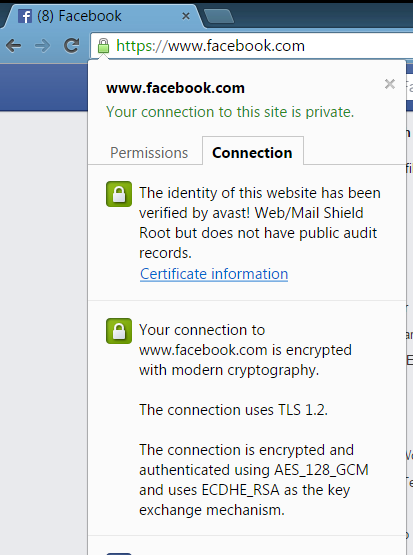
Avast is able to detect and decrypt TLS/SSL protected traffic in our Web-content filtering component. To detect malware and threats on HTTPS sites, Avast must remove the SSL certificate and add its self-generated certificate. Our certificates are digitally signed by Avast’s trusted root authority and added into the root certificate store in Windows and in major browsers to protect against threats coming over HTTPS; traffic that otherwise could not be detected.

Avast whitelists websites if we learn that they don’t accept our certificate. Users can also whitelist sites manually, so that the HTTPS scanning does not slow access to the site.

This video gives you an overview, but if any of this didn‘t make much sense to you, read below for a more detailed explanation. You can also explore the FAQ about HTTPS scanning in Web Shield.

What is HTTP and why is it being changed?

HyperText Transfer Protocol or HTTP is the network protocol used to deliver virtually all files and other data on the World Wide Web. When you visit a website you may see the HTTP:// prefix in the address. This means your browser is now connected to the server using HTTP. The problem with HTTP is that it is not a secure way to establish a connection, opening a door to cybercrooks who want to eavesdrop on your activities.

Hackers can eavesdrop via an HTTP address because when you connect to a website with HTTP, your browser assumes it is connected to the correct web server. The problem with this is that there is no way to authenticate that you are actually connected to the correct website. This is a big problem if you think you are connecting to your bank’s website, but you are really on a compromised network and have been redirected to a fake website. This is when the hacker can eavesdrop and see any passwords, credit cards, or other data.

HTTPS is meant to solve this problem

HTTPS, which literally stands for HTTP Secure, is the safe encrypted counterpart to HTTP. When you connect with HTTPS , it provides identity verification and security, so you get the benefit of encryption that prevents others from eavesdropping on your communications and ensures you that you are connected to the intended server.

What is a website security certificate?

HTTPS encryption and authentication are provided by security protocols known as TLS and SSL. The SSL protocol verifies that you are connected to the intended server with a “handshake” which proves the identity of the server to the client. This is achieved using SSL security certificates, which contain various pieces of information like the name of the holder, the domain, validity date, the certificate’s public key, and the digital signature.

Usually the certificate is digitally signed by a trusted certificate authority (CA) that it already knows. For the connection to succeed, the server, and in some cases the client, must provide a certificate that allows the computer to determine if the connection should be trusted or not. If the private key to the certificate is leaked, anyone can mimic the server’s identity.

Why does Avast create a ‘certificate authority’ and how is it created?

When the browser is about to make a connection to a HTTPS server, Avast Web Shield takes over the handshake and connects itself to the server. When the server sends its certificates, Web Shield verifies them against the Windows System Certificate Store – the same list of trusted certificates that Internet Explorer, Chrome, Opera, and other programs use. Web Shield scans the flow of the data connection, and after verifying that the communication is secure, hands over the connection to the browser.

Avast Web/Mail certificate rootWhat is a MITM attack and how does it differ from what Avast is doing?

The SSL protocol is imperfect, so hackers can take advantage of it. A man-in-the-middle (MITM) attack takes place when a hacker intercepts the communication between two systems by impersonating the two parties. This clever ruse makes them think that they are talking to each other when they are both actually talking to the attacker. The attacker can read, insert, or modify the data in the intercepted communication and no one ever knows.

The Avast WebShield must use a MITM approach in order to scan secure traffic, but the important difference is that the “middle man” we use is located in the same computer as the browser and uses the same connection. Since Avast is running with Administrator rights and elevated trust on the computer, it can create and store certificates that the browser correctly accepts and trusts for this, and only this, machine. For every original certificate, Avast makes a copy and signs it with Avast’s root certificate, located in the Windows Certificate store. This special certificate is called “Avast Web/Mail certificate root” to clearly distinguish who created it and for what purpose.

We want to emphasize that no one else has the same unique key that you have from the installation generated certificate. This certificate never leaves the computer and is never transmitted over the internet. The Windows System Certificate Store is the only place where your computer’s certificate is stored and accessed.

How do I maintain my privacy when Avast is scanning my banking connections?

Our customers’ privacy was our first concern when planning the implementation of HTTPS scanning. That’s why we created a way for whitelisting, or ignoring, the connection when Avast users access banking sites. Our current list has over 600 banks from all over the world and we are constantly adding new, verified banking sites. You can, and should, verify the bank’s security certificate when using online banking sites. Once verified, you can submit the banking or other web site to our whitelist by sending us an email: banks‑[email protected].

How to disable the HTTPS scanning feature

If you do not want Avast to scan HTTPS traffic, you have the option of disabling the feature in the Avast settings:

1. Open the Avast user interface → select Settings.
2. Select Active protection → click Customize next to Web Shield.
3. Select Main settings → check/uncheck Enable HTTPS scanning to turn this feature on/off.

Interview with Diego Navarrete, Panda Security CEO

Panda CEO

January 2015; it has been a year since you arrived at Panda, how has the company changed in the past months?

The company did go through three mayor changes during this time:

The first one, and probably the most important, is return to growth. Results we are achieving now show that the market is responding positively to our approach. This is important because restores our confidence, both towards the market, and also, to all our employees and the work every one of them does.

The second change and, the most visible, is our new corporate image. Mixes the best of the “Panda culture” with the targeted change and reinforcement of the company’s values: people-centric, innovative and non-conformist.

The third is, our investment on the future, the advance security solutions led by Adaptive Defense. Thanks to these we are again innovation leaders in the security industry.

Which are the main strategic objectives set for this year? And for the coming ones?

We have a strategic plan for 2015-2019 based on three pillars:

  1. Technology: with three key opportunities over the next years:
  • Mobility: solutions must be multi device and ensure protection and global coverage.
  • Internet of Things: there are more and more connected devices and therefore more protection and security is needed.
  • Advanced Threats: only solved with massive data analysis in the cloud.
  1. International expansion: our clients are global and mobile and we have to continue being so. We will addressed this in three steps:
  • Complete geographies where we are already strong: Western Europe, Latin America and USA. During 2015 we opened new country partners in those countries in Latin America that had no coverage before, like Panama.
  • Open new markets in emerging countries and economies where we don’t have a strong presence. For example, India or China.
  • Complete the acquisition and conversion of subsidiaries in countries which become important to our business, such as Italy and Denmark, both in the process of incorporation.
  1. Growth,  the necessary proof that we are doing a good job, also with three key areas:
  • Maintain the organic growth of the current product portfolio.
  • Continue with the improvement and growth ratio in our Web offer.
  • Prove that Adaptive Defense gives the expected results.

Diego Navarrete

The company’s profits are distributed almost 50% between retail products and corporative products, will this trend continue?

Device protection nurtures of the same base technology for both markets. We will keep these two lines although it is true that in retail, the margins are narrowing and in corporate, especially with Advanced Threats protection, clients’ investments are increasing significantly.

Three reasons why Panda is a global company.
  • Because 85% of our business is outside Spain.
  • Because 50% of our employees are outside Spain (HQ).
  • Because cyber-attacks are global and so is their defense.
Which are the most important threats in cyber security users might face? And companies?

For the user the most serious is still the theft of personal information and the use of that data for criminal purposes.

In the corporate field, we cannot forget that the jewel in the companies crown are also their information and applications. However, they have also other requirements set by the industry for which they have to comply with general and industry specific regulation.

How do you see the market? Does it tend to free products?

The power has clearly shifted from the organizations to the individual. The best way of convincing him of the value of your solutions is for him to try them first and then, if he likes them and they add value, he will pay for them.

In the corporate market there have always been pilots and free trials. Now is the individual who has the possibility of trying the service before purchasing it.

I like this model because it forces us to improve and think continuously about the user experience.

At Panda we talk about the ‘Internet of Things’, ‘Big Data’, ‘Cloud Computing’, mobility. What role plays security here?

Panda has been working with Cloud and Big Data since 2007, a fortress and at the same time a necessity because the number of attacks multiplies every year. To analyze 225.000 malware samples that arrive daily to our servers we need to benefit from this technology. In addition, the Cloud allows us to give almost instantly and in real time solution to these security problems.

After visiting subsidiaries and country partners, how do you think Panda is perceived thorough the world?

As a company with great technology, close to the user, which is going through a transformation moment.

Something you are proud of?

I am very proud of two things: the decision I made 15 months ago, when I decided to join this project, and the human team I have come across.

And finally, why Panda?

Because we are reinventing ourselves and at the same time we are reinventing the industry, because we develop innovative and of the future technology with a clear vocation of service, because is a leader company and it has a fantastic human team.

The post Interview with Diego Navarrete, Panda Security CEO appeared first on MediaCenter Panda Security.

Scams have arrived on Instagram, watch out!

For several days now we have been seeing many brands promoting their Instagram accounts with contests and giveaways. But sadly, once again, this is a scam! The Spanish National Police has warned about it through their Twitter account.

The alleged prize are gift brochures to spend on these clothes shops. To be able to win them you just have to follow that account and share it in your Instagram account.

michael kors instagram

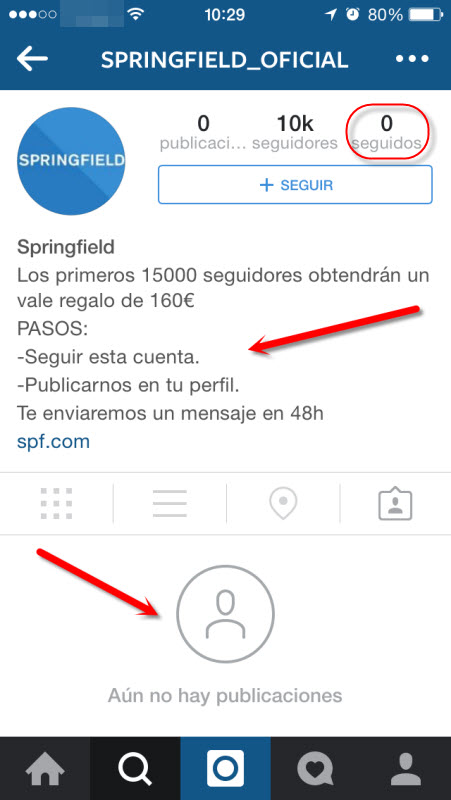
Tips to help you distinguish a fake Instagram account from an official one

  • Check its description
  • See if it has publications
  • Confirm the accounts it follows

Here you can see some examples:

springfiel instagram oficialspringfiel instagram falsa

Despite having seen this scam in Spain, we wanted you all to know, because we can find examples of these scams all over the world, so please be cautious, there is not such thing as a free lunch!

The post Scams have arrived on Instagram, watch out! appeared first on MediaCenter Panda Security.
Smart Lock: Enjoy your unlocked phone while you are in a ‘trusted’ place

smartlock android

We already know the importance of choosing well our passwords. In addition, if we want to do anything on our cellphone we have to follow this steps: enter our PIN, our code or pattern we have set to unlock the screen… something we are continuously doing as the phone locks itself every two seconds to save battery.

As far as security is concerned, laziness makes for a poor counselor, but sometimes all these boring actions are too much. We do not face the same risks at home watching TV than when we are walking on the street, at a bar or at any other place.

That is why, Google’s new initiative seems logical: Android versions 5+ (Lollipop) allows you to distinguish between what you consider safe locations and which pose a risk.

But, the operating system does not detect the danger itself (we haven’t reached that point yet), you have to indicate it. Something similar to what happens when your computer connects to a new wireless network and Windows asks you if it is a public access point, your work or your home. The difference is that when using Android, there are no warning pops-up reminding you to change the configuration.

Once the place is specify, the phone will recognize via GPS if you are actually there or not, and will activate or deactivate the feature that asks you to enter your PIN to unlock the screen.

If you pinpoint your home as a safe place, for your convenience this option will be disabled whenever you are inside, so you won’t have to continuously enter the code. On the contrary, as soon as you leave the perimeter, it will automatically activate and restore the protection standards.

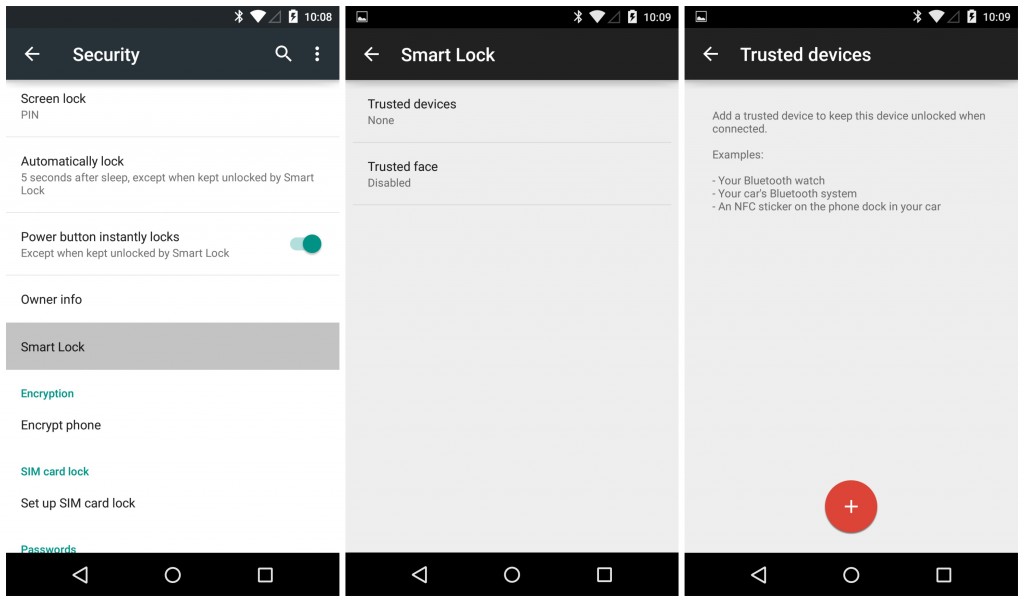
If you want to start using the system, go to “Settings”, then to “Security”. Once deployed the tab, go to “Trusted agents” and there you tap on “Smart Lock”, to enable it.

Smartlock mobile

Then you just have to select your trusted locations and add them to “Trusted places”. To add a place, the phone asks for an address or location to find it in Google Maps.

Each time you want to change these options, you will have to enter the password, PIN or the pattern you chose to unlock the device, this is a security measure which prevents someone unauthorized from making changes.

Despite that the option is useful and that it saves us from wasting time locking and unlocking our phone, setting it up has some implications. The most important is that the screen lock not only disappears while you are in a trusted place, but also for 80 meters around. ‘Google Lock’ can be an advantage, if you use it wisely.

The post Smart Lock: Enjoy your unlocked phone while you are in a ‘trusted’ place appeared first on MediaCenter Panda Security.

More protection in the Beta version of Global Protection 2016

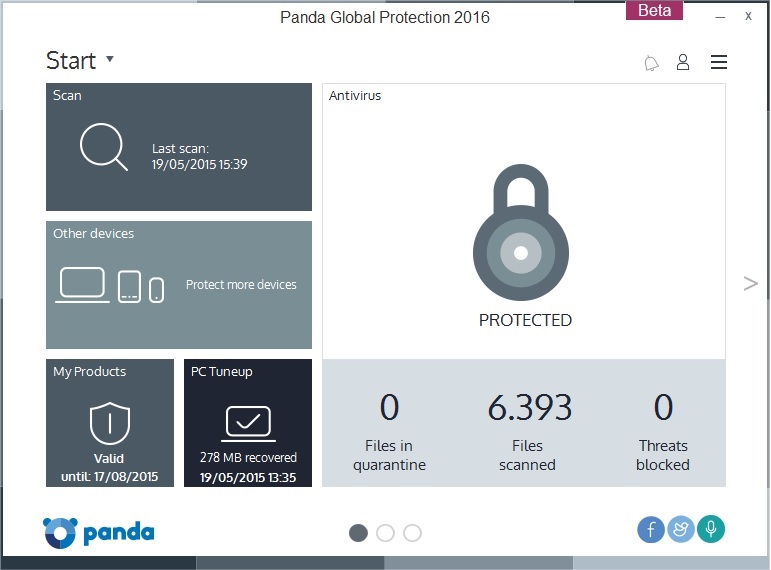
Panda Security announces the beta version of Panda Global Protection 2016, with a more powerful and lighter detection engine. In addition, this version includes Wi-Fi protection and offers recommendations for safeguarding the network from intruders. It also optimizes the PC by deleting unnecessary files and controlling the programs run at startup.

Panda’s new edition of its cross-platform solution for the consumer market also includes compatibility with Windows 10, and enhanced capabilities that make it an easier and more functional product for the user.

Designed to be flexible and intuitive to use, this new version gives the user easier access to its features.

beta, beta testers, win

Functionality at the service of complete protection

Panda Global Protection 2016 has been specifically designed to provide total and complete protection. In this respect, the new version includes improvements like the data shield and on-demand USB scanning, features that join the vaccine already included in previous versions.

Try the beta version of Panda Global Protection 2016

Beta testers can now take part in the Panda Global Protection 2016 beta. Anyone who wants to can now try the product and give their opinion, collaborating with their comments on how to improve the product. The beta testers who take part in testing this beta version can win €600 and become the “Beta Tester of the Year”.

To download the beta, click here.

Users can also share their opinion on the beta fórum.

The post More protection in the Beta version of Global Protection 2016 appeared first on MediaCenter Panda Security.

Beware of the ‘Game of 72’! Your child might be involved in this ‘game’!

children computer

There is a new game circulating in social networks and it is becoming dangerously viral, it is terrorizing parents and it could jeopardize children’s safety. Dubbed ‘Game of 72’ its alleged rules are simple: when teenagers are challenged they have to disappear without a word for 3 days.

The winner is who creates the greater hysteria among the adults around him. Meanwhile, the youngster has to avoid contacting anyone during those long 72 hours.

Police worldwide has warned of this dangerous game existence, which allegedly travels around social media and which would have originated with the disappearance of a 13-year-old French girl, who went missing for three days and after being found safe, she said that she had taken on a social media dare.

To this day, there is no evidence of this game really being played. According to the authorities investigating the disappearance of the French girl, she most likely made up the existence of the game to protect the person with whom she had disappeared.

However, hoax or true, this ‘game’ could be understood by youngsters as true and might trigger a boom of real cases of teenagers playing to disappear. Either way, the ‘Game of 72’ or its spreading hoax could become one of the many dangers teenagers face on social media, as are sextortion or cyberbullying.

Parents have to try to avoid this kind of situations or at least to minimize their children’s risk in their journey through social networks. This can be done by educating children on the responsible use of these platforms.

How to educate children on the responsible use of social media

  • Control, as far as possible, the sites they visit, by checking the browser history. In addition, there are browsers for children that block inappropriate content.
  • Allow them to have their own profile on social networks, when they are old enough. According to the Spanish law, you have to be at least 14 years old, though it is really simple to do it before, they just have to lie about their age. We must be on the lookout and make them comply with the minimum age.

girl mac

  • Initiate them into the privacy world: while adults know more or less what we can share online when it comes to personal information, children have to learn where to draw the line.
  • Have your own profile on the social network your children visits. Monitor their actions on the networks can be done not only from a computer screen.
  • Try to spend some time with them while they are on the computer, is a good way of knowing what they usually do on social networks. We must talk with them and explain them the dangers of the Internet.

The fact that the ‘Game of 72’ may be a hoax doesn’t mean that social networks are a safe place. If not an absurd challenge to vanish for 72 hours, there are others dangers lurking on the world of social platforms. That’s why, we should educate our children as soon as possible and monitor, as far as possible, their Internet activity could be key to avoid greater evils.

The post Beware of the ‘Game of 72’! Your child might be involved in this ‘game’! appeared first on MediaCenter Panda Security.

Avast Home Network Security is ideal for the self-employed

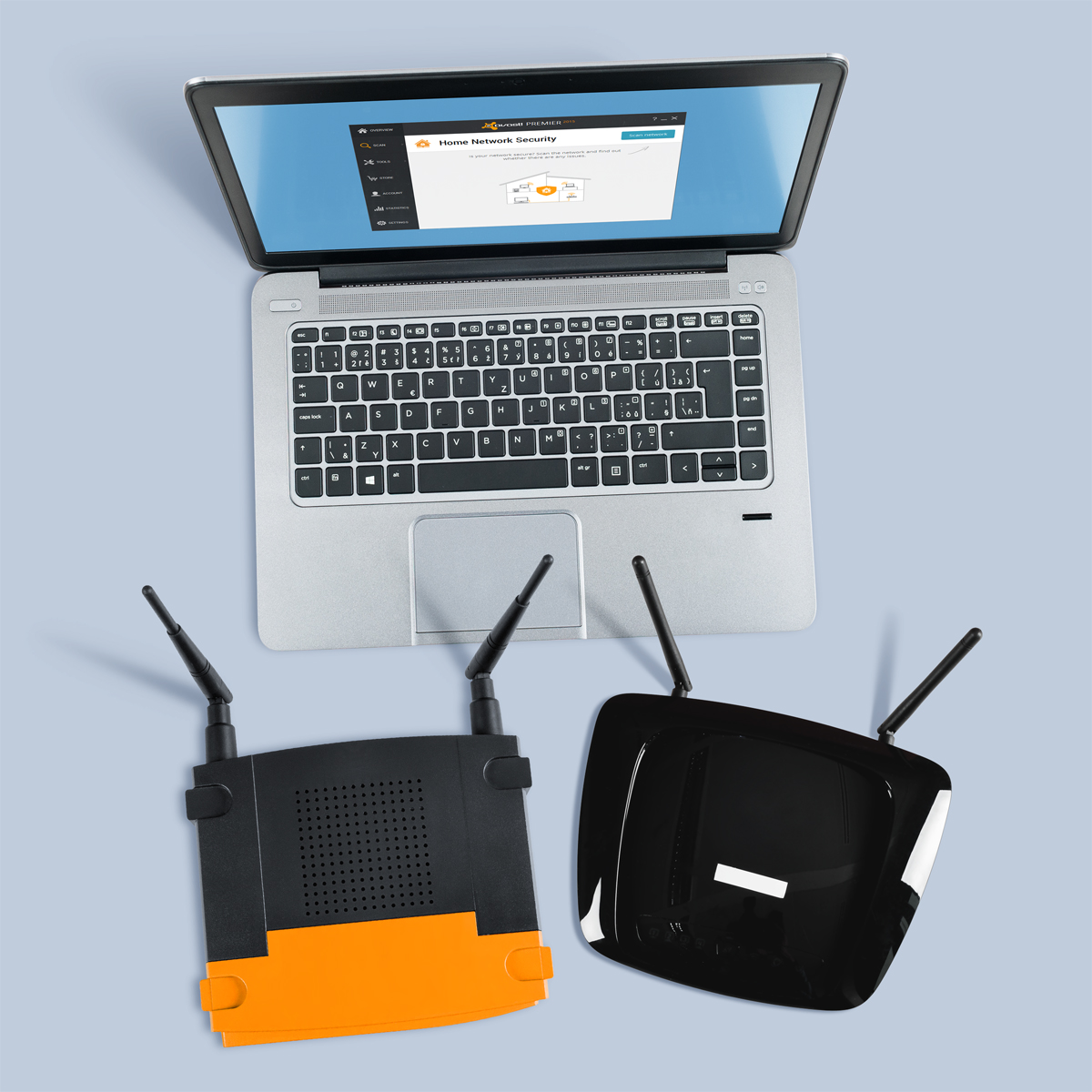
Don't let your router be the weakest link when it comes to protecting your home business.

Don’t let your router be the weakest link when it comes to protecting your home business.

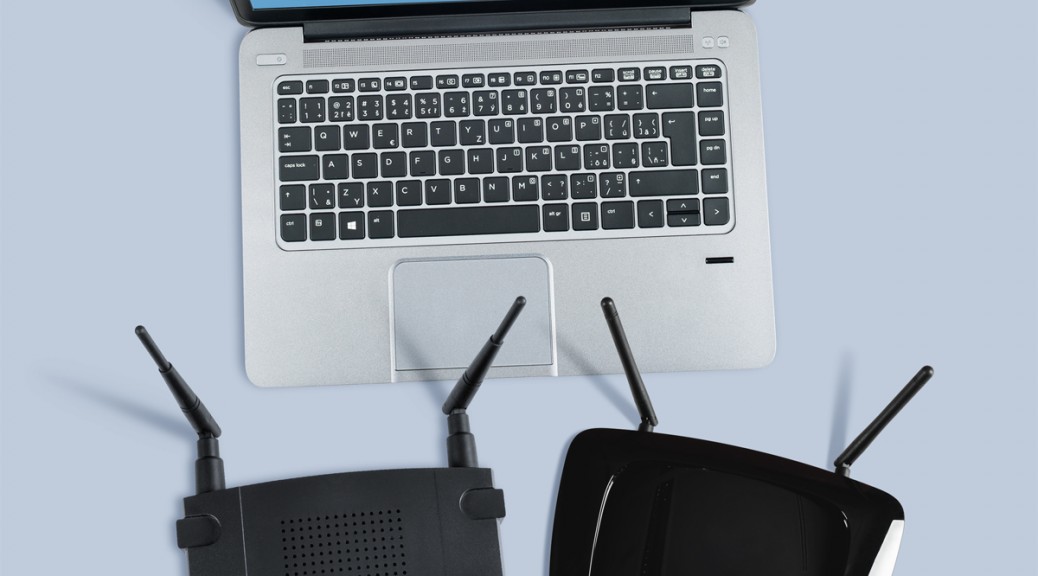
For those of us who are self-employed and/or work from home, our houses are sacred spaces on both personal and professional levels. Although often overlooked, our routers hold the key to our productivity, as they provide the powerful and consistent network connection that we depend on in order to get our work done. Unfortunately, we often take these little guys for granted, and because of this, routers have become the weakest security point in many home and small business networks these days.

“Unsecured routers create an easy entry point for hackers to attack millions of American home networks,” said Vince Steckler, chief executive officer of Avast. “If a router is not properly secured, cybercriminals can easily gain access to an individual’s personal information, including financial information, user names and passwords, photos, and browsing history.”

Securing your router is vital for both you and your business

You may have heard about the recent NetUSB driver flaw that made millions of routers vulnerable to malicious attacks. Unfortunately, this is just one case surrounded by the larger issue of users not taking the necessarily precautions to properly secure their home networks.

Avast now features Home Network Security (HNS), which scans for home router security problems. Avast is the only security company to offer a tool to help you secure this neglected area. Avast Home Network Security scans a user’s home network and routers for potential security issues that could allow a hacker attack. The scan looks for misconfigured Wi-Fi networks, exposes weak or default Wi-Fi passwords, vulnerable routers, compromised Internet connections, and enabled, but not protected, IPv6. It also lists all devices on the network so you can make sure only your known devices are connected.

In addition to protecting your devices using Avast Home Network Security, there several steps you can take in order to further improve your router’s security.

  • Change the default admin username and password to a strong password. Do not use default passwords because they’re generated from well-known algorithms that makes hacker attacks even easier. Do not use your name, date of birth, home address or any personal information as the password.
  • Turn off WPSthe automated network configuration method that makes your wireless password more vulnerable to hacker attacks.Turn on WPA2 encryption and, if you can, protect it with a strong password.
  • Change the default admin username and password to a strong password. Do not use default passwords because they’re generated from well-known algorithms that makes hacker attacks even easier. Do not use your name, date of birth, home address or any personal information as the password.
  • Upgrade your router firmware to fix known vulnerabilities of the router.
  • Don’t forget to log out after managing the router, avoiding abuse of the authenticated browser sessions.

Protect your router against malicious attacks with Avast Home Network Security.
Avast Home Network Security's scan helps you keep your router secure and safe from hackers.
Results are shown once Avast Home Network Security's scan is complete.


The Home Network Security Solution is available in free and paid versions of Avast. Get it at www.avast.com.


// <![CDATA[
!function(d,s,id){var js,fjs=d.getElementsByTagName(s)[0],p=/^http:/.test(d.location)?’http’:’https’;if(!d.getElementById(id)){js=d.createElement(s);js.id=id;js.src=p+’://platform.twitter.com/widgets.js’;fjs.parentNode.insertBefore(js,fjs);}}(document, ‘script’, ‘twitter-wjs’);
// ]]>

According to PC Magazine Panda FREE is the best free antivirus for 2015

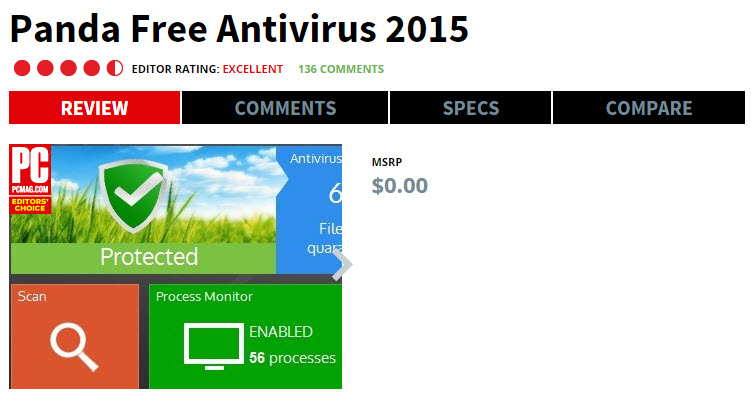
We bring you more great news! If a week ago we told you that we had achieved 100% detention rate according to AV-Comparatives, now we want to share with you that PC Magazine has listed Panda FREE as the best free antivirus for 2015.

best free antivirus

They highlight how easy to use it is, its quick install and that it provides “excellent lab results”.  PC Magazine says the best way of not having malware is to avoid downloading it and points out that Panda FREE has two ways of protecting you against these malicious downloads:

  • Blocking all access to known malicious URLs.
  • Scanning all the files downloaded, and eliminating the malicious ones immediately.

PC Magazine has chosen Panda FREE as their “Editors’ Choice”, and assures that Panda offers the best features of commercial antivirus according them and other independent labs.

Would you like to try the best free antivirus for 2015?

The post According to PC Magazine Panda FREE is the best free antivirus for 2015 appeared first on MediaCenter Panda Security.

New ASUS ZenPad to come with Avast Mobile Security

ASUS partners with Avast

ASUS partners with Avast

ASUS, the third largest consumer notebook vendor in the world, has selected Avast Mobile Security to be pre-loaded on its new line of Android powered tablets.

These tablets, called ZenPad, will be debuted at the upcoming Computex in Taiwan this June. The much anticipated 7-inch ZenPad 7 will give customers 12 months of Avast Mobile Security and allow free access to premium versions of Avast Backup and Avast Anti-theft.

“Avast is honored to collaborate with ASUS to provide consumers with the security to remain worry free in today’s always-on and always-connected world,” said Vince Steckler, CEO at Avast. “Consumers are relying on tablets for personal computing more than ever before, and storing massive data and information on these devices. With Avast Mobile Security preloaded on ASUS devices, today’s mobile consumer can have peace of mind browsing the Internet, knowing their devices and personal data are protected across a wide range of threats from malware to Wi-Fi hacks.”

Details of the ASUS ZenPad 7 have been leaked and are reported to have the following specs:

  • 7-inch IPS display screen
  • 1024 x 600 pixel resolution
  • Intel Atom x3
  • 1 GB RAM
  • 8 GB/16 GB built-in storage
  • MicroSD card slot
  • Front/back cameras
  • Wi-Fi and Bluetooth

Other models with Avast Mobile Security pre-installed include Z300C, Z380/CX, Z370C and Z370CG.

Avast Mobile Security is top-rated by users on Google Play Store and by independent testing organizations including AV-Test and AV-Comparatives. In addition to being available preloaded on ASUS tablets, Avast solutions are available on Google Play and in the Apple Store.