
Tag Archives: Malware

The Pirate Bay has grown clones loaded with malware. Beware!

A few weeks ago, a court in Madrid issued a statement to block access to the home page of ‘The Pirate Bay’ and all associated domains. The court based on the premise of the Spanish “Ley Sinde” to provide torrent downloads stopping in Spain, as it has in 13 other countries.

the pirate bay

So much for the theory; but the practice is a bit different. Although the judges established a 48 hour limit for all operators to veto these webs to its users, some have still to execute the warrant.

But the issue won’t be solved when they proceed. For years, members of ‘The Pirate Bay‘ have ensured its continuity through mirror pages, exact copies of the original site.

Any one of them gives you access to a server where you can find a copy of the torrents available for downloading movies, music and other files. So, you can keep downloading through The Pirate Bay just using alternative paths.

At the beginning there were a few dozen of these clones, but now this number is exorbitant. IsoHunt, another platform for sharing documents, is the one to blame. After the end of last year, when the Swedish police arrested some members of The Pirate Bay and led to the system crashing, the responsibles of this other web sympathized with them.

pirate flag

The result of their effort to keep up the torrent (pirate) flagship is the project called: The Open Bay, a fully editable open source version of the original site. Using this template, anyone with a basic knowledge of web design and programming can develop a site that indexes the contents of The Pirate Bay, IsoHunt and KickAss Torrents.

Now that ‘The Pirate Bay’ is operational again and banned in most countries, some people use the tool The Open Bay with even less lawful purposes than just sharing files without respecting a license. Cybercriminals insert parts of the content of an alleged mirror page (via iframe) on other websites that use the WordPress content management system.

the pirate bay code

So far it seems that there is no bigger problem, if it wasn’t because the address (which we are not going to tell you for your own safety) doesn’t lead to download site. When someone clicks on the link, a malware infects their computer and records the owner’s information, as bank details or passwords, sending them later to the criminals.

Why WordPress? This tool is not insecure on its own; cybercriminals based their attack on the outdated versions of some plugins, which have vulnerabilities, allowing the criminals insert the iframe with the malicious link.

The number of infected sites is still unknown, but the only way to avoid this code straining in our software is to keep WordPress and all its plugins up-to-date. Internet users that want to keep enjoying The Pirate Bay’s services, do it at their own risk.  We just advise them to be cautious and vigilant.

The post The Pirate Bay has grown clones loaded with malware. Beware! appeared first on MediaCenter Panda Security.

As Ransomware Attacks Evolve, More Potential Victims Are at Risk

In early December, as most people were dealing with the stress of looking for the perfect holiday gifts and planning out their upcoming celebrations, police officers in a small New England town were under a different sort of pressure. The vital files and data the Tewksbury Police Department needed to go about its daily business had been encrypted […]

Don’t take the bait: Beware of web attack techniques

Mousetrap with cheese

When it comes to cybercrime, it’s always better to be in the know. Here are a few ways that web attacks can find their way onto your device. Don’t be fooled — most cybercrooks design attacks to  take place where you’d least expect it.

  1. Social engineering preys on human weakness

“A lot of attacks are still using social engineering techniques; phishing emails – ways of convincing the user to give up valuable information,” said Avast CEO Vince Steckler.

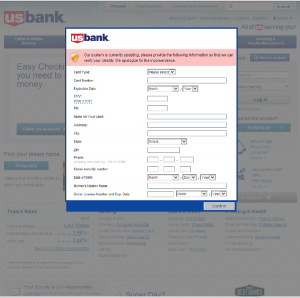
In a phishing or spearphishing attack, hackers use email messages to trick people into providing sensitive information, click on links, or download malware. The emails are seemingly sent from organizations or individuals the potential victims would normally get emails from, making them even more deceptive. Last July, Avast took a look at the Tinba Trojan, banking malware that used spearphishing to target its victims.
 usbank

An example of an injected form from Tinba Trojan targeting U.S. Bank customers.

Web attacks also take place through SMS Text Phishing, also known as SMSishing. This method has become one of the most popular ways in which malicious threats are transmitted on Android devices. These text messages include links that contain malware, and upon clicking them, the malicious program is downloaded to the user’s device. These programs often operate as SMS worms capable of sending messages, removing apps and files, and stealing confidential information from the user.

  1. Malicious apps attempt to fool you

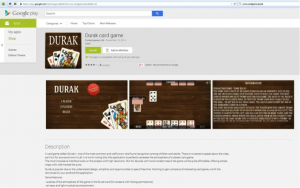
Malicious programs can disguise themselves as real programs by hiding within popular apps or games. In February, we examined malicious apps posing as games on Google Play that infected millions of users with adware. In the case of malicious apps, cybercrooks tamper with the app’s code, inserting additional features and malicious programs that infect devices. As a result, the malware can attempt to use SMSishing in order to collect additional data.
Durak-game-GP

The Durak card game app was the most widespread of the malicious apps with 5 – 10 million installations according to Google Play.

  1. Ransomware uses scare tactics that really work

Another name that made headlines was a group of malware dubbed ransomware, such as CryptoLocker, and its variants CryptowallPrison LockerPowerLocker, and Zerolocker. The most widespread is Cryptolocker, which encrypts data on a computer and demands money from the victim in order to provide the decryption key. Avast detects and protects its users from CryptoLocker and GameoverZeus.  

Make sure you back up important files on a regular basis to avoid losing them to ransomware. Ransomware made its way from desktop to Android during the year, and Avast created a Ransomware Removal app to eliminate Android ransomware and unlocks encrypted files for free.

Count on Avast apps to keep mobile malware at bay

To keep your devices protected from other ransomware, make sure to also install Avast Free Mobile Security & Antivirus from the Google Play store. It can detect and remove the malware before it is deployed.

Install Avast Ransomware Removal to find out if your Android devices are infected and to get rid of an infection. Avast Ransomware Removal will tell you if your phone has ransomware on it. If you are infected, it will eliminate the malware. Android users who are clean can use the free app to prevent an infection from happening.Once installed, you can easily launch the app to scan the device, remove the virus, and then decrypt your hijacked files.