Google has added another layer of security for users of Gmail on the desktop, which now supports content security policy, a standard that’s designed to help mitigate cross-site scripting and other common Web-based attacks. CSP is a W3C standard that has been around for several years, and it’s been supported in a number of browsers […]
Tag Archives: Malware

TorrentLocker — Ransomware in a country near you
Today, we are publishing research on ransomware that emerged in 2014. We have posted blog articles about this threat before, to raise awareness when we realized the criminals were targeting the United Kingdom and Spain.
The post TorrentLocker — Ransomware in a country near you appeared first on We Live Security.
Honeywell PoS Software Vulnerable to Stack Buffer Overflows
There are stack buffer overflows in two components of a Honeywell point-of-sale software package that can allow attackers to run arbitrary code on vulnerable systems. The vulnerabilities lie in the HWOPOSScale.ocx and HWOPOSSCANNER.ocx components of Honeywell’s OLE for Retail Point-of-Sale package, which is designed to help integrate PoS hardware with Windows PoS systems. Versions of the Honeywell […]
Upatre Downloader Spreading Dyreza Banking Trojan
Microsoft reports it has seen wire transfer spam carrying attachments containing the Upatre downloader which then infects machines with the Dyreza banking Trojan.
Mobile advertising firms spread malware by posing as official Google Play apps
As a malware analyst, I find new pieces of malware day in and day out. In fact, I see so many new malware samples that it’s difficult for me to determine which pieces would be really interesting for the public. Today, however, I found something that immediately caught my attention and that I thought would be interesting to share.

The three URLs listed above are websites that offer mobile monetizing kits, which are advertising kits that developers can implement in their mobile apps. The goal for developers is to monetize from advertisements. If a user clicks on one of the ads delivered by one of the above listed providers, he may be lead to a malicious subdomain.
The most visited of the three URLs is Espabit. According to our statistics, we know that Espabit’s servers get around 150,000 views a day and nearly 100% of the views are from mobile devices. This may not seem like that much compared to the number of Android users there are in the world, but it is still a considerable number. Espabit is trying to position themselves as a world leader in advertising, and their website may appear innocent, but first impressions can be deceiving.

The most visited Espabit subdomain, with more than 400,000 views during the last few months, leads app users to pornographic sites via the ads displayed in their apps. The site displays a download offer for nasty apps (no pun intended) that have malicious behavior.

The above is just one example of the malicious links; there are many others hosted on the same server. The majority of the links lead to pornography or fake apps that all have one thing in common: They all steal money from innocent users.
How do they convince people to download their app? By posing as official Google Play apps. The apps are designed to look like they are from the official Google Play Store – tricking people into trusting the source. Since Android does not allow users to install apps from untrusted sources, the sites offer manuals in different languages, like English, Spanish, German, and French, explaining how to adjust Android’s settings so that users can install apps from untrusted sources, like these malicious apps. How considerate of them.

Now let’s take a deeper look at what the apps are capable of doing:
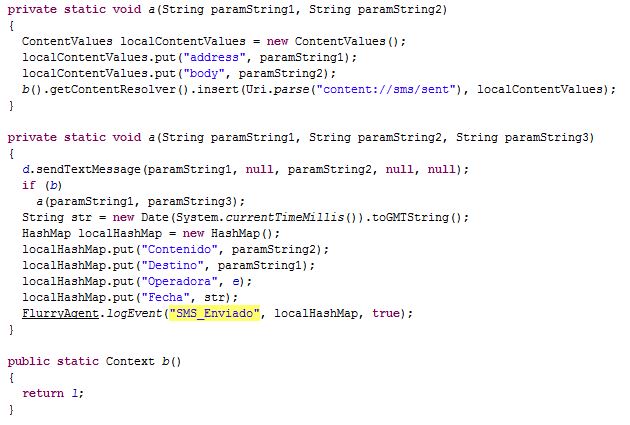
All of the “different” apps being offered by the three sites listed above are essentially the same in that they can steal personal information and send premium SMS. So far, we know about more than 40 of them stored on the websites’ servers. Most of the apps are stored under different links and, again, are offered in different languages (they want everyone to be able to “enjoy” their apps). The goal behind all of the apps is always the same: Steal money.
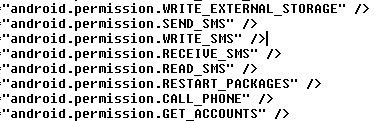
Some of the permissions the apps are granted when downloaded…
Once you open the apps, you get asked if you are 18 or older (they are not only considerate in that they offer their product in various languages, but they also have morals!).

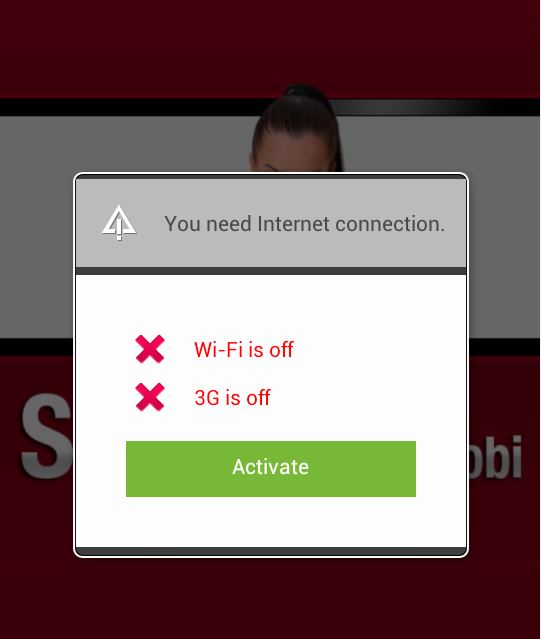
After you click on “YES” you are asked to connect your device to the Internet. Once connected to the Internet your device automatically starts sending premium SMS, each costing $0.25 and sent three times a week. That’s all the app does! The amount stolen a week does not seem like much, but that may be done on purpose. People may not notice if their phone bill is $3.00 more than it was the month before and if they don’t realize that the app is stealing money from them and don’t delete the app it can cost them $36.00 a year.
This malware is actually not unique in terms of the technique it uses. However, collectively, the three websites have around 185,000 views daily, which is a lot considering there is malware stored on their servers. Not everyone is redirected to malware, but those who are, are being scammed. Considering that the most visited malicious subdomain had around 400,000 views in the last quarter, it tells us that a large number of those visitors were infected. This means these ad providers are making a nice sum of money and it’s not all from ad clicks and views.
Although many mobile carriers around the world block premium SMS, including major carriers in the U.S., Brazil, and the UK, this case should not be taken lightly. These malware authors use social engineering to circumvent Google’s security and target innocent app users via ads. Think of how many apps you use that display ads, then think of all the valuable information you have stored on your phone that could be abused.
All malicious apps we found and described here are detected by Avast as:
Android:Erop-AG [Trj]
Android:Erop-AJ [Trj]|
Android:Erop-AS [Trj]
Some of SHA256:
DBEA83D04B6151A634B93289150CA1611D11F142EA3C17451454B25086EE0AEF
87AC7645F41744B722CEFC204A6473FD68756D8B2731A4BF82EBAED03BCF3C9B
Black Energy Malware May Be Exploiting Patched WinCC Flaw
Experts at ICS-CERT say that the BlackEnergy malware that has been seen infecting human-machine interface systems may be exploiting a recently patched vulnerability in the Siemens SIMATIC WinCC software in order to compromise some systems.

Charge Anywhere warns of payment data leak
Mobile payment platform Charge Anywhere has revealed an exploit in its software that means that five year’s worth of credit card data could be at risk.
The post Charge Anywhere warns of payment data leak appeared first on We Live Security.

VMCloak – Create a Virtual Machine the Easy Way
… and – in this we were correct – they are. You can basically find virtual machines:
- In companies running their internal servers as a VM for easier maintenance
- On Thin Client, where the end-users have simple terminals instead of “real” systems (for reasons of easier maintenance again)
- In clouds like the Amazon cloud where you can just “click your own system” within minutes
- As virtual appliances, simple systems which only have one job (like a network proxy). Easy to install.
However, due to our assumption we decided not to bother with the virtual machine detection.
That’s where we went wrong.
Now, at the end of 2014, about 20% of the malware out there still detects VMs. Especially the complicated-and-interesting malware does. Back when we started, we estimated that not more than a one-figure number would be able to do it by now!
Symantec released an article which covers that topic. Furthermore our own numbers show similar results (ours are a bit biased though: For the iTES project we filter out all the “boring” malware before we send the remaining samples to Cuckoo).
Malware detects virtual machines just to annoy the antivirus vendors
One way to classify samples in a virus lab is to run the suspicious sample in a VM and monitor its behavior. If it does attack the system, it’s malware – and that’s why malware is detecting whether or not it is running in a virtual machine and changes its own behavior accordingly. In the Avira Virus Lab we do not rely on a single classification method but combine several ones. So this is not really an issue.
But for our research project I wanted to observe the malicious behavior of even the trickiest malware in a virtual machine … a problem that obviously needs to be solved.
VM Detection and a Paranoid Fish
There are many ways to detect if your program is running in a VM. The most common ones are:
- Detect hardware configuration
- Network MAC address
- HD vendor Name
- BIOS vendor
- Video BIOS vendor
- Detect installed guest additions
- Detect specific registry keys
- Some malware detects a specific machine ID (for example based on a fingerprint on the user ID and the hardware being used)
These tricks are surprisingly simple and yet seem to be very effective.
Instead of writing a documentation on how to detect a VM I decided to add the identified tricks to a cool Open Source project: The Paranoid Fish (PaFish. If you are interested you can find my changes in the dev-chaos branch). For me as a programmer writing code (especially as simple and structured as required for PaFish) is like writing a documentation that executes and helps in the next step:
VM Cloaking
This step starts with hardware configuration to create a cloaked VM. You will have to do this before being able to install any operation system. After the OS is installed there will be other buttons to press: Registry settings and basic program configuration. Back in the “good old days” we had whole manuals on how to do it and configured the virtual machines manually; a quite boring and error prone task. Instead of writing another how-to we (Jurriaan Bremer and I) decided to fix it once-and-forever: We created a tool called VMCloak that can mass-produce ready-to-use cloaked VMs.
Just add your requirements to a configuration file, start the script, wait 2 coffees and you will have a dozen VMs.
Please welcome VMCloak
VMCloak will:
- Set up the virtual machine, including the appropriate hardware setup -like proper hardware ids, >50 GB of HD space (lesser is a sign for a VM), …
- Install the OS
- Set up networking
- Install applications
- Do some system config to cloak the machine
- …and it can install everything required for Cuckoo Sandbox
To give you a small glimpse of the very useful features VMCloak offers I’ll go into more detail concerning its dependencies (aka “automatically install programs”). A complete documentation can be found here.
When analyzing the behavior of a malicious sample you normally want some programs installed which then will be attacked by the malware. That can include old browsers, PDF readers, Flash players, you name it. Also, when doing a manual analysis, you want you default tools to view the running processes, system changes, etc.
Dependencies are small configuration snippets that allow VMCloak to automatically install programs after the OS has been set up. They define the filename of the setup file, which buttons have to be clicked to get through the installation and some additional information like flags, description, and even dependencies.
Without any kind of automation one would waste minutes to hours in order to click the next button.
Test your skillz
PaFish and VMCloak are Open Source and available for everyone. Especially VMCloak is still very young and there are lots of opportunities to test it and show your superior skillz:
- Add application packages (dependencies) for automatic program installation
- Add more cloaking (add PaFish VM detection followed by VMCloak cloaking, chess against yourself)
- Windows 7 installation or other – for programming admins
- Create virtual machines using VMWare, KVM, …
The opportunities are endless, so just go ahead.
TL;DR:
No need to ever create a virtual machine for malware analysis again. Use VMCloak.
For Science !
Thorsten Sick


The post VMCloak – Create a Virtual Machine the Easy Way appeared first on Avira Blog.
Red October Attackers Return With CloudAtlas APT Campaign
The attackers behind the Red October APT campaign that was exposed nearly two years ago have resurfaced with a new campaign that is targeting some of the same victims and using similarly constructed tools and spear phishing emails. Red October emerged in January 2013 and researchers found that the attackers were targeting diplomats in some […]
New Version of Destover Malware Signed by Stolen Sony Certificate
Researchers have discovered a new version of the Destover malware that was used in the recent Sony Pictures Entertainment breaches, and in an ironic twist, the sample is signed by a legitimate certificate stolen from Sony. The new sample is essentially identical to an earlier version of Destover that was not signed. Destover has been used […]