From finding flaws to suggesting innovative security measures for the future, we look at some of the biggest bug bounty payouts in recent years.
The post The world’s biggest bug bounty payouts appeared first on We Live Security.

From finding flaws to suggesting innovative security measures for the future, we look at some of the biggest bug bounty payouts in recent years.
The post The world’s biggest bug bounty payouts appeared first on We Live Security.
The commenting period regarding the Wassenaar Arrangement expired on Monday but the echo chamber around the largely maligned proposal continues to reverberate.
With the release of their newest operating system just days away, now is not the most convenient time for Microsoft to be facing and dealing with security bugs. However, two thirds of all 1.5 billion PCs operated by Windows across the globe were recently left vulnerable due to a security flaw found in nearly every version of Windows, including Windows 10 Insider Preview.

If you use Windows, the time to update is now!
The flaw (MS15-078) lies within the Windows Adobe Type Manager Library and can be exploited by cybercriminals to hijack PCs and/or infect them with malware. Users can be attacked when they visit untrusted websites that contain malicious embedded OpenType fonts. Microsoft explains more about the threat in a security bulletin advisory:
An attacker who successfully exploited this vulnerability could take complete control of the affected system. An attacker could then install programs; view, change, or delete data; or create new accounts with full user rights.
There are multiple ways an attacker could exploit this vulnerability, such as by convincing a user to open a specially crafted document, or by convincing a user to visit an untrusted webpage that contains embedded OpenType fonts. The update addresses the vulnerability by correcting how the Windows Adobe Type Manager Library handles OpenType fonts.
The flaw has been classified as critical, which is Microsoft’s highest measured level of threat. Anyone running Windows Vista, Windows 7, Windows 8 and 8.1, Server 2008, Server 2012 and Windows RT are affected by the flaw. Microsoft’s online Security TechCenter includes a full list of affected software and additional vulnerability information.
How to ensure your safety
Taking into consideration that this is a critical security threat that potentially puts your whole system at risk, it only makes sense to install the Windows patch as quickly as possible. The majority of customers have automatic updating enabled and won’t need to take any action because the update will be downloaded and installed automatically. Customers who have not enabled automatic updating, or who install updates manually, can use the links in the Affected Software section to download and install the update. This article walks users through two different methods of obtaining and installing the security udpate. Both methods require a restart after the patch has been applied.
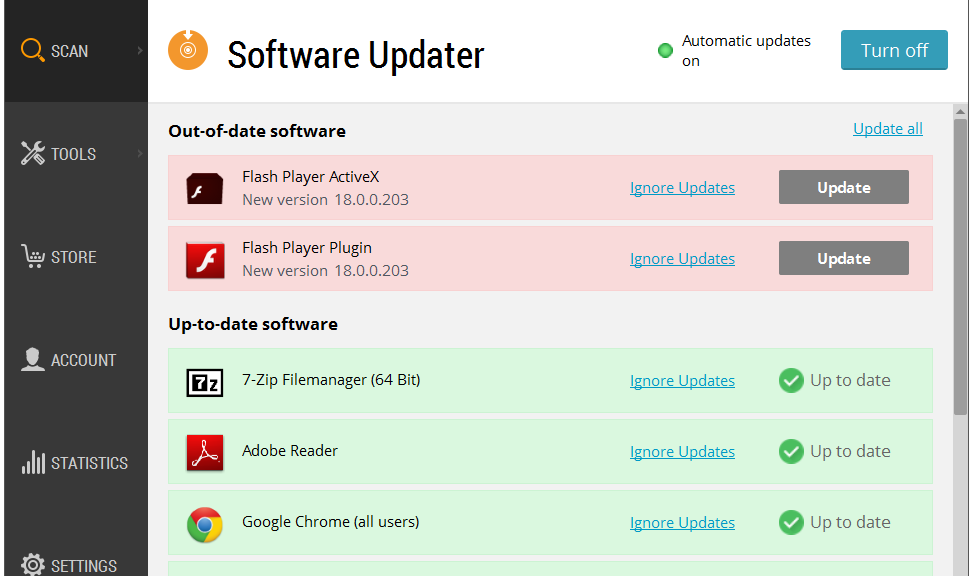
Avast Software Updater can lend a helping hand in ensuring that your software stays updated to the latest version. To find it, simply open your Avast user interface. Click Scan on the left side, then choose Scan for outdated software. You can then decide how to proceed.
Follow Avast on Facebook, Twitter, YouTube, and Google+ where we keep you updated on cybersecurity news every day.

UPDATE–As if all of the vulnerabilities in Flash and Windows discovered in the Hacking Team document cache and the 193 bugs Oracle fixed last week weren’t enough for organizations to deal with, HP’s Zero Day Initiative has released four new zero days in Internet Explorer Mobile that can lead to remote code execution on Windows Phones. […]
Some strains of Bartalex malware, a macro-based malware that first surfaced earlier this year, are dropping Pony malware and the Dyre banking Trojan.
Windows 10 will be launching in T-minus seven days and will be offered for free within its first year of availability to Windows 7 and 8 users. Not only will the beloved Start button be back in Windows 10, but Windows 10 will also include a personal assistant, Cortana. What’s more, the new operating system will introduce many promising security features and a new browser.
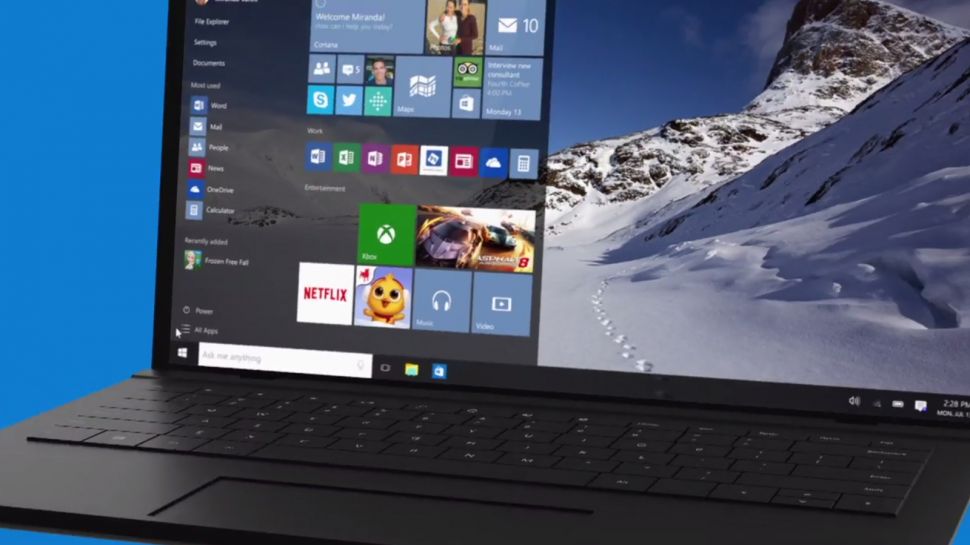
Image: TechRadar
Hello there, Windows Hello and Passport!
Windows Hello is biometric authentication that either scans your face, iris or fingerprint to access your Windows 10 device – very secret agent-like security! By doing so, Windows Hello eliminates the chance of hackers stealing your password to access your device, simply because you will no longer have a password to begin with!
Windows Passport also eliminates the use of passwords to access your online accounts. For now, Microsoft will work with the Azure Active Directory and has joined the FIDO alliance to subsequently support password replacement for other consumer, financial and security services. Windows will verify that you are truly the one using your device through a PIN or via Windows Hello, and then it will authenticate Windows Passport so you can log in to websites and services without ever using a password. Combined use of Windows Hello and Windows Passport would mean that a hacker would not only have to physically steal your device, but also kidnap you to access your accounts.
You will, of course, need hardware that is capable of infrared scanning your face or iris, or that has a built-in fingerprint reader to use Windows Hello. Microsoft has already confirmed that all OEM systems with Intel® RealSense™ 3D Camera (F200) will support Windows Hello’s facial unlock features.
Bye-bye Patch Tuesday
Microsoft usually issues security patches on the second Tuesday of every month, which can leave users vulnerable until Patch Tuesday comes around. In Windows 10, Microsoft will regularly issue security patches and users will be forced to accept every update, meaning they will be immediately protected from zero-day bugs.
Forcing updates is a good move. It’s the same as with an antivirus – everyone wants to have an up-to-date database to protect their system as much as possible. – Jiri Sejtko, Director of Virus Lab Operations
More app developer security support
AMSI – Antimalware Scan Interface will help protect users from script-based malware by offering an interface standard that allows apps and services to integrate with antivirus programs on Windows 10 devices. App developers can have their application call the AMSI interface for additional scanning and analytical services. The interface will look for potentially malicious content such as obfuscation and evasion techniques used on Windows’ built-in scripting hosts. Antivirus vendors can implement support for AMSI so that their engine can gain deeper insight into the data that applications consider potentially malicious. Avast will be implementing AMSI in the near future.
Edge, the edgy new browser in town
Microsoft’s Internet Explorer doesn’t have the best reputation, which is probably why Microsoft is introducing the new Edge browser in Windows 10. Edge was created from the same core as Internet Explorer by removing many of the old outdated features that were kept for compatibility reasons, including support for binary extensions like Active X and Browser Helper Objects. Basically, Edge will not support any browser extensions in its initial release, but will add a Javascript/HTML model similar to that of Mozilla, Google, Apple and Opera later on to offer browser extensions. Flash will be built into the Edge browser as well as PDF rendering. Additionally, Edge will be deployed as a Universal Windows App, so users can update Edge from the Windows App Store rather than via Windows updates, and it will run in a sandbox, meaning it will have little to no access to the system and other apps running on your device.
Not supporting any extensions and running Edge inside Windows’ sandbox is very good from a security standpoint. Browser extensions can not only distract users, but they can slow down the browsing experience and can create a huge security risk if abused, as they can see everything you do within the browser, including on encrypted sites. – Lukas Rypacek, Director of Desktop Platform
Avast is already compatible with Windows 10
Avast has been compatible with Windows 10 since March.
No major changes were needed to make Avast compatible with Windows 10; we had to slightly change some components to make everything work as it should, but no changes were needed in terms of behavior and communication. What we are now doing is migrating users to the latest version of Avast to ensure a smooth Windows 10 upgrade. – Martin Zima, Senior Product Manager
Are you looking forward to Windows 10 and will you be upgrading? Let us know in the comments section 
Follow Avast on Facebook where we keep you updated on cybersecurity news every day.

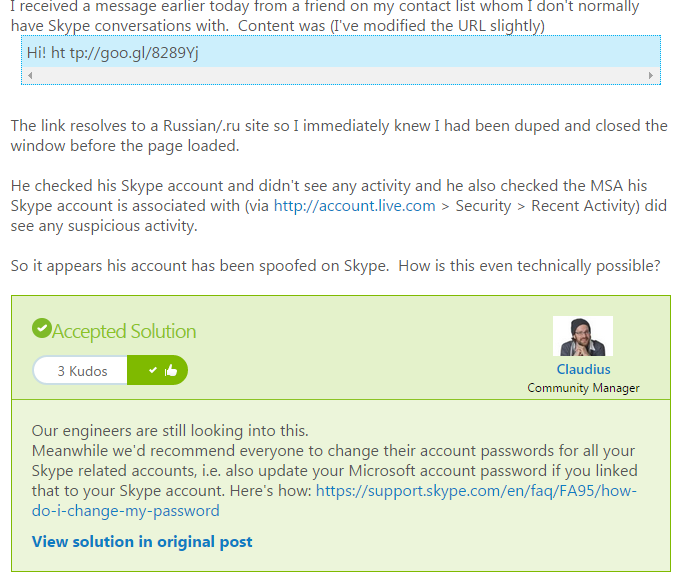
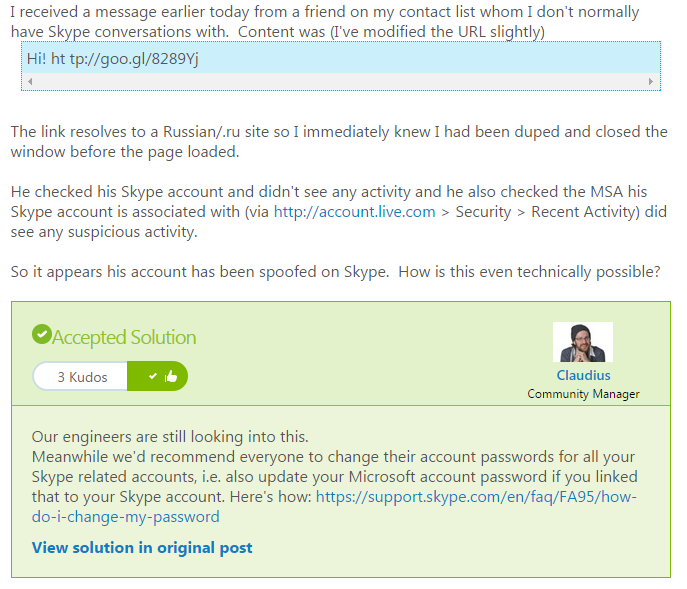
The advice comes as a response to users complaining in the Skype forum that they have been apparently receiving malicious links from friends.
This sort of attack, where attackers either gain access or can mimic an authentic account is known as spoofing and can be very successful due to the level of trust that people have in their own contacts.
If you think that you or someone you know has been a victim of spoofing, here are three things that you should you do.
Normally, spoofing or phishing emails will contain a link to a site. Don’t click on it, especially if it is a shortened link as seen in the Skype forum example. If you believe it could be genuine, hover over the link and your browser will reveal the final destination of the link.
As cyberattacks get ever more complicated and better disguised, it can become difficult to stay protected. That’s why it’s important to get the best possible antivirus solution that can help keep you safe not just from viruses and malware but additional tools like AVG’s LinkScanner technology can scan links and attachments to check whether they are safe even before you click on them.
Just as Microsoft advised on the Skype forums, if you believe you’ve been a victim of any kind of spoofing or account fraud, it’s important to change your password. If someone has access to your account you should put a stop to that as soon as possible.
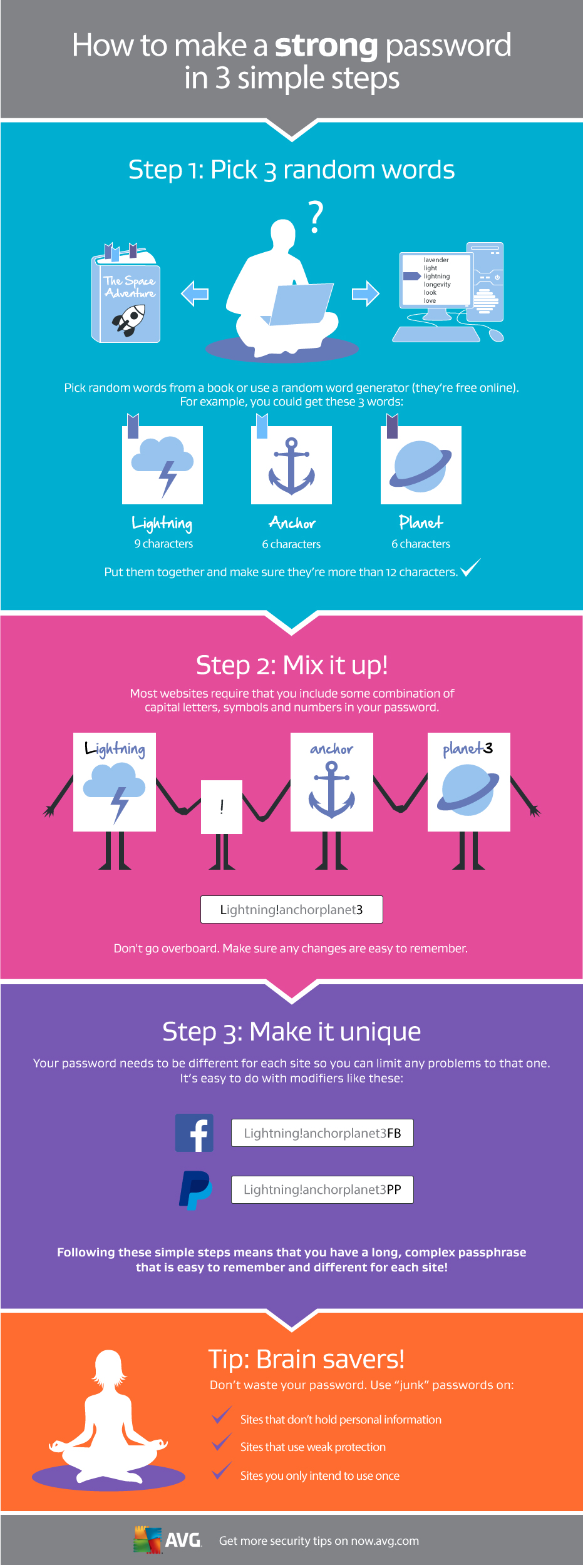
Take a little time when developing your new password and make sure that it gives you as much protection as possible.
For help doing this, take a look at the graphic below that will help you create a strong, unique password in three simple steps.


Yesterday Microsoft released an emergency security update for all of the supported Windows version (this means Windows 7, Windows 8/8.1, Windows RT and apparently even the unreleased Windows 10). The patch is supposed to fix an exploit that would allow hackers to access another computer easily. According to the company the flaw lies in the way the Windows Adobe Type Manager Library improperly handles specially crafted OpenType fonts.
“An attacker who successfully exploited this vulnerability could take complete control of the affected system. An attacker could then install programs; view, change, or delete data; or create new accounts with full user rights,” Microsoft says in their security bulletin. “There are multiple ways an attacker could exploit this vulnerability, such as by convincing a user to open a specially crafted document, or by convincing a user to visit an untrusted webpage that contains embedded OpenType fonts. The update addresses the vulnerability by correcting how the Windows Adobe Type Manager Library handles OpenType fonts.“
Microsoft also says that while they had information that indicates that the issue was public there is no evidence that the vulnerability was used in any actual attack on customers.
The vulnerability itself was apparently found after going through loads of data from the Hacking Team email breach.
The post Patch now: Microsoft Emergency Fix appeared first on Avira Blog.
Skype users have been advised by Microsoft to change their passwords following reports that ‘spoofed’ messages are being sent without user permission.
The post Microsoft advises ‘spoofed’ Skype users to change passwords appeared first on We Live Security.

Earlier this week, we told our readers about the three Flash Player zero-day vulnerabilities that were found in stolen files that were leaked from the Hacking Team. We advised Avast users to disable Flash until the bugs are fixed.
It doesn’t look good for Flash. Because of the continuing security problems facing the 20-year old platform, Google and Mozilla each announced this week that their Web browsers will eventually be dropping default support for Adobe Flash, and Facebook’s new security chief wants to kill Flash. For now you can still use it, but the reports of it’s death are not greatly exaggerated…
Adobe has released security patches for Windows, Mac OS X, and Linux. Adobe Flash Player installed with Google Chrome will be automatically updated to the latest Google Chrome version. Users of Internet Explorer 10 and 11 for Windows 8.x will be automatically updated to the latest version.
Another Hacking Team zero-day vulnerability was discovered in Microsoft’s Internet Explorer. Microsoft released a total of 14 security bulletins, 4 ‘critical’ and the remainder ‘important’ in their July Security Bulletin.
And finally, Oracle released a security update to fix the Java zero-day exploit reportedly used to attack military and defense contractors from the U.S. and spy on NATO members. The Critical Patch Update Advisory also includes 193 new security updates; 99 of which could be exploited by remote attackers.
Avast Software Updater can help you with most software updates. To find it, open your Avast user interface. Click Scan on the left side, then choose Scan for outdated software. You an then decide how to proceed.
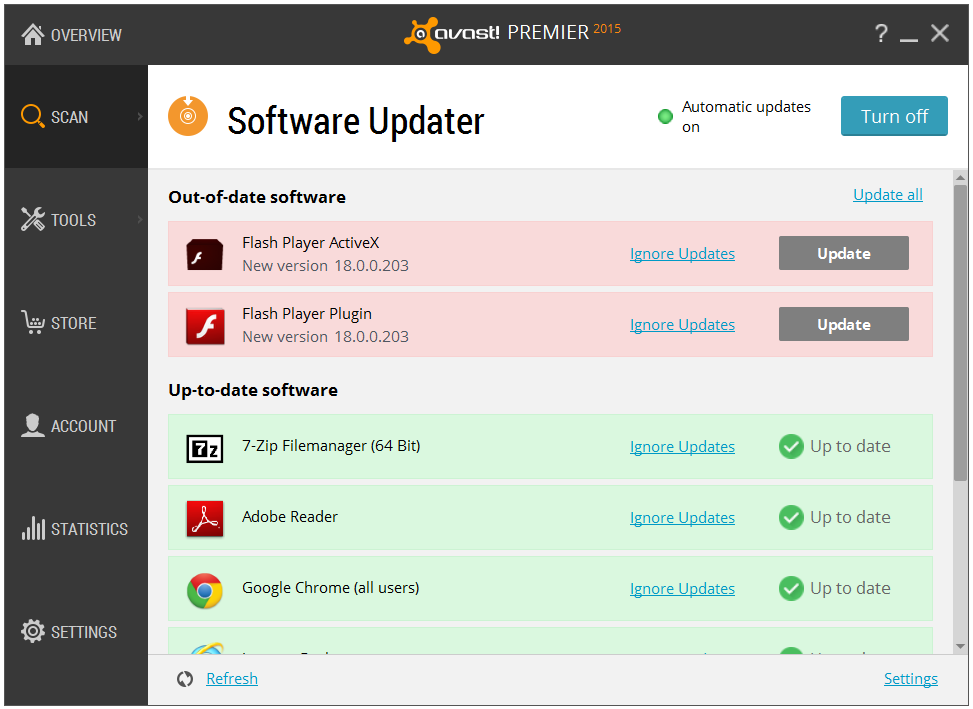
Avast Software Updater shows you an overview of all your outdated software applications
Follow Avast on Facebook, Twitter, YouTube, and Google+ where we keep you updated on cybersecurity news every day.