Tag Archives: Security

How to tell if an online review is trustworthy

When it comes to planning a purchase online, customer reviews can be a great source of information and a crucial part of the decision making process. But with cases of businesses doctoring their online reviews emerging, how can you be sure that the review you’re reading can be trusted?

Here are some signs to watch out for to make sure you don’t get the wool pulled over your eyes.


Check out the reviewer

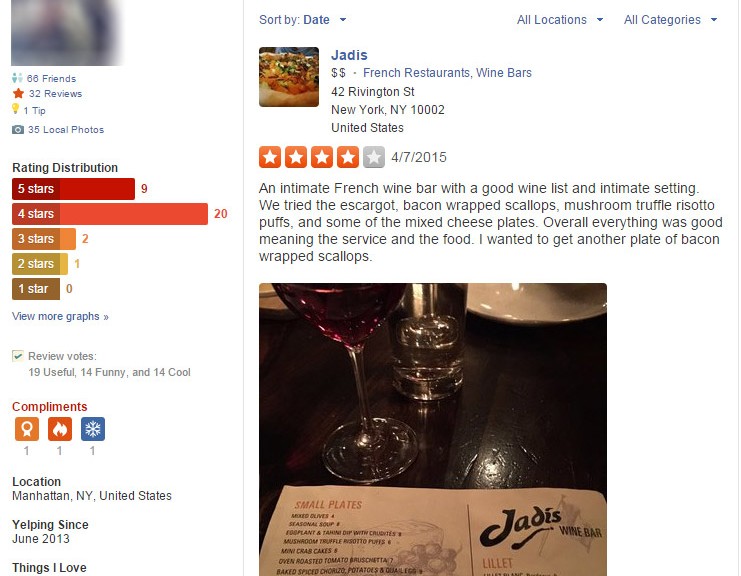
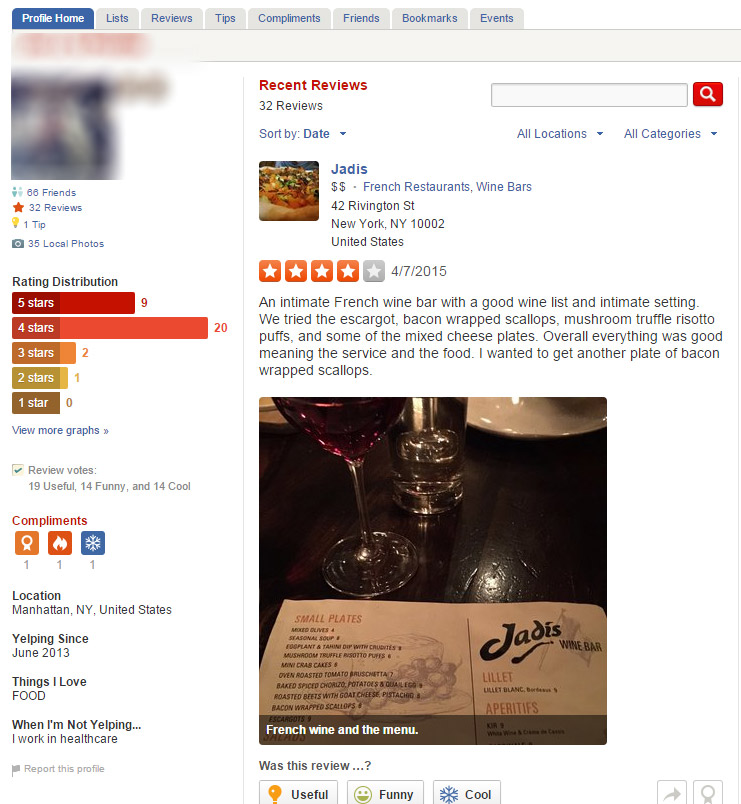
Your first point of reference should be the person who left the review. They are more likely to be a legitimate person if the following checks out:

  • They have been using the site for a long time before leaving the review
  • They have left reviews for other products
  • They have friends or belong to a network (on Yelp for instance)

All of these point to the behaviors of a real person who can be deemed impartial. If the review has only just joined the site or only left a review for the product or service in question, then you may want to consider basing your purchase on their advice.

Profile


Verified customers

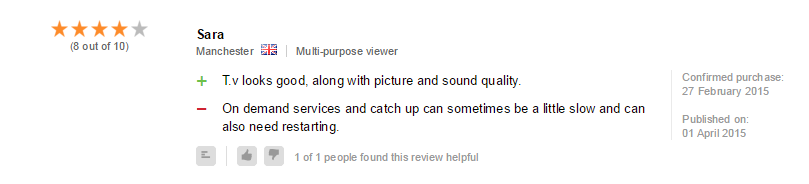
Many websites run employ services such as Revoo to help provide transparent and authentic feedback on their products. The review is actually part of the purchasing process so that you can be sure that only those that actually purchased the product have left a review.

Confirmed Purchase


Shop around

If you’re shopping for a big ticket item or booking at a pricey hotel, it is definitely worth checking reviews on many different sites and even social networks.

If something has great reviews on Yelp or Google Reviews, may have a bad rating on Trip Advisor, Amazon or another service. If the reviews differ significantly, it is certainly worth investigating a little further into them.

A quick search on Facebook or Twitter doesn’t hurt either. Check out any mentions of the product name or if a restaurant or hotel, visit their Twitter page to see how people are engaging with them. If there’s a lot of angry customers complaining, you may want to think twice before booking!

Do you have any tips to get trusted review online? Let me know on Twitter or on Facebook.

Do third-party app stores pose a threat to mobile security?

Android Malware

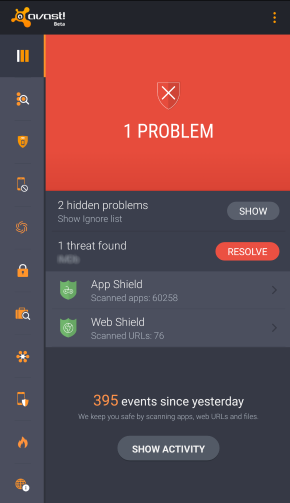
Malware detected on Android

Over time, we’ve noticed the presence of some fairly heated user debates disputing the necessity of security or antivirus apps for Android devices. This could have been sparked by our recent post which argues that you can’t always rely on the security of Google Play or because of the myth that antivirus companies create viruses to sell more software.

Certain security gurus claim that if users stick to downloading and purchasing apps using only the Google Play Store, nothing bad will happen to their devices. However, we found that this line of thinking is not 100% correct, as was demonstrated through the discovery of a rogue Dubsmash app or in the infamous case of apps on Google Play posing as games and infecting millions of users with adware. Despite these findings, there are some users who still feel that they’re safe whenever using Google Play. This feeling of false security could have negative consequences; for example, when your data or financial information is stolen or when you have to resort to resetting your device in order to cleanse it of malware.

So, we know we can’t rely on the Google Play Store all the time, but are third-party stores more secure? Of course not. In this case, how is it still possible that it’s not a problem to use third-party stores? First of all, it’s necessary to point out that there are certain legitimate and clean third-party stores, such as Amazon and FDroid. At the same time, there are tons of shady stores and even more black market .apk files promising to deliver you the latest features of a cracked app.

With these things in mind, how can users navigate the world of third-party stores?

Android's default .apk handler

Android default apk handler

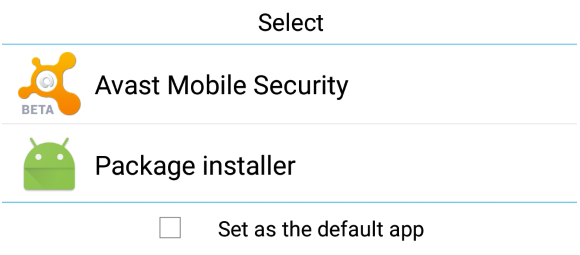
Besides the well known (and default) security options of Android, there is another useful feature that remains more or less unknown by average users: the default app feature. When Android (and also Windows) is about to open a file, it looks into its database to determine which application should be used and launches it. If you set Avast Mobile Security to be run at this preliminary stage of an app’s installation, it will scan the .apk file before it is opened and the installation process has begun. If any mistake or bug is detected, the process is halted and you’ll be given the option to uninstall the app.

If you have already installed Avast in your Android smartphone or tablet and this option is no longer shown, the easiest option will be to uninstall it, reboot and install it again. When the dialog pops up, choose Avast as your default handler for .apk files. As mobile malware reached the one million Android sample mark last year, the Avast database continues to grow exponentially. Avast Mobile Security also performs very well with new and unknown malware, as independent tests show us.

You can be safer and have a complete peace of mind while using third-party stores if you keep Avast Mobile Security running as your default installation package app. Download Avast Mobile Security for free on the Google Play Store.

How to set up your smartphone killswitch

With over 3 million smartphones stolen annually in the USA, and more than 300 each day on the streets of London, smartphone theft is sadly now an everyday occurrence.

These days, losing a smartphone means costs us so much more than the device itself. Our personal information, messages, emails, contacts and social networking profiles are all at stake. When you add banking and shopping apps, the financial costs can also escalate.

One of the most effective defenses against stealing and misusing your device and data is a killswitch functionality with reports suggesting killswitches can halve the number of smartphone thefts. It is so effective, that starting on July 1 2015, the state of California has ruled that all new smartphones must be shipped with killswitch functionality.

Once activated, a killswitch prevents a smartphone from being used or reprogrammed through a factory reset, making it very difficult for phone thieves to sell-on a working device.

The good news is that both Google and Apple rolled integrated killswitches for their smartphones in 2014, meaning that most smartphone users have access to basic level of protection.

Working with Qualcomm, AVG is developing a much more robust solution that is integrated directly into the hardware making it resistant to any number of attacks including factory resets or a SIM swap.


How to activate kill switch on Android

Step One: Set up remote access

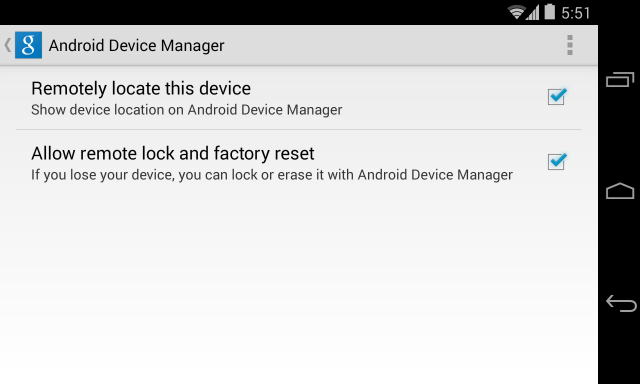
  • Go to Google Settings > Android Device Manager
  • Grant permission to both ‘Remotely locate this device’ and ‘Allow remote lock and factory reset’
Android Device Manager


Step Two:

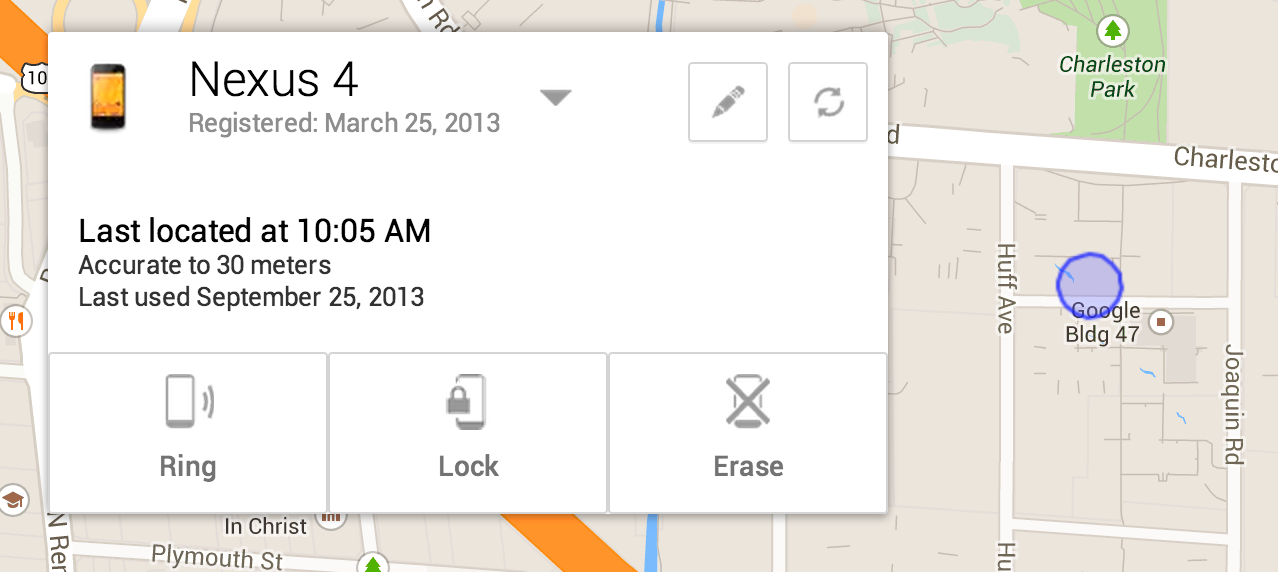
If your device is lost or stolen, go to any web enable device, log into Google and access the Android Device Manager Panel.

You will now see your device location on a map and have options to ring, lock and erase.

Nexus 4


How to activate kill switch on iOS.

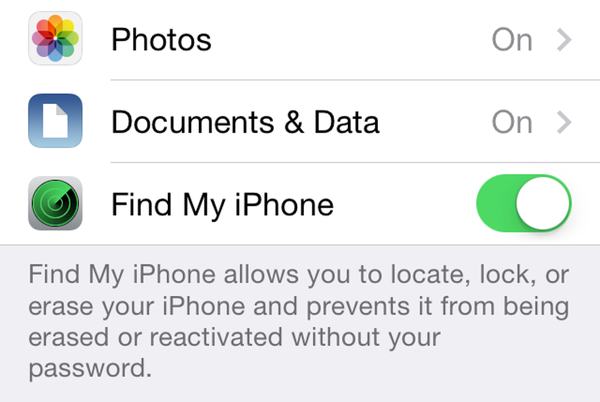
Step One: Enable Find My iPhone

  • Go to Settings>iCloud
  • Sign in with your Apple ID
  • Enable Find My iPhone

Lost My iPhone


Step Two: Enabling Lost Mode

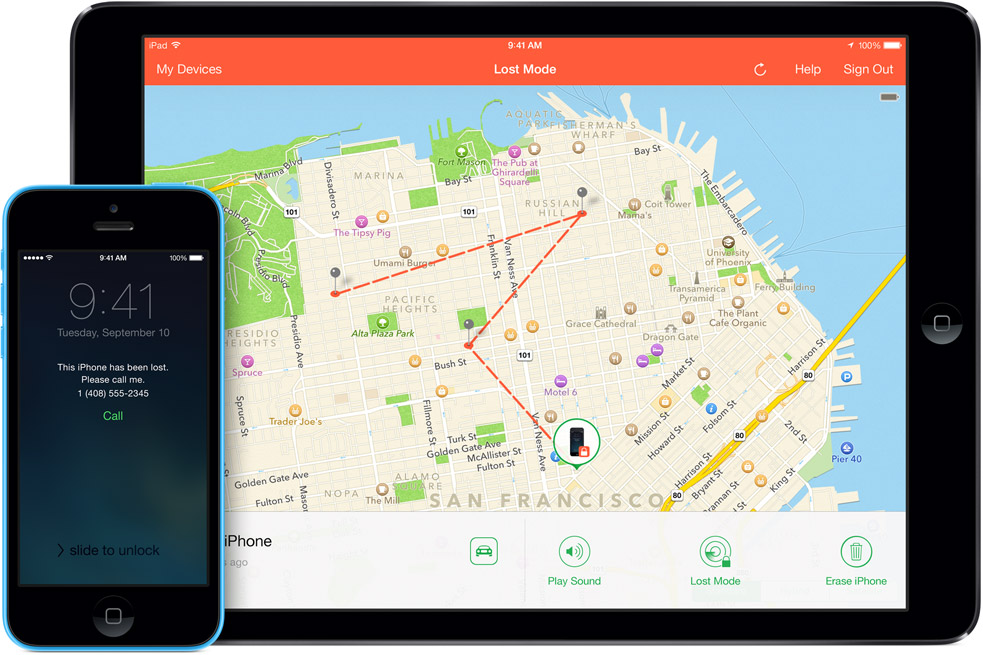
If you believe your device is lost or stolen you can activate the killswitch known as “Lost Mode”.

To do this, go to icloud.com/find from a Mac or PC, or alternatively you can use the Find My iPhone iOS app from another device.

This will bring up the Lost Mode dashboard which should pinpoint where your device is on a map and also give you the option to make it ring, lock it down or erase the data.

There is an option to customise the lock with a contact number for the safe return of your device. If you retrieve the device, you can safely return it to normal using your Apple ID login.

iOS Lost Mode

Office of Personal Management Hacked – US Government Downplays the Event

The second admission followed a week later. The Office of Personel Management (OPM) announced that on June 4, a hack attack had succeeded on governmental staff – four million people affected. It now appears that an additional 18 million records were stolen. The government, communicated this as two separate events in an apparent attempt to downplay the scale.

So what happened in the alleged second hack? That 18 million Social Security numbers have been compromised, is a “preliminary, unverified, approximate” according to a letter from the Director of OPM, Katherine Archuleta. The number — 18 million – affects people working for a federal agency or who applied for funding. The data, according to US government circles, may be in the hands of spies from the People’s Republic of China. This has been flatly denied by Chinese officials.

Mrs. Archuleta was called to testify before a Congressional committee: Encryptions are not always possible due to the age of facilities. She argued, however, that even encryption would have not sufficed, because the hackers would then have copied keys and passwords.

An article from the Wall Street Journal mentions that the government described the attack as happening in two waves in orde rto downlplay the severity. In addition, the OPM had denied the disclosure of sensitive information twice, even though the FBI had informed the OPM on June 5 about the attack…

The post Office of Personal Management Hacked – US Government Downplays the Event appeared first on Avira Blog.

Samsung phones vulnerable to hacker attack via keyboard update

Samsung Swiftkey vulnerability puts Samsung devices at risk

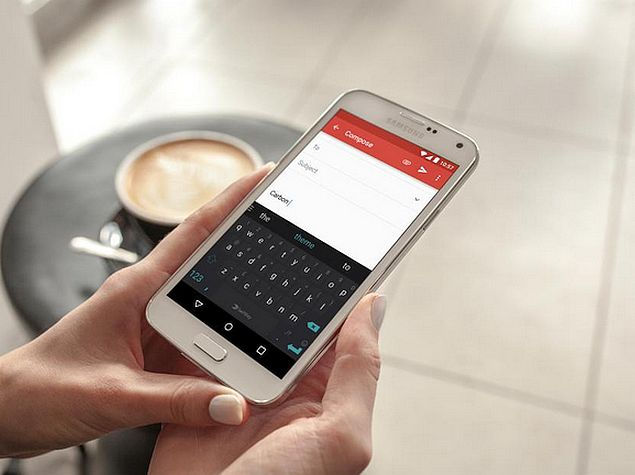
600 million Samsung mobile devices are at risk. Image source: gadgets.ndtv.com

We rely on our apps. Everyday we use our favorite ones to check news, the weather for our next trip, and communicate with our loved ones. Some apps, especially the system ones, are continuously in use, even if they are not the foremost app on your screen. The keyboard is one of them.

Recently, a dangerous vulnerability was discovered in the most popular keyboard, SwiftKey. If you have a Samsung S6, S5, and even a S4 running the stock operating system, you’re at risk. The app always checks for language updates, but this process is not performed in a secure way. If you’re connected with an open or public Wi-Fi, your phone is at risk of a very common and dangerous Man-in-the-middle attack. Your connection will be compromised and all the Internet traffic could be eavesdropped upon. That includes the passwords you’re typing in the very same keyboard, your financial information, everything.

To insure your security, you need to use a VPN when on Wi-Fi, since that’s when most updates are scheduled to occur. You probably already know what a VPN is and how it works. If not, you can find a lot of information in our blog. Our product, Avast SecureLine VPN, creates an encrypted tunnel for the inbound and outbound data of your Internet connection, blocking any possibility of a Man-in-the-middle attack.

But the story does not end here. If you use SwiftKey on an unsecured Wi-Fi, the attacker could also download malware into your phone or tablet. That’s a job for Avast Mobile Security & Antivirus (AMS). Some users think that we don’t need a security product for our phones. They also think that security companies exaggerate the need for a security app just to sell their products. AMS not only scans the installation process of apps but also checks the Internet sites you’re visiting and malicious behavior of any file in your device. You can install Avast Mobile Security & Antivirus on your Android device for free from the Google Play store.

NOTE: At the writing of this post, a patch for the vulnerability was provided to mobile network operators by Samsung. SwiftKey wrote on their blog, “This vulnerability is unrelated to and does not affect our SwiftKey consumer apps on Google Play and the Apple App Store.”


Attack at LOT leaves 1,400 passengers stranded

The hack happened in the afternoon and targeted the Polish flag carrier LOT. According to a report from Reuters “hackers attacked the airline ground computer systems used to issue flight plans”. The whole situation was resolved a few hours later. Nonetheless 10 national and international flights had to be canceled and even more were delayed. Luckily none of the planes or the airport itself were affected and no one got hurt. LOT took extra care to mention “that it has no influence on plane systems. Aircrafts, that are already airborne will continue their flights. Planes with flight plans already filed will return to Warsaw normally.”

The airline also made it clear that the airport itself was not affected. Once the ‘problem’ was fixed LOT issued the following press release. “The situation after the IT attack on our ground operation system is already under control. We are working on restoring the regularity as soon as possible. Our operating center is already preparing flight plans. We will try to ensure that the largest number of passengers are  informed and continue commenced journeys.”

Spokesman Kubicki said that LOT is using state-of-the-art computer systems, so this could potentially be a threat to others in the industry as well.

The post Attack at LOT leaves 1,400 passengers stranded appeared first on Avira Blog.

Avira Threats Landscape: Visualizing threats for you

Every day, thousands of different malicious programs are trying to infect as many devices as possible. The goal is the same for all of them: Get your data and if possible your money as well.

We have always been the firsts to learn about the threats that loom over every owner of a PC, Mac, tablet, or smartphone, but us having all the insights is not enough. While studying threats, keeping an eye on where they appear, and adapting our programs accordingly makes sure we keep our users as safe as possible, it’s still complicated to explain to the rest of the world why being protected is that important.

Sure, one reads about the newest threats, but only other people are affected by them, right? Especially big companies or governmental institutions seem to be the targets, so why bother at all. And that is where people are wrong. While the media most often talks about high profile cases, everyone else is at risk just as well! Every day there are millions of threats which have only one goal, namely to infect your devices. Be it your smartphone, laptop, Mac or PC – each and every one of them is at risk. Just think about the latest iOS and OS X exploits or the different ways cybercriminals try to gain control over what’s on your computer.

Check out the Avira Threats Landscape to find out where danger is lurking. #cybersecurity

In order to make our point we decided to share our insights with you in form of an interactive map. Our Avira Threats Landscape allows you to not only see which countries are the top targeted ones but also which threats are popping up the most and how many threats were detected in your country. Take a look at it, you won’t regret it. And when you see just how far reaching and widespread those threats are, make sure to warn your family and friends as well.  The most important thing though: Stay protected!

The post Avira Threats Landscape: Visualizing threats for you appeared first on Avira Blog.

Fix for 600 Million Galaxy Phones Available Soon

You might have heard of the security issue with Galaxy phones that was everywhere in the media this week. If not, let me fill you in:

Samsung phones come preinstalled with SwiftKey, a very popular alternative keyboard for Android and iOS. Security researchers from NowSecure discovered a vulnerability in the update mechanism for the customized version the company uses and which is being distributed on most of the Galaxy phone models.

According to NowSecure „a remote attacker capable of controlling a user’s network traffic can manipulate the keyboard update mechanism on Samsung phones and execute code as a privileged (system) user on the target’s phone. This can be exploited in a a manner that requires no user interaction — a user does not have to explicitly choose to download a languagePack update to be exploited.“

Samsung itself played the issue down and stated that a “very specific set of conditions” needs to be met in order for the attack to be successful. Nonetheless a patch will be made available soon – after all more than 600 million Samsung Galaxy phones are affected. The drawback is that only devices that have Samsung’s Knox security platform installed will profit from the updates. “For the devices that don’t come with KNOX by default, we are currently working on an expedited firmware update that will be available upon completion of all testing and approvals” the company says in their statement.

The post Fix for 600 Million Galaxy Phones Available Soon appeared first on Avira Blog.

Hola, Hola VPN users, you may have been part of a botnet!

VPN service Hola, which has millions of users, recently came under fire for not being as up front with their users as they should have been. In the past weeks it has been revealed that Hola does the following:

  • allows Hola users to use each others’ bandwidth
  • sells their users’ bandwidth to their sister company Luminati (which recently helped facilitate a botnet attack)
  • and, according to Vectra research, Hola can install and run code and additional software on their users’ devices without their users’ knowledge.

If you are an Hola user or if you know someone who uses Hola, please make sure you/they are aware of this.

The service, which can be downloaded either as an app or as a browser extension, is a peer-to-peer network that allows people to use other Hola users’ bandwidth to anonymize their browsing activities and to circumvent geo-restricted content.

Hola_logo_blackWhat many users did not realize is that they were essentially exit nodes and other Hola users could use their bandwidth to carry out illegal activity, like accessing child pornography.

Additionally, Hola sells its users’ bandwidth to its sister company, Luminati. Prior to the end of May, Hola did not mention Luminati on its website. Luminati’s premium service, which was originally advertised as being an anonymization network, uses Hola’s users as nodes to redirect traffic through. Hola’s connection to Luminati was exposed after a Luminati client launched a DDOS attack on 8chan, using Hola’s network (users) as a botnet.

Researchers at Vectra, a security company that identifies cyber attacks, dug a little deeper and discovered that Hola can also download and install additional software without the user’s knowledge and can install and run code without the user’s knowledge as well. Furthermore, Vectra found that Hola contains a built in console, “zconsole”. Zconsole allows direct human interaction with an Hola node even when Hola is not being actively used by a user. With access to the console an attacker could, as Vectra points out, “accomplish almost anything” and launch a large and targeted attack.

What we can learn from this

There is one main lesson people should learn from the Hola situation: research the products you download and use.

What many people may not have been aware of in this situation was how their  bandwidth could be abused by fellow Hola users and how much control Hola had. A VPN helps you to anonymize all of your browsing activities – and to access content in geo-restricted regions by redirecting it through other servers. This can, for example, be useful if you travel or live abroad and want to access content from your home country.

What you should research before choosing a VPN service

Before deciding which VPN service to use, research the VPN provider and make sure the provider you choose is trustworthy. Find out what methods they use. If they use servers to redirect traffic through, make sure you know who owns the servers, what they do with the data that flows through the servers and whether or not they keep your data or sell it to third parties.

Avast for example, offers free antivirus, but our Avast SecureLine VPN is a premium service. We charge for our VPN services, because we pay extra to own and maintain servers around the world to redirect traffic through. We do not log the data that flows via our VPN services.

Know how much control your VPN service really has Hola is available as an app and browser extension and as mentioned above, Vectra found that Hola is able to do a lot more than just redirect your traffic. Hola can download and run additional code through your browser, without your knowledge. Of course a VPN service is always going to have access to your personal data (otherwise it wouldn’t work). However, even if they don’t provide a VPN feature, browser extensions have immense control over your browser that most users may not be fully aware of.

 “Browser extensions can see everything you see in your browser, as well as everything you type in your browser, including passwords. Untrustworthy browser extension vendors can easily misuse this data and it is therefore extremely important that users be careful when choosing which browser extensions to install. On top of that, browser extensions can also manipulate search results and slow down your browser.”  Thomas Salomon, head of Browser Cleanup product development at Avast.

What you should do before downloading a browser extension

When deciding on whether or not you should download a browser extension, you should also first make sure the extension comes from a reliable and trusted source, read both professional and user reviews about the extension and read the extensions terms and conditions before downloading it.

What you should do if you have a bad extension installed on your browser If you are worried that you may have malicious extensions (they are often added when installing an otherwise legitimate program without you even noticing) installed on your browser or have an extension that is difficult to remove, you should run Avast Browser Cleanup. Avast Browser Cleanup is a tool that removes malicious and poorly rated add-ons and restores your browser to its initial and clean state. Avast Browser Cleanup is included in Avast and is now also available as a stand-alone product.

Keeping your browsing safe

Our browsing information is extremely valuable: we bank online, keep in touch with our loved ones via email and social media, search for everything under the sun on the Internet. Piece all this information together and you have someone’s complete identity, not something you want to hand over to just anyone.

VPNs and browser extensions, like Hola, become dangerous the minute they abuse their power, without openly informing their users of what they are doing. It is therefore vital that you are aware of what software you have installed on your computer and what extensions you have installed on your browser to keep your private information private.