Tag Archives: Security

Garage door hacked in under 10 seconds using only a child’s toy?

A famous football coach once said, “If you’re not getting better, you’re getting worse” and ironically this statement applies to your own security as well.  If you’re not keeping up-to-date with the latest security, then it’s probably getting worse because the threats just keep getting better.

This simple fact has been proven again by a researcher who demonstrates how he can hack most garage doors using nothing more than a modified electronic toy. Researcher Samy Kamkar has published his findings and a video explaining how he was able to hack a number of fixed-code garage door openers in under 10 seconds.


Not only is this a case of how old technology can be outdated by modern devices, but in this example the cause is a child’s toy that even today has already been discontinued by its manufacturer and is considered a throwaway item by some.  Recycling hackers unite.

There’s no doubt that hardware-hacking gadgets are starting to become more popular such as mobile phone jammers and issues with keyless entry systems on cars.

Luckily, for those of us fortunate enough to have a garage door, Samy has chosen not to reveal the inner-workings of his research, so that criminals can’t benefit.  But, let’s face it, the cat is out of the bag on this one, and the clock is now ticking.

Samy has also recorded a video explaining how to can protect yourself from attacks like these.

Video

Protecting against OpenSesame


Most of the tips involve learning about the technology in everyday objects such as garage doors. Once you know how the tech works, you can understand how it can be vulnerable to various attack types.

Until next time, stay safe out there.


US blames China for massive data breach

The OPM is responsible for human resources for the federal government which means they are the collectors and holders of personal data on all federal employees.

Law enforcement sources close to the breach stated that a “foreign entity or government”  possibly Chinese was believed to be behind the attack, according to an article published in The Guardian.

It should be noted that the Chinese government stated that it was ‘not responsible’ and this conclusion was ‘counterproductive’.

The OPM carries out background checks on employees and holds data dating back to 1985. A successful attacker could gain access to records of past and present employees, with data that could even refer to retired employees and what they are doing now.

Regardless of whether you believe the continual finger pointing by one government at another, there are real people that are effected and protecting them and their identity should be the priority.

Alarmingly, an official said to Reuters that “Access to data from OPM’s computers, such as birth dates, Social Security numbers and bank information, could help hackers test potential passwords to other sites, including those with information about weapons systems”.


How to stay safe

While those of us who do not work for the government won’t have been affected by this breach, what can we do to protect ourselves identity theft?

  • Ensure your online accounts are not using the email address and a password that could be guessed from personal information, if you are then change the password.
  • Keep a close watch on your credit reports. This will help you identify if someone is using your identity to take a line of credit in your name. Most credit scoring agencies allow you to run a report for free at least once.
  • Spammers may send emails that look like they are coming from valid sources. Make sure to carefully scrutinize these emails – don’t click on links that look suspicious – and if in doubt contact the sending organization directly to ensure it’s an official communication.
  • Avoid using the same email address or identity across multiple online accounts. For example, have a primarily email address used for recovery of forgotten passwords and account information. Have a secondary email address for offline and online retail transactions. Have a third for financial accounts and sensitive information.
  • Avoid Cold Calls: If you don’t know the person calling then do not hand over payment or personal details. If in doubt, hang up and call the organization directly to establish you are talking to legitimate operators.
  • Set privacy Settings: Lock down access to your personal data on social media sites, these are commonly used by cybercriminals to socially engineer passwords. Try AVG PrivacyFix, it’s a great tool that will assist you with this.
  • Destroy documents: Make sure you shred documents before disposing of them as they can contain a lot of personal information.
  • Check statements and correspondence: Receipts for transactions that you don’t recognize could show up in your mail.
  • Use strong passwords and two factor authentication: See my previous blog post on this, complex passwords can be remembered simply!
  • Check that sites are secure: When you are sending personal data online, check that the site is secure – there should be a padlock in the address or status bar or the address should have a ‘https’ at the start. The ‘s’ stands for secure.
  • Updated security software: Always have updated antivirus software as it will block access to many phishing sites that will ask you for your personal data.


Also consider enlisting an identity monitoring service, commercial companies that have been breached often offer this reactively to the victims. Understanding where or if your identity is being abused in real time will give you the ability to manage issues as they happen.

The dummies guide to hacking Whatsapp

WhatsApp – the super popular messaging app (800 million users), acquired by Facebook for $20 billion, has done it again… After a bug that exposed restricted profile pictures, data encryption that can be breached in 3 minutes, and the use of IMEI (International Mobile Equipment Identity) as a cryptographic key (it’s like using your Social Security Number as a password), WhatsApp is yet again in the headlines for privacy concerns…

The latest story – hacking Whatsapp. As reported by The Hacker News, anyone can hack your WhatsApp account with just your number and 2 minutes alone with your phone…

This video, posted on YouTube, shows how a hacker answers an authenticating call, intercepts a secret PIN, and uses that to access a WhatsApp account he just created on another phone.

This is not tied to a bug or loophole – it is the way that WhatsApp was built.

Bottom line? Please be very careful whom you lend your phone to, and make sure you don’t leave it lying around. Even locked, a garden-variety hacker can access your WhatsApp account in 2 minutes.

The post The dummies guide to hacking Whatsapp appeared first on Avira Blog.

OPM Data Breach: Data of 4 Million Federal Workers Exposed

According to the official news release, hackers managed to breach the Office of Personnel Management (OPM). With the information of 4 million federal government workers exposed, it is one of the biggest in the federal government’s history. The hack was discovered because “within the last year, the OPM has undertaken an aggressive effort to update its cybersecurity posture, adding numerous tools and capabilities to its networks”.

In order to determine the full impact the OPM is now investigating the issue together with the U.S. Department of Homeland Security’s Computer Emergency Readiness Team (US-CERT) and the Federal Bureau of Investigation (FBI).

In their statement the agency wrote: “Since the intrusion, OPM has instituted additional network security precautions, including: restricting remote access for network administrators and restricting network administration functions remotely; a review of all connections to ensure that only legitimate business connections have access to the internet; and deploying anti-malware software across the environment to protect and prevent the deployment or execution of tools that could compromise the network.”

Sounds all good, but who is to blame? According to The Washington Post and the Wall Street Journal the hackers might have been Chinese, a link that China’s Foreign Ministry Spokesman calls “irresponsible”.

The post OPM Data Breach: Data of 4 Million Federal Workers Exposed appeared first on Avira Blog.

Which is the most secure Android Smart Lock?

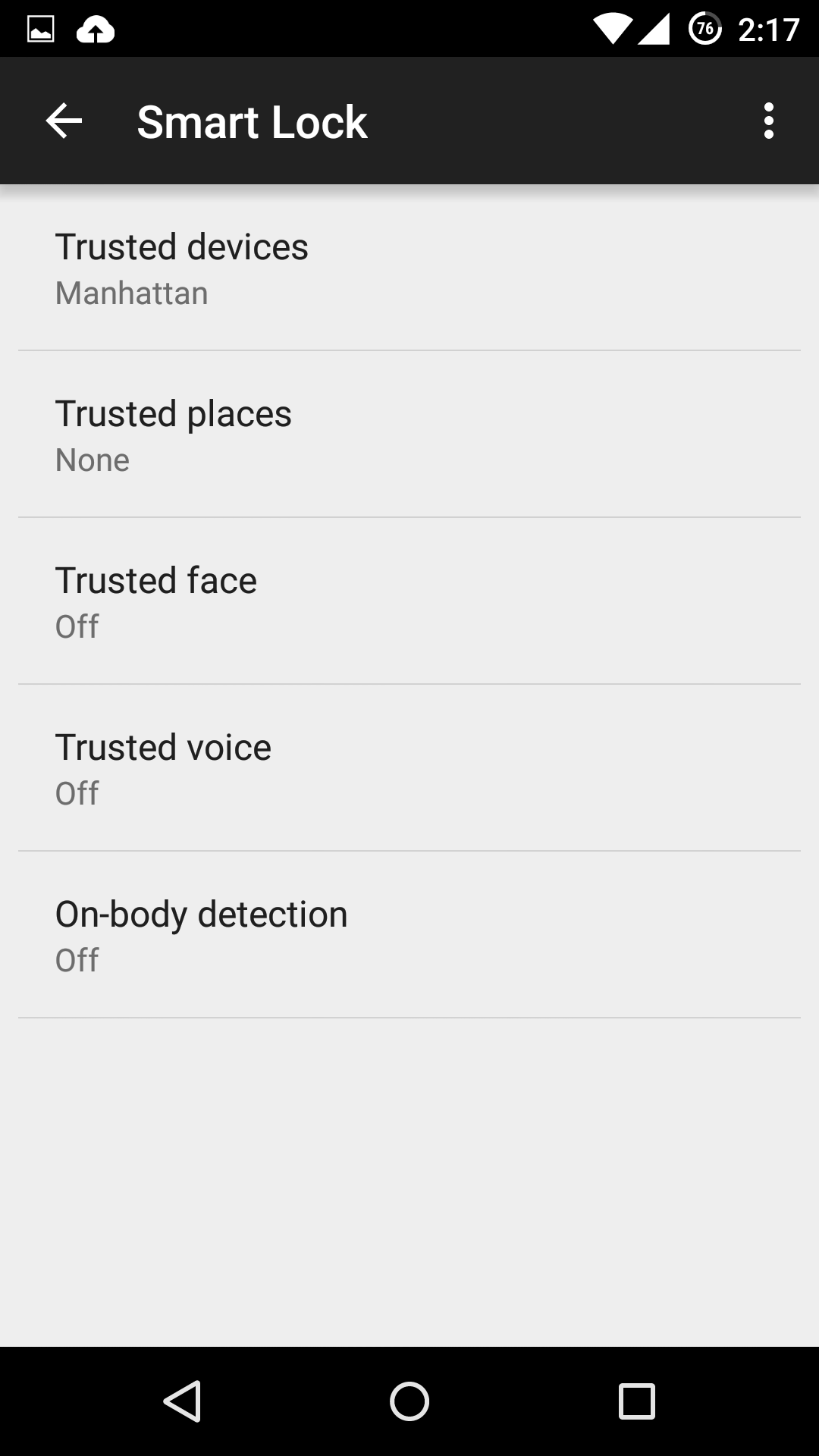
If you’re one of the lucky few to be running a phone or tablet with Android Lollipop (5.0 or above), you might be tempted to use one of its new Smart Lock security features. These features bypass your lock screen when certain conditions are met.

Here, we examine the various kinds of Smart Locks Lollipop offers, where they fail, and how reliable they are.

Trusted devices

Trusted devices is perhaps the safest of the new smart lock features. It works by confirming your identity with “something you have”; in this case a bluetooth device or NFC trigger. When your devices pair, your lock screen will be removed. The feature seems to have been designed with smartwatches in mind, but any bluetooth device like car or wireless headset will work.

This is particularly secure, as bypassing this lock would require both your devices be stolen at the same time. The other workaround includes spoofing the MAC address (or identity) of your bluetooth device, which is a difficult and highly unlikely process.

Trusted places

Trusted places creates geofences around specific areas you designate as “safe”. Usingbuilt-in GPS, WiFi scanning, and other location services, your device can determine whether you are inside the area and disable your phone’s lock screen. When the phone leaves the area, it automatically locks up again.

This feature can be particularly useful and safe if you designate your home as a safe zone, especially if you’re home is in an isolated area. However, we wouldn’t recommend setting any location you do not fully control as safe. Any passerby in the “safe zone” could potentially pick up your phone and use it. Furthermore, the feature isn’t as precise as it could be: the diameter of the “safe zone” can be up to 80 meters wide (nearly 90 yards or 262 feet).

Trusted face

Trusted face essentially confirms your identity by looking at you, using your device’s front facing camera to recognize your face. Because of that, hardware can be a limiting factor in this method’s reliability: a poor front-facing camera can quickly become a liability.

While the system is smart enough not to get fooled by a static photo of your portrait, it still requires you to “teach it” to recognize your face in several different lighting conditions or wearing various accessories.The more you do this, the more reliable it becomes, but it can require more “teaching” than most users would feel comfortable providing. Essentially, every time your phone doesn’t unlock is an opportunity to teach it.

Oh, and you can give up on getting this to work in low lighting conditions.

We leave it to you to determine the likelihood that a look-a-like will snatch your phone. Just don’t use this feature if you have an evil identical twin.

Trusted voice

Trusted voice relies on vocal recognition to confirm your identity. It works particularly well if you are a consistent user of Android’s voice activated features, since those learn to recognize your speaking patterns to better interpret your queries. If you do not use them often, you may find the reliability of this method to be somewhat limiting.

A secondary annoyance is that it relies on triggering the Google Launcher’s signature “Ok, Google” to unlock your screen, which will then wait for a search query or command. Unless you are a heavy user of the Launcher or Google Now, we don’t recommend this.

On-body detection

This is easily the least secure of the methods revealed so far, and we strongly recommend you do not use it. On-body detection relies on your phone’s internal accelerometers and gyroscopes to determine if you are carrying your phone. Unlock it once, and it will stay unlocked while in your hands or pocket. Put it down on a table, and it will lock immediately.

While this may seem to make sense and greatly simplify your life, it’s also a godsend to any pickpocket or straight-out thief that would snatch the phone out of your hands. So long as the phone is in movement, it doesn’t care who unlocked it. With over 3 million smartphones stolen every year in the US alone, and 2000 a day in the UK, we really cannot recommend this method.


How to turn the Smart Lock features on

If you decide you still want to use one or more of these securityfeatures, you’ll need to turn them on first, and Google has not made that easy.

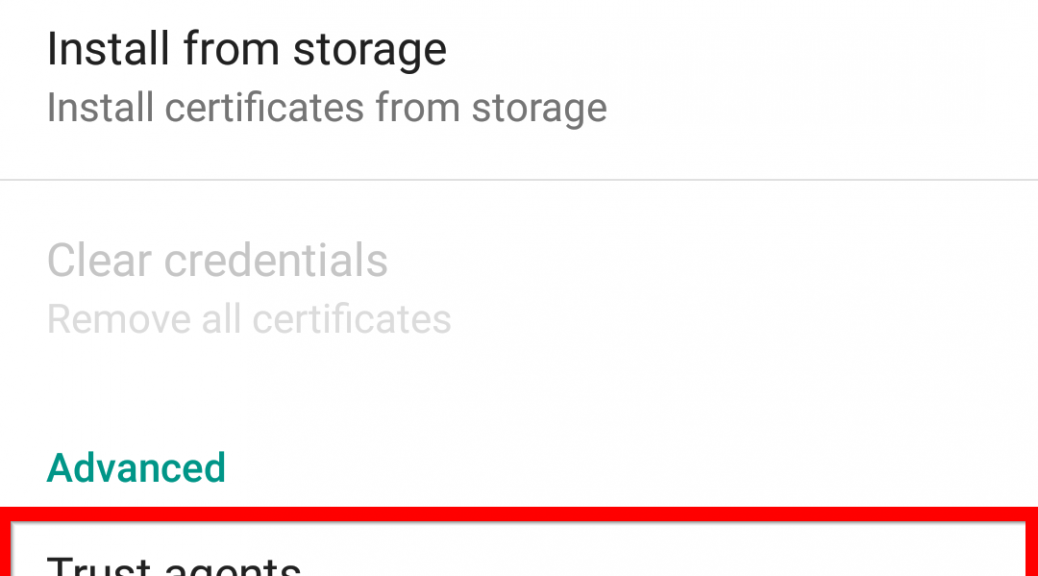
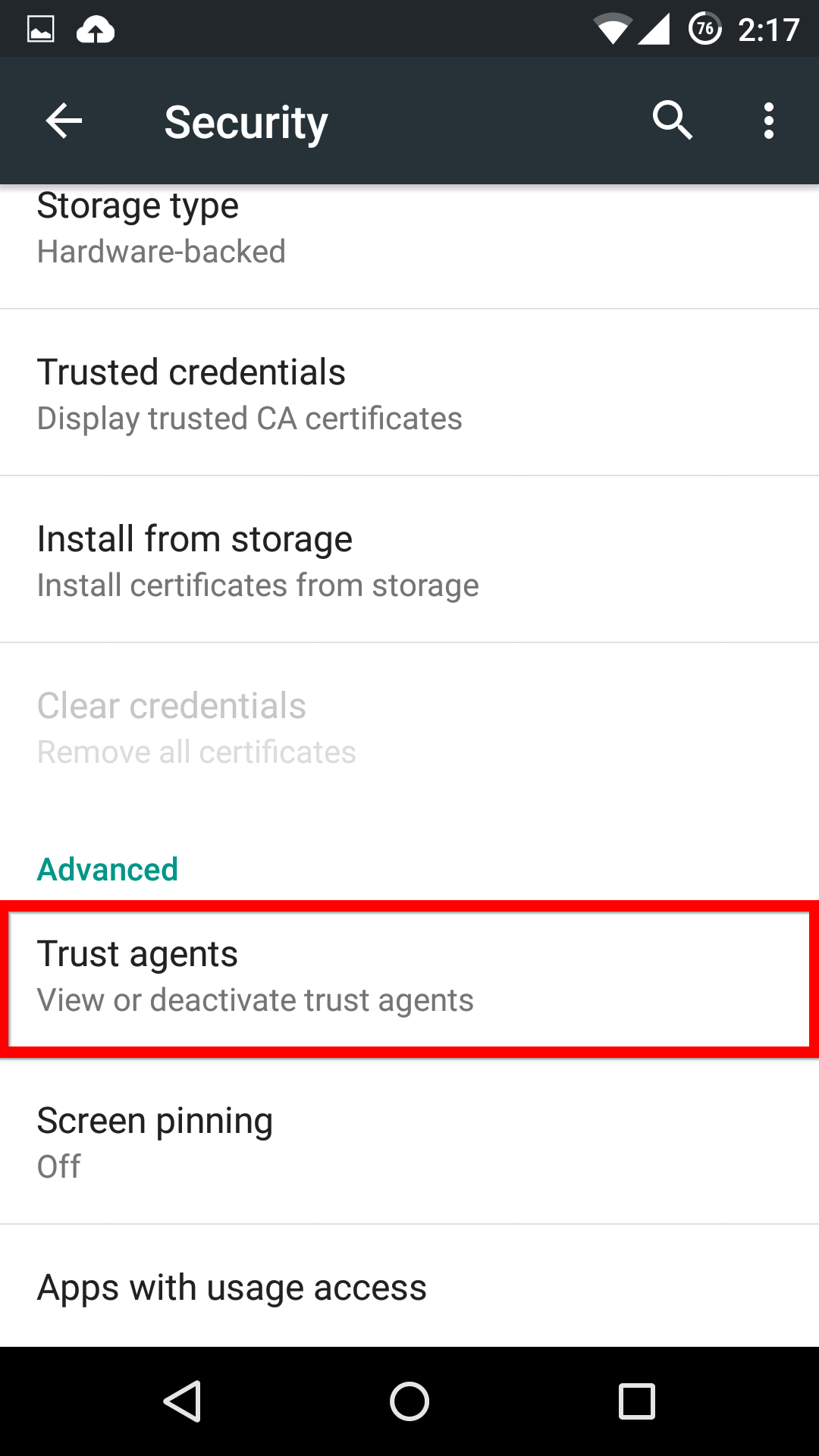
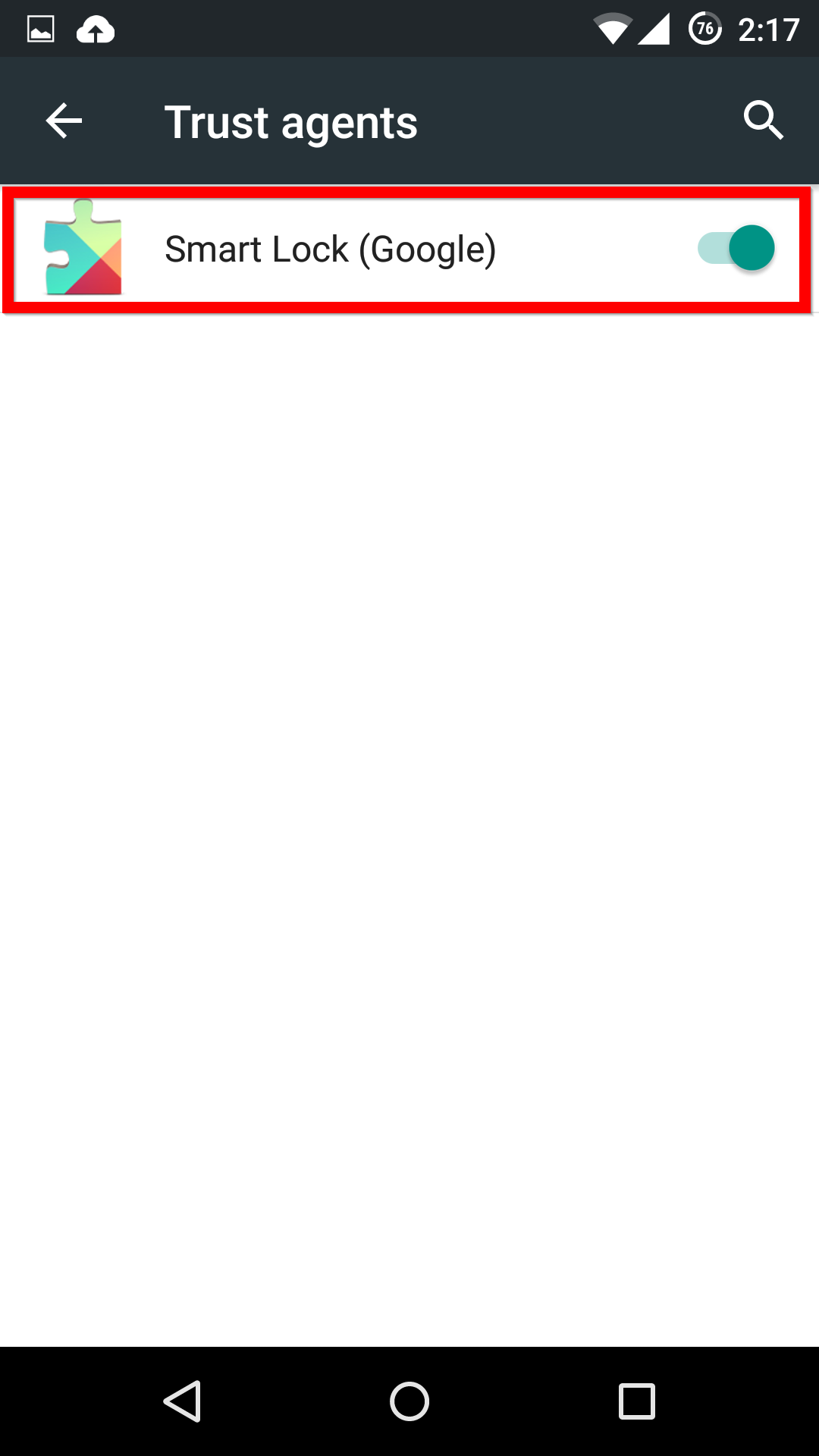
First, in the Settings menu, you’ll need to scroll down to Advanced and select Trust agents. Inside this menu, you’ll need to activate the Smart Lock option.

Trust Sources

Smart Lock


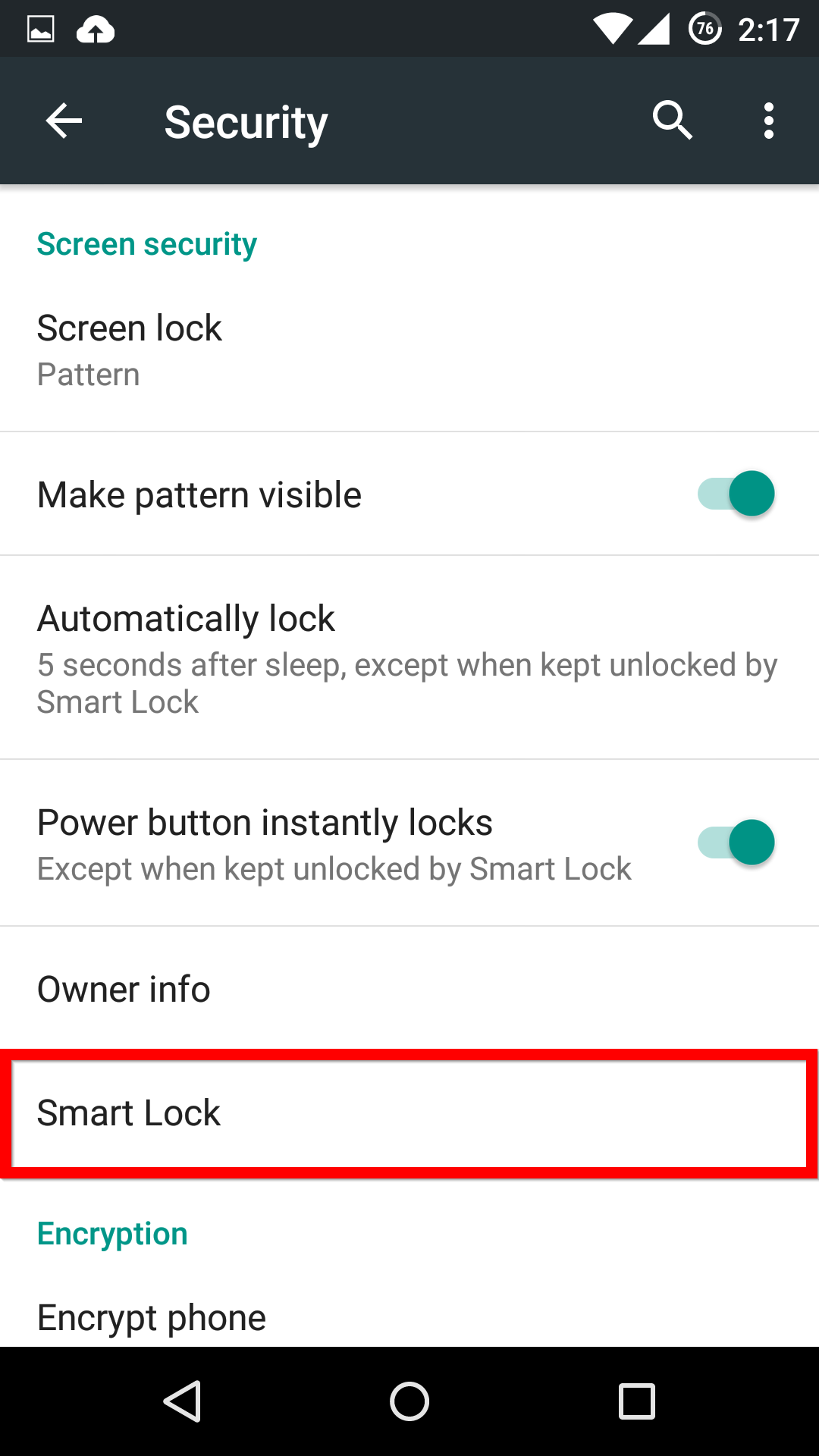
Now, when you head back into the main Security menu, you’ll be able to find the Smart Lock menu, and activate whichever features you want.

Smart Lock

Options


If you see one of these features missing, make sure that you’re Google Services app is up-to-date.


Emergency Security Band-Aids with Systemtap

Software security vulnerabilities are a fact of life. So is the subsequent publicity, package updates, and suffering service restarts. Administrators are used to it, and users bear it, and it’s a default and traditional method.

On the other hand, in some circumstances the update & restart methods are unacceptable, leading to the development of online fix facilities like kpatch, where code may be surgically replaced in a running system. There is plenty of potential in these systems, but they are still at an early stage of deployment.

In this article, we present another option: a limited sort of live patching using systemtap. This tool, now a decade old, is conventionally thought of as a tracing widget, but it can do more. It can not only monitor the detailed internals of the Linux kernel and user-space programs, it can also change them – a little. It turns out to be just enough to defeat some classes of security vulnerabilities. We refer to these as security “band-aids” rather than fixes, because we expect them to be used temporarily.

Systemtap

Systemtap is a system-wide programmable probing tool introduced in 2005, and supported since RHEL 4 on all Red Hat and many other Linux distributions. (Its capabilities vary with the kernel’s. For example, user-space probing is not available in RHEL 4.) It is system-wide in the sense that it allows looking into much of the software stack: from device drivers, kernel core, system libraries, through user-applications. It is programmable because it operates based on programs in the systemtap scripting language in order to specify what operations to perform. It probes in the sense that, like a surgical instrument, it safely opens up running software so that we can peek and poke at its internals.

Systemtap’s script language is inspired by dtrace, awk, C, intended to be easy to understand and compact while expressive. Here is hello-world:

probe oneshot { printf("hello worldn") }

Here is some counting of vfs I/O:

 global per_pid_io # an array
 probe kernel.function("vfs_read") 
     { per_pid_io["read",pid()] += $count }
 probe kernel.function("vfs_write")
     { per_pid_io["write",pid()] += $count }
 probe timer.s(5) { exit() } # per_pid_io will be printed

Here is a system-wide strace for non-root processes:

probe syscall.*
{
    if (uid() != 0)
        printf("%s %d %s %sn", execname(), tid(), name, argstr)
}

Additional serious and silly samples are available on the Internet and also distributed with systemtap packages.

The meaning of a systemtap script is simple: whenever a given probed event occurs, pause that context, evaluate the statements in the probe handler atomically (safely and quickly), then resume the context. Those statements can inspect source-level state in context, trace it, or store it away for later analysis/summary.

The systemtap scripting language is well-featured. It has normal control flow statements, functions with recursion. It deals with integral and string data types, and look-up tables are available. An unusual feature for a small language, full type checking is paired with type inference, so type declarations are not necessary. There exist dozens of types of probes, like timers, calls/interiors/returns from arbitrary functions, designated tracing instrumentation in the kernel or user-space, hardware performance counter values, Java methods, and more.

Systemtap scripts are run by algorithmic translation to C, compilation to machine code, and execution within the kernel as a loadable module. The intuitive hazards of this technique are ameliorated by prolific checking throughout the process, both during translation, and within the generated C code and its runtime. Both time and space usage are limited, so experimentation is safe. There are even modes available for non-root users to inspect only their own processes.  This capability has been used for a wide range of purposes:

  • performance tuning via profiling
  • program-understanding via pinpoint tracing, dynamic call-graphs, through pretty-printing local variables line by line.

Many scripts can run independently at the same time and any can be completely stopped and removed. People have even written interactive games!

Methodology

While systemtap is normally used in a passive (read-only) capacity, it may be configured to permit active manipulations of state. When invoked in “guru mode”, a probe handler may send signals, insert delays, change variables in the probed programs, and even run arbitrary C code. Since systemtap cannot change the program code, changing data is the approach of choice for construction of security band-aids. Here are some of the steps involved, once a vulnerability has been identified in some piece of kernel or user code.

Plan

To begin, we need to look at the vulnerable code bug and, if available, the corrective patch to understand:

  • Is the bug mainly (a) data-processing-related or (b) algorithmic?
  • Is the bug (a) localized or (b) widespread?
  • Is the control flow to trigger the bug (a) simple or (b) complicated?
  • Are control flow paths to bypass the bug (a) available nearby (included in callers) or (b) difficult to reach?
  • Is the bug dependent mainly on (a) local data (such as function parameters) or (b) global state?
  • Is the vulnerability-triggering data accessible over (a) a broad range of the function (a function parameter or global) or only (b) a narrow window (a local variable inside a nested block)?
  • Are the bug triggering conditions (a) specific and selective or (b) complex and imprecise?
  • Are the bug triggering conditions (a) deliberate or (b) incidental in normal operation?

More (a)s than (b)s means it’s more likely that systemtap band-aids would work in the particular situation while more (b)s means it’s likely that patching the traditional way would be best.

Then we need to decide how to change the system state at the vulnerable point. One possibility is to change to a safer error state; the other is to change to a correct state.

In a type-1 band-aid, we will redirect flow of control away from the vulnerable areas. In this approach, we want to “corrupt” incoming data further in the smallest possible way necessary to short-circuit the function to bypass the vulnerable regions. This is especially appropriate if:

  • correcting the data is difficult, perhaps because it is in multiple locations, or because it needs to be temporary or no obvious corrected value can be computed
  • error handling code already exists and is accessible
  • we don’t have a clear identification of vulnerable data states and want to err on the side of error-handling
  • if the vulnerability is deliberate so we don’t want to spend the effort of performing a corrected operation

A type-2 band-aid is correcting data so that the vulnerable code runs correctly. This is especially appropriate in the complementary cases from the above and if:

  • the vulnerable code and data can occur from real workloads so we would like them to succeed
  • corrected data can be practically computed from nearby state
  • natural points occur in the vulnerable code where the corrected data may be inserted
  • natural points occur in the vulnerable code where clean up code (restoring of previous state) may be inserted, if necessary

Implement

With the vulnerability-band-aid approach chosen, we need to express our intent in the systemtap scripting language. The model is simple: for each place where the state change is to be done we place a probe. In each probe handler, we detect whether the context indicates an exploit is in progress and, if so, make changes to the context. We might also need additional probes to detect and capture state from before the vulnerable section of code, for diagnostic purposes.

A minimal script form for changing state can be easily written. It demonstrates one kernel and one user-space function-entry probe, where each happens to take a parameter named p that needs to be range-limited. (The dollar sign identifies the symbol as a variable in the context of the probed program, not as a script-level temporary variable.)

probe kernel.function("foo"),
      process("/lib*/libc.so").function("bar")
{
    if ($p > 100)
        $p = 4
}

Another possible action in the probe handler is to deliver a signal to the current user-space process using the raise function. In this script a global variable in the target program is checked at every statement in the given source code file and line-number-range and deliver a killing blow if necessary:

probe process("/bin/foo").statement("*@src/foo.c:100-200")
{
    if (@var("a_global") > 1000)
        raise(9) # SIGKILL
}

Another possible action is logging the attempt at the systemtap process console:

    # ...
    printf("check process %s pid=%d uid=%d",
           execname(), pid(), uid())
    # ...

Or sending a note to the sysadmin:

    # ...
    system(sprintf("/bin/logger check process %s pid=%d uid=%d",
                   execname(), pid(), uid()))
    # ...

These and other actions may be done in any combination.

During development of a band-aid one should start with just tracing (no band-aid countermeasures) to fine-tune the detection of the vulnerable state. If an exploit is available run it without systemtap, with systemtap (tracing only), and with the operational band-aid. If normal workload can trigger the bug run it with and without the same spectrum of systemtap supervision to confirm that we’re not harming that traffic.

Deploy

To run a systemtap script, we will need systemtap on a developer workstation. Systemtap has been included in RHEL 4 and later since 2006. RHEL 6 and RHEL 7 still receive rebases from new upstream releases, though capabilities vary. (Systemtap upstream is tested against a gamut of RHEL 4 through fresh kernel.org kernels, and against other distributions.)

In addition to systemtap itself, security band-aid type scripts usually require source-level debugging information for the buggy programs. That is because we need the same symbolic information about types, functions, and variables in the program as an interactive debugger like gdb does. On Red Hat/Fedora distributions this means the “-debuginfo” RPMs available on RHN and YUM. Some other distributions make them available as “-dbgsym” packages. Systemtap scripts that probe the kernel will probably need the larger “kernel-debuginfo”; those that probe user-space will probably need a corresponding “foobar-debuginfo” package. (Systemtap will tell you if it’s missing.)

Running systemtap security band-aid scripts will generally require root privileges and a “guru-mode” flag to designate permission to modify state such as:

# stap -g band_aid.stp
[...]
^C

The script will inject instrumentation into existing and future processes and continue running until it is manually interrupted, it stops itself, or error conditions arise. In case of most errors, the script will stop cleanly, print a diagnostic message, and point to a manual page with further advice. For transient or acceptable conditions command line options are available to suppress some safety checks altogether.

Systemtap scripts may be distributed to a network of homogeneous workstations in “pre-compiled” (kernel-object) form, so that a full systemtap + compiler + debuginfo installation is not necessary on the other computers. Systemtap includes automation for remote compilation and execution of the scripts. A related facility is available to create MOK-signed modules for machines running under SecureBoot.  Scripts may also be installed for automatic execution at startup via initscripts.

Some examples

Of all the security bugs for which systemtap band-aids have been published, we analyse a few below.

CVE-2013-2094, perf_swevent_enabled array out-of-bound access

This was an older bug in the kernel’s perf-event subsystem which takes a complex command struct from a syscall. The bug involved missing a range check inside the struct pointed to by the event parameter. We opted for a type-2 data-correction fix, even though the a type-1 failure-induction could have worked as well.

This script demonstrates an unusual technique: embedded-C code called from the script, to adjust the erroneous value. There is a documented argument-passing API between embedded-C and script, but systemtap cannot analyze or guarantee anything about the safety of the C code. In this case, the same calculation could have been expressed within the safe scripting language, but it serves to demonstrate how a more intricate correction could be fitted.

# declaration for embedded-C code
%{
#include <linux/perf_event.h>
%}
# embedded-C function - note %{ %} bracketing
function sanitize_config:long (event:long) %{
    struct perf_event *event;
    event = (struct perf_event *) (unsigned long) STAP_ARG_event;
    event->attr.config &= INT_MAX;
%}

probe kernel.function("perf_swevent_init").call {
    sanitize_config($event)  # called with pointer
}

CVE-2015-3456, “venom”

Here is a simple example from the recent VENOM bug, CVE-2015-3456, in QEMU’s floppy-drive emulation code. In this case, a buffer-overflow bug allows some user-supplied data to overwrite unrelated memory. The official upstream patch adds explicit range limiting for an invented index variable pos, in several functions. For example:

@@ -1852,10 +1852,13 @@
 static void fdctrl_handle_drive_specification_command(FDCtrl *fdctrl, int direction)
 {
     FDrive *cur_drv = get_cur_drv(fdctrl);
+    uint32_t pos;
-    if (fdctrl->fifo[fdctrl->data_pos - 1] & 0x80) {
+    pos = fdctrl->data_pos - 1;
+    pos %= FD_SECTOR_LEN;
+    if (fdctrl->fifo[pos] & 0x80) {
         /* Command parameters done */
-        if (fdctrl->fifo[fdctrl->data_pos - 1] & 0x40) {
+        if (fdctrl->fifo[pos] & 0x40) {
             fdctrl->fifo[0] = fdctrl->fifo[1];
             fdctrl->fifo[2] = 0;
             fdctrl->fifo[3] = 0;

Inspecting the original code, we see that the vulnerable index was inside a heap object at fdctrl->data_pos. A type-2 systemtap band-aid would have to adjust that value before the code runs the fifo[] dereference, and subsequently restore the previous value. This might be expressed like this:

global saved_data_pos
probe process("/usr/bin/qemu-system-*").function("fdctrl_*spec*_command").call
{
    saved_data_pos[tid()] = $fdctrl->data_pos;
    $fdctrl->data_pos = $fdctrl->data_pos % 512 # FD_SECTOR_LEN
}
probe process("/usr/bin/qemu-system-*").function("fdctrl_*spec*_command").return
{
    $fdctrl->data_pos = saved_data_pos[tid()]
    delete saved_data_pos[tid()]
}

The same work would have to be done at each of the three analogous vulnerable sites unless further detailed analysis suggests that a single common higher-level function could do the job.

However, this is probably too much work. The CVE advisory suggests that any call to this area of code is likely a deliberate exploit attempt (since modern operating systems don’t use the floppy driver). Therefore, we could opt for a type-1 band-aid, where we bypass the vulnerable  computations entirely. We find that all the vulnerable functions ultimately have a common caller, fdctrl_write.

static void fdctrl_write (void *opaque, uint32_t reg, uint32_t value)
{
    FDCtrl *fdctrl = opaque;
    [...]
    reg &= 7;
    switch (reg) {
    case FD_REG_DOR:
        fdctrl_write_dor(fdctrl, value);
        break;
        [...]
    case FD_REG_CCR:
        fdctrl_write_ccr(fdctrl, value);
        break;
    default:
        break;
    }
}

We can disarm the entire simulated floppy driver by pretending that the simulated CPU is addressing a reserved FDC register, thus falling through to the default: case. This requires just one probe. Here we’re being more conservative than necessary, overwriting only the low few bits:

probe process("/usr/bin/qemu-system-*").function("fdctrl_write")
{
    $reg = (($reg & ~7) | 6) # replace register address with 0x__6
}

CVE-2015-0235, “ghost”

This recent bug in glibc involved a buffer overflow related to dynamic allocation with a miscalculated size. It affected a function that is commonly used in normal software, and the data required to determine whether the vulnerability would be triggered or not is not available in situ. Therefore, a type-1 error-inducing band-aid would not be appropriate.

However, it is a good candidate for type-2 data-correction. The script below works by incrementing the size_needed variable set around line 86 of glibc nss/digits_dots.c, so as to account for the missing sizeof (*h_alias_ptr). This makes the subsequent comparisons work and return error codes for buffer-overflow situations.

85
86 size_needed = (sizeof (*host_addr)
87             + sizeof (*h_addr_ptrs) + strlen (name) + 1);
88
89 if (buffer_size == NULL)
90   {
91     if (buflen < size_needed)
92       {
93         if (h_errnop != NULL)
94           *h_errnop = TRY_AGAIN;
95         __set_errno (ERANGE);
96         goto done;
97       }
98   }
99 else if (buffer_size != NULL && *buffer_size < size_needed)
100  {
101    char *new_buf;
102    *buffer_size = size_needed;
103    new_buf = (char *) realloc (*buffer, *buffer_size);

The script demonstrates an unusual technique. The variable in need of correction (size_needed) is deep within a particular function so we need “statement” probes to place it before the bad value is used. Because of compiler optimizations, the exact line number where the probe may be placed can’t be known a prior so we ask systemtap to try a whole range. The probe handler than protects itself against being invoked more than once (per function call) using an auxiliary flag array.

global added%
global trap = 1 # stap -G trap=0 to only trace, not fix
probe process("/lib*/libc.so.6").statement("__nss_hostname_digits_dots@*:87-102")
{
    if (! added[tid()])
    {
        added[tid()] = 1; # we only want to add once
        printf("%s[%d] BOO! size_needed=%d ", execname(), tid(),
 $size_needed)
        if (trap)
        {
            # The &@cast() business is a fancy sizeof(uintptr_t),
            # which makes this script work for both 32- and 64-bit glibc's.
            $size_needed = $size_needed + &@cast(0, "uintptr_t")[1]
            printf("ghostbusted to %d", $size_needed)
        }
    printf("n")
    }
}

probe process("/lib*/libc.so.6").function("__nss_hostname_digits_dots").return
{
    delete added[tid()] # reset for next call
}

This type-2 band-aid allows applications to operate as through glibc was patched.

Conclusions

We hope you enjoyed this foray into systemtap and its unexpected application as a potential band-aid for security bugs. If you would like to learn more, read our documentation, contact our team, or just go forth and experiment. If this technology seems like a fit for your installation and situation, consult your vendor for a possible systemtap band-aid.

Facebook Is Getting More Secure Thanks to OpenPGP

In order to achieve this goal Facebook just announced in a blog post that is now offering you the ability to encrypt e-mails via OpenPGP, an email encryption system.

“To enhance the privacy of this email content, today we are gradually rolling out an experimental new feature that enables people to add OpenPGP public keys to their profile; these keys can be used to “end-to-end” encrypt notification emails sent from Facebook to your preferred email accounts. People may also choose to share OpenPGP keys from their profile, with or without enabling encrypted notifications”, says Facebook

So basically the social network will allow you to give it your public key so that mails you might receive from Facebook (for example password resets) will be encrypted.  You can also enable encrypted notifications: Facebook will then sign outbound messages using your key so that you can be sure the emails are genuine.

The encryption system Facebook is using is OpenPGP where the PGP stands for “Pretty Good Privacy”. It’s one of the most popular standards when it comes to protecting email and should really serve its purpose well. Read this article if you want to find out more about Public Key Cryptography and PGP – it really will make the whole technique easier to understand.

The post Facebook Is Getting More Secure Thanks to OpenPGP appeared first on Avira Blog.

Don’t Let Your Mac Fall Asleep: It Might Dream Up A Rootkit

Just last month we talked about how the “Unicode of Death” crashes your iPhones and Apple Watches, how easily Apple Safari can be manipulated via URL-Spoofing and the Ex-NSA guy who pointed to Mac security flaws.

Now Pedro Vilaca, a security expert who is deep into Mac OS X and iOS security, found another not so great looking vulnerability. Take a look at what he wrote on his blog: “Well, Apple’s S3 suspend-resume implementation is so f*cked up that they will leave the flash protections unlocked after a suspend-resume cycle. !?#$&#%&!#%&!#.

And you ask, what the hell does this mean? It means that you can overwrite the contents of your BIOS from userland and rootkit EFI without any other trick other than a suspend-resume cycle, a kernel extension, flashrom, and root access.”

Wow. So basically it is possible to install a rootkit on a Mac without much of an effort. Just wait until the machine enters sleep mode for at least 30 seconds or more so the Flash locks are removed. Once gone the device is yours. With the Flash locks gone you can play around with the UEFI code and well … for example install a rootkit. The only way to protect yourself from it is to never let your Apple device go into sleep mode.

Luckily not all devices seem to be affected. Vilaca tested the issue against a MacBook Pro Retina, a MacBook Pro 8,2, and a MacBook Air, all running the latest EFI firmware available. All of them were vulnerable. There is a shimmer of hope though: The latest MacBooks might have been silently fixed by Apple, since the security expert was not able to replicate the vulnerability there.

The post Don’t Let Your Mac Fall Asleep: It Might Dream Up A Rootkit appeared first on Avira Blog.

Avast Data Drives New Analytics Engine

Did you know that Californians are obsessed with Selfie Sticks from Amazon.com? Or that people in Maine buy lots of coconut oil?

Thanks to Jumpshot, a marketing analytics company, you can find this information – as well as more useful information – by using the tools available at Jumpshot.com.

What may be most interesting to you is that Jumpshot is using Avast data to drive these unique insights. We provide Jumpshot with anonymized and aggregated data that we collect from scanning the 150 billion URLs our users visit each month. Using Jumpshot’s patent-pending algorithm, all of the personally identifiable information is removed from the data before it leaves Avast servers. Nothing can be used to identify or target individuals. Avast COO Ondřej Vlček explains the data stripping algorithm in an Avast forum topic.

Jumpshot infographic showing Amazon.com shopping cart values and the most popular products by state. Anonymized Avast browser data was used to create this information. Click here to see the full infographic.

Jumpshot infographic showing Amazon.com shopping cart values by state. Anonymized and aggregated Avast browser data was used to create this information. Click here to see the full infographic.

Data security, of course, is very important to us. We go to great lengths to keep our users safe, and have never shared any data that can be used to identify them. We never have and never will.

We are aware that some users don’t want any data – no matter how generic and depersonalized it is – to be used in market analysis. This is why we clearly state during the installation of our products what information we collect and what we do with it, and offer our users the ability to opt out from having that data collected. We believe we are unique in our industry in offering an opt-out, but we do so because we respect that choice to be our users to make, not ours. We’re grateful that more than 100 million of our users, when given a clear choice, have chosen not to opt out, and we thank you.

The foundation of our business is trust, and trust only exists with honesty.

We have always strived to have an honest relationship with our users, and we will continue to do so. Currently we do not make any money from this relationship but it is an experiment as to whether we can fund our security products indirectly instead of nagging our users to upgrade. As most people are aware, most all products we use every day—Chrome, Facebook, Firefox, WhatsApp, Gmail, etc.—are indirectly funded by advertisements. In most cases though, the products directly examine what users are doing and provide them targeted advertisements. Although we suspect some security companies are doing this, we do not believe it is the proper approach. Instead, we think that this anonymized, aggregated approach is much better to maintain the trust relationship that we think is so important between us and you, our loyal users.

As always, thank you for your support and patronage. Together we continue to make the Internet a safer place for all of us.