Category Archives: Avast

Avast

Is Facebook‘s “Most used words” quiz a privacy thief?

The “Most used words” app became a Facebook hit within days of its launch. At the moment of writing this article, it has been used by nearly 18 million users globally. There are many controversies about user privacy in relation to data that is collected by the app.
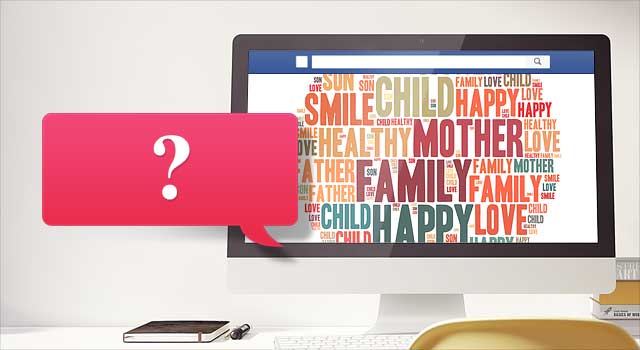
“Most Used Words“ is an unexpected privacy nightmare. Source http://en.vonvon.me/

“Most Used Words“ is an unexpected privacy nightmare. Source http://en.vonvon.me/

Earlier this week, the British company Comparitech published a blog post about the privacy nightmare caused by this innocent-looking Facebook app. “Most used words” is presented as a simple, playful quiz in which Facebook scans through and analyzes users‘ posts in order to generate a collection of words they use most frequently on Facebook. Sounds like fun, right? Before you try it yourself, take a closer look at this data-hungry wolf in sheep’s clothing – after some analysis of the app, it has turned out to be a privacy thief. When using the app, users give away following details:

First, the app asks for a couple basic pieces of information:

1. Name

2. Everything you’ve ever posted on your timeline

But then, it asks users to agree to give away the following personal details:

3. Profile picture, age, sex, birthday,and other public info

4. Entire friend list

5. All of the photos and photos you’re tagged in

6. Education history

7. Hometown and current city

8. Everything you’ve ever liked

9. IP address

10. Information about the device you’re using, including browser and language

Let’s face it — our concept of the privacy has  unarguably changed in the age of the Internet and social media. In the digital world, we leave our fingerprints on a daily basis while browsing, shopping, playing, and chatting on multiple devices. Regardless of our online activities, there should be limits as to how companies collect, store and process our personal data. In this case, the owner of the app, South Korean company vovon.me, can be accused of a serious breach of user privacy.

What do you give away when installing “Most used words”?

According to Vonvon’s official terms and conditions, you agree to your personal information being used in the following ways:

1. Used after the termination of your membership to the website and/or use of Vonvon’s services, for any reason whatsoever. (This basically means that you already gave away your data if you used the app.)

2. Stored on any of Vonvon’s servers at any location, including the countries that have little to no legal regulations regarding data privacy.

3. Sold to the third parties, which you agreed to according to this statement: […] We do not share your Personal Information with third parties unless We have received your permission to do so, or given you notice thereof (such as by telling you about it in this Privacy Policy) […]

4. Used in any manner by the third parties, as Vonvon doesn’t take any responsibility for it: […] this Privacy Policy does not apply to the practices of entities Vonvon does not own or control, or to individuals whom Vonvon does not employ or manage, including any third parties to whom Vonvon may disclose Personal Information[…]

How to protect yourself?

We have good and bad news for you. The bad one is that if you have already installed any of Vonvon’s apps, it’s unfortunately no longer possible to protect your privacy. (See point 1 in the paragraph above.)

If you haven’t used it yet, let this be a lesson to you. The same lack of privacy concerns can also be seen in other permission-hungry apps – this is why a weather forecast app would like to have access to your pictures and a cooking app requests your IP address.

We also advise you to review the current list of apps that you have already installed on Facebook, determine if you use them on a regular basis and pinpoint what kind of data the apps are requesting from you. You can do this by doing the following:

1. Select Settings in the top right of Facebook

2. Click Apps in the left menu

3. Hover over an app or game and click to edit its settings

You can find out more about Facebook apps‘ privacy and security in the About Apps section of the Help Center.

If you are an Avast user, log in into your Avast account and go to Social Media Security > Apps — we will guide you how to analyze each of your apps‘ security.

You might be surprised how many apps you have installed throughout the years, so don’t forget to make an audit of your apps on a regular basis.


Follow Avast on FacebookTwitterYouTube, and Google+ where we keep you updated on cybersecurity news every day.

Can shopping extensions help you find the best prices?

Protect your privacy while finding the best online prices.

The holiday shopping season is upon us and shoppers are flocking to the Web to find online deals and coupons. Shopping extensions for your web browser can help you find the best prices, but how do you know you are finding a great deal from a SAFE and trusted retailer?

There are several shopping tools that can help you find the lowest price from around the web, but I’ll start with the one that finds low prices and guarantees the safety and integrity of the online shop – Avast’s very own SafePrice.

Avast SafePrice finds the best prices from trusted retailers

SafePrice find the best deals from TRUSTED online shops

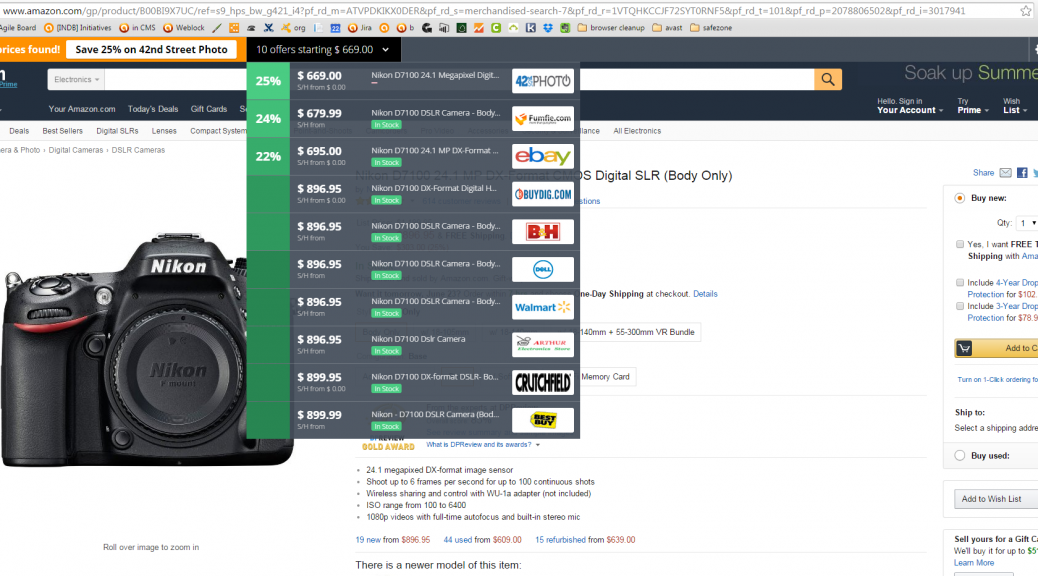
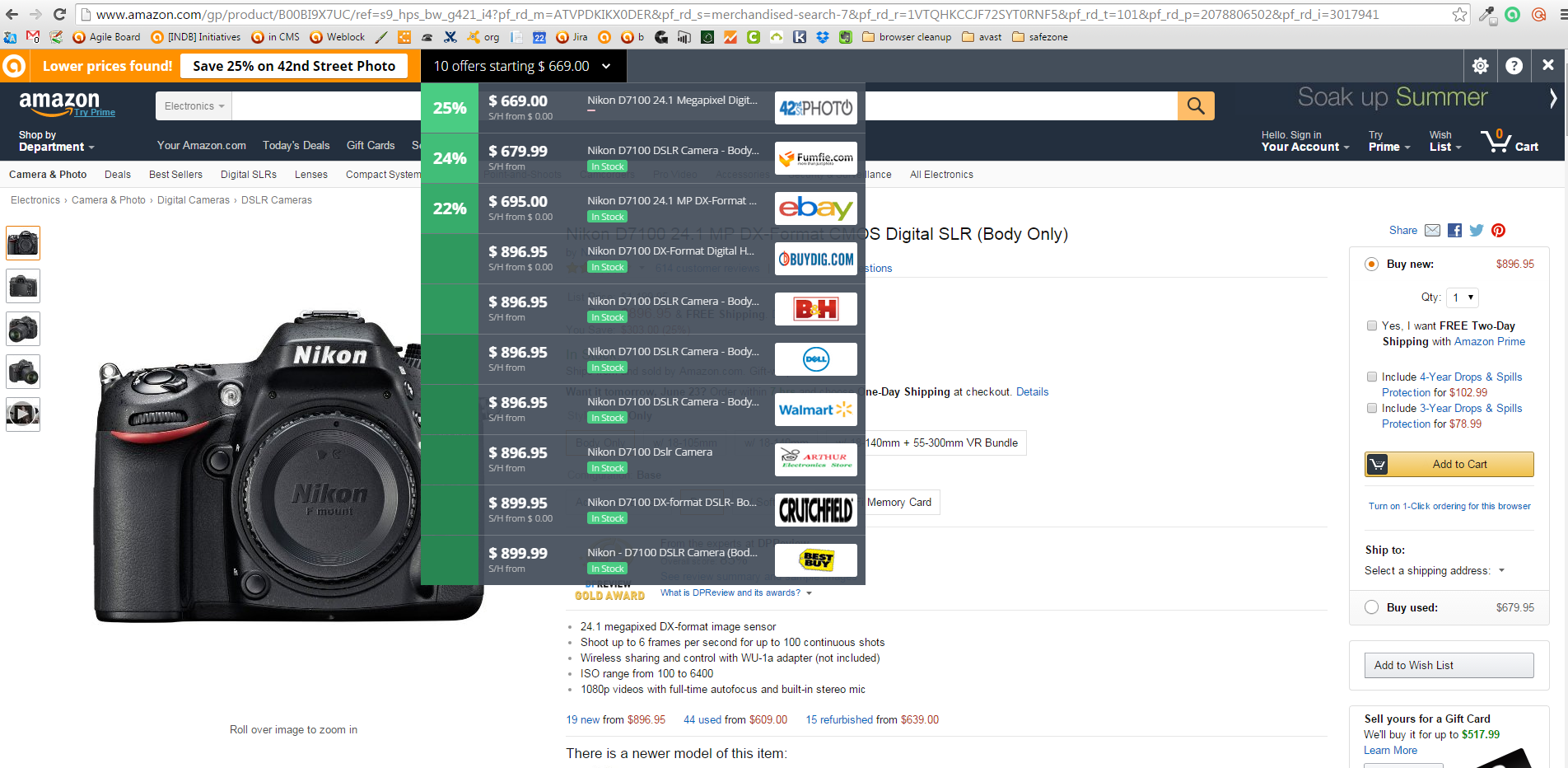
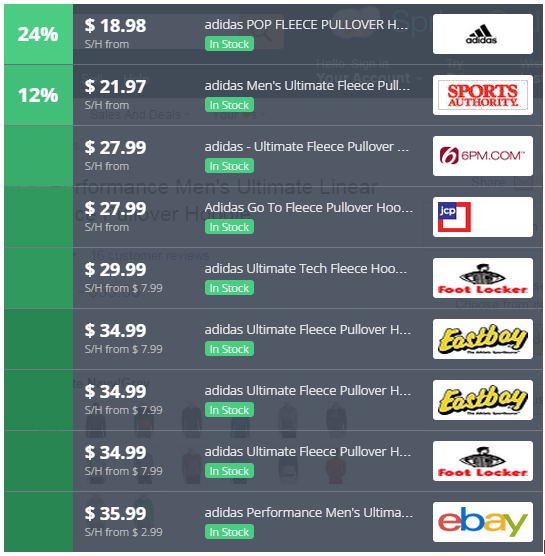
Instead of visiting price comparison sites first, all you do is go to your favorite online store and pick out what you want to buy. SafePrice checks the price against thousands of verified stores, then displays the best deals and coupons at the very top of your browser. The bar is invisible when you’re not shopping.

Avast users already have SafePrice installed. If you are not an Avast user, but wnat to use it to find trusted stores, then add the extension to Chrome from the Chrome Web Store.

SafePrice price comparison listHere’s what SafePrice does:

  • Offers coupons for savings on the same or similar products
  • Ensures that you’re buying from reputable dealers
  • Offers secure online price comparisons
  • Highlights the best deal
  • Provides easy customization capabilities
  • Hides from view when you’re not shopping
  • Offers deals without taking you to another site

SafePrice protects your privacy

SafePrice will never compromise your privacy. The specific products you are searching for and the URLs of the shopping sites you visit are communicated to our server. All personally identifiable information is stripped from this data in real time, so that the data that comes into our servers is completely anonymous.

Other shopping tools

InvisibleHand

InvisibleHand discreetly notifies you if the product you’re shopping for is available more cheaply from another retailer or travel site. It also shows you deals on hotels, rental-cars, and flights. Available for Chrome and Firefox.

Honey

Click on the Honey ‘Find Savings’ button during checkout and Honey will automatically apply coupon codes to your shopping cart. Available for Chrome and Firefox.

The Camelizer

For power-shoppers, this extension lets you track product price history information for items on Amazon, Best Buy, and Newegg. If you don’t need to buy the item now, you can sign up for price drop alerts via email or Twitter. Available for Chrome and Firefox.

RetailMeNot Coupons

For those who want to shop from their Android device (last year 53% of us did!), you can install RetailMeNot and search for the top deals and coupons from over 50,000 retailers.

Read our tips for safe shopping online.


Follow Avast on FacebookTwitterYouTube, and Google+ where we keep you updated on cybersecurity news every day.
‘Tis the Season to Shop Online

The holiday season is coming up and we expect that many will opt to shop online to avoid the big crowds in city centers, malls and stores. 

In America, Cyber Monday, the cyber version of shopping day Black Friday, was born in the mid 2000s. Cyber Monday sales have steadily increased since its inception and according to IBM Digital Analytics, sales grew 8.5% in 2014. According to ComScore, purchases are now also being made from smartphones with overall spending from mobile devices in the millions.

Americans aren’t the only ones who have embraced Cyber Monday, many other retailers around the world have come together to offer deals on the Monday after U.S. Thanksgiving and in China, Singles’ Day (November 11th) has become a major ecommerce day with 27,000 online merchants participating in 2014

via v3.co.uk

via v3.co.uk

This is not only an exciting time for online retailers and online shoppers but also for cyber criminals. I spoke with our senior malware analyst, Jaromír Hořejší about how cybercriminals are preparing for Cyber Monday:

Cybercriminals will use the same tactics they always do, but target consumers more during Black Friday with “special” offers via fake email campaigns to trick people into shopping on fraudulent sites to steal their information and money.

It is, therefore, vital you have antivirus installed on all of your devices. Antivirus software, like Avast, will detect and block phishing attacks before they can affect consumers.

Consumers should also make sure all of the software on their devices is up-to-date. Attackers often exploit vulnerabilities, which can be found in outdated software and by exploiting outdated software they can infect your device to then steal your financial information while you shop online.

In addition, consumers should shop at online stores that are known and credible. Credible sites usually use the HTTPS protocol, assuring secure communication. You can recognize if a site is using the HTTPS protocol by the little padlock in the address bar of your browser. If you are on a check out page and you don’t see the HTTPS padlock, do not enter your personal data and financial information!

How to minimize risks while shopping online

  • Use a payment service or your credit card – Experts agree that payment services like PayPal are safe because of their security practices and the encryption technology they use. Link it to a credit card so you get your credit card’s fraud protections in addition to PayPal’s. If you only use a credit card, designate one card for online purchases so if something unusual happens, you don’t have to track down all your other cards.
  • Keep a paper trail – Once you place your order, print or save records of the transaction. Check your credit card statement to make sure transactions match and there were no unauthorized charges.
  • Avoid shopping while using public Wi-Fi – Unsecure public Wi-Fi hotspots do not give you any protection from hackers who want to monitor what you are doing online. It’s not difficult for someone to intercept and modify communications between you and another site. If you have to do it, then use a Virtual Private Network (VPN) so your communications will be encrypted.
  • Use a secure browser – the new premium versions of Avast 2016 include SafeZone browser, which isolates banking and payment sites in a protected space, so users have an extra secure place to bank and pay bills online.

 Follow Avast on Facebook and Twitter  for more security tips, news, and trends. 

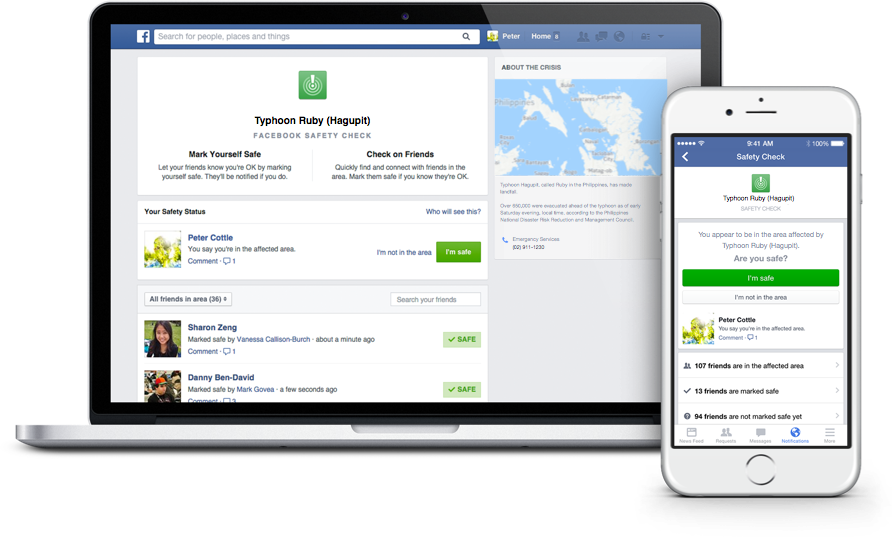
Facebook Safety Check feature allows users to connect with loved ones during a disaster

Facebook's Safety Check feature allows users to connect with friends and loved ones during a disaster.

Facebook’s Safety Check feature allows users to connect with friends and loved ones during a disaster.

Facebook’s Safety Check feature was created in October 2014 in response to the devastating earthquake and tsunami that struck Japan in March 2011. In a Facebook post about the feature, Mark Zuckerburg described the mission of the feature:

Over the last few years there have been many disasters and crises where people have turned to the Internet for help. Each time, we see people use Facebook to check on their loved ones and see if they’re safe. Connecting with people is always valuable, but these are the moments when it matters most.

This is how it works:

1. Facebook will prompt users that might be in the area of a natural disaster to inform others about their status using the Safety Check feature.

2. Users can click the “I’m safe“ button to let their Facebook friends know that they are safe.

3. Facebook will alert you of friends that used Safety Check and allow you to look over the list of friends who could potentially be affected by the disaster.

Safety Check is only offered to individuals that are located in a disaster area. Although the feature was originally created to respond to natural disasters, it has recently been utilized to help users connect with others in the wake of social crises. Zuckerberg told CNET that Facebook is still developing the policy to determine exactly when Safety Check will be activated. He was also quoted saying that he won’t post each time Safety Check is activated because “unfortunately, these kinds of events are all too common.”

For more information about Safety Check, you can read through Facebook’s page about the feature.


Follow Avast on FacebookTwitterYouTube, and Google+ where we keep you updated on cybersecurity news every day.
Facebook contest winners help welcome in Avast 2016

Our Facebook contest gave participants a chance to win one free year of Avast Premier 2016.

Our Facebook contest gave participants a chance to win one free year of Avast Premier 2016.

Over the weekend, we ran a fill-in-the blank contest on our Facebook page in celebration of the launch of Avast 2016 products. Participants had the chance to win a 1-year license for Avast Premier 2016, and could do so by finishing the following sentence:

“The best celebrations always include ______________.”

We received many fun, creative answers from our Facebook fans who are passionate about Avast and staying secure. Here are some of our favorite responses:

“The best celebrations always include free food, because who doesn’t like free food? #Avast2016

 “The best celebrations always include close friends, family and the dog. #Avast2016

“GOOD FOOD (along with family, of course). #Avast2016

 “The best celebrations always include an AVAST amount of love. #Avast2016

 “#Avast2016 The best celebrations always include Czech beer“

We’d like to thank each of our users who participated in the contest, and we encourage you to keep your eyes peeled for more upcoming promotions on our social media channels. Thanks for celebrating the arrival of Avast 2016 with us!


Follow Avast on FacebookTwitterYouTube, and Google+ where we keep you updated on cybersecurity news every day.
Windows 10 get significant upgrade

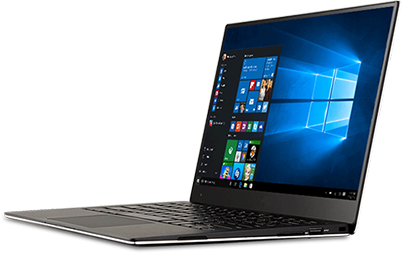
Microsoft Windows 10

Avast is the official Windows 10 consumer security software provider.

Yesterday, Microsoft released the first major update to Windows 10 for PCs and tablets since its initial release in July. It’s so large and improves so many features that it has been categorized as a whole new version instead of merely a patch or service pack.

Many of the features that have been in preview mode, including Cortana and Microsoft Edge, have significant upgrades. Additional capabilities in Cortana are only available in the USA for now. Improvements were also made to Mail and Calendar, Maps, Groove, Photos, Skype, and Xbox.

The Microsoft company blog states, “With this update, there are improvements in all aspects of the platform and experience, including thousands of partners updating their device drivers and applications for great Windows 10 compatibility.”

Avast 2016 is compatible with Windows 10

Avast is the official Windows 10 consumer security software provider. For best results with the new version of Windows 10, please make sure you also upgrade your Avast antivirus protection to the latest Avast 2016 version.

Avast is a recipient of the Windows 10 Compatibility Award from AV Comparatives.

image via windows.microsoft.com


Follow Avast on FacebookTwitterYouTube, and Google+ where we keep you updated on cybersecurity news every day.

Facebook increases security for users

Don’t ignore Facebook  alerts and take your time to improve your security

Don’t ignore Facebook alerts and take your time to improve your security

Facebook has become more concerned about its users’ security. The social giant understands that education is the key to providing users with a secure experience. We have already seen the Facebook “dinosaur” guiding us via privacy settings. Now Facebook pops out a short guide to improve the security of our profiles. We strongly recommend not to ignore it and take those steps to ensure that your profile is properly protected.

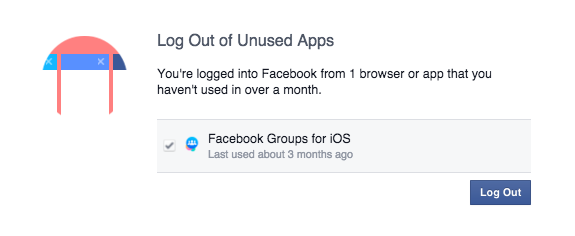
Step 1. Take control over your login

Don’t ignore Facebook  alerts and take your time to improve your security

Don’t ignore Facebook alerts and take your time to improve your security

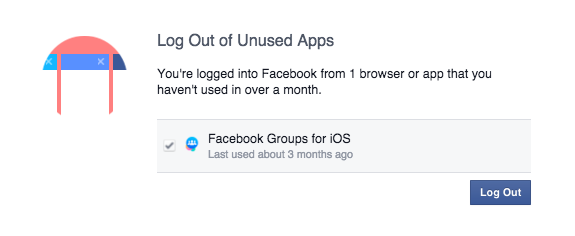
We check our Facebook profile on multiple devices: Our smartphones, tablets and via different apps (Facebook group, messenger, Facebook app). Sometimes we don’t even realize it! ‘Log Out of Unused Apps’ will show you all the apps that you use to log in, but haven’t used for a long period of time. From a security perspective that can create a vulnerable situation. If you don’t use the app, better log out!

We have also a solution for that. If you don’t want to be bother with constant login into your social account, we recommend Avast Passwords available for all your mobile devices for FREE. Check it out for Android and iOS. With one password you can safely log in into your all social apps, without remembering multiple passwords!

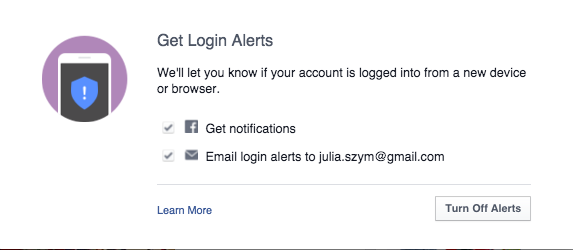
Step 2. Set up login alerts

Get login alerts

Login alerts will notify you about unauthorized login attempts into your account

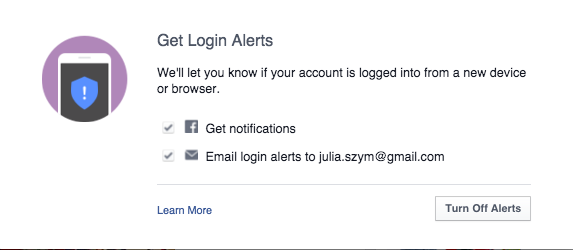
Facebook will let you know when there is an attempt to log into your account via a new device or browser. You can set up both – Facebook notifications as well as email alerts. In this way you have better control over who, when, and where someone tries to login into your profile. You will receive a notification and if it is a hacking attempt, you can block it. We recommend to chose both options, in order to increase your chances to discover a hacker, before he cracks your account.

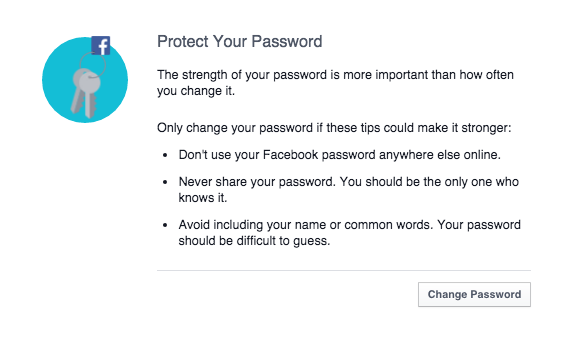
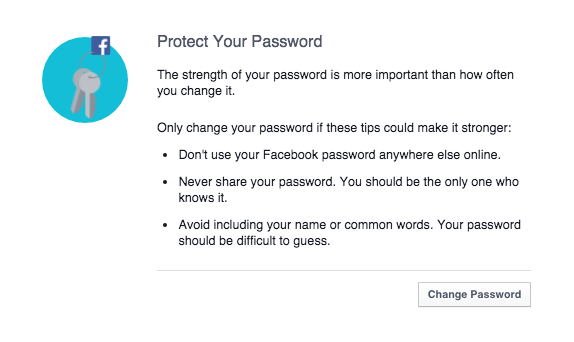
 Step 3: Protect your Password

Follow Facebook rules to protect your password

Follow Facebook rules to protect your password

Follow simple security rules:

  1. 1. Set up unique password to your account (don’t use the same password to all your social profiles).
  2. 2. Don’t share it with anyone else.
  3. 3. Make sure your password is strong: it should contain small and big characters, numbers and special signs. We recommend minimum 16 characters.
  4. 4. Change passwords regularly and always, if any of your accounts or websites that you use is compromised.
  5. 5. Last but not least, use Password management system, to protect all your accounts requiring logins, not only Facebook. For example the free Avast Passwords.
Secure Facebooking!

Secure Facebooking!


Follow Avast on FacebookTwitterYouTube, and Google+ where we keep you updated on cybersecurity news every day.

Facebook increases security for users

Don’t ignore Facebook  alerts and take your time to improve your security

Don’t ignore Facebook alerts and take your time to improve your security

Facebook has become more concerned about its users’ security. The social giant understands that education is the key to providing users with a secure experience. We have already seen the Facebook “dinosaur” guiding us via privacy settings. Now Facebook pops out a short guide to improve the security of our profiles. We strongly recommend not to ignore it and take those steps to ensure that your profile is properly protected.

Step 1. Take control over your login

Don’t ignore Facebook  alerts and take your time to improve your security

Don’t ignore Facebook alerts and take your time to improve your security

We check our Facebook profile on multiple devices: Our smartphones, tablets and via different apps (Facebook group, messenger, Facebook app). Sometimes we don’t even realize it! ‘Log Out of Unused Apps’ will show you all the apps that you use to log in, but haven’t used for a long period of time. From a security perspective that can create a vulnerable situation. If you don’t use the app, better log out!

We have also a solution for that. If you don’t want to be bother with constant login into your social account, we recommend Avast Passwords available for all your mobile devices for FREE. Check it out for Android and iOS. With one password you can safely log in into your all social apps, without remembering multiple passwords!

Step 2. Set up login alerts

Get login alerts

Login alerts will notify you about unauthorized login attempts into your account

Facebook will let you know when there is an attempt to log into your account via a new device or browser. You can set up both – Facebook notifications as well as email alerts. In this way you have better control over who, when, and where someone tries to login into your profile. You will receive a notification and if it is a hacking attempt, you can block it. We recommend to chose both options, in order to increase your chances to discover a hacker, before he cracks your account.

 Step 3: Protect your Password

Follow Facebook rules to protect your password

Follow Facebook rules to protect your password

Follow simple security rules:

  1. 1. Set up unique password to your account (don’t use the same password to all your social profiles).
  2. 2. Don’t share it with anyone else.
  3. 3. Make sure your password is strong: it should contain small and big characters, numbers and special signs. We recommend minimum 16 characters.
  4. 4. Change passwords regularly and always, if any of your accounts or websites that you use is compromised.
  5. 5. Last but not least, use Password management system, to protect all your accounts requiring logins, not only Facebook. For example the free Avast Passwords.
Secure Facebooking!

Secure Facebooking!


Follow Avast on FacebookTwitterYouTube, and Google+ where we keep you updated on cybersecurity news every day.

Facebook increases security for users

Don’t ignore Facebook  alerts and take your time to improve your security

Don’t ignore Facebook alerts and take your time to improve your security

Facebook has become more concerned about its users’ security. The social giant understands that education is the key to providing users with a secure experience. We have already seen the Facebook “dinosaur” guiding us via privacy settings. Now Facebook pops out a short guide to improve the security of our profiles. We strongly recommend not to ignore it and take those steps to ensure that your profile is properly protected.

Step 1. Take control over your login

Don’t ignore Facebook  alerts and take your time to improve your security

Don’t ignore Facebook alerts and take your time to improve your security

We check our Facebook profile on multiple devices: Our smartphones, tablets and via different apps (Facebook group, messenger, Facebook app). Sometimes we don’t even realize it! ‘Log Out of Unused Apps’ will show you all the apps that you use to log in, but haven’t used for a long period of time. From a security perspective that can create a vulnerable situation. If you don’t use the app, better log out!

We have also a solution for that. If you don’t want to be bother with constant login into your social account, we recommend Avast Passwords available for all your mobile devices for FREE. Check it out for Android and iOS. With one password you can safely log in into your all social apps, without remembering multiple passwords!

Step 2. Set up login alerts

Get login alerts

Login alerts will notify you about unauthorized login attempts into your account

Facebook will let you know when there is an attempt to log into your account via a new device or browser. You can set up both – Facebook notifications as well as email alerts. In this way you have better control over who, when, and where someone tries to login into your profile. You will receive a notification and if it is a hacking attempt, you can block it. We recommend to chose both options, in order to increase your chances to discover a hacker, before he cracks your account.

 Step 3: Protect your Password

Follow Facebook rules to protect your password

Follow Facebook rules to protect your password

Follow simple security rules:

  1. 1. Set up unique password to your account (don’t use the same password to all your social profiles).
  2. 2. Don’t share it with anyone else.
  3. 3. Make sure your password is strong: it should contain small and big characters, numbers and special signs. We recommend minimum 16 characters.
  4. 4. Change passwords regularly and always, if any of your accounts or websites that you use is compromised.
  5. 5. Last but not least, use Password management system, to protect all your accounts requiring logins, not only Facebook. For example the free Avast Passwords.
Secure Facebooking!

Secure Facebooking!


Follow Avast on FacebookTwitterYouTube, and Google+ where we keep you updated on cybersecurity news every day.

What happens when Avast engineers spend the night in a parking garage?

A hackathon resulting in creative prototypes of apps and hardware.

Avast engineers have a hackathon

Avast engineers pull an all-nighter

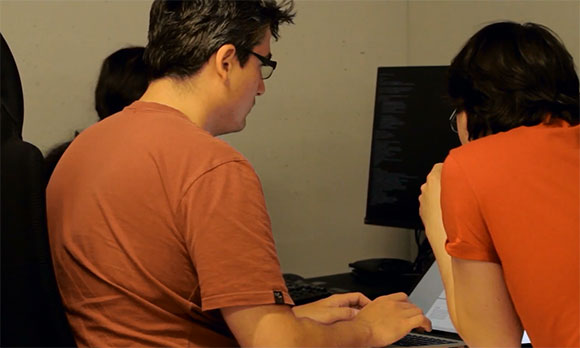
It had all the makings of a classic hackathon: An all-nighter in a weird location fueled by coffee and good ideas. Located in the parking garage of our current Avast headquarters, R&D teams participated in the event with the goal to invent cool things we can implement in our new HQ building, which is nearly completed.

We dubbed the hackathon Párkathon, because our new HQ building has a sausage-like curve to it. In the Czech language sausage is “párek” + hackathon = Párkathon.

Here’s what it looked like:

The Párkathon started on Thursday and continued through the wee hours of the morning all the way through Friday evening. Some people were so psyched about their projects that they continued at home or even stayed at the office during the weekend to finish . On Monday morning, the epic hackathon ended with a demo session and attendees voted for the winning team. The prize was a barbecue party for that team. And they kindly invited all the other Párkathon attendees.

Some of the projects that came out of Párkathon include:

Winning projects

iZasedáček – an interactive version of the office seating plan. This app let’s people quickly find who sits where and localize empty chairs. It includes floor maps of the building.

Stairs vs. Elevators – devices for measuring stairs or elevator usage. Including HW prototype – every time someone crosses two laser beams, his walk through is counted. Other use cases are under development.

Other projects that came out of Párkathon

Waldo – a tool for the real-time search of people within the building using iBeacons and GPS. Users can send messages along with a location request inside or outside the building to quickly organize a meeting.

Hacked Earth – 3D visualization of geo-located data on Earth’s surface. Can be used for real-time display of virus attacks around the world or product information like the visualization of app installations. The plan is to use it at reception, meeting rooms, or for events.

FunMon – the real-time monitoring of table football and billiards usage. Uses HW sensors to detect facility usage and allows short-term booking.

Orchestrované zobrazovátko – a system for streaming content to TVs around the building. This is an easy way to show content on any TV. There is also the option to broadcast the same message on a group of TVs or even all of them.

Zasedačkomat – an app for wall-mounted Android tablets in each meeting room. It shows the room availability and allows you to perform basic tasks like reserving the room or releasing it for use.

3D navigation – printing of custom made direction signs for our new building. This task included learning to work with 3D printer.

MemeGen – system for internal memes and jokes.


Follow Avast on FacebookTwitterYouTube, and Google+ where we keep you updated on cybersecurity news every day.