Category Archives: Avast

Avast

Why independent testing is good for Avast Antivirus

avtest_certified_homeuser_2015-08

Avast Free Antivirus just received another AV-Test certification for its stellar protection against real-world threats, performance in daily use, and usability.


Yay! It’s like collecting another trophy for the display case or another blue ribbon to hang on the wall, but what does it really mean? How is this type of testing useful for you, our customers?

Ondrej Vlcek, Avast’s Chief Operations Officer explains,

Because of the overwhelming growth of malware targeting consumers and businesses, labs like AV-Test Institute have become an invaluable independent source of data to Avast. Their research has influenced our engineers to expand their knowledge of malware, revolutionize diagnostic and detection methods, and facilitate strategies to get real-time updates to hundreds of millions of people who put their trust in our antivirus products.”

Here’s a little background on the testing lab.

AV-Test Institute is an independent lab designed specifically for testing and researching malware. Located in Magdeburg, Germany, they inhabit 1200m² (12,900 ft²) of space with 3 server rooms and a variety of main and secondary laboratories.

Safety protocols

AVTest labs networks

image via www.av-test.org

Just like a specialized facility that deals with infectious agents, AV-Test has set up safety protocols to avoid accidental infections. The hazardous material they store includes 330 million pieces of malicious test data collected over the past 15 years. Every day, they collect another 390,000 new samples of malware.

Thirty specialists work in three labs with more than 100 workstations connected to three physically separate networks: Red for all the test malware with no internet access, Yellow has limited internet access for malware testing, and Green has full internet access so they can download and update programs.

Test Procedures

Every two months, antivirus products are run through a series of tests using a pre-determined configuration that mimics that of the real world. The AV-Test lab looks at three areas: Protection, Performance, and Usability.

In the August 2015 round,  22 products were run through grueling tests. The products can earn a maximum of six points in each of the three test categories for a total of 18 points.

For example, in the Protection category, Avast Free Antivirus had to recognize over 330 zero-day malware attacks, which means they are new, still unknown threats. In the second phase, the objective was to recognize and defend against just under 45,000 known malware threats from the AV-Test reference sets. The average results for the July and August test were 98% detection for zero-day. Avast Free Antivirus scored 99% and 100%, for an average of 99.5%. Avast Free Antivirus identified 100% of widespread and prevalent malware in the second phase. We improved our overall score over the previous test by a half a percentage point, which makes a difference in the real world.

Certification

The award of an AV-TEST CERTIFIED seal of approval is evidence that Avast Free Antivirus has achieved the level of performance and protection defined by the AV-Test labs.

Tests like these, and the ones by Austrian lab AV-Comparatives, are not only for security geeks, but useful for our customers. Even if you never read over the results, you can be guaranteed that we take them seriously and strive to use the information to create the best products we can to protect your home and business PCs, Macs, and Android smartphones and tablets.


Follow Avast on FacebookTwitterYouTube, and Google+ where we keep you updated on cybersecurity news every day.

Cybersecurity tips for business travelers

business trip - working late

Sensitive business data is at risk when you travel. Take precautions to protect it.

Cybersecurity is not limited to your office or home. Nowadays, many of us use the same devices for work and personal business, so when traveling we need to be extra diligent to protect our devices and the data we have on them. If you use common sense and a bit of Avast technology, all your devices – laptops, smartphones, and tablets, can remain secure wherever you are.

Here are a few things you can do before you go and while you’re on-the-road:

1. Install antivirus protection. Your first and best line of defense on your PC or Android device is antivirus protection. Install it and make sure it is up-to-date.

2. Keep your operating system and software up-to-date. Hackers take advantage of software with security holes that have not been plugged, so take time regularly to make sure that your software and apps have patches and updates applied.

3. Lock down your device. Make it a habit to lock your PC and phone with a PIN, password, or even a fingerprint. Avast Mobile Security even allows you to password-protect your apps. Before you travel, make sure your critical apps, like access to your bank, are protected.

4. Turn off auto-connect. If you have your phone set to automatically detect and connect to available wireless networks, then turn it off. It’s much better to choose yourself. The new Avast W-Fi Finder can help you find secure Wi-Fi hotspots. Look for it to be released soon.

5. Avoid unencrypted Wi-Fi networks. Free Wi-Fi hotspots sure are nice, but they are not worth the risk to your personal data. They are unsecured and can give cybercrooks access to your internet-enabled devices. The safest way to use free Wi-Fi, even that supplied by your hotel, is to connect via a virtual private network, otherwise known as a VPN. The name sounds complicated, but with Avast SecureLine VPN, it is as easy as pushing a button.

6. Use smart passwords. Using a password like 1234 or password is not a smart thing to do at any time. But discovering that your account was hacked when you are traveling can ruin your trip. Plan ahead and manage your passwords in an intelligent way. There are plenty of memory tricks you can use to create unique passwords or you can let a password manager take care of the heavy lifting for you. Look for a new Avast password manager coming soon.

7. Think before you overshare. There are differing opinions about oversharing your location on social networks. Some say that broadcasting to the world that you are away invites a burglar into your home. Others say that broadcasting your whereabouts with regular updates is security in and of itself, because your friends and family know where you are in case something happens. And it could protect your contacts from the “I was arrested in Niagara Falls and need you to send bail money via Western Union” scam. Talk with your family and decide how you want to handle that.

8. Guard your devices. Thieves often target travelers. Don’t let yourself get so distracted that you lose track of your devices. Install Avast Anti-Theft before you leave. One of its useful features is called Geofencing. This allows you to set a perimeter, say around a table at an airport cafe, and if your mobile phone leaves that perimeter, an alarm will sound. If you discover any time that your smartphone or tablet has been stolen, Avast Anti-theft lets you control your cell phone remotely. You can locate and track your lost phone, remotely lock or wipe the memory, and even activate a customizable siren or alarm.

The best thing about all these tools is that they are free (or in the case of SecureLine, a free trial), so the next time you start packing for your business trip, make sure that your devices are ready to go too.


Follow Avast on FacebookTwitterYouTube, and Google+ where we keep you updated on cybersecurity news every day.

Making technology simpler: Thanks to my mother

Some days ago we wrote about scams targeting senior citizens. This group is at risk because generally speaking, they have less computer education than younger people who have grown up in the digital world. I recommended the reading to my mother, thinking she will benefit from it. She thanked me, but said that there were “some things” she did not understand.

Learning to surf internet

Friends and family can help senior citizens enjoy a safe online experience

In the Avast blog we do our best to write in simple terms. However, we know much more about security and, quite frequently, explains things in technical writing. So, I’ve take some time to write what will be useful for your mother (and mine). What about recommending her to read this?

Computer and mobile security essentials for senior citizens

  • Ask for help from one you trust. Don’t be ashamed to ask for help. Remember there are a lot of people that love to help and share knowledge. Start with your family and friends. If you and your friend both have Avast installed, it’s possible for them to remotely access your computer.  If they don’t have spare time or knowledge, then try the Avast Community Forum. With sections in several languages, you’ll find friendly people that could guide you with security technology. Find us there!
  • Install and keep your security software updated. Avast makes everything simple for you. All the “difficult tasks” have been automated: Protection against viruses and malware, blocking spam, preventing fraud and hacker intrusions, automatic updates of your software.
  • Scan and protect your network. That “complex” device with lights blinking that gets you on the internet is called a “router”. Do you know that it could be the weaker part of your network? Avast can scan your home network and make sure it’s secure. Our next Avast version will give you much more control of an online pain: Passwords. Keep them updated and strong!
  • In your Android mobile devices, use an easy and comprehensive security app. Avast apps bring a lot of protective features that give peace of mind, like analyzing malicious app (maybe the ones with intrusive ads, right?). With our family of apps, you can clean temporary files, keep your battery in good shape, and stay safe when using free Wi-Fi connections. Also, to stay safe, use only known app stores like Google Play and Amazon.
  • Common sense! Do not open unsolicited emails, ever! Don’t trust strange messages about promises of a better computer, prizes, and special offers. Keep your attention always on: Do not install unknown software, and do not accept extra offers during installation of trusted programs. If you have any suspicions, ask others or in Avast Community Forum.

What do you think? Did I write enough for your mother to understand? If so, I accomplished my goal.

Special thanks for my mother (for the inspiration and love). And a special thanks to the guys that share all their time and effort to make the internet a better place and for teaching me to write with such pleasure: The volunteers on the Avast Community Forum.


Follow Avast on FacebookTwitterYouTube, and Google+ where we keep you updated on cybersecurity news every day.

Got an aging parent? Tell them about the Grandparent scam

Scammers rob elderly victims of an estimated $3 Billion per year.

A scam that has been around since at least 2008 is still active and targeting elderly folks. Seventy-four year old Avast evangelist, Bob Gostischa, who knows a thing or two about scams, security, and privacy, received a call just yesterday from a scam artist attempting to steal money. “If it happened to me, I’m sure it’s going to also happen to others,” said Gostischa.

Male Family Members

Scammers target elderly people “because they’re more gullible.”

Here’s the basic premise:

Someone either calls or emails pretending to be your grandchild. The typical story is that they have been wrongfully arrested and need bail money wired right away. Another variation says they are traveling and have been mugged or even in an accident and badly injured. After going through this frantic sob story, and if they sense that their victim is falling for it, the scammer asks for money to be wired through services such as Western Union and MoneyGram.

After the phone call ended, Bob sent us a transcript so we could share it with Avast Blog readers. “I consider myself lucky because the first instinct was wow, how can I help her…?,” he said.  “I guess we all really need to be very vigilant at all times.”

Caller: Hello Grandpa, this is your granddaughter. I have laryngitis so I don’t sound like myself

Bob: You certainly don’t. Which granddaughter?

Caller: What do you mean?

Bob: Well, I have several. Caller: Your oldest.

Bob: Oh, OK (Suspicious because she should have said her name.) Is everything OK?

Caller: No.

Bob: What’s the matter?

Caller: I was visiting a friend in Niagara Falls and on my way home, I was involved in a car accident.

Bob: Are you OK?

Caller: Yes, everyone is fine.

Bob: And the car?

Caller: The car is fine. This woman came out of nowhere, and I hit her but she’s OK.

Bob: Thank God.

Caller: Yes, but when the cops came, they asked if I was drinking. I told them no but, because I’m taking medicine for my laryngitis, I failed the breathalyzer and spent the night in Jail.

Bob: Did they assign you an attorney?

Caller Yes, but I need bail money. Can you send me $500.00 via Western Union?

Bob:  That’s going to really be hard. We just had some medical bills so things are pretty tight.

Caller: Please Grandpa, can’t you put it on your credit card?

Bob: Sorry, they are all maxed out.

Caller Please Grandpa, I don’t want to stay in jail.

Bob: Sorry sweetie, but I really can’t and don’t have any money I can send.

Caller: click…. she hung up.

“In my case, my oldest granddaughter doesn’t drive and she also wouldn’t be in Niagara Falls,” said Gostischa.  “It’s very easy to fall for a scam like this because all of us want to help family – especially our grandchildren.”

Last year, CBS News interviewed a former scammer who worked this game. He said that on a good day he could make $10,000 from the grandparent scam. “We target people over the age of 65, mainly, because they’re more gullible,” the former scammer said. “They’re at home. They’re more accessible. Once you get them emotionally involved, then they’ll do anything for you, basically.”

How to protect yourself from the Grandparent Scam

The FBI’s Internet Crime Complaint Center (IC3) has these suggestions:

  • Resist the pressure to act quickly.
  • Try to contact your grandchild or another family member to determine whether or not the call is legitimate.
  • Never wire money based on a request made over the phone or in an e-mail…especially overseas. Wiring money is like giving cash—once you send it, you can’t get it back.

What to do if you have been a victim

  • Contact your local authorities or state consumer protection agency if you think you’ve been victimized.
  • File a complaint with IC3, which may refer the case to federal, state, local or international law enforcement or regulatory agencies for possible investigation, or The Federal Trade Commission. You can also call the FTC at 1-877-382-4357 to report a complaint.

Follow Avast on Facebook, Twitter, YouTube, and Google+ where we keep you updated on cybersecurity news every day.


Avast team at Webexpo conference

This past weekend, Prague hosted hundreds of web professionals at the Webexpo conferenceAvast Software was a proud general sponsor of this event.

Avast Webexpo booth

Avast was one of the sponsors of Webexpo

Attendees could meet our team at the Avast booth, try Avast technologies, and chat with our colleagues. They could also learn first hand how it is to work for the Best Czech Employer of 2013!

Those who attended the lectures could also learn from the Avast experts. It was the second time that Michal Augustýn, Avast’s Lead Software Developer was invited to a podium at Webexpo. Michal, who has worked at Avast for more than 7 years, designs and develops internal systems for Avast Virus Lab. He and his colleagues are the ones directly responsible for the security of our users. He talked about continuous development and improvement of Avast Backend infrastructures that allows us to send up-to-date virus signatures to protect millions of Avast users.

Another speaker representing Avast was Alena Varkočková. Alena proves that there are also geeky girls (YAY!) and that to be a great Senior Software developer at Avast Software, you don’t have to be a guy! In fact, Avast employs around 20% of women. Alena talked about a big project she was involved in: Developing the infrastructure to communicate with Avast users via in-product messaging. Thanks to their work, our users see pop-ups informing about program updates, monthly virus reports, or new threat alerts.

A third developer represented Avast Software on Webexpo’s podium – Marek Beneš. Marek, who has been with us for over 5 years, talked about the importance of monitoring your work from the developer perspective. He and his colleague Alena are responsible for development and continous releases of the virus signatures, delivered to the Avast users. They are making sure that  you, Avast users, receive the best up-to-date protection.

An exciting event for the attendees of the Webexpo conference was the opportunity to ask questions to the co-founder of Avast Software, Mr. Eduard Kučera. Avast Software is considered to be the first Czech Startup and it became the most successful Czech IT company, with offices in Prague and seven other locations, to serve security products to more than 230 million users all over the world. Mr. Kučera said that the keys to our success were releasing a free version of the Avast product, great reception among its users who keep recommending Avast, and basically good luck.

Alena, Michal, and Marek  are excellent world-class specialists in their fields. If you want to learn from the best follow Michal, Alena, Marek, and Avast Developers on Twitter: @AugiCZ, @alenkacz, @bblcz @avast_dev. If you want to join the Avast team and work for a great IT company, check out our available positions.

Webexpo 2015
Presenting at Webexpo
Presenting at Webexpo 2
Avast sponsored Webexpo
Eduard Kucera founder of Avast
Exploring at the Avast booth
IMG_6817
Avast dev jobs
Would you to work for Avast


Follow Avast on FacebookTwitterYouTube, and Google+ where we keep you updated on cybersecurity news every day.

Apple removes malicious apps from App Store

Apple slow internet

image via TechInsider

While the rest of us were soaking up the last of the season’s sunshine, Apple researchers spent the weekend removing hundreds of malicious apps for iPhone and iPad from the iOS App Store.

The recent exploit on Apple has shown us that even Apple’s system can be compromised quite easily,” said Avast security researcher Filip Chytry. “While this time nothing significant happened, it is a reminder that having everything under an Apple system could potentially make a system vulnerable.”

The malware seems to have been focused on Chinese users. Chinese media reported more than 300 apps including the popular instant messaging service WeChat, Uber-like taxi hailing program Didi Kuaidi, banks, airlines, and a popular music service were infected.

The malicious software programs got by Apple’s strict review process in an ingenious way. Hackers targeted legitimate app developers by uploading a fake version of Xcode, Apple’s development software used to create apps for iOS and OS X, to a Chinese server. It’s a large file, and reportedly quite slow to download from Apple’s U.S. servers, so to save time, unwitting Chinese developers bypassed the U.S. server and got their development tools from the faster Chinese server. Once their apps were completed, the malicious code traveled Trojan-horse style to the App Store.

“If hackers are able to exploit one entry point, they are able to attack all of the other iOS devices – and the fact that Apple doesn’t have a big variety of products makes it easier,” said Chytry.

Apps built using the counterfeit tool could allow the attackers to steal personal data, but there have been no reports of data theft from this attack.

“Regarding this specific vulnerability, consumers shouldn’t worry too much, as sandboxing is a regular part of the iOS system,” said Chytry.

A sandbox is a set of fine-grained controls that limit the app’s access to files, preferences, network resources, hardware, etc.

“As part of the sandboxing process, the system installs each app in its own sandbox directory, which acts as the home for the app and its data. So malware authors cannot easily access sensitive data within other apps,” said Chytry.

In a statement Apple said, “To protect our customers, we’ve removed the apps from the App Store that we know have been created with this counterfeit software and we are working with the developers to make sure they’re using the proper version of Xcode to rebuild their apps.”


Follow Avast on FacebookTwitterYouTube, and Google+ where we keep you updated on cybersecurity news every day.

AirDrop vulnerability is an easy avenue for hackers to exploit Apple devices

Do you own an Apple device? A vulnerability discovered within AirDrop could pose as a risk to your files. (Photo via aayush.me)

Do you own an Apple device? A recent vulnerability discovered within AirDrop could pose as a risk to your files. (Photo via aayush.me)

Recently, an alarming vulnerability has cropped up on iOS devices. This security loophole allows an attacker to overwrite arbitrary files on a targeted device and, when used in combination with other procedures, install a signed app that devices will trust without presenting a warning notification to users.

In a recent article published on Threatpost, it’s noted that the vulnerability is located in a library that lies within both iOS and OS X. In this case, the library in question is AirDrop, the tool featured on Apple devices that allows users to directly send files to fellow Apple device quickly and effortlessly. The problem lies within the fact that Airdrop doesn’t use a sandboxing mechanism in the same way that many other iOS applications do. When making use of a sandbox, every application has its own container for files that it can’t get beyond the so-called “walls“ of.

AirDrop gives users to the choice to accept file transfers either from only their own contacts or anyone who sends them a request to send files. In the case that a user can receive files from anyone, it’s quite easy for an attacker to exploit their device on their locked iOS device. What’s more, the attacker can even make the attack without the user agreeing to accept a file transferred using AirDrop.

Directory traversal attacks make the exploitation of this vulnerability possible

Mark Dowd, the security researcher who discovered the vulnerability, has been able to repeatedly and reliably exploit the security flaw. The vulnerability allows the attacker to execute a directory traversal attack, in which the attacker attempts to access files that are not intended to be accessed. Thus, the attackers are capable of writing files to any location they choose on the file system.

Since sandboxing rules weren’t being strictly enforced on AirDrop, Dowd was able to read/write hidden system resources in combination with his own directory traversal attack. In doing so, he was able to upload his own application into the system and make it appear as trusted.

This bug has been reported to Apple, but a full patch has not yet been released for the recently-launched iOS 9. Therefore, if you’re the owner of one or more Apple devices, make sure that your AirDrop sharing options are set to private and that you’re only able to receive files from your contact list.


Follow Avast on FacebookTwitterYouTube, and Google+ where we keep you updated on cybersecurity news every day.


Avast Mobile Security: So much more than just another security app

With millions of applications waiting to be installed in our gadgets, you not only need to be concerned about quality, but you also need to take the proper measures in order to avoid your phone becoming infected by malware. Unfortunately, we already know that Google Play and the Windows Store aren’t immune to malware. Even the Apple Store has its bad days, so we’re not trying to scare you. These days, malware is a continuing, growing threat.

Stay protected on multiple levels with Avast Mobile Security

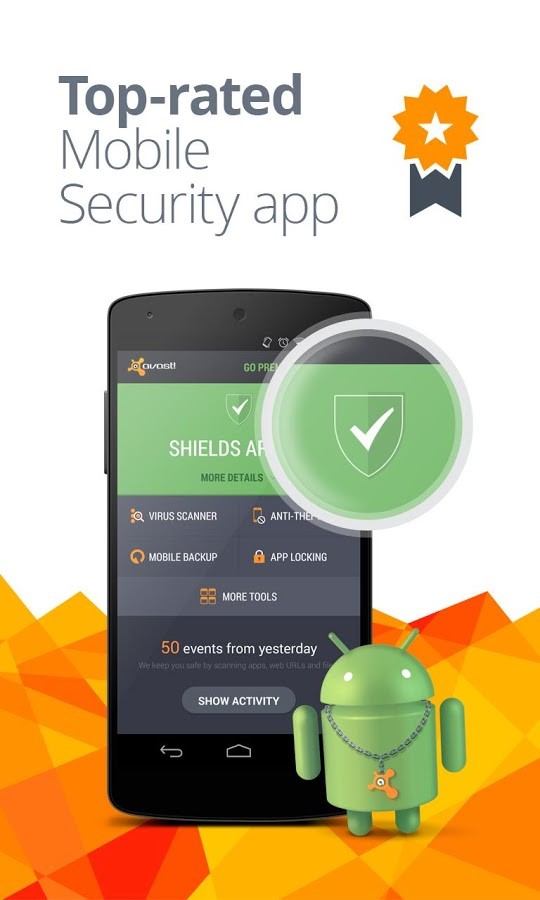
Avast Mobile Security will protect you while providing you with a worry-free browsing experience. Simply install the app and you‘re good to go! Here’s what you get from this multifaceted software:

  • Android protection: The free features of Avast Mobile Security ensure that your smartphone is safe from online threats and malware.
  • Incoming SMS filtration: You are allowed to block specific numbers for calls and SMS.
  • Stolen/lost device tracking: The software features anti-theft elements that provide you with remote options to track your phone location and also recover the same.
  • Warning alarms: In case you visit a website that malware infected, the software will alarm you by a warning sign or sound using its Web Shield.
  • Wi-Fi and network data usage tracking: You may be eager to know your data usage and Avast makes it quite easy. You can track your network data usage as well as Wi-Fi and perceive how much you have consumed and how much is left to use.
  • Mistyped URLs are auto-corrected: Avast Mobile Security is equipped with a SiteCorrect feature that saves users from the issues of mistyping URLs.

We invite you to check out Avast Mobile Security, free from Google Play.


Follow Avast on FacebookTwitterYouTube, and Google+ where we keep you updated on cybersecurity news every day.

Ads: Love or hate?

Ad-injection is an increasingly annoying and dangerous problem

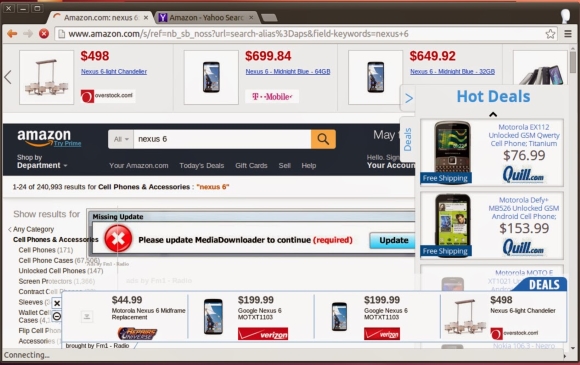
Ad injecting in action on Amazon

Malvertising attacks. Image via Google Security Blog

There are basically two reactions people have when they see ads in their browser. Some think they add interesting content and possibilities, insights and ideas or even, opportunities. The other group considers them as a distraction, an invasion and a disruption to what they were doing.

But most everyone will agree, once you begin something on your laptop or mobile, especially if it’s work-related task, you want to continue what you started. Lots of people get so into what they’re doing that they don’t see or think of anything else, and when an unwelcome ad comes through, it breaks the concentration. Some will say this is a man’s perspective. But even some women I talk to agree; even though they always say they are multitasking and (cough, cough) never lose focus.

When it comes to security, ads are becoming more and more a vehicle for malware. Ad-injecting malware is really a threat nowadays. Once on your device – computer or mobile – the malware will drop new ads into any (or most) sites you visit, sending ad revenue back to remote cybercriminals. For example, malicious porn ads use this type of redirection and clicking techniques.

Research conducted by Google from June to October of 2014 concluded that deceptive ad injection is a significant problem on the web today.  They identified tens of millions of instances of ad injection and detected 5.3 million different IP addresses infected with adware, 5% of the total testing group. The research also found that Superfish, one of the notorious businesses that have ad injection libraries,  was alive and well, not only pre-installed on Lenovo laptops, but breaking SSL protections for any other computer running it in background.

Ways to control unwanted ads in your browser

Inside Avast, we are convinced that adware toolbars and browser add-ons play an important role in the ads market.

Our Browser Cleanup feature detects millions of different adwares that target browsers.

TIP: Run Avast Browser Cleanup on your computer. It has identified more than 60 million different browser add-ons which are often bundled with free software, such as video players, Java and Flash updates.

Besides toolbars and browser add-ons, free software is often bundled with unwanted extra programs making it bloatware and a PUPs vector. Again, all the ad revenue is driven back to the bundles creators. Do we really need to see – and worse, have all that garbage installed in background?

TIP: Slow down when installing free software. Read all the screens and make sure you uncheck any boxes that ask you to install a 3rd party program that you don’t know anything about. You may even consider testing it in the Avast Sandbox first.

Another door for unwanted ads to enter is through outdated software which can be a backdoor for malvertising.

TIP: Keep your browser and software up-to-date. Avast Software Updater can help you keep up with that task.

You could read our blog to learn how to reduce data collection of Windows 10 or to correctly set your Facebook settings. However, there are other measures when it comes to webpages. There are two major ad blockers for browsers: AdBlock and uBlock.

TIP: Visit our user forum to learn and discuss the right ads protection for you. You will find some of our Evangelists that can guide you with easy-to-understand hints.


Follow Avast on Facebook, Twitter, YouTube, and Google+ where we keep you updated on cybersecurity news every day.

DeepScreen technology protects your business data before it’s at risk

Eliminate the risk of your sensitive business data being hacked.

Avast for Business protects your business data

Avast for Business protects your business data

Most of the truly dangerous malware is designed to harvest valuable business information – especially financial data. So hackers design malware to look like an innocent video, application, or website cookie. Sometimes malware can even be disguised as a exit button on an infected website. Basically, hackers use all kinds of tricks to get unsuspecting people to click, download, or run their malware.

The problem is that malware often ends up on a company computer or network completely by mistake. The file might look like a useful business graphic or tool, but when opened, it unleashes malicious code that takes over the computer and even the network.

So how do you stop this when you have 10, 20, 30, or more PCs, Macs, and servers under your care?

Make protection automatic

When a file is “DeepScreened” by Avast, it actually runs in the Sandbox, which is mainly responsible for keeping things isolated while watching for various high-level events and behavior of the program running. For example, it monitors the system call invocation and overall behavior of the program which is being executed.

This gives DeepScreen a chance to analyze the code and compare it against Avast’s massive cloud-based database, compiled from more than 230 million systems worldwide, to see if anything looks familiar. If the file behaves like malware, DeepScreen keeps you safe by quarantining the file in the Avast for Business Virus Chest. With no additional work on your part, DeepScreen automatically protects your company’s computers, files, sensitive information, and even your reputation.

Save time and money

When malware is restricted  to a secure virtual sandbox, your PCs, Macs, and servers are protected BEFORE any risk is introduced. No more having an employee sit idly by while somebody restores a computer. No more losing files that were corrupted. No more work interruptions from malware.

Most importantly, DeepScreen keeps sensitive information private, protecting the trust you’ve earned from employees and customers. And, as some larger companies in the news are finding out, business security can be the difference between profits and out-of-business.

Start protecting your company with Avast for Business which incorporates  DeepScreen technology, all for completely FREE .


Sign up for Avast for Business and save money and time for your company.