Category Archives: Avast

Avast

Do antivirus companies create viruses to sell more software?

Question of the week: Why does Avast and other antivirus companies try to scare us with all this news about viruses and bad apps? It makes me think you are connected to the threats.

Avast protects against hackers

Antivirus companies do not create the viruses- there are enough hackers doing it already!

Avast and other reputable antivirus companies are not connected to the creation of threats – there are plenty of them without our developers making something up! But thanks for your question. We would like to help you and our other customers understand the nature of cybersecurity in today’s world and assure you that we have the tools to protect your online environment.

Enough to keep us busy

The Avast Virus Lab receives over 300,000 samples of new potential viruses every day and has documented increases in mobile malware infections, vulnerabilities in widely used software and devices, and a surge in spying via free Wi-Fi hotspots. We don’t mean to scare you, but with the knowledge that more than 60 percent of companies have been the victim of an attempted cyber attack, and that Avast prevented more than 2 billion virus attacks last month, we have lots to talk about.

An example of a new type of attack was the recent discovery of a mobile app called Dubsmatch 2 which had “porn-clicker” malware hidden within it. The app was installed 100,000-500,000 times from the Google Play Store, usually a trusted source, before we notified Google and the app was removed.

“We suspect the app developer used the porn clicker method for financial gain,” wrote virus analyst Jan Piskacek. “The app developer probably received pay-per-click earnings from advertisers who thought he was displaying their ads on websites for people to actually see.

When financial gain is the motivator, cybercrooks get creative. But financial gain is not the only motivator. Hackers at Black Hat USA 2014 told surveyors that they were driven by the fun and thrill of it. (51% said so.) State-sponsored attacks are also increasingly being revealed. China, Russia, Iran, and North Korea are emerging as major players in hacking for political, nationalistic, and competitive gain.

Many people, even if they are aware of the threats, have not taken any action to protect themselves or their assets.

People overall are more aware of online security and privacy concerns after the revelations of the NSA’s surveillance activities, but despite that, most American adults have not made significant changes to their digital behavior, and 54% say that it would be “somewhat” or “very” difficult to find the tools and strategies that would enhance their privacy online and when using cellphones, according to a Pew Research Center report.

I have nothing to hide and I do not have the time or expertise are the most common reasons given for not taking action.

Avast is not your father’s antivirus

Since the nature of attacks has changed, we offer an “ecosystem” of protection services beyond our antivirus protection. The need for a more complete kind of protection was quite evident after the New York Times was hacked for 4 months by Chinese hackers. Jindrich Kubec, Avast’s threat intelligence director, acknowledges that there’s a distinction between the kinds of threats encountered by everyday Web surfers and the carefully targeted attack the Times faced, but he adds this wisdom,

“Seatbelts and airbags are wonderful protection and improve the safety of millions, but they will not stop a bullet fired — say by a hired killer. Does it mean you will stop using airbags and seatbelts?”

Check out the varied products that Avast offers to create your own security ecosystem. Avast Mobile Security, SecureLine VPN, Browser Cleanup, and GrimeFighter are not just new ways to make money, (some of the products are free!), they are intended to keep you and your assets as safe as possible.

Avast Data Drives New Analytics Engine

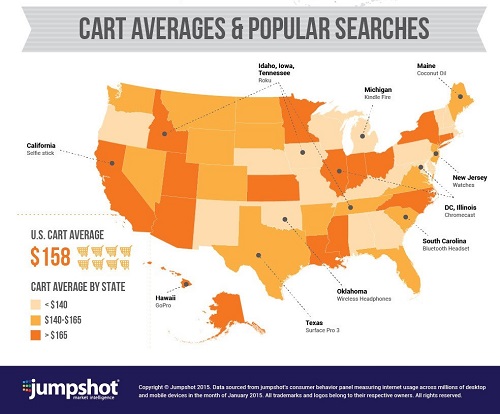
Did you know that Californians are obsessed with Selfie Sticks from Amazon.com? Or that people in Maine buy lots of coconut oil?

Thanks to Jumpshot, a marketing analytics company, you can find this information – as well as more useful information – by using the tools available at Jumpshot.com.

What may be most interesting to you is that Jumpshot is using Avast data to drive these unique insights. We provide Jumpshot with anonymized and aggregated data that we collect from scanning the 150 billion URLs our users visit each month. Using Jumpshot’s patent-pending algorithm, all of the personally identifiable information is removed from the data before it leaves Avast servers. Nothing can be used to identify or target individuals. Avast COO Ondřej Vlček explains the data stripping algorithm in an Avast forum topic.

Jumpshot infographic showing Amazon.com shopping cart values and the most popular products by state. Anonymized Avast browser data was used to create this information. Click here to see the full infographic.

Jumpshot infographic showing Amazon.com shopping cart values by state. Anonymized and aggregated Avast browser data was used to create this information. Click here to see the full infographic.

Data security, of course, is very important to us. We go to great lengths to keep our users safe, and have never shared any data that can be used to identify them. We never have and never will.

We are aware that some users don’t want any data – no matter how generic and depersonalized it is – to be used in market analysis. This is why we clearly state during the installation of our products what information we collect and what we do with it, and offer our users the ability to opt out from having that data collected. We believe we are unique in our industry in offering an opt-out, but we do so because we respect that choice to be our users to make, not ours. We’re grateful that more than 100 million of our users, when given a clear choice, have chosen not to opt out, and we thank you.

The foundation of our business is trust, and trust only exists with honesty.

We have always strived to have an honest relationship with our users, and we will continue to do so. Currently we do not make any money from this relationship but it is an experiment as to whether we can fund our security products indirectly instead of nagging our users to upgrade. As most people are aware, most all products we use every day—Chrome, Facebook, Firefox, WhatsApp, Gmail, etc.—are indirectly funded by advertisements. In most cases though, the products directly examine what users are doing and provide them targeted advertisements. Although we suspect some security companies are doing this, we do not believe it is the proper approach. Instead, we think that this anonymized, aggregated approach is much better to maintain the trust relationship that we think is so important between us and you, our loyal users.

As always, thank you for your support and patronage. Together we continue to make the Internet a safer place for all of us.

The Internet of Things (to be hacked)?

The Jetsons (via philosophymatters.org)

Soon, we’ll be living like The Jetsons (image via philosophymatters.org)

By the end of the decade, everyone on Earth will be connected.
–Eric Schmidt, Google chairman

As a rule of thumb, it’s good to keep in mind that anything and everything that can be connected to the Internet can be hacked. Poorly designed or implemented systems could expose serious vulnerabilities that attackers can exploit. Now, most of us are fairly familiar with certain gadgets that can be connected to the Internet, such as mobiles devices and/or laptops, smart watches, and cars, but what about the things that are still emerging within the Internet-connected world? Some of these new items include routers, sensors, and everyday gadgets such as alarm clocks, wearables, microwaves, and grills.

When dealing with the devices that we’ve come to know and love, such as our Android phones or iPads, we already encounter a multitude of shortcomings within privacy policies, unintentional data leakages, and the transmission of tracking and personal data in clear text. Taking this a step further, it’s both intriguing and frightening to think about the challenges we will face as the Internet of Things (IoT) becomes more and more of a reality. In a recent article published by the Guardian, author Marc Goodman paints an evocative picture of a world powered by the IoT:

Because your alarm clock is connected to the internet, it will be able to access and read your calendar. It will know where and when your first appointment of the day is and be able to cross-reference that information against the latest traffic conditions. Light traffic, you get to sleep an extra 10 minutes; heavy traffic, and you might find yourself waking up earlier than you had hoped.

When your alarm does go off, it will gently raise the lights in the house, perhaps turn up the heat or run your bath. The electronic pet door will open to let Fido into the backyard for his morning visit, and the coffeemaker will begin brewing your coffee. You won’t have to ask your kids if they’ve brushed their teeth; the chip in their toothbrush will send a message to your smartphone letting you know the task is done. As you walk out the door, you won’t have to worry about finding your keys; the beacon sensor on the key chain makes them locatable to within two inches. It will be as if the Jetsons era has finally arrived.

So how can we use these space-age technologies to our advantage? Although most software is still in the process of being optimized for wearables and other emerging smart gadgets, there are three main things to be on the lookout for as we move into the IoT’s heyday:

  • Issues on devices that could result in device loss, poorly programmed apps, or attacks driven by social engineering
  • Transmission issues caused by low-level encryption on Wi-Fi or Bluetooth that could result in traffic sniffing, man-in-the-middle and redirection attacks
  • Storage issues in the cloud that could directly result in data breaches

The sure-fire way to defend yourself against these vulnerabilities is to use a VPN when connecting to open, unsecured Wi-Fi networks. Avast SecureLine VPN is available for Windows, Android and iOS.

Where is my phone? Avast Anti-Theft knows.

Giri got his stolen phone back because of Avast Anti-Theft

Giri got his stolen phone back because of Avast Anti-Theft

A stranger broke into Giri C’s house last September. The thief looked through Giri’s belongings for something of value. He found a MotoE Phone and grabbed it. Mobile phones are an easy target because the thief can just slip in a new SIM card and resell the phone on the black market.

What this thief didn’t know was that Giri had installed Avast Anti-Theft protection. Avast Anti-Theft allows you to set up your desktop account or use a friend’s phone to remotely locate your device, lock it, activate the remote siren, or wipe its data clean.

When the SIM card is changed without the right permissions, Anti-Theft recognizes it and notifies you of the new number and geo-location so you can maintain contact with your phone. You can also activate a loud, customizable siren, which screams at maximum volume if the thief tries to silence it.

Giri reported the robbery to the local Bangalore police, and after a few days he received a call saying that someone had turned the phone into the station.

”When I received the phone from the police,” Giri told us, “the phone was giving the SIREN sound that my mobile is stolen due to the settings I have configured. I understand that the person who had stolen it might have tried replacing the SIM but he was not able to do it as it has locked the phone and the weird sound frightened him.”

Avast Anti-Theft has a loud alarm

The siren continuously and loudly says the following, by default, when activated: “This device has been lost or stolen!”. In the advanced settings of Avast Mobile Security you can customize what message the siren will sound, if you do not want to use the pre-set message. You can do this under “Select Sound File” or “Record Siren Sound”.

“I feel I recovered my stolen mobile only because of AVAST,” said Giri. “I thank your company for such a wonderful and useful product.”

Giri added a tip for other Android phone owners:

“More than using just anti-virus, it’s better to use software with proper tracking available which will be useful to avoid misuse of the phone, as similar features are not available in Android.”

Avast Anti-Theft is available on Google Play, where it can be downloaded for free.


Share your story with Avast

Share your story with Avast

Have you experienced  an attack or breach of your home network? Had your phone lost and/or stolen? We’d like to hear from you about your experience and how Avast saved the day — write to us with your story at [email protected].  If we post it on our blog, then we will send you an Avast goodie box. :-)

Explaining Avast’s HTTPS scanning feature

Avast scans HTTPS

Avast Web Shield scans HTTPS sites for malware and threats.

Internet users with basic security knowledge are aware that they should look for the padlock icon in the address bar or the HTTPS in a web address to indicate that a website is secure. We have gotten used to seeing it on bank sites or shopping carts where we input our credit card information. More and more, regular websites are making the switch from unencrypted HTTP to encrypted HTTPS. Last year, search giant Google sweetened the pot by adding HTTPS to their ranking algorithm. That action encouraged webmasters everywhere to make the switch to HTTPS.

But is HTTPS really more secure than HTTP?

The simple answer is not always. As more and more online services are moving to HTTPS, attacks are increasing. An encrypted connection ensures that the connection cannot be modified by anyone else, but it does not guarantee that the actual content being downloaded is safe. Just as with plain HTTP, if a legitimate website is hacked, malware scripts and binaries can be placed into the HTTPS page that appears to be safe.

That’s why it is imperative for security software to check this attack vector. To address this, Avast’s trusted Web Shield technology scans HTTPS sites for malware and threats.

How Avast’s HTTPS scanning feature works (the short version)

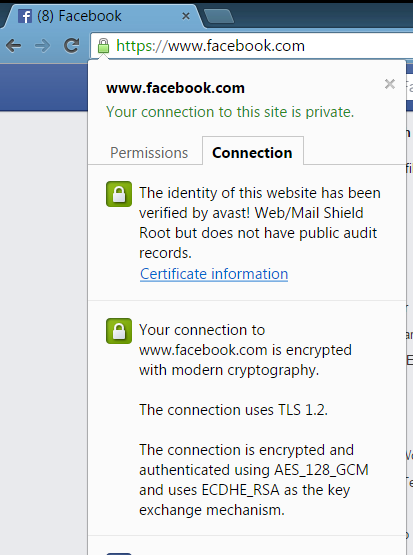
Avast is able to detect and decrypt TLS/SSL protected traffic in our Web-content filtering component. To detect malware and threats on HTTPS sites, Avast must remove the SSL certificate and add its self-generated certificate. Our certificates are digitally signed by Avast’s trusted root authority and added into the root certificate store in Windows and in major browsers to protect against threats coming over HTTPS; traffic that otherwise could not be detected.

Avast whitelists websites if we learn that they don’t accept our certificate. Users can also whitelist sites manually, so that the HTTPS scanning does not slow access to the site.

This video gives you an overview, but if any of this didn‘t make much sense to you, read below for a more detailed explanation. You can also explore the FAQ about HTTPS scanning in Web Shield.

What is HTTP and why is it being changed?

HyperText Transfer Protocol or HTTP is the network protocol used to deliver virtually all files and other data on the World Wide Web. When you visit a website you may see the HTTP:// prefix in the address. This means your browser is now connected to the server using HTTP. The problem with HTTP is that it is not a secure way to establish a connection, opening a door to cybercrooks who want to eavesdrop on your activities.

Hackers can eavesdrop via an HTTP address because when you connect to a website with HTTP, your browser assumes it is connected to the correct web server. The problem with this is that there is no way to authenticate that you are actually connected to the correct website. This is a big problem if you think you are connecting to your bank’s website, but you are really on a compromised network and have been redirected to a fake website. This is when the hacker can eavesdrop and see any passwords, credit cards, or other data.

HTTPS is meant to solve this problem

HTTPS, which literally stands for HTTP Secure, is the safe encrypted counterpart to HTTP. When you connect with HTTPS , it provides identity verification and security, so you get the benefit of encryption that prevents others from eavesdropping on your communications and ensures you that you are connected to the intended server.

What is a website security certificate?

HTTPS encryption and authentication are provided by security protocols known as TLS and SSL. The SSL protocol verifies that you are connected to the intended server with a “handshake” which proves the identity of the server to the client. This is achieved using SSL security certificates, which contain various pieces of information like the name of the holder, the domain, validity date, the certificate’s public key, and the digital signature.

Usually the certificate is digitally signed by a trusted certificate authority (CA) that it already knows. For the connection to succeed, the server, and in some cases the client, must provide a certificate that allows the computer to determine if the connection should be trusted or not. If the private key to the certificate is leaked, anyone can mimic the server’s identity.

Why does Avast create a ‘certificate authority’ and how is it created?

When the browser is about to make a connection to a HTTPS server, Avast Web Shield takes over the handshake and connects itself to the server. When the server sends its certificates, Web Shield verifies them against the Windows System Certificate Store – the same list of trusted certificates that Internet Explorer, Chrome, Opera, and other programs use. Web Shield scans the flow of the data connection, and after verifying that the communication is secure, hands over the connection to the browser.

Avast Web/Mail certificate rootWhat is a MITM attack and how does it differ from what Avast is doing?
The SSL protocol is imperfect, so hackers can take advantage of it. A man-in-the-middle (MITM) attack takes place when a hacker intercepts the communication between two systems by impersonating the two parties. This clever ruse makes them think that they are talking to each other when they are both actually talking to the attacker. The attacker can read, insert, or modify the data in the intercepted communication and no one ever knows.

The Avast WebShield must use a MITM approach in order to scan secure traffic, but the important difference is that the “middle man” we use is located in the same computer as the browser and uses the same connection. Since Avast is running with Administrator rights and elevated trust on the computer, it can create and store certificates that the browser correctly accepts and trusts for this, and only this, machine. For every original certificate, Avast makes a copy and signs it with Avast’s root certificate, located in the Windows Certificate store. This special certificate is called “Avast Web/Mail certificate root” to clearly distinguish who created it and for what purpose.

We want to emphasize that no one else has the same unique key that you have from the installation generated certificate. This certificate never leaves the computer and is never transmitted over the internet. The Windows System Certificate Store is the only place where your computer’s certificate is stored and accessed.

How do I maintain my privacy when Avast is scanning my banking connections?

Our customers’ privacy was our first concern when planning the implementation of HTTPS scanning. That’s why we created a way for whitelisting, or ignoring, the connection when Avast users access banking sites. Our current list has over 600 banks from all over the world and we are constantly adding new, verified banking sites. You can, and should, verify the bank’s security certificate when using online banking sites. Once verified, you can submit the banking or other web site to our whitelist by sending us an email: banks‑[email protected].

How to disable the HTTPS scanning feature

If you do not want Avast to scan HTTPS traffic, you have the option of disabling the feature in the Avast settings:

1. Open the Avast user interface → select Settings.
2. Select Active protection → click Customize next to Web Shield.
3. Select Main settings → check/uncheck Enable HTTPS scanning to turn this feature on/off.

Avast Home Network Security is ideal for the self-employed

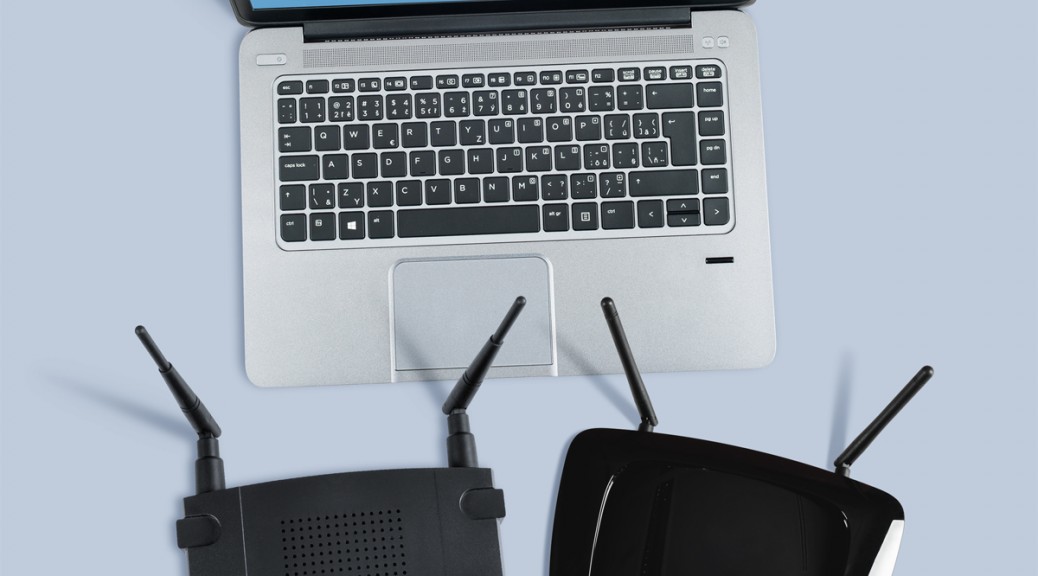
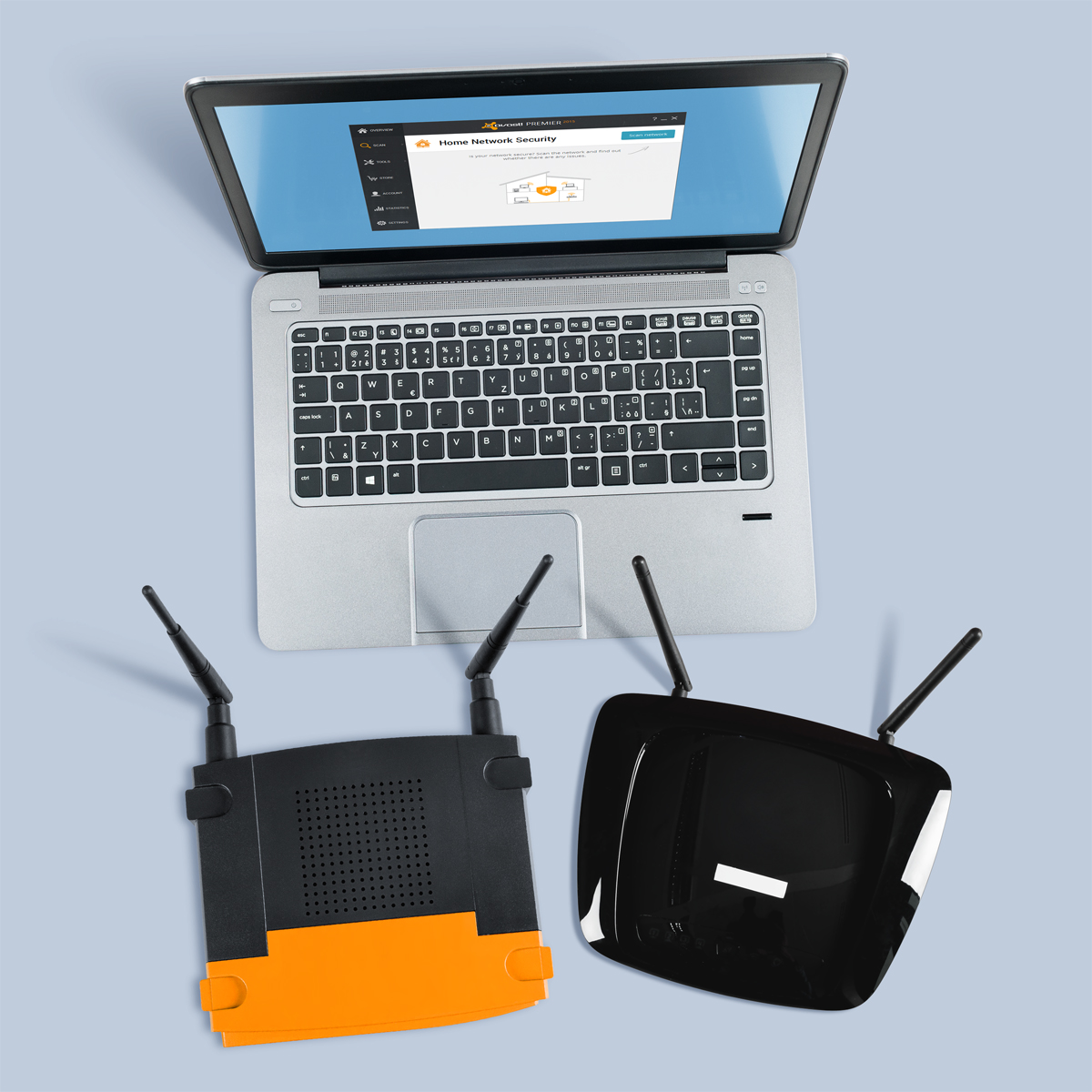
Don't let your router be the weakest link when it comes to protecting your home business.

Don’t let your router be the weakest link when it comes to protecting your home business.

For those of us who are self-employed and/or work from home, our houses are sacred spaces on both personal and professional levels. Although often overlooked, our routers hold the key to our productivity, as they provide the powerful and consistent network connection that we depend on in order to get our work done. Unfortunately, we often take these little guys for granted, and because of this, routers have become the weakest security point in many home and small business networks these days.

“Unsecured routers create an easy entry point for hackers to attack millions of American home networks,” said Vince Steckler, chief executive officer of Avast. “If a router is not properly secured, cybercriminals can easily gain access to an individual’s personal information, including financial information, user names and passwords, photos, and browsing history.”

Securing your router is vital for both you and your business

You may have heard about the recent NetUSB driver flaw that made millions of routers vulnerable to malicious attacks. Unfortunately, this is just one case surrounded by the larger issue of users not taking the necessarily precautions to properly secure their home networks.

Avast now features Home Network Security (HNS), which scans for home router security problems. Avast is the only security company to offer a tool to help you secure this neglected area. Avast Home Network Security scans a user’s home network and routers for potential security issues that could allow a hacker attack. The scan looks for misconfigured Wi-Fi networks, exposes weak or default Wi-Fi passwords, vulnerable routers, compromised Internet connections, and enabled, but not protected, IPv6. It also lists all devices on the network so you can make sure only your known devices are connected.

In addition to protecting your devices using Avast Home Network Security, there several steps you can take in order to further improve your router’s security.

  • Change the default admin username and password to a strong password. Do not use default passwords because they’re generated from well-known algorithms that makes hacker attacks even easier. Do not use your name, date of birth, home address or any personal information as the password.
  • Turn off WPSthe automated network configuration method that makes your wireless password more vulnerable to hacker attacks.Turn on WPA2 encryption and, if you can, protect it with a strong password.
  • Change the default admin username and password to a strong password. Do not use default passwords because they’re generated from well-known algorithms that makes hacker attacks even easier. Do not use your name, date of birth, home address or any personal information as the password.
  • Upgrade your router firmware to fix known vulnerabilities of the router.
  • Don’t forget to log out after managing the router, avoiding abuse of the authenticated browser sessions.

Protect your router against malicious attacks with Avast Home Network Security.
Avast Home Network Security's scan helps you keep your router secure and safe from hackers.
Results are shown once Avast Home Network Security's scan is complete.


The Home Network Security Solution is available in free and paid versions of Avast. Get it at www.avast.com.


// <![CDATA[
!function(d,s,id){var js,fjs=d.getElementsByTagName(s)[0],p=/^http:/.test(d.location)?’http’:’https’;if(!d.getElementById(id)){js=d.createElement(s);js.id=id;js.src=p+’://platform.twitter.com/widgets.js’;fjs.parentNode.insertBefore(js,fjs);}}(document, ‘script’, ‘twitter-wjs’);
// ]]>

New ASUS ZenPad to come with Avast Mobile Security

ASUS partners with Avast

ASUS partners with Avast

ASUS, the third largest consumer notebook vendor in the world, has selected Avast Mobile Security to be pre-loaded on its new line of Android powered tablets.

These tablets, called ZenPad, will be debuted at the upcoming Computex in Taiwan this June. The much anticipated 7-inch ZenPad 7 will give customers 12 months of Avast Mobile Security and allow free access to premium versions of Avast Backup and Avast Anti-theft.

“Avast is honored to collaborate with ASUS to provide consumers with the security to remain worry free in today’s always-on and always-connected world,” said Vince Steckler, CEO at Avast. “Consumers are relying on tablets for personal computing more than ever before, and storing massive data and information on these devices. With Avast Mobile Security preloaded on ASUS devices, today’s mobile consumer can have peace of mind browsing the Internet, knowing their devices and personal data are protected across a wide range of threats from malware to Wi-Fi hacks.”

Details of the ASUS ZenPad 7 have been leaked and are reported to have the following specs:

  • 7-inch IPS display screen
  • 1024 x 600 pixel resolution
  • Intel Atom x3
  • 1 GB RAM
  • 8 GB/16 GB built-in storage
  • MicroSD card slot
  • Front/back cameras
  • Wi-Fi and Bluetooth

Other models with Avast Mobile Security pre-installed include Z300C, Z380/CX, Z370C and Z370CG.

Avast Mobile Security is top-rated by users on Google Play Store and by independent testing organizations including AV-Test and AV-Comparatives. In addition to being available preloaded on ASUS tablets, Avast solutions are available on Google Play and in the Apple Store.

Ataque de gás em Buenos Aires: a vida imita a internet

Não se fala em outra coisa no mundo do futebol a não ser o ataque com gás de pimenta feito por um torcedor do Boca Juniors na semana passada aos atletas do River Plate no intervalo da partida entre as duas equipes, válida pelas oitavas de final da Copa Libertadores da América. Como resultado, o segundo tempo foi cancelado e, algumas horas depois, a partida também. Dessa forma, o Boca Juniors foi eliminado da competição em 2015 e ainda recebeu algumas outras punições, como a obrigação de jogar 4 partidas em casa com portões fechados e outras 4 como visitante sem sua torcida.

O caso foi tão sério que um vídeo se espalhou rapidamente nas redes sociais mostrando o torcedor do Boca Juniors atirando o gás dentro do túnel usado como segurança para os atletas.

Em partidas de futebol tensas como este clássico argentino, já se viu muita coisa: invasão de campo, agressão verbal e física a jogadores, arremesso de objetos e urina sobre atletas adversários, rojões e até mortes. Mas nunca se imaginou que alguém seria capaz de abrir um buraco naquele túnel de proteção para realizar um ataque dessa natureza. É a vida real imitando o mundo virtual.


Pois é mais ou menos assim que um ataque ao seu computador ocorre. O agressor pode ser comparado a um hacker. Assim como o cibercriminoso cria uma série de programas e sites ao seu redor para se disfarçar e criar vulnerabilidades em seu PC, o rapaz que realizou o ataque estava no meio de milhares de torcedores e, embora em ambos os casos é possível se suspeitar de algum tipo de perigo, eles são dificilmente identificados antes de um ataque.

Hacker

Há anos o mundo virtual é vítima de ataques inacreditáveis: a vida real agora imita a internet


E é por isso que existe na internet o “firewall”, que serve como uma barreira ou um túnel de proteção para seus arquivos e programas. O problema é que, assim como lá nas arquibancadas existem algumas pessoas que estão sempre tramando uma maneira de burlar as proteções aos atletas, há também milhões de hackers no mundo todo trabalhando 24 horas por dia, 7 dias por semana para descobrir uma nova forma de acessar a sua máquina, roubar seus dados ou simplesmente fazer a sua vida online se tornar um verdadeiro martírio.

Por outro lado, empresas de segurança como a Avast Software tentam criar soluções de segurança para esses ataques. Entretanto, ter um equipamento lá montado e funcionando de maneira correta não significa que pode-se ignorar outros fatores importantes de segurança.

Uma das perguntas que muito se fez nesses últimos dias é: “como este torcedor do Boca Juniors entrou no estádio com gás de pimenta?”. É exatamente o que ocorre com hackers que conseguem invadir computadores após os donos das máquinas autorizarem seus acessos, geralmente ao clicar em links maliciosos ou ao baixar programas suspeitos. Assim como no futebol, onde há regras de segurança pré-estabelecidas pela polícia e pela a organização da competição, mas mesmo assim os responsáveis pelas partidas falham ao permitir agressores de entrarem no estádio, no mundo virtual o antivírus atua como um meio de informação sobre potenciais riscos, mas cabe ao usuário a decisão final de seguir à diante com um download e/ou a instalação de algum arquivo maligno. Neste caso, nem o melhor antivírus de todos os tempos é capaz de impedir a infecção.

Portanto, se você acha que só porque você instalou um antivírus a sua vida na internet está segura e nada mais precisa ser feito, pense duas vezes. Reflita e procure se informar sobre os casos de ataques mais recentes. Não permita que um suspeito tente invadir o seu PC e destruir toda a proteção que você ali criou.

Já estou infectado. E agora?

Se você já está infectado ou se o seu computador está parecendo um vídeo clip da Corrida Maluca com ícones indo de um lado para o outro fora de controle, então você precisa de uma assistência técnica profissional.

O bom da internet é que hoje em dia você pode ter seu computador consertado sem sair de casa através de serviços remotos e/ou por telefone. Aqui está um deles fornecido pela Avast Software.

E lembre-se: nunca instale um antivírus em um computador infectado. Isso não resolverá o problema, pois seria o mesmo que implementar novos sistemas de proteção ao estádio, mas não retirar de dentro deles agressores que voltarão a atacar a qualquer momento.

Wise up and get smarter with your data

Most of us can agree that we don’t want our personal data falling into other people’s hands. This may seem like an obvious concept, but with the amount of data we regularly share online, it’s not such an uncommon occurrence that our information is wrongfully passed onto others. In this clever video published by Facebook Security, we learn how to nip scams in the bud and prevent others from tricking us into sharing personal information.

// <![CDATA[
(function(d, s, id) { var js, fjs = d.getElementsByTagName(s)[0]; if (d.getElementById(id)) return; js = d.createElement(s); js.id = id; js.src = “//connect.facebook.net/en_US/sdk.js#xfbml=1&version=v2.3”; fjs.parentNode.insertBefore(js, fjs);}(document, ‘script’, ‘facebook-jssdk’));
// ]]>

Ever had someone approach you online saying they are a foreign prince and asking for your personal information? Watch…

Posted by Facebook Security on Monday, May 18, 2015

In order to keep your personal data secure, make sure to practice the following:

  • Shred all personal documents before throwing them away. This is especially important when dealing with bank statements and bills.
  • Be mindful of what you post on social media and other online forums.
  • Choose your passwords carefully. Keep them diverse and don’t use the same password for each of your accounts.
  • Use security software on all of your devices and make sure that it’s up to date.

How to spot a hacker before it’s too late? As the video’s narrator warns, “Beware of anyone requesting your personal data or money, whether over the phone, via email or online. They may pretend to be a romantic interest, a family member in trouble, or even a foreign prince – odds are, they’re not.”


The Tar Heel State welcomes Avast Software

Avast announces the opening of our new Charlotte, N.C. office.

Avast announces the opening of our new Charlotte, N.C. office.

During this beautiful spring in “The Queen City” aka Charlotte, North Carolina, new Avast Software offices have opened their doors bringing 60 IT, marketing, business development, and technical support jobs to the area.

The flagship product launching out of the Charlotte office is Avast for Business, the new free, easy-to-use, cloud-managed security offering designed with small and medium sized businesses (SMBs), educational institutions, non-profit organizations, and small government in mind. Luke Walling, a long time Charlotte resident, is the general manager and vice president of Avast for Business.

“We’re thrilled to open doors in Charlotte,” said Walling. “With state-of-the-art facilities in North Carolina coupled with regional offices across the globe, Avast is in prime position to ensure our customers receive top-notch security solutions for their PCs, Macs and servers. As small business owners realize the essential need for data protection in today’s digital world, we’re happy to provide a free product that’s both reliable and secure. Charlotte has been home to me for many years and I’m pleased to report such a strong start.”

Since its launch in February 2015, Avast for Business has been adopted by 75,000 new customers.The freemium software model that Avast brings will change the complexion of security products for small businesses that are often priced out of the security game by expensive resellers, or forced to settle on using consumer-grade security software for business purposes. Avast for Business provides an easily managed and scalable solution for SMBs.

Avast expects to hire about 60 people based in Charlotte within the next few months. Job listings can be found on the Avast careers website and at this writing include positions such as Technical Support Specialist, Marketing Specialist, and several positions for Software engineers and a Senior UX Design/Creative.

The growing team is settling into their new office space, and with perks like an Avast orange pool table, free-flowing coffee and soft drinks, and team-building dinners and fun days out, they are sure to build upon their initial success. Welcome to Avast, Charlotte!

Marketing manager, Cathy F. cuddles with Chester
Sales rep Robert B. takes a pool break
Handsome pool table covered with Avast orange
Vanir I., data analyst has a park view from his desk
Chester reads the writing on the wall
The daily caffeine fix
Roger R. at dinner with the Charlotte team
Elena C. from Prague visits with Mike H.
Mirek S. from Prague enjoys a beer with Luke W., VP of the Charlotte office
Jessica T. enjoys the conversation with her Prague colleagues
Fun day out at Carowinds
Cathy F. and Robert B. are brave before riding the Carolina Cobra
These Avastians have braggin' rights after conquering the Nighthawk!