Category Archives: AVG

AVG

AVG Technologies Previews New Identity-as-a-Service “CloudCare SSO” at Cloud Summit

AMSTERDAM and SAN FRANCISCO –  22 October, 2014 – AVG Technologies N.V. (NYSE: AVG), the online security company for devices, data and people, today unveiled a preview of its new Identity-as-a-Service (IDaaS) services to partners attending its Cloud Summit in Phoenix, Arizona.   Managed services provider (MSP) partners at the Summit had an exclusive first-look at how AVG’s full Cloud-security and remote monitoring & management (RMM) services portfolio can help MSPs deliver secure sign-on (SSO) for easy, one-click security and control over their customers’ cloud applications and mobile data.  Partners will soon be able to experience the breakthrough integration of Multi Factor Authentication, Secure Sign-On, Mobile Device Management and Mobile Application Management all managed through Active Directory to ease complexity and simplify management.

“The aim of today’s game changing advance in the expansion of AVG CloudCare’s cloud-based security and mobile management capabilities is to help MSPs grow their businesses further by enhancing the levels of protection and control built in to their customer services,” said Mike Foreman, AVG’s General Manager, SMB. “We know that with the rapid adoption of mobile, BYOD and Cloud applications customers will require additional expertise from partners to help control and manage all their users’ applications and data.  We are listening. That’s why, for the first time in this space, AVG is combining Centrify’s IDaaS capability with our existing RMM platform to provide a single, secure access layer to all our Cloud services as well as more than 2,500 of the most popular Cloud-based business apps for partners and their business customers.”

Underlying technology for AVG’s new IDaaS capability is driven by Centrify, a leader in unified identity management across cloud, mobile and data center environments.  Management of multiple passwords is a major headache for businesses, especially as they adopt more and more mobile and cloud-based applications.   Figures show up to 80 percent of end user breaches are password related. Furthermore, industry events like the Heartbleed bug have raised popular consciousness of the need for stronger password protection, especially in sectors like financial services or health where tight data security and privacy requirements are mandatory.

“IDaaS is solving real problems for the enterprise and thanks to the initiative of market-savvy companies like AVG the technology will soon be giving AVG partners and their businesses the same benefits in a format they can afford,” said Shreyas Sadalgi, Centrify’s SVP of Business Development for Centrify. “We are thrilled to be working closely with AVG, a globally respected security brand with one of the largest active partner bases in the industry.

An exclusive preview of the Centrify IDaaS solution is available to resellers and MSPs attending AVG’s inaugural Cloud Summit for partners taking place from October 20th-22nd 2014 at The Sheraton Wild Horse Pass Resort in Chandler, Arizona.

For more information or to contact sales for a free, not for resale account, please email [email protected]

AVG’s business security portfolio is supported by a worldwide network of more than 10,000 partners.  Its pedigree in this area makes it ideally positioned to help smaller IT companies and MSPs harness low cost, cloud-based tools so they can transition into fully-fledged managed services businesses.

In October 2012 AVG introduced AVG CloudCare™, a cloud-based administration platform offering resellers a new way to implement and manage services such as antivirus, content filtering, online backup and email security services for their business customers. In June 2013 it added AVG Managed Workplace, an open eco-system Remote Management & Monitoring (RMM) tool. AVG‘s vision is to make the lives of MSPs and their business customers as easy as possible, regardless of whether staff are in the office, at home, or on the road.

About Centrify

Centrify provides unified identity management across data center, cloud and mobile — resulting in one single login for users and one unified identity infrastructure for IT. Centrify’s software and cloud services let organizations securely leverage their existing identity infrastructure to centrally manage authentication, access control, privilege management, policy enforcement and compliance across on-premise and cloud resources. More than 5,000 customers have deployed Centrify across millions of servers, workstations, and applications. With Centrify, organizations are reducing their costs associated with identity lifecycle management and compliance by over 50 percent.

About AVG Technologies (NYSE: AVG)

AVG is the online security company providing leading software and services to secure devices, data and people.  AVG has over 182 million active users, as of June 30, 2014, using AVG’s products and services including Internet security, performance optimization, and personal privacy and identity protection. By choosing AVG’s products, users become part of a trusted global community that engages directly with AVG to provide feedback and offer mutual support to other customers.

All trademarks are the property of their respective owners.

70 Percent of MSPs Must Adapt Services to Capitalize on Internet of Things, AVG Study Reveals

AMSTERDAM and SAN FRANCISCO – October 22, 2014 – Roughly 1-in-4 (26 percent) small- to medium-sized businesses (SMBs) and managed services providers (MSPs) expect the Internet of Things (IoT) including multiple devices, wearables and Cloud-based services in general to generate more money for them than any of the other current big IT trends, according to a new survey announced today by AVG Technologies N.V. (NYSE: AVG), the online security company for devices, data and people. Almost three out of five (57 percent) SMBs agreed that IoT will help boost their revenues, a sentiment that was echoed by around two-thirds (67 percent) of MSP respondents. However just 18 percent of SMB respondents thought their IT provider was ahead of the curve regarding IoT management while 70 per cent of MSPs themselves admitted the need to adapt their services to meet customer expectations in this regard.

“Our MSP partners are telling us that the ‘Internet of Things’ is the one IT trend making an immediate difference to their bottom line and the business customers that they serve. A massive 7 out of 10 stated they need to amend their offerings to enable business growth.”  said Mike Foreman, AVG’s general manager, SMB

The study*, which interviewed 1,770 small businesses and MSPs in the U.S., Canada, the UK, Germany and Australia, also revealed more than half (55 percent) of MSP respondents say customers are demanding Internet of Things related services and over three quarters (77 percent) are planning to expand their service/product portfolio. However, they had better adapt quickly. Of those SMBs with an IT provider, 68% feel that their provider could improve their service with regard to Internet of Things offerings and understanding.

“The study shows clearly that as businesses grow to rely more and more on the Internet of Things and Cloud-based services to help generate revenue most MSPs are still some way short of being ready to help customers’ manage this,” continued Mike Foreman. “The research strongly indicates that MSPs need to significantly up their game and demonstrate enhanced levels of protection and control over their customers’ ever changing data and device needs.”

A summary of the other key findings in the study were:

SMBs

Almost half (46%) of SMBs think that the Internet of Things will be the IT trend that has the greatest impact on their organization over the next five years. An even higher proportion -around seven in ten (71%) – say that due to the Internet of Things their organization will need to take extra steps to secure and protect their data

  • Around three fifths (62%) of SMB respondents report that their organization has budget specifically assigned over the next 12 months for the development of Internet of Things solutions. 49% have a moderate or substantial budget assigned for these solutions.
  • Only 18% of SMB respondents say that their IT provider is completely ahead of the curve with regard to the Internet of Things and the potential for their business. Of those with an IT provider, 68% feel that their provider could improve their service with regard to Internet of Things offerings and understanding.
  • The majority (84%) of SMB respondents say that their organization has purchased mobile devices within the last year, spending an average of over $6,500 on these devices. Of those who have purchased mobile devices within the last 12 months, SMB respondents estimate that their organization spends an average of around $4,500 in hidden costs annually.

MSPs

  • Over half (55%) of MSP respondents state that customers are demanding Internet of Things related services and seven in ten (70% but only 56% Germany) say that they will amend their services based on the wants of the customer.
  • However, less than two fifths (38%) of MSPs say that their organization currently has an integrated remote monitoring and management platform.
  • Around three fifths (58%) of MSP respondents say that they will need to join up with cutting edge partners in order to successfully offer Internet of Things-related services. Currently only 38% of MSP respondents feel that the vendors they work with are cutting edge.
  • Furthermore around three in ten MSP respondents feel that their current vendor helps make efficiency savings (31%) or productive gains (25%) for their customers.

* AVG commissioned independent technology market research specialist Vanson Bourne to undertake this research.  1770 interviews were carried out during September 2014 with IT and marketing decision-makers of organizations with of 1 – 500 employees with and 85/15 per cent split between SMBs and MSPs. Interviews were performed across five countries: UK, US, Canada, Germany and Australia. Respondents to this research came from a range of industry sectors, with only the public sector excluded.

For more information, please see our video on the survey findings:

http://www.prnewswire.com/news-releases/70-percent-of-msps-must-adapt-services-to-capitalize-on-internet-of-things-avg-study-reveals-573155550.html

About AVG Technologies (NYSE: AVG)

AVG is the online security company providing leading software and services to secure devices, data and people.  AVG has over 182 million active users, as of June 30, 2014, using AVG’s products and services including Internet security, performance optimization, and personal privacy and identity protection. By choosing AVG’s products, users become part of a trusted global community that engages directly with AVG to provide feedback and offer mutual support to other customers.

All trademarks are the property of their respective owners.

The Ultimate ‘Alien Isolation’ Performance Guide

Once Alien Isolation got announced a few months ago, I immediately went back and rewatched the 1970s Ridley Scott classic movie “Alien”. No AlienS, no Alien 3, no Alien 4. The plain old Alien! And it still holds up as one of the scariest sci-fi movies ever, dealing with the struggle of one women versus one alien.

With the blockbuster game, Alien Isolation, by Sega and The Creative Assembly, that very spirit of one versus one is back big time. Set 15 years after the events of Alien you play Amanda Ripley, the daughter of famous alien hunter Ellen Ripler from the movie. And while it’s set in probably the most beautiful graphics out there right now, it mimics the 1970s wonderfully:

Alien Isolation

It’s all about cassette decks, monochrome monitors, and wonderful sci-fi furniture art of that decade.

However, you need a fairly powerful system to run Alien Isolation but – lucky you – we’ve played the game over the course of the past couple of days and found ways to improve the performance of the game and even unlock some hidden features to make it run significantly faster on slower PCs. Here’s how:


#1 – Basic PCs and Laptops

Before you start tweaking performance settings for Alien: Isolation, I recommend that you follow the 9 essential steps to boost your PC or laptop speed that I published a while ago. This covers the basic steps to get your machine in top shape, including how to:

  • Upgrade your graphics drivers and even use beta drivers
  • Overclock your graphics card (safely!)
  • Use our AVG Zen Performance to turn off all performance-sapping background activity
  • Defrag your hard disk
  • …and more!

As Alien Isoluation takes its toll on your hardware, you got to be sure that it’s tweaked to its absolute limit before you jump into the game-specific settings.


#2 – Enhanced 2k/4k/8k and Level of Detail

Gamers have immediately found a way to increase the visual quality of the game greatly by increasing both the level of detail level beyond what’s possible in the “in game” settings menu as well increase the resolution of the shadows. Now instead of using shadows with a 1k resolution, they managed to crank that up to 2k, 4k or even 8k resolution.

We’ve done the tests and the visuals are noticeably better. Click on the before and after images:

Before:

Alien Isolation

After:

Alien Isolation

It’s relatelively easy to see the difference between the shots: the shadows appear much crisper and clearer. However, while it’s easy to see in bright spots, it’s relatively tough to differentiate in other more darker scenes. We noticed a drop of 20% in performance, though that was on a relatively “weak” mobile GeForce 650M. If you feel it’s worth the drop, it should be enabled.

All you have to do is download the tweaked “ENGINE_SETTINGS.XML” from this page. Put the XML file right in your Alien Isolations “Alien IsolationDATA” folder and overwrite the existing file with it. For example, if you purchased the game on steam, the file sits under: C:Program Files (x86)SteamSteamAppscommonAlien IsolationDATA

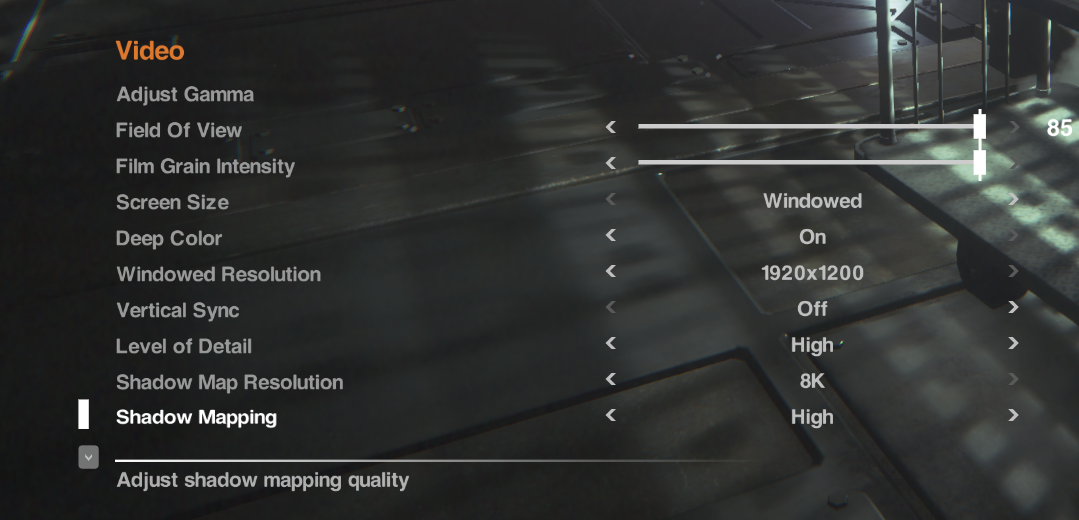
To enable the setting, launch the game and go to “OptionsVideo”. Make sure to set the “Shadow Map Resolution” to “8K”.


Alien Isolation


#3 – Enhance Reflections

Another great addition that comes with the enhanced engine file (see #2) are enhanced reflections that the developers turned off. Now while these may look significantly “nicer”, they also have a shiny look to them which some gamers feel disturb the overall atmosphere of the game:

Before

Alien Isolation

After

Alien Isolation


Source:
Steam Community

To enable it, you set the “Planar Reflections” to “Alternative” – see how you like it. If you want to go back, you can always set it to “On” (which is the game’s default setting). In my tests I noticed no drop in performance whatsoever with the reflections enabled or disabled.


#4 – Increase the Level of Details for Distant Objects

Some objects tend to pop up out of nowhere. In order to prevent this rather annoying (and tension breaking) effect, you should increase the level of detail for distant objects. This, too, can be done by applying the hacked file (#2) and enabling it under the “Level of Details” – simple go for the “Ultra” setting once you’ve enabled the tweak!


#5 – Skip the Videos

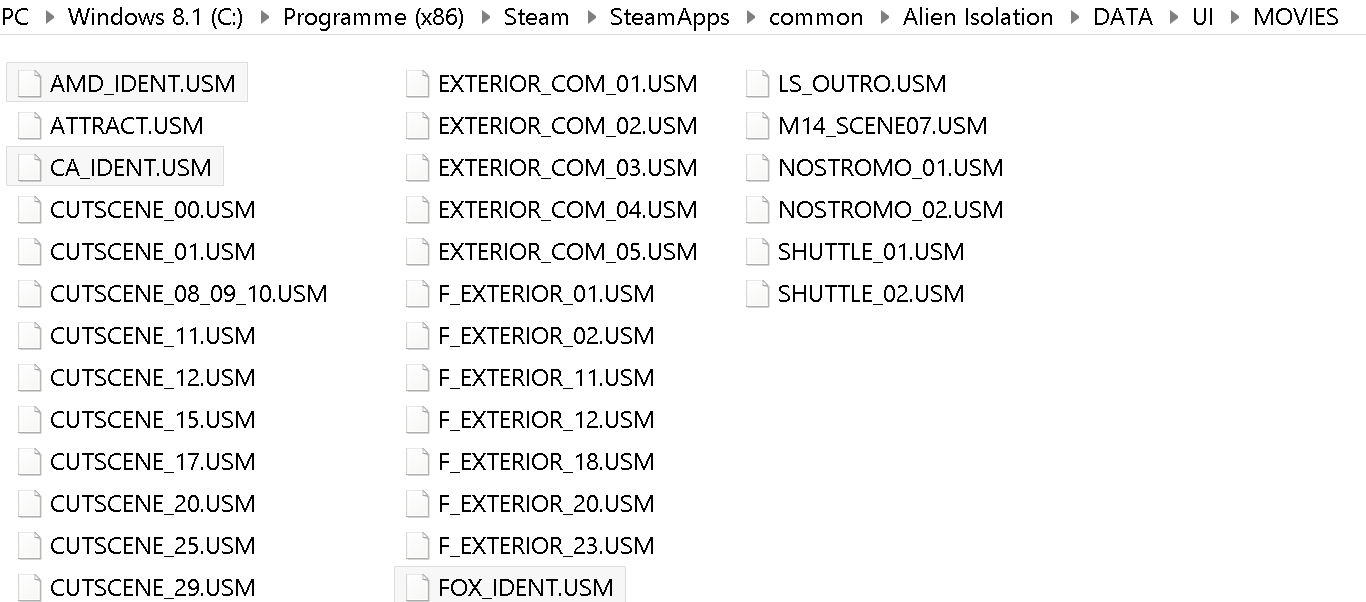
The introduction videos are somewhat annoying and they can’t be skipped at a push of a button. Here’s how to get rid of them. Simple solution: Delete them! Here’s how: Navigate to your Alien Isolations “DATAUIMOVIES” and delete or rename the files “AMD_IDENT.USM”, “FOX_IDENT.USM” and “CA_IDENT.USM”.

Alien Isolation


#6 – Get Smoother Mouse Movements

We’ve talked about VSync in the past and it still holds true, especially with Alien Isolation. With the vertical synchronization turned on you may get some delays. That’s why we recommend turning it off either completely using the in-game setting or via the NVIDIA or ATI control panel:

NVIDIA: To get to the NVIDIA Control Panel, right-click on your desktop, select “NVIDIA Control Panel” and head over to the “Manage 3D Settings” category on the left. Go to Maximum Pre-Rendered Frames first: This controls the number of frames that the processor prepares before transferring them to the graphics card. Increasing this value results in smoother game play, but you may notice a lag when using the mouse and keyboard. To eliminate the lag, try the “1″ setting. Next, move over to VSync: It synchronizes the frames that your graphics card renders with the refresh rate of your monitor. If you disable it, you will notice that Alien Isolation may not lag as much or not at all anymore.

ATI/AMD: You’ll find the Wait for Vertical Refresh feature in your 3D settings control panel. Disable Vsync for Alien Isolation and you may find it to run smoother.

Alien Isolation


#7 – Fix Your SLI RIG (Nvidia)

Got yourself a gaming rig with two (or more) graphics cards? Then you may in for a negative surprise as Alien: Isolation could completely crash on you at any moment or run even slower than with a single GPU. Here’s how to solve the problem: Download nVidia Inspector from this place and run the tool. Go to the SLI Compatibility form and change it to x080912F5. Done.


#8 – Enjoy!

As I’ve been super-busy as of late I couldn’t really play more than a few hours but I can tell you that the enhanced graphics tweaks really made the game more immersive and enjoyable. Now I can’t wait for the weekend to hit so I can crawl under a blanket, light up a candle and get hunted down by an Alien.


Zen Performance


Mac OS-X users hit with “iWorm” Malware

The warning is particularly relevant to those users who choose to download pirated software. As reported on The Safe Mac, the “iWorm” Trojan malware has been distributed through a pirate software website offering infected commercial software applications, such as Adobe Photoshop, Adobe Illustrator, Microsoft Office and Parallels.

This particular Trojan malware has been identified as being able to receive commands from the remote attacker and can inspect and transmit your files from your Mac. iWorm can also download and execute additional components – potentially causing serious havoc and compromising your privacy.

Mac users who choose to download untrusted applications from pirate websites are often completely unaware of the risks; easily blindsided by the immediate cost-savings of avoiding purchasing the software legitimately.

All iWorm Trojan malware is detected by AVG Antivirus for Mac including:

  • Virus OSX/iWorm.A
  • Trojan OSX/Iservice.B

While the prevalence of Mac malware remains relatively low when compared to Windows PC users, it’s no reason for Mac users to be complacent. Make sure you protect all your devices today.

Until next time, stay safe out there.


Thoughts on Mobile Digital Parenting

Dear Abby: My birthday is in 26 days…And I really want an iPod Touch for school. I’m in the fifth grade and everyone in my class has an iPod Touch, iPad or iPhone. EXCEPT ME!

Desperate Girl in North Carolina


This was a real letter sent recently to the venerable U.S. newspaper advice columnist Dear Abby. In her response to the 10-year-old, Abby wisely advised the “desperate” girl of some of the possible reasons for her parents’ opposition (among them, the ability to afford a device) and then encouraged the girl to talk with her parents about their concerns and how they could address them.

Digital-age parenting means there is a lot to consider about if and when is the right time for a child to get their own cell phone or other digital devices. Depending on the research you look at, between 56% (CTIA) and 30% (Kaiser) of children aged 8-12 have cell phones. In most cases, the research is a few years old – which means the percentage is likely to be much larger.

On the “pro” side a cellphone can be a great device to keep you connected to and keep track of your kids. On the “con” side, it also connects your kids more readily to the vast and not-always-friendly online world of social media, videos, games, movies, music, and TV shows and more.  Online safety and protection for our kids is a paramount concern.

In research we conducted earlier this year, 42% of parents said they worry that their child is spending too much time online. They are also unsure of what their kids are exposed to and many are uncertain as to how to keep them safe.

If your child is ready for a mobile phone, it’s important to educate them and have rules. Here are a few suggestions, starting with some rules:

House Rules

  • Consider a basic phone as a starter phone. Turn off extras if you are passing down an older model phone.
  • Set limits. Such as: Designated times the phone can be used. Number of minutes that can be used. Caps on number of texts that can be sent.
  • Block internet access and calls from unapproved numbers.

Some Do’s and Don’ts

  • Just as in the real world – never talk to strangers. Never respond to messages, emails, and texts from people they don’t know.
  • Always tell an adult if they receive any hurtful messages online… or requests from online friends to meet offline

In addition to our online and mobile security software, we’ve attempted to help parents by giving them other tools to address online safety. We’ve collaborated with the international children’s safety organization, Childnet, to create a guide to online and mobile phone safety starting at an early age, with our new Magda and Mo eBook series …The series, developed from a child’s eyes, using a series of click-and-tell stories that parents can use to help educate and foster dialogue with their kids about online safety.

Cleaning Up Your Right Click Menu

In this blog post, we’ll show you how to easily clean up your context menu in no time. It requires a little bit of tinkering with Windows, but if you follow our instructions you’ll find it easy to follow. Let’s do it:

All entries that show up under your “Right-click menu” or “Context menu” are stored in a rather secret location, called the Windows registry. Here’s how to open it:

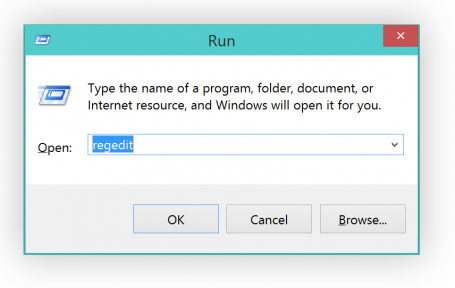
  • Hold down the “WINDOWS” key on your keyboard and then press the “R” button. This will bring up the following screen:
Command Menu

  • Type in “regedit” and hit Enter.


I recommend creating a back up before making any changes


  • To create a backup, simply click on “FileExport” and type in the file name.
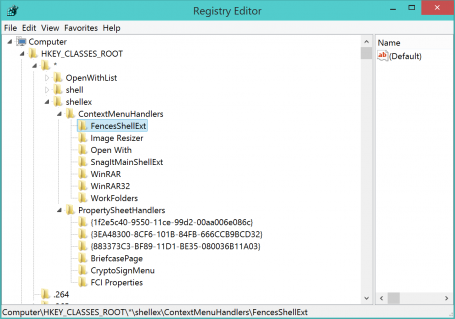
  • Next, open the following folders: HKEY_CLASSES_ROOT*shellexContextMenuHandlers. All the folders you see below represent entries in the right-click menu:


OK, let’s move on to actually getting rid of that folder. So, for example, the “AVG Shredder Shell Extension” folder represents the following item:If you like to get rid of it, simply delete that entire “Folder”.

  • In this example, I want to get rid of the entry for a nice desktop organization tool called “Fences” that I use a lot. Click on “FencesShellExt” (don’t touch the OpenWith or WorkFolders entries, though!) and hit the “Delete” key on my keyboard.


Now, once I cleaned it up, my context menu looks very clean:Plus, you may even be able to solve problems related to the context menus and delays when working with files.


Pro Tip:

If you’d like to add or remove items in your “Create New…” menu there’s a great (and much easier) solution for you. All you need is AVG PC TuneUp:

  • Once installed, go to “Personalize” and click on the “Personalize and behaviors”.
  • Head over to “File Types” and “New”
  • In this area you can easily get rid (or even add!) items that appear under the “New” menu, which I personally like to keep very clean as I only create a few files that way.


Got any questions? Let us know!


What does the future hold for women in Tech

Enormous untapped investment opportunity exists for venture capitalists smart enough to look at the numbers and fund women entrepreneurs

Prof. Candida Brush


As you may have gleaned from my columns and history as a woman entrepreneur in tech, I’m a huge supporter of getting more women into the field.  Indeed, I feel that women bring a unique perspective to tech, business, investing and leadership.

For many of us in the tech field, it was disappointing to hear the comments of Microsoft’s new CEO Satya Nadella’s when asked last week at pre-imminent women’s tech conference about his advice to women interested in advancing their careers – i.e. specifically on getting a pay raise. In an interview at “Grace Hopper Celebration of Women in Computing” event, which you can read an account of here, he appears to suggest women should be quiet and wait until the system works… The comments, which produced immediate backlash, drew Nadella to respond on Twitter trying to clarify his position – that he had been inarticulate… And wrong.

Unfortunately, pay parity remains an enormous hurdle for women. As I addressed in my column on Labor Day, it’s the 77% rule (women earn 77 cents for every dollar earned by a man in the U.S.).  And while Silicon Valley has been kinder in pay parity (when job parity exists), as other recent Silicon Valley research has pointed out, there also seems to be a 30% rule when it comes to women getting tech jobs.

Certainly, more work lies ahead to change these numbers and the mindset that encourages them.

But I also was struck recently by some encouraging findings in a comprehensive new survey on venture capital funding for women entrepreneurs by Babson College in the U.S. – which points to why there should be more women entrepreneurs.

The report found a narrowing but continuing significant gender gap in venture capital–funded businesses: Early-stage investment in companies with a woman on the executive team has tripled to 15% from 5% in the last 15 years. Despite this positive trend, 85 percent of all venture capital–funded businesses have no women on the executive team – and only 2.7% of VC-funded companies had a woman CEO.

But the report also contained this jewel: Companies with women on the executive team perform better! The study found that companies with a woman on the executive team are more likely to have higher valuations at both first and last funding (64 percent higher and 49 percent higher, respectively).

Called the Women Entrepreneurs 2014: Bridging the Gender Gap in Venture Capital, the study was conducted by Brush and fellow professors leading the Diana Project, a forward-thinking program founded in 1996 to research women-led businesses globally. The report provides the first comprehensive analysis of U.S. venture capital investments in women entrepreneurs in 15 years.

The study analyzed 6,793 unique companies in the United States that received venture capital funding between 2011 and 2013. You can read the executive summary here. The report findings and recommendations were shared on September 30 at an event presented by Babson’s Center for Women’s Entrepreneurial Leadership in partnership with the EY Entrepreneurial Winning Women Program.

Babson professor Brush noted in the report, “Only a small portion of early-stage investment is going to women entrepreneurs, yet our data suggest that venture capital–funded businesses with women on the executive team perform better on multiple dimensions. The venture capital community, therefore, may be missing good investment opportunities by not investing in women entrepreneurs.”

However, another key finding of the report, and one less encouraging, was that the number of women decision-makers in the VC community has dropped since 1999 – from 10% to 6%.

Among the Babson report’s recommendations to change the paradigm: Showcase the success of growth-oriented, venture-funded women entrepreneurs. I agree. There certainly have been a number of successful women VCs and angel investors in the past 15 years. Long-time angel investor Esther Dyson and VC partners Heidi Roizen of Draper Fisher, Jurvetson and Ann Winblad of Hummer Winblad, and more recently Margit Wennemachers of Andreessen Horowitz, are a few that come to mind.

I think the opportunities are there for women, but that there can certainly be more, a fact borne out by this study. Perhaps the silver lining is that companies and VCs not motivated by a sense of equal play will be inclined to inclusion by a mercenary motive – from a closer scrutiny at the women leaders’ financial performance.

There is a huge opportunity here for people who can think outside the common dichotomy of man/CEO; man/VC; woman/somewhere else. I just look at this and think what we are missing by not navigating outside of an outdated business paradigm!


On another note: I’m extremely proud to be a judge for The Pitch 2014, the small business competition in the UK. AVG is a lead sponsor and mentor for the event that concludes next week in Bristol on Oct. 23.

What is the POODLE Vulnerability?

The vulnerability relates to version 3 of an encryption technology known as SSL (Secure Socket Layer) that dates back to 1996. SSLv3 is still supported by most of the browsers and webservers on the Internet but has been replaced as the default encryption selection by newer encryption technology known as TLS (Transport Layer Security). Encryption is used to secure our connection on the Internet when we do, for example, online banking or purchase online.

When a browser connects to a webserver that supports this older technology there is a risk that if SSLv3 is the primary encryption or the connection security falls back from the newer TLS technology to SSLv3 then an attacker could potentially exploit this vulnerability. While it is unusual for websites to still be using SSLv3 as the default encryption technology, it is possible for an attacker to cause connection failures that force the server to default back to the older, insecure, technology.  By exploiting this vulnerability, an attacker could gain access to things like passwords and cookies, enabling him to access a user’s private account data on a website.

Companies have kept this old technology on their servers to ensure backward compatibility if needed. The two main options for companies to fix this vulnerability are to disable SSLv3 entirely, or change the security downgrade feature so that only the newer TLS encryption is used so that users remain safe.

As we have seen with these previous vulnerabilities it takes companies time to upgrade or in this case disable the software that is causing the issue (SSLv3 support) on the server and browser sides.  72 hours after the disclosure of the vulnerability, AVG researchers reveal that 37% of the top 100,000 domains are still vulnerable.

Staying safe:

Although web users can’t take any direct action to stay safe from POODLE, it is always good practice to keep all their systems and software updated.

For Windows users, run Windows Update to ensure you have installed all of the latest security patches. For Apple Mac users, ensure you run the Mac App Store and update to the latest security patches for your system.

By keeping your browser, operating system and security software up-to-date, you will ensure you have the best chance of avoiding malware and web based vulnerabilities.

Protect your mobile against tracking and hacking

AVG is proud to announce a great step forward in its Wi-Fi security offerings. Today we are introducing the brand new version of AVG Wi-Fi Assistant, an Android app that protects you from Wi-Fi tracking and Wi-Fi hacking.

The app, from the AVG Innovation team in Amsterdam, is currently in BETA, and we’d love your feedback. Get AVG Wi-Fi Assistant for FREE today from the Google Play store (some features require in-app purchasing).

Fueled by news of NSA leaks, security flaws like Heartbleed and browser extensions that make it simple to hack someone on public Wi-Fi, security and tracking are becoming key concerns for smartphone users worldwide.

Read on to learn more about Wi-Fi threats and how the new AVG Wi-Fi Assistant can help protect you.


Wi-Fi Security Threats

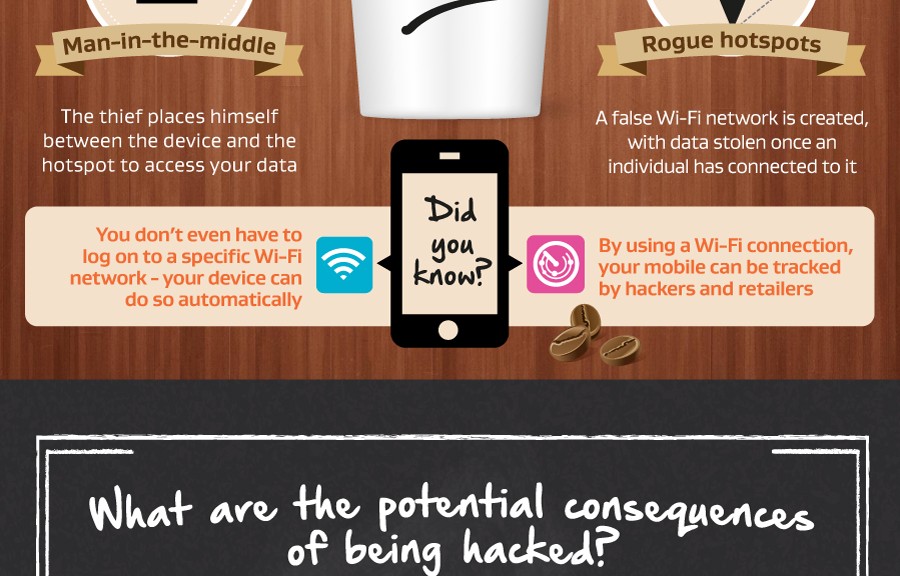
Wi-Fi hacking is the most common threat when it comes to public Wi-Fi. When you connect to an public Wi-Fi network (i.e. coffee shop, airport, or hotel), others maybe able to intercept your Internet traffic, collecting your passwords, private photos, emails, browser cookies and a lot more personal info. CNN has a hands-on example of this.  AVG Wi-Fi Assistant encrypts your communications to conceal them from hackers.

Wi-Fi tracking is the second big issue.  Currently specialized software solutions allow virtually anybody to use your phone’s Wi-Fi signal, to track your location and in some instances identify you. MIT Technology Review took a look at this Wi-Fi tracking technology and the inherent threats in this article . Wi-Fi tracking is even more worrying as most smartphone users have their Wi-Fi on all the time. This is increasingly an issue as retailers can use your Wi-Fi signal to track how you move around stores or around the city and even identify who you are. And that’s not all, if you keep your Wi-Fi open all the time hackers can trick your phone to connect to a fake Wi-Fi hotspot, and then snoop in at your private information.

AVG Wi-Fi Assistant can prevent tracking by turning off your Wi-Fi connection when you are not connected to a hotspot that you trust and automatically turns it back on when approaching the trusted hotspot again.


Wi-Fi Security Solutions

AVG Wi-Fi Assistant protects you against Wi-Fi Tracking and Wi-Fi Hacking by combining smart Wi-Fi Automation with VPN encryption in one simple to use app, for free. Here’s how it works:

Wi-Fi Security

Turn on VPN (Virtual Private Network) when you connect to a Wi-Fi Hotspot to conceal your data from unfriendly eyes. VPN secures your Internet connection and encrypts all the data you’re sending and receiving. This allows you to  use mobile data with lesser risk of your data or passwords being stolen.

Every month you get 500Mb of free VPN encryption; if you need more, you can upgrade to our premium VPN plan. We think this is a must have feature for online banking, emailing, or logging into your social networking accounts.

Wi-Fi Automation

AVG Wi-Fi Assistant runs in the background and learns the locations of Wi-Fi hotspots you connect to – without using GPS. It then uses your location to automatically turn your phone’s Wi-Fi adaptor on and off, exactly when you need it, hiding you from trackers. As a bonus, turning the Wi-Fi connection on and off can even extend your battery life.

Just to recap here are the Key Benefits of AVG Wi-Fi Assistant

  • Prevent password hacking
  • Prevent Wi-Fi tracking
  • Save battery power

Download the AVG Wi-Fi Assistant today and do let us know what you think.