Category Archives: AVG

AVG

The truth behind Snapchat “hack”

Well, it’s happened again. Another security breach, more embarrassing photos and films leaked all over the Web. Throw in privacy issues and possible child pornography charges and Cyber Security Awareness Month is getting off to a really bad start…or at least, to put a more positive spin on it, hopefully making people more aware.

“Snappening,” as its been called, which was revealed over the past weekend, is a breach involving users of a web site called SnapSaved.com and consists of approx. 90,000 photo’s and 9,000 videos  shared by as many as 200,000 Snapchat users.

SnapSaved.com, as you can probably tell by the description is a web service that allowed users to covertly save incoming message. The service did this by using your login credentials to access Snapchat’s servers and then store the images permanently on the SnapSaved servers.

Video

Staying Safe on Snapchat

Hackers managed to access the SnapSaved.com web site and steal the content that users had been storing there. While most of the content is reported to be of every day life there is of course some content that is more personal and inappropriate for viewing by anyone that it was not specifically meant for.

It’s important to understand that the hack was not on Snapchat’s servers.

It’s important to understand that the hack was not on Snapchat’s servers. Snapchat has built a growing and loyal user base on the promise that anything sent over its network disappears after a set period of time, typically a matter of seconds. This obviously promotes users sending material they would not send over other services and can possibly lead to people being a little more daring than they should be. You can read Snapchat’s reaction to these issues here.

The breach brings home the message that whatever you post online may well end up online forever and could be seen by people that it was not intended for. In fact recently we highlighted the potential issues that Snapchat users may have if someone decides to take a copy of something that was not intended to live beyond a few seconds. You can view the video for this here.


Here are some quick steps you can take:

  • Consider which third-party apps you and your family use. Clearly many of these apps have more vulnerability and less oversight than the actual services themselves. For the two bigger services, Facebook and Twitter, you can check: With Twitter, click on your profile image and select “Settings” and “Apps” to revoke access to applications you no longer use or do not trust. And for Facebook, in a browser, click the lock icon on the upper right corner and do a “Privacy Checkup” to review “Your Apps”. AVG PrivacyFix allows easy access to the privacy settings of major networks, you can download it here.
  • Review your Security Settings on all your programs. Consider who you are sharing information with, and who has access. Do you know whom your child has friended? Clearly there are trust and privacy issues here as well between you and your loved ones, but a healthy discussion is certainly not a step over the line.
  • Consider what content is being shared. It’s a matter of education that this content could be made public and may have value to hackers. This can be discussed with children in the same way you might discuss the danger in posting vacation plans or financial info.


We all need to be more vigilant in keeping our families, our businesses and ourselves safe and cyber-secure. And some the best tools we have are education, communication, and awareness.

How to tailor the ads you see on Facebook

It’s no secret that Facebook collects a large amount of information to better target advertisements towards you, but exactly what information is being used has for the most part remained a mystery. The treasure chest of data Facebook stores on over 1 billion users ranges from what people like, to what pages they visit, and who they interact with online. So what pieces of information actually goes into each advertisement, and how does this data look to the average person?

Recently Facebook has been on a big push to improve privacy for their users. They have released everything from the “Privacy Dinosaur” to help with basic settings, changed the default privacy settings for new users, and even enabled a hidden page to allow users to see their ad preferences profile.

To access your Ad Preferences profile on Facebook, just follow the following steps.

  1. Go to Facebook.com and login to your account.
  2. Hover over an advertisement on the right side of the news feed.
  3. Click on the blue x at the top right corner of the advertisement.
  4. Click “Why am I seeing this?”
  5. Click on “Manage Your Ad Preferences”


Or alternatively you can skip right to your Ad Preferences, although you will miss other relevant privacy information about advertisements, by going directly to https://www.facebook.com/ads/preferences/edit/?ad_id=6015766102901.

Once on this page you can start expanding the different sections and seeing exactly what Facebook is using as targeting terms for you. If there are some items you would prefer not to be targeted ads based upon you can click the blue switch at the right side of the term and that item will be removed.

Some users may actually prefer to provide more terms as well, so that they can see better and more relevant ads on their pages. To do this simply click in the “Add Preference” textbox at the top of the page and begin to type. You should see a dropdown with suggestions as you type more letters and once you see your item just click on it and it will be added to your profile.

This page shows Facebook is making strides to become more open and transparent in regards to their data use and privacy practices. It may be beneficial to check back at this page a few times to see how your preferences are being changed from your natural use of Facebook.

To keep up to date with the latest Facebook tips and privacy settings follow us on Twitter @AVGFree or like the AVG Facebook page.

The Changing Landscape of BYOD

“Bring your own device” has become increasingly common in the workplace as employees use their own tablets and phones for work-related activities, and their own laptops from home or the local Starbucks. Increasingly the lines are blurred with regards to privacy and questions of data ownership.

A recently passed California law has perhaps shown the way that the future holds. Little commented on when passed in August, this law has real-world implications and may have many ramifications with regard to privacy, security and data. (See ruling here)

In Colin Cochran v. Schwan’s Home Service, Inc., the California Court of Appeals in August reversed a Superior Court in Los Angeles County and ruled that “when employees must use their personal cell phones for work-related calls, Labor Code section 2802 requires the employer to reimburse them.”

The Order points out the purpose of the California Statute is “to prevent employers from passing their operating expenses on to their employees.” Specifically, it notes the following:

Pursuant to section 2802, subdivision (a), “an employer shall indemnify his or her employee for all necessary expenditures or losses incurred by the employee in direct consequence of the discharge of his or her duties, or of his or her obedience to the directions of the employer.”

The key question in the case was this:

Does an employer always have to reimburse an employee for the reasonable expense of the mandatory use of a personal cell phone, or is the reimbursement obligation limited to the situation in which the employee incurred an extra expense that he or she would not have otherwise incurred absent the job?

The Court’s answer was “that reimbursement is always required. Otherwise, the employer would receive a windfall because it would be passing its operating expenses onto the employee.” The Court ruled as follows:

Thus, to be in compliance with section 2802, the employer must pay some reasonable percentage of the employee’s cell phone bill. Because of the differences in cell phone plans and [work]-related scenarios, the calculation of reimbursement must be left to the trial court and parties in each particular case.

Time of course will tell how the expenses of purchase, maintenance and usage of employee-owned tablets, laptops, and home computers used for business are impacted by courts that follow the ruling in this case.

The court’s opinion is limited to reimbursement under California law. It doesn’t specifically mention privacy. I’d hate to speculate on any legal matter, but one can naturally wonder that if an employer must now pay for certain usage of devices, then is that employer entitled to all the information on that device?

To put it plainly, if the employer is paying for your tablet, does the employer get to look at all your emails and contact information? Who owns the data and intellectual copyright?

These questions no doubt will be settled as more cases come to court. But we’ve seen that when it comes to technology, legal precedent often lags behind technology.

In the meantime, it’s essential for businesses to have clear agreements, notices and policies, including a BYOD policy. See AVG’s eBook on BYOD for a good overview on the benefits, issues, risks and how to better protect your company’s data in the BYOD world.

Why There’s Room for RealPad

In my last blog, I discussed the current disconnect —or lag—with some seniors, especially older ones, when it comes to smartphone adoption.

As research by Pew and others has suggested, the reasons many older people have lagged in adoption of smartphones seems rooted in the footprint of the device, i.e. size of the user interface and thus ease of reading, viewing and manipulation. This is evident in the rapid adoption of larger devices like tablets and e-readers – by this demographic.

In recognition of the stumbling blocks for some seniors, earlier this month AARP launched its new RealPad tablet. The $189 device, produced in partnership with Intel, includes larger text and icons. But it also smartly packages all-hour tech support and video tutorials – tools designed expressly for seniors. And it comes preloaded with an AARP app, eBook reader, email (Gmail), photo sharing, video chat, games, tools and other features like a retirement and health calculators. Additional apps will be available on Google Play.

It’s basically a tablet—about the size of an iPad mini—that runs Google Android 4.4 with a custom app launcher featuring large icons. AARP says the tablet is designed for anyone who is apprehensive about using tablets and embracing technology and going digital.

AARP specifically targets 70-million 50+-age group, who haven’t adopted tablet technology. But I think the sweet spot for this product really isn’t most Boomers, but older seniors – the generation born before 1946. As we’ve discussed before, many Boomers are plenty tech savvy – and I also would be remiss if I didn’t mention that some seniors I’ve come across are plenty tech savvy…but not all.

OK, so why should you consider it for or recommend it to the seniors in your life? I like the design concept and larger icons and readability, but more than that, I like the addition of its one-click RealQuick Fix troubleshooting feature and 24/7-tech support. (Amazon’s Kindle Fire HDX also offers 24/7 support).

In terms of security, AARP has also made a smart move: It allows, among other free downloads, “Protecting Yourself Online for Dummies.” As it says, “Don’t let news about Internet risks deter you from taking full advantage of its benefits.”

My previous post had some of our own safety suggestions for seniors. I’m not clear on AARP’s entire security offering. We at AVG offer strong security apps on the Android platform, check out our Google Play page.

Is the RealPad the right choice for everyone over the age of 50? Probably not. But it was designed with an older adult in mind who needs a little extra care – and I applaud that.

I agree with AARP, there’s just too much value in the digital world for seniors to be shut off. Tablets and larger format smartphones can really enrich their lives. In addition to providing grandparents with a digital photo album of their grandkids and a social platform to stay connected with family and friends, it’s a ready-made platform and market for important things like health monitoring and management apps. RealPad is a great step in the right direction to address that need.

We should all be interested in addressing the needs of this market. After all, we are all likely to be seniors someday.

AVG and Sony partner to protect devices right out of the box

Mobile devices have become the cornerstone of our connected lives and we use them for everything from gaming to banking and tracking our health. This makes life incredibly convenient for smartphone users but it also carries a risk to our privacy and security.

Many apps on our smartphones stores generate and store information about us as people. With the average Android users having as many as 95 apps installed on their device, it quickly becomes clear that our devices are portable databanks that carry our contact, financial, health and location data.

With so much personal information stored on our devices, it’s never been more important for smartphone users to protect their data with basic security measures such as setting up a passcode or installing a security app that will check links and scan for infections when you download software or surf the web.

That’s why AVG is delighted to announce that we’ve teamed up with Sony Mobile to make it easier than ever for Sony Xperia customers to protect their devices and their data.

From autumn 2014, all Xperia Z3 smartphones and tablets will come with a free 180 days of AVG AntiVirus PRO so that devices are protected straight out of the box.


After the trial expires, users can either renew or downgrade to AVG AntiVirus FREE for Android so that their device is protected free of charge.

AVG AntiVirus FREE for Android was the first mobile security application to exceed 100 million downloads on the Google Play Store and has powerful tools to help you protect your device, keep it running smoothly and even locate your device should it get lost or stolen.

What can Bitcoin teach us about privacy?

By now you’ve probably heard a little about Bitcoin or one of the other virtual currencies. You’ve probably heard about the price fluctuations, maybe about the connections with illegal activities, or maybe even new companies starting to accept them as payments. These are all great ways to start learning about Bitcoin, but what interests me the most is the potential positive impact on privacy.

Bitcoin has been around for over five years now and many are still trying to really get a good grasp on what it is. The best way to describe Bitcoin is that it is a protocol, similar to what powers your email or phone number, which uses a public ledger to record every transaction. So when I purchase a new computer with Bitcoin or even just give some to a friend, anybody in the world can see it happen in near real time if they are looking at the ledger. This makes the world a much more public place, but still gives us more privacy by the pseudo-anonymous addresses and decentralized system.


Pseudo-Anonymity

The biggest case for privacy in Bitcoin is the pseudo-anonymous transactions. When looking at the public ledger we can see transactions occurring every second, the exact amount in each address, any notes attached to transactions, and what address each transaction is going to. While everything is very public in the ledger, the addresses themselves are all random strings of letters and numbers to allow the owner of each address to remain private.

One way to understand how these random strings allow for us to be anonymous, if we wish, is by making sure nobody knows what your address is. These addresses are something you can generate yourself without any need to connect with an email address or real name. You can then make payments or send Bitcoin to other people without ever having to give over personal information.

Some people may wish to publicize one of their Bitcoin addresses to allow others to send Bitcoin their way. This might be posted on a website, in an email, or even on social media so that others can see. For this reason it’s easy to generate multiple addresses that don’t need to be tied together in any matter so that you can remain pseudo-anonymous while still providing some public information.


Decentralized System

One of the most common themes seen in today’s technology news is breaches or hacks around credit cards. Most of the time there is a central company or website that has a collection of credit cards, names and addresses associated with them, and sometimes even the pins to the cards. This presents hackers with a treasure chest of information to attempt to get their hands on. Using Bitcoin, all of the information remains in your hands, and any attempts to alter the transaction records and forge payments is instantly broadcast and seen by everybody.

There are many “wallets” for Bitcoin online, which allow users to quickly setup addresses and start using Bitcoin, but it’s important to make sure you utilize all of Bitcoin’s security and privacy settings by keeping things in your own hands. With any amount of Bitcoin it would be smart to send to an “offline wallet” or addresses that only you have access to the private key, similar to pins for debit cards. With an offline wallet it’s important to keep a backup of the private key and if stored on a computer encrypt so not anybody can access. The recommendation however is to print and save in a secure location like a bank or safe offline.


Bitcoin may be interesting to watch because of the investment opportunity and hearing about those that have become rich off of it but the protocol itself opens up a lot of doors for privacy and security in the payment industry. By being able to anonymously send Bitcoin to anybody in the world, audit the entire system at any time, and keep the keys in your own hands people should be able to feel more trust in a world full of breaches and hacks.

Seniors are going mobile

More than three quarters (77%) of Americans aged 65 and older are now using cellphones. While they lag the general population (91%+), it is a significant increase over two years ago, according to recently released studies conducted by the Pew Research Center. But a much smaller group (only 18%) of this demographic has made the leap to a smartphone. The older the person, the research suggests, the less likely they have been to make the move to a smartphone.

In support of the findings, many of the seniors that I know tend to own older model cellphones that are either a) turned off, or b) not carried at all or used only under special circumstances (for travel and at insistence of family on special occasions), and c) are not used for more than actual phone calls.

But this is changing fast.

Seniors are showing a larger appetite for and are finding more value in larger format devices like tablets and e-readers. The Pew survey found 27% of seniors now own a tablet, e-reader or both (and that’s more than the public average).

Smartphone adoption should continue among seniors as new devices like the new Samsung Galaxy, Amazon Fire and Apple iPhone 6 continue to get larger and become easier to read and manipulate. In fact, the researchers at Deloitte predict that people 55+ (that would include Boomers through seniors) will experience the fastest growth in smartphone adoption in 2014, with 45-50% predicted to own a smartphone by the end of 2014.

Financial considerations for many seniors (especially those on fixed incomes) and confusion about carrier plans have no doubt led to a lag in smartphone adoption. But needing assistance to learn how to use the new devices and associated apps is one of the largest concerns by seniors (77%) in adopting smartphone technology, according to Pew.

This should be a concern to us in the technology industry. Shouldn’t we be making technology that is inherently simple to adopt? Shouldn’t we be designing apps for that –and, more specifically, with seniors in mind?

AARP thinks so. The organization just introduced a new tablet the RealPad aimed at this market. (I’ll cover this in more detail in my next column.)

During the recent national AARP event in San Diego, where AVG participated, we were concerned to learn that about one-third of the seniors we spoke to admitted that they use no security software on their smartphone or tablet devices. That suggests there is a lot of work to be done to help educate this audience on how to stay safe online.

Security of data is a primary issue when dealing with a smartphone or any smart connected devices – whether it involves sharing photos on social media, emailing or banking. Once online, Pew and others have found that the senior demographic is rapidly embracing social media (46%). In the brief survey of those who stopped by our booth on technology usage (we’ll share more details on this later), email was the most popular online application for the group, followed by banking.

Here are some simple tips for smartphone users to make data safer – applicable to everyone:

  • Screen lock the phone. Setting your smartphone to require a PIN code or password for access after an inactive period is a relatively easy way to keep your data safe.
  • Apply operating system updates. Often when our device prompts us to install an update, many of us simply ignore it. We shouldn’t. Many updates carry security-related improvements so update whenever you can.
  • Think twice before connecting your smartphone to a public Wi-Fi hotspot, because just as with a PC, this kind of shared, unsecured connection can leave activity and data vulnerable to eavesdropping and theft.
  • Beware of text message spam. Just like a web page or an email, text messages can be used for mischief. Especially if your device doesn’t have security software, links hidden in text messages can lead to malicious sites, unwanted apps and sometimes even expensive phone bills.
  • Which brings us back to security software! Use it! Malware writers see the vast mobile market as a great opportunity to make some quick profit. In a world where your smartphones probably carries more of your sensitive personal information that your home PC, it’s a good idea to use some basic protection.

I am very excited that more seniors are embracing smartphones and tablets. They are great tools to keep connected with family and friends, be active and engaged. Now, we in the tech industry must catch up with them and provide the tools to make it more useful and enjoyable!

AVG CloudCare scoops award in independent tests

AVG CloudCare’s AntiVirus 2014 component has just received an award following its first ever participation in one of the industry’s top security comparison tests. The latest Virus Bulletin gave us a score of 91.2 out of a possible 100 in both Reactive and Proactive tests.

In an age where security breaches are common and a company trades more than ever on its reputation, small businesses simply cannot afford to take any chances when it comes to protecting their confidential or customer data.

In fact a recent eMarketer study shows that undetected malware and cloud-based security are still among the top security concerns for small businesses.
That’s why I’m delighted that the Virus Bulletin test singled out AVG CloudCare for its scanning and detection performance. It is a strong indicator that we design our product wholly with users in mind and are addressing their very real concerns.

smb issues

Here’s what Virus Bulletin had to say:

“Scanning was very fast indeed, even in the initial runs, and overheads were pretty light, barely detectable once files had been checked for the first time. Our set of activities ran through in good time, and resource use was low. Detection was very strong indeed with excellent scores throughout our sets, and with no issues to report in the WildList or clean sets, a VB100 award is well deserved, adding another good result to that strong score.”


Our customers are echoing this sentiment:

Thomas Keats of Rainbow Computers, a small business and AVG IT partner told us “I love so much about AVG CloudCare, it’s increasing the bottom line, increasing interaction with the customer on more than one level, keeping me and my shop more in their mind each step of the way.”

If you are a small business looking for a way to stay ahead of the security curve why not ask a local IT contractor about AVG CloudCare? Your company’s security would be one less thing to worry about!

Learn more about AVG CloudCare at: www.avg.com/cloudcare

Learn more about the Virus Bulletin 100 test at: https://www.virusbtn.com/virusbulletin/archive/2014/06/vb201406-comparative

Cleaning Up Your Right-Click Menu

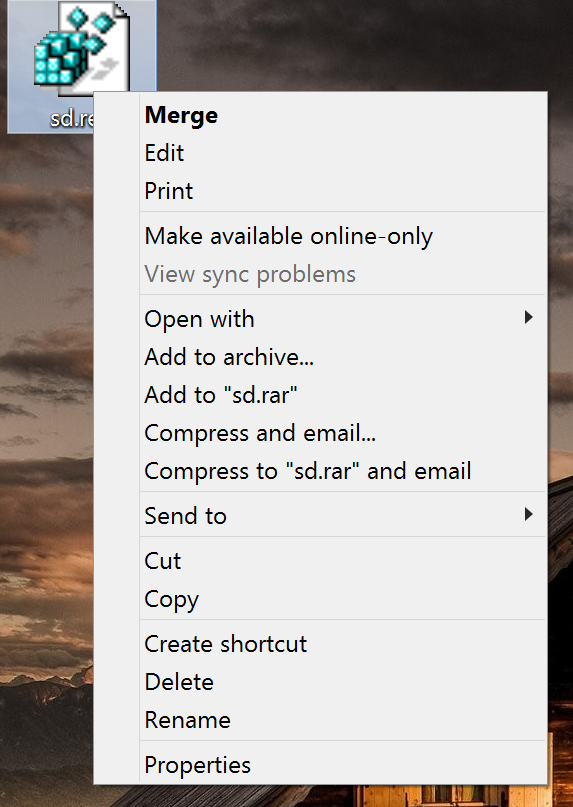
Does it take several seconds for the right click menu (called the “context menu”) to load when you right-click on a file, a folder or even just the desktop?

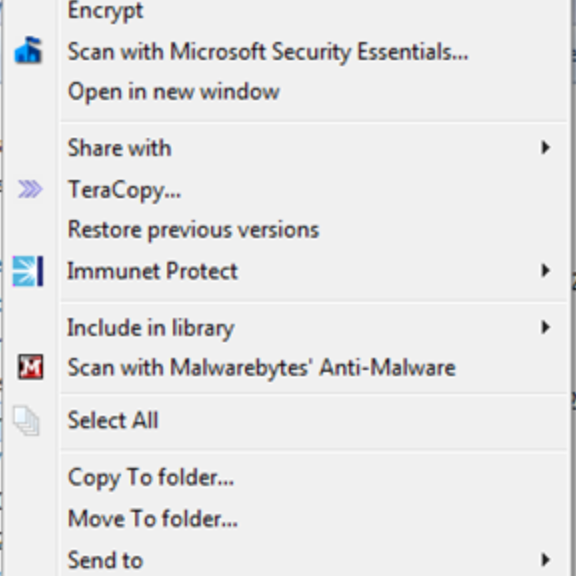
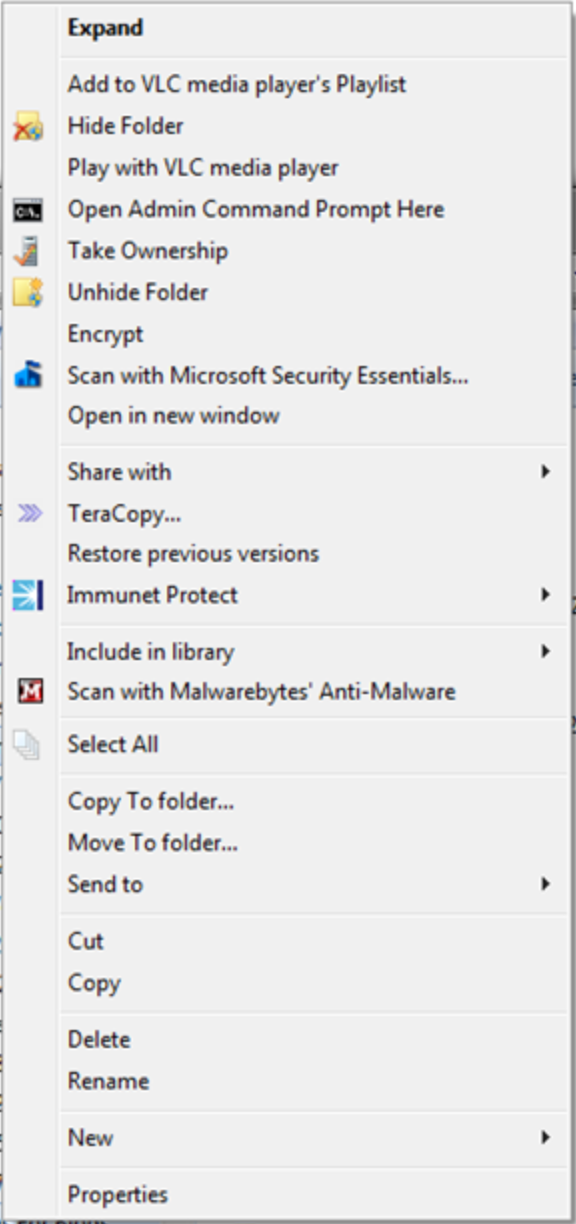
Are you tired of looking at completely overblown context menus like this:

2014-10-07_04-10-57

Then it’s time to clean up!

In this blog post, we’ll show you how to easily clean up your context menu in no time. It requires a little bit of tinkering with Windows, but if you follow our instructions you’ll find it easy to follow. Let’s do it:

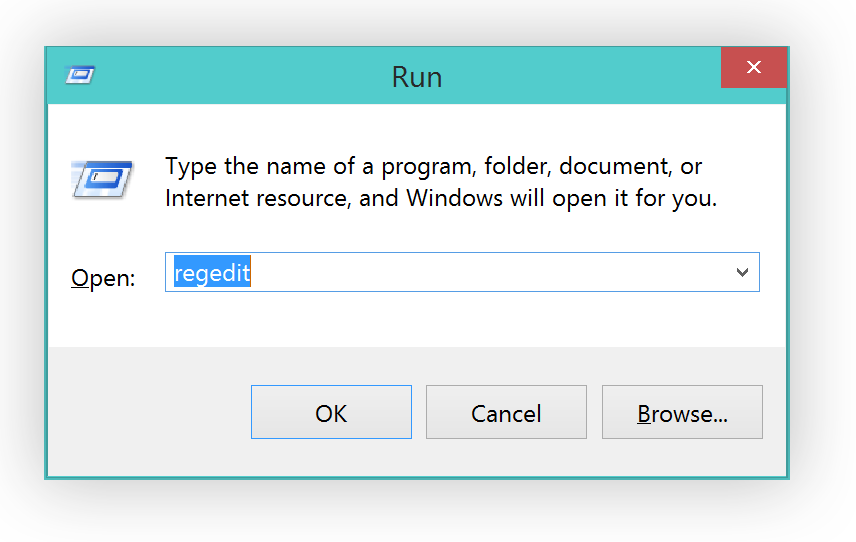
    1. All entries that show up under your “Right-click menu” or “Context menu” are stored in a rather secret location, called the Windows registry. Here’s how to open it: Hold down the “WINDOWS” key on your keyboard and then press the “R” button. This will bring up the following screen:
      2014-10-04_19-09-45
      Type in “regedit” and hit Enter.


    1. Before we make any changes, I strongly recommend you perform a backup of the entire folder structure so you can go back to the original menus any time you want. To do that, simply click on “FileExport” and type in the file name.


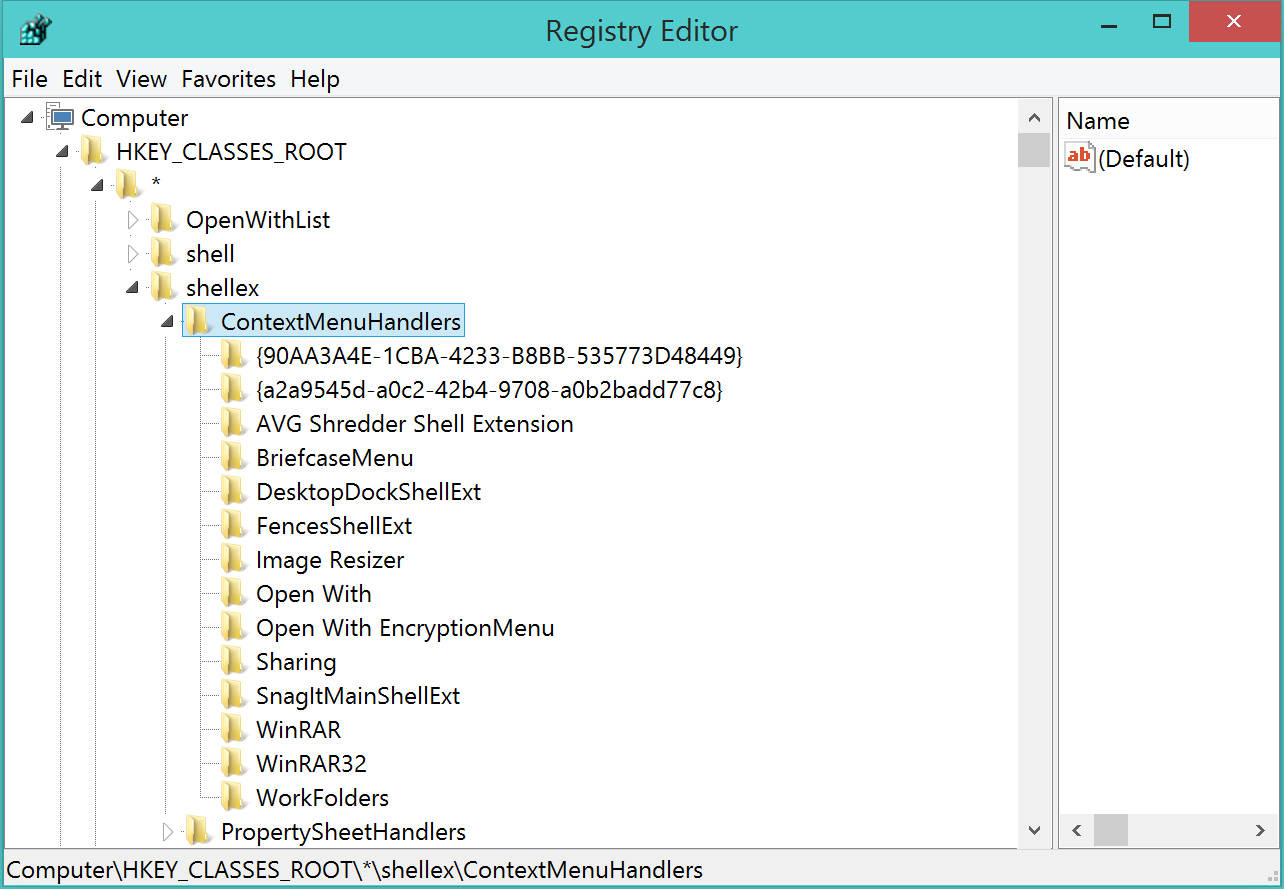
  1. Next, open the following folders: HKEY_CLASSES_ROOT*shellexContextMenuHandlers. All the folders you see below represent entries in the right-click menu:
    2014-10-04_19-11-21
  2. Ok, let’s move on to actually getting rid of that folder. So, for example, the “AVG Shredder Shell Extension” folder represents the following item:If you like to get rid of it, simply delete that entire “Folder”. So for example, I wanted to get rid of the entry for a nice desktop organization tool called “Fences” that I use a lot:So I click on “FencesShellExt” (don’t tough the OpenWith or WorkFolders entries, though!) and hit the “Delete” key on my keyboard. Now, once I cleaned it up, my context menu looks very clean:2014-10-07_06-36-04Plus, you may even be able to solve problems related to the context menus and delays when working with files.


Pro Tip:

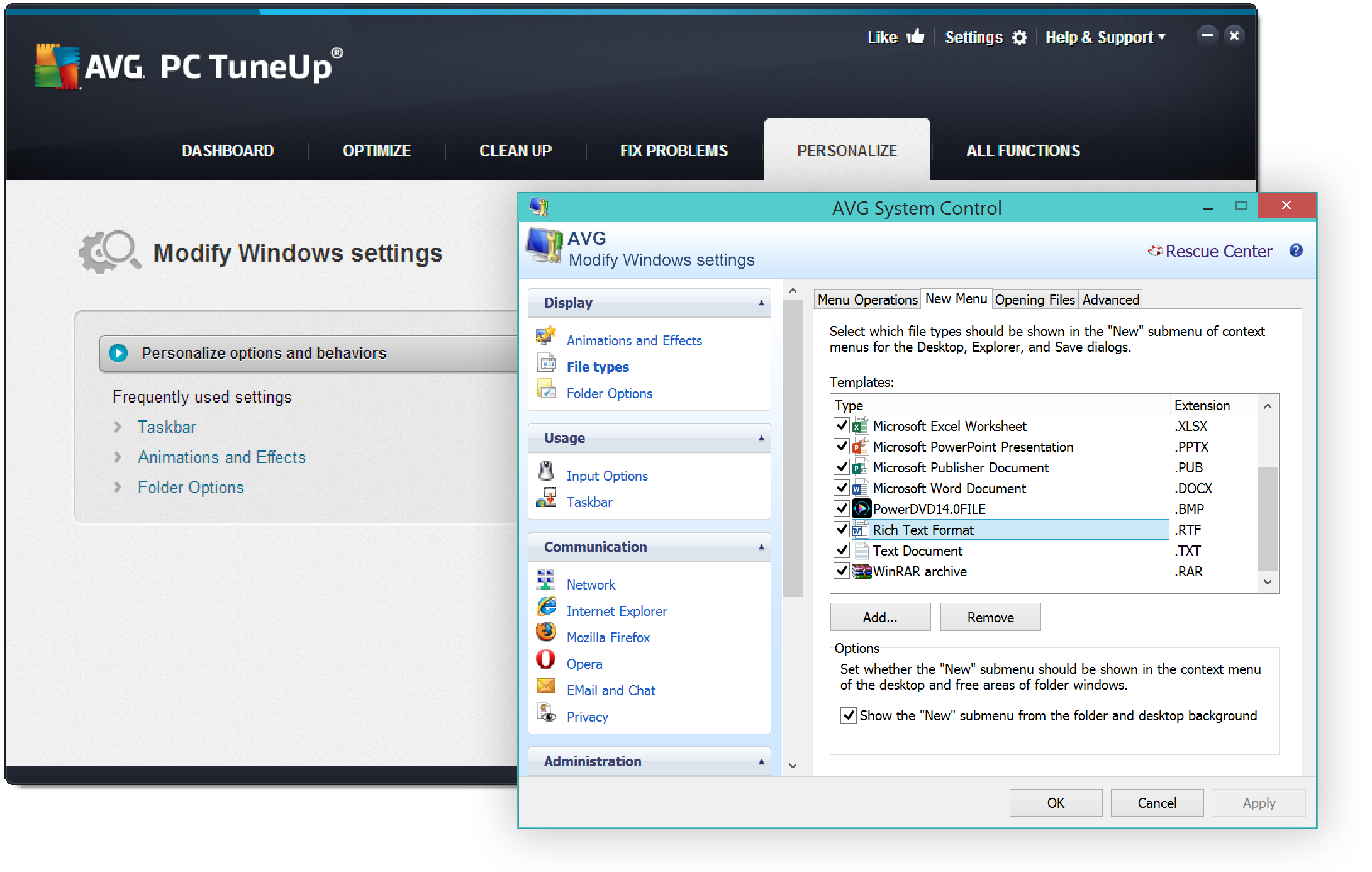
If you’d like to add or remove items in your “Create New…” menu there’s a great (and much easier) solution for you. All you need is AVG PC TuneUp (you can get the trial here: http://www.avg.com/us-en/avg-pctuneup):

Once installed, go to “Personalize” and click on the “Personalize and behaviors”.   Head over to “File Types” and “New”:In this are you can easily get rid (or even add!) items that appear under the “New” menu, which I personally like to keep very clean as I only create a few files that way:

2014-10-07_06-45-46

Got any questions? Let us know!

AVG and Sony partner to protect devices right out of the box

Mobile devices have become the cornerstone of our connected lives and we use them for everything from gaming to banking and tracking our health. This makes life incredibly convenient for smartphone users but it also carries a risk to our privacy and security.

Many apps on our smartphones stores generate and store information about us as people. With the average Android users having as many as 95 apps installed on their device, it quickly becomes clear that our devices are portable databanks that carry our contact, financial, health and location data.

With so much personal information stored on our devices, it’s never been more important for smartphone users to protect their data with basic security measures such as setting up a passcode or installing a security app that will check links and scan for infections when you download software or surf the web.

That’s why AVG is delighted to announce that we’ve teamed up with Sony Mobile to make it easier than ever for Sony Xperia customers to protect their devices and their data.

From autumn 2014, all Xperia Z3 smartphones and tablets will come with a free 180 days of AVG AntiVirus PRO so that devices are protected straight out of the box.


After the trial expires, users can either renew or downgrade to AVG AntiVirus FREE for Android so that their device is protected free of charge.

AVG AntiVirus FREE for Android was the first mobile security application to exceed 100 million downloads on the Google Play Store and has powerful tools to help you protect your device, keep it running smoothly and even locate your device should it get lost or stolen.