Category Archives: Antivirus Vendors

Antivirus Vendors

South Korea hit with banking malware using VPN connection

South Korean banks have been attacked by hackers again!

This is not the first time we reported malware which targets Korean banking customers. In the past, we wrote about Chinese threats against Korean Windows users and last year we published a series of blogposts, Fake Korean bank applications for Android (part 1, part 2, part 3), about malware targeting mobile platforms.

The Korean banking malware is based on the same principle previously used. The customer executes the infected binary, which modifies Windows hosts file. This file contains a list of domains with assigned IP addresses.  Malware, however, may modify this file. When a customer wants to visit his online bank website, he is redirected to the IP address specified in the hosts file, not to the original bank website!
XP Debugging2

The piece of malware we will discuss in this blog post performs the above mentioned modification of system settings. However, when we looked into the modified hosts file, we noticed something unusual.
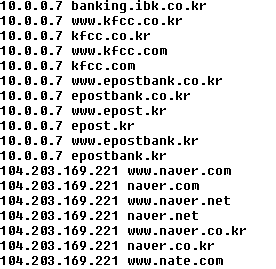
hosts

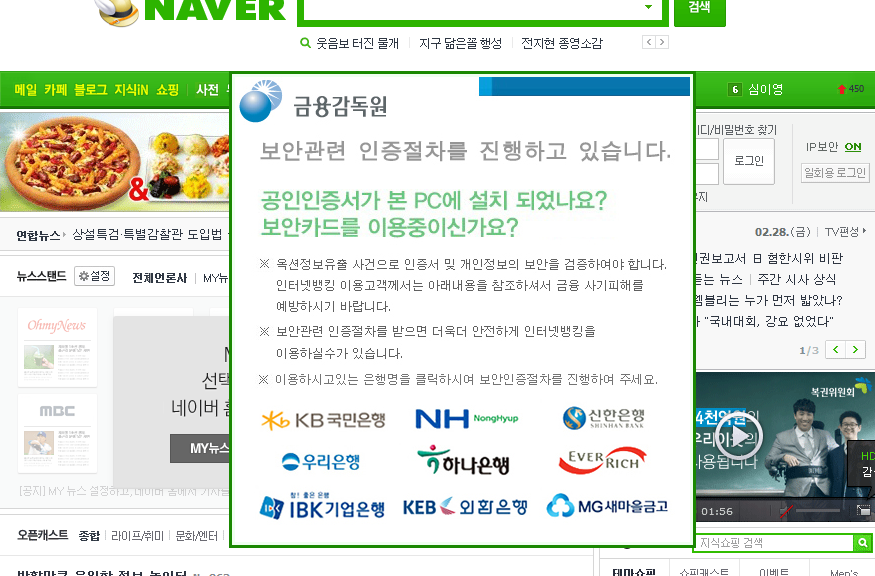
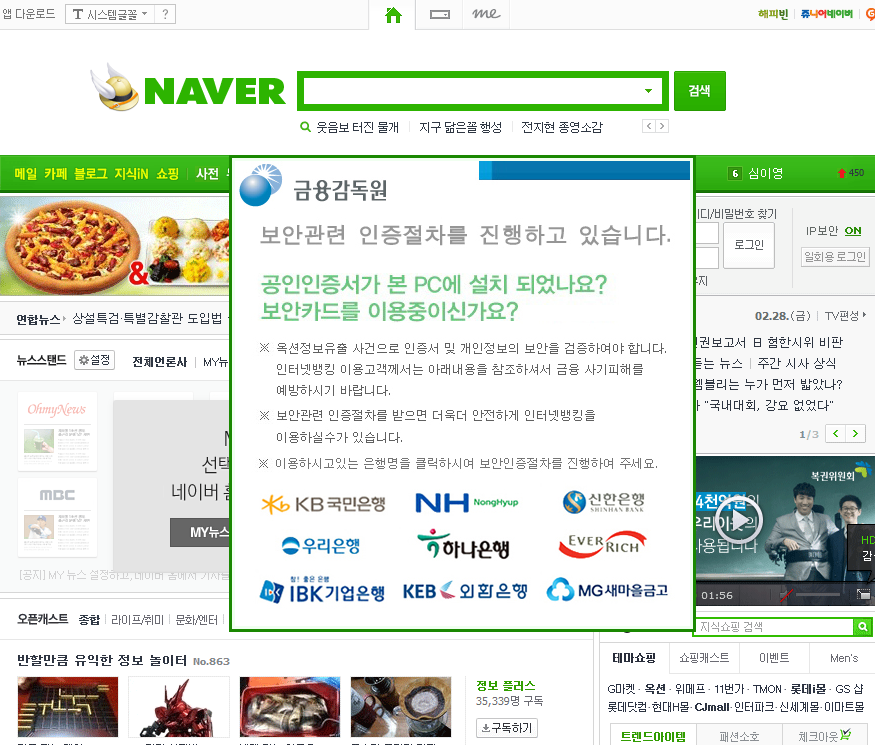
As you can see in the figure above (shortened screenshot of hosts file), the malware redirects many websites of South Korean banks to the IP address 10.0.0.7. If you try to enter this address into your web browser, you probably won’t get any response, because this is the private IP address. The other websites which belong to South Korean search engines, like Naver, are redirected to the publicly accessible IP address. When visiting any of these search engines on the infected machine, the following banner is displayed on the top of the regular website.
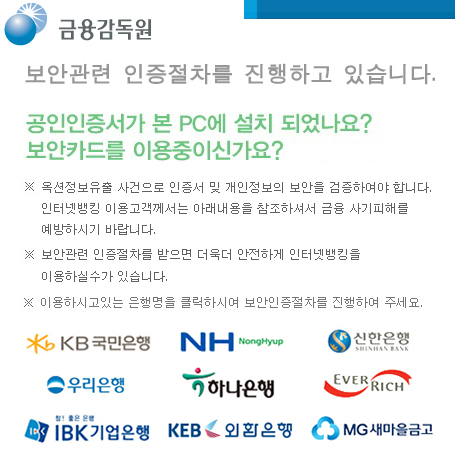
popThe image says:

Do you have a security software or program in your PC or Do you have a security card? Due to hacking incidents and potential of compromising users’ information if you want to use internet banking you need to do identification procedure.

We found one very interesting technical detail about the malware behavior – it uses a VPN connection! When a user clicks on one of the bank’s logos below, he is connected to a VPN and the fake banking website is displayed. At first, the malware connects to the C&C server and obtains configuration by GET request on 69.30.240.106/index.txt. The C&C answer includes a link to an executable modifying the hosts file and VPN server IP address.

900
test.exe
vpn=204.12.226.98

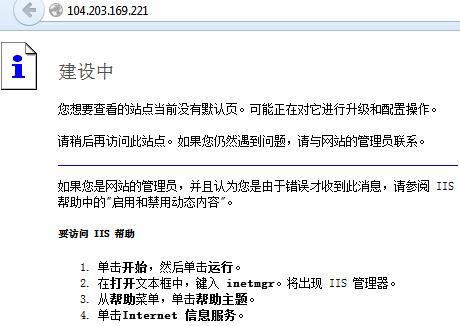
The executable is responsible for properly rewriting %windows%system32driversetchost file, which is queried for address translation before querying DNS on Windows machines. For example, if you want to go to www.naver.com the system first accesses the host file, and if there is a match it uses the specified IP address (104.203.169.221) for that site which differs from the original DNS records – 202.131.30.12 for our geographical location.

The malware targets Korean bank customers who access the following bank websites:

www.nonghyup.com, nonghyup.com, banking.nonghyup.com, www.nonghyup.co.kr, nonghyup.co.kr, banking.nonghyup.co.kr, www.shinhan.com, shinhan.com, www.shinhanbank.com, shinhanbank.com, www.shinhanbank.co.kr, shinhanbank.co.kr, banking.shinhanbank.com, banking.shinhan.com, banking.shinhanbank.co.kr, www.hanabank.com, hanabank.com, www.hanabank.co.kr, hanabank.co.kr, www.wooribank.com, wooribank.com, www.wooribank.kr, wooribank.kr, www.wooribank.co.kr, wooribank.co.kr, www.kbstar.com, kbstar.com, www.kbstar.co.kr, kbstar.co.kr, www.keb.co.kr, keb.co.kr, ebank.keb.co.kr, online.keb.co.kr, www.ibk.co.kr, ibk.co.kr, www.ibk.kr, ibk.kr, mybank.ibk.co.kr, banking.ibk.co.kr, www.kfcc.co.kr, kfcc.co.kr, www.kfcc.com, kfcc.com, www.epostbank.co.kr, epostbank.co.kr, www.epost.kr, epost.kr, www.epostbank.kr, epostbank.kr

The bank domain names are translated into a private network address range (10.0.0.7) and the search engines are translated to webserver running IIS. Webserver runs a Chinese version of IIS, as shown from the error message displayed when supplying incorrect header information.
iis
The malware, however, is not connected to the VPN all the time. The malware searches for the active Internet Explorer windows and if found, depending on Internet Explorer version, it locates browser’s address bar and extracts the currently entered url address. If URL belonging to any of the banks is found, VPN connection is established.

At first, malware drops a file %USERPROFILE%profiles.pbk, which includes the basic configuration. The credentials for VPN (name and password) are hard coded in the binary. The connection is made with help of Windows RAS API interface.
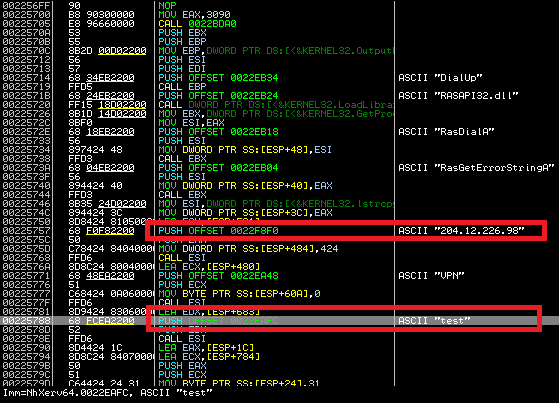
rasdial

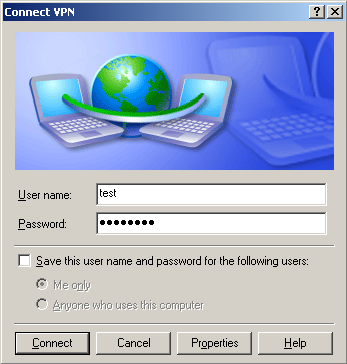
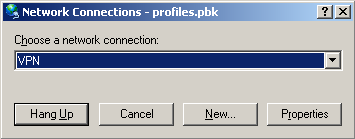
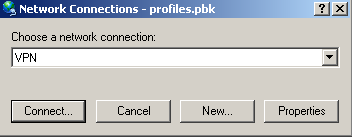
If we want to verify the VPN connection in Windows, we can simply locate the dropped PBK file and double click on it. In properties, we will choose “Prompt for name and passwords, certificate, etc.” We enter the username and password, which we previously extracted from the malicious binary. After pressing the “Connect” button, we are connected to the VPN, and if hosts file is properly modified, we can access the fake bank websites. After pressing “Hang Up”, we can disconnect from VPN.
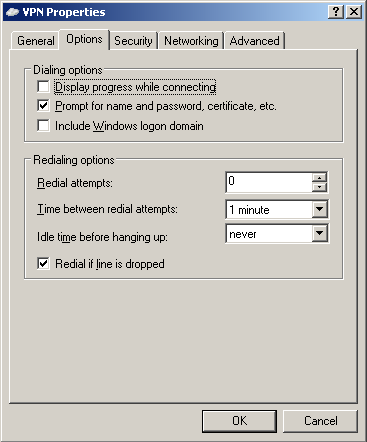
pbk01

pbk02

pbk03

pbk04


After a successful connection, “ipconfig /all” command lists PPP connection to VPN, with the current machine’s assigned private IP address. At this moment, the infected machine is connected into the private network and it can access contents hosted on 10.0.0.7.
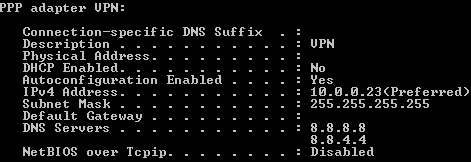
vpn

Example of visiting bank’s website on a compromised computer

When a customer visits nate, daum or naver on an infected machine, he is presented with the following banner.
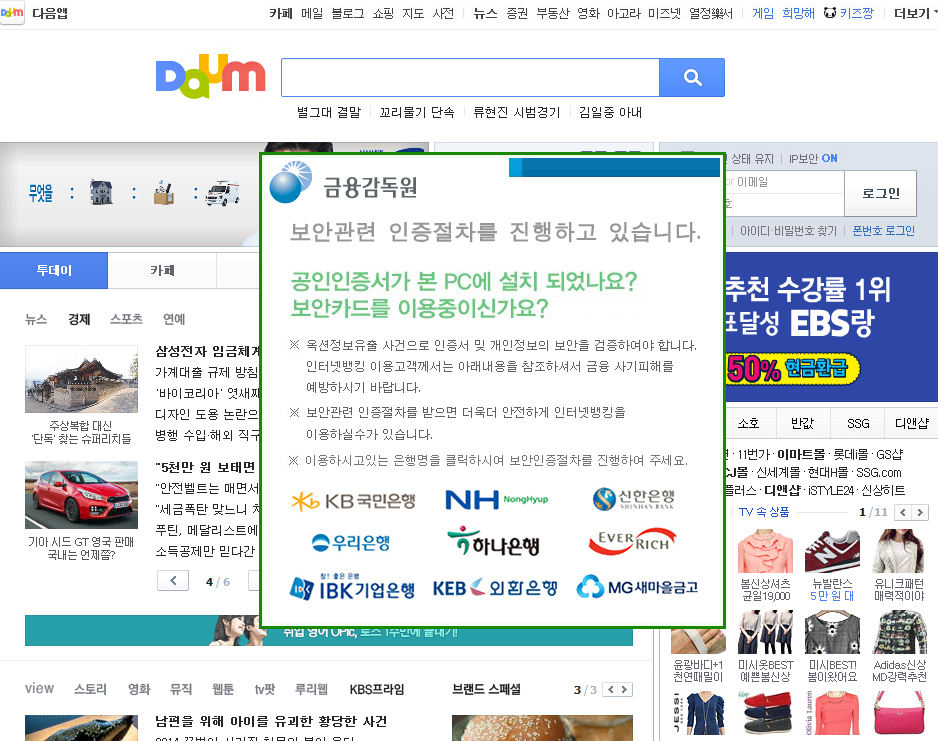
XP Debugging1

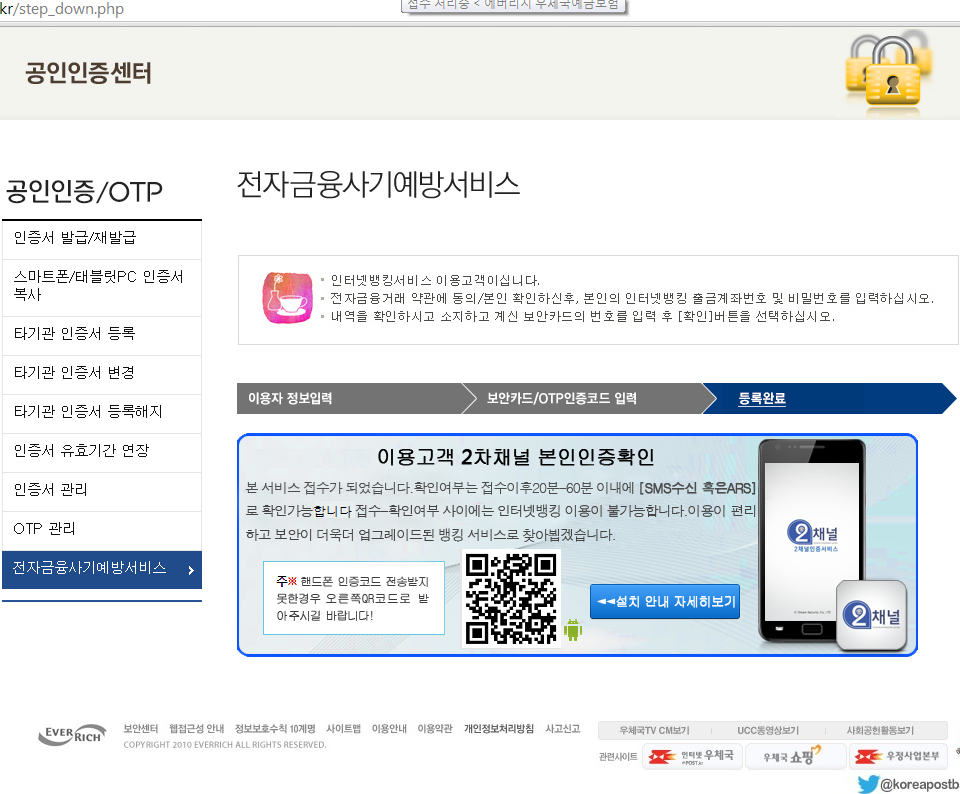
After clicking on the logo of a bank, the customer is presented with the following modified website (the example below was taken for epostbank.kr, however this attack works the same way for the other banks). If the customer clicks on any link on the fake bank website, he is presented with an error message. The message says that the additional security measures are available. After clicking OK, the fake verification process starts.
epostbank_errormsg
The customer is asked to fill in some personal details.
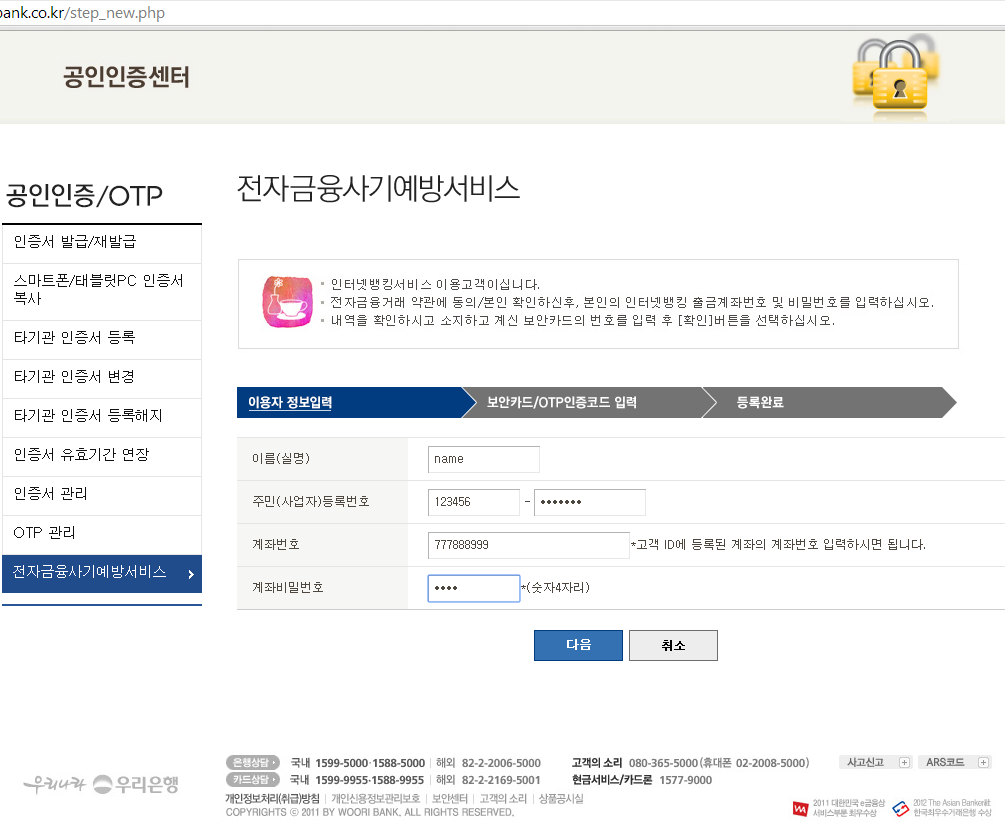
epostbank01
Then he is asked for a phone number and numbers in his security card.
epostbank02
Lastly, he is presented with a link to download a malicious Android application. At the writing of this blog post, the link to the malicious Android app is not working anymore.
epostbank03

SHAs:

Original dropper

1C22460BAFDDBFDC5521DC1838E2B0719E34F258C2860282CD48DF1FBAF76E79

Dropped DLL, C&C communication

FDF4CAA13129BCEF76B9E18D713C3829CF3E76F14FAE019C2C91810A84E2D878

Hosts file modifier

1D1AE6340D9FAB3A93864B1A74D9980A8287423AAAE47D086CA002EA0DFA4FD4


Acknowledgements:

This analysis was jointly accomplished by Jaromir Horejsi, David Fiser and Honza Zika.

A Guide to Facebook Privacy Basics

I’ve written a lot about over-sharing on social media. Why? Because it can be embarrassing, annoying and, in the worst case, dangerous to over-share our private information.

Often over-sharing happens unintentionally, because people haven’t adjusted their privacy settings.  On Facebook for example, every time you post it’s possible to choose who can see it.

The issue is that people regularly overlook privacy options or just fail to understand why it is a good idea. Facebook has taken steps to change this with the introduction of “Privacy Basics”.

Available from January 1st, Facebook will provide interactive guides to answer commonly asked questions about how to control your personal information on the site. These guides, available in 36 languages, will allow users to learn more about untagging, unfriending, blocking and more.

Here’s what Privacy Basics can help you control on Facebook:

What others see about you – Control who can see your posts, profile and friends, how to remove comments, tags and accounts.

How others interact with you – What other people can post on your timeline, what people can do to things you post, how to block users and what to do if your account is hacked.

What you see – How to customize what you see in your newsfeed and from advertisers.


Erin Egan, Facebook’s Chief Privacy Officer, described it this way: ”Privacy Basics is the latest step we’ve taken to help you make sure you’re sharing with exactly who you want, including our privacy checkupreminder for people posting publicly and simplified audience selectors.” You can read the announcement here.

Making Facebook settings simple, more intuitive, and explainable is great news, especially for new users.

Of course, it’s up to all of us to control our settings. Facebook is essentially handing you the keys. As the welcoming page for Privacy Basics says, “You’re in Charge.”

Is lack of trust limiting the potential for new online services?

If you do any or all of these, do you ever stop to think about whether you can trust these online services with your private data like bank details, personal health information, on top of the usual address and date of birth?

With the rapid development and uptake of the Internet of Things, 2015 is set to be the year where the choice of connected devices and services will really take off. With an estimated two billion new people coming online in the next four years across the world, the consideration of who they can trust with their data online has never been more relevant.

Building trust online isn’t as easy as it sounds. It involves every one of us, as individual web users, businesses leaders, policy makers and governments. It’s an agreement of rights and responsibilities on both end-user and provider sides of connected services.

With mobile being the most accessible and affordable means to connect to the Internet for billions of people in developing economies, the telecoms industry at large is going to have a very large role to play in building trust. This means anyone who is providing a mobile service or product needs to be part of this debate.

AVG’s CEO Gary Kovacs recently took part in a debate at GSMA’s Mobile 360 event on the steps needed to build a digital future for Europe. He outlined three principles that the industry must consider in this area.

First, we can’t expect users to simply understand the implications of going online for public services. The industry has a responsibility to help educate the web’s newest arrivals to understand the implications what they do online. Personal data is traded and marketed, and individual privacy can be eroded both with express user knowledge and without.

AVG recently attended the Clinton Global Initiative and announced its Smart User Mission which aims to help first time smartphone users better understand how their data and privacy is affected by the apps and services that they use. The main aim is to help consumers understand that sharing data is not bad; it simply needs to be consensual.

Smart User Iniative

Second, understanding and consenting to personal data exchange bring us to another issue; transparency. At some stage, we’ve all blindly accepted privacy and usage policies for apps and services. Businesses must take steps to become more transparent about their data policies and give users a clear explanation of how their data will be used. AVG has already done this with its Short Data Privacy Notice for its mobile apps but we recognize there is always more that can be done.

Finally, whatever actions the industry takes, we have to enforce it; it has to have teeth and it has to matter if it is to be meaningful. The need to grow consumer trust with the next generation of online services represents the next obstacle in our connected journey and the framework we work to put in place today will set the tone for users’ experiences online in the future.

Image courtesy of GSMA

Leave the tracking to the post office – not online advertising!

The holidays are here and many are opting to shop online for their holiday gifts, whether it’s to avoid the crowds or because time is running out. Online shopping is a convenient option, everything is almost guaranteed to be in stock, there are no lines and your purchase gets delivered to your doorstep. But, can this season’s holiday shopping come back to haunt you online? 

Ad networks, whether via browser extensions or cookies, track your online browsing activities to target ads tailored to your interests. Some see this is as a good thing as you are only shown ads for products or services that would be useful for you, while others may think it’s creepy that the Internet knows about your guilty pleasures. The holidays are about giving and generosity, so your online browsing activities may differ from what they are the other eleven months of the year. You may be researching whether you should purchase a round or square shovel for Uncle Jack, who put gardening tools on his holiday wish list, or which game you should order for your daughter. Now, do you really want to have ads for gardening tools and games for kids following you around the Internet?

How to shop undercover

Whether you want to protect your privacy or simply want to avoid targeted ads that may result from holiday shopping for family and friends, Avast is here to help!

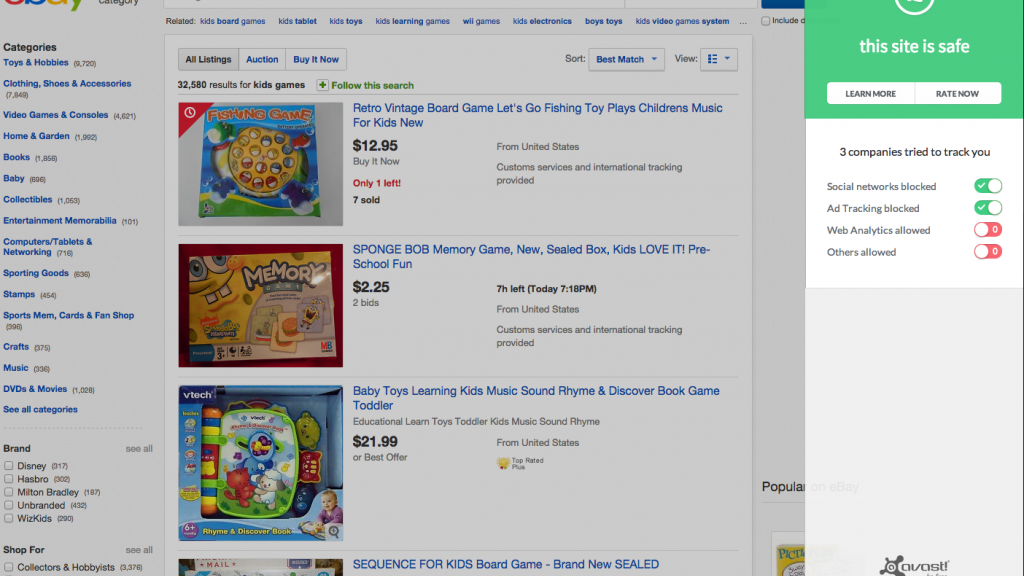
Avast Online Security comes with a Do Not Track feature. Do Not Track identifies tracking software and shows you a list of all tracking and analytics programs that are trying to track your online behavior. You then have the option to choose which tracking software you want to deny or allow to track your online behavior.

Online ad tracking Do Not Track

By denying tracking software, you eliminate your digital footprint and exclude targeted ads from following you while you browse. Most browsers do come with some form of Do Not Track, but they rely on HTTP Do Not Track headers. Avast on the other hand uses proprietary technology that cannot be overridden by servers.

Avast Browser Cleanup is another tool that will help ward off targeted ads. Browser Cleanup removes unwanted or poorly rated toolbars that could also be keeping an eye on your browsing sessions. Since Avast Browser Cleanup launched in February 2013, it has identified more than 40 million different toolbars, 95 percent of which have been rated as “bad” by Avast users.

Leave the tracking this holiday season to shipping companies and the post office, not online advertising! Avast wishes you and your loved ones safe and happy holidays (and shopping :))!

Avast Software’s security applications for PC, Mac, and Android are trusted by more than 200-million people and businesses. Please follow us on FacebookTwitter and Google+.

The message that can crash WhatsApp

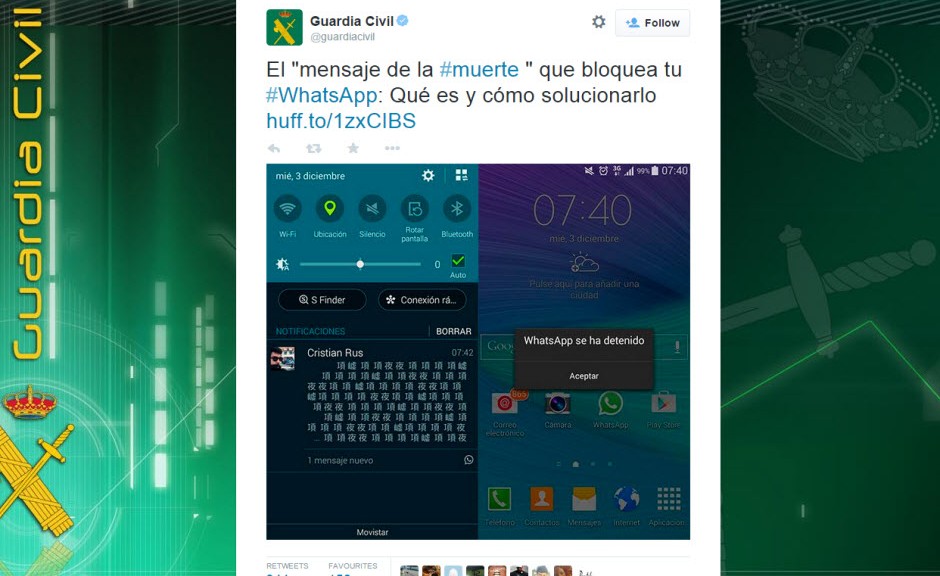
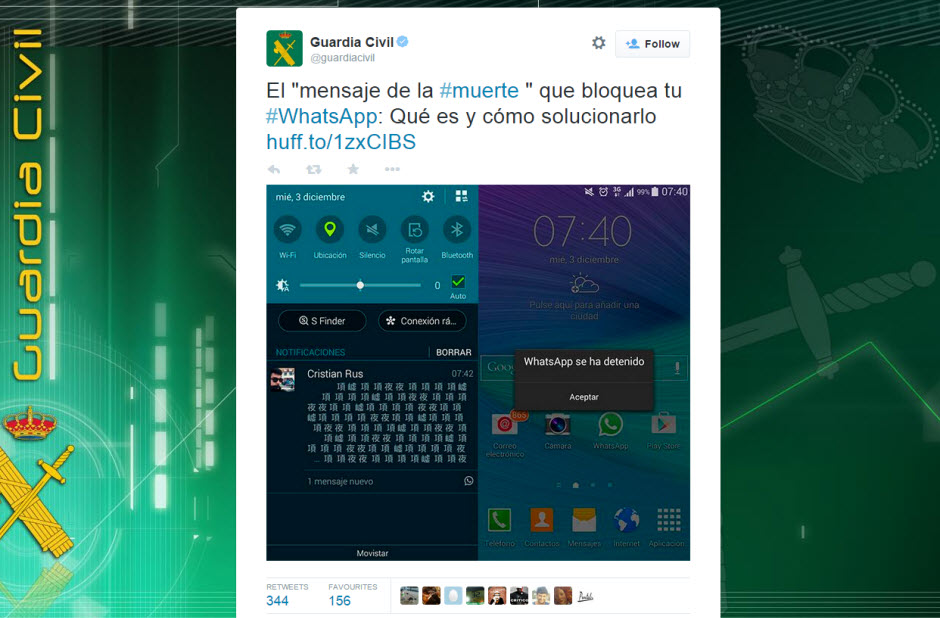
Warning! The Spanish Civil Guard is warning of a new threat on WhatsApp!

whatsapp-death-message

Known in Spanish as the “mensaje de la muerte” (the message of death), it only affects Android devices, not iPhones.

It works as follows: You receive a text message with Chinese-type characters which, having been copied and pasted to Whatsapp, will crash the application on Android devices. This is particularly dangerous for WhatsApp groups, as it blocks WhatsApp for all group members and deletes the group.

How to resolve the WhatsApp ‘message of death’

  • If received from another user: just delete the chat to resolve the problem.
  • If the message comes through a group, go to “Settings”, “Applications” “Manage Applications”, “WhatsApp”, “Clear Data”. Be aware however that all chats and messages histories for all groups will be deleted.

The post The message that can crash WhatsApp appeared first on MediaCenter Panda Security.