Category Archives: Antivirus Vendors

Antivirus Vendors

Protect your Sony Xperia for free with AVG

Having AntiVirus on your Android device is one of the most important ways to protect your data, contacts and privacy from hackers, thieves and scams. Some can even help you locate and recover your phone if you lose it.

It’s now even easier for Sony Xperia users to protect their phones as they now have unlimited access to PRO features for six months

Sony Xperia Z3 has AVG installed straight out of the box while Sony Xperia Z1 and Z2 users can download the app for free from Google Play.

When you protect your Xperia device with AVG, you get so much more than AntiVirus protection from malware and scammers.

Performance:

  • Kill tasks that are slowing down your device
  • Powerful battery saving mode to help your Xperia go further
  • Data plan tracking to help you avoid unwanted costs

Anti-Theft

  • Locate, lock and wipe your phone remotely
  • Make your phone ring even if it is on silent
  • Camera Trap will discreetly email you a picture of anyone trying unlock your phone

Privacy

  • Password protect any private apps
  • Back-up your data onto your SD card
  • Advanced call blocking and spam filtering


Watch our AVG Academy video on why it’s important to protect your Android smartphone:

Video

Michael McKinnon’s Mobile Safety Tips


German phishing scam spreading globally

In recent weeks, we detected another wave of phishing emails, written in German, pretending to be a billing invoice sent from various well-known companies such as Vodafone. Instead of a real invoice, they contain a link to an archive with a malicious code that can infect users’ PCs. The original wave of this malware campaign was already observed earlier this year primarily targeting Germany. This time, it is spreading worldwide. However, they are still in German, which helps identify them as a scam.

In this post, we give a brief technical description of this threat and provide several tips how to not get caught by similar phishing threats.


Phishing Emails

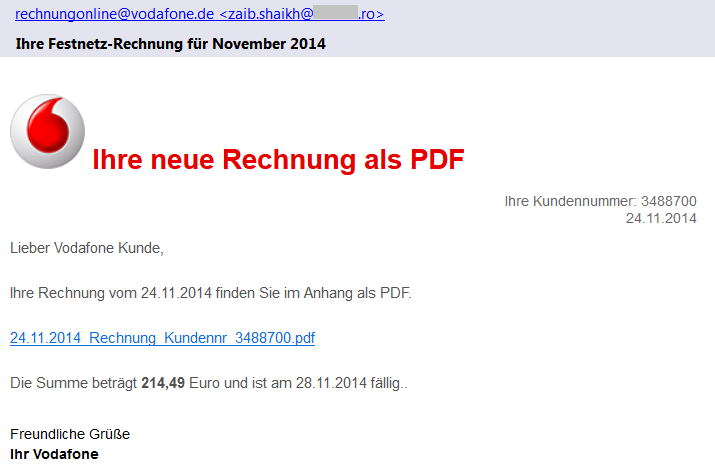
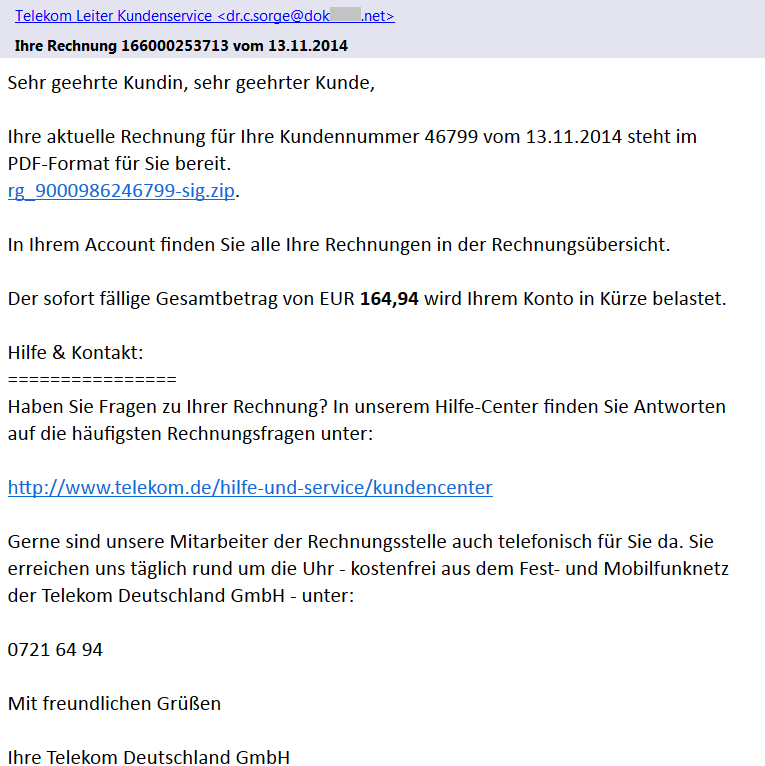
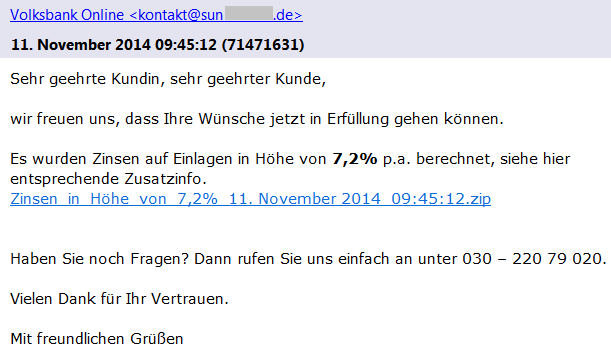
We have found several different versions of these emails that claim to be sent from Vodafone, Telekom Deutschland GmbH, Volksbank, and other companies with a faked sender name (e.g. [email protected]) including the official logos. As we can see in Vodafone’s official statement, these companies are aware of this scam and have already warned their customers. Each version of such email is slightly different and contains the current date, a random customer number and payment amount.

Phishing email - Vodafone

If we look more carefully at the sender’s email address, we can see that the true author did not bother with faking the sender’s email address. This should immediately alert the recipient as an email from German Vodafone would hardly be sent from an unrelated Romanian domain.

In the latest scam, the emails do not contain any attachment, which is different to the other recent phishing campaigns. The proclaimed bill (a PDF file) is available online via a given link (also unique for each version) that actually leads to a ZIP archive stored on one of the hacked sites. These archives contain an exploited/unsecured WordPress instance and they serve as a mule for the distribution of malware to users.

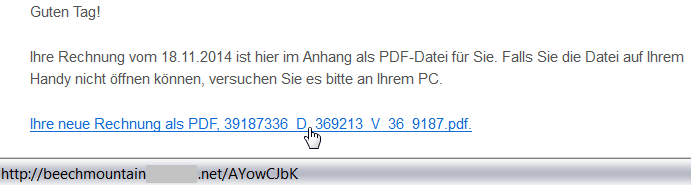
Once again, a user targeted by such an attack should be alerted via a simple inspection of the target location of the link by hovering the cursor over it (but remember to not click on the link). This feature is supported by most browsers and email clients. As we can see from the following figure, the target domain of the link is also very suspicious:

beachmountainXXX.net/AYowCJbK

.

Link to a hacked domain

Malicious Content

The downloaded file (e.g.

2014_11rechnung_K4768955881.zip

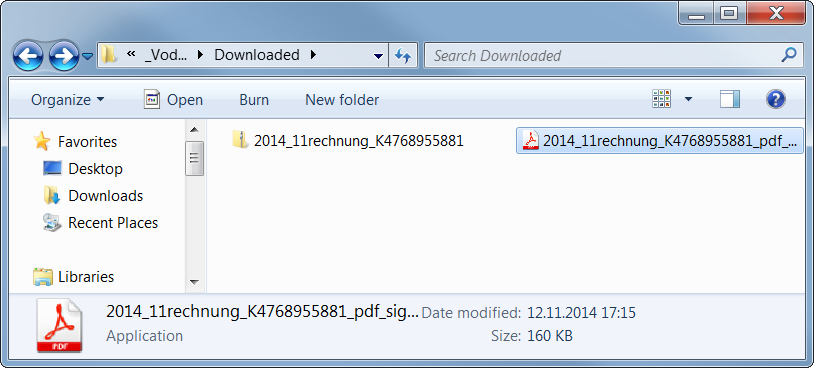
) is a ZIP archive containing an executable file. The user is fooled by the application’s icon (similar to Adobe Reader) to think that it is a PDF file, which is yet another well-known trick used by malware authors.

Icon of the executable file

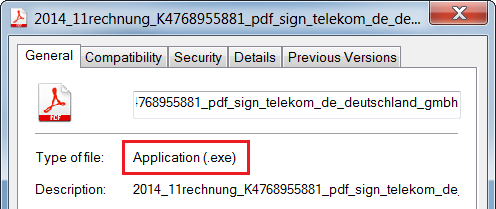
If you are not sure about the real file type, you can see the file properties.

For the following analysis of the malicious content, we use a sample with the MD5 checksum

b0a152fe885a13a6ffb0057f6f21912f

. It is an executable file downloaded from one of these links, likely originally written in C++ by using MFC.

First Stage

The (unwanted) execution of this file starts the first phase of the malicious behavior.

The file itself is 160 kB large, but most of its size is stored within the resource file masked as the following GIF image (109 kB).

The author of this sample used steganography because 99% bytes of the image content represents an encrypted code. This code is decrypted first and the control is passed to this decrypted code.

Furthermore, WinAPI functions are called indirectly (via functions

LoadModule()

and

GetProcAddress()

) and names of these functions are obfuscated and decoded during run-time on the application’s stack in order to make analysis more difficult.

Afterwards, it creates a new process with the same name and fills its sections with the decrypted code from the GIF image (via the

WriteProcessMemory()

function).

This new process copies the original file into 

C:Users%USERNAME%AppDataRoamingIdentitiesqwrhwyyy.exe

(as a read-only system file), registers itself to be run at system startup (registry key

HKCUSoftwareMicrosoftWindowsCurrentVersionRun

), and deletes the original file by using a generated batch file.

Once the file is executed from this new location, it behaves differently:

It checks whether it is analyzed or virtualized via the following techniques.

  • Detection of a loaded Sandboxie module 
    SbieDll.dll

    and detection of running processes 

    VboxService.exe

    (VirtualBox) and

    vmtoolsd.exe

    (VMware).

  • It also uses the
    GetTickCount()

    function to detect whether it has really started during the startup and also to detect debuggers.

  • If any of these is detected, the executable file stops its malicious activity.

Afterwards, it extracts and decrypts another executable file on stack from the aforementioned GIF image and injects it into other processes, such as

explorer.exe

,

firefox.exe

. This starts the second stage of infection. Note: some versions of this malware try also to check a working Internet connection via a DnsQuery of www.microsoft.com before starting the second stage.

Second Stage

This extracted file is relatively small (52 kB) because it is packed by the UPX packer (version 3.08).

After its run-time unpacking, it uses the same anti-debugging tricks as the previous sample.

The main body of this file can be described by the following decompiled code:

CreateMutexA(0, 1, mutexName); // "qazwsxedc"
Sleep(1800000);                // wait for 30 minutes
WSAStartup(0x202, &WSAData);   // initiate Winsock
seconds = getLocalTimeInSeconds(0);
if (GetTickCount() < 1920000 /* 32 minutes after startup */ &&
	GetTickCount() > 1000) {
	while (1) {
		malicious();           // the main functionality
		gStateInactive = 1;
		Sleep(300000);         // wait for 5 minutes
	}
}

  • For synchronization between the first and second stage, the mutex 
    qazwsxedc

    is used (e.g. another variation of classical

    qwert

    or

    asdfg

    names).

  • Afterwards, the malware waits for 30 minutes to remain stealthy. After that, it also checks whether no more than 32 minutes have passed since the system startup (i.e. whether it was started during the first two minutes after startup).
  • In its main loop, it follows the malicious behavior described in the remaining paragraphs (function
    malicious()

    ). After each iteration, it makes a 5 minutes break before the next action.

In this function, the string

DC85CCC4C4CCC7CED385C6CE919F9F98

is decrypted at first by using the fixed XOR key

0xAB

. The resulting string

w.googlex.me:443

represents a remote address of the command-and-control (C&C) host and its port. The second one is

m.googlex.me:53

. At first, the sample tries to check connection with these servers by using the Winsock functions. The other samples contain different lists of C&C servers:

ahokcjidanptacyu.eu
gctrbwqyxxyamcnn.eu
ggcrguelfhvtuxdb.eu
gkkelsrkypraqhto.eu
gunvpvqhnwxxgjsn.eu
gvlmoefoqapvrvec.eu
mcfpeqbotiwxfxqu.eu
...

Afterwards, it obtains information about the local computer, such as:

  • computer name;
  • version of operating system;
  • processor information and number of cores;
  • memory information.
English (United States) // local settings
TEST-PC                 // PC name
Windows 7 Professional  // Windows version
4096 MB                 // memory      
Intel(R) Xeon(R) CPU E5-1620 v2 @ 3.70GHz | CORE 8 // CPU
2014-10                 // malware version

Afterwards, this information is encrypted and send as a registration to a C&C server from the aforementioned list. The reply from the server is encrypted by the same algorithm. The very first byte of the reply message specifies an action (i.e. a control code) to be performed. To date, we have identified the following codes:

  • 18, 19, and 20 – open a specified page in Internet Explorer (with minor differences).
  • 16 and 17 – download and execute a file specified within the message. The file is downloaded via the
    URLDownloadToFile()

    function, stored with a random name, e.g.

    %TMP%mibww.exe

    and executed via the 

    WinExec()

    function.

  • 6 – terminate the process (itself).
  • 5 – inactivate itself for a specified time.
  • 2, 3, and 4 – these codes imply different types of online communication with other systems (e.g. for downloading other malware modules, communication with other infected systems, attacking specified targets). The communication is executed via a server-specified number of threads running the following built-in functions. Arguments to these functions are also sent within the messages from a C&C server. All of these functions are based on Winsock functions.
    • Sending a message to a given IP address (or host name) and port.
    • Communication with a remote server on ports 21 and 22.
    • Sending multiple types of HTTP GET requests to specified servers.
GET %FILE% HTTP/1.1
Accept: image/gif, image/x-xbitmap, image/jpeg, image/pjpeg, application/x-shockwave-flash, application/vnd.ms-excel, application/vnd.ms-powerpoint, application/msword, */*
Accept-Language: en-us
Accept-Encoding: gzip, deflate
User-Agent:Mozilla/4.0 (compatible; MSIE %VERSION%.0; Windows NT %VERSION%.1; SV1)
Host: %HOST%:%PORT%
Connection: Keep-Alive

GET %FILE% HTTP/1.1
Content-Type: text/html
Host: %HOST%
Accept: text/html, */*
User-Agent:Mozilla/5.0 (X11; U; Linux i686; en-US; re:1.4.0) Gecko/20080808 Firefox/%VERSION%.0

GET %FILE% HTTP/1.1
Referer: http://%ADDR%:80/http://%ADDR%
Host: %HOST%
Connection: Close
Cache-Control : no-cache

GET %FILE% HTTP/1.1
Content-Type: text/html
Host: %HOST%
Accept: text/html, */*
User-Agent:Mozilla/4.0 (compatible; MSIE %d.00; Windows NT %d.0; MyIE 3.01)

Those actions are constantly executed until the process is terminated by the C&C server (unlikely) or by user (e.g. system shutdown). However, this process is started once again during the system startup.

As we can see, it is up to the attacker to download and execute other malicious modules, such as password stealers, bankers, or to include the infected PC into a botnet.

Conclusion

Although, the analyzed phishing emails are far from perfect (download links and sender addresses are suspicious, the text of email is only available in German, etc.), it is still possible to fool a user into executing the malicious file. This file is powerful enough to infect the user’s machine and turn it into an unsafe place.

Here are some basic tips, that we’ve previously shared about how to detect a phishing email:

  • Check the spelling and grammar – it is unlikely that your bank or service provider will send you an email with such mistakes.
  • Sender’s name and email address can be spoofed, do not rely on them.
  • Look at the target address of the link – different domains than the official ones are highly suspicious.
  • Do not panic and do not do any action in haste. The attacker often tries to threaten you and make a time pressure on you.
  • Do not open suspicious attachments or links. If you really need to open a file, check its file type before double-clicking it. The file name and icon can be easily crafted to look like a picture or document.
  • If you are not sure about the email’s origin, try to contact that company directly (e.g. call official customer care), but do not respond to such email and never ever send your credentials in this way.
  • And as always: use AVG to stay protected.

Fake confirmation emails from Walmart, Home Depot, others in circulation

Cybercrooks target busy holiday shoppers with phishing scheme.

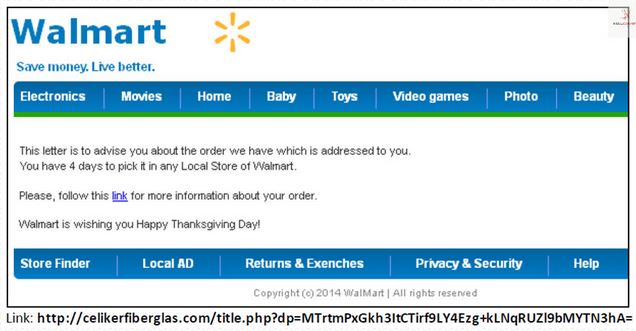
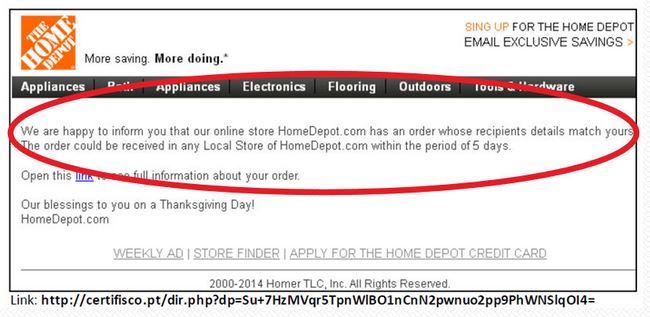
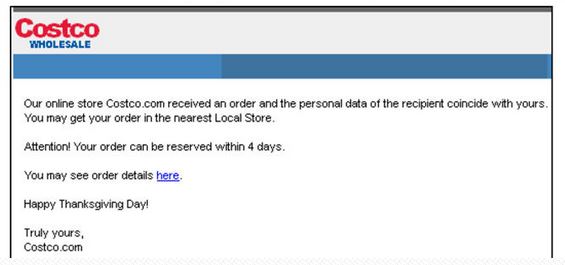
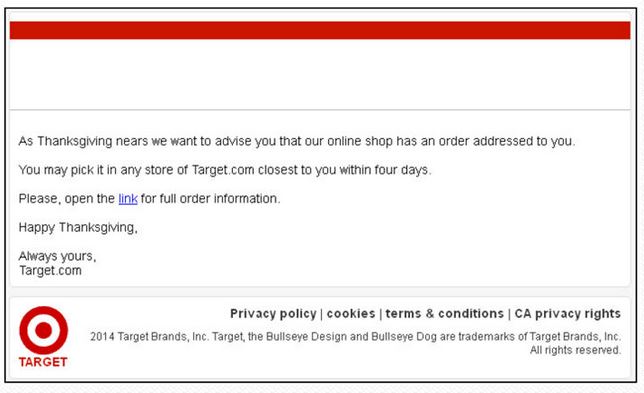
After all that shopping on Black Friday and Cyber Monday, consumers are reporting a bunch of phishing emails that look like authentic communications from poular stores. Malware-infected emails are reportedly coming from Walmart, Home Depot, Target, and Costco. The catch is these are not from the authentic merchants, but rather cybercrooks are using a phishing scheme to send fake emails with the intent to gather personal information from harried shoppers.

Walmart scam email

Millions of these emails are being sent each day, originating from more than 600 hacked websites that act as intermediaries, according to security analysts from Malcovery monitoring the attacks. This method prevented detection by causing the spammed links to point to websites that had been safe until the morning of the attack.

The messages have subject lines like this:

  • Thank you for your order
  • Order Confirmation
  • Thank you for buying from Best Buy
  • Acknowledgment of Order
  • Order Status

If you receive one of these emails, don’t click on any links. Instead, visit the merchant’s website or call their customer service. Don’t give any personal information out unless you know for sure with whom you are speaking.

Home Depot scam email

costco scam email


Signs of a fake email

Unfortunately, cybercrooks are becoming more professional with their scams, but here are a few things you can look for to tell a fake email from an authentic one.

  • Poor grammar usage
  • The Sender (the “from” line) may not match the merchant name
  • Links in the email do not go to the real website
  • There is no order confirmation number or details about the order. A real order confirmation email contains the details of your order without clicking on any links, as well as where it is being shipped and the payment method.

target scam email

How to protect yourself

Walmart acknowledged that the fraudulent emails were in circulation and suggested these steps if you receive a suspicious email.

  • If you actually placed an order and are suspicious about the email you received, log onto your Walmart.com order to check your order status.
  • Keep your virus software updated on all your computers.

If you were a victim of fraud via the Internet, you should file a report with your local law enforcement agency along with the Internet Crime Complaint Center (ICCC). The ICCC is a partnership between the FBI and the National White Collar Crime Center. You can make a report with the ICCC.

Avast Software’s security applications for PC, Mac, and Android are trusted by more than 200-million people and businesses. Please follow us on FacebookTwitter and Google+.


Why Android phones and tablets need Anti-Virus

Smartphones and tablets are now as powerful as your three year old desktop or laptop computer, which is why it’s just as important to ensure they are secure. And this is especially true for Android devices. In fact, as much as 97% of all mobile malware (that’s fake apps, viruses and scams) is on Android.

But how does malware get onto your phone in the first place? Here are the three top ways that malware can get onto your Android device and how a simple security app can help to keep you safe.

Video

Android Security Basics

Installing ‘untrusted’ apps

Only using the Google Play Store, or another trusted source for your apps is the default advice for every Android device owner.  And it’s good advice because reputable market places will often scan their apps to ensure they’re safe before you download them.

However, Android also provides the ability to download and install an app directly from a website – as a file with the extension “.APK” – provided, of course, that you first enable the security setting to allow “Untrusted sources”.

Anti-Virus for Android will not only help detect potentially malicious apps, it will also alert you to ensure you keep that “Untrusted sources” security option disabled, except for rare occasions when you might need to temporarily enabled it.


Web links and browsing

It’s not just rogue apps that can give you a bad day.  Browsing web sites from your Android phone and tablet can put you at risk.  And there’s also the inconvenience of having your device stolen or lost forever.

Surfing websites from mobile devices is amazingly convenient for you, and the scammers. By exploiting known vulnerabilities, especially in those older Android devices that aren’t up to date, just clicking on a malicious link can be enough to wreak havoc.

Luckily, a good Anti-Virus app which can also scan links and provide protection against phishing attacks will help you surf more safely.

And when it comes to losing your Android phone to tablet, Anti-Theft features allow you to remotely locate, and if stolen, remotely erase your device for peace of mind.

Challenge of Keeping Updated

The ability to keep your Android phone or tablet running the best version of Android with all the latest security fixes depends on a number of factors.

Firstly, the manufacturer may have shipped your device with a modified version of Android to make it behave a little differently.  For example, if you have a Samsung device using the “Touchwiz” interface, or an HTC with the “Sense” look and features.

Second, if you purchased your phone or tablet through a telephone company there’s a good chance it came bundled with some extra apps and features too.

All of these modifications, while arguably adding some value, delay the deployment of security fixes released by Google.

Often you have to wait for  either your telephone company or the device manufacturer (or both) has to refresh their modified versions of Android before you get the benefit.

A good Anti-Virus app can help to keep your device secure until those security updates arrive.

These are just some of the reasons why Android phones and tablets need Anti-Virus.  Do you know of any more?