
Those nasty ads didn’t even wait for the user to click on them.
The post Spotify serves listeners “The Sound of Malware” appeared first on Avira Blog.
Antivirus Vendors
Those nasty ads didn’t even wait for the user to click on them.
The post Spotify serves listeners “The Sound of Malware” appeared first on Avira Blog.
The Animas OneTouch Ping insulin pump contains vulnerabilities that could be exploited by a malicious attacker to remotely trigger an insulin injection.
The post Our insulin pumps could be hacked, warns Johnson & Johnson appeared first on WeLiveSecurity.


For most people, their smartphone has become the most important gateway to the internet. We use our phones to check facts on the move, plan journeys, update shopping lists and check our bank balance.
Simple-to-use apps have put information and services at our fingertips. In fact, the world now uses smartphones and tablets online more than any traditional computers and laptops.
So it’s no surprise that hackers and cybercriminals have turned their attentions to attacking your smartphone.
The relatively low cost of Android-powered smartphones, has helped the mobile operating system establish a significant majority of the mobile market. Android handsets outnumber iPhones by nearly 9 to 1 for instance.
This, coupled with the relative ease of crafting malware for the Android platform, has seen a massive increase in mobile attacks. In July this year, an estimated 10 million Android phones were infected with malware that spied on their owners for instance.
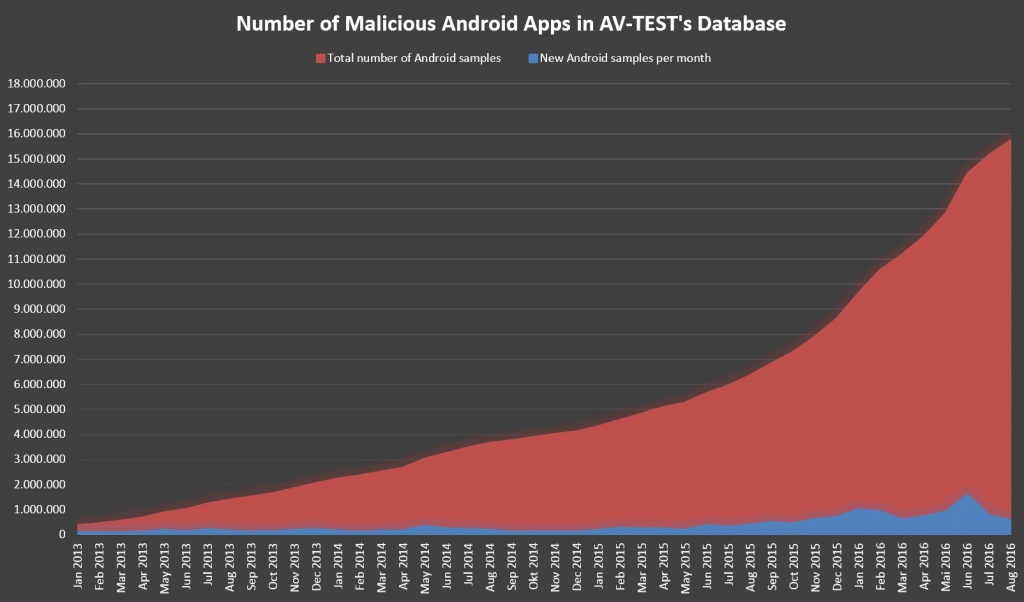
The problem has become steadily worse over time. In January 2013, AV-TEST database of malicious Android apps contained less than 500,000 examples. By August 2016, the total topped 16 million as the number of new malware variants released continues to grow.
The open nature of Android that allows anyone to create software and access key system resources – seen by many as one of the operating system’s strengths – makes it even easier for hackers to create malware and infect phones. This problem is compounded by the infrequency of software updates to patch these vulnerabilities, leaving Android users at risks for months.
Just like your PC, you have the responsibility for keeping malware from being installed on your phone. There are however a few easy steps to counter the most obvious risks.
The Google Play app store is the largest, and most trustworthy source of apps for your phone. All of the apps available there have been checked to ensure they do not contain malware, so you should be safe installing them.
Other app stores or websites are not so stringent, so there is a much higher risk of infection when using them.
Email has been a particularly effective way of installing malware on PCs, so cybercriminals use many of the same techniques on your phone. Always treat email attachments with caution, and never open anything that looks suspicious.
And if you are prompted to download software unexpectedly, there’s a reasonable chance that someone is trying to trick you into installing malware.
Malware can sometimes be downloaded and installed without warning via infected banner ads. Installing an ad blocker app can help prevent compromised banner ads from being displayed – which also stops malware from being downloaded.
Your home PC is protected by antivirus software – and your Android smartphone needs the same level of protection. Leaving your phone open to malware installation is a serious risk – and cybercriminals will take advantage eventually.
Panda Mobile Security (also available in the trusted Google Play store) offers maximum protection against malware along with a number of useful tools should your phone be stolen. You are protected against Android viruses and information theft at all times.
These practical steps will help to improve your device security – and stop the most common malware attacks. And because they are simple and straightforward, you can get started right now.
To learn more about protecting your Android smartphone, please check out this guide.
The post Android malware surges again appeared first on Panda Security Mediacenter.
Feeling overwhelmed by the number of devices and passwords you have to manage and remember? Here are four top tips how to help handle this tech overload.
The post How to handle multiple devices and passwords at once appeared first on WeLiveSecurity.

Some users of the ad-supported music streaming service Spotify Free got more hits than they bargained for, according to numerous reports.
The post Spotify Free hits sour note with infected ads appeared first on WeLiveSecurity.

Targeted attackers are using an increasingly wide range of deception techniques to muddy the waters of attribution
Consistent and relentless DDoS attacks are causing “real damage” to organizations around the world, with the number of affected enterprises on the rise.
The post DDoS attacks ‘consistent, relentless and damaging’ to organizations appeared first on WeLiveSecurity.

WeLiveSecurity author and ESET researcher Lukas Stefanko will be answering questions about Android malware on Reddits‘ popular Subreddit r/IamA.
The post Malware researcher Lukas Stefanko will be online on Reddit appeared first on WeLiveSecurity.


A new iOS update has been released and this can lead to trouble. Here’s how you can create a backup before the trouble starts …
The post HowTo: Create an iOS backup for your devices appeared first on Avira Blog.

As the World’s most popular messaging application, WhatsApp is constantly adding new features designed to delight their 1 billion registered users. And the latest update contains a number of goodies that will delight fans of picture messaging.
This all looks very familiar…
For anyone who uses the Snapchat app, the new WhatsApp features will seem very familiar. In fact, you might say that they are identical.
WhatsApp users can now take a photo, and quickly add a sketch or some text, before sending it as a message – just like Snapchat. Or they can add emojis – that look exactly the same as those in Snapchat. There’s even several navigation gestures (zooming in an out, or switching between cameras) that are exactly the same as those used in the Snapchat app.
The reason WhatsApp have borrowed so much from Snapchat is simple – to keep people engaged with their platform. The more that people use the platform, the better able WhatsApp (and their parent company Facebook) is to profile them for advertising purposes.
And obviously people want entertaining picture messaging services – so these new features are sure to be incredibly popular
Because of its popularity, WhatsApp has been targeted by cybercriminals many times over the years. Several times researchers and hackers have uncovered flaws in the software that allow accounts to be compromised.
Every one of these breaches has the potential to expose personal information – or to give criminals useful information for identity theft.
WhatsApp has made significant efforts to improve security, although privacy still remains doubtful because of the new data sharing agreement with Facebook. However end-to-end encryption of messages – including the new photo options – should prevent people from “listening in”.
No matter how trusted the developer may be, you should always treat each new app (or update) with some caution. Installing an antivirus and security tool will help you see what is going on behind the scenes, how the app is using your personal data.
The WhatsApp service is known to take a copy of your entire address book and upload it to their servers for instance. WhatsApp are relatively transparent about this (they can better identify your friends who are also using their service) – but other developers are not. You should always use a tool like Panda Mobile Security to monitor exactly what’s happening on your phone.
Otherwise you might be installing software that accesses much more personal data than you expect.
You can prevent data stored on your handset from being accessed by thieves too. Panda Mobile Security allows you to lock each app with a PIN, so if you don’t enter the right code, the app cannot be opened. If someone steals your phone, they cannot view your messages and pictures.
Because the latest update is still very new, no one has yet exposed any new WhatsApp security vulnerabilities. And even if there aren’t any problems, the release is a useful reminder of the importance of scanning new apps from malware, loopholes and suspicious data access permissions.
Download your free copy of Panda Mobile Security now – then go get creative with the new WhatsApp picture features. Have fun!
The post New WhatsApp updates: how to keep your privacy. appeared first on Panda Security Mediacenter.