Meet the Hackers Who Drive the Porsches You Paid For – Motherboard
Category Archives: Antivirus Vendors
Antivirus Vendors
Few Users Are Concerned About Their Online Security – BetaNews
Few Users Are Concerned About Their Online Security – BetaNews
The secret security trick that will help protect Yahoo! users
Yawn, another data breach. This time it’s Yahoo! that’s affected. Despite news outlets proclaiming it’s the biggest breach of its kind, how many of us even lifted an eyebrow?
Are we in danger of becoming complacent when data breaches are being disclosed so frequently and seem to grow in size?
Every month, or less, another story hits the press about a data breach and we are told to hurry along and change our passwords. Now, don’t get wrong – this advice is good. Changing passwords, protecting email accounts, enabling two-step authentication and generally being more vigilant and secure about our online activities are all things that will help stop the bad guys getting too much access to our online life and private information.
But let’s consider the fact that the Yahoo! data breach, which happened in 2014, affects an estimated 500m user accounts and the data exposed may include email addresses, phone numbers, date of birth details, encrypted passwords and, in some cases, security questions. Even if you go and change your passwords today, there may already be an opportunity for cyber-criminals to reset or access your other online accounts as some of this information has already been released by the hackers.
In the face of a breach with such far-reaching implications, maybe it is not that we are complacent, but that we simply don’t know what we can do after the fact. There are a few simple actions we can take, however, that will help.
Stop trusting the traditional password and move to two-step authentication, if you haven’t already. This may sound complicated but it’s a concept you already know from every time you use your ATM card. You have the card and you know the PIN; but without both parts, the card will not work in an ATM machine.
For an online account, the two factors might be your phone and the contents of a text message sent to you at login. It doesn’t have to be inconvenient, either. Some companies only invoke this stronger login process when you try accessing an account from a new device, which seems like a good compromise.
For Yahoo! users, it might be a relief to know that Yahoo! has a fairly unique security system that is called account key. If you are about to change your Yahoo! password, I recommend taking the extra step and switching this service on.
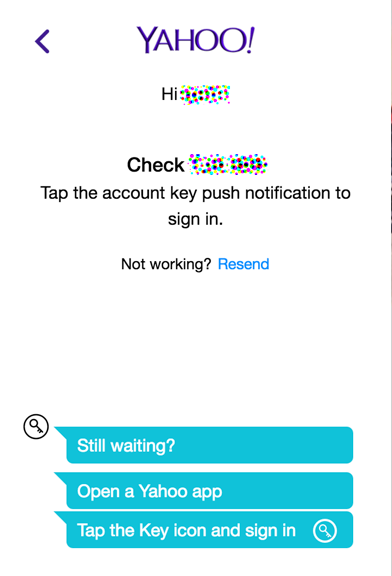
It simplifies logging in by connecting your login request with the Yahoo! app on your phone. The browser login screen asks for your Yahoo! ID, then displays a page that says it’s waiting for confirmation to login.
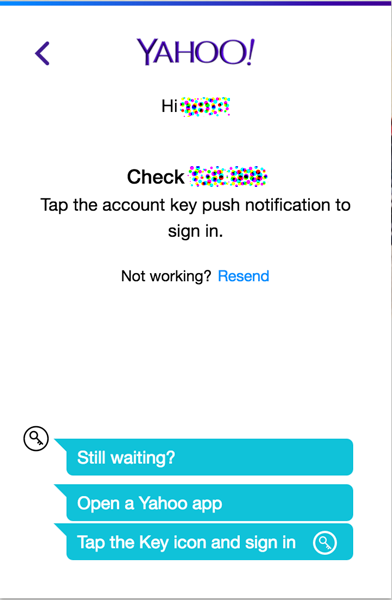
Meanwhile, your phone will receive a notification asking you to confirm the login with a simple click of a button – yes or no.


Mr. Robot security recap: 10 lessons learned from Season 02
Cybersecurity and hacking play a leading role in the series, so with Mr. Robot season 02 almost over, we want to do a reality check on the scenarios we saw.
The post Mr. Robot security recap: 10 lessons learned from Season 02 appeared first on WeLiveSecurity.


Ransomware doesn't sell itself: Marketing malware on the darknet
My colleagues from the Avast Threat Labs published an interesting (and detailed) blog post about Petya ransomware and its little brother, Mischa. This duo works together to encrypt disks and files, pushing innocent victims to pay thousands of dollars to regain access to their computers and files. Particularly interesting is that the ransomware authors have an established marketing strategy to promote Petya and Mischa. They created a brand for the ransomware, as well as an affiliate program, making it possible for the IT-savvy average Joe to distribute the ransomware.


Yahoo Data Breach: Top 5 things you should do immediately

Yahoo’s biggest nightmare was confirmed yesterday – back in late 2014, a copy of certain user account information has been stolen from Yahoo’s network. The story started developing in early August when a hacker named “Peace” was openly trying to sell personal information of more than 500 million Yahoo account users on the dark web.
According to Yahoo, the account information may have included names, email addresses, telephone numbers, dates of birth, hashed passwords and, in some cases, encrypted or unencrypted security questions and answers.
Even though the breach happened two years ago it is not too late to take action, especially if you haven’t changed your password in a while.
Top 5 things you should do immediately
Change your password now!
It is as simple as that. Change not only your Yahoo password on your Yahoo account, but also review all your online accounts on which you’ve used the same or similar information. The sooner you do it, the better!
Turn on the two-step authentication that Yahoo offers.
Two-step verification uses both your password and an extra security code to verify your identity whenever you sign in to your account. If someone else tries to access your account, even if they can guess your password, they still won’t be able to get in without using two-step verification.
Pick better passwords.
We cannot stress more on the fact that using the same passwords for many accounts is not recommended. As you remember Yahoo are not the only one who’ve had similar issues. Back in 2014 eBay asked 145 million of their users to change passwords after a data breach. Changing your passwords often must be a habit!
Update your security questions immediately.
Yahoo says about 1 billion people globally engage with one of its properties each month. The chances your password is in the wrong hands are not minimal and the risk is real. Take action and don’t wait anymore, time is key here.
Go through old emails and remove sensitive content.
If your Yahoo account information is indeed for sale on the dark web, someone can hack into your email at any minute. There is tons of document scans, tax returns, credit card details and invoices that may be laying around your inbox. All these documents contain information you want to keep for yourself.
Remain vigilant! After Yahoo admitted the data breach you may be approached by fraudsters pretending to be someone they are not. It is important for you to not engage with online fee-based, toll-free-number services. Even though the incident happened nearly 2 years ago and you may be off the hook, we advise you to remain cautious and spend some time making sure you are fully protected.
The post Yahoo Data Breach: Top 5 things you should do immediately appeared first on Panda Security Mediacenter.

8 years of Android: malware, malicious apps, and how to stay safe
At eight years old, Android is hugely popular. Both with users and attackers.
The post 8 years of Android: malware, malicious apps, and how to stay safe appeared first on WeLiveSecurity.


Half a billion Yahoo users victim to ‘biggest data breach in history’
Yahoo has confirmed that half a billion users may have had their data stolen in what has been described as the ‘biggest data breach in history.’
The post Half a billion Yahoo users victim to ‘biggest data breach in history’ appeared first on WeLiveSecurity.

Kaspersky Internet Security Awarded Level 1 Certification by MRG Effitas
Kaspersky Lab announced today that its Kaspersky Internet Security solution was awarded a ‘Level 1’ certification from MRG Effitas, following its quarterly 360 Degree Assessment & Certification for Q2 2016.

Worldwide “Crysis†Through Remote Desktop Protocol
 Two weeks ago we saw a ransomware attack in a server belonging to a French company. It was a Crysis variant, a ransomware family that appeared earlier this year. We witness thousands of infection attempts by ransomware on a daily basis, but this one caught our attention as the file somehow showed up in the computer when no one was supposed to be using it and in fact, there were no email clients or Internet browsers running there.
How did it get into the computer?
Why did the security measures in place allow this file into the server? That’s what we wanted to find out, and so we began an investigation. It turns out that this server is running Remote Desktop Protocol (RDP) and these cybercriminals used a brute force attack until they could guess the credentials to obtain remote access.
Back to the story—as most users do not have 2FA enabled and the passwords are not that complex nor random, it is pretty easy to get into a server using this kind of brute-force attack, a good dictionary or with the most common combinations. This is not a new technique. More than a year ago, I remember one wave that hit Spanish companies with ransomware using the exact same technique. Cybercriminals usually perform these attacks at night or during weekends, when there are few people in the office, or none at all.
Cybercriminals get into a server using this kind of brute force attack, a good dictionary or with the most common combinations.
In this case, the attack to the server started on May 16th, where they performed 700 login attempts. These were performed automatically, usually for a period of two hours approximately. Most of these attacks have been happening from 1am to 3am, or from 3am to 5am. Each and every day. The number of login attempts changes, for example on May 18th there were 1,976 while on July 1st there were 1,342.
After almost four months and more than 100,000 login attempts, the attackers were finally able to get into the server and drop the Crysis ransomware.
This is a Worldwide Crysis
This week our colleagues from Trend Micro published an article that warned us about similar attacks happening in Australia and New Zealand that deploy Crysis variants. Unfortunately, we can say that those are not the only countries—this is happening at a worldwide level (at least since May).
Assuming you need to have RDP running and connected to the Internet, apart from monitoring connection attempts so you can learn that you are under attack, you should also enforce complex passwords. The best approach would be to implement 2FA, such as SMS passcode, so guessing passwords becomes useless.
We’ll continue to keep you informed with our Tales from Ransomwhere series!
The post Worldwide “Crysis” Through Remote Desktop Protocol appeared first on Panda Security Mediacenter.