Category Archives: Panda Security

Panda Security

The technical support scam and how to avoid it

When talking about cybersecurity, we instantly think of viruses and malware. But advances in personal computer security have made it much harder for hackers to infect your PC through traditional channels like email.

As a result, they have developed new attack methods to get around your defences using a range of techniques, on and off-line. One of the most used and also successful is the “Technical Support Scam” that combines social engineering and technology to empty a victim’s bank account.

What is the Technical Support Scam?

Social engineering relies on building trust with a victim, before tricking them into doing something that gets around their security defences. In the case of the Support Scam, criminals telephone their victims pretending to be from a reputable business, like Microsoft or your security or telephone provider – a company name you recognize.

Posing as an engineer, the hacker informs their target that they have already fallen victim to criminals, and they must take urgent action to plug the security gap. The victim is asked to visit a webpage from their computer, and to download a remote control tool that will allow the engineer to access their system to perform “repair work”.

Once in control of the computer, the “engineer” may call up the computer’s event log and show a number of scary looking (but completely harmless) alerts. They will then suggest downloading further tools that allow them to fix these errors.

Unfortunately these tools are actually malware that will steal valuable information from the victim’s computer – particularly online banking details and passwords. The victim may feel that the engineer has done them a favor, but the reality is that they have invited the hacker to steal from them.

Avoiding the Technical Support Scam

There are several ways you can protect yourself from becoming a victim of this scam. These four tips will help keep you safe:

1. Use your common sense

Microsoft or Panda (for example) never ring customers to inform them of security problems. These companies may provide assistance by telephone, but they never call you first. In fact, unless you pay for a third party technical support service, no one should call you about problems with your computer or router.

No matter how urgent the issue sounds, anyone claiming to be calling about PC security problems is lying.

2.Protect your personal and sensitive information

Never give your account numbers or passwords to anyone over the phone or the Internet unless you are 100% sure who they are. If you are in any doubt at all, hang up. Keep in mind that fraudulent activities are profitable for the bad guys.
A good rule to follow for any incoming call: never hand over your credit card or bank details. Just don’t do it!

3. If you have a doubt: tell everyone about it

The Telephone Support Scam preys on people’s insecurity about their lack of tech knowledge. It is very easy to be a victim, and the best defence is sharing knowledge – telling other people about this scam, and what the criminals are doing. It is much easier to put the phone down if you know that the call is a scam.

You should also consider reporting the scam to the company being investigated. If you do, make sure you find the right details though.

4. Protect your PC in advance

Do not forget to use antivirus protection for all your devices. If your device is protected by an anti-malware toolkit, it will not be generating security errors online or anywhere else. So you know that someone claiming you have a problem is also lying.

If your computer does not have an up-to-date security toolkit installed, you must act now – download a free trial of Panda Security to get started.

Most social engineering attacks can be avoided by taking a second to think through the implications of what you are being told. You must not allow yourself to be bullied into making what could be a very costly mistake.

For more useful tips and advice about staying safe online, please check out the Panda Security knowledge base.

The post The technical support scam and how to avoid it appeared first on Panda Security Mediacenter.

RDPPatcher, the Attack that Sells Access to your Computer at a Low Price

In recent months, there’s been a significant uptick in PandaLabs reports of malware that is installed using a Remote Desktop Protocol (RDP). Every day, we witness thousands of infection attempts using ransomware, hijacking systems for bitcoin mining, etc., which all have one thing in common: access via RDP after gaining entry with credentials obtained using the brute force method.

There are plenty of useful purposes for an RDP, but unfortunately in the wrong hands it can become a weapon for cybercriminals. We’ve already spoken of a shared history between RDP and ransomware, especially in the corporate environment.

The new attack discovered uses the same technique of entry, but its goal is completely different from those analyzed previously. This time, after infiltrating the system, it focuses on finding Point of Sale Terminals (POS’s) and ATMs. The reason for this is that they are simple terminals to attack anonymously from the Internet, and the economic profit of selling stolen information is high.

RDPPatcher: Selling system access on the black market

In the present case, the brute force attack lasted a little over two months until, in January 2017, they hit upon the correct credentials and gained access to the system. Once the system was compromised, the cybercriminals attempted to infect it with malware. They found their attempts blocked by Adaptive Defense, at which point they modified the malware and tried again, without success. Since Panda’s advanced cybersecurity solution is not based on signatures and does not rely on previous knowledge of malware in order to block it, modifying the malware didn’t change the result.

It’s clear from the malware analysis what the purpose of the attack is. The hashes of the two file are the following:

MD5  d78be752e991ccbec16f11e4fc6b2115

SHA1  4cc9d2c98f22aefab50ee217c1a0d872e93ce541

MD5  950e8614db5c567f66d0900ad09e45ac

SHA1  9355a60dd51cfd02a921444e92e012e25d0a6be

Both were programmed on Delphi and packaged with Aspack. After unpacking them, we found that they were very similar to each other. We analyzed the most recent of them: (950e8614db5c567f66d0900ad09e45ac).

This Trojan, detected as Trj/RDPPatcher.A modifies the Windows records in order to change the type of RDP validation. These are the entries that the system modifies:

HKLMSYSTEMCurrentControlSetControlTerminal ServerWinStationsRDP-Tcp /v UserAuthentication /t REG_DWORD /d 1
HKEY_LOCAL_MACHINESYSTEMCurrentControlSetControlTerminal ServerWinStationsRDP-Tcp” /v UserAuthentication /t REG_DWORD /d 1

And deletes the following entries if they are present in the system:

“HKEY_LOCAL_MACHINESOFTWAREMicrosoftWindowsCurrentVersionPoliciesSystem” /v legalnoticecaption /f
“HKEY_LOCAL_MACHINESOFTWAREMicrosoftWindowsCurrentVersionPoliciesSystem” /v legalnoticetext /f

Subsequently, it leaves another file (MD5: 78D4E9BA8F641970162260273722C887) in the %TEMP% directory. This file is a version of the application rdpwrap and is run via the runas command with the parameters “-i –s” in order to activate concurrent RDP sessions on the system.

It then proceeds to profile the machine and obtain its information:

  • Username
  • Device name
  • Amount of time the device has been turned on
  • Operating system version
  • Language
  • Virtual maching
  • Memory
  • Processor name
  • Number of processor cores
  • Processor speed
  • Antivirus

It then connects to the control server (C&C server) to access a list of services that measure the speed of connection to the Internet, and later saves the data related to upload and download speed. Next it checks which antivirus is installed on the computer. Contrary to what we are accustomed to seeing in most malware attacks, it does not do this to remove the installed antivirus or to change its behavior. It is simply gathering data.

This is the list that we have extracted from the binary with the processes that it searches:

See Table 1
Once this is done, it begins to search for different types of software to continue profiling the computer. It mainly looks for POS, ATM, and online gambling software. What follows is a small part of the list of software that it searches (in total there are several hundred):

See Table 2

It also combs through browsing history, where another list is contained, categorized by areas of interest:

See Table 3
These chains are searched for in the browser history by the malware itself. They’re used to “label” the computer based on software used and webpages visited.

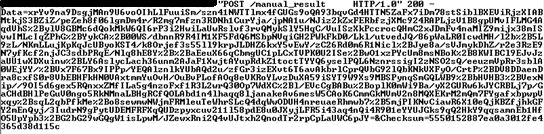
Once it’s finished with the data gathering from the system, it makes a web petition to the C&C. In order to hide the sending of the information via web traffic from detection systems, it first encrypts it with AES128 using the password “8c@mj}||v*{hGqvYUG”, which is embedded in the sample analyzed. It then codifies it on base64.

Example of the encrypted petition.

The C&C server used for this malware sample is located in Gibraltar:

Conclusion

As we’ve seen, the first thing the attacker seeks to do is to inventory the computer, compiling all types of information (hardware, software, webpages visited, Internet connection speed), and install an application that allows multiple RDP sessions at once. At no point does credentials theft, or any other data theft, occur.

The explanation for this is very simple: the cybercriminals behind these attacks sell access to these computers for a very small fee. Being in possession of so much data from every system allows them to sell access to other groups of cybercriminals specializing in different fields. For example, groups that specialize in the theft of card data can acquire computers with POS software, and so on. Cybercrime has indeed become a profitable racket.

The post RDPPatcher, the Attack that Sells Access to your Computer at a Low Price appeared first on Panda Security Mediacenter.

Online gaming safety tips

Mobile gaming is changing the shape of online gaming but how safe is it?

Mobile gaming is huge! According to a report recently released by market research firm SuperData, the global mobile gaming sales revenue in 2016 was over $40 billion. The mobile gaming market is now bigger than the global tea market and the global naval market. According to SuperData, the trend will only increase as mobile gaming is getting the support of the emerging multi-billion VR industry.

In 2016 more than 97% of VR headsets sold were for mobile devices. Having in mind the price Oculus, Sony and HTC are offering for their flag products; it is not a surprise that budget solutions such as Google cardboard and Samsung Gear VR ended up accounting for almost all VR headsets sold last year.

While maritime safety and tea are losing the battle against Candy Crush Saga and Pokemon GO, the security of the people enjoying the perks of their ultra-powerful mobile handsets might be compromised.

Here’s a top 5 list for mobile gaming dangers

Virtual and Augmented Reality

It may sound tempting to be able to teleport yourself onto a roller coaster while sitting on the couch at home, but games which break the perception of the presence could be dangerous. Similar to motion sickness, some VR players tend to experience virtual reality sickness. Stop gaming immediately should you start feeling disoriented or you have symptoms such as a headache or nausea. There are reported cases of people who lost their lives while hunting Pokémons so augmented reality could be dangerous too. Keep your eyes open for the surrounding area!

Hidden Fees

You’ve finally found the most amazing mobile game in the world – it has amazing graphics, it is real time, and the game is endorsed by your favourite celebrity! What could go wrong? A lot of things, such as the status of your bank account. Mobile games sometimes have in-app purchases, make sure you check before getting an additional weapon or skipping an advert that is currently playing it may end up costing you real money. Unfortunately, they do not accept doubloons in the real world, so the more prepared you are, the better.

It is a well-known fact that 90% of the children, aged 12 years or less, are mobile gamers (using their cell phone or a borrow from a family member) and these phones need to be protected to avoid the potentials risks of uncontrolled purchases.

Approved Apps

Make sure to always download applications from the Play Store or the App Store. Sometimes apps connect to your social media profiles, and they can see personal information such as your full name, date of birth, location and even your home address.

If the app you have on your phone is not approved, you may end up not only sharing all this valuable information with the wrong people, but you may install a virus on your phone that can lurk around your mobile handset and steal your passwords. Stay alerted and stick to the approved apps on the Play Store and the App Store, and even then, use services that allow you to scan the applications that you are installing on your phone.

To use this feature, you must set an unlock PIN and select the apps you want to lock. Should you forget your PIN, you’ll be able to reset it through your Panda Security account.

Maturity filters

Children already spend more time on the Internet than watching TV. Their favourite content is on emerging video platforms such as YouTube. A huge percentage of children nowadays have smartphones, and even though regulations tend to be strict, you don’t want your kid to be able to access chat rooms and content that is not monitored by you. Predators thrive on new ways of getting in touch with vulnerable people, and mobile gaming is one of those places.

Some games have chat rooms where people can socialize. Relying on admins may not be a full solution so make sure you know where you and your kids go while taking a breath before launching the next game on your cell phone. Always check out the PEGI ratings of an app before you let your child access it unless you want your 13-year-old son to get better than you on Texas hold ’em poker. Kids need restriction so don’t forget to use a PIN-protect access to the apps you want to control.

Panda’s Mobile Security for Android has a feature that allows you to PIN-protect access to your apps. The feature comes with privacy protection that prevents from unauthorized access to messaging apps and social media sites. The feature also comes with parental control functions that help you restrict the little ones from accessing certain apps, games, etc.

Expect the unexpected

Hackers are cruel and unfortunately technology savvy. They are always finding new ways of approaching you and your loved ones. Innovation is what they do best, and even though antivirus companies tend to be a step ahead of them, not everyone has protection. As mobile phones and mobile gaming are taking an increasingly bigger part of our lives, we firmly advise you to keep your eyes open and always bear in mind that sometimes even the App Store and the Play Store might miss something and let you install an infected app.

Good news is Panda allows you to scan applications before installing or updating an app.

While hackers keep finding new ways to get your money, we are solely focused on preventing them from being successful by constantly adapting to their new habits.

Luckily, Panda Security offers the best mobile security protection for all your devices including cell phones and tablets. Check out our security service solution here and be protected while gaming on your mobile device.

The post Online gaming safety tips appeared first on Panda Security Mediacenter.

Access Cards Will Disappear from 20% of Offices within Three Years


You arrive at the office, you approach the security gates, you swipe your card and start the day. It’s one of the motions that a large percentage of the workforce goes through daily, because today, and it seems that for a while yet, the access card is still the reigning security device for entering corporate offices.

By 2016, less than 5% of organizations had incorporated the use of smartphones to access their facilities or restricted parts of them. By 2020, according to a report by the consultancy Gartner, this percentage will have tripled: 20% of companies will have replaced access cards with smartphones.

Although the vast majority of mobile phones on the market already have Bluetooth and NFC technologies, there are still few companies that have taken the next step and put these technologies to use. Which, to be fair, may be seen as a wasted opportunity, since the necessary devices are ever-present in the pockets of authorized employees.

The progressive replacement of access cards by smartphones will go hand in hand, according to Gartner, with the adoption of biometric systems such as fingerprint or iris scanners, or facial recognition, because it is much easier and safer to implement them if accompanied with a mobile phone.

“Rather than having to add biometric capture devices in or alongside readers, the phone itself can easily be used as a capture device,” said David Anthony Mahdi, director of research at Gartner. “This approach also mitigates the risks from an attacker who gains possession of a person’s phone.” If an intruder were to steal an employee’s device, biometric authentication would still have to be overridden.

Given its advantages (convenience, cost reduction, etc.), the only thing that stands between the smartphone and access to the vast majority of offices is a company’s willingness to implement the change – many of the access control systems and card readers installed today in companies require a major update to be compatible with smartphones that use wifi, Bluetooth, or NFC to establish identification parameters.

It’s just a matter of time. In a few years, if Gartner’s predictions are correct, many employees will have a new way to start their day at the office. They will arrive, they will approach the security gates, they will take their mobile out of their pocket and take a selfie, they will enter and begin the workday. They no longer have to worry about getting the card before leaving home. Their phone is always with them.

The post Access Cards Will Disappear from 20% of Offices within Three Years appeared first on Panda Security Mediacenter.

How to Distribute Your Technology Budget

The new European General Data Protection Regulations came into effect on 25 May, although countries and institutions have a period of two years to prepare for their final implementation. Given this situation, and to comply with the requirements of the standard, one would hope for companies to increase their investment in computer security. However, the scenario turns out to be quite different, according to a recent report from Gartner, a technology consultancy.

The firm’s experts warn that security spending generally makes up for between 1 and 13% of the corporate budget for technology. The important thing, analysts say, is not the size of the budget designated to secure and protect systems, but how the budgets are used.

“Clients want to know if what they are spending on information security is equivalent to others in their industry, geography and size of business in order to evaluate whether they are practicing due diligence in security and related programs,” explained Rob McMillan, research director at Gartner.

However, these comparisons between companies or sector-averaged data are not much use, according to the analyst. “You could be spending at the same level as your peer group, but you could be spending on the wrong things and be extremely vulnerable,” he warned.

According to the Gartner study, most companies continue to misuse and misinterpret IT spending figures with projections spanning over at least the next four fiscal years.

The consultancy indicates some guidelines for companies in their allocations of future budgets. The goal is to optimize the returns on their investment, which must meet the costs of hardware, software, services (such as consulting and auditing) and personnel.

To identify actual security costs, you must consider the equipment that security solutions integrates, updates, cybersecurity solutions, and other programs and applications, outsourced services, tools to ensure privacy, and training for employees.

According to the consultancy, it is not necessary to allocate large sums of money to implement measures to ensure the security of corporate systems and data. It would be enough if the expenditure involves between 4 and 7% of the technology budget, depending on how sensitive the information the company handles and the type of systems it already uses.

The post How to Distribute Your Technology Budget appeared first on Panda Security Mediacenter.

Tips to find online love safely

Online dating fraud victims at record high

The rise of online dating has been phenomenal. In fact, a research paper published by the Association for Psychological Research found that online dating services are now the second most popular way for people to find love.

For those hoping to begin a romantic relationship this is great news – there’s a huge number of people available who are also looking for love.

But just like every other online activity, you need to be smart.

So how can you protect yourself?

1. Don’t share too much information

Many people run into problems because they share too much information up front. Including your email address or personally identifiable information in your profile picture gives away details that cybercriminals can later exploit.

Instead, use the communications tools provided by the dating service to share information once you are sure your date is trustworthy.

2. Don’t download attachments

We all love to receive Valentines cards, and criminals will use this against us. Never download ecards from dubious websites because they may contain malware that will infect your computer, stealing personal data.

You can help protect yourself against dodgy ecards with robust antivirus software. Scan all your incoming email attachments to avoid becoming a victim.

Download a free trial of Panda Security now to ensure you are protected.

3. Don’t share bank details

Dating sites are a great way to meet people and find love across the world. But beware of anyone asking you to pay for them to visit you – they may be using a phishing scam to steal more than your heart.

Never give your bank details to anyone online, no matter how hard you have fallen for them. Some unscrupulous scammers will take that information and use it to empty your bank account.

Be sensible

It’s always hard to remain objective when you are falling in love, and that’s why criminals target dating sites. But to stay safe, you must follow these three simple rules, or risk becoming another statistic.

The good news is that by keeping personal information private, avoiding suspicious email attachments, and not sharing your bank details, you have everything in place for when you do find “the one”.

Good luck, and happy Valentine’s Day!

The post Tips to find online love safely appeared first on Panda Security Mediacenter.

The EU’s Plan for Making Sure Robots Don’t Bring Harm to Humans

 Will robots steal jobs? For many, the answer is yes, they will indeed. A recent study from the World Economic Forum has put a number on the dispute that has been on the table for a while now: between now and 2020, 7.1 million jobs will disappear in advanced countries, and 2.1 million will be created. In other words, 5 million jobs will be lost for good.

Another recent report, this time from the Organization for Economic Cooperation and Development (OECD), has identified Spain, Austria, and Germany as being the countries that will most be affected by the robot revolution. Specifically, what is already being called the “fourth industrial revolution” will cause 12% of workers from these three counties to be substituted by machines, compared with an average of 9% from the OECD’s member countries.

People aren’t freaking out quite yet, but many in Europe are feeling some apprehension about this. That’s the reason why the European Parliament has developed a set of rules to regulate the relationship between robots, citizens, and companies, in a manner that may recall the robotic laws of Isaac Asimov.

This proposal for a legal framework will now have to be debated by the European Commission, who will decide whether or not to regulate the implementation of robots in society to minimize the adverse effects caused by the machines.

Here are the proposed measures.

An Off Switch

As ‘machine learning’ and ‘deep learning’ techniques are advancing by leaps and bounds, the European Parliament wonders what will happen if robots teach themselves more than we bargained for and end up becoming dangerous. Its proposal is that, by law, a deactivation button be installed in all robots in case of emergency.

They Can’t Hurt Humans

Seemingly lifted straight out of Asimov, this measure proposed by the European Parliament would prohibit companies from manufacturing any robot that has the aim of harming human beings. Pretty basic, and probably common sense, yes, but also necessary. If approved, you’d have to take into account ‘killer robots’ designed for war.

No Emotional Bonds

More than a concrete measure, this one could be considered a firm reminder. The European Parliament wants to make it clear to humans that robots have no feelings (at least for now) and that, therefore, they should not allow themselves to be cajoled by apparent emotions that are really only feigned.

Insurance for the Bigger Ones

The manufacturer and the owner of the robot will be held responsible for any damage it may cause, so that the owners of a large (or highly dangerous) automaton must take out an insurance policy (legislation that is similar in nature to laws governing automobile insurance).

Machine Obligations and Rights

The European Parliament’s report defines robots, to the surprise of many, as “electronic people”, and confers them rights and obligations similar to those of humans, which remain to be defined. It could even get to the point that they are held accountable for their actions in the eyes of the law, along with their creator and owner.

We’re All Taxpayers (Even Them)

One of the most controversial measures included in the proposition is that the robots, in order to reduce the social impact of unemployment, may be required to pay social security contributions and pay taxes as if they were human workers. In this way, they would contribute to filling the coffers of pension and health funds.

Basic Universal Income

As many humans are going to find themselves unemployed, the report also mentions the possibility of creating a basic income system that guarantees a minimum living stipend to people, thus easing the transition between an economic model based on human labor and the almost complete automation of work.

The post The EU’s Plan for Making Sure Robots Don’t Bring Harm to Humans appeared first on Panda Security Mediacenter.

The Ten Apps that Bog Down Performance on Android Smartphones

The Android operating system is the undisputed king of smartphones. According to the latest data from Kantar Media, Android continues to enjoy a solid lead in market share. Companies and individual users alike are turning to Android as their principal OS for their devices.

Despite the success of this operating system, we have all complained about our smartphone at some point or other. Maybe the battery doesn’t last an entire day on a single charge, or it’s drained our mobile data usage too quickly, or it’s running low on storage space. Yes, we should all probably take a breather and stop complaining so much, but it’s also good to know that in most cases it’s not the phones themselves that are lagging, but rather the apps that are the main drivers of smartphone performance issues.

Snapchat, Spotify… even Clean Master

You can check for yourself which applications are most detrimental to the performance of your device. Accessing the Settings menu of your mobile, you can consult the consumption of each app in Power Saving Mode, look at the RAM that each application consumes in Memory or consult the amount of space they occupy from the option Internal Storage.

Be warned that there are some applications in particular that will hamper the productivity of your phone. These include social networks, such as Snapchat, the rising star among millennials, or the dating service Tinder. Spotify, the music streaming app par excellence; Line, a rival instant messaging service to WhatsApp; or Amazon Shopping, which conveniently lets you make purchases from the ecommerce behemoth, are other famous services that cause our phones to slow down.

Google Sheets, the spreadsheets application that many companies use to share and edit documents in a collaborative way, also figure among them. You’ll probably be surprised to hear that Clean Master, which is designed to clean out and optimize your phone, also consumes a lot of resources. Of course, other famous apps that we couldn’t live without also consume large amounts of battery or RAM, as is the case of Facebook, Instagram and Google Maps.

Some tricks to improve performance

There are some steps you can take to improve the speed of your Android phone. One is to uninstall the apps you do not use from the Application Storage menu. You can also delete the data that the application has downloaded or clear the cache to speed up the processes.

Another, somewhat more cumbersome, alternative is to enter the Android developer options from the Settings menu, About Phone and Software Information (you’ll have to press Build Number seven times) and disable animations.

On your business phone, make sure you are using applications in a way that does not needlessly consume resources and that you are protecting your device with the cybersecurity solution that best suits your business.

The post The Ten Apps that Bog Down Performance on Android Smartphones appeared first on Panda Security Mediacenter.

Your Smart TV Has Been Hijacked. To Continue, Please Pay Ransom

Cybercriminals that specialize in ransomware, which affects thousands of computers and mobile devices every year, are ramping up their attacks against businesses. It is here that they can get their hands on valuable information and large sums of cash. This particular kind of malware, which hijacks devices and demands a ransom for their return, has managed to conquer another kind of technology: smart TVs.

Last December, the American developer Darren Cauthon announced on Twitter that a family member’s television had fallen victim to one of these attacks. As Cauthon explained, it all came about after the victim had installed an app to watch movies on the Internet, apparently from a third-party website.

The television in question was an LG model that came out in 2014 that is compatible with Google TV, a version of Android tailored to televisions. Once it had infiltrated the device, the malicious software demanded a ransom of $500 dollars to unlock the screen, which simulated a warning from the Department of Justice.

The appearance of the false message would lead you to believe that it’s a version of the ransomware known as Cyber.police, also known as FLocker. Ordinarily this ransomware affects smartphones with Google’s operating system. After hijacking the device, the malware collects information from the user and the system, including contact information and the location of the device, to be sent encrypted to cybercriminals.

To avoid paying the ransom, Cauthon unsuccessfully attempted to restore the television set to factory values, but eventually had to resort to the manufacturer’s own services to return it to a state prior to the installation of the malware. Although his relative managed to regain control of the machine without paying any sum to the criminals, he did end up having to pay the manufacturer $340 for the service, not much less than the ransom itself.

The Cauthon case has not caught security experts by surprise, given that last summer a team of researchers had warned of FLocker’s activity on smart TVs. In addition to the United States, ransomware attacks have been reported on smart TVs in Japan.

LG’s post-2014 model are no longer compatible with Google TV, but rather use WebOS, an open source operating system based on Linux. However, new attacks should not be ruled out, as cybercriminals continually refine their tools, which are increasingly focused on infecting Internet of Things devices at business and in the household.

The post Your Smart TV Has Been Hijacked. To Continue, Please Pay Ransom appeared first on Panda Security Mediacenter.

Keychain, Apple’s Cloud-Based Tool That Safeguards Your Data

Safeguarding your company’s confidential information, in many cases, calls for having your employees create and properly manage a series of passwords. Not only should they choose complex credentials, but they should also vary among themselves. And they definitely should not be saved in easily accessible places, like a text document.

Password managers come in handy in this task that is so indispensable to corporate security. For their part, companies that have Apple devices for their employees have the Keychain as an ally: it is a password manager in the cloud that makes things really easy when defending corporate privacy via robust password selection.

Activating this tool is simple: just go to iCloud Settings from an iPhone or an iPad and activate the Keychain option. From a Mac you go to the “System Preferences” menu.

Once activated, all the passwords used by the employee will be stored in iCloud, with its own encryption. Once uploaded to the cloud, it will be possible to use those credentials on all devices that are synchronized and authorized to do so.

However, the Apple Keychain is much more than just a place to store passwords in the cloud. In fact, it allows users to completely forget about the clutter of having several passwords since, when they sign up for the service, the keychain suggests complex and distinct options to those already used and automatically saves it. No need to commit anything to memory.

It is also possible to store credit card data and certificates to sign documents digitally. Thus, Apple encryption and its cloud service are one hundred percent responsible for security on the platforms used by employees.

By combining this tool with the right protection to avoid threats, your company’s confidential information will be safer. It makes sure that your passwords are secure and that they will not be stored remotely in any place. And those who want to spice up their passwords can still edit them (or delete old ones) to make them even more complex. When corporate security is at stake, it can never hurt to add extra layers of protection.

The post Keychain, Apple’s Cloud-Based Tool That Safeguards Your Data appeared first on Panda Security Mediacenter.