Tag Archives: featured1

The FBI’s most wanted cyber-criminal used his cat’s name as a password

Not for the first time here, we find ourselves talking about passwords. In January, the software company SplashData listed the most popular passwords of 2013, on the basis of millions of passwords found on the Internet. Among the most frequently used were simple combinations: ‘123456’ was in first place followed by ‘password’.

We’ll have to see what comes out in the next report, though we’ve already seen how even cyber-criminals can make such a simple mistake.

Jeremy Hammond was arrested in Chicago in 2012. In those days he was the most wanted cyber-criminal. He had managed to compromise the Web page of Stratfor, an intelligence and espionage firm whose customers include the U.S. Defense Dept.

The authorities managed to track him down with the help of Hector Xavier Monsegur, leader of the now defunct hacker group Lulz Security. This organization was the alleged perpetrator of the attack on the CIA’s website in 2011 and the theft of Sony Pictures user account details in the same year.

They finally caught him, though Hammond had time to shut down his Mac laptop before the police got into his house. To start it up again they needed his password.
saved-password

Hammond is now serving time in Manchester Federal Prison. While behind bars, he’s explained that hacking Stratfor’s Web page was not difficult. The main error, he claims, was that those responsible for the site had not encrypted their customers’ credit card details.

His own error, however, was quite different. Hammond has acknowledged that the weak point of the computer that he had used for a number of ‘jobs’, and which no doubt let police IT experts get into the machine, was its password. “Chewy123” is simply the name of his cat (plus the obvious sequence of numbers).

We have often spoken here of the techniques you can use to avoid making the same error as Hammond. Make sure your password is complex, and never use a sequence of numbers or letters.

There are also tools available to check the strength of your passwords, and you should change them regularly and use a password manager.

However much you think your data won’t be of interest to anyone, cyber-criminals can exploit information in many ways, not just for direct financial gain. And it’s not just large organizations that are targeted by hackers. IT security experts have recently warned of the leaking of passwords from platforms such as Gmail and Dropbox.

It’s difficult to stay ahead of cyber-criminals, but it’s not too hard to ensure that your passwords don’t figure in the ranking of the worst combinations. We all have to start somewhere.

The post The FBI’s most wanted cyber-criminal used his cat’s name as a password appeared first on MediaCenter Panda Security.
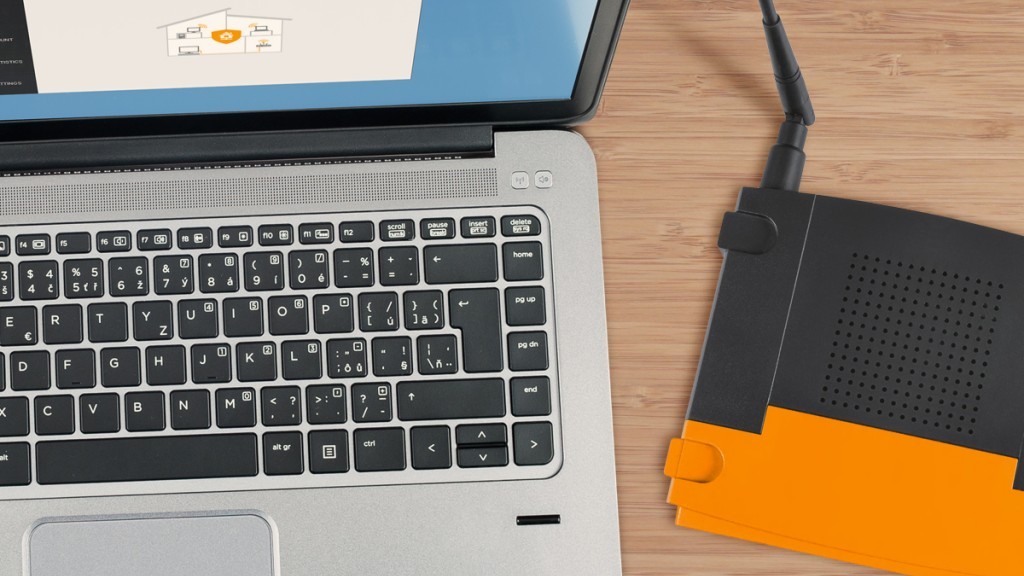
12 ways to boost your router’s security

hns2aWith the increasing number of network security breaches, we need to improve awareness regarding the security of your home network.

We simply need to follow some rules to control and prevent system penetration and also bandwidth theft (and losing money!). Safeguard your valuable information available through your home wireless connection and do not be easy target for hackers!

Here are 12 ways to boost your router’s security:

  1. 1. Install your router in a safe place where the wireless signal is available only inside your own house. Avoid placing it near to a window.
  2. 2. Turn off WPS, the automated network configuration method that makes your wireless password more vulnerable to hacker attacks.Turn on WPA2 encryption and, if you can, protect it with a strong password.
  3. 3. Change the default admin username and password to a strong password. Do not use default passwords because they’re generated from well-known algorithms that makes hacker attacks even easier. Do not use your name, date of birth, home address or any personal information as the password.
  4. 4. Upgrade your router firmware to fix known vulnerabilities of the router.
  5. 5. Don’t forget to log out after managing the router, avoiding abuse of the authenticated browser sessions.
  6. 6. Disable remote management of the router over the internet. In a business environment, if you need this management, it will be safer to use NAT rules allowing SSH or VPN access only.
  7. 7. To prevent CSRF attacks, don’t use the default IP ranges. Change the defaults 192.168.1.1 to something different like 10.8.9.7.
  8. 8. Prevent ROM-0 abuse (i.e., access to the secret data stored in your router: your ADSL login/password combination and WiFi password) of your router and forward port 80 on the router to and non-used IP address on your network. Check how-to here.
  9. 9. Set your router DNS servers to automatic mode (or DHCP) or for a static value that you manually set exactly according to your ISP.
  10. 10. Disable IPv6 on the router or, if you really need IPv6 services, replace the router with a IPv6 certified one.
  11. 11. You can save bandwidth and allow only specific computers or devices to access your WiFi even if they have the security key to enter. Find the computer MAC address (the “physical address” listed with the command line ipconfig/all at a cmd window). Into your router settings, you should look for the Mac filtering settings to add this identifier there.
  12. 12. Use a secure VPN in open/public WiFi hotspots. You can read more on how Avast SecureLine can protect PC, Mac and Android devices in these situations. If you cannot avoid using public WiFi, then try not to log in or enter your credentials (specially banking or credit card ones), but also your email and phone number. If you really need it, always prefer the secure protocol HTTPS (check the browser address bar).

Avast Software’s security applications for PC, Mac, and Android are trusted by more than 200-million people and businesses. Please follow us on FacebookTwitter and Google+.


Is backing up your data the same as exposing it? In this case – Yes!

Losing contacts from your mobile phone is highly inconvenient. There’s seems to be a solution –  You can find them online! The catch? Your contacts are in a publicly accessible place.

1playstore photo

Seriously.

If you care for your privacy you should always be suspicious about “Cloud Backup” solutions you find in the Google Play Store. The solution that is being analyzed here backs up your personal contacts online. In public.

Upon starting the application, you will find a screen where you can put your mobile number and a password of your choice. Then you can upload your contacts in the cloud.

 2app

A brief analysis inside this application shows us how exactly it backs up your contacts in the cloud. The contacts are associated with the phone number that you have given in the previous step and they are sent through HTTP POST requests in a PHP page.

3savedatacloud

Further analysis through IP traffic capturing with Fiddler helped usdiscover the results in the pictures above; a page located online, for anyone to see, that contains thousands of un-encrypted entries of phone numbers and passwords. Using the info in the app you can retrieve personal private data (contacts) from another user.

4fiddlerinfo 5datafromserver

We found log in data inside those entries from countries like Greece, Brazil, and others

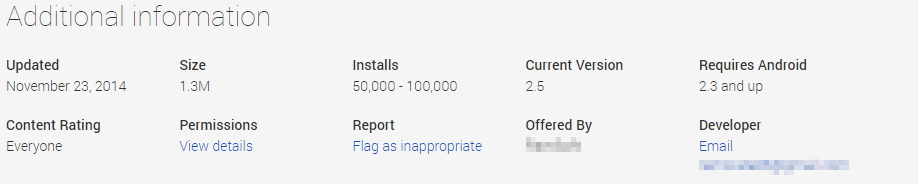
The Play Store page says that this app has been installed 50.000-100.000 times. This is a big number of installations for an application that doesn’t deliver the basic secure Android coding practices. The developer must use technologies like HTTPS, SSL and encryption on the data that are transferred through the web and stored in the server. Nogotofail is a useful network security testing tool designed by Google to “to help developers and security researchers spot and fix weak TLS/SSL connections and sensitive cleartext traffic on devices and applications in a flexible, scalable, powerful way.

6appinfoplaystore The application has been reported to Google without receiving any response.

Avast detects it as Android:DataExposed-B [PUP].

Samples (SHA-256):

F51803FD98C727F93E502C13C9A5FD759031CD2A5B5EF8FE71211A0AE7DEC78C 199DD6F3B452247FBCC7B467CB88C6B0486194BD3BA01586355BC32EFFE37FAB

With NFC, even the most expensive smartphones are vulnerable

mobile-security

Nowadays we are defined by our phones. When you buy a smartphone, you automatically become a convert, defending the benefits of your particular brand over others. Some users become part of the Apple faithful, flocking to their exclusive stores to buy designer iPhones. Others are Google fanatics, with alerts set in their Nexus 5 to warn of the imminent arrival of Nexus 6. Compulsive Amazon shoppers click away on their Fire Phone cart, while traditionalists continue to trust in the numerous and much-lauded features of Samsung Galaxy.

Unless you are one of those who has joined the retro phone trend and have renounced WhatsApp forever, we are sorry to inform you that your smartphone -whatever the make- has a security flaw. Specifically, in the use of NFC (‘Near Field Communication’), a wireless communications system that lets you transfer data at high frequency over short distances, at a range of 10 centimeters. In fact, NFC is a subset of RFID (Radio-frequency identification) systems that have been used for years now to identify pets (microchips). So if dogs can be recognized through this system, why not phones?

In smartphones, NFC allows data to be exchanged between devices, although a more interesting use for this technology is that it allows our phones to be used as credit cards.

smartphones

You can already use your NFC to pay for things thanks to Google and its PassWallet app. Apple, not wanting to be left behind, has introduced the Apple Pay system with iPhone 6. And now banks are getting on the mobile payment technology bandwagon. In the future, we will even be able to use phones as subway tickets or door keys. NFC offers the potential for all-in-one devices with myriad uses.

If you weren’t previously aware of this technology, then you must be marveling at the thought of not having to rummage around drawers looking for your wallet or keys. Well, it’s true, but don’t get too excited. Even though the system operates over very short distances, it still has security flaws. In the recent Pw20wn Mobile 2014 competition in Tokyo, where there was a reward of US$150,000 (€120,000) for the sharpest hackers on the planet, security flaws were detected in the NFC systems of many top-of-the-range phones.

Two separate groups of experts demonstrated during the competition different ways of compromising the NFC technology on Samsung Galaxy S5. These hackers are two-nil up on one of the most prestigious smartphones on the market.

mobile

Even the all-powerful Google has been unable to keep its precious Nexus 5 free from security problems. In the Pw20wn Mobile 2014 competition, a third NFC attack forced the pairing of devices thanks to a combination of two malicious programs.

And it’s not the first time that an NFC security hole has been uncovered in Google’s device. Charlie Miller, an ‘ethical hacker’, was able to communicate with a Nexus S through a chip placed near the device, as he demonstrated at Black Hat 2012 in Las Vegas. After this he forced the phone to enter a malicious website, from where he took complete control of the phone by exploiting the NFC vulnerability. The Nokia N9 was also subject to the same attack on this occasion.

Although there can be no doubt that the detection of these flaws improves the security of our smartphones, perhaps for the moment at least we all feel a little safer keeping our money and the keys to our houses in our pockets, handbags or under a pile of papers on our desks. Even the sharpest hacker would find it difficult to exploit a security hole there.

Nevertheless, your NFC could still be useful for many things. And no doubt it will gradually become more secure. For the moment, fans of Nexus 6 are looking forward to getting their hands on it, and plans are afoot to unlock the phone automatically with the help of an NFC ring on the user’s finger. Could the phone’s PIN also be hacked? Let’s see.

The post With NFC, even the most expensive smartphones are vulnerable appeared first on MediaCenter Panda Security.
Donate generously on Giving Tuesday, but watch out for scams

#GivingTuesday is a day dedicated to give from the bounty we have received.

GivingTuesday2014

After the shopping free-for-all of Black Friday, the local discoveries of Small Business Saturday, and the online click frenzy of Cyber Monday, people the world over have a day for giving thanks.

On Tuesday, December 2, 2014, charities, families, businesses, community centers, and students around the world will come together for one common purpose: to celebrate generosity and to give. ~www.givingtuesday.org

From supporting women’s microfranchises selling solar products in Nicaragua to supplying feed and services to a ranch in Arizona that helps save horses from abuse and neglect to constructing toilets in a school in West Bengal, there are a myriad of opportunities to spread your goodwill and your cash. It’s also an opportunity for cybercrooks to scam those with a generous heart.

What you need to know about charity scams

Charities and fundraising groups use all methods to solicit funds, so you could receive a phone call, a knock at your door, an email, a message via social networking sites, and even a text message on your mobile phone. Before giving your donation, carefully review a charity and ensure it is a trustworthy organization.

The Better Business Bureau (BBB) and the Federal Trade Commission (FTC) offers some valuable tips.

    • Watch out for copycats. There may be hundreds of charities seeking support in the same category, and some may use a name that is similar to a better-known, reputable organization. Don’t fall for a case of mistaken identity.
    • Avoid being pressured. Don’t succumb to high-pressure tactics that try to get you to donate immediately. Responsible organizations will welcome your gift tomorrow just as much as today.
    • Give through a reputable, secure service. If a charity asks for donations in cash, by money wire, or offers to send a courier or overnight delivery service to collect the donation immediately, then beware. A genuine charity will give you time and a secure method to make your donation.
    • When in doubt, check them out. The results of a Google or Yahoo search have been known to include bogus phishing sites designed to look like a legitimate charity’s website. Just look up scams around Hurricane Katrina, and you’ll see what I mean. Charity Navigator says,
      • Carefully examine the web address. Most non-profit web addresses end with .org and not .com. Avoid web addresses that end in a series of numbers.
      • Bogus sites often ask for detailed personal information such as your social security number, date of birth, or your bank account and pin information. Be extremely skeptical of these sites as providing this information makes it easy for them to steal your identity.

Avast Software’s security applications for PC, Mac, and Android are trusted by more than 200-million people and businesses. Please follow us on FacebookTwitter and Google+.


BlackBerry Messenger. The app that lets you chat only to those you want to.

BBM-iphone

A few years back, when we discovered that our parents’ business phones could be used for more than just sending emails, something changed. BlackBerry Messenger made everyone want to switch to this new device which let you chat with friends for free.

I have to admit that practically all my friends started out with a BlackBerry and for months we did nothing but send messages back and forth via the application. I remember worrying about whether the message that had been delivered (the famous ‘D’) had been read, or when I didn’t get a reply after a message that had been read (‘R’).

Over time, it became apparent that other apps, such as WhatsApp and Viber offered just as much and more. That’s why we left BB chat behind in favor other messaging apps.

Previously BBM could only be installed on BlackBerry devices, while competitors had versions for all operating systems. But now you no longer need to feel nostalgic about the dancing, hugging icons, because you can now download BBMessenger for Android,  iOS  or Windows Phone, free.

Though it seems incredible, I still speak with a friend who only has BBM, and what’s more, he has no interest in WhatsApp or other such apps.

BBM-chat

The great advantage that it offers, according to my friend, is that you can speak only to whom you want to. BBM continues to work by invitation. This means that to add someone to your contacts they have to give you their app PIN. So in the end you have a list of contacts that you have ‘chosen’. Other than that, the way it works is pretty much the same as before.

New features in BlackBerry Messenger

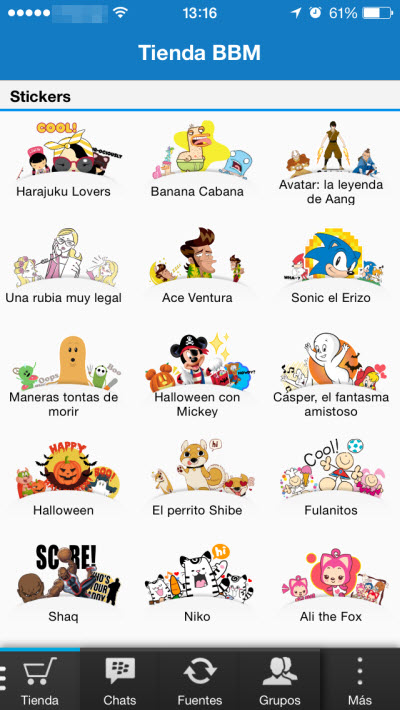
Perhaps one of the more interesting new features is the BBM store. It’s a sticker store, a bit like Line where you can buy different images to add to your chats.

BBM-stickers

Another thing you will come across with the new BBM are the chats on the BBM Channels, which could be between people, brands or communities. For example, you could create a new channel to talk about a given topic or sign up to an existing BBM Channel.

What do you think? Do you miss your BBM chats? Vintage is now the latest thing, and they don’t come more vintage then BBM…


The post BlackBerry Messenger. The app that lets you chat only to those you want to. appeared first on MediaCenter Panda Security.

AirHopper, the malware that infects your corporate network even though you are not connected to the Internet

Seems logical, doesn’t it? If your company has ever warned you that you must tread very carefully when browsing the Internet so that your computer (and sooner or later, every computer in the office) does not get infected with a virus, it would be normal to think that going offline is not a bad (although drastic) alternative.

We are very sorry but you cannot rest easy even if the computer you use at work is not connected to the Internet; it is still vulnerable unless you have an enterprise antivirus solution like Panda Advanced Protection Services.

disconnected-computer

To start, a pen drive can easily replace the Internet for malicious pursuits. Your work computer’s USB port will thereby become your Internet connection, as far as viruses are concerned, as this would be its entrance.

However, USB ports are not your work computer’s only weak spot if you do not have an Internet connection. There are other vulnerabilities that compromise, and greatly, the security of your computer.

One of these vulnerabilities lies in the radio receivers on smartphones and electromagnetic signals, as proven by AirHopper, a malware that can infect a computer and collect data from it without needing it to be online.

Although it sounds complicated, a group of researchers in Israel have proved it in a study: A computer without an Internet connection is also vulnerable. To start, the cyber-crook needs to install AirHopper on the computer. That is undoubtedly the largest hurdle faced by data thieves because unfortunately, the rest is a breeze.

Once AirHopper is installed on the computer, the malware uses the monitor to emit electromagnetic signals whenever a key is pressed. The cyber-criminal, who must be within seven meters of the computer, will need a smartphone with FM radio to receive the data typed on the computer.

According to the researchers, the data can be transmitted from the computer to the cyber-criminal’s smartphone screen at a rate of 13 to 60 bytes per second.

It might not seem like a fast method that downloads large amounts of data but it is fast enough for a cyber-criminal to steal passwords in just 8 seconds or short texts that you type into your work computer.

AirHopper

Fortunately, it is a type of attack that will probably not go beyond being a proof of concept, as in order to carry it out the cyber-criminal needs physical access to the computer in order to infect it, and then needs to be close by in order to receive the data you type on their smartphone. In addition, not all monitors can emit electromagnetic waves that are strong enough.

So now you know; if you want to keep your company secure from these types of threats, request a free demo of Panda Advanced Protection Services and our team of experts will help you with whatever you need.

The post AirHopper, the malware that infects your corporate network even though you are not connected to the Internet appeared first on MediaCenter Panda Security.

How to disable IPv6 support in your router settings

Your WiFi network is not secured

Your WiFi network is not secured

After the previous articles you should be convinced that router vulnerabilities are one of the major concerns in network security. As you already know, the new Avast 2015 version includes a security feature called Home Network Security (HNS) which scans your network and router for vulnerabilities and prevent threats.

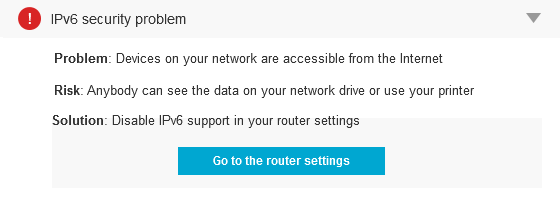
One serious problem occurs when when IPv6 (Internet Protocol version 6) is enabled (both by the ISP and on the router), but there is no IPv6 firewall being used. Which means that anyone on the Internet can access devices on the network (like printers, network disks, etc.). This is often the case because the routers are small, embedded devices that cannot handle IPv6 firewalling.

The main advantage of IPv6 over IPv4 is its larger address space: it allows 2128 or approximately 3.4×1038 addresses (or sites) which is an enormous number! In addition to offering more addresses, IPv6 also implements features not present in IPv4: it simplifies address assignment, network renumbering and packets processing.

In fact, a proper IPv6 firewall requires quite some processing power and RAM, so it’s no wonder that many of the cheap routers don’t have that functionality at all (or it’s not working properly).

The remediation is relatively simple: Just disable IPv6 on the router. In most cases, this shouldn’t have any impact on other services, unless they require IPv6 (in which case, it would be good to replace the router with something better which is IPv6 certified).

Avast Internet Security and Premium products offer full support to IPv6 for your computer on our silent firewall. Take into account that other devices, like network drives connected to the router won’t be protected.


Avast Software’s security applications for PC, Mac, and Android are trusted by more than 200-million people and businesses. Please follow us on FacebookTwitter and Google+.


Panda Internet Security 2015 achieves Virus Bulletin certification

Virus Bulletin

Congratulations are in order! Panda Internet Security 2015 has achieved Virus Bulletin certification!

In addition to this good news in itself, we also achieved it the first time that we presented this product. This proves its consistency and confirms what we have been saying for the last few months: the effectiveness of the XMTâ„¢ Smart Engineering engine included throughout our 2015 Consumer line.

Panda Internet Security 2015

This engine allows each technology to interact with the rest to reach higher detection and disinfection levels. With it we have achieved the best protection and resource consumption rates on the market, which reflect its excellent capabilities.

Have you tried any of our products? Choose the best antivirus for you!

The post Panda Internet Security 2015 achieves Virus Bulletin certification appeared first on MediaCenter Panda Security.