Tag Archives: featured1

Facebook ads. How to avoid them?

facebook

Have you ever wondered why the advertisements that appear on your Facebook feed offer you the exact product and service that you are supposedly interested in? Have you also stopped to think about what information Candy Crush holds on you, or do you just click play anyway?

Facebook offers you information on your privacy, although it’s like that few users have ever reviewed it. Hardly surprising when you consider that it would take it 76 days to read all of the terms and conditions of the services that we use over the course of a year, according to a study carried out by the Carnegie Mellon University.

It’s likely that lots of workers include information relating to their role in the company on their Facebook profile, so both you and they could benefit from a better level of privacy control on the social media site. Here are a few tips to make it harder for companies to follow your tracks online.

Stop giving away personal information to applications

Every time that you install an application from Facebook it tells you what information you will share with it. In that moment, you can edit the information you wish to share. Seeing as you’ve probably ignored this or have logged into Facebook from the external website, we’ll explain to you how to restrict the details that you give away to the apps.

  • The first thing you have to do is click on the lock in the top right part of the Facebook page. Click on “see more” form the expandable menu and access “settings and privacy tools”.
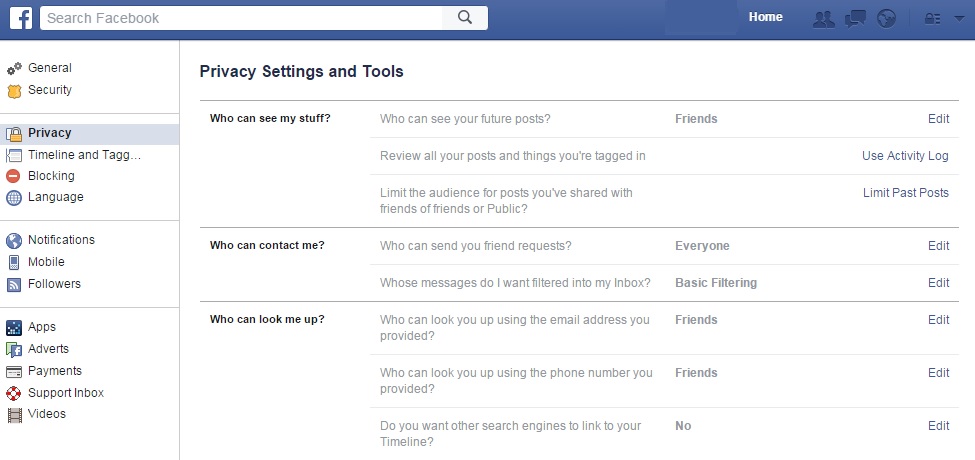
facebook privacy settings

  • Then, search the left column for the button marked “applications” and click on “see all”. We bet you never expected to see so many websites associated with your Facebook page! Now, it’s time to organize it all.
  • You can click beside each application to delete it from your account, or you can click on the pencil icon to edit the information that each app keeps on you. Keep in mind that there may be some details that are obligatory and you can’t keep them hidden.
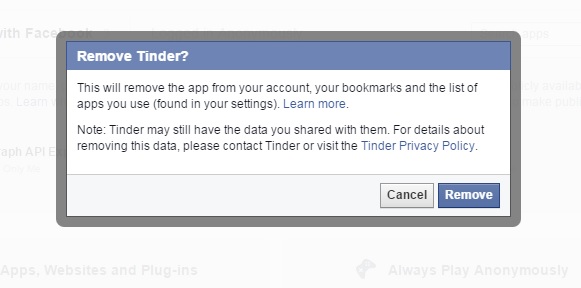
facebook remove

  • When you’ve finished this process, go to the bottom of the page where you’ll find two very interesting options. The first of these is the option to activate “always play anonymously” and the second is to edit the information on Facebook that others can see in the apps that you use by clicking on “applications used by others”.
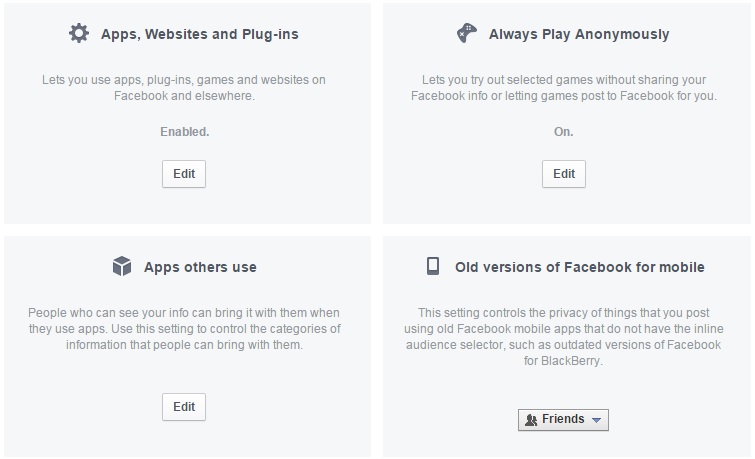
facebook apps

Repel the advertising

If you want to stop Facebook from using your personal information to show you predetermined advertisements, then there are a few ways you can go about it.

  • The first is click on the arrow at the top of the page, beside the lock icon, and access the part for “settings”. In the left column you’ll see “adverts”. From there you can deny Facebook the right to use your actions (for example, things you indicate you like) to offers ads to your friends and that you don’t receive ads based on their preferences either.

To do this, you need to click on the “edit” option for both “other websites” as well as “adverts and friends” in order to change the default setting from “only friends” to “nobody”.
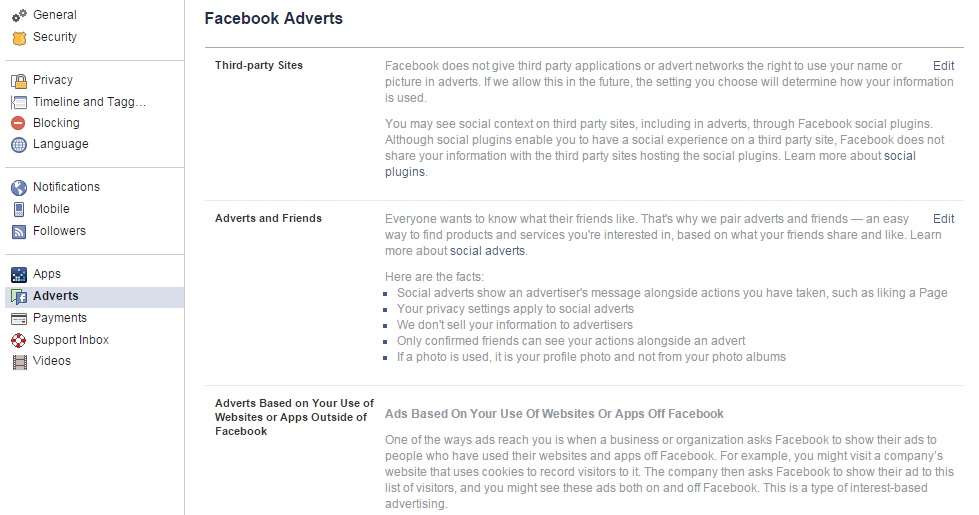
facebook adverts

You can also use other tools to avoid this personalized advertising such as Facebook Disconnect or Adblock Plus. So, if you want to improve your privacy on Facebook and control what businesses can analyze from your information, you know what to do. It is also recommended that you read the policy of the company so as you know what you’re getting yourself into.

The post Facebook ads. How to avoid them? appeared first on MediaCenter Panda Security.
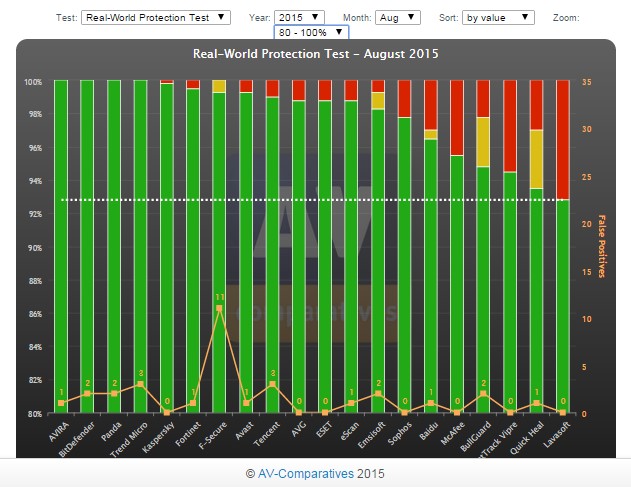
Panda Security achieves a 100% detection rate yet again, according to AV-Comparatives!

It’s happened again! Our free antivirus, Panda Free Antivirus, has obtained a 100% rate of detection according to the monthly report that was carried out in August by AV-Comparatives.

This is another success for our XMT motor, which is the basis for all of our consumer solutions.

av comparatives august

That’s not all, though! We scored the same result in the Real World Protection Test that was carried out during the last three months. This test recreates real-life conditions in which it analyzes and subjects different protection solutions to various tests. Here are Panda’s results:

comparatives
You can see all of the information in this infographic, which explains it all for you. Congratulations, everyone!

The post Panda Security achieves a 100% detection rate yet again, according to AV-Comparatives! appeared first on MediaCenter Panda Security.

Social Engineering techniques – What they are and How businesses can avoid them

thief computer

Although it may be tempting to imagine hackers as being shy and socially inept types, whose only human interaction is via their computers, this is an assumption which rarely corresponds to the reality. In fact, in some cases, the social capabilities of hackers have worked greatly in their favor as a method of intrusion.

This technique is called social engineering and consists of tricking and manipulating the victim into committing a human error so as to compromise the security of IT systems.

Social psychology as a method of intrusion

This form of intrusion doesn’t rely on vulnerabilities in the IT system, but rather a social interaction (online, by telephone, or face-to-face) between the attacker and the weak link in the IT security chain – the user. The most successful social engineering techniques are based on the charisma and problem solving capabilities of the hacker, and almost always a deep knowledge of human psychology, of our irrational impulses, and of our feelings of trust, curiosity, attraction, and fear.

For example, the hacker will try to pass itself off as another person (such as a security personnel or a technician) or will pretend to have a role authority so as to coax confidential information from the victim. All of this is done without the victim realizing for one moment they are being duped.

worried woman computer

Kevin Mitnick, one of the most notorious hackers in the 1990s, now works as a digital security consultor and says that social engineering is usually based on four fundamental principles:

  1. “We all want to help”
  2. “The first reaction is to trust in the other person”
  3. “We don’t like to say no”
  4. “Everyone likes to be praised”

An example is that of Chris Nickerson, the founder of Lares, an American security consultancy firm that used social engineering techniques to test the levels of security in businesses by means of “red team tests”. Armed with only information available to the public on the internet and a technician’s shirt from a known tele-operator, Nickerson tries (and usually succeeds) to access the company’s offices and manipulate the workstations in front of all the employees.

Brief classification of techniques

  • Passive – based on observation and behavior analysis, with the aim of reconstructing their daily routine, to create an approximate psychological profile, etc.
  • Non-present – based on requests for information via email or over the phone.
  • Present but not aggressive – this includes actions such as spying on someone’s house or looking for personal documents in the trash.
  • Aggressive and present – Psychological pressure and identity theft.

social engineering

How do I stop my employees from becoming victims?

In their 2003 book, Hacking Linux Exposed, B. Hatch and J. Lee suggested adopting the following attitudes and they are still relevant today:

  • “Train the users” – given that this type of attack is always launched against a person, the best way to avoid it is to ensure that all of your employees are aware of what to look out for when it comes to social engineering tactics.
  • “Be paranoid” – the authors recommend “cultivating a healthy paranoia”, as it is normal that the hackers will be wary of using someone who doesn’t seem to trust them. “They look for the easiest objective”, they added.
  • “Ask them everything” – it’s advisable to always ask the person you are dealing with why it is that they need the information that they request. “The majority of social engineering attacks fail by asking the attacker questions”.
  • “Always check their sources” – if we are suspicious of a request sent my email, we should verify it by calling the person by telephone. If we speak face-to-face with someone we don’t know, we should demand to see some form of ID.
  • “Learn to say no” – when a hacker is applying social engineering tactics, it is normal that he or she does it by straying from the norms of the business or tries to get the victim to do it. Keeping within the set rules is a good form of defense in these cases.
  • Also recommended is that the business has a good EDR platform (to detect and protect against threats) such as Adaptive Defense 360.

This means that if a user falls for a trap and clicks on a link to download an infected application, it is blocked immediately. It will also inform, in real time, to the company’s security team so that they can act as soon as possible.

The post Social Engineering techniques – What they are and How businesses can avoid them appeared first on MediaCenter Panda Security.

PandaLabs detected more than 21 million new threats during the second quarter of 2015, an increase of 43% compared to the same period in 2014

PandaLabs, the laboratory set up by Panda Security, has published its quarterly report where it shows the latest statistics on malware and cyberattacks that have been at the forefront of this year’s second quarter. The creation of new malware samples have broken records in this timeframe.

The world of cybersecurity doesn’t take a moment’s rest and cybercriminals are a constant threat. The number of malware examples continues increasing and shows no sign of stopping, so here we’ll share with you the most important details of this report.

Malware can’t be contained

The creation of new types of malware continues to grow, reaching an average of 230,000 new examples every day during the second quarter of 2015. This represents an increase of 2% compared to the first quarter of the year. The figure is alarming and more than 21 million new threats have been generated during these three months. Compared to the same period last year, where there were 160,000 samples, this shows an increase of 43%.

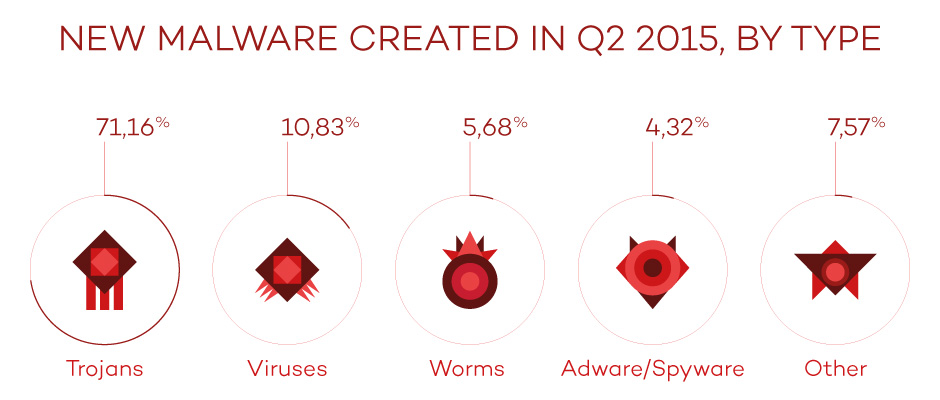
Of the new malware created this quarter, the most popular has been the Trojan, which accounted for 71.16%. This was followed by traditional viruses which made up 10.83%.

new malware

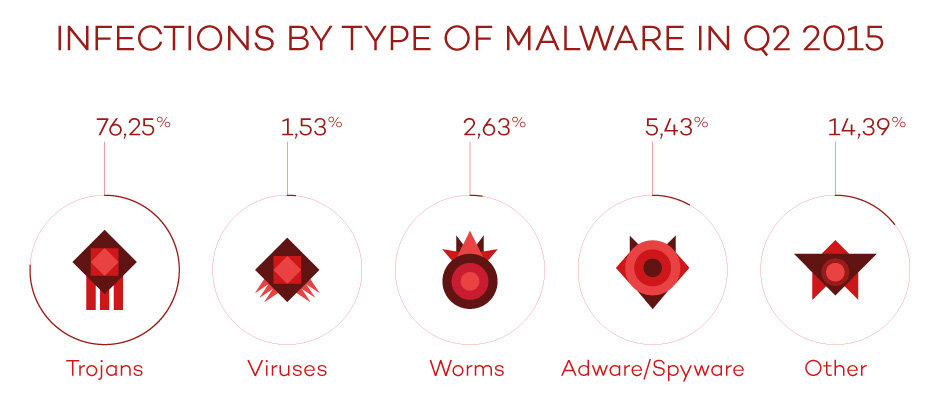
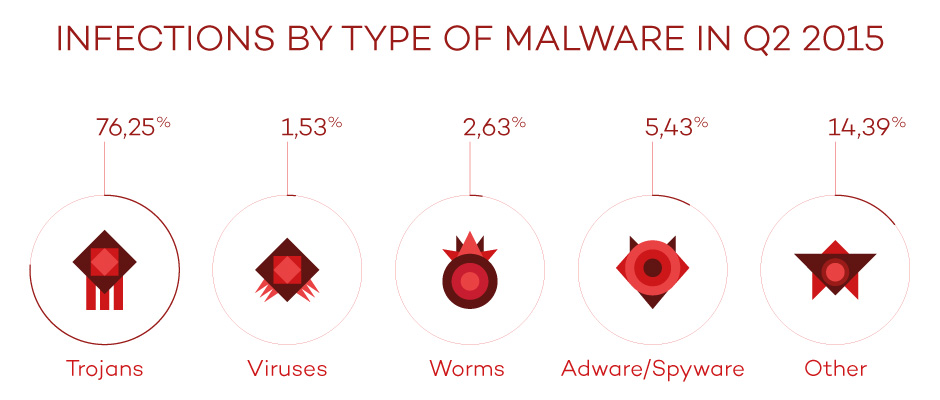
If we analyze the infection by type of malware we can see that, logically, the figures are the same as those for newly created malware, except for the category marked others, whose percentage is higher by a significant margin. Trojans continue to be the main cause of infection, with 76.25% of all users infected by them.

type of infections

Asia and Latin America show a higher rate of infection

China, once again, sits at the top of the chart with 47.53% of all computers infected. It is followed by Peru (43.11%) and Turkey (41.97%), respectively.

On the other hand, the countries with the lowest infection rates were Sweden (21.57%), Norway (22.22%), and Japan (23.57%). It is important to highlight Europe as the region with the lowest rate of infection worldwide, with nine countries on this ranking. As regards Spain, the rate of infection was (36.37%), which places it above the worldwide average.

Cybercrime is the order of the day

Among the main threats that were collected in the study, the use of Cryptolocker was highlighted as being used to infect both private users and businesses.

In the case of private users, cybercriminals have begun to reuse an old technique that was first used over 20 years ago. It consists of infecting the victim via the macros in Office documents, mainly Word. One such example which was discovered by PandaLabs was a Word document containing a blurred image. At the top of the document in bold capital letters there was a message that indicated that the image was blurred for security reasons. If the user wanted access to the information then they had to enable the macros, with an arrow pointing to the button to be pressed. Once enabled, it showed you the clear image while simultaneously infecting you with a type of Cryptolocker.

In this quarter we have seen some of these notable cyberattacks on businesses:

  • Ryanair, the well-known low-cost airline, was the victim of an attack which led to the loss of 5 million dollars.
  • CareFirst BlueCross BlueShield, an American medical insurer, suffered an attack which saw the theft of information relating to over a million clients.
  • AdultFriendFinder, an online dating site, suffered an attack which saw the theft of private user information. The attackers offered the stolen information to the first one to pay them 70 bitcoins, equivalent to $17,000 at the time. Not long after, the complete database was published online.
  • LastPass, a leading password management company, was another victim of information theft.
  • The well-known group Syrian Electronic Army managed to infiltrate the website of the US Navy, publishing propaganda promoting Bashar Al-Assad and his regime in Syria.
  • Ben Rhodes, Assistant to the President of the United States and Deputy National Security Advisor for Strategic Communications and Speechwriting, stated that the White House had fallen victim to an IT attack.

In the second quarter, attacks focused on mobile devices were popular among hackers. WhatsApp is a popular way to attract and try to infect users with a trick called WhatsApp Trendy Blue. It passes itself off as a “new version” of the application with extra features when, in reality, the only thing it does is sign the user up to an expensive billing service.

These are just some of the important cases that we have seen this quarter. More than ever, businesses need to be prepared for this massive avalanche of information theft. They need to reinforce their systems and security solutions, and understand that a simple antivirus is no longer enough to safely protect themselves from an attack. Preventing attacks is the best way to combat them, as the costs associated with an attack put the stability and existence of businesses at risk.

The complete report is available here.

The post PandaLabs detected more than 21 million new threats during the second quarter of 2015, an increase of 43% compared to the same period in 2014 appeared first on MediaCenter Panda Security.

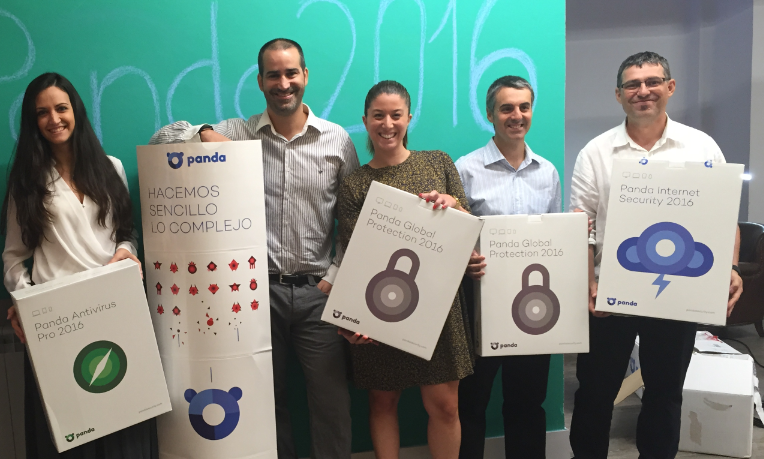
We’ve presented the new #Panda2016 solutions to the media!

simplexity

If you’ve ever tried out on of our products then you’ll know that we protect, and make easy, the day to day life of our customers. The digital world is getting more and more complex, at Panda we work to make the digital life of our users easy and safe – that’s why we are SIMPLEXITY!

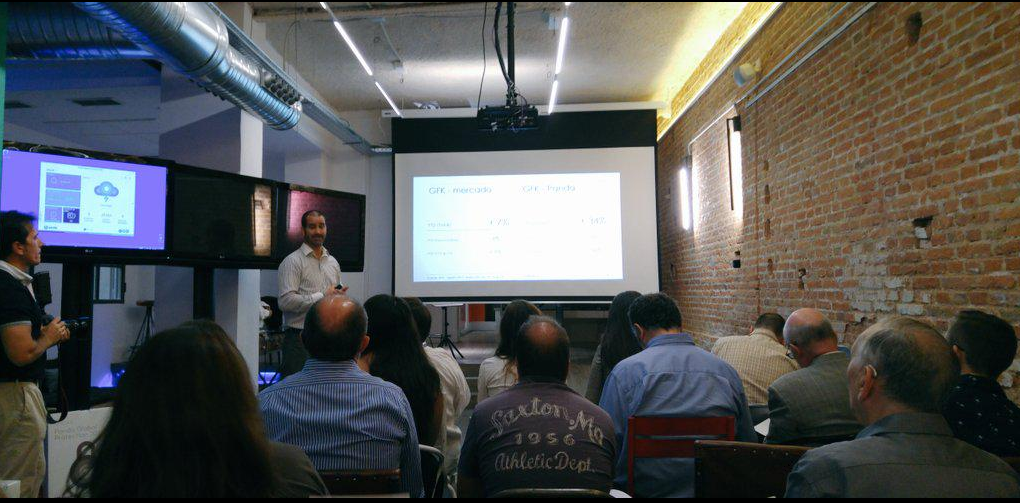
In the Retail press conference that we held last Friday in Madrid, we decided to continue with this core idea and show this philosophy to the Spanish media in a very special event in the Espacio Mood.

The Global Retail team presented the new Panda 2016 consumer solutions in a relaxed and intimate environment that surprised those in attendance due to its down to earth feel.

panda 2016 evento presentacion

Miguel Bullón, Panda Security’s Global Retail Director, started the presentation by detailing the latest information on the company’s growth both locally and globally, and the company’s strategy for 2016 which will see Panda bet ever more on internationalization with more affiliates and country partners.

He also highlighted the differential value that Panda’s 2016 solutions offer compared to other options in the market – the Panda guarantee.

Miguel Bullón Panda Security

Next, Hervé Lambert, Global Consumer Operations Manager, and Alberto Añon, Consumer Product Manager, listed the advantages and innovations of the new Panda 2016 solutions. They consist of:

  • Multiplatform security
  • Wi-Fi protection
  • Parental control
  • Antitheft services
  • Smartwatch protection

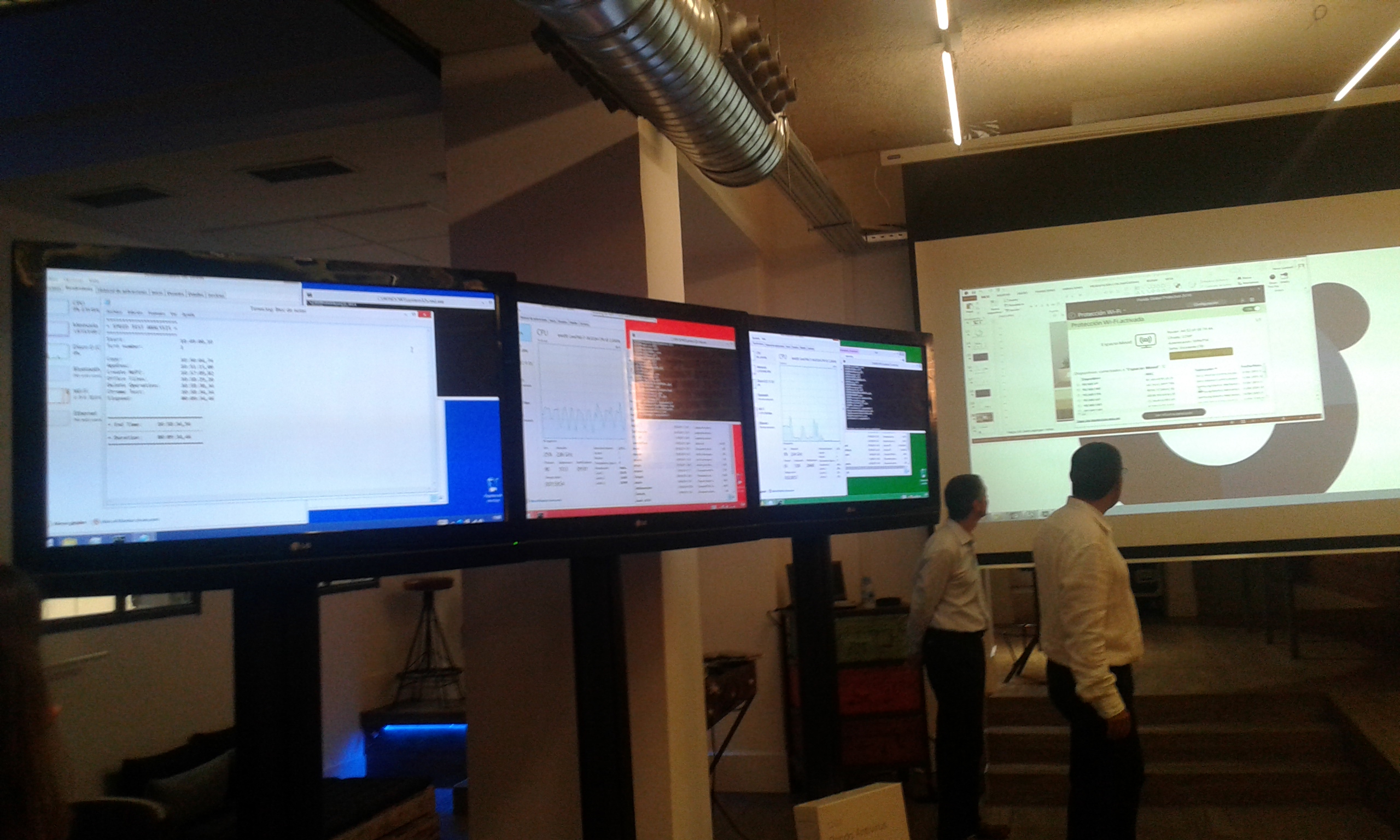
The most memorable moment of the presentation was, without a doubt, the demo that we did comparing the functionality of Panda with that of the competition. The attendees could verify that Panda used up the least resources compared to the competition!

Hervé Lambert, Global Consumer Operations Manager, and Alberto Añon, Consumer Product Manager

That wasn’t all and, before we finished, the journalists were able to unwind and enjoy a massage, interview Miguel Bullón, and share doubts and impressions in a relaxed manner with all of the members of Panda’s Global retail team.

Well done to everyone!

panda global retail team

The Retail team: RAQUEL RUÍZ, MIGUEL BULLÓN, NATALIA LÓPEZ, ALBERTO AÑÓN Y HERVÉ LAMBERT. They rock!

The post We’ve presented the new #Panda2016 solutions to the media! appeared first on MediaCenter Panda Security.

Panda Security detects record levels of malware created to infect users

PandaLabs, Panda Security’s dedicated detection laboratory, draws attention to the record increase in the creation of new malware samples in its latest Quarterly Report for the second quarter of 2015. The malware detected has been created to infect both businesses and users alike.

In the second quarter of 2015 alone there were an average of 230,000 new malware samples created, which means a total of 21 million new types in these three months. Compared to the same period last year, where there were 160,000 registered samples, there has been an increase of 43%.

This large number of samples is, for the most part, mutations of already known malware. This way, cybercriminals try to stop the antivirus laboratories from detecting the infection.

As regards the types of malware, Trojans continue to be, by a large margin, the most common (71.16%) and are the main source of infection, with 76.25% of users infected by this malware. This quarter also saw the proliferation of PUPs (Potentially Unwanted Programs) which accounted for 14.39% of infections and placed just behind Trojans.

infections type

Cryptolocker, the big threat to businesses and users

Among the main threats that this study collected, the use of Cryptolocker to infect businesses and users was highlighted.

In the case of users, cybercriminals have begun to reuse an old technique to infect users, one which was first seen 20 years ago. It involved infecting users via a macros in Office documents, especially Word. To complete this attack, the criminals included a blurred image which could only been seen if the user activated the macros. Once the user does this, they are infected with Cryptolocker.

Businesses are also at risk from infection by Cryptolocker, such as the example of Ryanair, which lost 5 million dollars via a transfer to a Chinese bank. Other companies that have been victims of information thefts include CareFirst BlueCross BlueShield and the online dating site AdultFriendFinder.

“Cyber hackers are looking at businesses more and more as it is relatively easy for them to steal information”, affirms Luis Corrons, Technical Director of PandaLabs. “Sometimes it’s as simple as introducing a variant of Cryptolocker in a file that is sent to an employee and, once it’s opened, the security of the entire company is at risk”.

This quarter also saw attacks on mobile devices. One of the ways in which hackers have duped their victims is by WhatsApp. Called WhatsApp Trendy Blue. It passes itself off as a “new version” of the application with extra features when, in reality, the only thing it does is sign the user up to an expensive billing service.

In June, PandaLabs detected a phishing campaign directed at Android developers that published their creations on the Google Play store. The trick consisted of stealing password information in order to propagate malware via Google Play.

Asia and Latin America register the highest rates of infection

PandaLabs’ Quarterly Report also collected information on the rate of infection worldwide, according to computer’s protected by Panda’s software. The areas with the highest rate of infection were Asia and Latin America, which placed above the average of rate of infection (33.21%). China was the country with the highest rate of infection (47.53%), followed by Turkey (43.11%) and Peru (41.97%).

On the other end of the scale, Europe and Japan were the areas with the lowest rate of infection. Sweden (21.57%), Norway (22.22%), and Japan (23.57%) are the countries with the lowest infection rates worldwide.

However, some European countries recorded infection rates above the global average such as Spain (36.37%), Poland (38.48%), and Slovenia (38.05%), while in Latin America there were rates of 38.21% and 37.86% in Brazil and Colombia, respectively.

The complete report is available here.

The post Panda Security detects record levels of malware created to infect users appeared first on MediaCenter Panda Security.

Avast Mobile Security: So much more than just another security app

With millions of applications waiting to be installed in our gadgets, you not only need to be concerned about quality, but you also need to take the proper measures in order to avoid your phone becoming infected by malware. Unfortunately, we already know that Google Play and the Windows Store aren’t immune to malware. Even the Apple Store has its bad days, so we’re not trying to scare you. These days, malware is a continuing, growing threat.

Stay protected on multiple levels with Avast Mobile Security

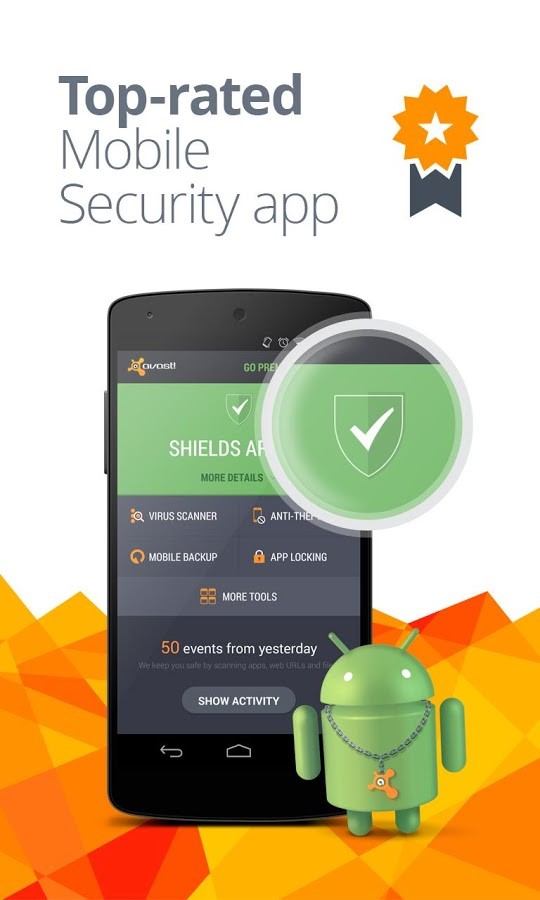
Avast Mobile Security will protect you while providing you with a worry-free browsing experience. Simply install the app and you‘re good to go! Here’s what you get from this multifaceted software:

  • Android protection: The free features of Avast Mobile Security ensure that your smartphone is safe from online threats and malware.
  • Incoming SMS filtration: You are allowed to block specific numbers for calls and SMS.
  • Stolen/lost device tracking: The software features anti-theft elements that provide you with remote options to track your phone location and also recover the same.
  • Warning alarms: In case you visit a website that malware infected, the software will alarm you by a warning sign or sound using its Web Shield.
  • Wi-Fi and network data usage tracking: You may be eager to know your data usage and Avast makes it quite easy. You can track your network data usage as well as Wi-Fi and perceive how much you have consumed and how much is left to use.
  • Mistyped URLs are auto-corrected: Avast Mobile Security is equipped with a SiteCorrect feature that saves users from the issues of mistyping URLs.

We invite you to check out Avast Mobile Security, free from Google Play.


Follow Avast on FacebookTwitterYouTube, and Google+ where we keep you updated on cybersecurity news every day.

Ads: Love or hate?

Ad-injection is an increasingly annoying and dangerous problem

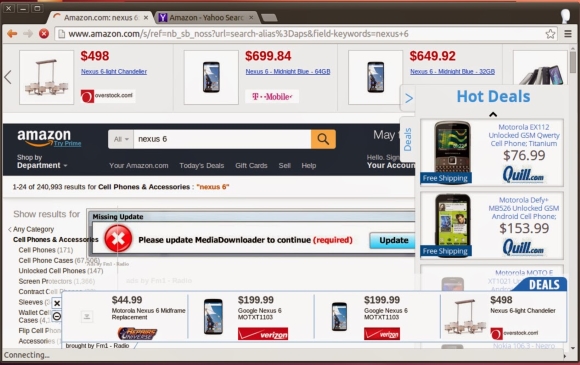
Ad injecting in action on Amazon

Malvertising attacks. Image via Google Security Blog

There are basically two reactions people have when they see ads in their browser. Some think they add interesting content and possibilities, insights and ideas or even, opportunities. The other group considers them as a distraction, an invasion and a disruption to what they were doing.

But most everyone will agree, once you begin something on your laptop or mobile, especially if it’s work-related task, you want to continue what you started. Lots of people get so into what they’re doing that they don’t see or think of anything else, and when an unwelcome ad comes through, it breaks the concentration. Some will say this is a man’s perspective. But even some women I talk to agree; even though they always say they are multitasking and (cough, cough) never lose focus.

When it comes to security, ads are becoming more and more a vehicle for malware. Ad-injecting malware is really a threat nowadays. Once on your device – computer or mobile – the malware will drop new ads into any (or most) sites you visit, sending ad revenue back to remote cybercriminals. For example, malicious porn ads use this type of redirection and clicking techniques.

Research conducted by Google from June to October of 2014 concluded that deceptive ad injection is a significant problem on the web today.  They identified tens of millions of instances of ad injection and detected 5.3 million different IP addresses infected with adware, 5% of the total testing group. The research also found that Superfish, one of the notorious businesses that have ad injection libraries,  was alive and well, not only pre-installed on Lenovo laptops, but breaking SSL protections for any other computer running it in background.

Ways to control unwanted ads in your browser

Inside Avast, we are convinced that adware toolbars and browser add-ons play an important role in the ads market.

Our Browser Cleanup feature detects millions of different adwares that target browsers.

TIP: Run Avast Browser Cleanup on your computer. It has identified more than 60 million different browser add-ons which are often bundled with free software, such as video players, Java and Flash updates.

Besides toolbars and browser add-ons, free software is often bundled with unwanted extra programs making it bloatware and a PUPs vector. Again, all the ad revenue is driven back to the bundles creators. Do we really need to see – and worse, have all that garbage installed in background?

TIP: Slow down when installing free software. Read all the screens and make sure you uncheck any boxes that ask you to install a 3rd party program that you don’t know anything about. You may even consider testing it in the Avast Sandbox first.

Another door for unwanted ads to enter is through outdated software which can be a backdoor for malvertising.

TIP: Keep your browser and software up-to-date. Avast Software Updater can help you keep up with that task.

You could read our blog to learn how to reduce data collection of Windows 10 or to correctly set your Facebook settings. However, there are other measures when it comes to webpages. There are two major ad blockers for browsers: AdBlock and uBlock.

TIP: Visit our user forum to learn and discuss the right ads protection for you. You will find some of our Evangelists that can guide you with easy-to-understand hints.


Follow Avast on Facebook, Twitter, YouTube, and Google+ where we keep you updated on cybersecurity news every day.

DeepScreen technology protects your business data before it’s at risk

Eliminate the risk of your sensitive business data being hacked.

Avast for Business protects your business data

Avast for Business protects your business data

Most of the truly dangerous malware is designed to harvest valuable business information – especially financial data. So hackers design malware to look like an innocent video, application, or website cookie. Sometimes malware can even be disguised as a exit button on an infected website. Basically, hackers use all kinds of tricks to get unsuspecting people to click, download, or run their malware.

The problem is that malware often ends up on a company computer or network completely by mistake. The file might look like a useful business graphic or tool, but when opened, it unleashes malicious code that takes over the computer and even the network.

So how do you stop this when you have 10, 20, 30, or more PCs, Macs, and servers under your care?

Make protection automatic

When a file is “DeepScreened” by Avast, it actually runs in the Sandbox, which is mainly responsible for keeping things isolated while watching for various high-level events and behavior of the program running. For example, it monitors the system call invocation and overall behavior of the program which is being executed.

This gives DeepScreen a chance to analyze the code and compare it against Avast’s massive cloud-based database, compiled from more than 230 million systems worldwide, to see if anything looks familiar. If the file behaves like malware, DeepScreen keeps you safe by quarantining the file in the Avast for Business Virus Chest. With no additional work on your part, DeepScreen automatically protects your company’s computers, files, sensitive information, and even your reputation.

Save time and money

When malware is restricted  to a secure virtual sandbox, your PCs, Macs, and servers are protected BEFORE any risk is introduced. No more having an employee sit idly by while somebody restores a computer. No more losing files that were corrupted. No more work interruptions from malware.

Most importantly, DeepScreen keeps sensitive information private, protecting the trust you’ve earned from employees and customers. And, as some larger companies in the news are finding out, business security can be the difference between profits and out-of-business.

Start protecting your company with Avast for Business which incorporates  DeepScreen technology, all for completely FREE .


Sign up for Avast for Business and save money and time for your company.


What does the Avast Sandbox do?

The Sandbox is like a hamster ball. It keeps potential troublemakers isolated.

The Sandbox is like a hamster ball. It keeps potential troublemakers isolated.

The Avast Sandbox lets you run a questionable program without risking your computer.

The Avast Sandbox is a special security feature which allows you to run potentially suspicious applications automatically in a completely isolated environment. This is particularly useful if you don’t completely trust whatever you just downloaded or you visit dodgy websites because programs running within the sandbox have limited access to your files and system, so there is no risk to your computer or any of your other files.

Here’s how it works: By default, if an application is started and Avast detects anything suspicious, it will automatically run the application in the Sandbox.  The advantage of running an application in the Sandbox is that it allows you to check suspicious applications while remaining completely protected against any malicious actions that an infected application might try to perform.

The browser or other application will then open in a special window, indicating that it is being run inside the Sandbox. When the Sandbox is closed, it will be restored to its original state and any downloaded files or changed browser settings will be automatically deleted.

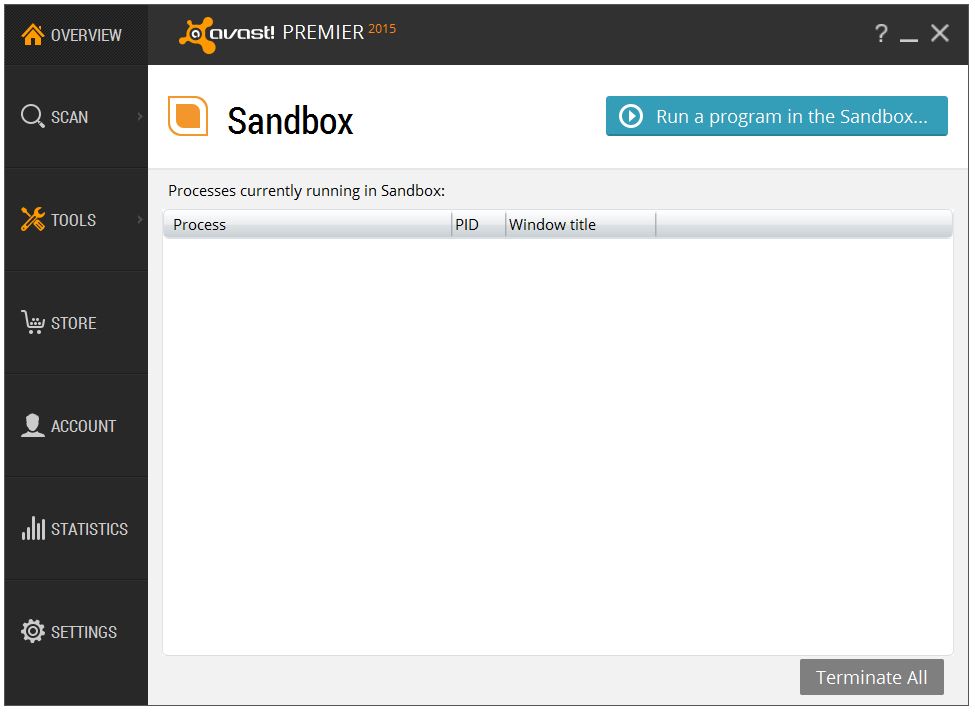
Avast Sandbox

The sandbox window in Avast Premier.

The Avast Sandbox is part of Avast Premier 2015, Avast Internet Security 2015 and Avast Pro Antivirus 2015.


Follow Avast on FacebookTwitterYouTube, and Google+ where we keep you updated on cybersecurity news every day.