Tag Archives: featured1

TGIF: Avast news wrap-up for April 3 – 17

The Avast bi-weekly wrap-up is a quick summary of what was on the Avast blog for the last two weeks.

house cleaning serviceSpring has sprung and it’s time to clean the dust and grime away after a long winter. In a departure from our regular security-oriented blog posts, we share 10 spring cleaning tips to combat grime. Don’t forget you can also clean your mobile devices! But you barely have to lift a finger because Avast GrimeFighter Safe Clean will remove the grime from your Android mobile devices with the touch of a button. If only window washing were so easy!
Screenshot_shieldsIndependent testing lab AV-TEST gave their coveted certification to our popular mobile security application, Avast Mobile Security. If you are still on the fence regarding protecting your Android smartphone then read How to find the best protection for your Android phone? Independent tests.

Don't forgetMany smartphone owners are more worried about losing their device then they are about becoming infected with malware. That’s why we created Avast Anti-Theft. Make sure you have the latest version of our free app so if your phone gets lost, you can track it via your My Avast account or using SMS notifications from your friend’s phone. Turned Android auto-updates off? Manually update Anti-Theft to stay protected. explains how you can use Avast Anti -Theft to recover your lost Android device.
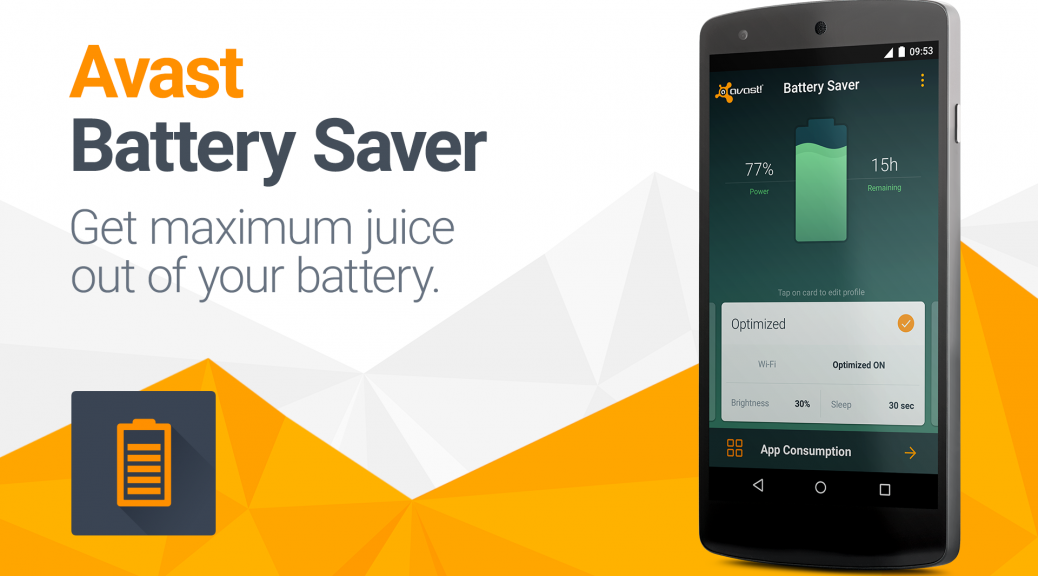
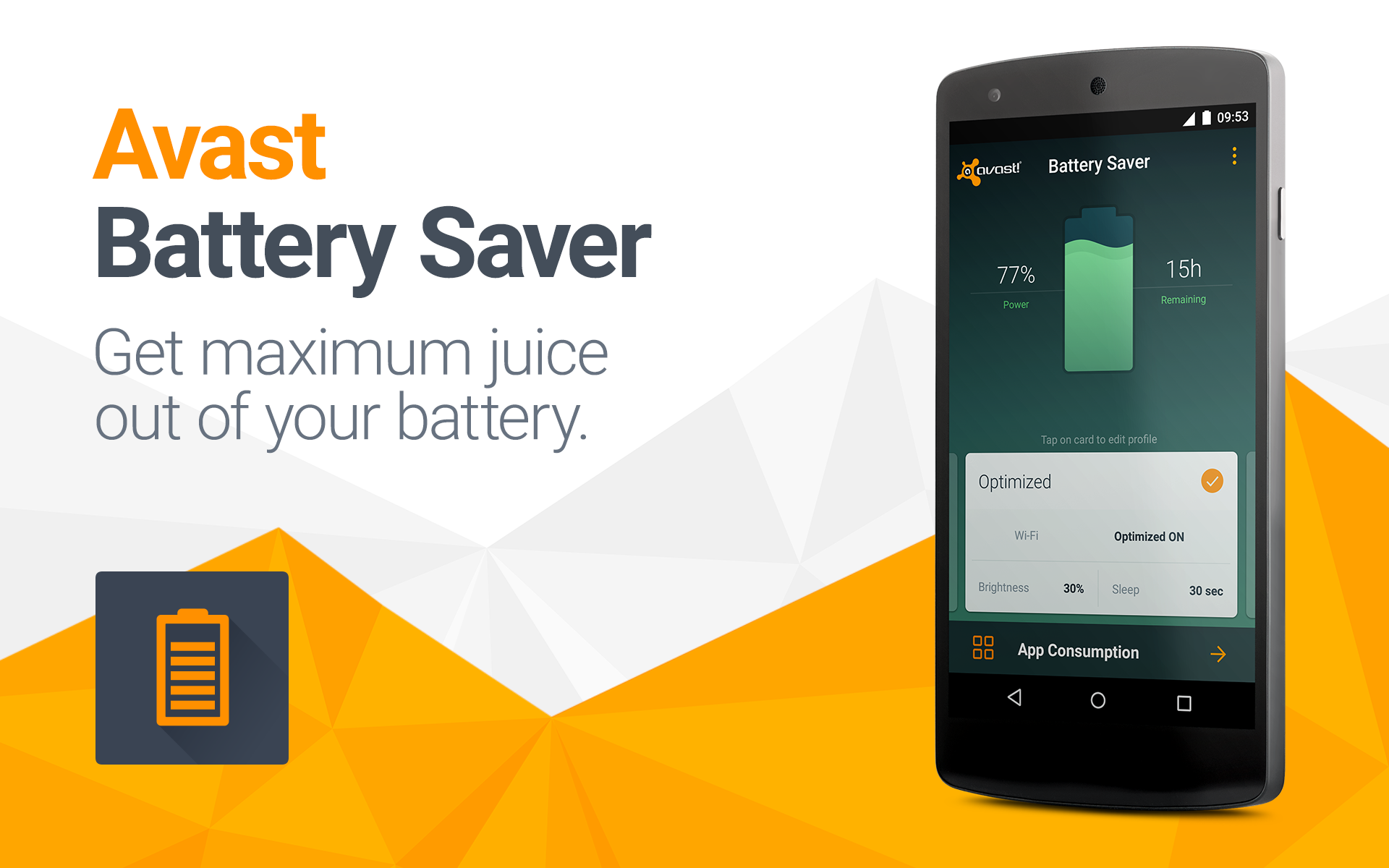
Battery-Saver--1920x1200The mobile development team released a handy little app called Avast Battery Saver. This free app from Google Play helps you save some battery power. But not just any app can do it. The blog post Fear and loathing on Google Play: An in-depth look at today’s battery saving and cleaning apps gives us the scoop on apps that promise to save battery life with task cleaning.

How to use Avast productsHow to extend the life of your phone’s battery is a question that we all have when the juice starts running out. The Avast Battery Saver app can help save about 20% but there are other ways to save battery life. We give you the tips and also share the future of smartphone batteries.

laptop using Wi-FiThe unsecured Wi-Fi hotspot at the local cafe can be bad news if thieves capture your login credentials. Android users with Avast Mobile Security have a built-in feature called Wi-Fi Security that warns them if any issues are detected. We are now seeking iOS beta testers for an app called Avast SecureMe that will include the same type of feature for iPhone users. Check our blog Wi-Fi Security feature foolproofs your network connections both in public and at home and scroll down to the bottom for the beta test sign up link.

Mousetrap with cheeseCybercrooks use a variety of attack vectors to reach their victims. Targeted spearphishing attacks use email messages to trick people into providing sensitive information while malicious apps for Android disguise themselves as innocent games. The scary ransomware locks up all your files and demands ransom for the key to unlock it – on both PCs and and mobile devices! Avast keeps you aware of cybercrooks latest tricks in Don’t take the bait: Beware of web attack techniques.

Wi-Fi Security feature foolproofs your network connections both in public and at home

Wi-Fi Security feature protects your network connections both in public and at home

Protect your Wi-Fi connections using Avast’s Wi-Fi Security feature.

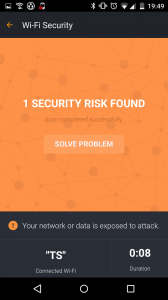
Wi-Fi Security is a feature that is available for Android users within the Avast Mobile Security app as well as within Avast SecureMe for iOS. The feature’s job is to scan Wi-Fi connections and notify you if it finds any security issues including routers with weak passwords, unsecured wireless networks, and routers with vulnerabilities that could be exploited by hackers.

While conducting user testing, we found that 22% of Avast Mobile Security users make use of the Wi-Fi Security feature, making it the 2nd most used feature within Avast Mobile Security.

“Avast SecureMe and Avast Mobile Security offer users a simple, one-touch solution to find and choose safe networks to protect themselves from the threat of stolen personal data,” said Jude McColgan.

Wi-Fi Security scan notifies you of any issues that are detected

From all the users who tested the Wi-Fi Security feature, more than 10% of the scans performed returned some kind of problem, such as the use of non-encrypted passwords or a router that is susceptible to security threats. The Wi-Fi Security feature currently performs checks for the following four key elements:

  • Non-encrypted, unsecured wireless networks
  • Networks with weak encryption
  • Weak router passwords
  • Routers with known security issues

What’s the risk that my personal data will be stolen?

If you use unsecured Wi-Fi when you log in to a banking site, for example, thieves can capture your log in credentials which can lead to identify theft. On unprotected Wi-Fi networks, thieves can also easily see emails, browsing history, and personal data if you do not use a secure or encrypted connection like a virtual private network (VPN). See our global Wi-Fi hacking experiment to see how widespread the threat really is.

Wi-Fi Security offers two solutions to defend against malware threats

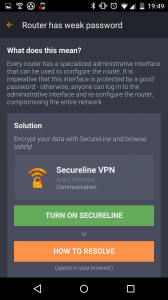
After the Wi-Fi Security feature has scanned your device, you’re presented with two options:

1) Launch Avast SecureLine VPN

2) Click the ‘How to resolve’ button

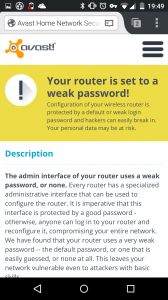
The first of the two options is meant to be used when you’re connecting to public networks – it’s ideal for cafes, airports, or hotels. On the contrary, users should opt to resolve detected threats if they’re browsing at home using their own devices. When taking this route, you’re redirected to the Avast website in order to set up your router in accordance with our guidelines.

Wi-Fi Security scan notifies you of any security issues that are detected  The feature offers users two solutions to any detected issues  We'll walk you through the process of securing your router on the Avast website

How do I get the Wi-Fi Security feature onto my device?

Avast SecureMe will soon be available in the iTunes Store. Before its widespread release, we will be conducting an invitation-only public beta test. Please sign up hereand the SecureMe team will contact you. If you have already downloaded Avast Mobile Security for Android then you’re all set to start using the Wi-Fi Security feature (you’ll find the “Wi-Fi Security” button on the app’s dashboard). For those yet to download Avast Mobile Security, it is available now from the Play Store.

How to clean up your computer for free


free antivirus

There are some viruses that although they don’t completely block a computer, they can still affect its performance. Have you noticed your computer slowing down but don’t know why? Do you think it could be infected? Try Panda Cloud Cleaner, our disinfection tool, and you can resolve these and other issues.

Panda Cloud Cleaner is an advanced antivirus based on Collective Intelligence (scanning in the cloud) which removes malware that traditional antivirus solutions are unable to detect. This free disinfection tool will help you remove viruses such as the notorious Police virus.

How to clean up your PC with Panda Cloud Cleaner

Follow these steps to use our free disinfection tool, Panda Cloud Cleaner.

1. Download the free antivirus.

Panda Cloud Cleaner - Start


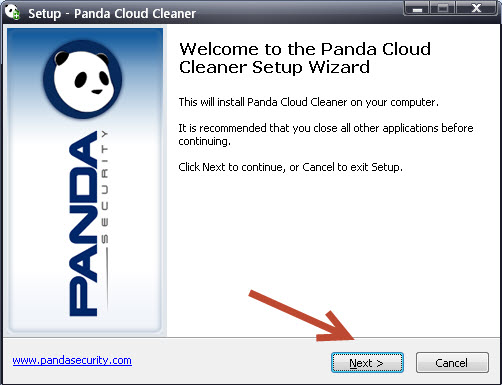
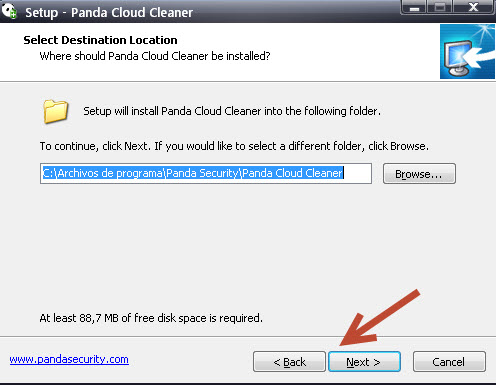
2. Follow the instructions in the program installer.

Panda Cloud Cleaner - Welcome

Panda Cloud Cleaner - Scanning


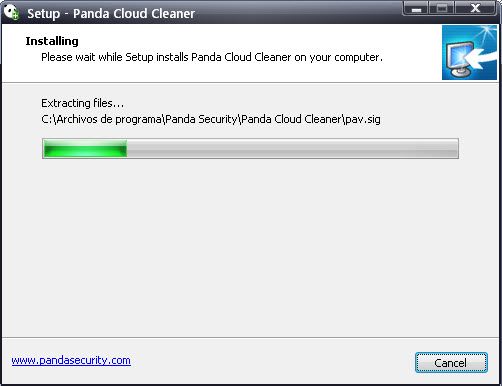
3. Wait until all installation files have been copied.

Panda Cloud Cleaner - Extracting


4. When this is complete, click Finish.

Free Antivirus


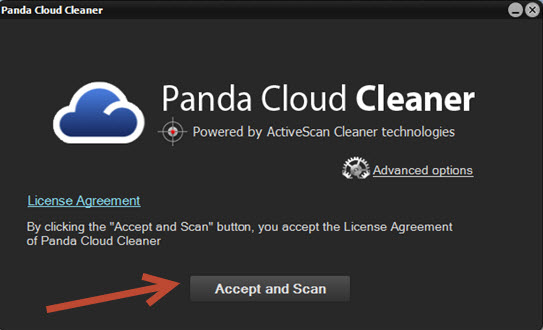
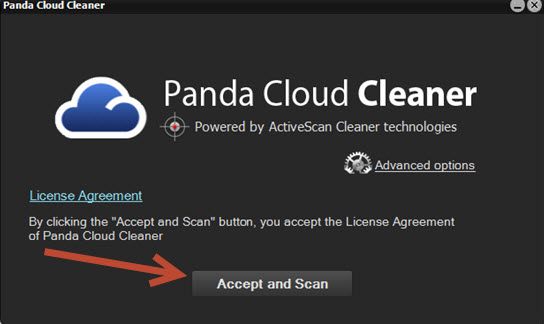
5. Click Accept and Scan in the Panda Cloud Cleaner window.

Panda Cloud Cleaner - Accept


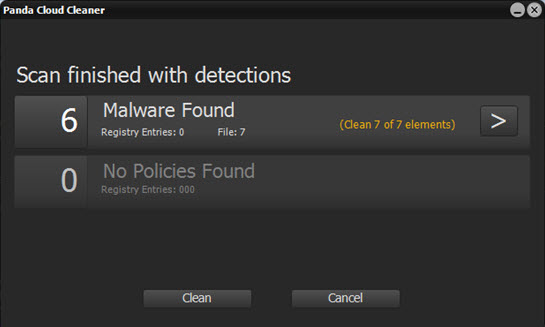
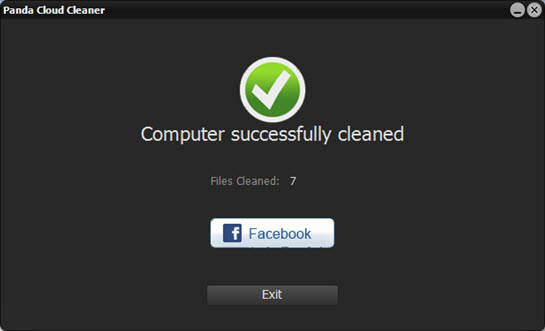
6. When the scan is complete, Panda Cloud Cleaner will display a summary of the malware detected. Check the list of detections carefully to avoid deleting legitimate software and click Clean.

Panda Cloud Cleaner - Finish

Panda Cloud Cleaner - Success


Would you like to try our free antivirus on your PC?
Free Antivirus

The post How to clean up your computer for free appeared first on MediaCenter Panda Security.

How to extend the life of your phone’s battery

How to use Avast productsIf you have a smartphone, you are basically carrying around a pocket-sized laptop with a built-in camera and phone. Denser electronics have allowed for some powerful features to be built into a small package, but the weak link is the battery that runs it all. Battery energy has yet to match the quick growth of features on electronic devices.

Where does the juice go?

The power it takes to keep the device running all day depends upon what you do as well as your operating system, settings, and network (Wi-Fi, CDMA/GSM, 2G/3G/4G), but battery manufacturers say typical Lithium-ion (Li-ion) batteries provide up to ten hours talk time and up to 300 hours standby time.

Apps drain the battery. They sit in the background pinging servers, keeping track of where you are, and waiting for signals. Wi-Fi, Bluetooth, and GPS use power looking for routers and satellites or other Bluetooth devices. The display uses lots of power too, especially at full brightness and if you do graphic-intensive activities like play games.

The environment also has an impact on Li-ion batteries. They suffer from stress when exposed to temperatures above 30°C/86°F. This high heat accelerates capacity loss which cannot be restored. Likewise, cold can decrease electricity flow, making your device sluggish.

When do I need to replace my battery?

Conventional wisdom says you’ll probably need a new phone battery each year. Factors like charge and discharge cycles, exposure to high temperatures, and aging decrease performance over time. Manufacturers say the life of most Li-on range between 300 and 500 cycles. Beyond this lifespan, batteries gradually diminish below 50 percent of the original capacity.

If you notice that your battery depletes rapidly, fails to hold a full charge, or feels abnormally warm then most likely it’s time to replace your phone’s battery.

How to save battery life?

Battery SaverEveryone knows it can take hours to charge a lithium-ion battery and depending on your use, it sometimes doesn’t even last through the workday. Here are some tips to conserve battery power.

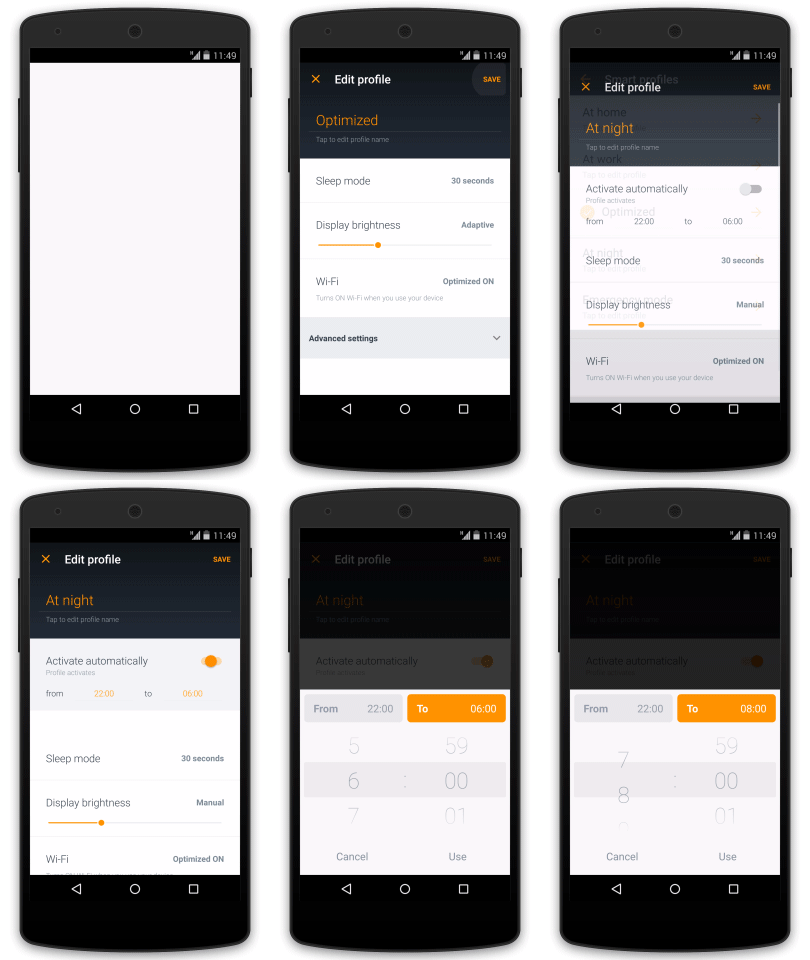
  • Use Avast Battery Saver. Our free app from Google Play optimizes phone settings using ‘Smart profiles’ which activate automatically based on time, location, and battery level. This saves up to 20% on one charge.
  • Avoid full discharges and charge the battery more often between uses.
  • Limit exposure to extreme temperatures, especially heat. Don’t leave your phone in a hot car. Room temperature is best.
  • Lower your screen brightness. You can experiment, but usually anywhere above 50% is still readable. Some phones let you set it to auto-adjust.
  • Turn off vibrate, ringtones, and the flash on your camera.
  • Keep apps updated. The updates often improve battery usage by making the apps more efficient.
  • When in areas with no cell coverage, turn the device to airplane mode or even turn it off. Otherwise, the phone will continue to search for a signal and that eats battery.
  • Limit graphics-intensive activities like gaming and watching videos.
  • Turn off WiFi, Bluetooth, and GPS when you don’t need them.

Read more about Avast Battery Saver, Fear and loathing on Google Play: An in-depth look at today’s battery saving and cleaning apps.

The future of smartphone batteries

The race for a safe, cheap, long-lasting, energy-rich battery is on. With electric cars, wearable tech, and the Internet of Things running our households, inventors, scientists and business people are searching for the breakthrough that will change batteries forever. The next-generation of batteries may well be built with silicon-based electrodes, take advantage of the oxygen we breathe to recharge power cells, or be organic.

Just last week, a super-fast (1 minute!) chargeable aluminum-ion battery with a high-charge storage capacity developed at Stanford University was announced. This low cost, durable (it was able to withstand more than 7,500 cycles without any loss of capacity) battery is not ready to be mass produced, but it holds promise.

Until that time comes though, used the Avast Battery Saver free app to extend the life of your phone’s battery. :)

Disposable email address: easy, free and safe

smartphone on the hand

After searching in Google for what appears to be ages, finally you find a web page that seems reliable, you start reading and realize that it contains all the information you were looking for! But your happiness is shattered when, suddenly, the host asks you to verify you are not a robot! A robot?! To prove you are a human being you enter your email address and register to the web page.

You rarely stop to think that your email will be captured in the platform’s database and that from now on, it will probably collapse your inbox with spam or fill your email up with malware. The solution to this problem is not to sing up to these web pages with your personal email account, but use instead a disposable one.

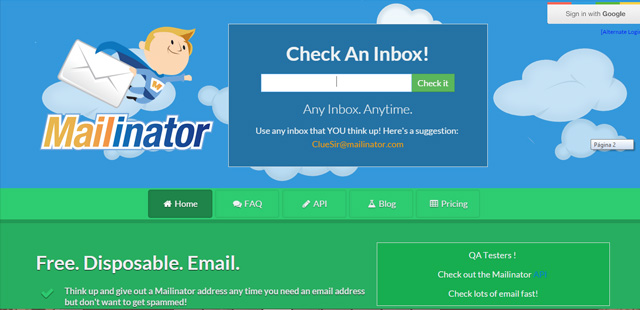
There are many programs out there that offer creating disposable email accounts, accounts that last a short period of time and whose spam won’t bother you. Some of the platforms that allow you creating temporal emails accounts are: Maildrop, Yopmail, Air mail, Guerrilla mail, Now my mail, Hide my ass, Mailinator o Email Temporal Gratis.

Most of them don’t require much registration information, others allow you to forward messages, and in some cases, you are able to select the account’s expiration date.

Mailinator, for example, is one of the longest-standing free disposable email services, which denies access to emails with attachments, and by doing so it prevents malware from entering the account. You just have to choose an available name and you may enter your temporary inbox. But we must warn you, these are shared accounts, so there might be more people using it.

mailinator

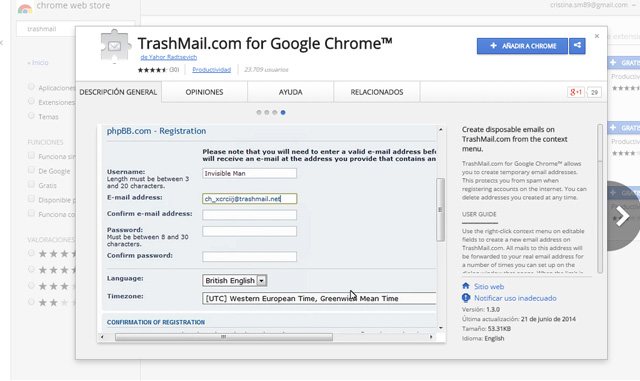
Another option is installing a browser extension to create disposable email accounts without accessing a web page. There is an extension available for both Firefox and Chrome, it is called Trashmail. You can create a new account in Trashmail by clicking on “Register a new account” and filling out all the information required, even the email address to which it will redirect your messages.

The next step is selecting your preferences on the General tab: you can choose the message’s lifetime and notify your regular email when the temporal email has expired.

trashmail

You can also create an alias of your own email address. For example, in Gmail you can receive the messages sent to [email protected]  and the email will arrive to [email protected].

Once you are inside the platform you register yourself with the first address, the alias, so the platform’s database only registers your alias email and won’t fill up your inbox. You can also choose which messages go directly to the trash, which are forwarded to other email accounts or which simply stay on your inbox, just by setting some filters. But you must take into account you will be sharing your real email address.

So, now you know, the next time a website asks you for your email address don’t jump in and write your personal or business one. Be cautious and use a disposable email address. You have everything to gain: it is easy, free and safe.

The post Disposable email address: easy, free and safe appeared first on MediaCenter Panda Security.

How to solve your problems with your computer or smartphone

premium assistance

Do you have a virus in your computer and don’t know how to remove it? Don’t know how to set your Wi-Fi connection? You have a new smartphone and need to set it up?

Don’t worry! Ask for our remote assistance and enjoy a hassle-free digital life.

We have three different plans for you to choose from. Which meets you needs:

Fix&Protect Plan

Keep your computer virus-free.

  • Basic TuneUp/Optimization of Windows on 1 computer.
  • Disinfection of viruses and spyware.
  • Resolving any technical or IT security queries.
  • Installation and configuration of Panda Antivirus PRO (3 months of service).

Family Plan

Configure your home Wi-Fi network, as well as your PC, Mac or smartphone.

  • All options included in the Fix&Protect Plan.
  • Technical assistance for up to 5 devices.
  • Setting up your home Wi-Fi connection.
  • Setting up privacy settings on social networks.
  • Setting up your smartphone or tablet.
  • TuneUp/Optimization of your PC, Mac or smartphone.
  • Installation and configuration of Global Protectio on 5 devices (3 months service).

Complete Plan

A security expert will assist you anytime, anywhere.

  • All the options included in the Digital Home Plan.
  • Technical assistance for up to 10 devices.
  • Configuration of security on Web browsers and email accounts.
  • Troubleshooting of problems on your operating system or any other app or software.
  • Assistance with peripherals such as printers, cameras, scanners, etc.
  • Installation and setup of Global Protection on up to 10 devices (3 months service).

Try our remote assistance and forget about your problems. Call us free of charge and we will inform you about how it works!

The post How to solve your problems with your computer or smartphone appeared first on MediaCenter Panda Security.

The Pirate Bay has grown clones loaded with malware. Beware!

A few weeks ago, a court in Madrid issued a statement to block access to the home page of ‘The Pirate Bay’ and all associated domains. The court based on the premise of the Spanish “Ley Sinde” to provide torrent downloads stopping in Spain, as it has in 13 other countries.

the pirate bay

So much for the theory; but the practice is a bit different. Although the judges established a 48 hour limit for all operators to veto these webs to its users, some have still to execute the warrant.

But the issue won’t be solved when they proceed. For years, members of ‘The Pirate Bay‘ have ensured its continuity through mirror pages, exact copies of the original site.

Any one of them gives you access to a server where you can find a copy of the torrents available for downloading movies, music and other files. So, you can keep downloading through The Pirate Bay just using alternative paths.

At the beginning there were a few dozen of these clones, but now this number is exorbitant. IsoHunt, another platform for sharing documents, is the one to blame. After the end of last year, when the Swedish police arrested some members of The Pirate Bay and led to the system crashing, the responsibles of this other web sympathized with them.

pirate flag

The result of their effort to keep up the torrent (pirate) flagship is the project called: The Open Bay, a fully editable open source version of the original site. Using this template, anyone with a basic knowledge of web design and programming can develop a site that indexes the contents of The Pirate Bay, IsoHunt and KickAss Torrents.

Now that ‘The Pirate Bay’ is operational again and banned in most countries, some people use the tool The Open Bay with even less lawful purposes than just sharing files without respecting a license. Cybercriminals insert parts of the content of an alleged mirror page (via iframe) on other websites that use the WordPress content management system.

the pirate bay code

So far it seems that there is no bigger problem, if it wasn’t because the address (which we are not going to tell you for your own safety) doesn’t lead to download site. When someone clicks on the link, a malware infects their computer and records the owner’s information, as bank details or passwords, sending them later to the criminals.

Why WordPress? This tool is not insecure on its own; cybercriminals based their attack on the outdated versions of some plugins, which have vulnerabilities, allowing the criminals insert the iframe with the malicious link.

The number of infected sites is still unknown, but the only way to avoid this code straining in our software is to keep WordPress and all its plugins up-to-date. Internet users that want to keep enjoying The Pirate Bay’s services, do it at their own risk.  We just advise them to be cautious and vigilant.

The post The Pirate Bay has grown clones loaded with malware. Beware! appeared first on MediaCenter Panda Security.

Fear and loathing on Google Play: An in-depth look at today’s battery saving and cleaning apps

Aavst Battery Saver saves battery power.

Install Avast Battery Saver on your Android device for free from Google Play!

Avast Battery Saver quickly and easily helps you to save your Android’s battery life

Mobile devices are currently evolving at an exceptional rate. Processor speed, display quality and connectivity options have changed dramatically over the past few years. However, battery capacity still seems to be struggling to keep up with the evolving capacity needed to power the enormous amount of new processors and displays.

According to a recent survey answered by 20, 000 people, 60% of Android owners are not satisfied with their device’s battery life.

There are a huge amount of Android applications trying to solve that problem, yet most of them fail to do so. When examining the features available on these apps, it becomes easy to see why many of them haven’t achieved complete success.

Task-killing

Task-killing is the most popular feature available not only within many battery saving apps, but also within cleaners and phone boosters. It most likely originated in Windows’ desktop operating system. Since users had first become accustomed to closing programs on Windows when their PCs began to slow down, this behavior transferred over to mobile devices when the users began to use Android.

However, Android’s system works differently. Android aims to keep RAM full in order to switch between applications more quickly. If there is no free RAM left, Android kills less recent applications. Thus, there is no need for the user to shut down the apps manually. Furthermore, task-killing actually slows down devices because each time an app is shut down, its data must be loaded to RAM again.

Try it yourself

Here’s a small test that you can try: install a task-killer, RAM booster or battery saving app that “cleans” RAM. Click the main button (it’s usually called “Optimize” or “Boost”). You’ll see several apps killed. Then, wait for a few seconds and try it again. Nothing will happen, as you’ve just killed everything.

Now, uninstall or clear the data in the tested app. After you click the “Optimize” button again, almost all of the apps you’ve just killed are shown to be killed again. Looks strange, huh? It might appear that the “Optimize” button doesn’t do anything. In reality, it does kill applications. The trick is that many apps start directly after being killed using Android’s WakeLock feature. Apps with an “Optimize” button have a timer which prevents users from seeing that killed apps are running again after a few seconds. Because of this, there is no sense in using “Optimize”.

More info about task-killing can be found here:

1. http://www.howtogeek.com/127388/htg-explains-why-you-shouldnt-use-a-task-killer-on-android/

2. http://lifehacker.com/5650894/android-task-killers-explained-what-they-do-and-why-you-shouldnt-use-them

How can I actually save my device’s battery life?

A couple main factors that contribute to saving battery is turning off certain features of your device including Wi-Fi and mobile data and limiting display brightness and timeout.

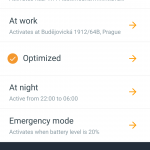
Avast now brings you Avast Battery Saver, an application which saves power without hassle. It optimizes phone settings such as Internet connectivity, screen brightness, and timeout according to your needs. Smart power profiles are activated automatically based on time, location, and battery level without sacrificing the activities you love most.

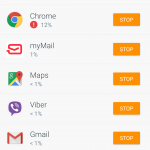
Avast Battery Saver also contains a powerful tool to solve the issue of apps draining your battery’s lifespan while not being used. You have the ability to see how much battery every app is draining and force stop any that you’re not currently using. Unlike task-killing, force-stopping is Android’s native solution to prevent apps from unnecessarily running in the background. Once force-stopped, an app will not run again until it’s next manually opened.

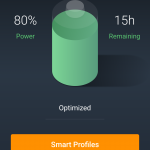
Avast Battery Saver indicator
Avast Battery Saver App Consumption
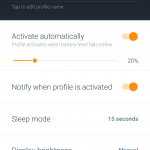
Avast Battery Saver Emergency mode
Avast Battery Saver Smart Profiles

Ready to save? Download Avast Battery Saver for free on Google Play.

Adaptive Defense 1.5, the enterprise solution that seeks security against advanced and targeted attacks

Panda Security announces Adaptive Defense 1.5, the new version of the managed service that ensures security against Advanced Persistent Threats (APTs) and targeted attacks in enterprise environments. Adaptive Defense has a disruptive approach compared to traditional blacklist-based malware detection systems.

The major new features of Adaptive Defense 1.5 include the disinfection service, the ability to view the status of endpoints in real-time and the ability to manage the settings from a single Web console.

adaptivedefense

Protection against targeted and zero-day attacks

An APT (Advanced Persistent Threats) is new generation malware that uses multiple infection vectors at the same time and for an extended period of time, remaining hidden on the computer, and whose main objectives are industrial espionage and data theft.

Traditional antivirus solutions are not capable of detecting these types of attacks, nor of disinfecting the computers infected by them. Adaptive Defense, however, proposes a new security model based on supervision, control and classification of the behavior and nature of every application run in order to provide robust and complete protection, only allowing legitimate applications (goodware) to run.

In addition, the ability to incorporate it into the customer’s existing infrastructure, coexisting with traditional antivirus solutions and with the SIEM solution used by the company, coupled with its disinfection capabilities, make Adaptive Defense the complete and definitive enterprise tool against all types of malware, including targeted and zero-day attacks.

“With the blocking modes of Adaptive Defense 1.5, we can ensure complete and robust protection for all companies. These modes only allow applications classified as goodware to run, making it the ideal solution for companies that require a ‘Zero Risk’ security policy”, explains Josu Franco, VP Corporate Development at Panda Security.

Real-time audit service

Adaptive Defense 1.5 constantly scans the applications that try to run, and automatically classifies all applications using Machine Learning techniques in Big Data environments under the supervision of specialized PandaLabs technicians. If malware is identified, the user receives instant warnings with a comprehensive report detailing the locations, infected machines and the actions performed by the malware. The execution graphs allow the administrator to view the events triggered by the malware, providing clear and thorough information about the actions performed by malware, the recipients of the messages and the files created. Furthermore, the new version of Adaptive Defense identifies software with known vulnerabilities installed on the network.

The post Adaptive Defense 1.5, the enterprise solution that seeks security against advanced and targeted attacks appeared first on MediaCenter Panda Security.

Avast Mobile Security: What’s not to love?

Mobile is attractive to cybercrooks

Our mobile phones are fantastic little devices — these days, they’re as powerful and can accomplish nearly all the things a regular computer can. While this is convenient for us, it also gives cybercrooks a relatively easy in-road to your private data and financial information. As 2015 rolls along, consumers continue to become more aware of mobile security options available to them, since they will increasingly use mobile apps that contain sensitive banking, financial, and personal health information.

Last year, more than 1 billion Android devices were shipped out to customers around the world. With Android winning the majority of the smartphone market, it offers a tempting target to malware authors. The average user is not especially concerned about being infected with a virus on their phone or tablet, but unfortunately, mobile malware is more than just a myth. Avast currently has more than one million samples of mobile malware in its database, with 2,850 new mobile threats being created every day by hackers.

Even if you think your chances of being infected with malware are low, we suggest that you go ahead and install a good mobile antivirus software. The great thing about Avast Mobile Security is that it’s free, so your investment is minimal – just a few minutes of setup and you’re ready to go.

Avast Mobile Security includes antivirus protection which scans your apps to see what they are doing, and a Web shield that scans URLs for malware or phishing. Malicious apps allow malware to enter your phone, so it’s good to have Avast on your side to detect when a bad one slips by on Google Play or another app store.

1440x900

When taking a look at Avast Mobile Security’s features and capabilities, it’s easy to see why it’s a top-rated mobile security app.

AV-TEST All-Stars

Avast Mobile Security did not commit any mistakes when tested with 1,932 legitimate apps from the Google Play Store and 981 legitimate apps from third party app stores. In addition, all this protection, according to AV-TEST, did not “impact the battery life”, or “slow down the device during normal usage”, and “does not generate too much traffic”.

To compare the choices of mobile antivirus software, you can look at the January 2015 “Mobile Security Test” conducted by the independent labs at AV-TEST. They looked at 31 popular Android security apps. Avast Mobile Security tops the list because it detected 100% of malicious apps without any impact on the battery life or slowing down of the device.

AMS Referral Program

In the latest update of Avast Mobile Security, we added a referral program, so you can recommend Avast Mobile Security to your friends and family. Not only can you recommend the best mobile security app available on Google Play, but you will be rewarded for doing so; you can earn up to three months of Avast Mobile Premium for free!

Here is how it works: For every five friends you send an SMS to recommending Avast, you get one free month of Avast Mobile Premium. Cool, huh?

There you have it — we’re huge fans of Avast Mobile Security, and we think you will be too. Download Avast Mobile Security for free on Google Play.