Was the Federal Bureau of Investigation justified in paying over $1.3 million for a hacking tool that opened the iPhone 5c of San Bernardino terrorist?
Tag Archives: Malware

Tips to help shield your reading devices
Today, April 23rd, we celebrate World Book Day. Literature has evolved greatly in recent times, both in the way we enjoy it and the way we consume it. How we read, in the digital realm, has changed. In today’s on-the-go society, it is becoming less and less common for people to use paperbacks or hardcovers, and is becoming more and more common that we use many different platforms to enjoy reading. Now we read from our smartphones, tablets, eBooks … Electronic ink has been imprinted in our lives. We read everything and anything from short stories to novels, the news to blogs… we turn them into trending topics. We even share excerpts from the books we read on social media. Stories become viral thanks to transmedia storytelling and techniques.
Not only are we seduced with words, but audiovisual content plays a very important role in grabbing our attention. New technology enriches our reading, using videos or photos to interact with the reader. We live in the era of Branded Content. Struggling brands position themselves in a way that seems “organic” in the minds of consumers by offering unique and high-quality content. Now we are fluent in a new language, digital language, and the language in which today’s literature is based on. We write simpler and add hyperlinks. Digital writing is intended to be enjoyed only on-screen, 100%.
Tips to safeguard your reading device
We often forget that a computer virus in Windows can be passed to a smartphone whether it’s an iOS or Android, and a lot of these viruses can even infect our eReaders. To prevent malware from damaging our reading device, whatever it is, we must follow these guidelines:
1- Beware of USB ports: we must first analyze anything that can be inserted into a computer or electronic device. This is the simplest and most popular way cybercriminals can infect our devices.
2- Only buy or download eBooks from legitimate online stores or known editorial pages.
3- Beware of file size: if we introduce some eBook DRM we must be wary if it occupies more than 2Mb, as it could possibly be a virus that could damage the device.
4- Install an eBooks library manager: if the eBook is a virus or has one, the manager will alert us.
Like always, prevention continues to be the best option to help us enjoy our reading (or browsing) safely. Happy World Book Day!
The post Tips to help shield your reading devices appeared first on Panda Security Mediacenter.
Core Windows Utility Can Be Used to Bypass AppLocker
A researcher has discovered that Windows’ Regsvr32 can be used to download and run JavaScript and VBScript remotely from the Internet, bypassing AppLocker’s whitelisting protections.
PoS Attacks Net Crooks 20 Million Stolen Bank Cards
A report released Thursday shines a bright light on point-of-sales system attack targeting hospitality and retail businesses that could of given earned cyber crooks a $400 million payday.
Misunderstanding Indicators of Compromise
In this Threatpost op-ed, Dave Dittrich and Katherine Carpenter explain the dangers of conflating measurable events, or observables, with indicators of compromise, which require context and other constructs to provide true threat intelligence.

Creators of SpyEye Virus Sentenced to 24 Years in Prison
In Brief
Two International hackers, Aleksandr Andreevich Panin and Hamza Bendelladj, have been sentenced to a combined 24 years and 6 months in prison for their roles in developing and distributing SpyEye banking trojan, a powerful botnet similar to the infamous ZeuS malware.
Both hackers were charged with stealing hundreds of millions of dollars from banking institutions worldwide.


Researcher releases Free Ransomware Detection Tool for Mac OS X Users
In Brief:
Introducing RansomWhere, a free generic ransomware detection tool for Mac OS X users that can identify ransomware-like behavior by continually monitoring the file-system for the creation of encrypted files by suspicious processes.
This ransomware detection tool helps to block the suspicious processes and waits for the user to decide whether to allow or stop the process.

Latest TeslaCrypt Targets New File Extensions, Invests Heavily in Evasion
Researchers at Endgame have found new versions of TeslaCrypt in the past few weeks that target a host of new and unusual file extensions, and deploy new obfuscation and evasion techniques.
Be careful with CryptoBit, the latest threat detected
A few days ago at PandaLabs, Panda Security’s anti-malware lab, we discovered a type of ransomware that we believe is extremely important to talk about, especially because of its novelty and its unique features. The name of this new ransomware is CryptoBit.
If we compare it to what we’ve learned thus far from other ransomware, we can say that CryptoBit is a one-of-a-kind specimen. It’s different from other ransomware for many reasons, one of the main differences being the message that appears instructing the victim to rescue their files. Its additional features will be revealed in this article.
Analyzed Sample
This report focuses on the analysis of the following sample:
a67855dbd18652e99f13d29045b09391382bb8c817cda1e498cd01eb4a7bdf2c (sha256)
This sample is protected thanks to a “packer”, a trojan that disguises another type of malware. After “unpacking” it, we can notice that, in addition to a date of recent compilation (April 5, 2016 at 12:20:55 PM), there is a total lack of strings, evidence that the author of CryptoBit wished to hinder the analysis of your code, by any and all means.
Distribution
After analyzing the data provided by Panda Security’s “collective intelligence systems”, it is possible to determine the vector that was used to distribute CryptoBit is being used by the “Exploits Kits” that affect different web browsers.
Behavior
Once the sample’s behavior is unpacked and analyzed, we can more accurately determine the basic way CryptoBit works:
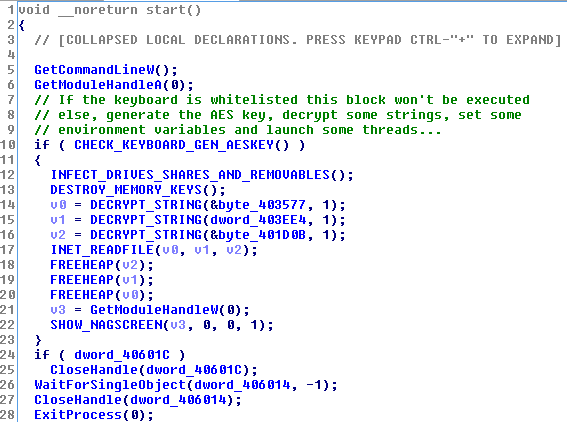
The first thing CryptoBit does is check the keyboard’s configured languages. If the keyboard is configured with one of the following codes: 0x1a7, 0x419 (Russian) or 0x43f (Kazakh), the program does not end up encrypting any file.
After making sure that the keyboard is not in their blacklist, CryptoBit goes to all local disk drives, network folders, and removable drives (USB), searching for files containing any of the intended extensions. What is its objective? To encrypt the entire contents of the file (another unusual feature) in order to request their rescue later on.
In particular, CryptoBit is interested in the following file extensions:
|
ods crp arj tar raw xlsm prproj der 7zip bpw dxf ppj tib nbf dot pps dbf qif nsf ifx cdr pdb kdbx tbl docx qbw accdb eml pptx kdb p12 tax xls pgp rar xml sql 4dd iso max ofx sdf dwg idx rtf dotx saj gdb wdb pfx docm dwk qba mpp 4db myo doc xlsx ppt gpg gho sdc odp psw psd cer mpd qbb dwfx dbx mdb crt sko nba jpg nv2 mdf ksd qbo key pdf aes 3ds qfx ppsx sxc gxk aep odt odb dotm accdt fdb csv txt zip |
Once the process of file encryption has begun, the user can see a window on their computer similar to the one show below:
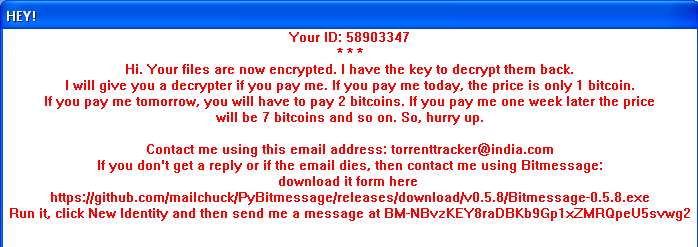
In this message we see some details that draw our attention and which can be used to classify this new type of ransomware:
ID shown as “58903347”
In the number shown for the analyzed sample, this value is always the same. It does not matter if you run this Malware repeatedly, or if you do it on different devices. This suggests that we will find ourselves with an ID of ransomware rather than a particular user (or computer).
The number of bitcoins you have to pay
In general, the required amount of Bitcoins are fixed, or have a limit. In this specific example, we see that the author (or authors) are requesting a bailout that is a little excessive.
How to get in contact with “them”
The user is not able to contact the hacker through a web server accessible via a URL, and they do not ask the user for anything in particular, at least they don’t at this exact moment.
They ask the user to contact them with using an email address that seems untrustworthy (ex. [email protected]). If the victim does not receive a response, they can also contact the hacker using an application called “Bitmessage”, a branch of another application that can be found in “GitHub”.
Additionally, if this message is not enough to convince them that their files have been encrypted, each time that this folder is accessed with one of these (now) indecipherable files, the user will discover a couple of extra files that were created intentionally:
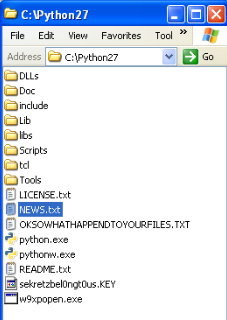 OKSOWATHAPPENDTOYOURFILES.TXT
If we take a look at this file we will find the same message (this time in text format) that is shown to the user after their files are encrypted.
sekretzbel0ngt0us.KEY
In this second file we see a hexadecimal sequence with a length of 1024 which, once decoded, will correspond to a binary sequence of 512 bytes (or 4096-bits).
Later, in the “encrypted” section, it will show us the meaning of the file called “sekretzbel0ngt0us.KEY“, where encryption has been used to encrypt other files.
Another CryptoBit action that is visible to the user is an HTTP request that looks like:
http://videodrome69.net/knock.php?id=58903347
Notice: the requested script “knock.php” does not exist, what it’s doing is ignoring the intentions of the last action.
Encryption of Files
Encrypting files to encrypt other files, in each run, CryptoBit generates the algorithm AES, or “Advanced Encryption Standard” (a random key of length 32 bytes or 256 bits), making it practically impossible to decrypt files unless this information known.
In order for us to not lose this key which allows us to decrypt files if the ransom was paid, the author of this ransomware, stores the AES key generated with an encryption using the RSA algorithm.
A public key that is chosen is a length of 4096 bits and we find it “hardcoded” within the analyzed sample.
Once encrypted with a RSA AES key, it will be stored in the files named “sekretzbel0ngt0us.KEY“, making it only comprehensible if there are corresponding RSA “private keys” (which in theory, would only be in the possession of the cypher’s author.)
In this section, we notice a specific detail: the absence of calls to the native libraries that encrypt files using the RSA algorithm. CryptoBit uses a series of statically compiled routines that allow you to operate with large numbers (“big numbers”), making it possible to reproduce the RSA encryption algorithm.
Conclusion
As we can see, this newly discovered ransomware phenomenon is not going out of style. We are finding new samples every day that still surprise us. In this specific case, we aren’t as shocked by the use of “serious cryptography” (AES + RSA), something that is more and more standardized, but we are amazed by the ambition behind it and can appreciate its good design and interesting ideas.
As always, keep your antivirus updated and make sure to back up your important files.
Analysis of CryptoBit by: Alberto Moro, Abel Valero and Daniel Garcia
The post Be careful with CryptoBit, the latest threat detected appeared first on Panda Security Mediacenter.

Dorkbot: 5 years since detection
In the half-decade that has lapsed since Dorkbot was first identified, millions of innocent victims, going about their everyday business, have been affected in over 190 countries. It has, quite literally, wormed its malicious way into computer systems throughout the world.
The post Dorkbot: 5 years since detection appeared first on We Live Security.
