
Tag Archives: Mobile Security

Why the unblocking system of your Android isn’t secure and how you should change it

unblocking system android

If the most wanted cybercriminal in the US used the name of its cat as its password and a Google study revealed that typical security questions such as “What is your favorite food?” were practically useless, what should we expect of the unblocking system that protects our smartphone from being accessed? Very little, of course…

Just like the obvious passwords and answers, the traces that most of us draw on the screen to unblock our smartphone are usually easy to guess. This has been demonstrated by Marta Løge, an investigator from the Norwegian University of Science and Technology, in a study which shows her findings which and that she presented at the PasswordsCon conference in Las Vegas.

By analyzing nearly 4,000 real user patters, the expert was able to discover a series of inadvisable practices which are repeated all too often. First of all, when choosing a blocking pattern we can draw a trace of up to 9 points (the grid is laid out in 3×3), but the majority of users choose to use less.

The average number of swipes used for the pattern is five, which reduces the number of possible combination to only 9,000. However, it turns out that the majority of users only opt for four swipes (the minimum allowed), which means that the range of patterns that the average user chooses is limited to a little more 1,600, which is clearly not enough.

Length of pattern Number of combinations
4 1624
5 7152
6 26016
7 72912
8 140704
9 140704

This isn’t the only error that we are making as 44% of us start the pattern in the top–left corner of the screen. If that wasn’t worrying enough, 77% of the patterns start in any one of the four corners of the grid. By knowing that the pattern is usually made up of just four points, and that one of them could be in any of the corners, then this considerably reduces the security of the pattern.

Furthermore, it turns out that we are more likely to trace the pattern from left to right and from top to bottom, which makes it even easier to guess.

android bad patterns

There are other important factors to keep in mind besides the number of swipes. The complexity of the sequence is also essential when choosing a pattern. If we go with the numbers in order from 1 to 9, we see that it is more difficult to guess the combination of “2, 1, 3, 6” than it is “1, 2, 3, 6”.

Even though both have just four swipes, the stronger choice features a change in direction (from 2 to 1, and from 1 to 3), while the simpler one displays all of the errors we mentioned earlier – starting from the top left of the screen, going from left to right, and from top to bottom. If this is what you are using to protect your cellphone, change it straight away.

choosing a pattern

It is usually said that the user is the weakest link in the chain when it comes to cybersecurity. As Løge said at PasswordsCon, “the human being is decipherable” and therefore acts in ways that can be guessed easily.  In fact, “we are seeing the same elements in the unblocking patterns as in PIN codes or numerical passwords”, states the investigator.

From now on, if we don’t want to be the link that breaks the chain, leaving our device open to threats, we will have to think outside the box when it comes to creating an unblocking pattern. One last bit of advice – don’t stop swiping until it looks like an abstract painting!

The post Why the unblocking system of your Android isn’t secure and how you should change it appeared first on MediaCenter Panda Security.


Which chat service should your business use? Different messaging services go head-to-head

foto principal

Instant messaging services have become an essential part of our lives. Not only do we constantly use them to keep in touch with friends and family, but also to chat with work colleagues about business related topics. Nowadays it’s rare not to be part of a work WhatsApp group!

It’s a reality that we can’t ignore, and the idea of companies prohibiting the use of these platforms is unthinkable, but businesses can’t allow for confidential information relating to the organization to be spread around different chat services unsupervised. Professional secrecy, confidentiality agreements, and data protection laws are some of the reasons why this flow of information shouldn’t fall into the hands of third-parties and needs to be controlled.

The best solution for a business lands somewhere in the middle – combine the free and easy-to-use services that the employees use daily, with a secure corporate tool which allows for safe management of information from computers or mobile devices.

However, which of these application should we avoid, and why? An investigation carried out by the Electronic Frontier Foundation (EFF), a non-profit organization which defends, among other things, online user privacy, has the answer.

The study analyzes seven aspects that, according to the EFF, are the most important when it comes to ensuring the confidentiality of a conversation on an instant messaging app. You can see them, in the following order, in the images below:

  • If the messages are encrypted by the sender from the sender to the server, and from the server to the recipient.
  • If the service provider can read the messages.
  • If the user can test to see if the person they are chatting with is really who they say they are.
  • If old messages can be accessed in the event of someone hacking the service.
  • If key parts of the application’s code (especially relating to the encryption) can be consulted. In this case, the EFF considers it to be better if the software is open source.
  • If the cryptographic design of the service (i.e., how the encryption is implemented) is well documented so that it can be reviewed by independent experts.
  • If the tool has been audited during the previous 12 months by the EFF.

Among the most popular instant messaging services, Skype comes out worst after the trials. If your company uses this application for video conferences between different headquarters or offices, it’s best that you look for a better option. It only complies with one of the security requirements demanded by the EFF (that the messages sent are encrypted).

skype EFF

Another popular tool for conference calls, Google Hangouts, also fares poorly according to the organization. It only passes two of their tests – the messages are encrypted (but not encrypted on the Internet’s giant server) and the app has been recently audited. However, it suffers from too many weak points to be considered a viable option for businesses.

google hangouts eff

Although Facebook chat is popular among workers, using it isn’t exactly ideal. According to the report by the EFF, it received the same result as Google Hangouts, passing only two of the tests.

facebook chat eff

The same happens with WhatsApp, the popular messaging service, and Snapchat, a platform favored by youngsters. Although the photos on the latter automatically delete themselves, the service’s security levels leave a lot to be desired.

WhatsApp eff snapchat eff

Apple’s chat service, iMessage, fares better, only failing two of the tests – the user can’t check if the person they’re chatting to is really who they say they are, and the app’s code isn’t available to be reviewed. You need to take a leap of faith if you want to continue using this service.

iMessage eff

The secret chat service provided by Telegram is the safest and most secure of all that we have included in this piece, as it complies with all of the tests set out by the EFF.

However, the normal conversations fail in three areas – the service provider can read messages, there’s no way to verify the identity of the person you are chatting with, and old messages are susceptible to attack if someone gets hold of the encryption codes.

telegram eff

So, that’s the state of play at the moment and if you decide to go with one of the tools mentioned above or your company doesn’t have its own internal alternative, you’re best off choosing one of the more secure ones – if you go with one of the weaker options, keep in mind its weaknesses.

As a general rule, try to avoid sending confidential information by instant messaging, as there are better ways of doing it.

The post Which chat service should your business use? Different messaging services go head-to-head appeared first on MediaCenter Panda Security.

Back to school without any nasty surprises: security advice for your child’s cellphone or tablet

back to school

When September rolls around the focus of all parents, many just back from holidays, inevitably reverts to getting their littles ones prepared for the new academic year. Apart from worrying about buying new text books, getting the uniform fitted, and making sure their child’s schoolbag isn’t damaging their backs, there is a new worry which has reared its head in recent years – if the kids are taking their tablets or cellphone to school, is there any way to strengthen the security of these devices?

Cybercriminals don’t care whether their victim is young or old, and the number of attacks that target schools or institutes is rising each year. Often, the networks available at schools isn’t as secure as we would like and this puts the devices, and the information stored on them, at risk.

To avoid a September filled with headaches, there are some easy tips that you can pass on to your child to ensure they use their tablet or cellphone without any problems:

New computer or cellphone?

If you’ve just bought your child their first laptop, tablet, or smartphone to bring with them to school, make sure to install a complete security solution; one that is trustworthy and offers a guarantee. There’s nothing quite like a good antivirus to avoid any nasty scares.

Fine-tuning

Make sure that the operating system and the programs or applications are correctly updated. The manufacturers usually fix any vulnerabilities that appear but you can only be sure of this if you have the latest version of the software.

children with tablets

Use Wi-Fi with caution

We have already spoken about the risks associated with using public Wi-Fi connections, but in this case it is of utmost importance if the school has an open connection for the students to use. It is better if your child uses their own data, but be sure to brief them on these tips in case they connect to insecure networks.

Be wary of theft and other users

One of the more obvious dangers and one that most commonly happens with younger people. Be sure that your child knows how important it is to always have their cellphone under control and in their presence. Also, smartphones make up 33% of all objects that are stolen, so you can never be too safe.

Strong passwords

If, by chance, the device ends up in the hands of someone else, the final barrier of protection would be the password. Remember that a different password should be used for each device and that passwords should be complex and difficult to guess. A mix of letters, numbers and symbols usually suffices (avoid things like your date of birth or 12345 – they’re far too common and easy to figure out). The same applies to PINs and unblocking codes.

kids studying


Caution with that they share

Even though there are age limits for registering on social media sites and messaging services such as Facebook, WhatsApp or Snapchat, young people still have a huge presence on these communication platforms.  Take a look at the privacy options for your child or show him or her how to do it themselves. Warn them that whatever they share online is there for all to see and that they need to be careful.

Cyber-bullying and sexting

Social media, like most things, can be used for fun or to cause harm. Just like in the playground, there is online bullying and your kids could become victims of unpleasant messages of WhatsApps.

As they get a little older, speak with your children and warn them of the dangers of sharing risqué photos online (you can’t control what their friends do, and kids learn from each other). Being informed is the best way to avoid any problems in this respect.

The post Back to school without any nasty surprises: security advice for your child’s cellphone or tablet appeared first on MediaCenter Panda Security.

The invisible trail left by your device’s battery which leads right to you

battery, track

While smartphones and tablets continue to have more features which help make our lives easier, their battery life isn’t usually something which users are happy with.

Now, whilst the manufacturers are working on extending its shelf-life, the batteries are in the spotlight for another reason. This time, the engine of these mobiles is putting user privacy at risk by leaving a trail of all your movements online.

The fact what businesses and cybercriminals are able to find out this information is down to a characteristic of HTML5, the latest version of the language used to create webpages. This function allows webpages to know the status of the battery and adapt what it shows.

So, in the event that our battery hasn’t got a lot of energy left, websites written in HTML5 can be loaded (if the developer allows) with all unnecessary items removed in order to save resources and power.

battery, cybercriminals

This isn’t a new characteristic as it was introduced in 2012 and works with Chrome, Opera, and Firefox. Recently, however, a group of French and Belgian investigators have published a study which shows that the information received this way is specific and puts our security at risk.

It is possible to tell the percentage of battery remaining and the estimated life before it completely runs out, but what is really worrying is that this data is collected every 30 seconds (almost in real time).

In addition, researchers have also found that, after several visits, you can find the maximum capacity of the battery and eventually identify the user each time you visit a particular website, creating a kind of digital trail.

It also doesn’t make much difference if you surf incognito. In fact, neither the firewall of a computer or using a VPN are enough to escape this monitoring by HTML5. As if that were not enough, everything happens without the user being aware, since the website does not have to ask permission to gather all this information.

Beyond technical features like this that endanger our privacy – and that will probably be changed soon, following the controversial study – users should remember how to protect their privacy in the digital environment and also protect themselves with the best security tools available – it’s your security that’s at risk.

The post The invisible trail left by your device’s battery which leads right to you appeared first on MediaCenter Panda Security.

OwnStar Attack Now Aimed at BMW, Chrysler, Mercedes Cars

The OwnStar attack that hacker Samy Kamkar revealed late last month can be used against not only GM vehicles, but cars manufactured by Mercedes-Benz, BMW, and Chrysler, as well. The attack allows Kamkar to intercept the traffic from nearby mobile phones that have specific apps open that control safety and security features on their vehicles. […]

Buying smartwatches – The latest craze that’s also a security risk

smartwatches

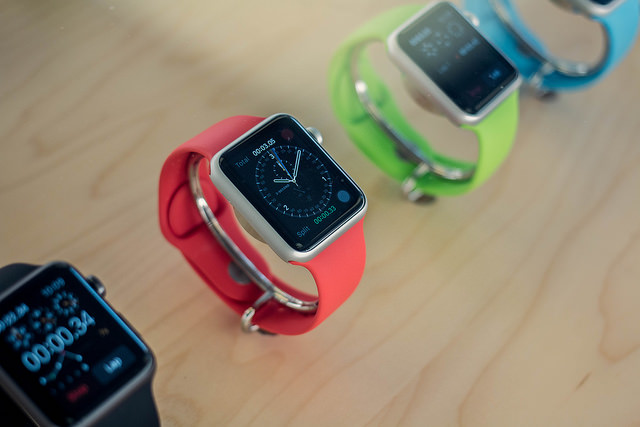
This is the latest must-have in mobile devices and the more its popularity increases, the more our confidential information is at risk – as they become more popular, smartwatches are now becoming the latest target for cybercriminals.

At the end of the day, millions of users will store their personal data on these devices that act as a bridge with our mobile phones. Therefore, the security of wearable fashion should be a matter of vital importance for manufacturers.

However, the current proliferation of smartwatches ​​is far from being as secure as we would expect from a device that is setting out to become popular worldwide.

According to a recent study carried out by HP, the majority of smartwatches that are currently available are at risk of cybernetic attacks.

Further proof of this is shown in the recent smartwatch that was unveiled by Apple. At the moment, there is nothing to prevent the password of the Apple Watch from being deleted and a stolen device being used to make purchases.

However, Apple is not the only manufacturer of smartwatches that needs to improve the security of its wearable products. In fact, the details of the study are telling – 100% of the analyzed models have a vulnerability that threatens user data. The main weak point is the absence of a double authentication process which, undoubtedly, would make the product more secure.

In addition, researchers found unsafe web interfaces and outdated methods of data encryption on the devices. To make matters worse, 70% of the watches analyzed have problems with their firmware updates.

smartwatch

Beyond the risk to the information gathered by the smartwatches (passwords, bank details and even the heartbeat of its owner), the vulnerabilities of these devices could be used by cybercriminals to access networks and computers connected to the smartwatch. That means that the security of these watches may impact the rest of our technological lives.

“It is vital that we take precautions when sending confidential information or when we wear smartwatches to work”, explained the people behind the study.

For now, there is little that users can do to make their smartwatch completely secure. Therefore, it is best to check which model offers more tools to protect your information and, above all, take special caution when sharing confidential information with your wearable devices.

The post Buying smartwatches – The latest craze that’s also a security risk appeared first on MediaCenter Panda Security.

Zero Day in Android’s Google Admin App Can Bypass Sandbox

The Android security team at Google is having a busy month. First the Stagefright vulnerabilities surfaced last month just before Black Hat and now researchers at MWR Labs have released information on an unpatched vulnerability that allows an attacker to bypass the Android sandbox. The vulnerability lies in the way that the Google Admin application […]

Take control of your antivirus for Android from your Smartwatch with Panda Mobile Security!

Did you know that the new version of Panda Mobile Security, our antivirus for Android, is now available in the Google Play store?

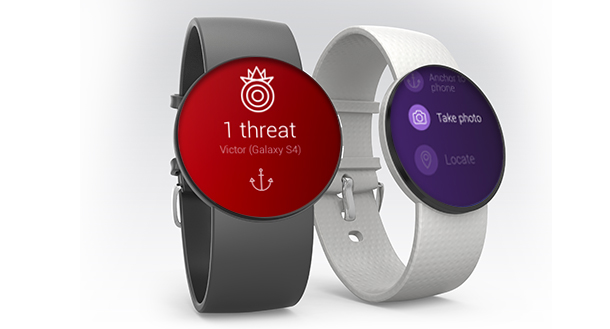
The main difference with this version is that you can access the features directly from your Android Wear Smartwatch. That means, that if you have a smartwatch, you can control the antivirus from your wrist.

New Panda Mobile Security

This is what you can do:

  • Analyze your telephone / tablet from the smartwatch.
  • Antitheft and locking of device.

But that’s not all, if you have the PRO version, Panda Mobile Security allows you to:

  • Connect your watch to your device; an alarm will ring if they are too far apart.
  • Remotely activate an alarm on your device.
  • You can get a picture remotely on your Android device from your Smartwatch.

Panda Mobile Security, protects your smartphone or tablet against viruses, malware and spyware. In addition, it protects user privacy by blocking those applications that access confidential data without permission. And now, you can use it from your Android Wear™ smartwatch as well!

The post Take control of your antivirus for Android from your Smartwatch with Panda Mobile Security! appeared first on MediaCenter Panda Security.