Category Archives: AVG

AVG

Could hackers use your GoPro to spy on you?

It turns out that baby monitors are not the only weak point in our digitally connected homes. Earlier this week, security researchers Pen Test Partners warned that Internet enabled GoPro Cameras were vulnerable to hijacking.

As reported on the BBC, the researchers gained access to a GoPro Hero4 camera, even though it appeared off, and could see and hear through the device, as well as delete videos stored on it.

According to the report, the attacker could “wake” the device, turn off its recording lights, and then video-stream what the device could see to his own mobile phone.”

According to a GoPro statement, the issue is not an issue of security but rather of poor password choices by their users. “We follow the industry-standard security protocol called WPA2-PSK (pre-shared key) mode…. We require our customers to create a password 8-16 characters in length; it’s their choice to decide how complex they want it to be.”

Clearly, this is a potentially harmful risk to privacy and security, so the first and most important thing that you should do if concerned by this attack is create strong passwords.

The following infographic has three simple steps that you can take to help create a strong password that will help keep your devices and personal data safe.

AVG Business Opens State-of-the-Art Facility in Ottawa

AMSTERDAM / Ottawa, Ontario – June 4, 2015 – AVG® Technologies N.V. (NYSE: AVG), the online security company™ for more than 200 million monthly active users, announced today that its AVG Business unit now has a new, state-of-the-art facility in Ottawa, Ontario. This Global Center of Excellence for Managed Workplace serves the growing, international small-to-medium business (SMB) market from a new 34,400 square foot facility supporting more than 140 technical, sales and management staff.

“We chose Ottawa as the AVG Business Global Center of Excellence because of the workforce talent and our confidence in the region, which are key ingredients in our focused customer support and development strategy,” says Marco La Vecchia, Vice President Channel Sales, AVG Business. “AVG is increasingly focused on SMBs because we know the number of attacks on SMBs nearly doubled since 2011.  Also, the trend to mobile and flexible working conditions within businesses continues to rise.  This highlights the need for the facilities and technology that would allow us to continue such growth, as well as the need for additional employees.”

AVG Business provides a suite of integrated solutions for IT administration, integrated security, Remote Monitoring and Management (RMM), and mobile device management. Working with more than 10,000 partners globally, including thousands of  Managed Service Providers (MSPs), AVG Business helps them achieve their business goals by being able to provide best-in-class Internet security products and services to their customers.

“We see potential growth in the SMB space through our channel partners, with RMM combined with security services,” adds La Vecchia. “As far as AVG’s growth, we contribute that to talented sales, support and engineering teams.”

In April 2015, the company introduced AVG Business Managed Workplace, the most comprehensive version of AVG’s fully integrated, open ecosystem RMM platform. Managed Workplace Version 9.1 delivers an enriched social media-style user interface that streamlines workflows to simplify the lives of IT providers, MSPs and their small-to-medium sized business customers.

The new site on-boarding process displays actionable data on the dashboard within minutes of deployment. The addition of remote mobile security, through AVG Secure Sign-On, and Backup and Disaster Recovery enable data to be protected on any device at any time.

Dedicated, global customer service and technical support is available to all partners, with a value-add, two-tier premium Network Operations Center support service, that offers 24/7 response; and remediation available for additional support in English-speaking markets.

In 2014, AVG Business offices were added in strategic regions for future growth – DACH, Nordics and Brazil.  The new Ottawa facility was officially opened earlier today by LaVecchia and AVG executives and employees. .

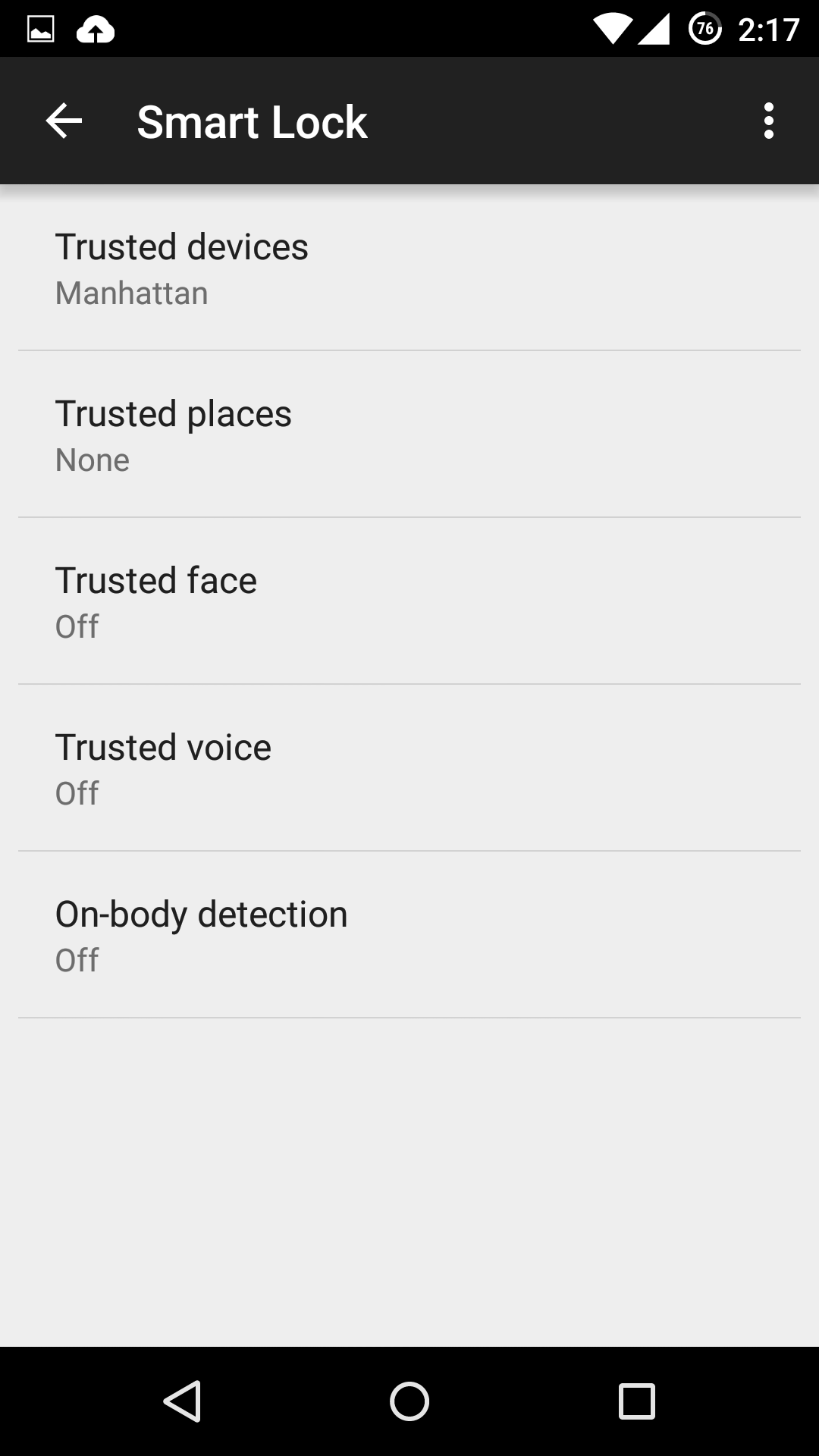
Which is the most secure Android Smart Lock?

If you’re one of the lucky few to be running a phone or tablet with Android Lollipop (5.0 or above), you might be tempted to use one of its new Smart Lock security features. These features bypass your lock screen when certain conditions are met.

Here, we examine the various kinds of Smart Locks Lollipop offers, where they fail, and how reliable they are.

Trusted devices

Trusted devices is perhaps the safest of the new smart lock features. It works by confirming your identity with “something you have”; in this case a bluetooth device or NFC trigger. When your devices pair, your lock screen will be removed. The feature seems to have been designed with smartwatches in mind, but any bluetooth device like car or wireless headset will work.

This is particularly secure, as bypassing this lock would require both your devices be stolen at the same time. The other workaround includes spoofing the MAC address (or identity) of your bluetooth device, which is a difficult and highly unlikely process.

Trusted places

Trusted places creates geofences around specific areas you designate as “safe”. Usingbuilt-in GPS, WiFi scanning, and other location services, your device can determine whether you are inside the area and disable your phone’s lock screen. When the phone leaves the area, it automatically locks up again.

This feature can be particularly useful and safe if you designate your home as a safe zone, especially if you’re home is in an isolated area. However, we wouldn’t recommend setting any location you do not fully control as safe. Any passerby in the “safe zone” could potentially pick up your phone and use it. Furthermore, the feature isn’t as precise as it could be: the diameter of the “safe zone” can be up to 80 meters wide (nearly 90 yards or 262 feet).

Trusted face

Trusted face essentially confirms your identity by looking at you, using your device’s front facing camera to recognize your face. Because of that, hardware can be a limiting factor in this method’s reliability: a poor front-facing camera can quickly become a liability.

While the system is smart enough not to get fooled by a static photo of your portrait, it still requires you to “teach it” to recognize your face in several different lighting conditions or wearing various accessories.The more you do this, the more reliable it becomes, but it can require more “teaching” than most users would feel comfortable providing. Essentially, every time your phone doesn’t unlock is an opportunity to teach it.

Oh, and you can give up on getting this to work in low lighting conditions.

We leave it to you to determine the likelihood that a look-a-like will snatch your phone. Just don’t use this feature if you have an evil identical twin.

Trusted voice

Trusted voice relies on vocal recognition to confirm your identity. It works particularly well if you are a consistent user of Android’s voice activated features, since those learn to recognize your speaking patterns to better interpret your queries. If you do not use them often, you may find the reliability of this method to be somewhat limiting.

A secondary annoyance is that it relies on triggering the Google Launcher’s signature “Ok, Google” to unlock your screen, which will then wait for a search query or command. Unless you are a heavy user of the Launcher or Google Now, we don’t recommend this.

On-body detection

This is easily the least secure of the methods revealed so far, and we strongly recommend you do not use it. On-body detection relies on your phone’s internal accelerometers and gyroscopes to determine if you are carrying your phone. Unlock it once, and it will stay unlocked while in your hands or pocket. Put it down on a table, and it will lock immediately.

While this may seem to make sense and greatly simplify your life, it’s also a godsend to any pickpocket or straight-out thief that would snatch the phone out of your hands. So long as the phone is in movement, it doesn’t care who unlocked it. With over 3 million smartphones stolen every year in the US alone, and 2000 a day in the UK, we really cannot recommend this method.


How to turn the Smart Lock features on

If you decide you still want to use one or more of these securityfeatures, you’ll need to turn them on first, and Google has not made that easy.

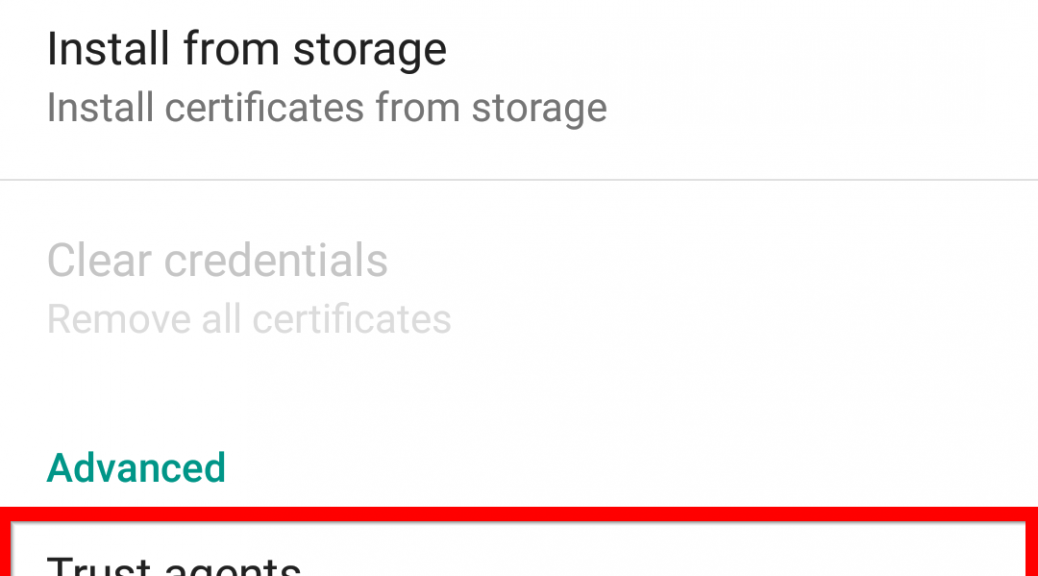
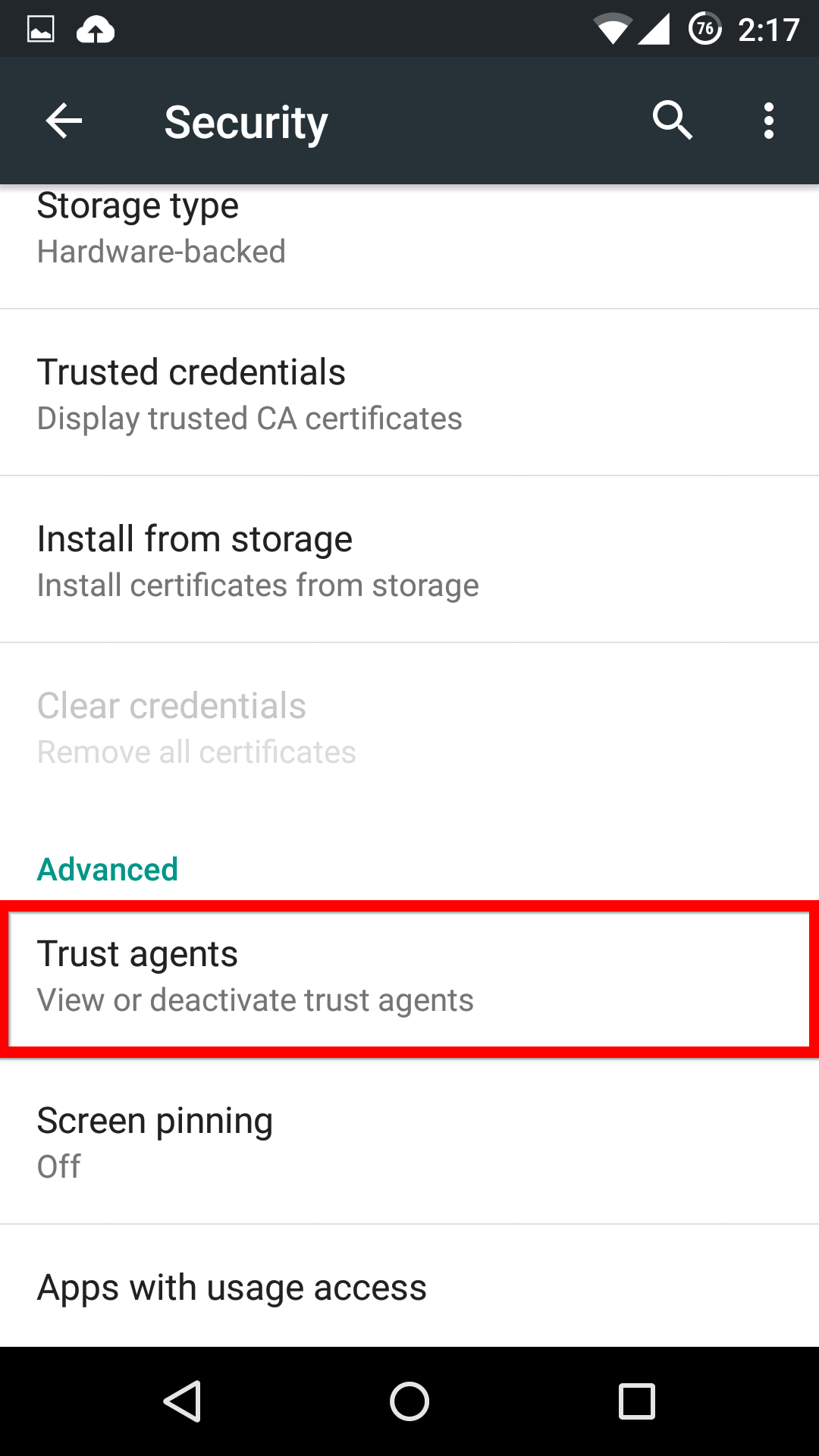
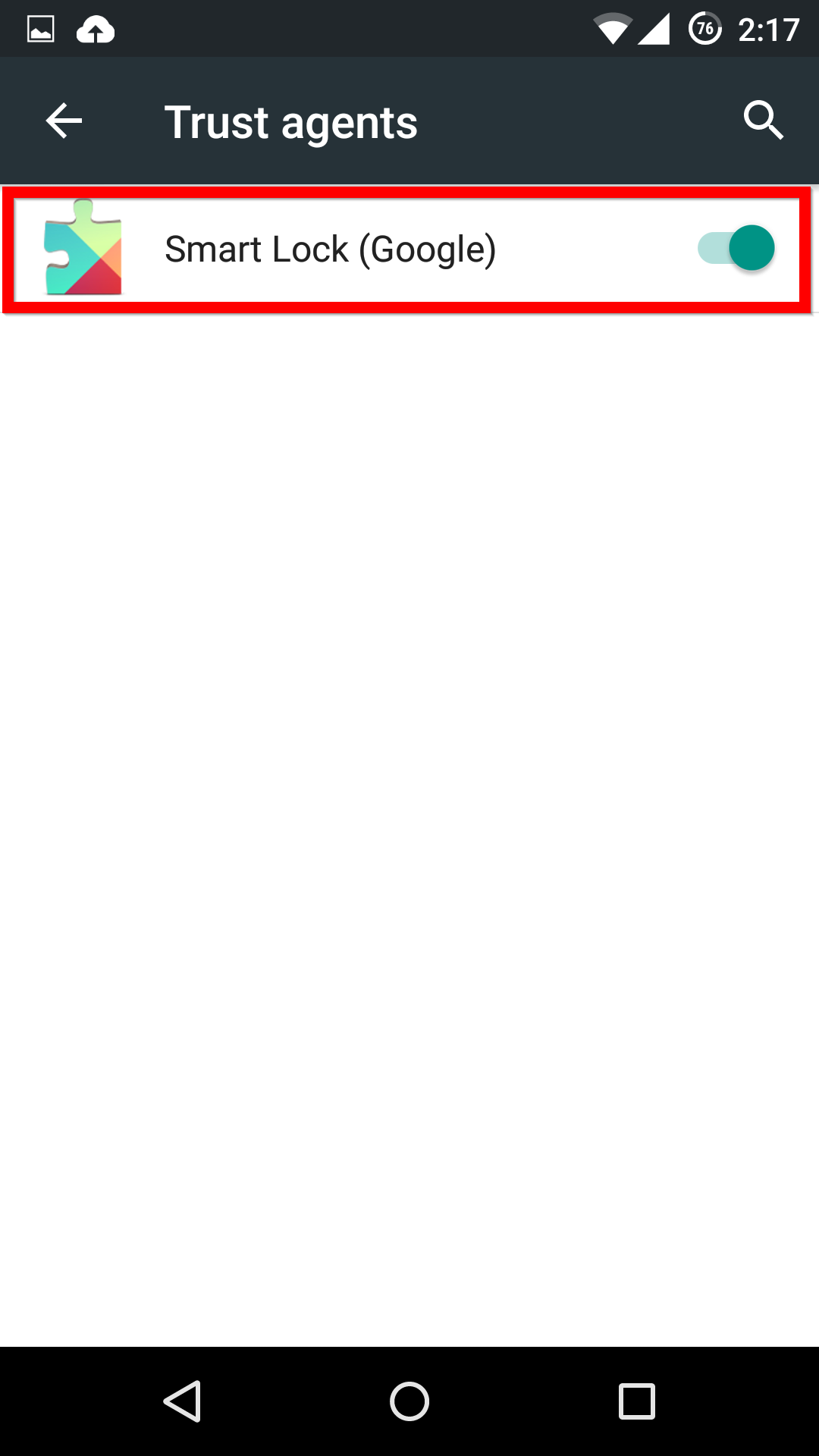
First, in the Settings menu, you’ll need to scroll down to Advanced and select Trust agents. Inside this menu, you’ll need to activate the Smart Lock option.

Trust Sources

Smart Lock


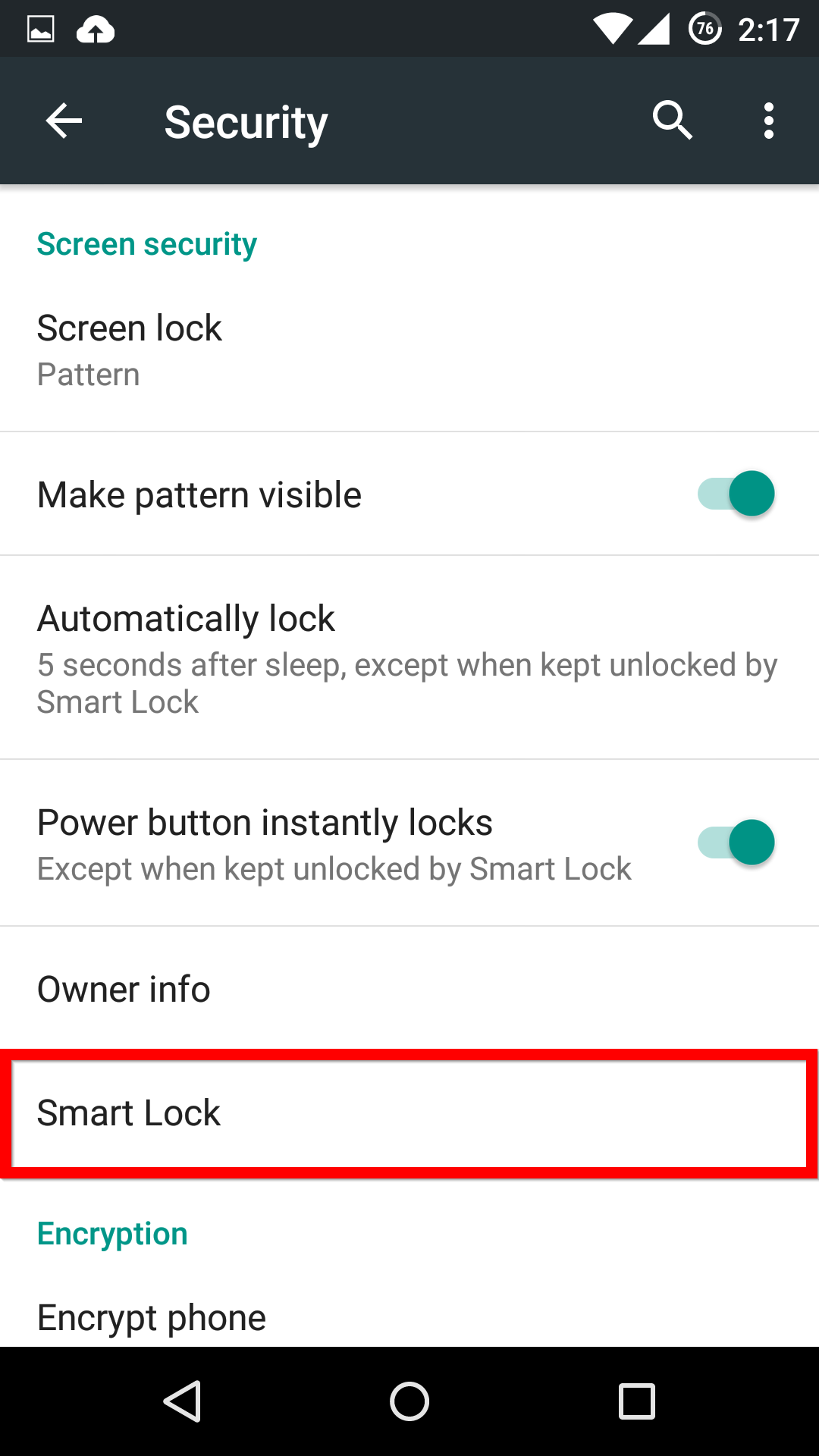
Now, when you head back into the main Security menu, you’ll be able to find the Smart Lock menu, and activate whichever features you want.

Smart Lock

Options


If you see one of these features missing, make sure that you’re Google Services app is up-to-date.


A $1,600 fine for children spending too much time online?

Taiwan have legislated on ‘screen time’ for children under 18, making it illegal for them to use electronic devices for excessive periods of time. The fine for breaching this law is around $1,600, which I am sure you will agree would be a little painful on the family finances.

While most of us can appreciate the idea of this law, I am sure like me you read it and realize this is a non-enforceable and probably not practical.

Think about the devices that our young people use, smartphones, tablets, laptops, games consoles, MP3 players, TV’s and more… The list is seemingly endless and many of them are used for very different purposes.

Does revising on a laptop ahead of exams at school break this law? One could argue that a fine on excessive “gaming” could be justified but this law doesn’t go nearly far enough on the details. Computers and connected devices are used for so much more than wasting time and they can have real constructive educational merit.

I don’t think any government can or should legislate on something that is difficult to enforce and should be the decision of a responsible parent or guardian.

It is important that we balance the screen or connected time of our children with offline activities like swimming, cycling or other pastimes. Interestingly, when writing this I considered where reading belonged. Is it screen time or non-screen time? I remember my childhood and being told to go and read rather than watching TV, of course with today’s e-readers, it maybe just be additional screen time.

The other consideration here is that we, as an older generation, look on screen time as different, or even negative. Our children are growing up with screen time just being a regular part of life. Their perception of screen time, and tech in general will be very different to ours. Our own Digital Diaries research pointed at this several years ago when we saw that children were learning digital skills before life skills.

I wonder how many adults would admit to spending too much time attached to screens and are setting a bad example to their children? After all, they follow our lead…

You can follow me on Twitter @TonyatAVG


Self-Driving Trucks Ahead  

The Freightliner Inspiration Truck is the first licensed autonomous commercial truck to operate on an open public highway in the United States and made its debut by driving across the Hoover Dam earlier this month.

Video

Freightliner Inspiration


Of course, the mix of radars, sensors, lasers and technology that enable autonomous driving is applicable to many other forms of transportation. But the self-driving truck is a very natural and promising extension of the category.

With its truck, Daimler promises to unlock autonomous vehicle advancements that reduce accidents, improve fuel consumption, cut highway congestion, and safeguard the environment.

The Freightliner Inspiration is only a prototype of what is could be reality in ten years’ time and, for now, Daimler has made it clear that it is still relying on drivers.

“The driver is a key part of a collaborative vehicle system,”  Richard Howard, Senior Vice President at Daimler said at the Freightliner Inspiration’s unveiling. “With the Freightliner Inspiration Truck, drivers can optimize their time on the road while also handling other important logistical tasks, from scheduling to routing. The autonomous vehicle technology not only contributes to improved safety and efficiency, but allows for improved communication through connectivity and integration.”

Autonomous trucks are already used by mining conglomerate Rio Tinto in Western Australia to haul millions of tons of material.

Automation for trucking and haulage is so significant as logistics are so important when it comes to shipments. Often, drivers are pushed to the limit to make deadlines. Combine human fatigue with mechanical failures, and the results can be deadly.  A 9,000 gallon unleaded gasoline tanker fire in Detroit and a school bus tragedy in California, are just two of the most recent and tragic examples where automated driving could have made a difference.

The latest statistics from the US Department of Transportation (DoT) showed that 342,000 large trucks were involved in traffic incidents during 2013 with 3,964 people killed and 95,000 people injured. Those are some scary stats and ones that make automation, or semi-automation, an imperative.

Don’t get me wrong. I’m not knocking the drivers. These are hard-working men and women who are up against crazy schedules and are often away from their families for weeks at a time.  Imagine driving full-time? It would be both physically and mentally exhausting.

The Walmart driver involved in the crash last June that seriously injured actor Tracy Morgan and killed his fellow passenger, the comedian James McNair, was reportedly nearing his drive-time limit when he rear-ended their car.  (Just this week, Walmart announced it had reached an undisclosed settlement with Morgan, after earlier settling with McNair’s family.)

On another cautionary note: just as car hacks have become a problem with autonomous cars, security is even more paramount with trucks and their automation systems.

As we previously reported, the remote car hack scenarios and vulnerabilities being experienced caught some of the top car manufacturers by surprise. I hope that when it comes to autonomous trucking, that manufacturers have taken note and are thinking further down the road.

New “Porn Droid” ransomware hits Android

Researchers at ZScaler have discovered a new variation of the “Porn Droid” ransomware that affects Android devices.

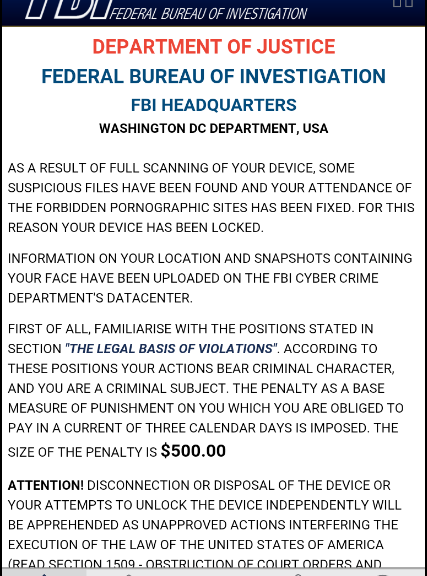
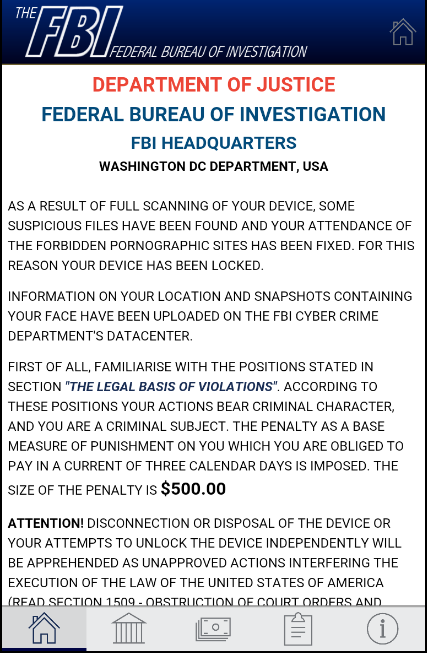
Once the device is infected, the malware sends the user a message, apparently from the FBI, accusing the user of watching child pornography. It then demands a $500 ransom to restore the device to normal.

fake FBI alert


Infection:

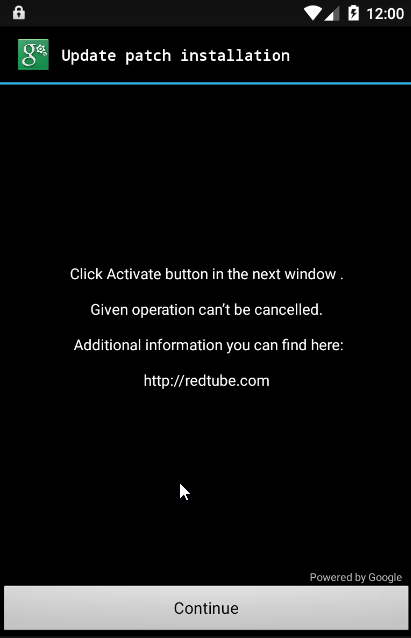
After masquerading as a Google patch update, the malware then asks for a number of powerful permissions including “Erase all data” and “set storage encryption”.

Fake Google Alert


Clearly, the message is not from the FBI and the victim should not pay the ransom.

Porn Droid


How to stay safe:

Always check permissions

Apps are the lifeblood of our Android devices and make them the powerful and useful tools we know and love. Apps help us stay in touch with family and friends, guide us, educate us and sometimes simply entertain us. But how much attention do we pay when we install an app? In the case of this ransomware, an alert user would never have granted those permissions to an app.

For a list of permissions to look out for when installing an app, check out this AVG Academy video from Michael McKinnon.

Video

Make sure you check these app permissions


Have up-to-date security software

One of the simplest and most effective ways of keeping your device safe from malware such as “Porn Droid” is to have up-to-date antivirus protection.

By scanning links and attachments before they are loaded onto your device, security apps like AVG’s AntiVirus for Android can help keep your device free from randomware and running in top condition.


Got privacy? Fewer than 10% of Americans feel in control of their data

It’s a tricky tightrope we walk between security and privacy. The newest report by Pew Research shows that Americans value their privacy and, paradoxically, are only too aware that they don’t have it.

The report, released May 20, highlighted what Pew terms “data insecurity.”

  • Nine in ten adults say being in control of who can get information about them and controlling what information is collected about them is important.
  • Only 9% of respondents felt they had a lot of control over how much information was collected about them and how it was used; and just 6% of the Americans surveyed felt that they could depend on the government to keep their data secure.
  • In the neighborhood of seven in ten people were not confident their activities and records recorded by online advertisers, social media sites and search engines would remain private and secure.

“The majority of Americans believe it is important – often very important – that they be able to maintain privacy and confidentiality in commonplace activities of their lives. Most strikingly, these views are especially pronounced when it comes to knowing what information about them is being collected and who is doing the collecting.”

We at AVG know this well. Pews report mirrors the attitudes that have shown up in our own research and studies conducted with the Mobile Economic Forum.  In our 2014 survey with MEF, we found that 72% of mobile consumers are not happy sharing personal data such as location or contact details when using an app, and one-third (34%) say trust prevents them from buying more goods and services using their mobile device.

The good news is that it looks like people are increasingly aware of their digital footprint and taking action.  For example, according to the Pew survey, 59% cleared their cookies or browser history; 47% refused to provide personal information not relevant to a transaction; 25% used a temporary username or email address; and 24% gave inaccurate or misleading information about themselves.

If you’re like those in the majority of the Pew survey and increasingly worry about your privacy, I urge you to take action.

At the very least, you can take advantage of our free AVG PrivacyFix app to help you manage your online profile across multiple social media platforms, and on all your devices, from one simple interface.  This includes adjusting privacy settings, stopping ad targeting, and blocking tracking.

In the meantime, the tide may be turning for privacy. A lawsuit brought by the American Civil Liberties Union led to a U.S. federal appeals court ruling in May that found that the NSA’s bulk phone call metadata-gathering program is illegal. (If you’re an insomniac you can read the 97-page ruling here.)

Obviously, we all want a strong national security program, and if rooting out terrorist cells is to have any success, a communications intelligence network is paramount. But there is another equally important imperative represented by the Fourth Amendment. The Fourth Amendment protects all Americans against unreasonable searches by the government. It’s a fine balance between the two mandates and goes directly to the Constitution.

The court ruling is a serious matter, and there may be broader implications. Surely, the natural question is then do these consumer rights apply to all digital footprints, including cyberspace?

Stay tuned.

Watch your data! 80% of UK identity fraud is happening online

A new report from  the UK fraud prevention service, Cifas shows that incidences of identity fraud rose by 27% in the first three months of 2015 with nearly 35,000 confirmed cases.

In fact, identity theft was so prevalent that it very nearly constituted half (47%) of all recorded cases of fraud.

The report also highlighted the fact that 80% of all identity fraud in the first quarter was attempted or perpetrated online and that credit card and bank account details were the most common targets for attackers to pursue.

As Detective Chief Superintendent Dave Clark, from the City of London Police explains “By following some simple procedures, such as creating strong passwords, protecting internet connected devices with up-to-date security software and not sharing too much personal information online, we can make life much more difficult for the identity fraudsters.”


How can you help keep your data safe from fraud?

Creating a strong password

Creating a strong and memorial password doesn’t need to be difficult. We’ve created an easy to follow infographic that explains exactly how it’s done in three simple steps.

AVG’s Michael McKinnon also has some great advice on simple mistakes you can easily avoid when creating a password.

Video

Four Password Mistakes to Avoid


Get up-to-date security software

Like Detective Chief Superintendent Dave Clark explained above, having up-to-date security software is important on all of your devices. Importantly, protecting your devices is neither expensive nor complicated. AVG has a number of free security solutions that can help protect your PC, Mac or Android device. AVG Zen also makes it incredibly easy to manage the security, performance and privacy of multiple devices all from one screen.


Don’t give up your personal information

While you should try not to “overshare” online anyway, taking the time to learn about “phishing” and how to avoid it can you detect scams and hoaxes online so that you don’t unknowingly hand over your valuable information to an attack.

AVG’s Tony Anscombe has some great advice to avoid phishing:

Video

How to Avoid Phishing

Are these the world’s greediest apps?

On a typical business or vacation day, my phone barely makes it through the day: A bit of Googling here, a bit of research there, some email and gaming in between and before I know it, my battery life is down to 10% and it’s only 4pm!

It’s not necessarily my smartphone’s fault, but likely a consequence of the demanding apps that I run, often completely invisibly in the background. These apps drain not just battery life but also fill up my storage or cause a ton of mobile traffic.

Turns out, I’m not alone.

When looking at one million of our anonymous AVG AntiVirus and AVG Cleaner users, we discovered the most resource-hungry apps in the first quarter of 2015. Plus, we found the most-used apps in each category! Curious as to what’s new this quarter?


Key findings:

Dating & chatting apps surge into the Top 10

Android owners worldwide were trying to meet Mr or Mrs Right in the first three months of 2015. POF Free Dating entered the Top 10 and there was a new entrant at number six from the chat category, OoVoo Video & Text, which also had a noticeable impact on battery life.


Facebook Messenger is now the top communication app:

Facebook Messenger has previously been ranked as the third most popular communication app behind WhatsApp and Google Mail but has since overtaken them and now sits top of the pile.

Facebook Messenger


Samsung Knox, Samsung Push, and Beaming Service are the top battery drainers

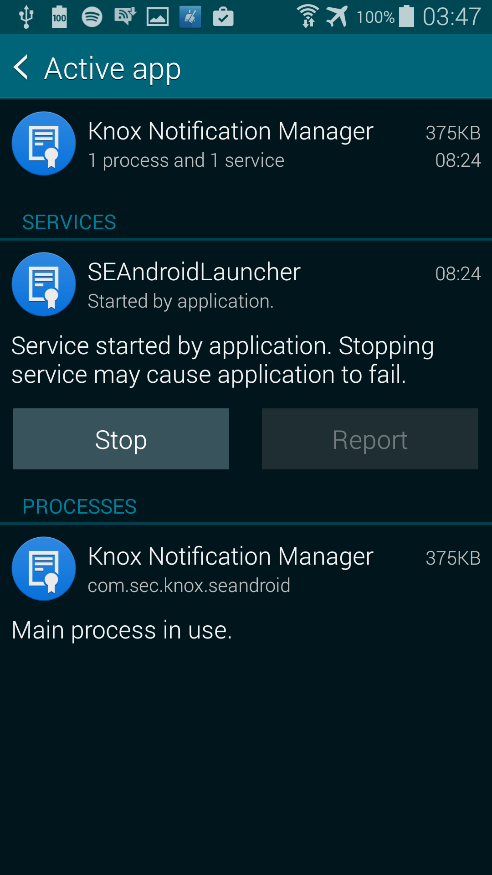
Samsung’s KNOX security service drains the battery of your Galaxy smartphone invisibly in the background.

Knox

In addition, the built-in Samsung Push Service now also runs in the background and made it to 7th position. This service is required for ChatON, a WhatsApp rival that packaged with almost all of the company’s handsets. The good news for your batter is that Samsung turned it off on February 1st.

The top spot among battery draining apps is a background service called Beaming Service by Mobeam Inc., which also comes bundled with many Samsung phones.

Tip: See our all-new AVG Android Optimization Guide to identify and turn off such resource-hungry apps.


Cleaning and security apps that drain your phone

People looking to protect and clean their phone should know some of the top used apps, including Lookout Security & Antivirus and Clean Master, show up in the top spots on our lists of top battery drainers and traffic consuming apps. What’s interesting is that 88% of all measured apps in the traffic consumption category consume less traffic than Clean master, which clocked in at several hundred megabytes of data per user.

Clean Master


New gaming style on the rise: casino games start a new trend

In the first three months of 2015, we identified a massive spike in the use of card and casino games as well as big blockbuster arcade games.

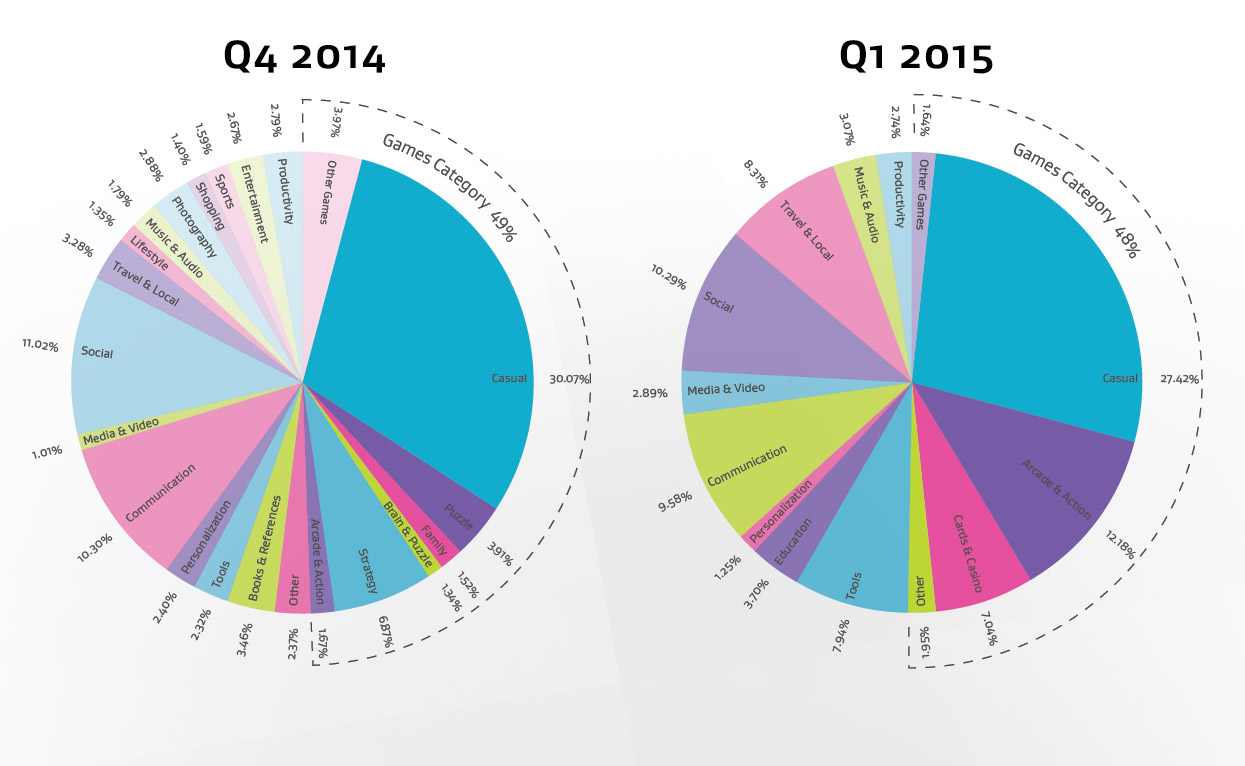
While the casino category didn’t even exist previously due to its low usage, in the January to March period of 2015, it featured as up to 7% of usage, and arcade games also grew to 12% usage from 1.6% in the previous quarter. Solitaire and Zynga’s Livepoker stood out as particularly popular.

Conversely, we spent far less time playing casual, strategy, puzzle or family games. See graph below:

Usage Chart

Find a full list and all the data in our app report here.


So what are you supposed to do if you’ve got one or even many of our resource drainers installed? Our AVG Android Performance Guide will help you out with great tips to improve battery life and clean up space in no time!

For highlights from the report, check out the infographic below.

Android App Report Q1 2015