Category Archives: AVG

AVG

Are Facebook’s new guidelines for inappropriate content enough?

The new policy, which runs to 2,500 words is designed to remove the confusion over why some content gets removed and some doesn’t.

So what kind of things are included in the new  guidelines?

Several things that you would expect to be deemed inappropriate were listed, for example:

  • Bare buttocks
  • Female breasts that show a nipple
  • Text that contains vivid detail of a sexual act
  • Praising or supporting terror groups
  • Altered images or video considered bullying
  • Hate speech
  • Criminal activity
  • Self injury


The list goes on and is a step in the right direction for users, but does it go far enough?

For example you could still post graphic images or video and if, and only if, someone complains then an interstitial page will be shown warning viewers that there is a potentially graphic or upsetting graphic image.  Why should this content be on the site at all?

It seems that while many of the obvious things that we would not expect to see in normal life are being blocked, some still are allowed. I recently saw a clip spreading around that showed the murder of the French policeman in the Charlie Hebdo attack earlier this year.

While no terror group can exist on Facebook, that doesn’t seem to stop people sharing graphic inappropriate content relating to violence, discrimination or other unwelcome things.

While I applaud any move that reduces the amount of inappropriate content on a social network used by minors, I still feel that they could do more.

I wonder whether there is a revenue motive at hand. Graphic videos are accompanied by ads around them and when they go viral then so do the ads around them.  And remember kids of 13 could be watching this content legally!

Can you imagine if a major news network showed the actual murder on TV, there would be public outrage and complaints to regulators, so why are we allowing it to happen online.

I believe we should look further into why some issues seem acceptable online but not in the real world. In my eyes, the rule should be as simple as “if you can’t see this offline in a public place then it is unacceptable to allow it online in a public place”.

Follow me on twitter @tonyatavg

Vulnerable Mobile Apps are just waiting to be exploited

The Apple AppStore and Google Play are doing a great job in guarding their mobile users from downloading and installing malicious apps.

By centralizing App distribution, mobile platform owners can prevent hackers from uploading malicious apps and potentially infecting millions of users. This is a great lesson that we learned from the PC days where a decentralized distribution system, and open platform, made it easy for malware to spread.

Can we claim a victory on the hackers?  Not quite yet.

The fact that the AppStore and Google Play managed to control the distribution of malicious apps does not mean there are no vulnerable apps out there.

Hackers are clever; they have found ways to get around stringent app store controls by exploiting existing non-malicious apps that are vulnerable. This can be done either via a different app, by inspecting data on transit or even via the web, while you browse from your mobile browser.


How can an app be vulnerable?

There are three main ways that an app can be vulnerable to hackers.

Data transmission

Almost all mobile apps transmit and receive data between our devices and remote servers. This allows apps to update, send statistics, check licenses, monitor analytics and so on. There are two ways that this leaves app vulnerable:

  • No encryption – if data leaving your device is unencrypted, hackers can ‘look inside’ it and get your passwords, credit card number or any other personal details you many not want to share. This is most common on public Wi-Fi hotspots like those found in airports, malls or coffee shops.
  • Certificate validation – when apps send data to a remote server, it’s important that it is the correct one and not one owned by a hacker. The use of digital certificates on the server can help the app validate the server’s identity. Without these digital certificates, data can be at risk.

Data storage

As we use mobile apps, most of them store data locally on our devices. These often take the form of log files, which record our activities within an app, the strings we typed in it, cached data/reports and more. There are two ways that these files can leave apps vulnerable:

  • No encryption – storing data on the device can greatly improve app performance and user experience. However, leaving private data unencrypted on the device can be dangerous. A separate app installed on the device can potentially have a permission to access such file, ‘look inside’ and retrieve personal data.
  • Files left after uninstall – when we uninstall apps from our devices, many of us expect that all related files (with our private data in them) are also removed. However, this is no always the case. Apps often have permission to create files in various locations on our devices, these can be left behind when apps are removed. Such fragments can later be accesses by other apps to retrieve data.

3rd party components

It’s quite common for app developers to release their products out to the market very quickly. As time is short, developers reuse components (SDKs) from 3rd parties to support the functionality they need. Example of popular development tools and components can be found here – http://www.appbrain.com/stats/libraries/dev

The issue with these toolkits is that they are not always secure. Here are a few examples:

  • Android WebView – many mobile apps display web content. In order to download and render such content on a mobile device, most Android developers use the WebView component. However this component was identified to be vulnerable to remote attacks – CVE-2012-6636.
  • Dropbox Android SDK – when mobile apps would like to integrate its functionality with cloud storage (like photo apps, wallets, vaults etc.) they integrate SDKs from cloud storage providers. The Dropbox Android SDK was found to be vulnerable – CVE-2014-8889. This vulnerability may enable theft of sensitive information from apps that use the vulnerable Dropbox SDK both locally by malware and also remotely by using drive-by exploitation techniques.
  • Configuration and development errors – as long as humans will continue to code software, vulnerabilities will exist. The increasing complexity of operating systems, databases, app logic and platforms, compounded by short development windows makes it very difficult for developers to catch each and every error in their code. Unfortunately this leaves large volumes of untested code that are potentially vulnerable.


Why do apps have these vulnerabilities?

Now that we have identified the main types of vulnerability found within mobile apps, it’s important to understand the root causes behind them. It’s not simply a question of bad coding.

Awareness

Just as with any problem, if you unaware of a risk you won’t pay attention to it. Most developers are trained to deliver functionality, not security.

Small development teams

Unlike PC products, most mobile apps require relatively small development teams. With the ever increasing functionality required and short time to market, the available time to spend on finding vulnerabilities is getting shorter and shorter.

Abandoned apps

Developers have abandoned thousands of apps due to low monetization. These abandoned apps are no longer supported and any vulnerabilities remain indefinitely.

Rush to market

The mobile world is moving faster than ever. Developers need to code and release their apps in almost ‘no time’. While the business demand functionality, that leaves almost no-time to security scanning and audits.


What can developers do to secure their Apps?

It’s not all bad news though, there are several things that app developers can do to improve the security of their apps.

  • Learn about secure coding and vulnerable SDKs to avoid common mistakes and deliver a secure app to your users.
  • Embed security testing in the general quality assurance procedures; from unit testing to continuous integration.
  • Use automated tools to statically and dynamically scan and test for vulnerabilities
  • Remove unneeded functionality from your code or stop the distribution of an app that is no longer supported.


What can App Store and Google Play do?

Still, developers are not entirely responsible for eradicating vulnerable apps. Official mobile stores employ automatic security scanners to identify malicious apps. These can often be very difficult to detect and it requires lots of resources and attention.

However, a lot of improvements can be made to help prevent the distribution of vulnerable apps.  I believe the most progress can be made in improving communication between the app stores and developers when issues arise:

  1. Developers should receive a notice once their app was found to be vulnerable.
  2. Apps that include popular development tools that were found vulnerable should be notified and asked to update the tool/SDK to a safe version.
  3. Developers should have sufficient time to release a fix, otherwise their app should be unlisted.
Reference: A list of top 10 Mobile Risks was published by OWASP group during 2014 : https://www.owasp.org/index.php/OWASP_Mobile_Security_Project#tab=Top_10_Mobile_Risks
 

Women in Tech Speak Out at SXSW

I am in awe of the women who came to my conversation “Boardroom or Baby” at SXSW this past weekend. They were bright, energized, passionate and very engaged in the conversation.

I started the session by asking the women to team up and decide what they believe to be the single most important issue to help women succeed in tech.

Video

Judith Bitterli Boardroom or Baby Session Highlights from SXSW

As you are probably aware, currently women comprise about only 30% of the tech workforce and make roughly 77 cents on the dollar of what a man makes in tech.

We have a lot of work to do to close the gender gap, but based on the energy coming out of room # 407 at SXSW, I am very hopeful we can get there! I am committed to helping and one of the ways I will contribute is to take each of the items put forth by the group and write a blog offering up counsel on how to successfully navigate the issue. I will be bringing in subject matter experts and life experts to help. Below is the list. If you feel I missed anything please get in touch via Twitter @judyatAVG.

My question to the group was: What is the single most important thing we can do to help women succeed in tech?

Here are their answers in their own words below:

  • Make your career goals known.
  • Speak up and stand up for what you think is right.
  • Don’t let men talk for you; make sure your voice is heard.
  • Work hard.
  • Gain people’s respect.
  • Build and use your network
  • Find a strong female leader in the workplace as a mentor. Break the “Bro” club.
  • Fight against confidence loss when you’re in a room of male leaders.
  • Female diplomacy – speak up
  • Mentorship: Be a mentor to other women and girls. Find a female mentor higher up.
  • Find a sponsor.
  • Create formal sponsor programs, so that men can mentor women without social stigma.
  • Build resources for keeping and supporting a woman’s ability to stay working after she has a baby.
  • Stand up for what we need, realizing the value you bring.
  • Own your own career path to success.
  • Don’t operate from a place of fear.
  • Make people understand that flexibility does not equate to laziness, so don’t be afraid to ask for it.
  • Create awareness on the issue.
  • Make it an issue all care about, not just women.
  • Show the value to the bottom line or success to the business, so everyone is onboard with empowering women.
  • Strip names off of resumes.
  • Reach and speak out to younger girls in elementary school and middle school.
  • De-genderize toys.
  • Speak up in meetings and having a point of view.
  • Build more STEM work in elementary school for young girls.
  • Don’t be the first to tear another woman down.
  • Connect with other women below and beside you and find what you can do to help them achieve their goals.
  • Women should support women.
  • Have a support system in place for mothers.
  • Mentor other women.
  • Find male allies.
  • Get in the mix (female diplomacy).
  • Talk about issues.
  • Remove negative stigma on the term “emotional”.
  • Have more forward conviction in the forward progress we want to see.
  • Educate girls at a young age – letting them know the opportunities are there (Girls who Code).
  • Start off strong. Ask for what you deserve.
  • If you think you can do it go for it!
  • Inner belief: skills, ability, desire.
  • Attitude: stop apologizing, be assertive, and take charge.
  • Maternity leave.
  • Making a “girl playground”.
  • Start girls young in tech.
  • Encourage women not to be afraid to go into a male driven field. Make it welcoming in both culture and environment.
  • Create policies that give flexibility to maternity leave.

I was struck by how many individual issues were highlighted. If you would like to hear about any of these in particular on Twitter, please let me know and I will try to prioritize it.

I plan to address these issues on Twitter as well as a dedicated Facebook page as well as here on the blog.

Remember, change happens when like-minded people band together for a common cause. This is our cause:  removing gender bias from the workplace and not allowing women to be penalized for having a baby.

To all the women in tech attending my session at SXSW- and beyond, I thank you and encourage you to stay strong and continue to speak out!

Judith

USB Killer reminds us what untrusted really means

If this “USB Killer” invention is real, then plugging in one of these unknown devices could electrocute your defenseless PC or Mac, and damage it beyond repair.

It’s a far cry from today’s worst-case-scenario of getting infected by malware and it’s a timely reminder to anybody who stumbles across a USB device by chance – you’ll want to think twice before plugging it in.

Indeed the natural curiosity of what happens when someone finds a USB stick in a public place is well documented, and as far back as 2010 it even spawned the concept of the USB dead drop.

This latest news adds to a growing concern around the security of all USB devices.  Last year researchers Karsten Nohl and Jacob Lell revealed a number of attacks known as BadUSB that has since uncovered a swathe of problems where malware could be transferred at a hardware layer with very little ability to protect against this type of threat.

But we have previously warned about the dangers of anything ‘untrusted’ – be it software, apps and hardware devices.  Your security these days relies more on trust than ever before, as outlined recently by our CEO Gary Kovacs in his keynote speech at Mobile World Congress.


What to do if you find an unknown USB device?

NEVER connect it to your PC or Mac. At best it will contain Malware, or at worst it may be a USB Killer (although unlikely).

Try to return it to its owner. Ask around or check if it has a label on it; or leave it where you found it, in case the owner returns to find it.

Consider destroying the USB device. Remember, if the device isn’t yours – neither is the data that it might contain.

Until next time, stay safe out there.

Five Useful Ways to Repurpose Your Old PC or Laptop

When you’ve just bought a new computer it can be very easy to neglect your old one. However, even computers more than five year’s old can still be very useful.. Here are some ideas to give you inspiration.


Use it as a home theatre PC:

Instead of having a DVD-player, a Blu-ray player or set-top-box connected to your TV, use your old PC as a home theatre PC (HTPC) hooked up to your TV or projector. You can then enjoy all your content with one single remote control. So much easier!
I recently converted an old laptop into a home cinema PC. Even a 5 year old PC or laptop can easily handle things like Netflix streaming and HD video beautifully – all you need is a remote and a DVI/HDMI adapter + cable!

Home Theatre PC


Put it in your kitchen:

Got an old PC lying around that’s capable of running Windows 8 (which is very likely)? If so, get a touchscreen and put it on your kitchen counter. Download an app like Recipe Keeper or Cocktail flow and use interactive recipes for your next culinarian creation:

Recipe Computer


Use it as storage:

A “NAS” (Network Allocated Storage) is basically a network drive that you can use to store and access files from everywhere in your home. Simply install a NAS tool like http://www.freenas.org/ on your old PC and hook it up to your router.

NAS Computer

Once that’s done, it’ll act as a fileserver that you can, for example, stream movies to any device in your household – or even access it remotely when you’re on the go! Makes life a lot easier and you can save money, given that dedicated NAS aren’t cheap.
 

Keep on using it and tune it up:

If you didn’t get a new PC or want to give it to someone in your family, you can easily breathe fresh life into your old PC by giving it a proper tune-up.

Use our new version of AVG PC TuneUp and follow our three basic tips right here. Plus, last year, we’ve put together an extensive list of tips to clean up and speed your PC, laptop or ultrabook running Windows:
Ultimate PC Optimization Guide Part One

Ultimate PC Optimization Guide Part Two

Ultimate PC Optimization Guide Part Three


Once you’ve run through all of that you’ll be looking at a PC that feels almost like a new one.

PC TuneUp


Give it away:

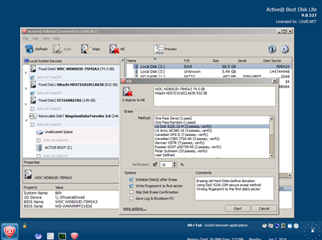
If you can’t sell it online, just give it to charity or a friend who needs it more than you. But don’t forget to wipe it clean using a tool like Active@KillDisk to completely wipe the content of the drive, so nobody will ever recover your data, passwords or worse…

Five Tips for choosing a Cloud Storage Service

Cloud services are incredibly convenient and can also be a great cost saving measure. But you shouldn’t blindly place trust in cloud services without doing some research first.

If you are considering using a cloud service, I would strongly advise finding the answers to the following questions before signing on the dotted line.

Is it for personal or business?
There are plenty of free options, but you need to determine which is the most reliable and secure, especially if your business will depend on it.

What are you storing and why?
The different cloud services that are currently available offer a variety of features and options that may be better suited to a particular need.

What sort of encryption is available?
Does the cloud storage service offer encryption? If the provider is hacked, your data will be vulnerable. So if they don’t offer encryption then you might want to encrypt your vital documents before uploading

Does the service offer extra security?
Where possible use additional security features like two-factor authentication and login notifications to ensure you have the added layer of security to prevent unwanted breaches.

Do you have adequate backups?
Don’t rely on a single backup, especially for your critical files. You should also backup regularly.

Women in Tech: The Conversation Continues at SXSW  

I was struck by the mea culpa issued last week by former Huffington Post and Washington Post manager-turned entrepreneur Katharine Zaleski. Her commentary, posted on Fortune.com on March 3, was entitled: “I’m sorry to all the mothers I worked with.

Zaleski said: “I didn’t realize how horrible I had been, until I had a child of my own.”

Then, she recounted the eye rolling and “silently slandering” that she participated in with colleagues – aimed at working moms who couldn’t make end of day meetings or meet for drinks after work.

That was before her personal journey and becoming a mother herself. “Empathy is a great teacher,” she said.

Zaleski has since founded PowertoFly, a job matching platform for women in highly skilled positions across tech and digital that they can do from home, or in an office, if they choose.

The time commitment to parenting contradicts office culture, Zaleski noted in her video interview with Fortune that runs alongside her column.  “We need to end the idea that work value is based on physically being there.”  In other words, she advocates, that we need to value output over time in office.

As Zaleski acknowledges, work at home and/or flexible work schedules is one solution to the problem for moms – though not the only one.

On that note, I am super excited to have the conversation “Boardroom or Baby: The Choices Women have in Tech,” at SXSW this Saturday (3:30 p.m. JW Marriott Room 407) which delves into the heart of this topic.

There are many considerations and questions women need to ask themselves if they are considering having a family and a career in tech. I’m fond of using the analogy of wedding planning:  Many of us carefully plan for our wedding day – a one day event in our lives – but don’t plan for the critical decisions we must make about our careers and our families.

As Zaleski noted in her interview: 1 billion women will be coming into the workforce in the next 10 years – 80% of which will be mothers (based on U.S. Census Bureau estimates). Yet, as she also noted, today we also see more women dropping out of the work force, more than at any time since the 70s. As she advocates, “We have to find a way to allow women to careers while they also have lives.”

You don’t need to be a woman, or to have a child to understand this is a problem that we need to address.

This is why I believe ‘women in tech’ has become one of the major discussions at this year’s SXSW- and of our time. As I noted in my previous blog, there are quite a few sessions and conversations taking place on the topic of women in tech, gender equality and diversity. It underscores that the time is finally now for this issue in our industry.

In preparation for my talk, we interviewed nearly 20 Silicon Valley women in tech, along with some men, for their perspective on gender equality in the tech workplace today.


Video

Boardroom or Baby?


We received some amazing and thought provoking insights, which I will be sharing in my session, here and on Twitter and Facebook.

I also want to thank all of the remarkable people who participated in interviews for my session, among them: Julie Hanna, entrepreneur and board chair at Kiva; Robin Abrams, veteran tech CEO , and her daughter, Libby, a new entrant in the tech workforce. Also, Sheila Brady, former engineering director at Apple, and Barbara Krause, Silicon Valley PR pro, and her daughter Emily, another new tech workplace entrant. Also, Stephanie Boudreau, program manager for Google Hangouts, and Robin Starbuck Farmanfarmaian, a health, IT and bioscience executive and entrepreneur.

Finally, I want to call out that we at AVG are also delighted to be the sponsor of the Mothers’ Room for SXSW this year, for the entire festival. If you are a mom attendee, come check it out.

It’s located in Room 1 in the Convention Center. It’s a quiet comfortable place to feed and change your baby, entertain yourself, and keep siblings busy.

We at AVG know that for moms and all parents, looking after our families is job number one. Not only physically but in cyberspace as well…

I look forward to continuing our conversation at SXSW Interactive and beyond.

Join us in person or at @judyatAVG #techwomen #SXSW.

AVG AntiVirus Wins Top Rated Security Product 2014

“Does exactly what it says on the tin” was an advertising slogan that appeared in the UK in the 90s. It resonated well with consumers due to its simplicity. Today, it’s a common term referring to something that is straightforward and does the job.

I am reminded of this phrase when I read the recent independent test results for the AVG AntiVirus products. The results show that AVG products are delivering our promise to protect our users from malware. Lets take a moment to review the recent results…


VB100

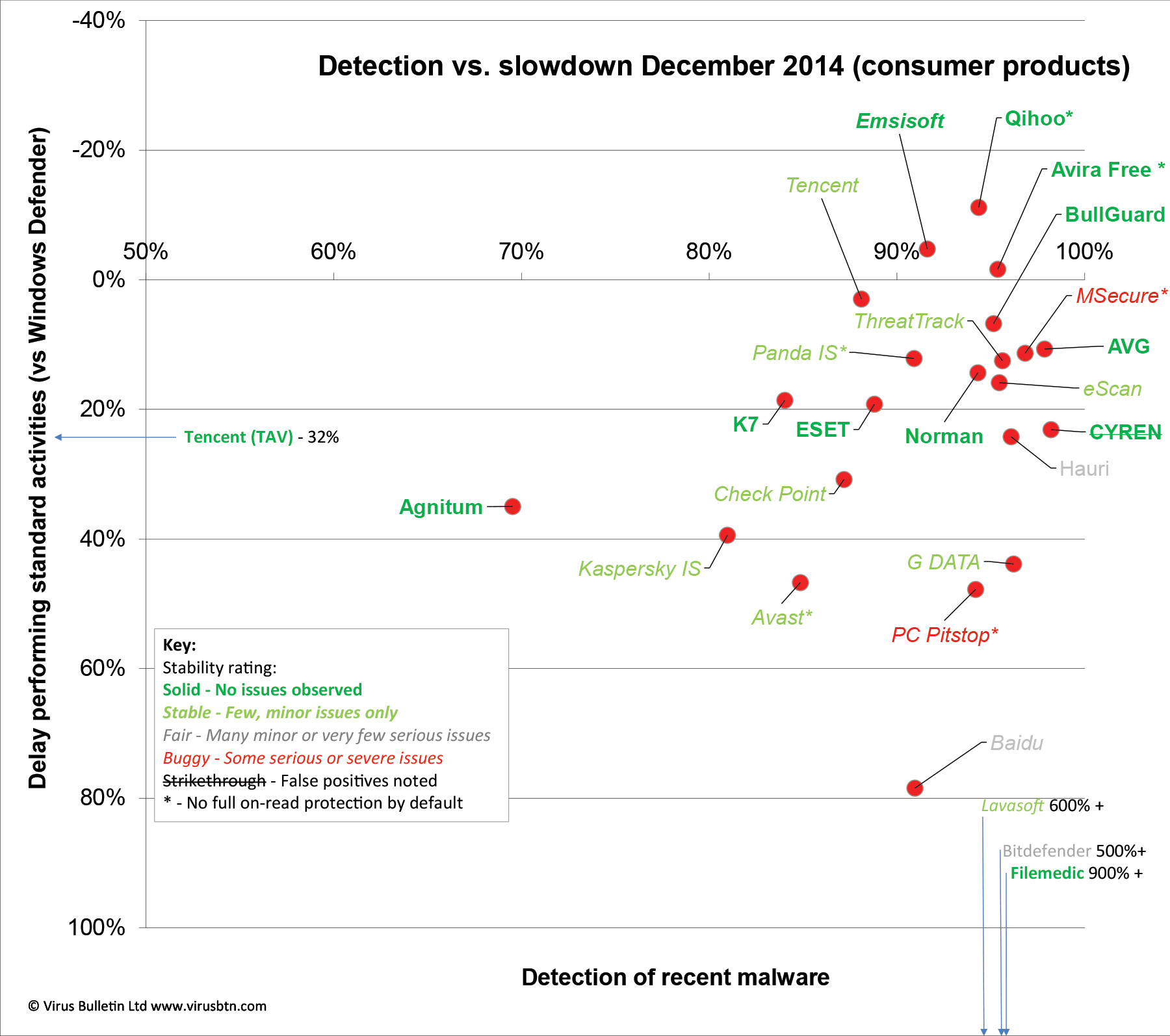
Virus Bulletin (VB) tested 39 Anti-malware solutions running on Windows 7 Professional and AVG AntiVirus received the top RAP result with 91.6%. The test measures a products detection rates on the newest samples available as well as an unknown sample to see how quickly and accurately they detect it. Click here to see the full test results.

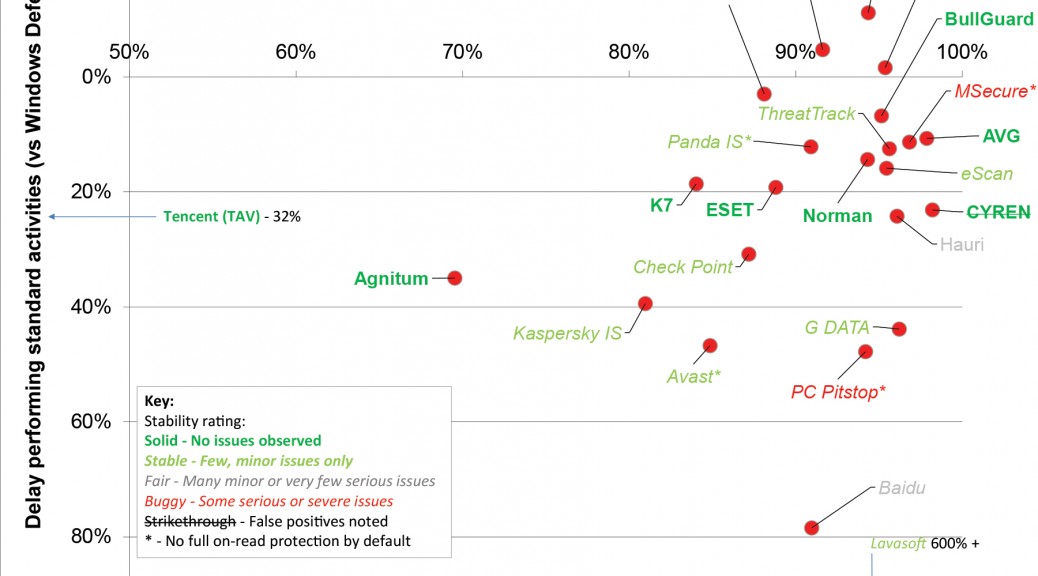
But it’s not just about An important part of providing the best protection is that the detection engine doesn’t slow down the performance of the machine. VB tested the performance impact slowdown vs detection and there was nothing to worry about here either, as you can see here.

VB100

AV-Comparatives

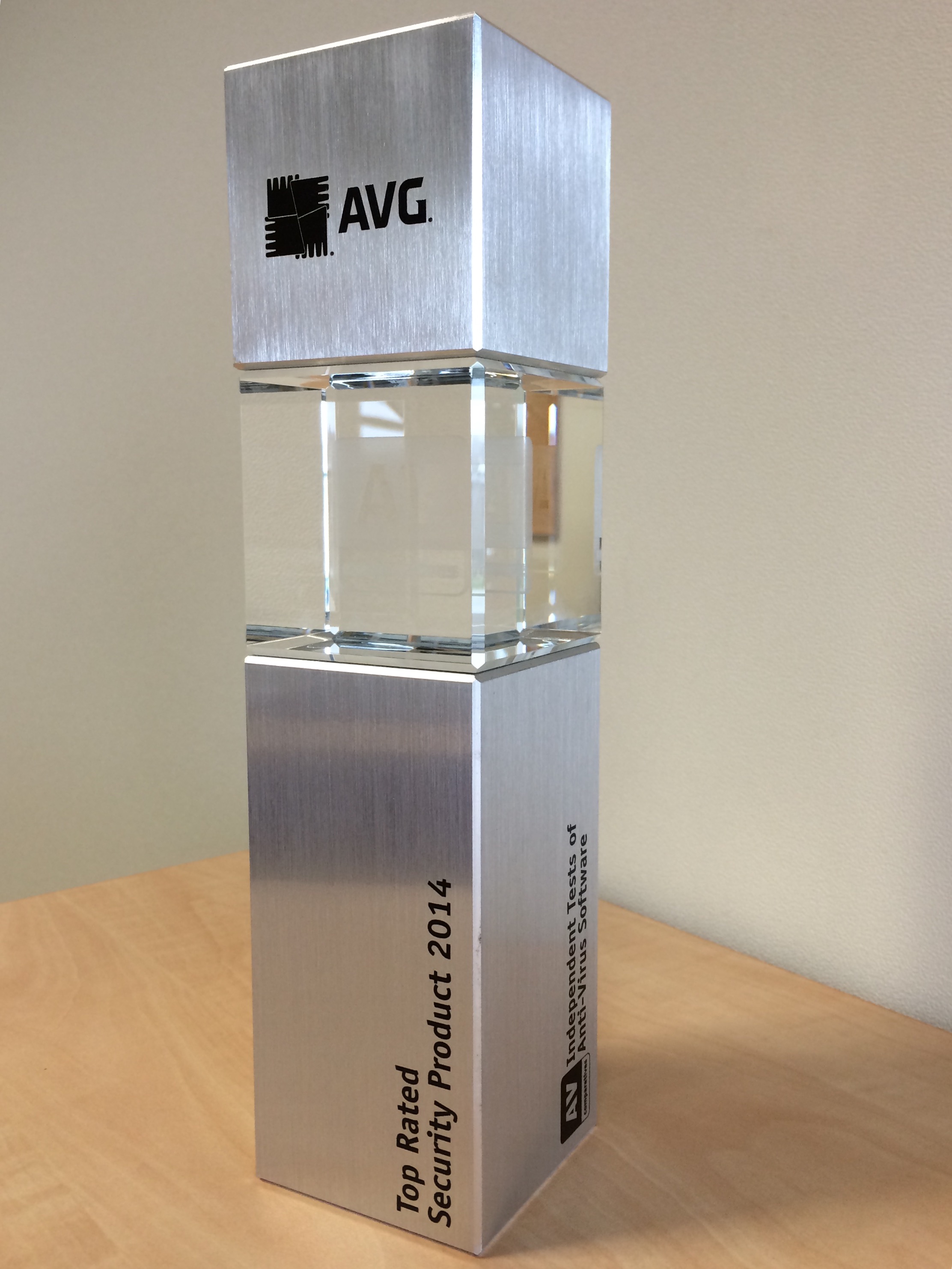
Detecting malware is of course extremely important but its also critical that malware is removed once detected and AV-Comparatives conducts a test that measures the quality of removal and AVG AntiVirus achieved ‘Gold’ status in this test along with ‘Top Rated Security Product 2014’.

AV Comparatives


In summary the above tests show that the AVG AntiVirus products really do ‘exactly what it says on the tin’ for detection, performance and in the removal of malware.

It should give you the confidence to use the Internet without worry as AVG has you covered.

Follow me on twitter @tonyatavg

Own a Mac? Well, it might need a clean-up too…

Well, believe it or not this is not always the case. As even the shiniest of sports cars need to go to a mechanic once in a while, your Mac needs to get a proper cleanup as, over time, its hard-drive can get cluttered.

In this article, we’ll dive deep into the data clutter that even the newest Macs accumulate after only a few days. I’ll talk about how much disk space you can regularly recover and how getting rid of clutter can improve your privacy and boost system reliability.

Let’s give your Mac a proper spring clean – throughout the year!


The daily data-clutter…

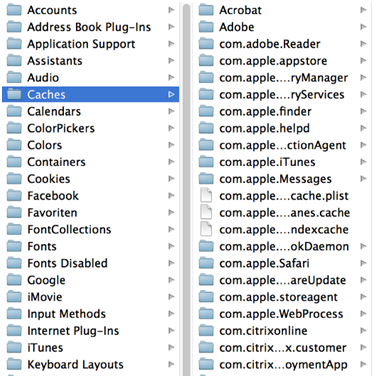
Here’s an unfortunate, little known, but true fact: Almost every time you use your applications, play a game or browse the web, your Mac collects data “junk”. This data is officially known as cache which is the data collected from errors and other system activity in countless log files.

Unfortunately, this data is hidden on your hard disk and can’t be easily deleted.

AVG Cleaner for Mac Cache


But it’s not just cache that you need to clean regularly. For most people, both the Download folder and the Recycle Bin remain the central store for all downloaded files (dmg images, old PDF files etc.)

This can easily amount to several Gigabytes if forgotten! It’s time to find out all about why your Mac’s disk may be bloated and how you can easily spot files that you didn’t even know were lurking on your hard disk.


A Quick Lab Test

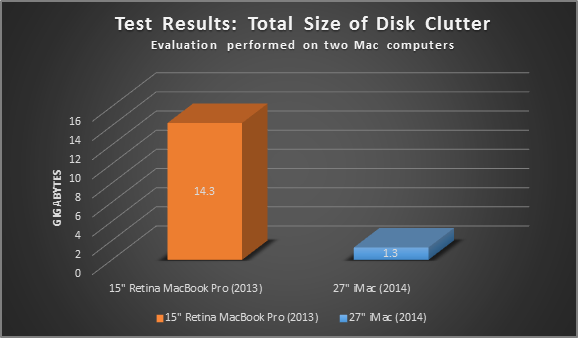
We’ve analyzed the contents of some of our Macs internally with our very own AVG Cleaner for Mac, and found more than 14.3 GB of unnecessary files in various locations on a Retina MacBook Pro that we’ve been using productively for several months. An iMac® 27” which was purchased and used for just a few weeks for basic tasks such as surfing the web and light office tasks showed 1.3 GB of wasteful files.

AVG Cleaner for Mac Clutter

Digging deeper, we found that a huge chunk of this unnecessary data was located in the Mac OS® “Download” folder – a folder that we rarely cleaned up and that served mainly as a temporary storage for downloaded programs, audiobooks, videos, ISO files, and more.

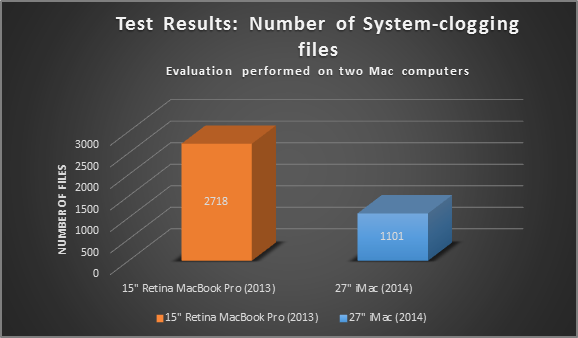
What’s more interesting than how much disk space I could recover was the sheer number of unnecessary files on those machines:

AVG Cleaner for Mac Log Files

On the newly-bought MacBook Retina, I found 2,718 junk files – most located in the hidden user cache folder. The MacBook Air suffered from more than 1,101 unnecessary files. “So what’s with all that junk?” you might be asking. Basically the three most common trash types include….


Application Cache

Most applications that you actively use on your Mac create what’s called “cache” and “log” files. Cache files are helpful, as they’re sometimes known to speed up the application launch or boost web-browsing speed (i.e. the Safari® cache).

Unfortunately, a lot of apps don’t clean up their cache files when they’re no longer being used and this is when the cache gets out of control:

Old and corrupt cache files from previous app versions could cause errors when running newer apps.

Cache files could completely grow out of proportion.

Out of date cache files are forgotten on your hard disk and remain there forever, growing and growing….

We’ve dug deep into all the data trash found on these two machines to give you an example of how junk could affect your daily work (or gaming) routine…..

  • Uninstall leftovers
  • Font lists
  • Browser Cache
  • History Lists
  • Application images

These are just some selected examples of unnecessary cache files we found on our test machines. It’s wise to flush the cache every now and then (at least once a month) to either prevent problems or solve them effectively – even AppleTMitself recommends flushing the cache once in a while to troubleshoot your Mac. More on that below…


Log files

Next to cache files, Mac OS and a lot of applications tend to create log files. These contain protocols of crashes, when you started an application, when the last update occurred and so on. Most of the log entries have one thing in common, no one except professional developers or trained admins are able to get anything out of it.

  • Update logs
  • Crash files
  • General logs

Unless your IT admin wants to analyze your log files, there’s barely any need to keep them. We’ll show you how to delete them safely…

Download & Trash folder

As I mentioned above, the Download folder can accumulate Gigabytes of unnecessary files. Why? Because it’s your browsers default location for storing files. Even I, who cares a lot about disk space and cleaning up, forget to clean out the Download folder. To a lot of users, the Recycle Bin serves the same purpose….you delete files but just forget to go through it and delete unwanted stuff permanently.


AVG Cleaner for Mac helps you clean up all these unnecessary files in seconds. In the meantime, why not download it and give it a try today, it’s free!

Vine celebrity hacked

The account, which had more than 285 million “loops” to date, was compromised and hackers deleted every video linked to the account.

The hack comes just days after Phillips was in the news for making a living off sponsored Vines. A report on the BBC claimed that he was making as much as £12,000 per six second clip.

While Phillips is working with Vine to try and restore his lost videos, it’s worth remembering that you don’t have to be a celebrity to be hacked.

Here are a couple of things you can do to help keep your online accounts safe from hackers.


Use Two-Factor Authentication

Two-Factor Authentication is a great way to protect your online accounts. By using a randomly generated code, sent to your email or phone, it makes it very difficult for hackers to gain access.

Video

What is Two Factor Authentication


Don’t use the same username across all accounts

Make sure that you use a different usernames across all your accounts so that if your credentials fall into the wrong hands, the risk is limited to only one site.

Also try not to use your real name in your username as this can help attackers verify your identity and be sure the account belongs to you.


Use a strong password

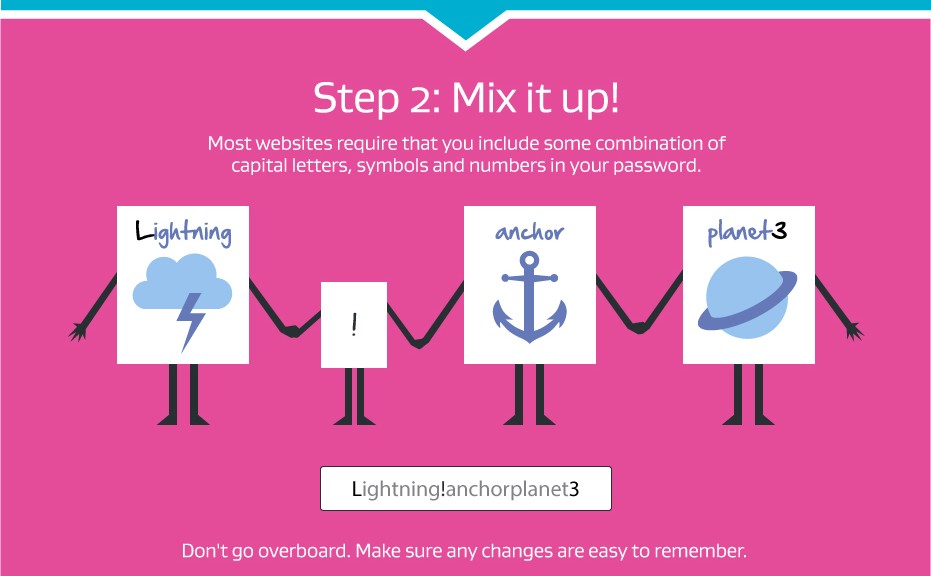
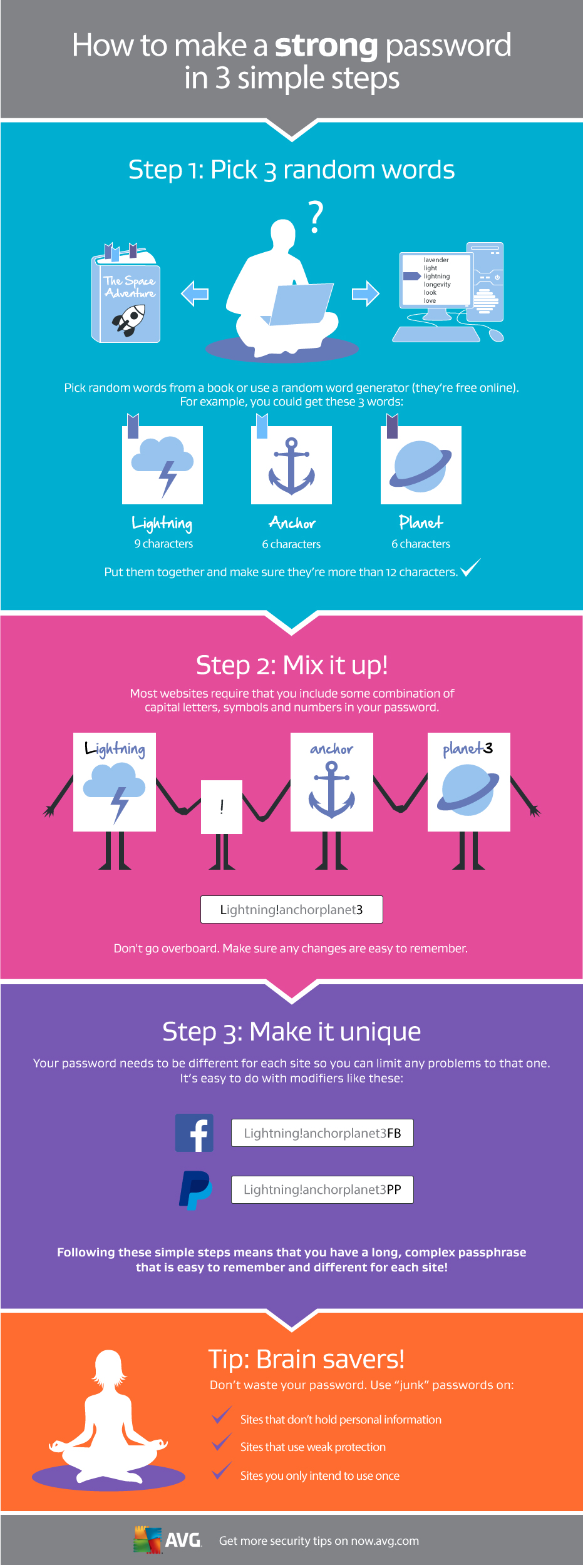
Passwords play a crucial role in protecting your online accounts from hackers. Here is a simple guide to creating a strong one:

Making a Strong Password