Tag Archives: featured1

TGIF: Avast News Wrap-up for March 18 – April 2 2015

The Avast biweekly wrap-up is a quick summary of what was on the Avast blog for the last 2 weeks .

Watch March Madness with SecureLine VPNMarch Madness wraps up on April 6th. Even if you are traveling abroad, all you basketball fans can watch the game using a VPN service. Stay safe during March Madness using Avast SecureLine explains why you should always use VPN when connecting to a public Wi-Fi hotspot, plus the added benefit of being able to watch geo-restricted content online.


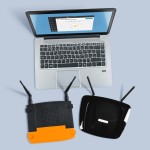
laptop and routersSpeaking of Wi-Fi – Just like in real estate, one of the most important things for your router is location, location, location. 5 things you can do to boost your Wi-Fi network shares helpful things that you can do yourself to make your Wi-Fi signal stronger within your home or business.


IMG_20150328_115931I run because I really REALLY like Beer!

Team Avast rocked it at the Sportisimo Prague Half Marathon.


WBDWorld Backup Day was a good reminder that we need to take time to prevent data loss on our PCs and mobile phones. We discovered that one of the main reasons that people do not back up their data is because they are lazy.


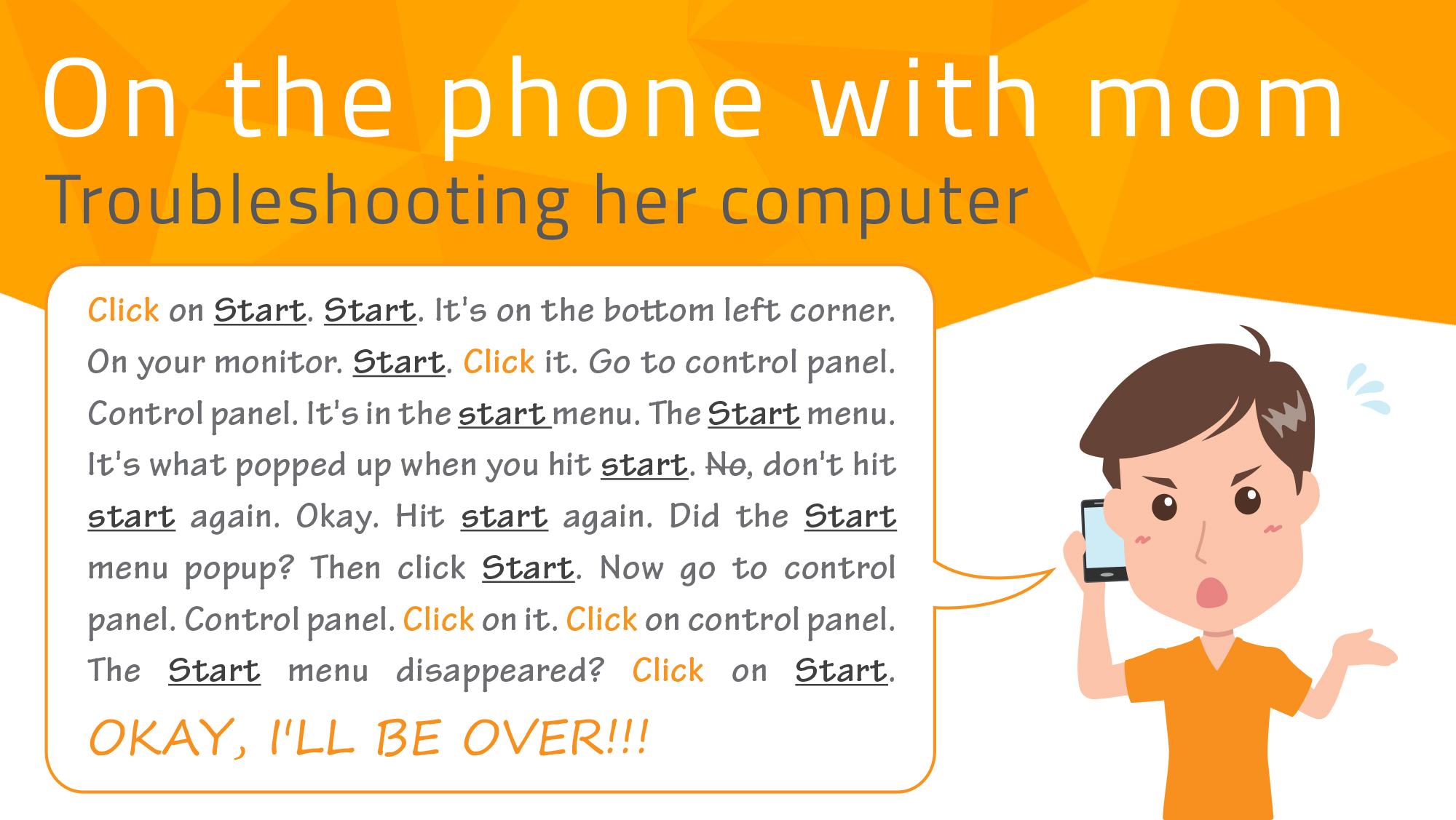
Remote AssistanceThe family IT expert knows how frustrating it can be to help someone solve a computer problem over the phone. Avast makes it easier with our Remote Assistance service. Now you can Help others with their computer issues using Avast Remote Assistance.

For those of you who like to DIY, you can learn How to use the Avast Virus Chest and what actions you can perform on files inside the chest.

 
avtest_certified_homeuser_2015-02With all the security improvements in browsers and operating systems, some people have questioned whether they still need antivirus protection. The business of malware has changed, but it can still be devastating if you are targeted. COO ONdrek Vlcek explains why Avast is not your father’s antivirus protection.


A security breach has been detected in WordPress SEO by Yoast plugin!

wordpress

The search engine optimization, the well-known SEO, enables Google to show our webpage before than other hundreds of millions of sites. That’s the reason why editors of corporate and personal blogs worry so much about visibility.

If you use WordPress, you will probably have installed “WordPress SEO by Yoast”, the most famous plugin that handles this task and has over 14 million downloads. An essential tool for any blogger, it helps displaying the post’s keywords, a headline and intro making it easier for the search engine and the robot that index the sites to read.

If you have it too, you should know that it has recently been discovered some vulnerabilities, which could be exploited by any attacker to get into your blog.  If you are thinking right now about uninstalling or changing the passwords, because you can’t figure anything else to do, don’t worry: they have already solved the problem. Now, of course you will have to download an update soon!

Security expert Ryan Dewhurst warned about the issue a few days ago. He works for WPScan, an open source security tool that allows security professionals and web administrators evaluate the vulnerabilities of WordPress.

Dewhurst found that a cyber-attacker could break the database’ security and obtain confidential information through a SQL injection attack in version 1.7.4. (version 1.5.3. for those who paid the premium subscription).  In addition, all the previous versions were also vulnerable.

wordpress seo by yoast

The security gap, in the simplest terms, would allow querying the blog’s database, which would compromise the stored information (authors and subscribers usernames and passwords, for example). Even, the vulnerability could be used to infect the site’s visitors through some malware.

This plugin’ security experts resolved the issue within 90 minutes after realizing it. They patched the vulnerability and offer an update, version 1.7.4. which comes without this damn security gap and you can download it manually from their website.

The people in charge of “WordPress SEO by Yoast” thanked Dewhurst for publishing his findings and asked users to download this update as soon as possible in order to keep themselves safe.

In addition, there is a much more comfortable way for updating all the versions without having to be on the look. If you have already installed WordPress version 3.7., or higher, you can order your plugins to automatically install updates so you don’t have to worry about them. You can do it by using the “Advanced Automatic Updates” option.

The post A security breach has been detected in WordPress SEO by Yoast plugin! appeared first on MediaCenter Panda Security.

Help others with their computer issues using Avast Remote Assistance

Avast Remote Assistance gives you access to any other computer with Avast installed.

Do your friends and family always call you when they run into a problem with their computer? Forget driving across town to help them out – if they are also Avast users, you can remotely access their computer.

remote assistance with mother

Avast Remote Assistance makes it a lot easier on the family IT person.


How to use Avast Remote Assistance

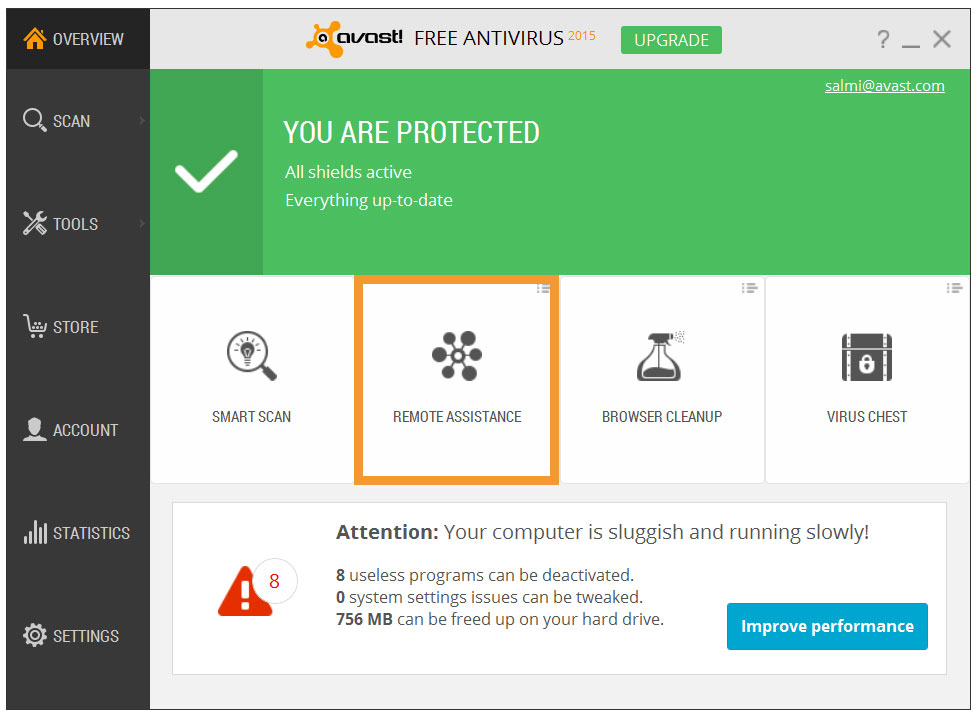
If you are the IT expert, the person in need of help has to request assistance from you. Instruct them to open the Avast user interface. The easiest way to find it, is to go to one of the four tiles on the Overview screen, and click on the small menu icon in the top right corner. A drop-down selection will open. Choose Remote Assistance.

remote-assistance-UI

Customize your Avast Overview screen for fast access.

Next, tell them to click the blue Get Assistance button. Avast will generate a code that they need to provide to you.  They can transfer the code to you by telephone, email, or chat. Make sure they understand that by sending the code they are granting you remote access to their computer. After you take control, this dialog disappears automatically.

When you receive the code, you will copy it into the box on your Avast’s Remote Assistance screen.  Follow the directions to connect. When the connection is established, this dialog disappears and the remote desktop window appears.

To close the connection, press the Alt+Shift+End shortcut.

Caution! New SMS scam!

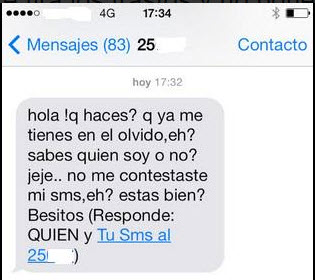
We have seen many scams involving text messages, the most recent one in Spain a few days ago; crooks sent innocent users this SMS…

sms scam

“Hello! What are you doing? You have forgotten about me, eh? Do you know who I am, or not? LOL… You didn’t answer to my SMS, uh?  Are you alright? XOXO (Answer WHO and …)”

This is what reads in the captured SMSs.

Have you received this type of text message?

This is happening in Spain, where the National Police has alerted in their Twitter account about these types of messages.

What is the criminal’s benefit? It’s an economic profit, evidently. How? There are two possibilities:

  • Subscription to SMS Premium services, which will increase your telephone bill.
  • Exchanging messages with a machine for hours, paying important amounts of money for each message.

So, if you receive a SMS like this on your cellphone, just ignore it! No acquaintance of yours would contact you like this.

Even if you are not in Spain, we advise you to be careful! You never know where the cybercriminals may strike again!


The post Caution! New SMS scam! appeared first on MediaCenter Panda Security.

How to withdraw money safely without a credit card

We have been warned many times, advised to hide the hand while dialing our secret number when withdrawing money from an ATM. However, cloning credit cards or phishing is a criminal offense that doesn’t require the cybercriminal’s physical presence to access numbering scheme, expiration date and CVC number.

The methods used by criminals include, fake emails from the alleged entity asking to change the passwords or enter the pin, or hacked POS terminals which transfer the customers banking information. Once duplicated, card can also become a commodity between criminals, dealing with them in an online black market.

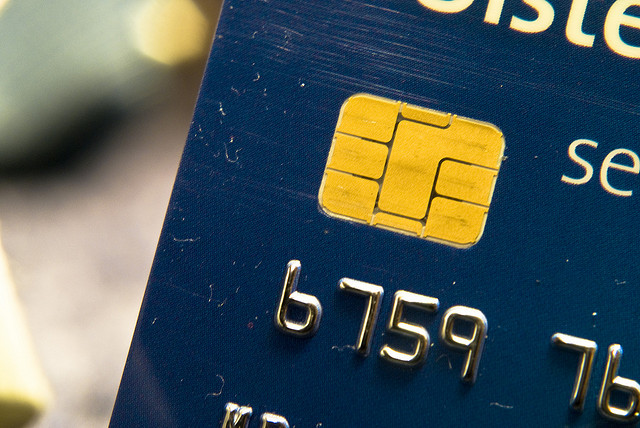
Neither the traditional magnetic stripe nor the latest chip installations have managed to slow down cloning. This latest technology seemed promising: it generates a unique code for each transaction, which hinders fraud.

credit card

Nevertheless, security experts at Cambridge University demonstrated that data phones and ATMs fail when producing random numbers. Actually, it can be predicted applying the needed methods.

Banks are looking for alternatives to protect their customers from possible attacks. The latest idea is eliminate credit cards (if something creates problems, what a better solution than to wipe it away) and replace them with mobile phones. If we are already able make transactions with our smartphone, why wouldn’t we be able to withdraw money?

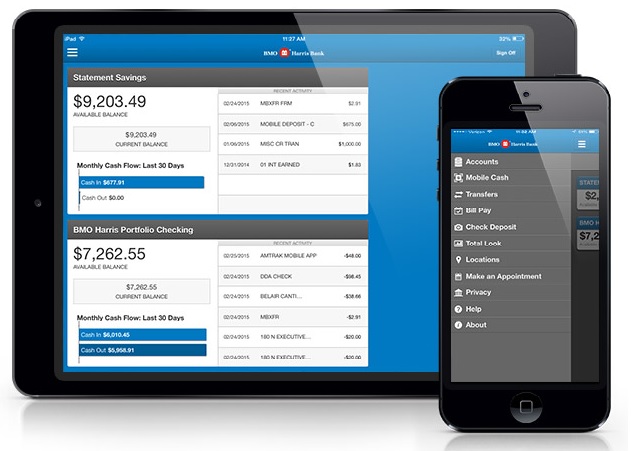
BMO Harris Bank, one of the subsidiaries of Bank of Montreal Canadian, has launched the biggest ATMs network that uses this new system. In order to use them you don’t need to remember any password, or cover your hand while dialing the pin with the other one.

smartphone

The entity’s customers only have to take out their mobile phone, download and register in to the banking application Mobile Cash. What follows it is nothing like the traditional method, of pressing the machine’s keys or the screen.

The app asks the user the amount he wants to withdraw and only saves the banking details during the communication with the ATM, where he must select the option Mobile Cash.

Then the machine generates a QR code, like the ones airlines or concerts halls use. Simply hold the smartphone so it reads the QR code and automatically orders the withdrawal.

bank app

Those who are for this system, maintain that it will speed up transactions and it ensures safety, since the mobile tool doesn’t store any banking information on your phone permanently.

A cybercriminal has to access your mobile phone and get the password you use in the banking application to freely manage the money in your account. Although some banks believe this is not an easy process, the issue may raise a number of concerns.

Every day we discover new cases of apps that without the user’s permission access certain personal data, information stored on other features and smartphones vulnerabilities and backdoors. How can an application guarantee complete security?

Withdrawing money through our smartphone is still not available worldwide. But when the possibility arrives we will have to analyze the possible consequences it may carry. Convenience and speed in transactions are not the only things that matters.

The post How to withdraw money safely without a credit card appeared first on MediaCenter Panda Security.

Stop what you’re doing and back up your work

Today, we celebrate World Backup Day with a reminder of how important it is to back up our data.

post-backupday-universal-EN

Data loss can occur when least expected, and it’s a shame that so many irreplaceable digital memories are lost. For businesses, it can be costly – the kind of costs that can close the doors!

So take the pledge today, and then get busy.

“I solemnly swear to back up my important documents and precious memories on March 31st.”

What is a backup?

A backup is a second (and sometimes third) copy of all your important files — for example, your family photos, home videos, documents and emails. It’s not something you do once a year and forget about; a good backup plan will be continuous and include multiple layers to not only recover your data but also include steps for data preservation.

The rule of thumb for backing up is

  • 3 copies of anything you care about – Two isn’t enough if it’s important.
  • 2 different formats – Example: Dropbox + DVDs or Hard Drive + Memory Stick or CD + Crash Plan, or more
  • 1 off-site backup – If the house burns down, how will you get your memories back?

Experts advise that you store two copies of your files in external storage media. That can be a local drive on your computer, an external hard drive, you could print documents, burn a DVD, etc. You can backup important files or your entire computer. Another copy should be kept off-site. Many people use an “online drive” like Drop Box or Google Drive. “Cloud” backups are great for people who want to keep only their most important documents safe because there is usually only a certain amount of storage that’s free.

Don’t forget to back up the data on your mobile devices

Thirty seven percent of respondents we surveyed said they do not back up their data. Don’t wait until your device is lost or destroyed – today is the day to do your first backup!

If you have an Android mobile phone or tablet, install our free Avast Mobile Backup to back up your contacts, call logs, SMS text messages, and other data to your Avast account or Google Drive.

Why people don’t back up their mobilephones and other facts

Devastation. The feeling you get when you realize your mobile phone is missing. All those photos, contacts, and other stuff – gone forever. Why? Because it wasn’t backed up.
mobile backup survey

Just in time for World Backup Day, Avast conducted a global survey to find out whether or not people back up data on their mobile devices. We received responses from 288,000 users in countries including the United States, Germany, India, Mexico, and Russia.

In order to get an idea of which kinds of data users store on their devices, we began the survey by asking respondents for what purposes they use their mobile devices aside from making calls and sending text messages.

In response, we found that two out of ten people use their mobile device to take photos, 18% browse the Internet, 17% listen to music/watch videos, and 16% use social networking apps like Facebook and LinkedIn.

Why do people not back up their data?

Put simply, most people don’t think it is necessary to back up their data. Globally 36% and nearly half of Russian’s do not think it is necessary (48%).

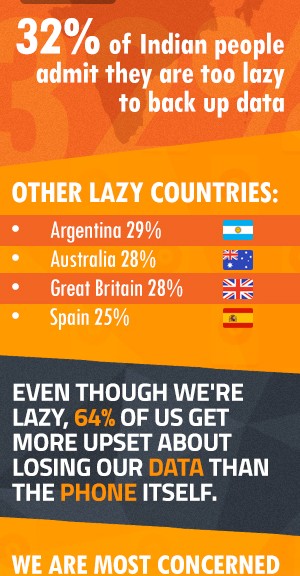
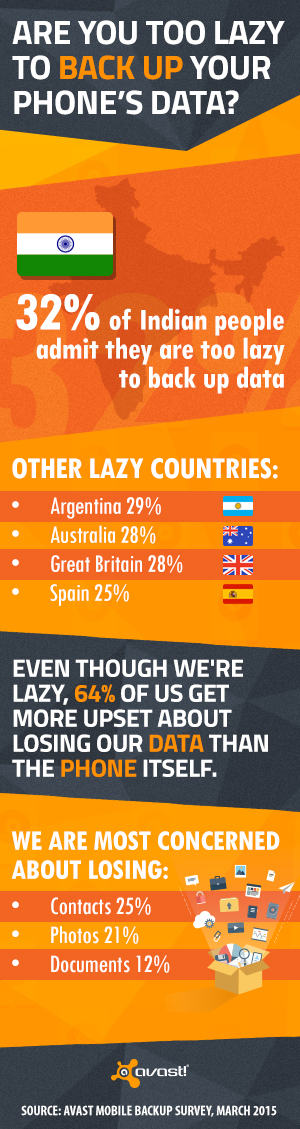
Almost a quarter of the world attributes not backing up their data to laziness (24%). Thirty-two percent of Indian people admit that they are too lazy to do a back up.

Thirty-six percent of British respondents claimed not to back up their data because they believe their data is not valuable, compared to only 22% of global respondents citing this as their reason for not backing up their mobile data.

What is more valuable to mobile users: hardware or data?

Now that we established that lots of people don’t care about their data, are too lazy to prevent its loss, or don’t think its worth the trouble, we then asked users what they would be more upset about losing: their data (that has not been backed up) or their device (the hardware).

Globally, 64% of people would be more upset about losing their data that has not been backed up rather than the device itself. Respondents in Mexico backed up this claim most significantly, with 78% of Mexican users claiming they would be more upset about losing their data than losing their hardware.

Which data are people worried about losing?

Across the board, users were most heavily concerned about losing the contacts stored on their mobile device (25%) and photos (21%). Despite these concerns, 37% of respondents said they do not back up their data. Brazilians are the least likely to back up their data (45%), yet 64% of Brazilians would be upset about losing it.

Why you should back up your mobile data

We use our mobile devices to make important calls, capture valuable moments, browse the web, to use our favorite apps and so much more. Anything can happen to your mobile device in a split second; it could fall into the toilet, go missing (either through loss or theft) or even get run over by a car! Yet, as we discovered, many do not back up the data they consider indispensable.

How to back up your data

You can back up your data in many ways: by connecting your mobile device to a PC (like nearly one-third of global users do. See below.), connect to a Cloud service (like Dropbox, iCloud, or Google Drive) or use a mobile back up app like Avast Mobile Backup.

When people actually do back up their data, how do they go about it?

The majority of those who do back up their data back it up on a monthly basis (41%), while another 8% back it up on a daily basis.

Most people back up their data by connecting to a PC (32%) — only 17% back up their data to the Cloud. When we inquired about this difference in numbers, 46% of users expressed their reluctance to back up to the Cloud due to privacy concerns. Germans were the most concerned about their privacy when it came to Cloud back up (61%), with Spanish (58%) and American (57%) respondents close behind them.

Avast at the Prague Half Marathon 2015

March 28th, 2015 – It was a gray and chilly Saturday morning when some of Avast’s fittest gathered to run in the 17th edition of the Sportisimo Prague Half Marathon. As the biggest running event in the Czech Republic, this year’s race drew in over 12,000 participants. Thirteen brave Avastians ran the event’s full 21 kilometers and 12 (also brave) Avastians ran in relay teams. The relay teams consisted of four members, three of whom ran five kilometers and a fourth who ran six. The Avast runners chose to support the Committee of Good Will – Olga Havel Foundation, an organization that works to support handicapped, abandoned and discriminated individuals in their integration into society.

Avast runners

Avast’s runners before the half marathon

Let the race begin

 
The race took place in Prague’s historic city center along the Vltava River. Both the start and end points of the race were positioned in Jan Palach Square, named after Jan Palach, a student who immolated himself to protest the Soviet occupation of Czechoslovakia in 1969. At the starting line, I found myself stretching and warming up next to thousands of fellow participants. As we eagerly waited for the race to begin, some sort of miracle occurred – the sun’s rays made their way through the clouds, warming our cold bodies and lifting our spirits. Then, at noon, the starting pistol was fired and we began the race, appropriately accompanied by the sounds of Bedrich Smetana’s “The Moldau”. This celebrated piece of classical Czech music evokes the sounds of the Vltava River, the body of water that served as the backbone of the race.

IMG_0393IMG_0392


Step out of your comfort zone

 
The Prague Half Marathon was the first official race that I’ve taken part in. I ran five kilometers as part of one of Avast’s three relay teams. Intimidating is definitely a word one could use when describing the experience — when the race began, literally thousands of people ran past me and it soon became somewhat of a struggle to keep up in the constant stream of runners. However, it was great having my colleagues there for moral support. During the first kilometer, one of my colleagues passed me, giving me a cheerful greeting en route to complete the race’s full 21 km.

As I ran, I let the Vltava’s breeze cool me off while I basked in the sun’s warmth and admired Prague’s breathtaking views. Within just two kilometers, I had passed some of the city’s most famous sites, including the Charles Bridge, National Theater, and Dancing House. Out of the corner of my eye, I could even see the Prague Castle on the other side of the river. Upon reaching the five kilometer mark, I handed my baton chip over to my teammate, who continued on and crossed the Vltava to meet our third runner.
 

The results

 
Each of the Avast relay teams completed the half marathon in just under two hours. The individual runners, who ran the full length of the race, all finished within two and a half hours. To top it all off, Avast’s fastest runner, Adam Simek, came in 88th place out of the 12,500 runners who participated, completing the half marathon in a remarkable one hour and 18 minutes!

IMG_0404


A message to my fellow Avast runners: You guys all did an amazing job and I hope you have all recuperated from the run :) I look forward to running with you again next year!


IMG_20150328_110746

IMG_0386


IMG_20150328_115931 IMG_20150328_144607

Do you use uTorrent? Careful with what it installs in your computer!

pc with torrents

If you love downloading things of the Internet, probably you know uTorrent, one of the most famous clients of BitTorrent, which allows us to download files quickly and free. In spite of the annoying banners that constantly accost users. There are many webs where you can check how to eliminate these sponsored advertisements.

Nevertheless, Bit Torrent, with 150 millions of users per month, suffered strong reviews in the last few days because of their latest update design. As one user explained in the uTorrent forums, they had installed new software, without warning him. He only realized it when he saw that his processor was consuming more resources than it should.

In this particular case, the program that sneaked into his computer was EpicScale, a mining bitcoins software. To those who don’t know how the Cryptocurrency works, mining is the process that replaces currency issuance. Users offer part of their computer resources for the community’s benefit and then obtain some cryptocoins.

uTorrent

After the first message, many more users protested, ensuring that EpicScale was installed on their computers without them knowing it. Bit Torrent, uTorrent’s parent company, confirmed the service’s inclusion in the last update, but assures the users were notified. “We have reviewed the issue closely and can confirm there is no silent install happening…. Most likely these users accepted the offer during install,” the company explained.

Therefore, or users are mistaken or there is a lack of transparency in the system. After revising the whole process experts at Trusted Reviews concluded that because the system design, users were misinformed. Now, they don’t dismiss that the problem may be due to a faulty installation. So if you are uTorrent user check if it has also installed EpicScale and, if you want, remove it so it stops consuming your computers resources.

Some users stated that they couldn’t uninstall the program completely with the Control Panel feature “Add/ Remove Programs” nor erasing the program’s data. One of the recommendations already spreading through the Internet is to uninstall EpicScale with the help of CCleaner.

bitcoins

Another option is logically stop using uTorrent. Torrent Freak has already included a list of ten possible alternatives that you can use if you want to abandon this P2P client and continue downloading “torrents” safely: qBittorrent, BitTornado, Vuze or Tribler are some of the options available to continue downloading.

What can we draw from this? It is always advisable to read carefully all the steps in the installation wizard, just in case anyone tries to sneak a service partner, to consume your resources or for other purposes.

The post Do you use uTorrent? Careful with what it installs in your computer! appeared first on MediaCenter Panda Security.

Not your father’s antivirus protection

avtest_certified_homeuser_2015-02

Avast received the AV-Test certification for home use products.

Do I really need security on my computer anymore?

Over the years, web standards have improved and the security of operating systems and browsers have become better. Because of these advances, some people question whether they need security protection at all. But you need to remember that in parallel to positive advances in protection, cybercrooks have improved their skills and become more stealthy and targeted.

Hackers are no longer mischievous kids breaking into government agencies because they can. “These days, cybercrooks have to make business driven-decisions like the rest of us because their resources are limited,” said Ondrek Vlcek, COO of Avast.

Current malware is often disguised as legitimate applications, malicious Android apps sneak by protocols of the huge download sites, and home and business networks are being attacked via weakly protected routers.

“Threats are no longer just targeting devices, but accounts and routers. A recent example is the iCloud hack where cybercrooks stole personal photos of more than 100 celebrities, including Jennifer Lawrence and Kate Upton,” said Vlcek. “This attack happened via their account and can as well be the result of a router hack. No matter which device you use, all Internet traffic flows through your router so you have to make sure it is secure. You don’t have to be Jennifer Lawrence to be attacked.

Not your father’s antivirus protection

Antivirus protection has come a long way since it scanned individual files. Avast has taken modern virus protection to a high art with real-time updates and heuristic scans that detect new threats it’s never even seen before.

Avast performs so well in protecting against “real-world” threats such as Trojans, worms and viruses as well as web and email threats, that it just received the AV-TEST certification for our home user products.

Avast scored perfectly in the detection of widespread and prevalent malware discovered in the last 4 weeks, and had very little incidence of disruptions caused by false positives. Our consumer products have basically no measurable impact on the performance of the computer while doing things that the average user does on a daily basis: Visiting websites, downloading software, installing and running programs and copying data.