
Tag Archives: Malware

Mac Malware Can Secretly Spy On Your Webcam and Mic – Here's How to Stay Safe

Apple Mac Computers are considered to be much safer than Windows at keeping viruses and malware out of its environment, but that’s simply not true anymore.

It’s not because Mac OS X is getting worse every day, but because hackers are getting smart and sophisticated these days.

The bad news for Mac users is that malware targeting webcams and microphones has now come up for Mac laptops as well.
<

Android malware surges again

panda-security-android-malware

For most people, their smartphone has become the most important gateway to the internet. We use our phones to check facts on the move, plan journeys, update shopping lists and check our bank balance.

Simple-to-use apps have put information and services at our fingertips. In fact, the world now uses smartphones and tablets online more than any traditional computers and laptops.

So it’s no surprise that hackers and cybercriminals have turned their attentions to attacking your smartphone.

The Android factor

The relatively low cost of Android-powered smartphones, has helped the mobile operating system establish a significant majority of the mobile market. Android handsets outnumber iPhones by nearly 9 to 1 for instance.

This, coupled with the relative ease of crafting malware for the Android platform, has seen a massive increase in mobile attacks. In July this year, an estimated 10 million Android phones were infected with malware that spied on their owners for instance.

The problem has become steadily worse over time. In January 2013, AV-TEST database of malicious Android apps contained less than 500,000 examples. By August 2016, the total topped 16 million as the number of new malware variants released continues to grow.
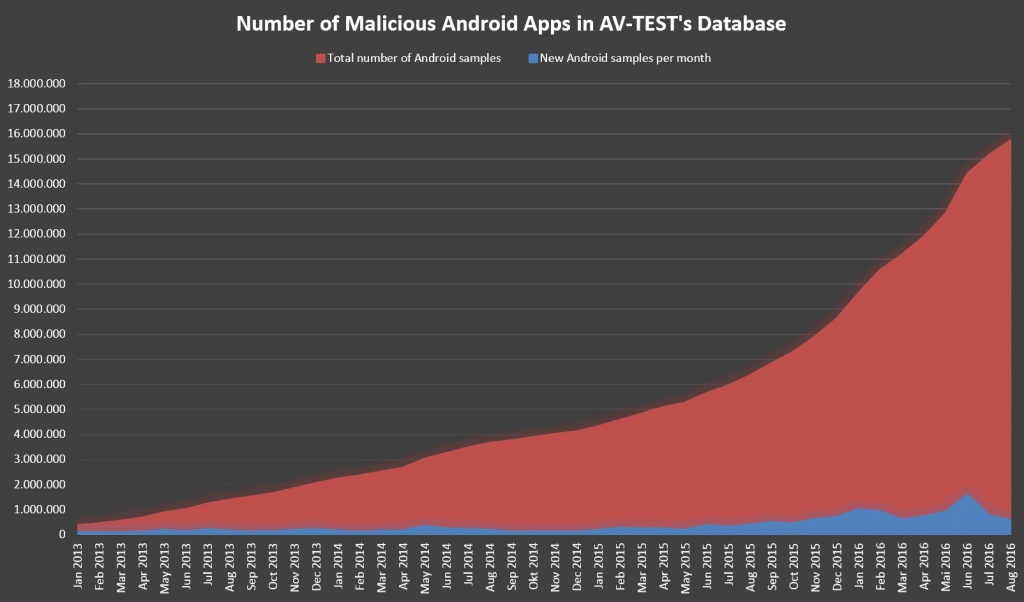
pandasecurity-av-test

The open nature of Android that allows anyone to create software and access key system resources – seen by many as one of the operating system’s strengths – makes it even easier for hackers to create malware and infect phones. This problem is compounded by the infrequency of software updates to patch these vulnerabilities, leaving Android users at risks for months.

Protecting your Android handset against malware

Just like your PC, you have the responsibility for keeping malware from being installed on your phone. There are however a few easy steps to counter the most obvious risks.

1. Always use an official app store

The Google Play app store is the largest, and most trustworthy source of apps for your phone. All of the apps available there have been checked to ensure they do not contain malware, so you should be safe installing them.

Other app stores or websites are not so stringent, so there is a much higher risk of infection when using them.

2. Treat email with caution

Email has been a particularly effective way of installing malware on PCs, so cybercriminals use many of the same techniques on your phone. Always treat email attachments with caution, and never open anything that looks suspicious.

And if you are prompted to download software unexpectedly, there’s a reasonable chance that someone is trying to trick you into installing malware.

3. Consider installing an ad blocker

Malware can sometimes be downloaded and installed without warning via infected banner ads. Installing an ad blocker app can help prevent compromised banner ads from being displayed – which also stops malware from being downloaded.

4. Install an antivirus app

Your home PC is protected by antivirus software – and your Android smartphone needs the same level of protection. Leaving your phone open to malware installation is a serious risk – and cybercriminals will take advantage eventually.

Panda Mobile Security (also available in the trusted Google Play store) offers maximum protection against malware along with a number of useful tools should your phone be stolen. You are protected against Android viruses and information theft at all times.

Get protected now

These practical steps will help to improve your device security – and stop the most common malware attacks. And because they are simple and straightforward, you can get started right now.

To learn more about protecting your Android smartphone, please check out this guide.

The post Android malware surges again appeared first on Panda Security Mediacenter.

Beware! You Can Get Hacked Just by Opening a 'JPEG 2000' Image

Researchers have disclosed a critical zero-day vulnerability in the JPEG 2000 image file format parser implemented in OpenJPEG library, which could allow an attacker to remotely execute arbitrary code on the affected systems.

Discovered by security researchers at Cisco Talos group, the zero-day flaw, assigned as TALOS-2016-0193/CVE-2016-8332, could allow an out-of-bound heap write to occur

Source Code for IoT botnet responsible for World's largest DDoS Attack released Online

With rapidly growing Internet of Thing (IoT) devices, they have become a much more attractive target for cybercriminals.

Just recently we saw a record-breaking Distributed Denial of Service (DDoS) attacks against the France-based hosting provider OVH that reached over one Terabit per second (1 Tbps), which was carried out via a botnet of infected IoT devices.

Now, such attacks are expected

Microsoft Edge Adds App Guard Browser Security

Microsoft is bringing virtualization to its Edge browser with a security tool called Windows Defender Application Guard. The technology, announced this week at Microsoft’s 2016 Ignite conference in Atlanta, takes a virtualization-based approach to isolating browser-based attacks from the internet. Windows Defender Application Guard will be exclusive to enterprise versions of Windows 10 and will […]

Webcams, Routers and Other Risks to your IT Security

panda security

The fleet of computers in your business may be protected but that does not mean that your corporate information is safe. Beyond tablets, there are a number of devices such as mobile phones and smart watches that have joined the list of gadgets that every enterprise must control and protect to prevent IT risks. Every office contains a number of vulnerable devices that can pose a danger to confidential data.

Although we do not usually pay attention to webcams, they pose a danger to corporate privacy and security—even the founder and CEO of Facebook, Mark Zuckerberg, shared a photo on the social media site where we can see that the laptop’s camera is covered for security purposes.

Covering webcams at your office when they aren’t being used could help keep your corporate information private.  An example of this occurred two years ago when it was discovered that a Russian website issued a direct signal to more than 70,000 private webcams that were hacked.

Printers, routers and USB

However, there is more work to be done than just covering webcams. Every office has routers that are not generally given the proper attention. Without the proper security measures (like simply changing the standard password that comes with your computer), a router can easily be taken advantage of by cybercriminals. They can easily take over your bandwidth and build a network of malicious bots, or worse, link it with a DDoS attack on another website.

There’s more. Corporate printers can be one of the biggest cybersecurity problems in your corporate environment. Every document that is sent out to print has to travel through a network that can be attacked. It is worrisome to think what could happen to this private information on the way to the printer. As you can see, the security of these devices are just as important as any other computer in the office.

Any device with USB storage in the office could put the entire corporate structure at risk. Malware on pen drives can be transmitted using USB ports on computers or can be used as a storage device to steal information.

As you can see, beyond covering webcams and changing router passwords, it is important to have reliable anti-malware  protection for your business, devices and networks in your workplace.


The post Webcams, Routers and Other Risks to your IT Security appeared first on Panda Security Mediacenter.