Tag Archives: Security

#ShredFest helping protect against Identity Theft

It’s no secret that personal data and private information left lying about, either in physical or digital form, can be used by thieves to steal your identity.  The problem is that securely destroying old documents, especially if you have boxes and boxes of them, can be time-consuming and frustrating.

And if you don’t destroy your data securely the consequences of being a victim to identity theft can range from outright theft of money, to unexplained debts, leaving you feeling like somebody else has taken over your life.

But thanks to a growing movement called #ShredFest originally from New York, things might get a little easier. It’s a subsidised program designed to provide secure document destruction free-of-charge. You might already have something similar in your local area, sometimes run by local banks and communities once or twice a year – or perhaps this is your opportunity to make-it-happen!

The statistics on Identity theft are nothing short of shocking. In the United States the Federal Trade Commission reports that in 2014 it received 332,646 complaints making ID theft the number one reported crime for the 15th year in a row. 

Stolen identities used in the United States in 2014 were used mostly for Government and benefits related fraud (30%) followed by Credit Card fraud (26%), Phone/Utilities fraud (16%) and Bank fraud (10%).

With the ability for criminals to collude easily on a global scale, it’s not inconceivable that we will see ID theft attempts in the future combine information obtained from the litany of online data breaches (for example, Ashley Madison), along with tidbits obtained through “dumpster diving” right at your own back door.

Fortunately, with a few simple precautions and some dedication to properly destroying the remnants of your online correspondence, and other important paperwork (that you’re no longer required to keep by law), you should be able to reduce the risk of ID theft happening to you.

Destroying Physical Documents

Got boxes of documents that you should be securely destroying? Despite #ShredFest only being available in a small number of locations at the moment, a quick search online reveals many companies that provide shredding services for a small fee.

But weighed up against the risk of ID theft against you at any time, it may well be worth it at any cost; and think of how a quick trip to your local shredding depot with a car-load of documents is not only going to put your mind at ease – but all that storage space you’ll get back at home!

Another alternative is to purchase your own document shredder – something that I have owned for many years and highly recommend – however, those boxes of tax paperwork may still be inescapable, so an annual trip to #ShredFest is likely still needed.

If you do purchase your own shredder, however, consider one that has a “cross-cut” feature (that cuts the paper into smaller pieces) which is considered a little more secure, and also there are models that can shred old CD-ROMS and DVDs which can come in handy.

Shredding Computer Files

Did you know that selecting a file and pressing delete, or simply moving the file to the trash (even after you empty it) isn’t enough to securely remove it?  It’s important to understand how to securely delete digital files on all your devices – not just your PCs, but also Mobile devices.

We’ve covered in the past how easy it is to use features like AVG’s File Shredder which can overwrite your private and personal files multiple times to ensure they cannot be recovered again.

Also if you’re recycling your old PC’s or Mobile devices, including disposing of them permanently, ensure you have taken all reasonable steps to correctly erase the data on them – this sometimes isn’t as easy as a simple factory-reset, particularly with older Android mobile devices.

Lastly, if you have an online email account (such as Gmail, Yahoo or Outlook.com) you’re likely holding on to years worth of old email that could prove to be extremely valuable to an ID thief.  As I suggest in these tips about securing your online email account, make sure you purge all your old and unwanted email too.

Until next time, stay safe out there.

Analysis of a Spam Mail

Spamming is a big and a nasty problem in our online world, every day. Each and every one of you probably had this one mail in your inbox. The mail where you didn’t know if you could open it because it might contain a dangerous attachment, or the one where you were just really annoyed by the nonsense content. I guess that we can all agree: nobody wants that.

The post Analysis of a Spam Mail appeared first on Avira Blog.

Analysis of a Spam Mail

Spamming is a big and a nasty problem in our online world, every day. Each and every one of you probably had this one mail in your inbox. The mail where you didn’t know if you could open it because it might contain a dangerous attachment, or the one where you were just really annoyed by the nonsense content. I guess that we can all agree: nobody wants that.

The post Analysis of a Spam Mail appeared first on Avira Blog.

Nine out of ten parents worry about kids online − yet few act

The internet is arguably the new frontier for communication, collaboration and business but, with criminals also using it for ill-gotten gains, it does have its bad parts too. And this is making life difficult for parents struggling to keep up with their child’s technology obsession.

The post Nine out of ten parents worry about kids online − yet few act appeared first on We Live Security.

Ashley Madison Hack – what has been leaked?

As with all privacy breaches there are multiple victims here. The customers whose personal data has been leaked, as well as the company trusted to keep it secure; a trust that may never be regained.

However, what makes this case highly significant is the collateral damage that will likely spread beyond just the direct privacy breach.  Family ‘secrets’ are revealed and victims are ‘ousted’ – seemingly at the hands of anonymous hackers with a point to prove.

Another oddity in this case is that AshleyMadison.com charges only men for their subscriptions and message credits, while female users are able to use the site free of charge.  This has resulted in the victims consisting mostly of men, connected by way of their credit card transaction histories, causing an asymmetry rarely seen in data breaches made public.

While the hackers have released the data in what could best be described as a harsh and judgmental way, they do offer some clues about how trustworthy the data may or may not be, “Find someone you know in here? Keep in mind the site is a scam with thousands of fake female profiles.”

On that note, remember that the information obtained and released by hackers in data breaches by their very definition is never verified by the companies who are breached, and so this brings into question the integrity of all the data, regardless of how authentic it might seem.  For example, there may be deliberately false information inserted by the hackers designed to damage reputations or serve another agenda.

Accordingly, as already reported the hackers also provided this disclaimer of sorts, “Chances are your man signed up on the world’s biggest affair site, but never had one.”  In short, make sure you have all the facts before a potentially dangerous and damaging real-life Internet hoax unfolds in your own backyard.

Here’s a summary of the exact data that was breached:

  • Full names and addresses
  • Birthdates
  • Email addresses
  • Credit card transactions
  • GPS Coordinates
  • User Names & Passwords
  • Sexual Preference
  • Height, Weight, physical characteristics
  • Smoking and drinking habits

Lastly, while it may be easy to fall into the trap of victim-blaming and judging based on your own set of moral or ethical standards in this case – as social media opinions begin to rush forth in the coming days and beyond, it’s important to keep sight of the broader picture of what is transpiring.

Today’s breach may well affect nearly 30 million victims, and maybe you don’t know any of them… this time.  Next time, in another context, it could be you.

In the meantime, let’s hope that the active investigation into the perpetrators behind this hack are brought to justice, because as the statement from Avid Life Media rightly asserts, this is an act of criminality.

Until next time, stay safe out there.

10 ways to ensure your security while shopping online

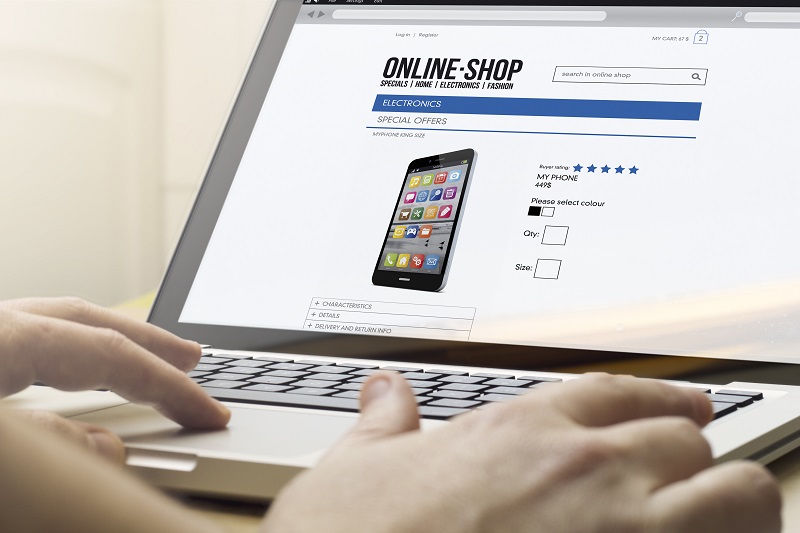
That online shopping increases day by day is not news. If you are an average user, you are probably already aware of the normal precautions and have taken them yourself. Ease of use and convenience when browsing for different products or searching for the best prices has improved greatly. However, at the same time, online threats and frauds have also increased exponentially. Therefore, from time to time, all of us must review our behavior and think again if our habits are secure.

Follow a few simple tips to stay safe while shopping online

Follow a few simple tips to stay safe while shopping online

Best practices while online shopping

1. Use your own computer or mobile device when shopping. It seems obvious, but you cannot trust a computer that does not belong to you, even your best friend’s computer. It might not have appropriate protection and it could already be compromised by malware. So, always use your own device, install an anti-malware solution and before you start doing anything that involves your money, scan your network to discover if it is safe.

2. Use your own Wi-Fi connection with a strong password. You must use a non-standard password for your network and router. Router vulnerabilities and weak passwords allow cybercrooks easy access to your home network. This sounds complicated, but it’s really not. Avast Home Network Security can help you by guiding you to the manufacturer’s website. The blog post will help you understand what it does and why it’s important.

3. If you cannot avoid using public/open Wi-Fi, use a VPN to encrypt your communications, or it could be eavesdropped on and your financial data and credit card credentials could be stolen. Avast SecureLine VPN offers strong encryption for Windows, Mac, and Android devices.

4. Choose your online store wisely. Focus on the best-known ones, where you can read other consumers’ opinions and reviews. We prefer the official site, especially if you are buying apps, so you can avoid fakes or other software bundled together with what you want. Nevertheless, this is not enough. Rogue apps have been know to slip into official stores like Google Play or Windows Store. You really need to have a security app installed and updated in your device: why don’t you do it right now with free Avast Mobile Security?

5. Look for a safe site. Nowadays, all the safe sites use HTTPS protocol (you know, that little padlock in the address bar of our browser). Avast products also scan your HTTPS traffic and prevents many threats. Do not give personal information: common sense is a good security measure, why would you need to inform your birthday to the online store? Moreover, while you are browsing, take your time to check refund policies, privacy policy (what do they do with your personal data), and product guarantees.

6. Search for the best price. You may find the free tool Avast SafePrice (available as a browser plugin called Avast Online Security) useful in helping you find the best offers online in trusted stores.

7. Do not use the same password for all your accounts. You must be aware that if you have an account or have done business with any company that falls victim to a breach, hackers sell your passwords to other cybercrooks. Use different passwords in different sites and a password service.

8. Keep your own computer up-to-date. A lot of security issues start when hackers exploit vulnerabilities in the software installed in your computer. The more popular software they are, the better for hackers. Adobe, Oracle, and Microsoft are only recent examples.

9. Keep a paper trail. Print or save your transaction records; it will be easier for any post sale issue. While you have a trail, you can check your credit card statement to make sure transactions match and if there were unauthorized charges.

10. Prefer safe payment options like your credit card or PayPal. Do not send money directly to the store or vendor. Credit cards have built-in protections and you can receive a refund in case of fraud.

Follow Avast on Facebook, Twitter, YouTube, and Google+ where we keep you updated on cybersecurity news every day.

Introducing the new Facebook Security Checkup

Earlier in August, the world’s largest social networking site, Facebook, unveiled their new Security Checkup feature.

The aim is to create a series of simple tools that help users control which devices are logged into Facebook, receive alerts when new devices log in and tips on creating a strong password.

Video

Facebook Security Checkup


Let’s take a look in more detail:


Log out of unused apps:

If you have multiple devices linked to your Facebook account, you may be surprised to see just how many apps have access to your account. Closely monitoring which apps have access to your account is a great way to help protect your account security and the privacy of your personal information.

It’s worth remembering that apps that have access to your Facebook account also have access to a lot of your personal information. Be selective about which apps you allow.


Login Alerts:

Setting up login alerts is a great way to help you manage access to your Facebook account. Used in conjunction with other security features such as Two-Factor Authentication, login alerts make it very difficult for any unauthorized party to gain access to your account. I’d highly recommend implementing both this and Facebook’s Login Approvals.


Password strength tips:

The final tool in the Security Checkup is some advice both for creating a strong password and also password safety advice.

The advice recommends using a password unique to Facebook, never sharing your password and avoiding dictionary or identifying words.

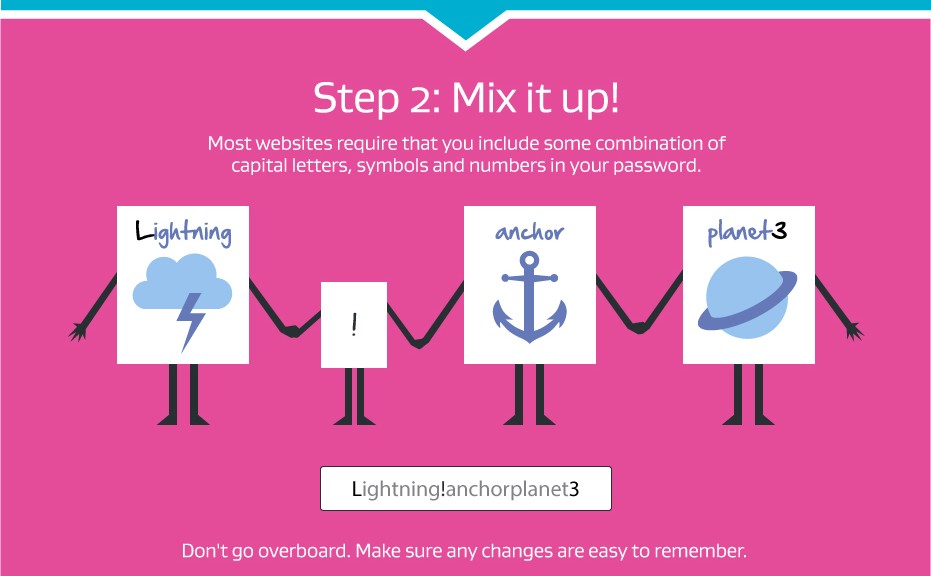
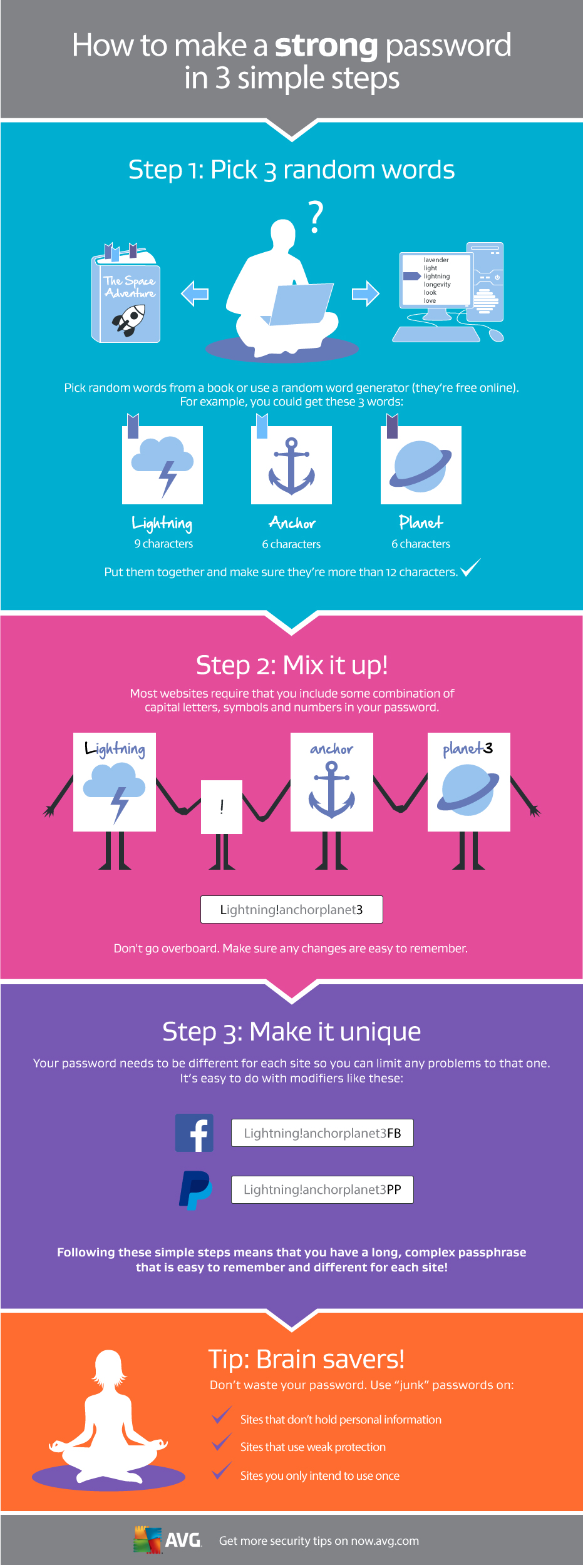
Your password is one of the most important parts of keeping all your online accounts safe, for more information on creating a strong, unique password that’s easy to remember, check out this infographic below.


Making a strong password

WordPress 4.2.4 Security and Maintenance Release

WordPress 4.2.4 is now available. This is a security release for all previous versions and we strongly encourage you to update your sites immediately.

This release addresses six issues, including three cross-site scripting vulnerabilities and a potential SQL injection that could be used to compromise a site, which were discovered by Marc-Alexandre Montpas of Sucuri, Helen Hou-Sandí of the WordPress security team, Netanel Rubin of Check Point, and Ivan Grigorov. It also includes a fix for a potential timing side-channel attack, discovered by Johannes Schmitt of Scrutinizer, and prevents an attacker from locking a post from being edited, discovered by Mohamed A. Baset.

Our thanks to those who have practiced responsible disclosure of security issues.

WordPress 4.2.4 also fixes four bugs. For more information, see the release notes or consult the list of changes.

Download WordPress 4.2.4 or venture over to Dashboard → Updates and simply click “Update Now.” Sites that support automatic background updates are already beginning to update to WordPress 4.2.4.

Already testing WordPress 4.3? The second release candidate is now available (zip) and it contains these fixes. For more on 4.3, see the RC 1 announcement post.