Without encryption you could not do online shopping, online banking or even downloads and updates over the internet without running an extreme risk.
The post Putting the S into HTTPS appeared first on Avira Blog.
Without encryption you could not do online shopping, online banking or even downloads and updates over the internet without running an extreme risk.
The post Putting the S into HTTPS appeared first on Avira Blog.
Without encryption you could not do online shopping, online banking or even downloads and updates over the internet without running an extreme risk.
The post Putting the S into HTTPS appeared first on Avira Blog.
By now, most of us are familiar with the term the “Internet of Things”. It has come to describe the always on, always connected world where day to day objects are online. It ranges from smart-watches to smart fridges and is closer to reality than you may think.
Much has been written about the need to secure the devices that make up the Internet of Things, but I believe there is another battle to be won.
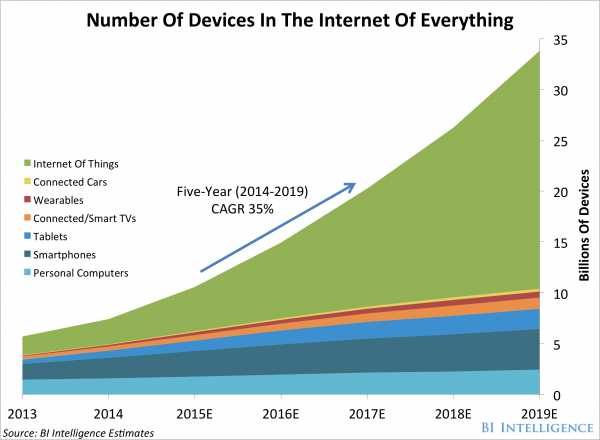
According to most reliable research, the number of Internet connected devices is growing rapidly and will continue to do so for the foreseeable future.
Building security into each and every one of these devices is no mean feat. In fact, it will be very difficult indeed. That’s what I believe that it is of vital importance that we focus our attention on securing routers and Wi-Fi hotspots.
As the number of Internet enabled devices in our homes continues to increase, more and more members of the public are getting ready to adopt smart home appliances, energy meters and wearables.

All of these newly connected devices entering the home should be rigorously secured as they will be handling data specific to your household. Securing them individually could be tough though, until you realise that they share something in common – they communicate via the Internet access point, a home router.
As you can see, the number of home routers in the market is continuing to grow rapidly, but is only a fraction of the number of total devices.

Robustly securing each home router or a public hotspot has the knock-on effect of securing the data transmission of dozens of devices and, for my money, is a much more realistic approach to securing the Internet of Things.
Sadly, security on most popular routers is still pretty basic and has a user experience to match. Clunky menus that aren’t immediately intuitive can leave users at a loss when it comes to making changes to their Internet settings.
Here are three simple things that you can do right now to help improve the security of your home Wi-Fi network.
Change the login details
Most routers will come with default login details. Many people never get round to changing them but you really should. “User name: admin Password: Password” is not a secure login and could potentially grant router level access to attackers if they know the manufacturer defaults of your device.
Set up an access list:
Most routers will allow you to set up a “permitted devices” list that limits access to your network. Setting this list up and including all your family’s devices is a good way to make sure that no unauthorized devices access your network.
Double check your Firewall
A Firewall is an important router feature that helps filter out bad traffic requests coming into your home. All traffic that is sent and received in your home goes through a Firewall and more specifically through “ports”. These are akin to doors, with each one dedicated to certain traffic types. It is always worth checking your Firewall settings in your router to make sure that you do not have any unnecessarily opened ports.
For tips on how to improve your home Wi-Fi Signal, check out the video below.


Being a finalist at Technovation 2015 means competing against over 400 apps from 64 different countries. The challenge? To build an app in just a few months that would help solve real-world problems such as sports concussions or childhood obesity.
I had the pleasure of leading the “Security By the Numbers” workshop at Technovation 2015 #wpitch2015. This workshop is designed to help the young finalists visualize themselves as entrepreneurs and transition their prototypes into market-ready apps.
So what defines a market-ready app? Increasingly, the answer is security. From the continuous stream of high-profile data breaches to the rising prevalence of malicious apps on Android, the lack of app security has proven to be a gold mine for cybercrime. In fact, a recent study by IBM found that the cost of data breach could be as high as $300 per single lost record and $154 per record on average.
As with all good design, app security is not a simple afterthought. That’s because security to the app is like a shell to a turtle, it’s a skeletal structure that needs to be designed for.

This workshop used an AVG app with over a million users to illustrate three key principles of app security:
This was particularly beneficial for the students because it provided them a glimpse into the technical infrastructure and monitoring that can support a large scale mobile application.
My favorite feedback from the workshop was “Technovation was an enlightening experience and helped me see this as a career, this workshop helped me understand what it would take to take my ideas to market.”
It was an inspiration to be surrounded by so many bright, driven and accomplished young women. I’m excited to see a future with a more diverse and inclusive tech industry!
AVG Technologies @AVGFree is a gold sponsor of Technovation thanks to the efforts of Anar Simpson @AnarSimpson, Todd Simpson @ToddSimpson and Judith Bitterli @JudithBitterli.
Mariya Snow @mariyasnow is a Senior Engineer at AVG Technologies.


A new Chrome extension called KeyboardPrivacy injects delays into typing patterns, thwarting attempts to build biometric profiles of users for authentication.
A blog released this week by Cybersecurity firm Zimperium details how Android phones can be infected when receiving an MMS (multimedia messaging service), giving hackers complete control of your phone. The report estimates that the security vulnerability is present in 950 million devices.
All the hacker needs for the attack is your phone number, and they can send you the message. In some cases the clever attackers have the message delete itself after delivery. The phone needs to be running Android 2.2 or later for it to be effected, that’s the majority of phones.
MMS Messages sent to Android phones that use the default messenger app use a piece of software called Stagefright that processes the messages. It is this component that potentially vulnerable to attack.
The real danger in the attack is that it requires no user intervention or action and can be installed completely without the victim’s knowledge.
Zimperium are a responsible company and not only alerted Google to the issue but also provided them with the necessary code to resolve the issue, and Google being responsible as well patched the software quickly, within 48hrs.
The big question is how do you get the fix and what is required? Generally this is dependent on your handset provider building the fix into their Android software and then pushing the fix to you. Typically, new software updates are not pushed to devices older then 18 months, this is of course due to the way we, as consumers, churn our mobile phones and always want a new one.
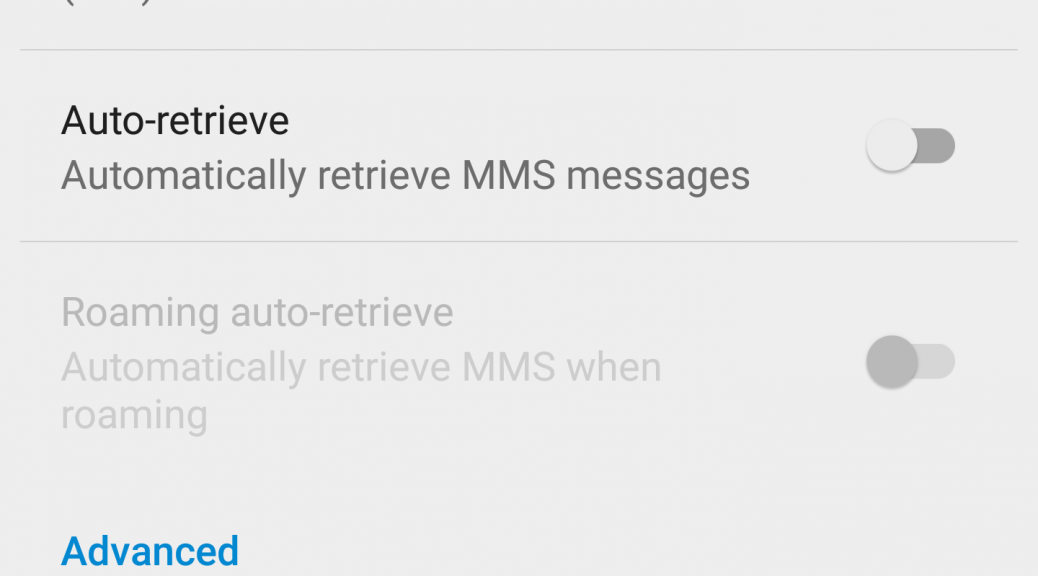
Alternatively, you can reduce the risk by switching off the ‘auto-retreive’ option in the Android MMS service, this would then mean that any MMS destined for your phone would need to be accepted by you. I have just taken these preventive steps on my Nexus 6 as follow:
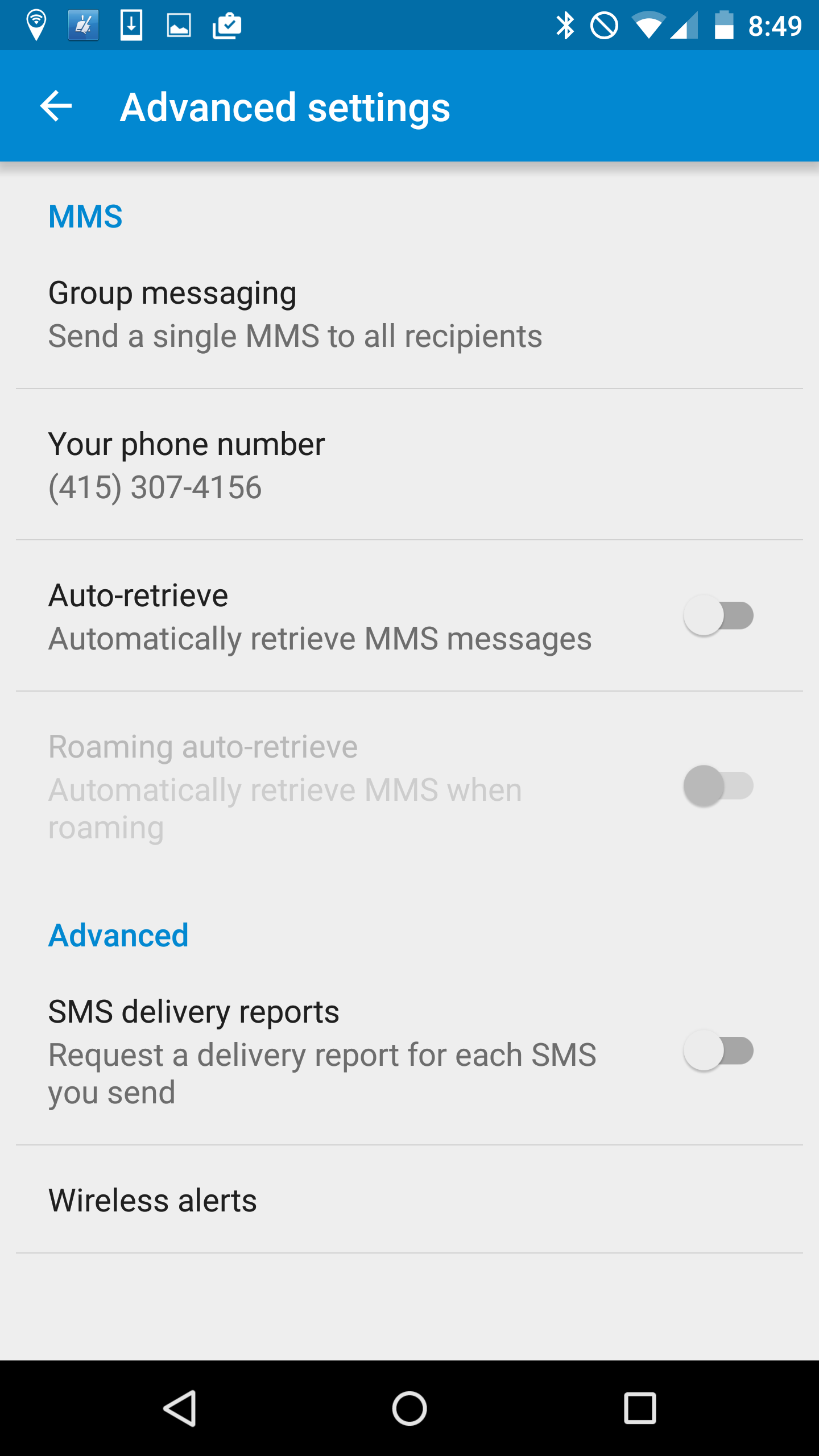
If you are running Google Hangouts as the default way to receive MMS messages then switching back to the standard messenger and switching the auto-retrieve option off will help mitigate the risk.
There are other vendors who also use the Stagefright code, some of whom have responded quickly and already released and delivered the fix to their users, they include Mozilla, Silent Circles Blackphone and CyanogenMod.
The research paper detailing the exact details of the vulnerability is due to be delivered at the Black Hat conference in Las Vegas next week. Every year around this time hacker’s use the conference to publish major issues found in our everyday devices. Just last week Charlie Miller published a report on taking control of a Chrysler Jeep.
I wonder what devices are next on the list and isn’t it worrying that they wait for Black Hat to publish the details rather than raise the concern when they actually find it.
Follow me on Twitter @TonyatAVG


For more tips on online security and privacy, check out the AVG Academy YouTube channel.


Wow, that sentence sounds rather boring, right? Well, let’s elaborate a bit. If you are an avid PC gamer you most like know Steam, and if you are into playing (or watching) gamers compete in Multiplayer Online Battle Arenas (MOBAs), you also might have noticed that some of the more famous DotA 2 players got their accounts stolen. Of course their accounts were not the only ones affected, but definitely the most noticeable ones.
What happened is that Steam apparently had a rather big loophole in its system: One could access another account with only the username – and it was as simple as eating pie. Just take a look at the video below and be amazed:
The issue is now fixed, after Valve learned of it on July 25th – so if you are a gamer with a lot of games in your steam library (or a professional DotA/CS:GO player) you can relax.
According to Kotaku, Valve release a statement to those affected:
“To protect users, we are resetting passwords on accounts with suspicious password changes during that period or may have otherwise been affected. Relevant users will receive an email with a new password. Once that email is received, it is recommended that users login to their account via the Steam client and set a new password.
Please note that while an account password was potentially modified during this period the password itself was not revealed. Also, if Steam Guard was enabled, the account was protected from unauthorized logins even if the password was modified.
We apologize for any inconvenience.”
The post Steam Account Security Issue Got Fixed appeared first on Avira Blog.
One in five of the 198 million Americans who have plans to take vacations this summer are planning to go abroad, with Europe being the most popular destination.
The attraction is not surprising given the strong US dollar, though uncertainty about the Greece debt crisis and default, and its impact (still an unknown), is a possible damper for some travel plans.
At this juncture, the UK Foreign Office has advised its travellers: “Visitors to Greece should be aware of the possibility that banking services – including credit card processing and servicing of ATMs – throughout Greece could potentially become limited at short notice.”
The Greek situation aside…If you are preparing to travel abroad, here are some tech-related tips on the basics to make sure you have a great, safe time.
Cash or credit cards?
It’s a simple but complex question. Many small proprietors in Europe only take cash. So, you will need to travel with a certain amount of cash.
Starting with currency basics, there are many apps that can show you instant conversion rates, no matter what country you are visiting. And now, ordering currency online can make your life easier. Order Euros online from your bank in advance and get delivery direct to your home or for pick up at your local bank branch in 1-3 business days.
If you need to find an ATM on the fly while abroad, try an app such as as ATM Locator available on the Android platform or iOS.
At the end of the day, most security experts advise against using your debit card for anything beyond cash withdrawals at ATMs. For other transactions, use cash or a credit card.
Using Your Mobile Abroad
Probably chief among the tech challenges for most of us when traveling abroad is using your cell and smartphones. Cell phones and other mobile devices from North America don’t automatically work in Europe. Europe uses the GSM network and much of North America primarily uses the CDMA network. Some US cell phone companies use GSM (T-Mobile, AT&T), but many do not.
To be able to use phones whether they are public phones, landlines or a mobile phone, please confirm the situation with your personal device manufacturer and service provider before you leave for your trip.
Among your options, is to rent a European cell phone. Telestial, for example, offers standard rental package which comes with a SIM with a UK number. That means that if you are calling to other countries, there are calling charges. For lowest calling charges rent the phone and then purchase a local SIM either in advance or when you arrive.
If you can use your own phone, get an international calling and data plan. Roaming charges have improved, but can still add up very quickly. Before you leave, contact your carrier for an international data and calling plans. Also check how to access your Cell phone voicemail when traveling abroad; it may be different than when you are at home.
Turn off the phone when not in use. Turn off 3G (or 4G), cellular data and data roaming when not in use. Another quick fix is turn your phone on “airplane mode.’ Disable automatic downloads and app updates, or restrict this feature to operate only when connected to Wi-Fi. Reset all your usage statistics (so you can keep track of how much you are using your phone, whether it’s texting, voicemail, etc.).
You might also want to pick up a local calling card, as old school and non-high-tech as that seems. J In many cases, these cards offer better rates to cellular networks in foreign countries than are available in the U.S.
“Free” Wi-Fi considerations
Wi-Fi is ubiquitous now and that’s a good thing. But you need to be careful. This is where a lot of data gets stolen. Whether it’s at a café or your hotel, you should ask staff to tell you the name of the network. Many scams simply say “Free Wi-Fi” and people innocently connect with them…
As another simple precaution, avoid disclosing any sensitive information online in a free Wi-Fi hotspot. This would include banking, credit card information, or other personal data.
I highly recommend using AVG’s Wi-Fi Assistant, a free app that allows you to encrypt your data when on the move and helps save battery by shutting off your smartphone’s Wi-Fi when not in use.
Oh, and finally, be sure to leave that selfie stick at home J. (They have been banned at many tourists sites!)


Earlier this July, the British government published “The Pathway to Driverless Cars: A Code of Practice for testing”, a fourteen page document clarifying the legislation around driverless vehicle testing in the UK.
As expected, the document is heavily skewed towards safety, with stipulations for operator overrides and emergency service procedures among others.
That’s not the part that I found interesting about the guidleines. That came later, and was more focused on data collection and cyber security.
As we have come to expect from our connected devices, data collection is inevitable. The government’s outlines mandate the following as minimum data recording functionality on the vehicle.
As a minimum this device should record the following information (preferably at 10Hz or more):
Add to these minimum prerequisites some other specific datasets such as location (for traffic updates etc.) and you begin to get the picture. Very soon our connected, driverless cars will become a hive of activity, bringing convenience to our daily lives but documenting it like never before.
In fact, immediately following the data collection requirements, the document then went on to establish expected behavior for handling this data.
“Testing is likely to involve the processing of personal data. For example, if data is collected and analysed about the behaviour or location of individuals in the vehicle, such as test drivers, operators and assistants, and those individuals can be identified.”
Will our own cars present a privacy risk to us in the future? Thorough data logs of everything we do and everywhere we go suggest that it might. Who knows, perhaps we’ll see an optional “incognito mode” like we see in some web browsers, where you can drive “off-record” for a limited time.
I was also pleased to see the inclusion of some basic cybersecurity standards included in the document. As our digital world rapidly merges with the offline, it becomes ever more important to safeguard the things that matter most from attack.
The document stipulates:
“Nevertheless, manufacturers providing vehicles, and other organisations supplying parts for testing will need to ensure that all prototype automated controllers and other vehicle systems have appropriate levels of security built into them to manage any risk of unauthorised access.”
This is hardly comprehensive but it does make developers consider cybersecurity from the outset.
While time will tell just how ready the people of Britain are for driverless vehicles, but it’s good to see that the government is addressing safety concerns both on the road and online.