Tag Archives: Security

XSS Vulnerability In WordPress – Update Now

The guys from WordPress just released version 4.2.3 of their software, which is mostly a security update. They “strongly encourage you to update your sites immediately.“ To do so just visit your Dashboard, click on ‘Updates’ and then on ‘Update Now’. As mentioned above you’ll only have to update manually if, for whatever reason, you decided to disable the automatic updates.

According to their blog entry the newest version contains fixes for 20 bugs from 4.2. The page also says: “WordPress versions 4.2.2 and earlier are affected by a cross-site scripting vulnerability, which could allow users with the Contributor or Author role to compromise a site. This was initially reported by Jon Cave and fixed by Robert Chapin, both of the WordPress security team, and later reported by Jouko Pynnönen.

We also fixed an issue where it was possible for a user with Subscriber permissions to create a draft through Quick Draft. Reported by Netanel Rubin from Check Point Software Technologies.“

And don’t forget: Since WordPress is definitely one of the most popular Content Management Systems and blogging platforms out there it remains an attractive target for cybercriminals – especially due to the huge user base. Administrators should always keep their WordPress installations (including addons and themes) updated and patch as soon as there are security updates available.

If you want to find out more about the dangers you could face as a blog administrator and get some advice which might help you to protect your page, take a look at Ange Albertini’s blog article concerning the topic.

The post XSS Vulnerability In WordPress – Update Now appeared first on Avira Blog.

New Study: 10 Out of 10 Smartwatches Vulnerable

A new study on the Internet of Things with focus on smartwatches released by HP revealed that of 10 smartwatches that were tested, all contain significant vulnerabilities and are a “risk that goes beyond the device”.

So what exactly are we talking about? According to the study (PDF) “the results of the research were disappointing, but not surprising.” There are deficiencies when it comes to authentication and authorization, privacy concerns, and problems with the implementation of SSL/TSL.

Their key takeaways are as following:

  • “Data collected initially on the watch and passed through to an application is often sent to multiple backend destinations (often including third parties)
  • Watches that include cloud interfaces often employed weak password schemes, making them more susceptible to attack
  • Watch communications are trivially intercepted in 90% of cases
  • Seventy percent of watch firmware was transmitted without encryption
  • Fifty percent of tested devices offered the ability to implement a screen lock (PIN or Pattern), which could hinder access if lost or stolen
  • Smartwatches that included a mobile application with authentication allowed unrestricted account enumeration
  • The combination of account enumeration, weak passwords, and lack of account lockout means 30% of watches and their applications were vulnerable to Account Harvesting, allowing attackers to guess login credentials and gain access to user account”

So yes, it’s basically the same cycle as with most of the ‘newer’ tech gadgets. They get released, there is a big hype, but security becomes only important after lots and lots of reports on hacks, vulnerabilities, and the inevitable bad press. Think nothing of it guys, everything is just the way it always was …

The post New Study: 10 Out of 10 Smartwatches Vulnerable appeared first on Avira Blog.

Microsoft releases emergency Windows patch after discovery of critical security flaw

With the release of their newest operating system just days away, now is not the most convenient time for Microsoft to be facing and dealing with security bugs. However, two thirds of all 1.5 billion PCs operated by Windows across the globe were recently left vulnerable due to a security flaw found in nearly every version of Windows, including Windows 10 Insider Preview.

If you use Windows, the time to update is now!

If you use Windows, the time to update is now!

The flaw (MS15-078) lies within the Windows Adobe Type Manager Library and can be exploited by cybercriminals to hijack PCs and/or infect them with malware. Users can be attacked when they visit untrusted websites that contain malicious embedded OpenType fonts. Microsoft explains more about the threat in a security bulletin advisory:

An attacker who successfully exploited this vulnerability could take complete control of the affected system. An attacker could then install programs; view, change, or delete data; or create new accounts with full user rights.

There are multiple ways an attacker could exploit this vulnerability, such as by convincing a user to open a specially crafted document, or by convincing a user to visit an untrusted webpage that contains embedded OpenType fonts. The update addresses the vulnerability by correcting how the Windows Adobe Type Manager Library handles OpenType fonts.

The flaw has been classified as critical, which is Microsoft’s highest measured level of threat. Anyone running Windows Vista, Windows 7, Windows 8 and 8.1, Server 2008, Server 2012 and Windows RT are affected by the flaw. Microsoft’s online Security TechCenter includes a full list of affected software and additional vulnerability information.

How to ensure your safety

Taking into consideration that this is a critical security threat that potentially puts your whole system at risk, it only makes sense to install the Windows patch as quickly as possible. The majority of customers have automatic updating enabled and won’t need to take any action because the update will be downloaded and installed automatically. Customers who have not enabled automatic updating, or who install updates manually, can use the links in the Affected Software section to download and install the update. This article walks users through two different methods of obtaining and installing the security udpate. Both methods require a restart after the patch has been applied.

Avast Software Updater can lend a helping hand in ensuring that your software stays updated to the latest version. To find it, simply open your Avast user interface. Click Scan on the left side, then choose Scan for outdated software. You can then decide how to proceed.


Follow Avast on FacebookTwitterYouTube, and Google+ where we keep you updated on cybersecurity news every day.

WordPress 4.2.3 Security and Maintenance Release

WordPress 4.2.3 is now available. This is a critical security release for all previous versions and we strongly encourage you to update your sites immediately.

WordPress versions 4.2.2 and earlier are affected by a critical cross-site scripting vulnerability, which could allow anonymous users to compromise a site. This was reported by Jon Cave of the WordPress Security Team, and fixed by Robert Chapin.

We also fixed an issue where it was possible for a user with Subscriber permissions to create a draft through Quick Draft. Reported by Netanel Rubin from Check Point Software Technologies.

Our thanks to those who have practiced responsible disclosure of security issues.

WordPress 4.2.3 also contains fixes for 20 bugs from 4.2. For more information, see the release notes or consult the list of changes.

Download WordPress 4.2.3 or venture over to Dashboard → Updates and simply click “Update Now.” Sites that support automatic background updates are already beginning to update to WordPress 4.2.3.

Thanks to everyone who contributed to 4.2.3:

Aaron Jorbin, Andrew Nacin, Andrew Ozz, Boone Gorges, Chris Christoff, Dion Hulse, Dominik Schilling, Ella Iseulde Van Dorpe, Gabriel Pérez, Gary Pendergast, Mike Adams, Robert Chapin, Nikolay Bachiyski, Ross Wintle, and Scott Taylor.

AV-Comparatives describes AVG AntiVirus for Mac® as ‘flawless’

While this makes us at AVG proud it’s the commentary that the editor uses to describe our Mac product that really pleases us. “AVG AntiVirus is a simple, easy to use antivirus program for Mac, with all the essential features. Its detection of Mac malware was perfect”.

In fact the test results state that not only did the AVG product score 100% in the detection of Mac malware but it also scored 100% in Windows Malware Detection. We at AVG believe that you should feel protected across all of your devices, so we work hard to block the bad stuff regardless of which operating system you prefer.

Our Mac product is simple and easy to use, with features to scan the ‘Entire Mac’, ‘File Scanner’ and ‘Real-Time Protection’ it could not be easier to keep your Mac secure.

If you are one of those Mac users sitting there without protection then you need to think about the assets and information that you have on your machine. While there are limited examples of malware for the Mac platform it could be devastating if it infects your machine.

Imagine taking the view that you have never seen someone you don’t know try opening the front door of your house, so you leave it unlocked. On the day that the chance burglar does try the door and its unlocked then the burglary is likely to be very bad as there is nothing stopping them from emptying your entire house.

Loading the AVG Antivirus product on you Mac, just like locking your door, is a preventative measure that all Mac users should take to stay safe. And what makes this even more compelling is that it’s completely free.

Download AVG AntiVirus for Mac from here.

You can follow me on Twitter @TonyatAVG and find my Google+ profile here.

Why “Chip and PIN” is more secure than “Swipe and Sign”  

This change to “chip and PIN” has already occurred in many other countries and has reduced credit card fraud – in particular “card skimming” and “cloning” whereby somebody can make a copy of your credit card and use it elsewhere.

Most credit cards now contain a “smart chip” on them that are much more secure than the “magnetic stripe”.  The reason for this is that the smart chip is actually a tiny-computer that can interact directly with a payment terminal or ATM – and they’re designed never to give up their secret information.  Whereas a magnetic stripe reveals all its data and is easily copied.

U.S. business owners who fail to upgrade their payment terminals to support chip & PIN by October will also become liable for any fraudulent transactions as American Express, Discover, MasterCard and VISA get set to implement the change.  However, some “pay at the pump” Gas stations will be exempt until 2017.

The good news for all of us though is that insisting on a PIN at the point of sale means your card, if lost or stolen, is useless to whoever might get hold of it – except for contactless transactions which don’t require a PIN under a certain transaction amount.  As always you should still protect your credit cards the same way you do with cash.

Five (5) quick PIN tricks and tips:

  1. Did you know YOU can change your PIN at any time? You can easily change the PIN assigned to your new card at an ATM (usually at an ATM belonging to your bank) – just look for the “select new PIN” or “Other” options.
  2. How long is your PIN? It can be between 4 and 6-digits in length – personally I like to use 5 just to be different!
  3. Don’t use your date of birth! Having a 4 or 6-digit PIN can be a temptation to store your birthdate, but it should be obvious that this is something to avoid at all cost!
  4. Don’t use predictable key combinations! Try to avoid choosing a PIN that uses a combination of keys that form a pattern – for example, 2580, 1234, 1379.
  5. Never write your PIN down! Now that you know how to change the PIN yourself, you should be able to choose one that you’ll never forget – so make sure you don’t write it down or store it anywhere, like on your mobile device – doing so will almost certainly be a violation of your credit card issuer’s acceptable usage policy.


Until next time, stay safe out there.

Title image courtesy of thisismoney.com

Why you should change your Skype password now

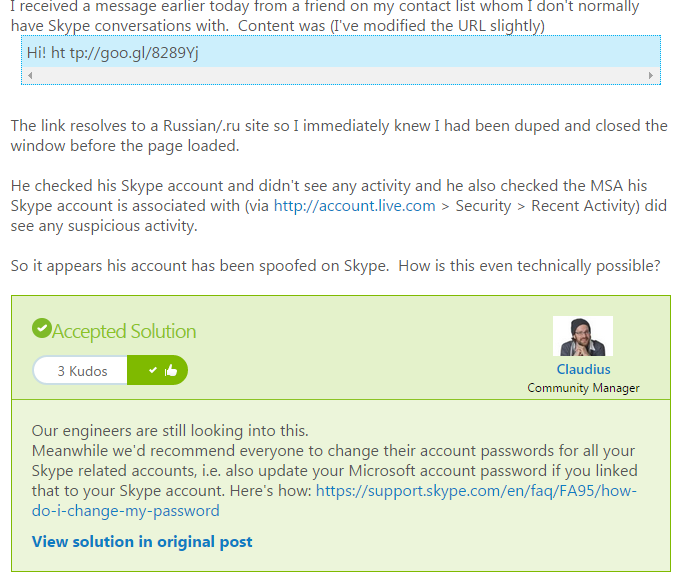
The advice comes as a response to users complaining in the Skype forum that they have been apparently receiving malicious links from friends.

This sort of attack, where attackers either gain access or can mimic an authentic account is known as spoofing and can be very successful due to the level of trust that people have in their own contacts.

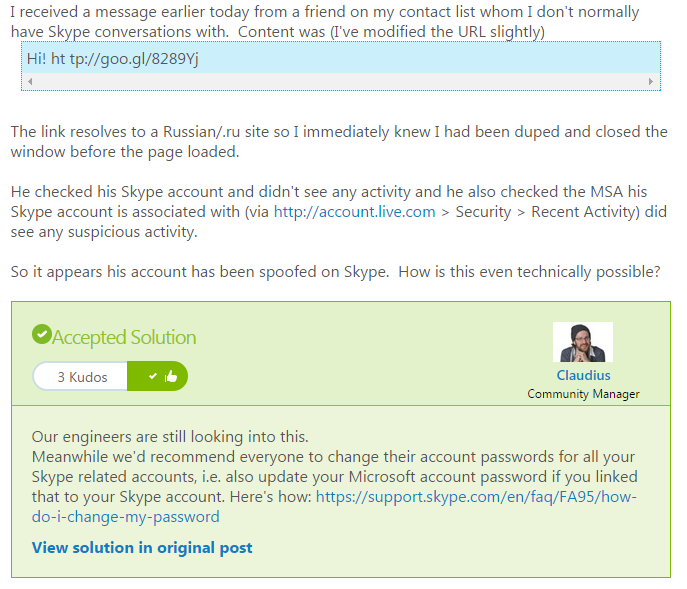
Skype Spoofing


If you think that you or someone you know has been a victim of spoofing, here are three things that you should you do.


Don’t click

Normally, spoofing or phishing emails will contain a link to a site. Don’t click on it, especially if it is a shortened link as seen in the Skype forum example. If you believe it could be genuine, hover over the link and your browser will reveal the final destination of the link.


Get protection

As cyberattacks get ever more complicated and better disguised, it can become difficult to stay protected. That’s why it’s important to get the best possible antivirus solution that can help keep you safe not just from viruses and malware but additional tools like AVG’s LinkScanner technology can scan links and attachments to check whether they are safe even before you click on them.


Changing your password

Just as Microsoft advised on the Skype forums, if you believe you’ve been a victim of any kind of spoofing or account fraud, it’s important to change your password. If someone has access to your account you should put a stop to that as soon as possible.

Take a little time when developing your new password and make sure that it gives you as much protection as possible.

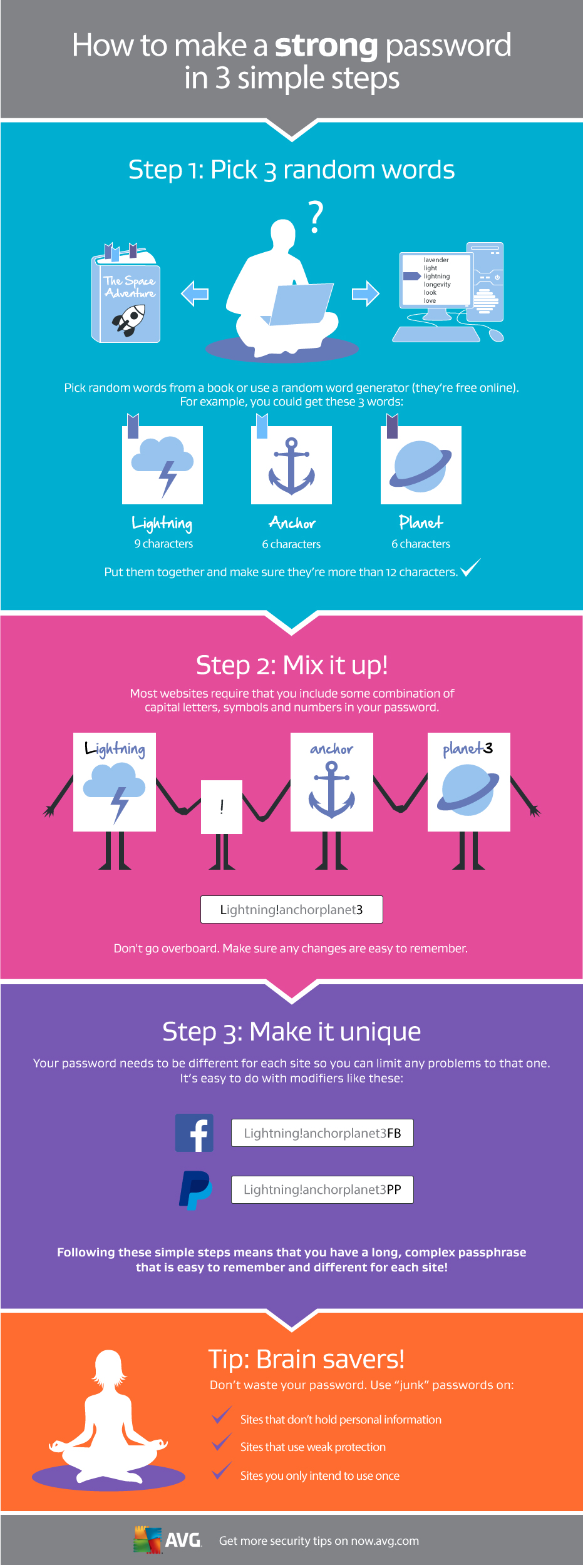
For help doing this, take a look at the graphic below that will help you create a strong, unique password in three simple steps.

Making a strong password

Three reasons to be happy that Apple Pay has arrived in the UK

I’ve long been a fan of Apple Pay and the fact that it is finally available in my homeland, the UK, is a good thing.

While most Americans are still using credit card magstripes to make payments, a few early adopters have been using Apple Pay since it was released around a year ago in the US. I am one of them, and I have to admit I’m impressed.

First and most obviously, there’s the convenience of being able to make small purchases quickly and easily using just my phone. No more digging around for my wallet or cash but a quick bleep and I’m done.

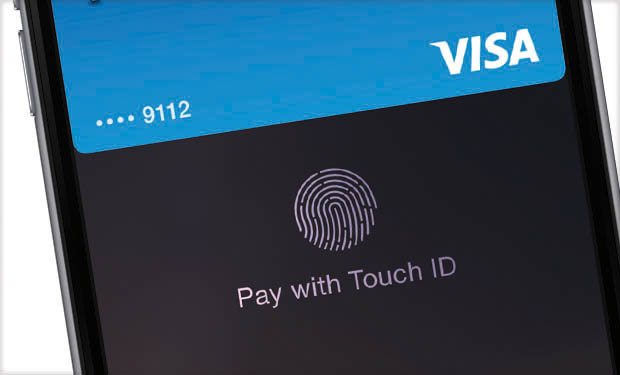
Next is the security. Paying with Apple Pay isn’t just convenient but secure as well. When you hover over the contactless payment point, you use the Touch ID to authenticate the transaction, making it much more secure than the contactless credit and debit cards already in use in the UK which have no authentication at all and can be used by anyone for small purchases.

Touch ID


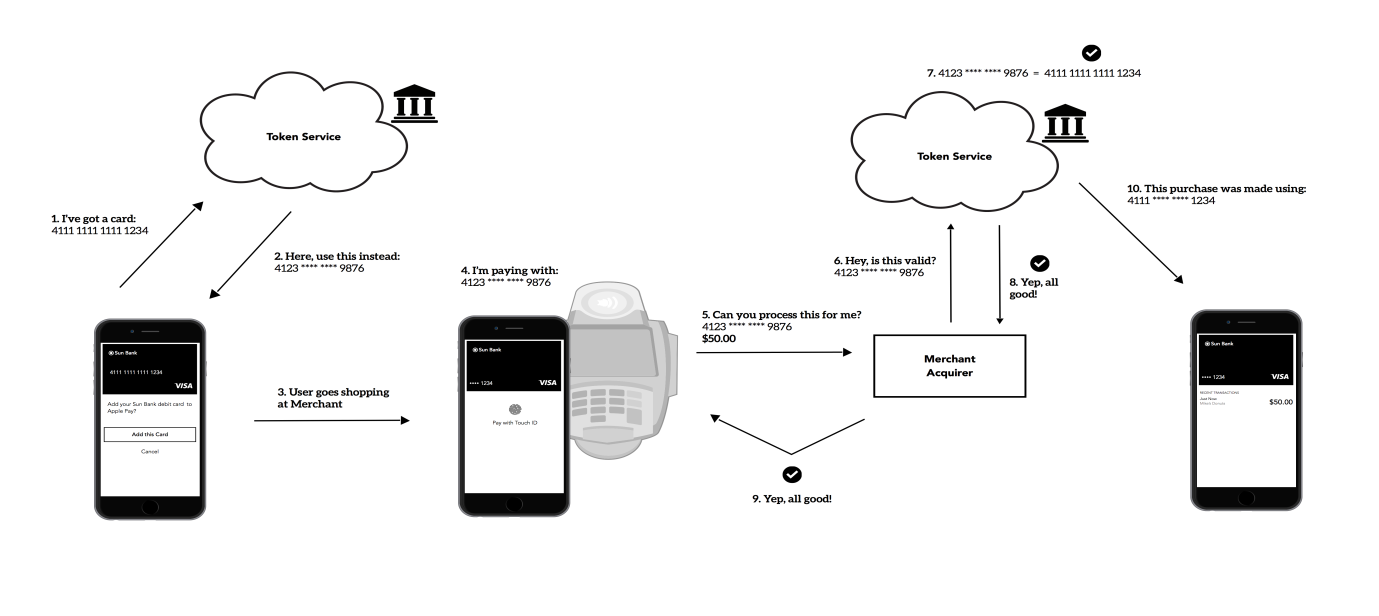
Apple Pay also helps protect your privacy thanks to Apple’s Unique Device Account Number. A system specifically designed for Apple Pay, using a Unique Device Account Number means that Apple never needs to transmit or share your actual card or banking details with the merchant. This adds a significant layer of protection for your payment data.


Apple Pay Diagram

Image source


For more information on how mobile payments work check out this blog from my colleague Judith Bitterli and these three trends from Charlie Sanchez.

In You can follow me on Twitter @TonyatAVG and find my Google+ profile here.

Digital Diaries: Teens are Photoshopping their images before sharing

Our latest  Digital Diaries research shows that more than two in ten children said they had edited photos of themselves before posting them online. Photoshopping at age 11 -13? Twenty-two percent of kids surveyed reported they had. Why?

Globally, thirty percent of the kids who altered their photos said they did so to make them look better.  Thirty four percent (34%) said they edited to make the photo look like more fun. And girls (21%) were more prone to do the editing than boys.

In the age of Facebook and Instagram, this definitely ties into the pressures we place on kids as a society to look perfect – and unrealistic beauty standards perpetuated by models and movie stars (many of whom are often Photoshopped).

Here in the U.S., did you know that one of the options now offered for school photos is to Photoshop your kid’s photo? You can take care of any imperfections like braces, blemishes and teeth whitening that might make the photos appear less than perfect.

In 2010, when The New York Times reported on the emergence of the phenomena, some of the leading school portrait photography companies reported up to 10% of elementary school photos were being altered. What kind of message does this photo altering send to kids?

“If we encourage kids to want to erase their imperfections when they’re very young, how will they ever be able to handle acne…or wrinkles?” wrote a young blogger who has written about the negative effects of Photoshopping on young people—specifically girls on social media.

Which brings us back to digital parenting…There’s a lot here for us to continue to ponder as we and our families live more and more of our lives always on and online.

It’s important for parents to show their children that what they see online or in the movies isn’t always real. The digital doctoring of images in the pursuit of ‘perfection’ can have damaging consequences for the self-image and confidence of young girls and boys.

The digital world holds a host of opportunity and excitement for our children, but as parents, grandparents, uncles and aunts, it’s our job to guide them and educate them in the pro’s, con’s and deceptions that it can bring with it.

More than one in 10 American mobile users is the target of mobile malware

Threat analysts and malware researchers in the Avast Virus Lab detect and neutralize threats as soon as they appear.

Threat analysts and malware researchers in the Avast Virus Lab detect and neutralize threats as soon as they appear.

The Avast Threat Report provides an overview of global threat activity.


Avast malware researchers and Avast customers work 24/7 to protect each other.

Avast protects 230 million people worldwide in more than 186 different countries — we are present in more countries than McDonalds and protect more people than any other antivirus security provider. We stream 250 micro updates a day that protect our users from attacks. This is made possible by the 230 million devices we protect that simultaneously act as de facto sensors. These sensors provide us with information about suspicious files to help detect and neutralize threats as soon as they appear. Once we identify a suspicious file on a single device, it is reported back to the Avast servers and all Avast users around the world are immediately protected. This is called our Community IQ – it not only lets us better protect our users but also gives us valuable insights into the current security landscape.

Top targeted countries

Romania, Turkey and Vietnam were targeted the most in terms of PC threats in Q1 of 2015, with Romanians having a 54% chance of encountering threats. In France, Germany, Brazil, Great Britain and the United States, the chances were much lower; nonetheless, nearly one out of every three PC users encountered threats in these countries.

Percentage of PC threats encountered by country:

  • 41 percent Russia
  • 37 percent Spain
  • 34 percent Brazil and France
  • 29 percent Germany
  • 28 percent United States and Great Britain

Within the mobile sphere, Romania also had a high chance of encountering malware, along with China and Malaysia.China was targeted the most, which is most likely due to the fact that the Google Play Store is blocked in the region and, therefore, mobile users download apps from third-party stores.

The number of users accessing the Internet in China via mobile devices has surpassed the number of users accessing the Internet via PC this year, which also makes them an attractive point of access for cybercriminals on the hunt for a widespread target pool.

Percentage of mobile threats encountered by country:

  • 21 percent Russia
  • 16 percent Spain
  • 12 percent United States
  • 10 percent Brazil
  • 8 percent France and United Kingdom
  • 6 percent Germany

Top detections and exploits

Despite Android being fairly secure, mobile malware did grow dramatically with potentially unwanted programs (PUPs – a cute acronym for a not-so-cute threat), including adware, dominating the top ten Android detections.

On the PC side, the majority of the top ten detections included LNK files. LNK files are used to create shortcuts that typically point to an executable file or script and appear on one’s computer desktop as an icon, tricking users into using malicious shortcuts.

In terms of exploits, two of the biggest vulnerabilities that were exploited targeted Javascript and an HTML parser. The first exploit, targeting Javascript, could lead to a remote code execution in Internet Explorer versions 6 to 10 The second, on the other hand, targeted an HTML parser in Internet Explorer 10, and if successful, the attack could lead to remote code execution. Even if the attack was unsuccessful, it could still cause a denial of service.

Malicious ways

We observed a variety of tricks that cybercriminals use and one interesting, less common technique cybercriminals use is domain rotation. This method regularly creates new domains and subdomains and redirects malicious traffic to them. This is done to avoid blacklisting and capitalizes on the fact that it takes time for antivirus software to find and check these new domains, releasing new detections after they’ve been properly examined. Fortunately, Avast uses advanced algorithms to recognize domain rotations and block infected subdomains.

We also watched ransomware targeting PCs and mobile devices evolve. For example, PC ransomware CryptoWall did not originally use anonymization networks in earlier versions. CryptoWall 2.0 began using TOR to communicate with the command and control (C&C) server and now CryptoWall 3.0 uses I2P (Invisible Internet Project) a lesser-known anonymization network to avoid being blocked. Mobile ransomware Simplocker, on the other hand, reappeared in February 2015 using asymmetrical cryptography, making it impossible to recover encrypted data without accessing the C&C server.

Global Wi-Fi experiment

We not only observe malware threats, but we also ventured out of the office to further explore the security risks of public Wi-Fi. Our mobile security experts traveled to nine cities in the United States (San Francisco, Chicago, New York), Europe (Barcelona, London, Berlin), and Asia (Seoul, Hong Kong, Taipei) to observe public Wi-Fi activity.

Our observations revealed major security flaws in Wi-Fi hotspots and showed how easy it is for hackers to view users’ browsing activity, searches, passwords, videos, emails, and other personal information. While security issues were found in all cities, the experiment showed that users in Asia are more prone to attacks than users in both Europe and the U.S. Users in Berlin and San Francisco were most likely to take the necessary steps to protect their browsing.

Our experiment also shed light on the fact that a significant portion of users browse primarily on unsecured HTTP sites while connected to open Wi-Fi networks. HTTP traffic is not encrypted and is therefore unprotected, meaning that our team was able to view all of the users’ browsing activity, including domain name and page history, searches, personal log information, videos, emails, and comments. Taking this a step further, it was even possible for the Avast researchers to see products that a user browsed on eBay while not being logged in to the site as well as articles that people read on Wikipedia.

We have put together a security report for the first quarter of 2015, which includes a list of top targeted countries, threats, exploits, domain detections and much more. Open the full Avast Threat Report here.

Follow Avast on FacebookTwitter and Google+ where we keep you updated on cybersecurity news every day