Category Archives: AVG

AVG

World’s 25 worst passwords revealed! Is yours one of them?

According to this report, the world’s most used passwords from 2015 were “123456” followed closely by “password” itself. And to make matters worse, out of the Top 25 over a third (40%) were lazy combinations of those first two passwords.

Also on the list were shockers such as “solo”, “starwars” and even “princess” more than likely referring to the latest Star Wars movie that has been top of mind for many.

Perennial favorites like “qwerty” and “1qaz2wsx” also appear on the list, as people continue to think that using a pattern on their keyboard will thwart the cybercriminals – who, by the way, have known about that technique for years!


1 123456
2 password
3 12345678
4 qwerty
5 12345
6 123456789
7 football
8 1234
9 1234567
10 baseball
11 welcome
12 1234567890
13 abc123
14 111111
15 1qaz2wsx
16 dragon
17 master
18 monkey
19 letmein
20 login
21 princess
22 qwertyuiop
23 solo
24 passw0rd
25 starwars


Okay yes, I’ll put my hand up, I’ve been guilty of using one of these passwords myself – have you? But the important question is why we do it.

Having to think of a new and unique password these days is annoying and frustrating, especially when we’re all being told to create different passwords for every online account we have.  For some of us, that’s hundreds of accounts!

So what is the solution?  Here are some password tips.

  1. Watch this video on why you should never use the same password twice – and understand how you can “separate” a common password for use across multiple sites in a reasonably secure way.
  2. When thinking up a new password, learn about the four common mistakes that people make with passwords, as I explain in this video.
  3. Where available, especially for important accounts like Email, Banking and Facebook, consider activating “2-Factor” or “2-Step” authentication where you can – it’s no excuse for creating a lazy password, but it does add another layer of security.

Until next time, stay safe out there.


‘Instagram for Doctors’ app could risk your privacy

A social networking app called ‘Figure 1’ dubbed the ‘Instagram for doctors’, allows medical professionals to share photos and comments of interesting or baffling clinical cases with the goal of providing advice, education, and treatment options. But does it put patient privacy at risk?

Anyone can download the app and view the material posted on the platform, but only healthcare professionals can post images or make comments.

Any images posted to Figure 1 must have any physical details that could identify patients (faces, tattoos, piercings etc.) obscured or removed using the in-app tools. According to Figure 1, these images are then reviewed by moderators to verify that all identifying information has been properly removed.

However, while the in-app tools help maintain patient anonymity, there may be situations where a patient’s symptoms are so unique that, by virtue of the fact, they could be easily identified.

Figure 1 claims to take the issue of patient privacy extremely seriously, however, Dr Landy the creator of the app admitted that control of the patient consent process was out of their hands — it still remains the responsibility of the medical professional or institution.

Risks and concerns

The question of data security is all important in this particular case, because a data breach could be personally damaging for patients, and financially costly for medical practitioners and institutions alike.

As a patient, here are four questions you might like to ask your health care provider.

  • What assurances do you have that your data is being handled appropriately?
  • If your privacy is relying on any kind of human moderator, who’s watching the moderators?
  • How is your personally identifiable data securely disposed of, and when?
  • Does your provider have suitable data breach prevention policies, and are all their employees familiar with them?

Even though some companies and their employees may have the best intentions for their customers, not having proper measures in place can result in actions that have serious implications — as was the case with the 56 Dean Street clinic in London.

The Figure 1 app is an example of how technology can democratize knowledge to improve the speed and delivery of essential information that can make a real difference to people’s lives.

However, technologies that handle extremely confidential information must be tempered with the right controls to avoid privacy breaches at all costs.


PC Malware that silently installs apps on your Android device

The AVG VirusLab was recently exploring the Chinese Android App market and encountered PC based Malware with an interesting side-effect – it was silently (without any notifications to the user) installing apps to Android devices directly connected to the PC.

With a competitive landscape of over 1.9 Million Android apps in the Google Play store alone, and more in other global marketplaces, it’s not hard to see why such tactics are appealing to developers.  Advertising a new app has become increasingly difficult, and costly.

Pre-installation of apps, for example, is one of the most successful ways that developers can get attention and market share, yet it is prohibitively expensive and replies on partnerships with a limited number of handset vendors.

China’s underground black market however appears to be providing a cheaper pre-installation alternative for developers to spread their new apps – through special “alliance” operations such as ones we identified called “cyber café alliance” and “fast step union”.

These alliances offer access to a combination of groups such as hackers, distributors, cyber cafes, phishing websites, servers, etc. They are organized and operated systematically and focus on providing a sales and distribution service.

What we captured and described below, is typical of such “promoting” Trojans – malware designed to assist in the promotion or distribution of software or apps using questionable methods.

This particular malware starts by being downloaded to the computer, but its main purpose has little to do with the PC itself.  Using some clever techniques, it will even “help” you install mobile device drivers if you haven’t already.

From then on, once installed on your PC, whenever you connect your mobile device to your computer it will download an “App promotion list” and install those apps silently to your device.

Download the device’s driver from the server:
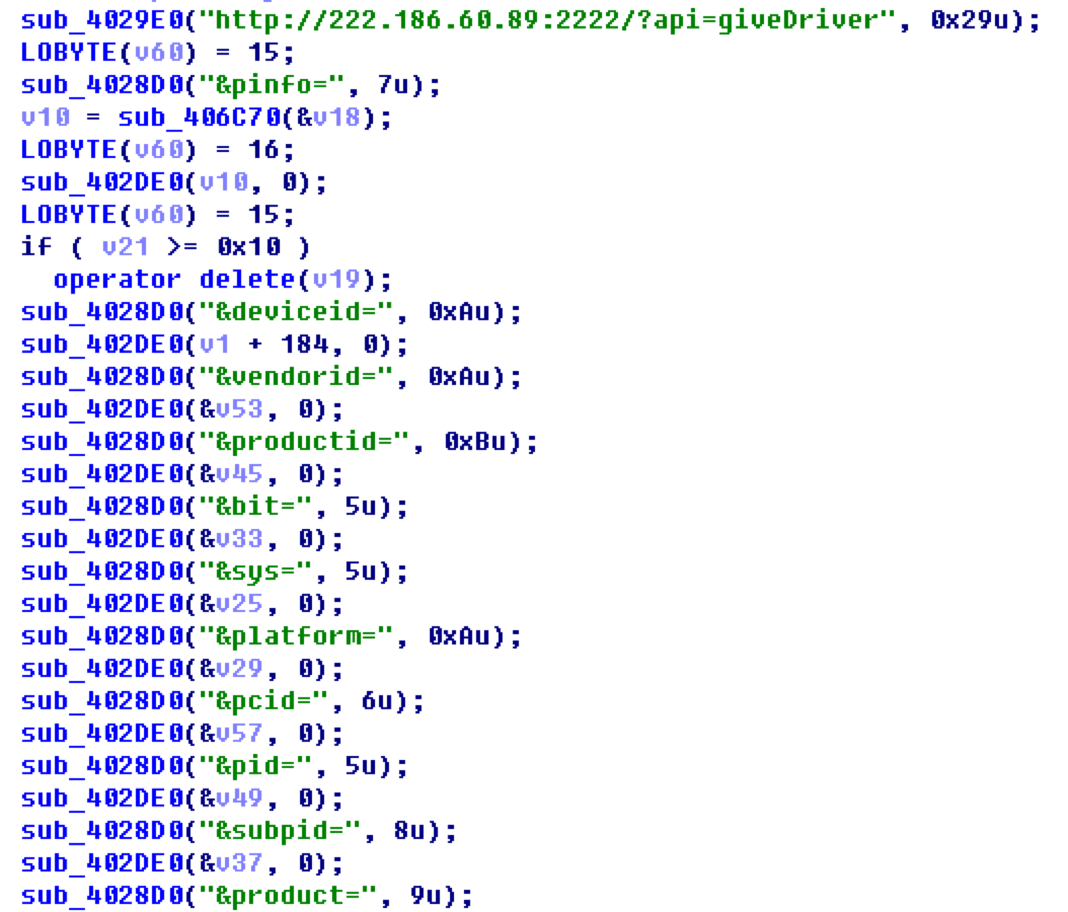
 

The server’s response:

{ “platform”:”android”, “service”:”winusb”, “args”:””, “dl”:”http://222.186.60.89:1001/driver/Android/Google/Google64.zip”, “md5″:””, “size”:”” }

Download Adb and other components:

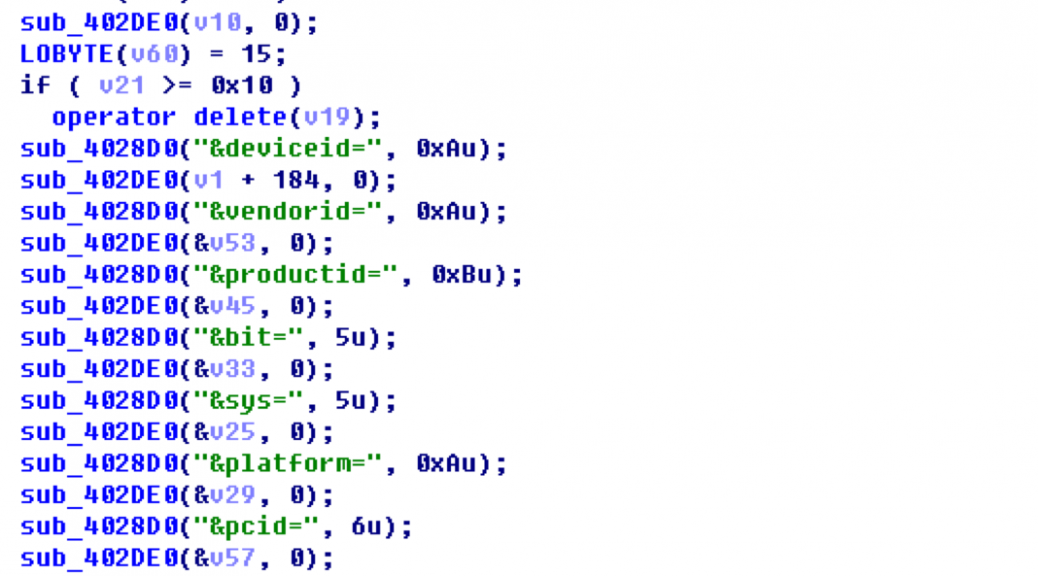
Download the App list:

Below is an example list:

{ "list" : [{
    "dl" : "http://222.186.60.128:1501/522/TTAPKYH_ZX_AG_595_20150826_2.0.0.2.a",
    "pn" : "org.funcity.runrunner.yh.zx",
    "md5" : "9441ce1595fa1d9a4577263d2c30307a"
},

{
    "dl" : "http://222.186.60.128:1501/522/MHLS_AG_906_20151109_1.0.0.1.a",
    "pn" : "com.ltestany.catmouse",
    "md5" : "21b4ba7356f93c4e206455c42a2fc275"
},

{
    "dl" : "http://222.186.60.128:1501/512/BDMSN_ch_white308.a",
    "pn" : "com.tunimei.p8.bai.bdmsn42",
    "md5" : "f732fa12b1754caaf70822fb3dc81dfb"
},

{
    "dl" : "http://222.186.60.128:1501/522/BYDR3JJB_AG_375_20150907_1.0.0.9.a",
    "pn" : "com.you2game.fish.qy.zx1",
   "md5" : "73411890e59a099606122e39fe01c0dc"
},

{
    "dl" : "http://222.186.60.128:1501/512/qqbrowser_6.1.2.1715_22411.a",
    "pn" : "com.tencent.mtt",
    "md5" : "0d8cd219f36e445ef483cf42da5aaca4"
},

{
    "dl" : "http://222.186.60.128:1501/522/com.qihoo.gameunion_41611.a",
    "pn" : "com.qihoo.gameunion",
    "md5" : "dfe5a616507560a49c16831d12b882a0"
},

{
    "dl" : "http://222.186.60.128:1501/522/CFQMJS_AG_610_20150811_1.0.0.3.a",
    "pn" : "com.aiwan.sniper212.zxcps.zx1",
    "md5" : "8446863713d13cb047029f867167f785"
},

{
    "dl" : "http://222.186.60.128:1501/512/Sogou_Explorer_1493.a",
    "pn" : "sogou.mobile.explorer",
    "md5" : "63e3b5c44796ac43fd3eb99d568c6525"
},

{
   "dl" : "http://222.186.60.21:1501/522/xiuba-3.3.0-3262-1-TEST1.a",
    "pn" : "com.xiu8.android.activity",
    "md5" : "721a40131f83bee2874904fb332c8de5"

}]}


Use adb.exe to install the Apps:

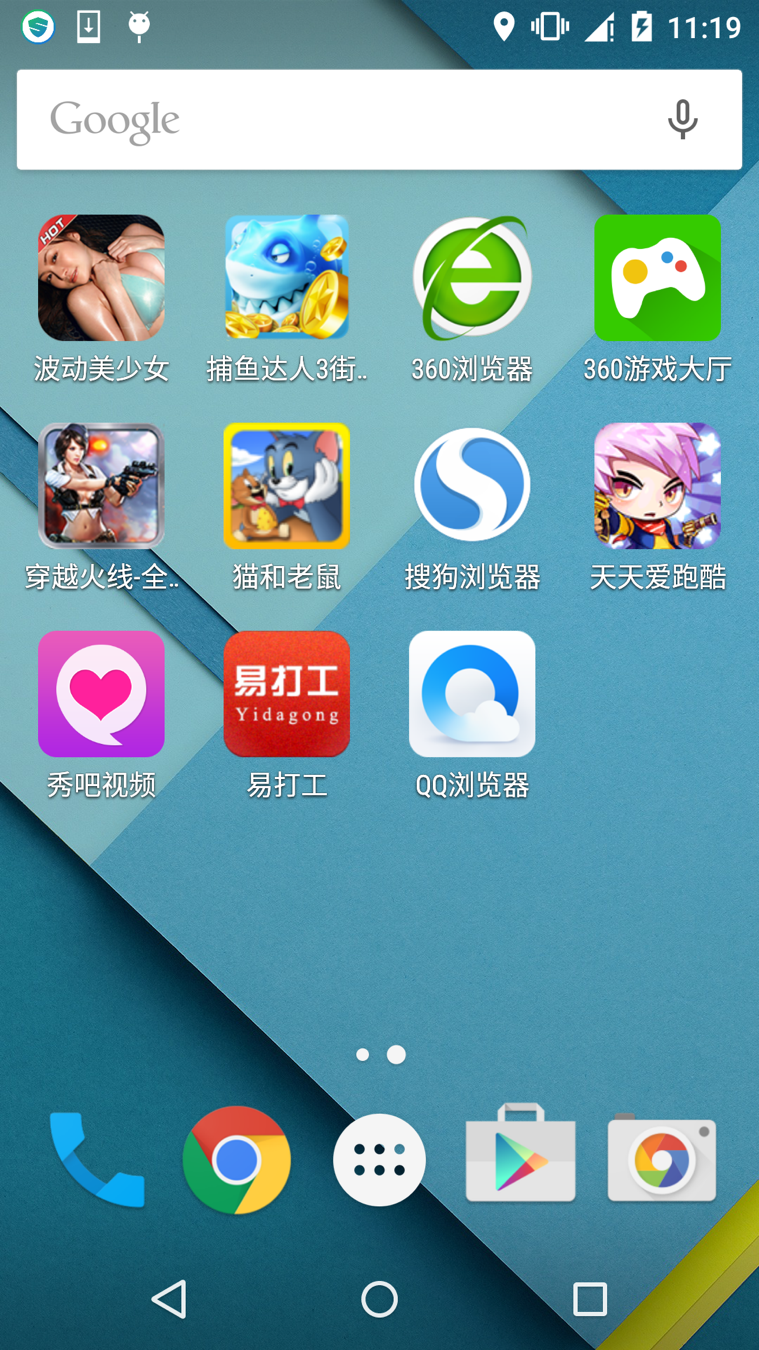
Apps in the below snapshot are all installed by this malware.
We have noted that this malware is regularly updated. At the time of our research the latest version is 1.7 and this malware checks with a remote server to get the newest version each time it runs.

Query the server to check the version:

http://222.186.60.89:9023/?action=getVersion&pcid=6C78A9C3_%3CMACHINE_NAME%3E&nowVer=1.1&pid=109&subpid=&runas=exe

And the server responded with:

{ "renew" : "0", "version" : "1.7", "dl" : "http://222.186.60.128:1123/setup/appmain.v1.7.exe" }

We found this malware has been actively developed and improved for some time, and below is a record of some of the versions we have observed. It is possible this malware is developed and maintained by a stable team.

But how is this malware distributed to end users’ computers in the first place? The answer is via the alliance model we mentioned above.

In our research, we looked at two cyber café alliances named in Chinese ‘领跑吧网吧联盟 (Leading runner cyber café alliance)’ and ‘快步网盟 (Fast step net union)’ – and we captured some of their distributing servers and their client’s apps:

[File]
kuaibu8=http://4IG7UpAH.adkuai8.com:7000/iniuser/
szicoad=http://4IG7UpAH.adkuai8.com:7000/ico/
wbzzlm=http://4IG7UpAH.adkuai8.com:7000/wbzzlm/

[update]
Startupdate=yes
kuaibu8=kuaibu8
szicoad=szicoad
wbzzlm=wbzzlm

[server]
01=down01.kuaibu8.com:5505
02=down01.kuaibu8.com:5505
03=down01.kuaibu8.com:5505
04=down01.kuaibu8.com:5505
05=down01.kuaibu8.com:5505
06=down01.kuaibu8.com:5505
07=down01.kuaibu8.com:5505
08=down01.kuaibu8.com:5505
09=down01.kuaibu8.com:5505
10=down01.kuaibu8.com:5505

[dllhost]
yewu01=/updata/adclient/ie/ieadd.dll
yewu02=/updata/adclient/cpu/cpuvod.dll
yewu05=/updata/adclient/desk/tequangame.exe
yewu06=/updata/adclient/desk/desk1.exe
yewu09=/updata/adclient/pcfen/app.dll
yewu10=/updata/adclient/sohu/adpc.exe
yewu98=/updata/adclient/baidu/baidu.dll
yewu100=/updata/adclient/online/ipdong.dll
yewu101=/updata/adclient/online/letvst.exe

[yewu01]
zhuyeid=/updata/adclient/baidu/baidu.dll
daohang=/updata/adclient/baidu/baidu.dll

[MD5]
pc.dll=19F7823A7CFE41AC7391BA1C8C402D4B
ieadd.dll=B72A680F93B3EE939FD5ED7818BB28FB
cpuvod.dll=C98A50E044DE1BC9E3E0ED3B7B334231
baidu.dll=37E8DBBF71D48CE87B6D21362A4E2E69
tequangame.exe=A36BCA657DA769E928FC1F746759E66F
desk1.exe=6438B7830D7B110CDF2CDF017AC6EF69
app.dll=5E782960BB0EABB41E756E58381CB5DA
adpc.exe=ED596AB4CABE52680A97073C29BCAC6D
ipdong.dll=5C6F0FEE74493D76F6EBA01BBC741190
2345ieadd.exe=93E32D9C0D647EC2DA4E456398905947
ieadd360.dll=136E8CA0987C754EEBFBCC7164307E78
letvst.exe=6283F091AE24944D487A67FC0C92DD46
wyvip.exe=689DBD3CED0D2A1404DD5ED1E6B06EB6
bdbrowserSetup-7.6.504.2877-1811_10003289.exe=095D58F8A54AC364836A7BA4AA802D25

In order to help protect you from this type of malware, AVG is already detecting them as “Agent5.ZKR” – just one of the many threats we continue to protect you against, on all your devices.

The need for managed services will continue to grow in 2016 — AVG Business is here to support you

Industry research is already indicating the growth of managed services in 2016 as the channel continues to recognize its potential for SMB clients.  According to one recent study from market research organization Techaisle, as much as 71% of U.S. SMB channel partners surveyed are currently offering one or more managed services solutions and another 18% are planning to offer the services within the year.

Here at AVG Business, that’s no surprise. More of our partners are moving toward a proactive approach and transitioning to managed service models, moving away from reactive strategies that are difficult to manage and maintain for their SMB clients.

Yet, successful implementation is key to unlocking the power of managed services. Simplifying the experience for both the partner and SMB customer is critical.  Depending on the technology in place or the type of service contract, there could be multiple steps required before both the channel partner and SMB can realize the benefits of a centrally planned and automated security defense.

The benefits of this type of defense reach far and wide.  A centrally planned solution enables AVG channel partners to efficiently deliver their unique service offerings within one standardized service delivery platform. This puts automated, service standardization in place to enable a scalable offering to better address the security needs of their SMB customers.

At AVG Business, we’re committed to helping our partners effectively unlock the power of all AVG security solutions in their marketing, selling, and implementation of managed services so they too can see the magic behind this proactive, planned and automated approach.

Here are just a few of the AVG partners experiencing great results:

  • Dave Barnard, owner of DB Computer Services came to AVG Business because he’d been told by a friendly competitor that our AVG Managed Workplace solution had “every tool a MSP needs” something we were happy to prove. According to Dave, DB Computer Services is now able to “offer an outsourced IT support solution that is complete, simple to understand, predictable, affordable and scales with the growth of our clients’ businesses.” 
  • For Darren Nichol, the Technical Director of pckwikfix, the move to managed services was about “standing out in the crowd by continuing to truly care and put our customers before sales targets.” The proof of this came just a few weeks after purchasing AVG Managed Workplace – the team was able to convert more than 50 clients to the streamlined monthly subscription model. With routine jobs now automated, fully integrated systems and access to unprecedented detail, Nichol says the team is “starting to get a feel for the freedom we now have to be more hands on with customers’ more interesting challenges.”
  • Meanwhile Chris Carter, technical infrastructure consultant at APH, was so convinced by AVG Managed Workplace’s new premium remote control feature, plus the quality of our technical and sales support, that it migrated its entire base of managed service clients from a standard antivirus product to the full-service AVG Business platform.

We have done a lot of work toward addressing the business needs of AVG partners, including within our AVG Managed Workplace technology platform, as well as best practices on how to fulfill service contracts in the most efficient and profitable way.

We are listening and responding – and we will have more updates and news to share this year.

Until then, please continue to share your feedback in 2016!

AVG Named One of 2016’s Coolest Cloud Security Vendors

It has been a cold month for all the right reasons this January as AVG has just been named one of CRN’s Coolest Cloud Security Vendors for 2016. This is the second consecutive time AVG has made the list, and it’s validation of our hard work over the last twelve months. We’ve been busy and – more importantly – focused on providing even more value for our AVG Business partners and their SMB clients in 2016.

In CRN’s recent recognition, the IT channel publication noted our cloud security and remote monitoring and management (RMM) capabilities for businesses. We continue to see AVG partners transition to solutions such as AVG CloudCare and AVG Managed Workplace as security becomes a higher priority for small business owners and their IT staff.  When you couple this with our advanced Business Edition security products, it’s easy to see the value in our AVG Business solutions.

Earning the recognition as a ‘cool cloud security vendor’ also reflects our commitment to ensuring cloud solutions like AVG CloudCare are easy to implement and manage, simplifying the experience for partners and their SMB end-users.

AVG CloudCare is a single cloud platform that enables the real-time management of a full suite of cloud-based security services including antivirus, online backup (OLB), and a number of other key features.

If you’re not sufficiently impressed by our ‘cool’ credentials already, here are a few more top reasons why you should consider investigating AVG CloudCare for yourself:

  • Ease of Use – AVG CloudCare’s online dashboard is well designed and easy to use for managing desktops, laptops and servers all at a glance.
  • Remote Deployment – As long as one device is on the network, AVG CloudCare can be deployed to any computer attached to the network from the web console.
  • Remote Updates and Scans – AVG CloudCare administrators can force definition updates and scans remotely.
  • Dashboards and Reporting – AVG CloudCare administrators can view all managed devices through an online dashboard showing their status.
  • Content Filtering – As an add-on, content filtering can protect your client’s business from malicious websites and increase productivity by disallowing certain groups of sites.

This recognition is also a true testament of the continued support from our partner and SMB community. As we head into 2016, we remain committed to helping solve today’s business security challenges and helping businesses be productive and successful.

Thank you for your support!

Prevent strangers from using your Wi-Fi network

If you’re running an open Wi-Fi network, you’re opening yourself up to risk in several ways.

  1. You could be liable for crimes someone commits using your network: it’s your Wi-Fi network, so it’s your name that will show up when the police start looking.
  2. You’re exposing your PC or mobile devices to hackers:if anyone can join your network, they can find all the other devices connected to it too.
  3. You could be paying for other people’s use of bandwidth:if you thought your data plan was expensive, imagine what it could look like if your neighbors start streaming movies at your expense.
  4. You could be violating the terms of services from your Internet Service Provider: they are selling their connection to you, not your neighborhood.

Basic ways to secure your home Wi-Fi:

Most of these security measures can be done by connecting to your router’s settings.

  1. Change your network name: Don’t use any personally identifiable names for your home network, like your own name or business name. It just makes it easier for someone to target you specifically. Use something that’s random or private.
  2. Use WPA2 encryption: Your router likely has settings for various forms of encryption, but stick with WPA2, the strongest variant.
  3. Make sure you use a strong password:Use a long password, at least 20 characters long. That seems long, but you can write it down on a sticker and place it on the router itself.

These basic tricks should help you keep your home Wi-Fi network safe from uninvited guests…

Give Your Android Device More Space, Speed & Battery Life

Ready to use our new AVG Cleaner for Android™ 3.0 and its new one-tap ANALYZE view or Smart Photo Cleaner? We’ll guide you through the most important steps of a typical clean-up to make sure you’re not missing anything.

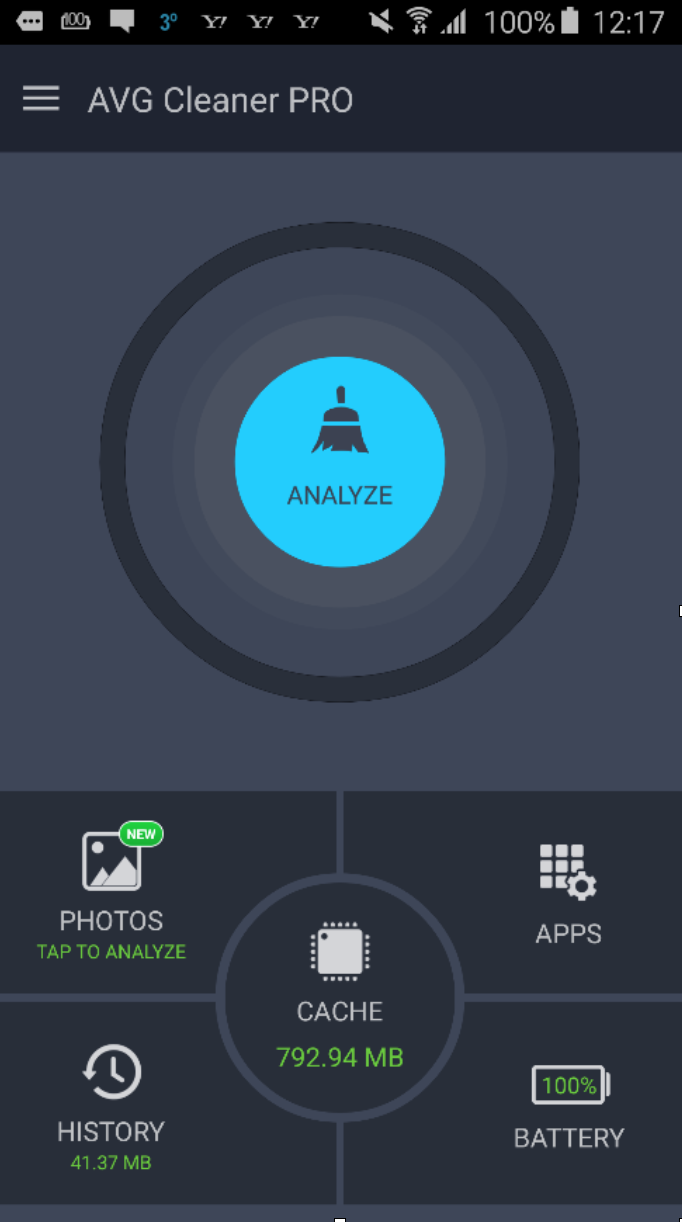
Step 1: Download & launch the new app! Got it? Tap the Analyze button.

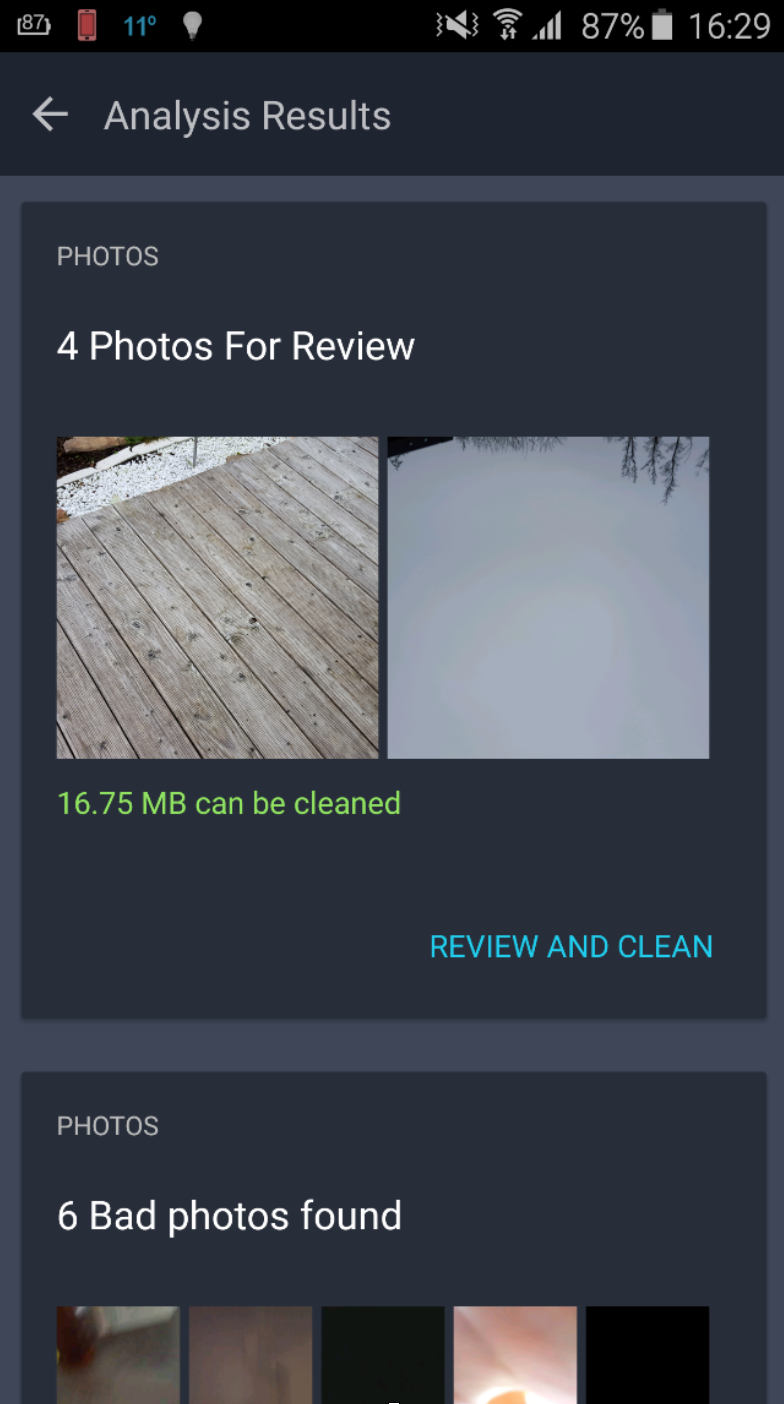
Step 2: Clean up photos! Wait for the results. In this example, it found 4 photos that were classified as bad or potentially unwanted:

Tap on Review and Clean, and then use either thumbs down/thumbs up or swipe left or right to delete a photo or keep it. AVG Cleaner for Android will now start learning which photos you like or don’t like to give you more personalized suggestions. But no worries, it will never automatically delete anything – the choice is always yours! Next, go to the Bad Photos and Similar Photos sections to clean up the ones you no longer need. Here, you can mark photos you no longer want:

Got them all? Tap on Delete X Photos! You’ll then find yourself in the Analysis Results area again.

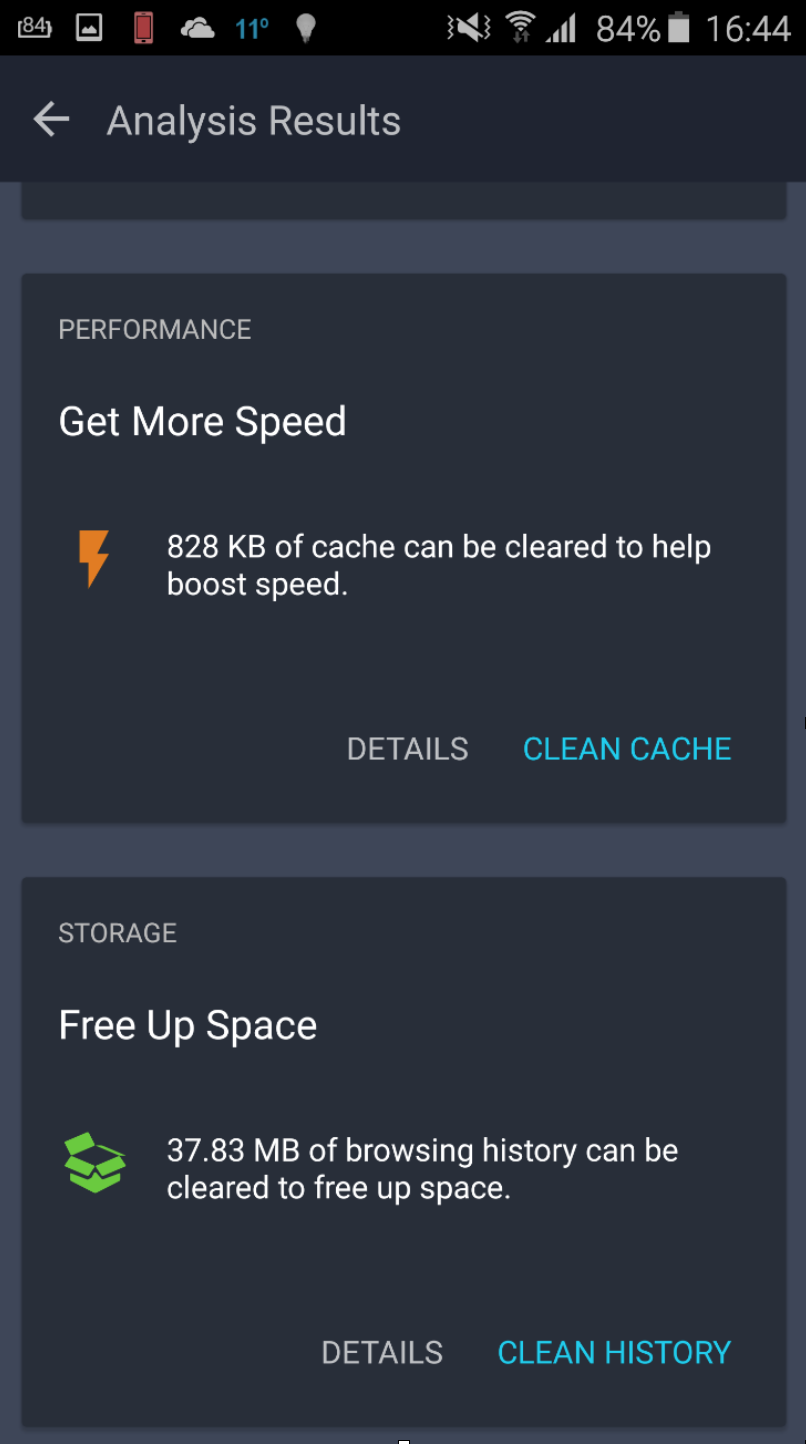
Step 3 – Clean cache: Every time you use your apps, they create what’s called “cache” files. For example, Facebook temporarily stores data from your timeline once you open it to access it quicker next time you open the app. However, many apps tend to forget to delete this data which can accumulate to quite an amount wasted storage. Just tap on Clean Cache and be done with it!

Step 4 – Clean history: Your browser leaves behind traces, such as cookies, temporary browsing data and long-forgotten downloads.

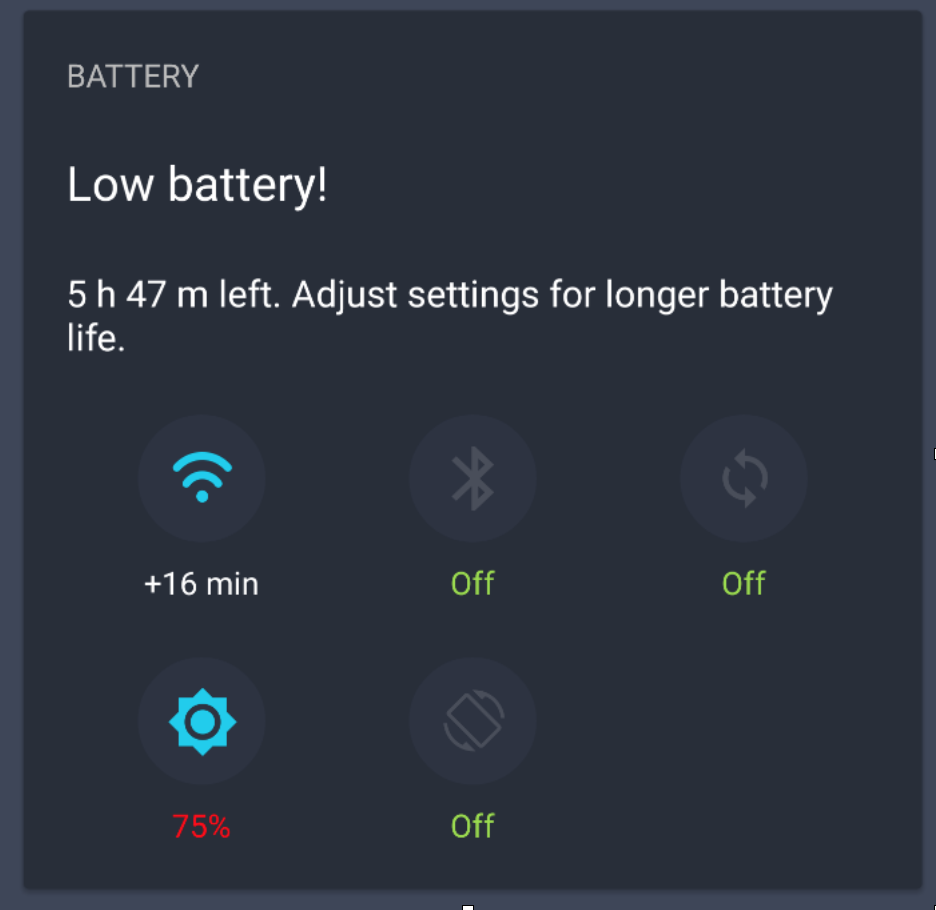
Step 5 – Stop Battery Hogs: The next slice shows you which features of your phone draw the most battery life from your phone – and allows you to turn it off!

Tap to turn anything off you might not need, especially if you’re on the go and without a power outlet in sight.

Step 6 – Stop Memory Hogs: If any currently running app is consuming more than 1% of your memory, they will show up here. You can then go ahead and Force Stop them or Uninstall if you don’t need these anymore.

Step 7 – Get rid of Battery-draining apps: Is your phone not making it to the end of the day without recharging? It may not be your phone itself, but some renegade app(s) that run(s) all the time in the background or does things they’re not supposed to. This section helps you find out which ones are the top drainers – and allows you to stop or delete them!

Step 8 – Free up space: Still struggling to store photos, music or apps on your phone? Then have a look at the last section, Free up space, to see which apps consume the most storage – and get rid of the ones you no longer want!

How much space were you able to free up? How many photos were cleaned up thanks to our new Smart Photo Cleaner? And how many performance-draining apps have you put an end to? Let us know in the comments section below.

If you’re looking for a quick clean-up of all of your unwanted photos, check out our newly re-launched Cleaner today for free!

Six things to think about in the new year

Here are six things to think about for this year, with business security strategy top of mind…

1. Artificial Intelligence keeping us safe online
Artificial intelligence and machine learning isn’t just about robot dogs and self-driving cars. The latest AVG Business anti-malware products contain a number of sophisticated neural learning and cloud-data collection techniques designed to catch malware earlier and more often. Expect to hear more through 2016 about how artificial intelligence will help transform security solutions to help keep malware at bay.

2. Certificate Authorities: beginning of the end
SSL continued to be a big talking point in 2015 with further vulnerabilities being disclosed. This year the debate will continue around certification, development of new open standards and easier choices for website owners. Every news story about certificate mismanagement, security mishaps, and data breaches puts Certificate Authorities under increasing scrutiny. For many small businesses, the website owners paying a Certificate Authority and submitting themselves to what can sometimes be an arduous verification and checking process, is cumbersome and unnecessary.

This is where technical alternatives like Let’s Encrypt (currently in beta) are bound to flourish.

Additionally, Google’s Certificate Transparency project will continue to identify rogue SSL Certificates through detections built into modern day web browsers, as Google continues to hold Certificate Authorities to account – helping keep us all safer.Lastly, with the promise of other solutions such as the Internet Society’s proposed DANE protocol, offering the ability for any website owner to validate their own SSL certificate and therefore bypass a Certificate Authority altogether, 2016 will be an interesting year to watch!

3. Malvertising, Ad Networks: shape up, or ship out
Malvertising is what happens when malware is served up to innocent web site visitors; it’s happening all too frequently and is caused by questionable third party relationships and the poor security of some online advertising networks. At the root of this problem is the “attack surface” of ever-growing, ever-complex advertising and tracking “scripts” provided by ad networks and included by publishers (often blindly) on their websites. The scripts are slowing the browsing experience and anyone who has installed an ad blocker recently will tell you they can’t believe how fast their favourite websites are now loading. Research conducted by The New York Times showed that for many popular mobile news websites, more than half of the bandwidth used comes from serving up ads. That’s more data from loading the ads, scripts and tracking codes, than the content you can see and read on the page!

Whatever the solution, one thing is for certain, Ad Networks need to shape up and address their security, otherwise 2016 may well be remembered as the year of Malvertising.

4. Augmenting passwords with extra security steps in 2016
The need for strong passwords isn’t going anywhere in 2016. There were reminders in 2015 that even having the world’s longest smartphone passcode doesn’t mean someone can’t figure it out.

This year, there will be growing use of extra steps to make accessing data safer. In 2015, Yahoo announced a security solution using mobile devices rather than a password for access, and we even saw Google include Smart Lock features that can use the presence of other nearby devices to unlock your smartphone. Two-factor authentication – using two steps and ‘something you have and something you know’ to verify someone’s identity – will continue to be popular for use by many cloud-based providers looking to avoid data breaches.

5. The Internet of Things needs security by design
Every device seems to be getting smart – in the home and in the office. You’re likely going to be using your smartphone as a “lifestyle remote” to control a growing array of devices. Being able to set the office temperature remotely, or turn on the kettle in the communal kitchen without leaving your desk may sound helpful, but the devices have the potential to give up WiFi keys. Every unprotected device that is connected to a network is open to hacking. Cyber criminals are probing hardware, scanning the airwaves, and harvesting passwords and other personal identity data from wherever they can. So the advice is simple: every connected innovation needs to be included in your business-wide security.
6. Update and upgrade or face the financial and legal consequences?
Upgrading and updating all your software, devices, gadgets and equipment remains a vital business issue. The Internet of Things is raising new questions about who is responsible for what in a legal sense. Who owns data? What happens when machines take “autonomous” decisions? Who is liable if something goes wrong? To take one extreme example, a police officer pulled over one of Google’s driverless cars in November for causing a traffic jam on one Californian highway by driving too slowly. Again, the lesson is clear. The simple rule this year is to ensure that your business software and systems are always using the latest update. Your life may not depend on it, but your livelihood might.

So these are my six “thinking points” as we head into 2016.

Here at AVG, we look forward to helping you keep security front and center for your business this year. For more information on AVG Business security solutions that keep devices, data and people protected every day, across the globe, visit http://www.avg.com/internet-security-business.

Top 5 troubleshooting tips for Windows 10

If you have recently upgraded to Windows 10, of if you’re still trying to, you may be suffering some of the problems we’ve seen. We answer the top questions to your burning issues on Windows 10 that have plagued many users out there.

#1 – The Upgrade to Windows 10 doesn’t work

Even on my machines I had this problem: Despite multiple Windows Update attempts, the upgrade to Windows 10 seems to never show up. The same goes for installing new versions of Windows 10, like the November 2015 update.

Here’s how I eventually solved the problem. Unfortunately, it involves a bit of fiddling with the Windows registry, which – in this instance – is totally safe. No worries, we’ll talk you through this:

  1. Press the WINDOWS+R keys at the same time.
  2. Type in “regedit” (without the quotes) and press Enter.
  3. Using the tree navigation that appears, open up the following folders:
    HKEY_LOCAL_MACHINESOFTWAREMicrosoft
    WindowsCurrentVersionWindowsUpdate
  4. Right-click on WindowsUpdate, select NEW and DWORD-Value.
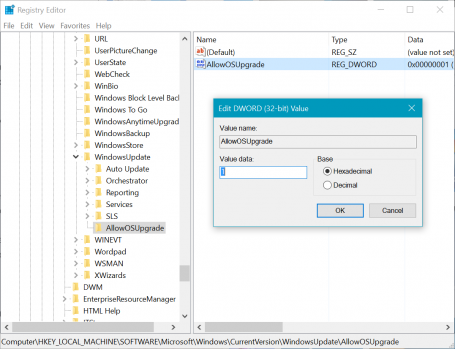
  5. Name the new folder “AllowOSUpgrade” (see the example picture)
  6. Within that, add the DWORD value called “AllowOSUpgrade”, double-click on that and type in a “1”
  7. Reboot your PC, use Windows Update again to download and install Windows 10.

Sounds complicated? Here’s how it should look:

Windows Registry Editor with AllowOSUpgrade

If this still doesn’t work, you should then try running this Windows Troubleshooter to resolve the issue, as described by Microsoft in this article.

#2 – Sound not working or volume too low

Can’t hear any sounds or music following an upgrade to Windows 10? First, you should check your PCs manufacturers page for the latest sound drivers.

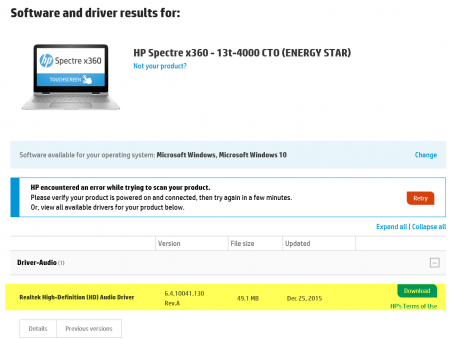
For example, on my HP Spectre x360, the official driver website offered me brand-new drivers for the integrated Realtek HD Audio chipset:

Realtek Audio Driver Update

Installing the latest drivers should help with most of these issues and should be the first step to take. However, if that didn’t do anything: Open up the start menu and type in “Control Panel” to open the classic settings. Then go to Hardware and Sound, Sound and double-click on your default sound chip. Usually it’s the one with the green checkmark.

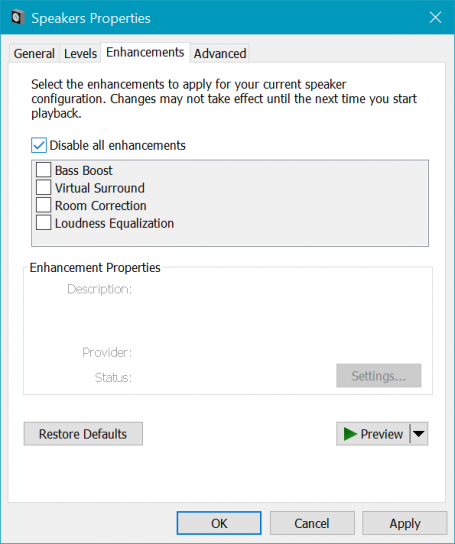
Next, move to the Enhancements tab and check Disable all Enhancements, which should instantly enable your audio.

Disable all Enhancements

#3 – Annoying Default Programs

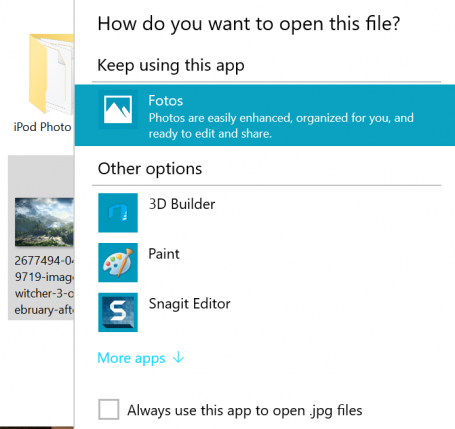
I feel like every time I install a Windows Update, it defaults back to the standard apps for photos, music and websites – or pops up these annoying screens:

Annoying default apps in Windows 10

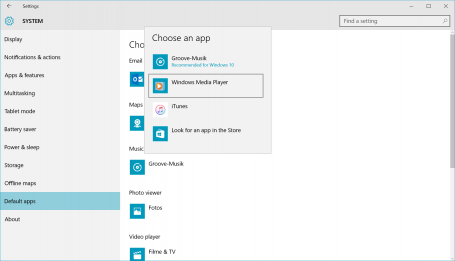
In some cases, even if you check Always use this app to open .xyz files, it reverts back to the default or asks the same question over and over again. To avoid this from happening, you should go through the Defaults settings once and decide what should happen if you open a file. To do that, click on the Start button and hit Settings. Head over to System and then on Default apps.

Setting default apps in Windows 10

Once you set this here, Windows 10 should remember this!

#4 – Turn off Quick Access

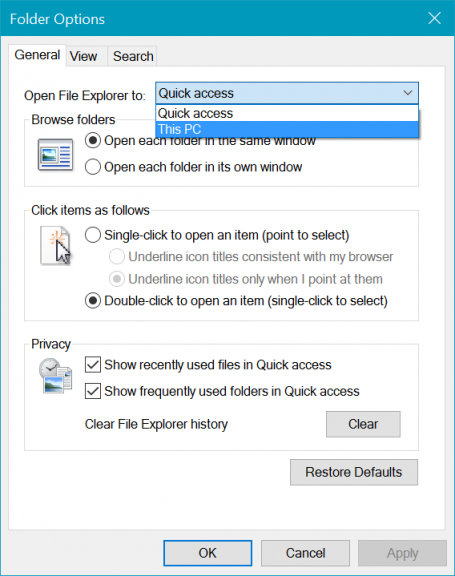
The new Windows 10 file explorer has a Quick Access view when you launch it, which is divided into Frequent folders and Recent files. If you’re like me (and many others), you don’t want this view as it messes with your muscle memory of opening up file explorer and going to a specific folder. Thankfully there’s an easy fix: Open up File Explorer and click on the File button in the top left corner. Next, click on Options. Here you can decide whether you want file Explorer to open with Quick access or the more familiar This PC view:
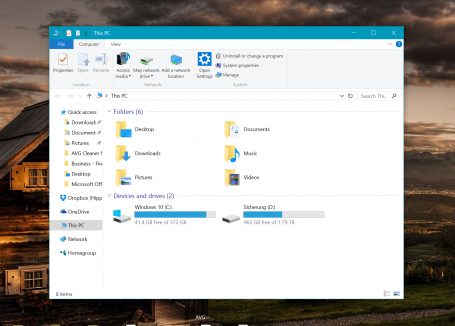
Turn off Quick Access

Much better, isn’t it?

Windows 10 looking better after these tips

#5 – OneDrive doesn’t sync anymore

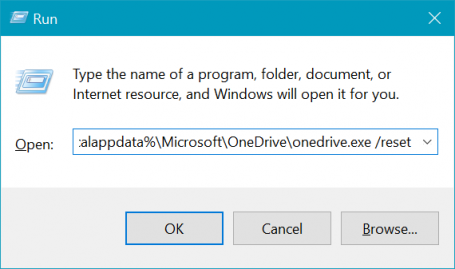
I really do love OneDrive as I use it to sync all my photos, documents, songs and even my entire desktop across my gaming PC, my laptop and my office workstation. But it’s got its little annoyances, for example when it crashes after a reboot or won’t sync files. The one thing that always helps me is to reset OneDrive: To do that, press the Windows key and R at the same time:

Reset or restart OneDrive in Windows 10

Click OK. The OneDrive icon should disappear and then reappear after a while – and then it should hopefully all be good and sync again.

Got any more Windows 10 issues that are totally annoying to you? Follow us on Facebook. We’re gathering more issues and will follow up in a couple of months with new fixes.

Five things to learn from 2015

Here are my five things we discovered in the last 12 months.

  1. Big brands being hacked grabs headlines – but the story can start with a small business.
    The hack and release of personal data from the adult dating site Ashley Madison probably got the most media attention of all the security breaches in 2015, but it was far from the only one. The list of familiar brands and organizations that suffered confidential data breaches ranged from VTech the children’s toy manufacturer, to the US Internal Revenue Service, to the UK’s phone and broadband internet provider, Talk Talk. There was even a “live demo” of a Chrysler-Jeep being hacked on the highway. How do hackers get in? A common tactic is via employees innocently clicking bogus links in emails or bringing malware-infected personal devices into the workplace. Crucially, hackers can find their way into big brands via small company suppliers where security may be weaker. The message is simple: all businesses need to ensure their online defences are as strong as possible.
  1. New payment methods: faster transactions but new threats
    2015 was the year that new payment methods really seemed to take off. On the one hand, “contactless” bank cards allowed consumers to make payments by tapping a card against a terminal without having to swipe and enter a PIN. But this use of RFID technology also gives cybercriminals a new opportunity to steal data – if they can get close enough.Likewise, smartphone payments – such as Apple Pay and Android Pay – are turning phones into wallets. That means thinking about your phone’s physical and cyber security. So is your business taking every possible step to keep its data – and customers’ data – as safe as possible in this new world of faster and mobile payments?
  1. Bring your own device can allow hackers through the office door
    How many of your employees bring their own mobile devices to work and use them to check and send work-related emails, access spreadsheets or other company data? So don’t forget to protect mobile devices in business, they are as vulnerable as desktop devices and carry business critical data. Two mobile hacks in 2015 reminded us all of how vulnerable smartphones can be: the MMS messages with a hidden sting, and the Stagefright 2.0 vulnerabilities in the Android operating system.
  1. Don’t think your Mac device is a safe bet!
    Part of the Apple myth is that its devices are always malware free; indeed, remember those old “I’m a Mac, I’m a PC” ads from the late 90s with the actor representing the PC catching a terrible cold versus the healthy young Mac? That myth was truly tested in 2015 when fake developer tools that were used to create iOS apps containing malicious code known as “XcodeGhost” made their way onto the Apple App Store. The moral of the story? If you’re using Apple tech, make sure you’re taking security seriously … you can still catch a cold.
  1. We’re only human!
    An error this year by an individual at the UK holiday firm Thomson was a timely reminder that however tight your online security, human beings make mistakes. Data about the name, home address, telephone number and flight information of 458 people were attached in error to an email. The simple lesson? Everyone should take a moment to think twice before attaching documents to an email and hitting send. Just ask the question: what I am sending and should this be shared in this way?

So there we are: five lessons from the outgoing year to remind us of the critical need to keep business security top of mind.

For more tips, insights and product information to keep your business protected, check out our web site at http://www.avg.com/internet-security-business. We look forward to helping keep you and your business safe as we head into the 2016!