Category Archives: AVG

AVG

Sports fans, avoid these weak passwords!

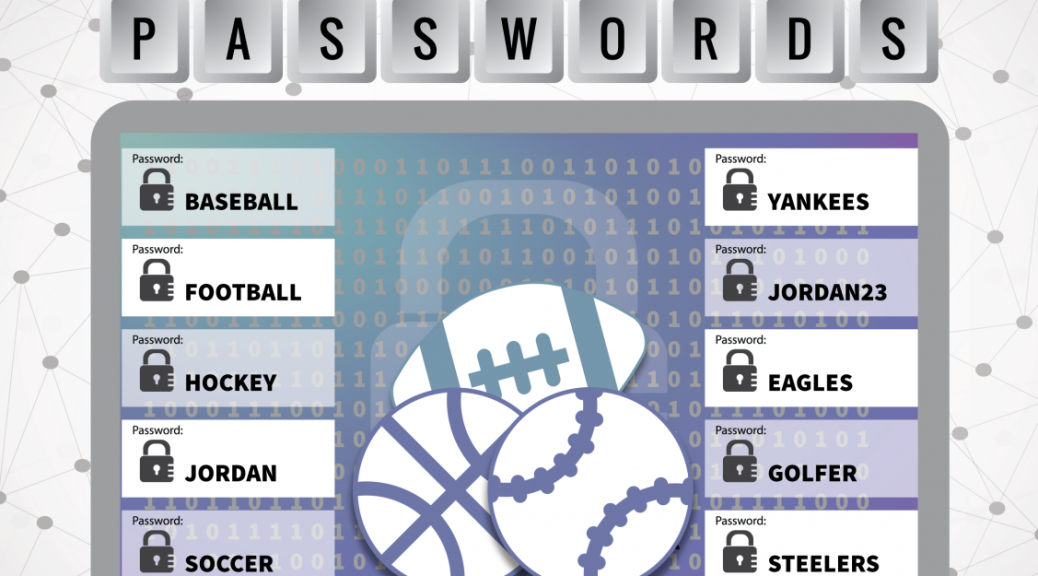
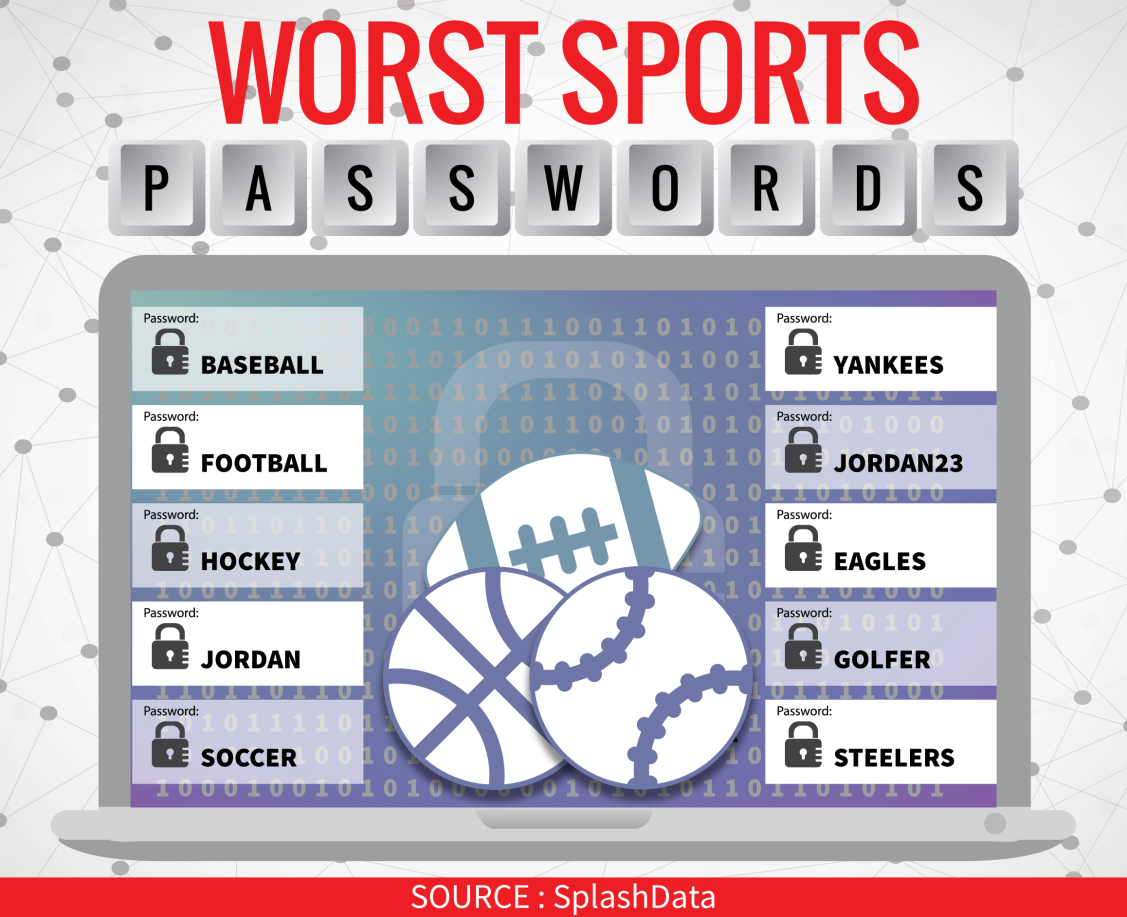
Earlier this week, a list of 25 worst sporting passwords was released by SplashData, and includes a whole raft of easily guessable passwords,  the most common being “baseball” and “football”.

Worst Sporting Passwords


In fact, baseball and football are so common that they appeared on the list of overall worst passwords published earlier in 2015.

It goes without saying that if you see your password among this list it really is time to change it. Having a weak password can make it easy for attackers or scammers to gain access to your accounts and the data stored within.


How to create a strong password:

Creating a strong password is much easier than winning the World Series and in a few simple steps you can have a password that can help keep your data secure while also being easy to remember.

For tips on what to avoid when getting a new password, be sure to check out this video from AVG Security Expert Michael McKinnon.

Video

Four password mistakes to avoid

Three AVG performance tools for your new PCs

There are a few things you absolutely must do on your new PC, laptop or ultrabook so you can really get the most out your new gear. I have put together some handy tips using AVG tools to ensure that you’re not left disappointed!

Before we start, you should visit parts one and two to make sure that your old machine doesn’t go to waste!


Secure and optimize your PC from Day One

No one likes pre-installed bloatware, spyware or viruses. Constant popups or icons in the notification tray can ruin the feel of a new device. I’d advise making our performance and protection bundle the first thing you download to keep your PC clean and virus free.

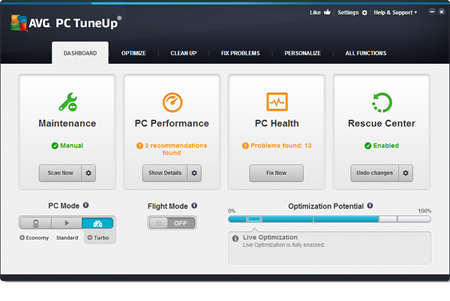
AVG PC TuneUp

Also have a look at some of the performance tips for new PCs on our blog:

A lot of these tips dive deeper into the performance features of AVG PC TuneUp and show you how they work, step by step.


Get rid of unwanted programs and files

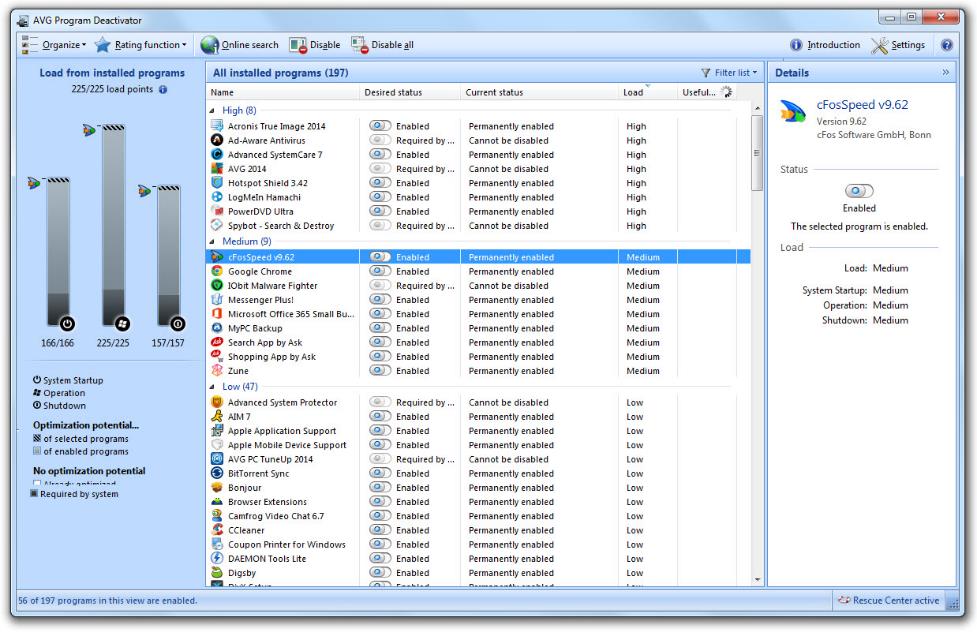
These days, PCs come with a lot of preinstalled trial software and advertising. While some of this software can actually be useful, in many cases they can slow down performance and get in the way. My advice is to use AVG PC TuneUp’s Uninstall Manager to get rid of programs you may no longer need.
Within AVG PC TuneUp, simply go to “Optimize” and click the “Uninstall Programs” button. From here you can click on Load to show you the programs that slow you down the most, or you can use “Filter list” to look out for large or rarely used programs and get rid of them in a snap.

AVG Uninstall Manager

If you need some of these programs, you can also “freeze” them so they don’t consume resources: To do that, click on “Deactivate Programs” and flip the switch. This will turn off the background activity (which slows down your system) until you start it!


Update your drivers

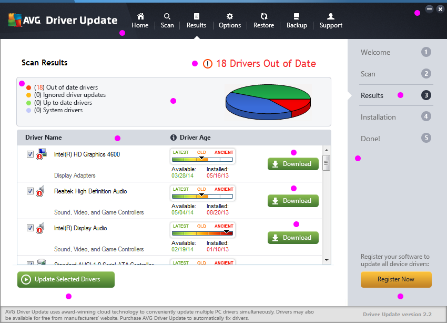
When it comes to performance, drivers are a hugely important of the puzzle. They control the hardware that’s built-into your machine. They control how your graphics work, how your Wi-Fi transmits data, how your hard disk stores its data or how and when your Bluetooth connects to your phone.

Driver Updater

That’s why you should install AVG Driver Update to make sure that you get the latest drivers all the time!

VIDEO: Gary Kovacs’ Keynote Address at MWC 2015

In the keynote, Kovacs outlined AVG’s mission to create a safer Internet for everyone.

In our modern connected world, the lives of consumers are more exposed now than ever before in history. A wide range of our actions online are monitored, tracked and scrutinized, not always towards benevolent ends.

AVG recently conducted a round of research with MEF which shows that more and more people are demanding trust, and it is becoming a real factor in decision making around technology.

To end, Kovacs issued a call to arms to challenge the existing model and create what he calls a Trust Revolution.

Online Tax Identity Fraud on the rise

I recently called my friend Mary to wish her a happy 83rd birthday. She was having a fine day, but had just received a disturbing phone message from the IRS requesting that she call back urgently to settle a tax debt, and that she could use her credit card to do so.

Thankfully, Mary was too smart to trust a blind call from a purported IRS representative – because the call was a one of the “imposter” tax fraud scams making the rounds. In this case, a con artist impersonates a government official and tries to bilk trusting taxpayers for un-owed back taxes. (This type of scam also happened to me last year, though not at tax time!)

Of the 2.5 million consumer complaints received by the Federal Trade Commission last year received, the imposter scams were the third most common.  Debt collection scams ranked second. But at the very top of the list is identity theft. (You can see the full list here.)

In tax identity theft, scammers steal Social Security numbers to file for a tax refund before the real taxpayer can. In many cases, victims may not even learn about the fraud until they file a return, at which point IRS notifies them that the return has already been filed and paid!

The IRS announced  that the number of tax identity theft cases has doubled each year in recent years. It estimated it has paid out $5.8 billion in fraudulent tax refunds in 2013 because of identity theft. The IRS also reported it also was able to stop another 5 million attempts to get fraudulent refunds, which saved taxpayers another $20 billion.

Many tax fraud cases involve stolen social security numbers. CNNMoney reports that hackers stole more than 6.5 million Social Security numbers last year, with up to 80 million more at risk this year as part of the Anthem data breach alone.

2014 is sometimes called the year of the hack and it is clear that while large-scale breaches continue we will surely see elevated rates of identity theft, especially in the tax season.

All is not lost though, by following a few steps you can help keep all your credentials in the right place:

  • Always keep you AntiVirus up to date! If you don’t protect your device, your data could be vulnerable to attack.
  • Never click a link you don’t trust. If in doubt, visit the official website and log in to your account there.
  • Shred physical copies of important documents when they’re no longer needed.
  • Don’t trust urgent phone calls or emails from the IRS demanding action and personal information. The IRS will never contact you by phone or email!
  • If you do get contacted, make a note of their number, and report it to the IRS at its fraud report site.


Here’s wishing you many happy returns!

Is the rise of biometric security a good thing?

Whether we like it or not, it seems that biometric security is rapidly becoming the norm.

In March alone, Samsung unveiled new iris scanning technology, Microsoft announced facial recognition for Windows 10, Asus introduced fingerprint scanning and Qualcomm, Fujitsu and Intel all jumped in with biometric tools of their own.

Why are we seeing such rapid adoption?

Although it may still seem futuristic, modern biometric security has been around for a number of years. You could argue though that it was only with the launch of the iPhone 5S and its fingerprint scanner that people really started to take notice.

Now, fuelled by convenience, biometric security is at the forefront of our minds. After all, why remember a password or have to input a code when your device can simply scan you and authorize access?

Is it secure?

While few people can argue that biometric security is not convenient, there are still question marks over its viability as a robust security measure.

SRI, who developed Samsung’s iris scanning technology claim that “tests have shown this purely iris-based solution to be more than 1,000 times more accurate than published fingerprint data.” This begs the question, how secure is fingerprint data?

Not all that secure it turns out. In October 2014, a hacker known as Starbug accurately replicated the fingerprint of the German Minister of Defense from nothing other than hi-res images taken of her at an event.

More recently, AVG’s own researchers from the Innovation Lab in Amsterdam developed a set of ‘Invisibility Glasses’ that used specialist materials and technology to successfully counteract facial recognition technology.

We’ve written many times before about the pros and cons of biometric security, from speculating on the future to busting myths.

However for now, it’s clear that if biometric security is really going to become our de-facto method of authentication, we need to make sure it is rigorously tested.

A lesson in online identity

This week I noticed two news stories that brought this advice to mind.

The first involves the popular dating app Tinder, where a developer exposed a serious security flaw to trick men into flirting with each other, thinking they were talking to a woman.

I am sure you can imagine the type of messages that went back and forth and the anger when men realized that they were talking to other men looking for women.

The developer claims that he created the hack to highlight the harassment that women often face on dating apps.

The second story is rather amusing but also very serious, a convicted fraudster escaped from prison by tricking prison officers with a fake bail email.

Using a mobile phone, Neil Moore created an email account belonging to a fake domain closely resembling the court service’s official address. He then emailed the prison’s custody inbox with instructions of his release.

Authorities only noticed Moore was missing three days later when lawyers turned up to interview him. Fortunately, he later turned himself in and was charged with “escape from lawful custody” where the judge described the behavior as ‘ingenious’ criminality.

There’s a chance that you’ll think these stories are quite amusing, which of course they are, but both have different but serious consequences.

When we communicate with others online it’s important that we validate them in the same way we would in real life. We scrutinize people’s behavior and appearance to make an informed decision on trustworthiness and character.

You of course can’t look someone in the eye on the Internet, so it’s doubly important to scrutinize their credentials (email addresses, user names etc) and their behavior (what they are asking of you and what they claim).

Perhaps that’s a lesson that the folks at Her Majesty’s Prison Service could do with learning.

Follow me on twitter @tonyatavg

Vulnerability found in Trivia Crack

Earlier in March, researcher Randy Westergren, decided to investigate the gameplay mechanics of popular trivia quiz app Trivia Crack.

What he found was surprising. Within the app’s code is a hidden “cheat mode” that provides the player with the answers to each question, clearly not intended for general use.

While discovering “cheat mode” doesn’t present an immediate threat to most players, it’s a timely reminder that not all apps are secure.

Westergren altered the Trivia Crack’s code to harmlessly enable “cheat mode” but it is also possible to insert malicious code.

As Westergren explains, this vulnerability “should serve as a good example that client application privacy cannot be guaranteed and developers should be careful about what’s included in their compiled releases.”

Trivia Crack is certainly not the first popular app to face scrutiny from potential attackers with apps such as Angry Birds often the target for malicious attack.

As AVG CTO Yuval Ben-Itzhak explained in his recent blog post, “hackers are clever; they have found ways to get around stringent app store controls by exploiting existing non-malicious apps that are vulnerable.”

The largest challenge for mobile security today is not blocking malicious apps but instead protecting benign apps that are vulnerable to attack thanks to short time to market, small development teams and budgets.

Even apps from well-known developers or apps that you have had installed for a long time can become vulnerable if not properly maintained and security tested.

How can players protect themselves?

The best way to defend yourself against malicious apps is to download mobile antivirus on your device.

AVG AntiVirus for Android FREE has over 100 million downloads from the Google Play Store.

Download it today.

Watch this video for more tips to help you protect your Android device,

Video

How to protect your Android device


World Back Up Day: Five Tips for choosing a Cloud Storage Provider

Billions of people use the Internet every day. We use it to work, play, create and share memories. World Back Up Day is an annual reminder to protect our most precious files from being lost forever.

After all, what would you miss if you lost everything?

Cloud based back up services are incredibly cost effective and most allow you to access your files from anywhere in the world.

So if you’re ready to celebrate World Back Up Day, I have five tips on how you can pick a secure cloud storage service.

Is it for business or personal use?

There are plenty of free options, before you trust a service with your personal or critical business files you should make sure it is reliable and secure.

What type of files are you storing and why?
Different cloud services offer various features and options that might suite your particular need. For example video or photos back up.

What level of encryption do they offer?

Does the cloud storage service offer encryption? If the provider is hacked, your data will be vulnerable. If the provider don’t provide encryption then you should consider encrypting it yourself before you upload.

Are there additional security features?
If possible, use additional security features like two-factor authentication and login notifications to help prevent unwanted breaches.

Do you have adequate backups?
Don’t rely on a single backup, especially for your critical files. You should also backup regularly.


Until next World Back Up Day, stay safe out there.

Heartbleed: One Year On

When news of the Heartbleed vulnerability broke this time last year, it was a watershed moment for the Internet and especially for security.

OpenSSL, the fundamental layer of encryption used by major websites around the world, was found to be flawed. Through a specific type of attack, a victim’s personal data including passwords, financial credentials could be stolen.

While the discovery of a vulnerability in OpenSSL didn’t come as much of a surprise to those who work in the security industry – after all, completely secure code is a rarity. Instead, the shock was the extent of the vulnerability, with around 60% of the entire web at risk.

Now, a year on, I’d love to be able to say that we’ve learned many lessons from Heartbleed and that the web is now a more secure place. Sadly, it’s not as simple as that.

Public awareness remains a major issue for Internet security. Recent research from password security developer Dashlane indicates that a year on, 86% of American’s have not heard of Heartbleed.

Dashlane spoke to AVG’s Chief Strategy Officer, Todd Simpson, about their results.

Video

The State of Online Security One-Year After Heartbleed


However, awareness is just one issue. Months after Heartbleed broke, I wrote of several further vulnerabilities in OpenSSL that had also emerged. Although each vulnerability discovered is theoretically a vulnerability fixed, it highlights the fact that this is still much work to be done. This is particularly true of open source software.

Open source software has several major benefits and will be around for a long time yet, but vulnerabilities such as Heartbleed demonstrate that there is risk and responsibility for all of us to protect the systems we have come to rely on.

Why has there been so little progress in securing OpenSSL and similar open source systems since Heartbleed appeared?

In my opinion, the issue lies within the very nature of open source software. OpenSSL is incredibly useful and has been adopted throughout the world, but how many people pay for OpenSSL, or donate time and money to keep it functional and secure? Not so many.

The OpenSSL Project does a great job finding and fixing vulnerabilities when they appear but in order to truly move the dial for Internet security, we need more investment.

Right now, the hands of the world’s online safety is in the hands of only a few coders working in small teams. That simply won’t do.

In April last year I wrote a blog highlighting a number of ways that we can all work together to improve the security of open source software.

Ultimately, it comes down to the fact that vulnerabilities will always exist; it’s up to all of us to take responsibility for our security.

Can These Glasses Protect Your Identity?

What are invisibility glasses?

Developed by AVG Innovation Labs, the glasses help protect your visual identity in the digital age.

Through a mixture of technology and specialist materials, privacy wearables such as invisibility glasses can make it difficult for cameras or other facial recognition technologies to get a clear view of your identity.

For more information on AVG’s Invisibility Glasses check out this blog post.