Category Archives: AVG

AVG

Top Threats to Business Data in 2015

Around 1,000 delegates at the NexGen Cloud Conference in San Diego last week heard Tony Anscombe give some valuable insight into the partner opportunity for the Internet of Things.  The good news for our service provider partners is the opportunity is huge. Our recent Monetization of IoT study shows that around three fifths (62 percent) of small businesses has budget specifically assigned over the next 12 months for the development of IoT solutions.

On this evidence 2015 is shaping up to be an important year for IoT investment.  Engaging with IT providers on NextGen Cloud matters is just one component of what’s to come. The other part concerns the immediate future for their small business customers and the ever changing threat landscape.

With that in mind, here are my top threats to watch for in 2015:-

More ransomware

The latter part of 2013 was notable for a spate of ransomware attacks on small businesses. This has continued in 2014 and we are likely to see more instances in 2015. Ransomware, like the infamous CryptoLocker, encrypts or locks personal files on your machine and extorts a ransom to recover them.  To avoid falling victim, businesses should use reputable antivirus software, avoid risky downloads, educate staff and keep security software/operating systems regularly patched and updated.


Advanced Persistent Threats (APTs)

Cybercriminals are increasingly focusing their attacks on small businesses.  APTs are a relatively new class of malware developed by cybercriminals to steal passwords, logins and customer data.  They are purposely designed to gain a foothold in the business and remain there undetected for a prolonged period of time.  To counter this businesses require an equally sophisticated approach to defense that includes protection from risks in mobile communications and Cloud services as well as traditional networks.


Password-related breaches

As Cloud services and the Internet of Things become part of everyday business life password management is going to become a hot issue.  We saw a good example of this in the news last month where streaming images from thousands webcams and CCTVs around the world ended up on a Russian website simply because they had default passwords or no log-in codes at all.   Many of the images were taken from business CCTV equipment.  Until companies learn to manage their passwords efficiently we can expect to see a lot more of this kind of incidents.


Mobile threats

Not so long ago it was probably quite natural for your Apple®-loving colleagues to congratulate themselves for using the relatively threat-free Macintosh platform. But the tide is turning.  The prevalence of iPad® and iPhone® mobile devices in the office has turned the Apple operating system into a prime target. Last month we saw reports of a new combination of malware that infects Apple’s OS®X and iOS® mobile devices called the OSX/WireLurker Trojan.  Android™ too is subject to attack. You may have seen recent news reports about a new variant of Android malware called NotCompatible that uses spam email blasts and compromised websites to infiltrate secure company networks.


In summary, the outlook for business security threats is one of increasing diversity.  At the same time more IoT devices and Cloud services are coming on stream. Our study strongly indicates that small businesses are ready to spend on ways to simplify how things are kept up to date, secure and monitored in 2015.


iPhone®, iPad® and Apple® are trademarks of Apple Inc., registered in the United States and other countries.
Android™ is a trademark of Google Inc.

AVG Business strengthens team for big push in 2015

However, as always in business, you can never afford to rest on your laurels and we will continue to invest in and expand our bleeding-edge cloud security and managed services platforms.  To assist us with this task it gives me great pleasure to welcome on board Francois Daumard as our new vice-president of Global Channel Sales.

Most recently with the mobility management company FiberLink, Francois has a strong background in Channel Sales and has previously worked for such organizations as Apple and Microsoft.  Francois’ experience encompasses Global Sales & Marketing, Operations and establishing international strategic Channel Partner Programs.  He is well-recognized as an active participant in the Channel Community and currently sits on the Vendor Council of CompTIA.

Francois will be responsible for the channel sales teams across the globe.  He brings a tremendous amount of experience to the team and will be working closely with our VP of Marketing & Product Marketing Joanna Brace and her marketing team as we work to add a little sparkle to our channels in 2015.

As we pivot AVG business towards a cloud model, expansion of our global footprint has gathered pace. In 2014 Brazil, Australia, Germany and, following the recent acquisition of Norman Safeground, Scandinavia, DACH and Benelux have all come on stream.

Of course the size of the challenge ahead of us should not be underestimated.  We are not going to convince businesses overnight how radically we have changed as an organisation.  We must show them that today we are the online security company for devices, data and people with a modern consumer and business product portfolio to suit both markets.

Hopefully our continued roll out of market-leading cloud security and remote management solutions coupled with an unwavering commitment to helping our 10,000 global partners and their customers manage large numbers of business mobile devices will help to overturn some of those entrenched perceptions.

In summary, as we build up to the strategically important Mobile World Congress 2015 we can count on a solid framework, closely aligned to the ever changing needs of the Channel, that is capable of carrying us towards our next goal. That goal is to become the market leading applications vendor for streamlined delivery of cloud security and managed services to small and medium sized businesses.

Tech Gift Ideas for Boomers

These gifts will definitely make your loved ones feel special this holiday, even if they are not very tech savvy.


Under $50

Restoration Hardware Travel Charger


Winner: Roll Up Travel Charger ($49). I travel a lot and love the simplicity of this travel charger from Restoration Hardware. Not only can it charge up to four gadgets simultaneously, but the roll up design keeps cables out of sight. Perfect!

Runner up: Belkin Bluetooth Receiver ($40). Play music straight from your phone or tablet onto any stereo with a tiny $40 dongle from Belkin.


$50-100

Video

Brookestone Virtual Keyboard

Winner: Virtual Keyboard ($99). Many of us, not just seniors, have problems typing out texts on our iPhones or tablets. This is especially true when the message goes beyond LOL!

With a virtual keyboard, you can turn any flat surface into a QWERTY-friendly environment. I like the Brookstone Virtual Keyboard.

Runner Up: Amazon Kindle ($79). I’ve written before about my love of reading and I still believe that e-readers make great gifts for anyone who enjoys a book. Not only that but many classic novels are available for the Kindle for free!


$100+

Video

Photo Cube Mini Printer

Winner: Photo Cube Mini Printer ($150). Holidays are a time for gatherings and that means picture taking. However, printing pictures that you’ve taken on your phone can be a bit of a hassle.

The printing experts at VuPoint have a solution. The new-millennium version of the Kodak Instamatic, the Photo Cube Printer will instantly print photos straight from any device. No computer needed.

Runner Up: Ringly ($195). What looks like a cocktail ring, is actually a smart device, synced to your phone. It uses vibrations and colored lights to inform you of any calls or messages so you can keep your phone out of sight.


Charitable Causes

I’m looking to make this holiday season more meaningful by giving back.  I love the fact that “Giving Tuesday” is taking hold as a holiday shopping idea.

Here are some tips to finding that perfect gift with a conscience:

NPR Giving Gift List:

NPR Giving Gift

NPR have created a marvelous Giving Gift List encouraging people to donate their money or time to a good cause and/or by purchase handmade gifts from craftspeople in some of the worlds’ struggling countries.

The list contains beautifully curated and intriguing items– from Guate Custom Boots from Central America for $200 to a Bamboo Bicycle Holder from Ghana priced at $20.


One World Children’s Fund

One World Children's Fund

One World Children’s Fund has many worthwhile projects deserving your support. Personally, I am treasuring a beautiful handmade basket I received from a friend’s charitable organization supporting a secondary school in Tanzania called Tinga Tinga that emphasizes education for girls.


I wish we could set aside every Tuesday as Giving Tuesday. Here’s wishing you happy holidays and I hope this gives you some great gift ideas and a little giving inspiration!


Protect your Sony Xperia for free with AVG

Having AntiVirus on your Android device is one of the most important ways to protect your data, contacts and privacy from hackers, thieves and scams. Some can even help you locate and recover your phone if you lose it.

It’s now even easier for Sony Xperia users to protect their phones as they now have unlimited access to PRO features for six months

Sony Xperia Z3 has AVG installed straight out of the box while Sony Xperia Z1 and Z2 users can download the app for free from Google Play.

When you protect your Xperia device with AVG, you get so much more than AntiVirus protection from malware and scammers.

Performance:

  • Kill tasks that are slowing down your device
  • Powerful battery saving mode to help your Xperia go further
  • Data plan tracking to help you avoid unwanted costs

Anti-Theft

  • Locate, lock and wipe your phone remotely
  • Make your phone ring even if it is on silent
  • Camera Trap will discreetly email you a picture of anyone trying unlock your phone

Privacy

  • Password protect any private apps
  • Back-up your data onto your SD card
  • Advanced call blocking and spam filtering


Watch our AVG Academy video on why it’s important to protect your Android smartphone:

Video

Michael McKinnon’s Mobile Safety Tips


German phishing scam spreading globally

In recent weeks, we detected another wave of phishing emails, written in German, pretending to be a billing invoice sent from various well-known companies such as Vodafone. Instead of a real invoice, they contain a link to an archive with a malicious code that can infect users’ PCs. The original wave of this malware campaign was already observed earlier this year primarily targeting Germany. This time, it is spreading worldwide. However, they are still in German, which helps identify them as a scam.

In this post, we give a brief technical description of this threat and provide several tips how to not get caught by similar phishing threats.


Phishing Emails

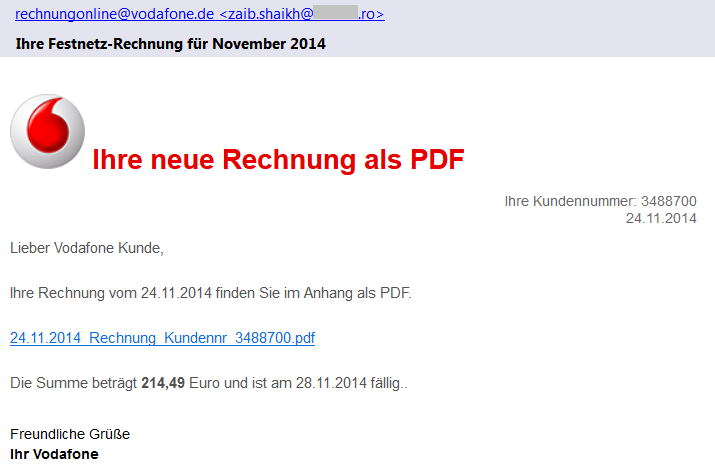
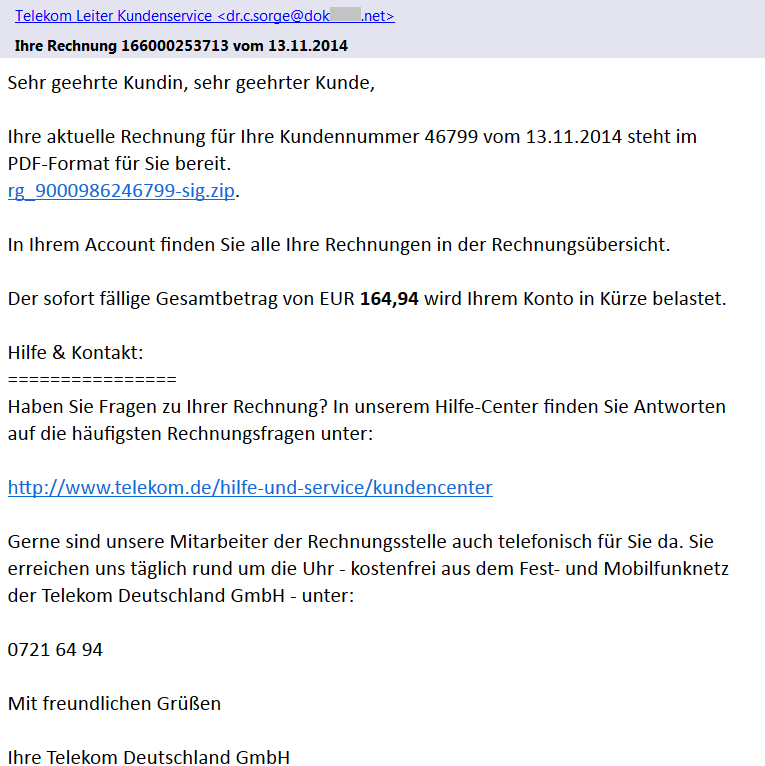
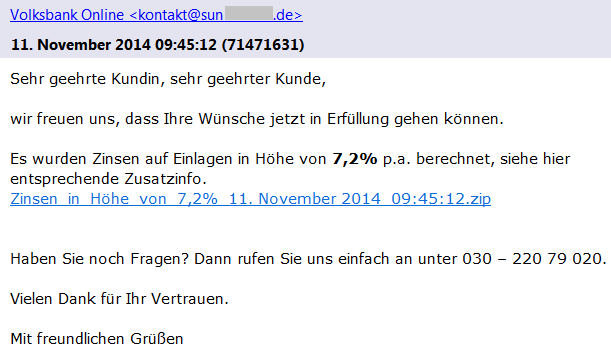
We have found several different versions of these emails that claim to be sent from Vodafone, Telekom Deutschland GmbH, Volksbank, and other companies with a faked sender name (e.g. [email protected]) including the official logos. As we can see in Vodafone’s official statement, these companies are aware of this scam and have already warned their customers. Each version of such email is slightly different and contains the current date, a random customer number and payment amount.

Phishing email - Vodafone

If we look more carefully at the sender’s email address, we can see that the true author did not bother with faking the sender’s email address. This should immediately alert the recipient as an email from German Vodafone would hardly be sent from an unrelated Romanian domain.

In the latest scam, the emails do not contain any attachment, which is different to the other recent phishing campaigns. The proclaimed bill (a PDF file) is available online via a given link (also unique for each version) that actually leads to a ZIP archive stored on one of the hacked sites. These archives contain an exploited/unsecured WordPress instance and they serve as a mule for the distribution of malware to users.

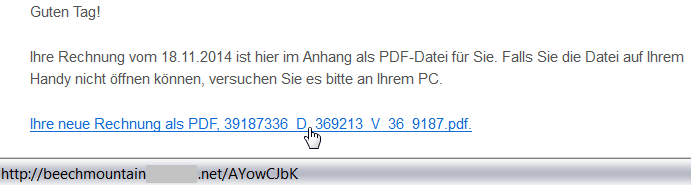
Once again, a user targeted by such an attack should be alerted via a simple inspection of the target location of the link by hovering the cursor over it (but remember to not click on the link). This feature is supported by most browsers and email clients. As we can see from the following figure, the target domain of the link is also very suspicious:

beachmountainXXX.net/AYowCJbK

.

Link to a hacked domain

Malicious Content

The downloaded file (e.g.

2014_11rechnung_K4768955881.zip

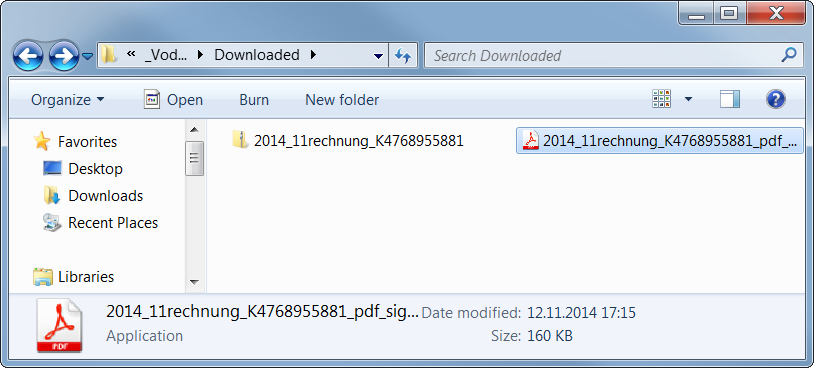
) is a ZIP archive containing an executable file. The user is fooled by the application’s icon (similar to Adobe Reader) to think that it is a PDF file, which is yet another well-known trick used by malware authors.

Icon of the executable file

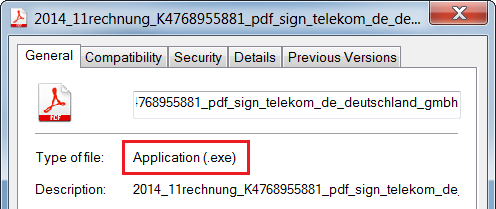
If you are not sure about the real file type, you can see the file properties.

For the following analysis of the malicious content, we use a sample with the MD5 checksum

b0a152fe885a13a6ffb0057f6f21912f

. It is an executable file downloaded from one of these links, likely originally written in C++ by using MFC.

First Stage

The (unwanted) execution of this file starts the first phase of the malicious behavior.

The file itself is 160 kB large, but most of its size is stored within the resource file masked as the following GIF image (109 kB).

The author of this sample used steganography because 99% bytes of the image content represents an encrypted code. This code is decrypted first and the control is passed to this decrypted code.

Furthermore, WinAPI functions are called indirectly (via functions

LoadModule()

and

GetProcAddress()

) and names of these functions are obfuscated and decoded during run-time on the application’s stack in order to make analysis more difficult.

Afterwards, it creates a new process with the same name and fills its sections with the decrypted code from the GIF image (via the

WriteProcessMemory()

function).

This new process copies the original file into 

C:Users%USERNAME%AppDataRoamingIdentitiesqwrhwyyy.exe

(as a read-only system file), registers itself to be run at system startup (registry key

HKCUSoftwareMicrosoftWindowsCurrentVersionRun

), and deletes the original file by using a generated batch file.

Once the file is executed from this new location, it behaves differently:

It checks whether it is analyzed or virtualized via the following techniques.

  • Detection of a loaded Sandboxie module 
    SbieDll.dll

    and detection of running processes 

    VboxService.exe

    (VirtualBox) and

    vmtoolsd.exe

    (VMware).

  • It also uses the
    GetTickCount()

    function to detect whether it has really started during the startup and also to detect debuggers.

  • If any of these is detected, the executable file stops its malicious activity.

Afterwards, it extracts and decrypts another executable file on stack from the aforementioned GIF image and injects it into other processes, such as

explorer.exe

,

firefox.exe

. This starts the second stage of infection. Note: some versions of this malware try also to check a working Internet connection via a DnsQuery of www.microsoft.com before starting the second stage.

Second Stage

This extracted file is relatively small (52 kB) because it is packed by the UPX packer (version 3.08).

After its run-time unpacking, it uses the same anti-debugging tricks as the previous sample.

The main body of this file can be described by the following decompiled code:

CreateMutexA(0, 1, mutexName); // "qazwsxedc"
Sleep(1800000);                // wait for 30 minutes
WSAStartup(0x202, &WSAData);   // initiate Winsock
seconds = getLocalTimeInSeconds(0);
if (GetTickCount() < 1920000 /* 32 minutes after startup */ &&
	GetTickCount() > 1000) {
	while (1) {
		malicious();           // the main functionality
		gStateInactive = 1;
		Sleep(300000);         // wait for 5 minutes
	}
}

  • For synchronization between the first and second stage, the mutex 
    qazwsxedc

    is used (e.g. another variation of classical

    qwert

    or

    asdfg

    names).

  • Afterwards, the malware waits for 30 minutes to remain stealthy. After that, it also checks whether no more than 32 minutes have passed since the system startup (i.e. whether it was started during the first two minutes after startup).
  • In its main loop, it follows the malicious behavior described in the remaining paragraphs (function
    malicious()

    ). After each iteration, it makes a 5 minutes break before the next action.

In this function, the string

DC85CCC4C4CCC7CED385C6CE919F9F98

is decrypted at first by using the fixed XOR key

0xAB

. The resulting string

w.googlex.me:443

represents a remote address of the command-and-control (C&C) host and its port. The second one is

m.googlex.me:53

. At first, the sample tries to check connection with these servers by using the Winsock functions. The other samples contain different lists of C&C servers:

ahokcjidanptacyu.eu
gctrbwqyxxyamcnn.eu
ggcrguelfhvtuxdb.eu
gkkelsrkypraqhto.eu
gunvpvqhnwxxgjsn.eu
gvlmoefoqapvrvec.eu
mcfpeqbotiwxfxqu.eu
...

Afterwards, it obtains information about the local computer, such as:

  • computer name;
  • version of operating system;
  • processor information and number of cores;
  • memory information.
English (United States) // local settings
TEST-PC                 // PC name
Windows 7 Professional  // Windows version
4096 MB                 // memory      
Intel(R) Xeon(R) CPU E5-1620 v2 @ 3.70GHz | CORE 8 // CPU
2014-10                 // malware version

Afterwards, this information is encrypted and send as a registration to a C&C server from the aforementioned list. The reply from the server is encrypted by the same algorithm. The very first byte of the reply message specifies an action (i.e. a control code) to be performed. To date, we have identified the following codes:

  • 18, 19, and 20 – open a specified page in Internet Explorer (with minor differences).
  • 16 and 17 – download and execute a file specified within the message. The file is downloaded via the
    URLDownloadToFile()

    function, stored with a random name, e.g.

    %TMP%mibww.exe

    and executed via the 

    WinExec()

    function.

  • 6 – terminate the process (itself).
  • 5 – inactivate itself for a specified time.
  • 2, 3, and 4 – these codes imply different types of online communication with other systems (e.g. for downloading other malware modules, communication with other infected systems, attacking specified targets). The communication is executed via a server-specified number of threads running the following built-in functions. Arguments to these functions are also sent within the messages from a C&C server. All of these functions are based on Winsock functions.
    • Sending a message to a given IP address (or host name) and port.
    • Communication with a remote server on ports 21 and 22.
    • Sending multiple types of HTTP GET requests to specified servers.
GET %FILE% HTTP/1.1
Accept: image/gif, image/x-xbitmap, image/jpeg, image/pjpeg, application/x-shockwave-flash, application/vnd.ms-excel, application/vnd.ms-powerpoint, application/msword, */*
Accept-Language: en-us
Accept-Encoding: gzip, deflate
User-Agent:Mozilla/4.0 (compatible; MSIE %VERSION%.0; Windows NT %VERSION%.1; SV1)
Host: %HOST%:%PORT%
Connection: Keep-Alive

GET %FILE% HTTP/1.1
Content-Type: text/html
Host: %HOST%
Accept: text/html, */*
User-Agent:Mozilla/5.0 (X11; U; Linux i686; en-US; re:1.4.0) Gecko/20080808 Firefox/%VERSION%.0

GET %FILE% HTTP/1.1
Referer: http://%ADDR%:80/http://%ADDR%
Host: %HOST%
Connection: Close
Cache-Control : no-cache

GET %FILE% HTTP/1.1
Content-Type: text/html
Host: %HOST%
Accept: text/html, */*
User-Agent:Mozilla/4.0 (compatible; MSIE %d.00; Windows NT %d.0; MyIE 3.01)

Those actions are constantly executed until the process is terminated by the C&C server (unlikely) or by user (e.g. system shutdown). However, this process is started once again during the system startup.

As we can see, it is up to the attacker to download and execute other malicious modules, such as password stealers, bankers, or to include the infected PC into a botnet.

Conclusion

Although, the analyzed phishing emails are far from perfect (download links and sender addresses are suspicious, the text of email is only available in German, etc.), it is still possible to fool a user into executing the malicious file. This file is powerful enough to infect the user’s machine and turn it into an unsafe place.

Here are some basic tips, that we’ve previously shared about how to detect a phishing email:

  • Check the spelling and grammar – it is unlikely that your bank or service provider will send you an email with such mistakes.
  • Sender’s name and email address can be spoofed, do not rely on them.
  • Look at the target address of the link – different domains than the official ones are highly suspicious.
  • Do not panic and do not do any action in haste. The attacker often tries to threaten you and make a time pressure on you.
  • Do not open suspicious attachments or links. If you really need to open a file, check its file type before double-clicking it. The file name and icon can be easily crafted to look like a picture or document.
  • If you are not sure about the email’s origin, try to contact that company directly (e.g. call official customer care), but do not respond to such email and never ever send your credentials in this way.
  • And as always: use AVG to stay protected.

Why Android phones and tablets need Anti-Virus

Smartphones and tablets are now as powerful as your three year old desktop or laptop computer, which is why it’s just as important to ensure they are secure. And this is especially true for Android devices. In fact, as much as 97% of all mobile malware (that’s fake apps, viruses and scams) is on Android.

But how does malware get onto your phone in the first place? Here are the three top ways that malware can get onto your Android device and how a simple security app can help to keep you safe.

Video

Android Security Basics

Installing ‘untrusted’ apps

Only using the Google Play Store, or another trusted source for your apps is the default advice for every Android device owner.  And it’s good advice because reputable market places will often scan their apps to ensure they’re safe before you download them.

However, Android also provides the ability to download and install an app directly from a website – as a file with the extension “.APK” – provided, of course, that you first enable the security setting to allow “Untrusted sources”.

Anti-Virus for Android will not only help detect potentially malicious apps, it will also alert you to ensure you keep that “Untrusted sources” security option disabled, except for rare occasions when you might need to temporarily enabled it.


Web links and browsing

It’s not just rogue apps that can give you a bad day.  Browsing web sites from your Android phone and tablet can put you at risk.  And there’s also the inconvenience of having your device stolen or lost forever.

Surfing websites from mobile devices is amazingly convenient for you, and the scammers. By exploiting known vulnerabilities, especially in those older Android devices that aren’t up to date, just clicking on a malicious link can be enough to wreak havoc.

Luckily, a good Anti-Virus app which can also scan links and provide protection against phishing attacks will help you surf more safely.

And when it comes to losing your Android phone to tablet, Anti-Theft features allow you to remotely locate, and if stolen, remotely erase your device for peace of mind.

Challenge of Keeping Updated

The ability to keep your Android phone or tablet running the best version of Android with all the latest security fixes depends on a number of factors.

Firstly, the manufacturer may have shipped your device with a modified version of Android to make it behave a little differently.  For example, if you have a Samsung device using the “Touchwiz” interface, or an HTC with the “Sense” look and features.

Second, if you purchased your phone or tablet through a telephone company there’s a good chance it came bundled with some extra apps and features too.

All of these modifications, while arguably adding some value, delay the deployment of security fixes released by Google.

Often you have to wait for  either your telephone company or the device manufacturer (or both) has to refresh their modified versions of Android before you get the benefit.

A good Anti-Virus app can help to keep your device secure until those security updates arrive.

These are just some of the reasons why Android phones and tablets need Anti-Virus.  Do you know of any more?

Three essential tips for new Android devices

Unfortunately, with today’s smartphones (which have the capacity and the feature-set of a high-end PC from about 10 years ago) it’s no longer a matter of popping in the SIM and using it.

There are a million things to watch out for and set up. In this week’s blog, we’ve compiled the three most useful steps you need to take besides running through the initial setup and downloading your favorite apps.

Sign into your Google Account:

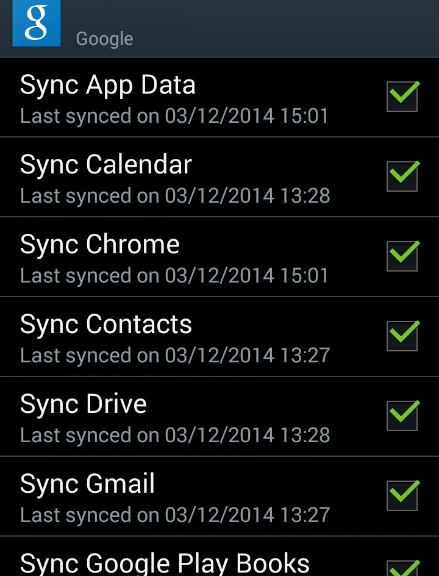
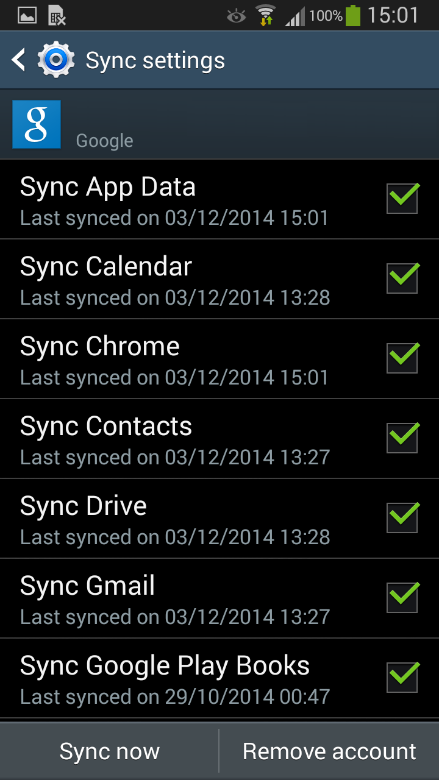
One of the first things your new Android will ask you to do is sign into your Google account. Now, you could technically go without a Google account, but the benefits outweigh a lot of the worries some users have: once you sign in, it will back-up your phone’s settings, installed apps, account data and more – plus it allows you to purchase apps on the Google Play Store.

If you’re worried about privacy, simply create a new account and leave out information you don’t want to be shared with Google.

Google Sync

Get the latest update:

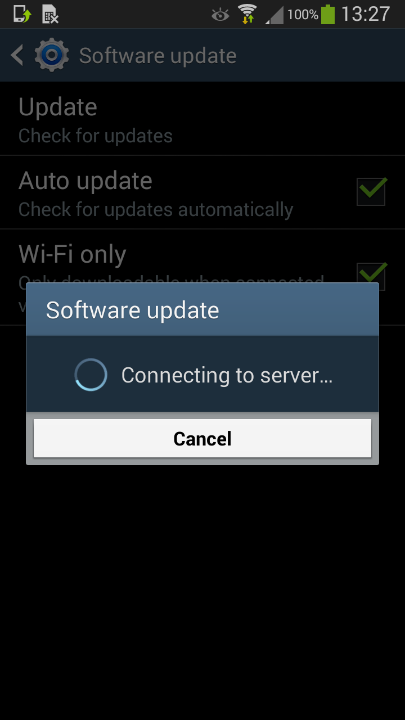
Most phones come with outdated software right out of the gate (as software continues to improve after devices come off the production line). We suggest checking for updates in your “Settings” app under “About device” (or similar).

Do the same for your apps so you don’t have to go into the Google Play store all the time. Go to Settings again and look for the “Auto-update apps” checkbox.

Software update

Get rid of preinstalled bloatware:

As we discovered last month in our AVG App Consumption report, one of the top reasons for battery drain, storage consumption and data traffic are the preinstalled apps on your phone.

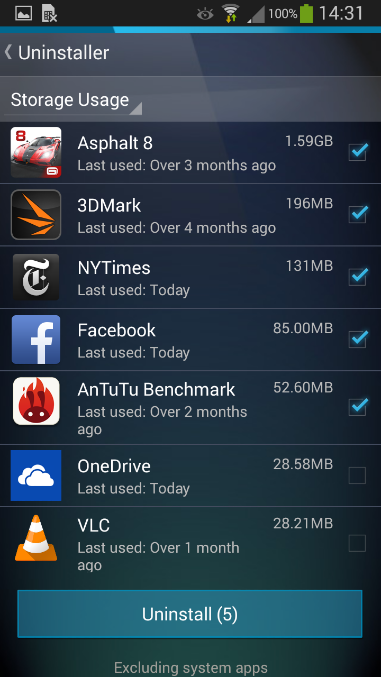
We’ve actually made a free app, AVG Cleaner for Android, which lets you view the most draining apps on your phone and helps you get rid of them: Open it up and go to the App Uninstaller.

This will list all your currently running apps. If you tap on the little blue arrow in the top right, you can then sort the list by:

  • App Usage – how often you use each of your apps
  • Storage Usage – how much space your apps use
  • Battery Usage – how demanding each app is on your battery
  • Data Usage – the apps that send and receive the most data (to help avoid hitting your data plan limit)

Uninstall Bloatware


Addressing A New Generation of Mobile Threats Through Innovation

What inspires our innovation most is our customers – and finding solutions to better protect them, their personal data and their devices. In order to do this, we are constantly tracking new security threats in today’s ever-changing digital world.

As a starting point for the day, we showed a Live Global Threat Map. This dynamic map provides a snapshot of virus/malware activity we are tracking real-time on PCs and mobile devices all around the world. On our map, you can zoom in and actually see the number of infections in each country over a period of time. With 188 million active users, 90 million of which are mobile, we have a pretty good pulse on the threats around the world.

Most of our demos for the day were focused on the new generation of attacks uniquely focused on mobile functionality. While the first generation of mobile attacks were primarily using vectors and methods used in the PC world, now we are starting to see the second generation mobile attacks.

These new attacks include the use of voice, social engineering, rough access points and exploitation of various vulnerabilities in apps.

Here are a few of the mobile threats we demoed:

Voice Activation

Voice activated software is a standard feature on smartphones and is also appearing in smart TVs and other Internet-connected devices. It also, unfortunately, can be used maliciously. Did you know some applications can respond to voice, even when a phone is locked? We demonstrated how the mobile operating system will respond to a synthetic voice and allow a malicious app to bypass the limitations of a locked device or permissions, allowing it to call a phone number, send mail and other malicious actions. The flaw is very simple and it impacts a broad range of products utilizing voice activation technologies; they simply do not authenticate the source of the voice.

App Vulnerabilities

In the PC world, software can be distributed and installed on the PC from any source. As a result we are seeing many malicious programs impacting this platform. The mobile world has learned this lesson and is centralizing app distribution via app stores. This approach improves control and scan the apps for malicious intent. However, the fact that an app is not malicious doesn’t mean it isn’t vulnerable. We showed an app available on an app store that was downloaded over 5 million times, but is vulnerable. Our demo showed how easy it would be to exploit the vulnerability and take over the mobile device from a remote – allowing streaming video and voice from the device to the hacker.

iOS Threats

All mobile platforms share security issues and we at AVG always keep an eye on emerging threats in all mobile platforms. For example, we demoed the recent Apple iOS “Masque Attack” technique. This technique allows an attacker to substitute malware for a legitimate iOS application under a limited set of circumstances. It works by luring users to install an application from a source other than the iOS app store or their organization’s provisioning system, such as delivered through a phishing link.  This technique takes advantage of a security weakness that allows an untrusted application with the same “bundle identifier” as that of a legitimate application to replace the legitimate application on an affected device, while keeping all of the user’s data. This vulnerability exists because iOS does not enforce matching certificates for applications with the same bundle identifier.  Apple’s own iOS platform apps, such as Mobile Safari, are not vulnerable. In our demo we created a malicious iOS application named ‘FakeBook’ that steals all the user’s data that the legitimate Facebook application have access to.

Visual ID Hijacks

Malicious apps that assume visual identification of a “real” well-known brand (think about banking and social media applications) can replace a legitimate app and wreak havoc. Take Droidphish, a new attack vector we discovered, for example. If a hacker registers with a specific URL, when a link within the real app or even on a web page is clicked, the malicious app can assume the identity of the legitimate application. In our demo, the attacker gains complete control over your device, your email and data, even to the point of taking a photo of you using the device.

Texting Hijinks

We’ve all been warned to beware of URLs sent via a text (SMS) message. When clicked, they can redirect you to a malicious website. In our demo we showed media that a malicious app can even read and reply to incoming text messages without any visual appearance and without the owner of the device being aware that something is going on!

Cross-Platform Infection

Another demo scenario involved an app that creates a malicious PDF that is later automatically synced—via a cloud-based, file sharing service like DropBox – between a PC and mobile device, infecting the other device without even knowing. Imagine if the PDF had an “interesting” name that may trick the user into opening it.

Wi-Fi Hacks

We are constantly warned that public open Wi-Fi is unsafe, but there are millions of public Wi-Fi hot spots open and that means a lot of security risks ahead. Here are three scenarios we demonstrated on public Wi-Fi:

  • Sniffing – Via free Wi-Fi, anyone sitting next to you in a coffee shop could be looking at the traffic you are sending if your data is unencrypted, including your chats, messages, emails etc.
  • Spoofing – You connect to a malicious hotspot thinking it is legitimate- i.e. it could be named for a well-known coffee shop. (A colleague in Amsterdam ran an experiment and 60 people connected to his network in less than an hour!)
  • Tracking- Walk into a retail store and SSID info allows tracking of your location. In some cases, a trusted retailer may be seeking to personalize your experience when you walk into a department. But in other cases, the tracking could be for nefarious purposes.

For these very scenarios, our Innovations Labs team created AVG Wi-Fi Assistant to smartly turn your Wi-Fi on/off along with a secure Virtual Private Network (VPN) service – so that no one can track you through Wi-Fi, or look at your data being transmitted. Additionally, AVG Wi-Fi Assistant also offers substantial battery life improvements.

Finally, we also demoed some current innovative mobile security products that help people protect themselves: AVG Zen and new apps from Location Labs, a new AVG company.

This was our first Experiential Lab day and we look forward to hosting many more in the future!

AVG’s Joanna Brace Appointed to MEF North and Latin America Board

MEF members elected ten new regional Board Directors during its recent MEF Global Forum in San Francisco. Among the new directors elected was AVG’s own Joanna Brace, VP Marketing & Product Marketing SMB.

Joanna leads AVG’s business global marketing, product management, product marketing, channels marketing, web marketing and partner enablement teams.

She brings understanding of the ever-changing SMB environment and the needs of todays’ mobile businesses to MEF.  “The days when work was confined to an office with four walls and a locked door are gone.  Thanks to mobile technology and popular cloud-based applications today’s start-ups are living in a world where doing business without walls is perfectly normal,” Joanna noted.

Judith Bitterli was elected to MEF’s Global Board in October. AVG has been an active MEF member in the policy working group which developed AppPrivacy, part of MEF’s Mobile Initiative, and sponsored exclusively MEF’s Global Consumer Trust Report in 2013 and 2014.

The MEF North and Latin America Board