Tag Archives: featured1

Mobile World Congress 2015: the unstoppable growth of mobile devices

mobile world congress

After attending the Mobile World Congress 2015 one thing is clear to us: the growth of mobile devices is unstoppable!

As the number of users and mobile devices increase, the number of threats and attacks do too. And with more and more mobile devices and users linked to movility the cyber-criminals have found their target niche.

How can we protect ourselves from that raising number of threats?

Panda Mobile Security: Maximum protection for your Android devices

This is not the first time we talk about our antivirus for Android, but today we want to tell you about the new features our colleagues in PandaLabs are working on!

For example, a couple of moths ago we saw how the downloading of some apps traped us in to using SMS Premium. That’s why Panda Mobile Security has created in “Privacy Auditor” a new functionality called “Cost Money”.  So if you downloaded a Weight Loss app or a QR reader, or any app with permissions to behave in this malicious way will be flagged as such. Check them and if they seem malicious remove them rightaway!

Nor should we forget that the threats there were previously founded on other platforms now can be atacking our mobile phones or tablets. For instance, the Ramsonware virus that “hijack” the device requesting a payment, as it renders useless the device and prevents us accessing our data.

We are even descovering threats cybercriminals created to take pictures of the users while the device is turned off or paused, and steal their data.

In addition, Panda Mobile Security, available in 16 languages in a few days, highlights the importance of geolocation. For example, the “Theft Alert” allows the device when someone  introduces the wrong password, takes a photo and sends it via email with the device location.

What to protect with a mobile antivirus?

We want that our Android antivirus to be a complete security solution so it makes the users life easier and safer!

With that in mind we are able to protect againts virus, fraud and threats, locate the mobile phone or tablet in case you lose it (or someone steals it!), protects private data and resource management.

Want to try our free antivirus for Android?

The post Mobile World Congress 2015: the unstoppable growth of mobile devices appeared first on MediaCenter Panda Security.

Avast Battery Saver extends your Android’s battery life

New intelligent app from Avast learns individual user behavior and optimizes features to maximize battery life.

Avast Battery Saver app for Android

Get Avast Battery Saver for free from Google Play

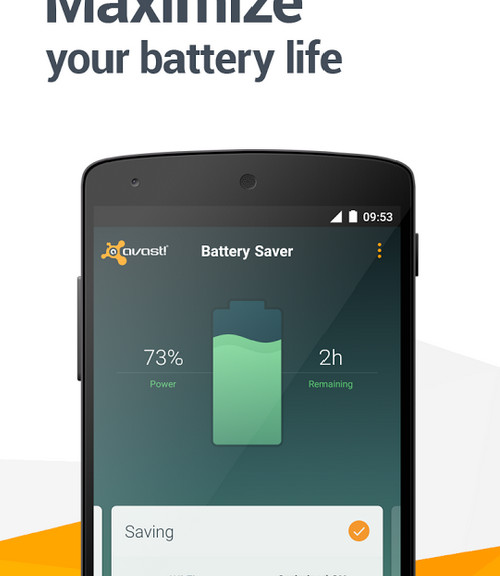
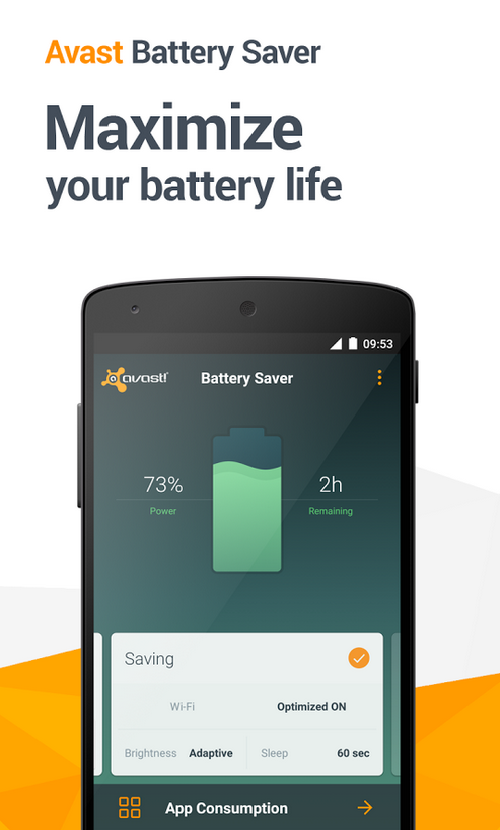
Avast is excited to announce the release of our newest app, Avast Battery Saver. Battery Saver is the first intelligent battery-saver app for Android that increases battery life by an average of 7 hours. Avast Battery Saver optimizes your device’s settings, adjusting data connections, screen brightness and timeouts based off of its ability to learn about individual usage behavior.

“Everyone needs more battery life for their mobile devices, but most battery savers shut down the wrong apps,” said Jude McColgan, Avast’s President of Mobile. “Avast Battery Saver learns which apps are most important to the user, and shuts down only those that are less used.”

In contrast to other battery-saver applications, Avast Battery Saver learns about your daily routine and thus suggests the best smart profiles for your phone. It doesn’t require you to change your behavior or usage, nor does it affect voice calls, text messages, or the ring volume of your phone.

Avast Battery Saver significantly improves battery life, saving up to 20% on one charge — and it’s free from the Google Play Store.

This improved battery manager will take care of your battery’s health the same way a doctor takes care of yours. The result is more battery life with less hassle.

The app’s convenient features make Android devices significantly more efficient

  • Smart profiles activate automatically based on time, location, and battery level.
  • App consumption detects and permanently stops apps that drain too much battery life.
  • Precise estimate of remaining battery life based on actual phone usage and historical data. Battery level is displayed in a percentage and time remaining in status bar notification.
  • The application can turn off Wi-Fi when there are no known hotspots nearby.
  • Your phone limits connections to the Internet to every 5, 10, 15 or 30 minutes, based on your current profile configuration, when its screen is turned off.
  • Emergency mode is activated when your battery level is very low, and it turns off all functions that require significant energy, saving power for when you really need it (e.g. Wi-Fi, data connection, Bluetooth or GPS).

The app currently works with these profiles: Home, Work, Night, and Super-Saving Emergency Mode. You can easily switch from one mode to another and manage them within the app. Avast Battery Saver is now available for download in the Google Play Store.

Avast Battery Saver app free in Google Play

Cyber-criminals set their sights on drones

dron flying

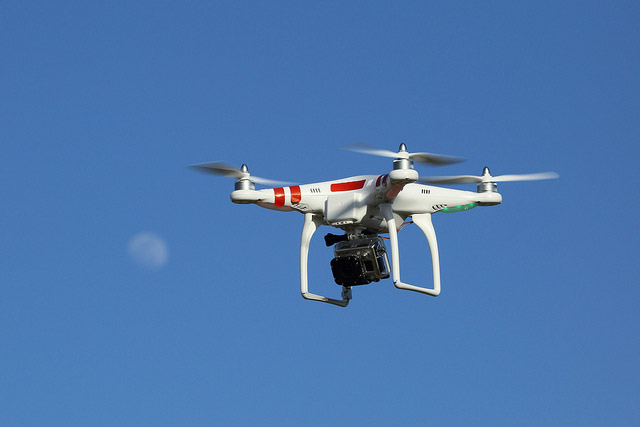
More and more cameras are watching us from the sky. And no, they don’t belong to the police or some intelligence agency, but to your neighbors. Unmanned aerial vehicles are becoming a more common sight, and there is no shortage of people wanting to fly their small camera-equipped drones to get the perfect shot.

Despite the many good uses of these flying machines (crop inspection, rescue missions, crime fighting, etc.), drones can also pose a security threat as they are difficult to detect and neutralize.

A few days ago, the U.S. Secret Service opened an investigation after finding a small recreational quad copter in the grounds of the White House. Despite the machine was operated by a government employee and not a criminal, the incident raised a lot of concerns as it came just four months after another incident in which an intruder managed to jump over the perimeter fence of the presidential mansion.

U.S. authorities (who have been using unmanned aircrafts in military operations for years now) are increasingly worried about the fact that drones could be used by criminals or terrorists to launch attacks with explosives or chemical weapons.

dron

At the beginning, drones were restricted from flying near other aircrafts, airports or populated areas (in Spain, for example, drones must stay at least 8 kilometers (5 miles) away from an airport). However, the proliferation of domestic drone use is raising new concerns for privacy and security. Can small drones be used for small-scale espionage?

DJI Technology Co., the Chinese maker of the device that crashed on the lawn of the White House, and one of the leading makers of consumer drones in the world, has announced it has plans to change software on its drones to prevent them from flying over Washington. Additionally, the company also plans to disable its drones from crossing national borders after police discovered a DJI drone that apparently crashed while attempting to carry drugs into the U.S.

But, are drone manufactures taking enough measures to prevent cyber-criminals from manipulating their software? According to ‘The Wall Street Journal’, cyber-security experts have warned that drone no-fly zones are relatively simple for computer programmers to deactivate. “There’s more stuff that the industry can be doing as a whole to improve the overall security,” DJI spokesman Michael Perry said.

There are actually reasons to be concerned, as shown by the appearance of the first ever backdoor malware for drones: Maldrone. Security expert Rahul Sasi has discovered and exploited a ‘backdoor’ in Parrot AR, one of the most popular drone models. A backdoor malware can infiltrate target computers, appearing to be harmless, and take control of a drone by interacting with its sensors and serial ports. Rahul Sasi has even published a video proof-of-concept to demonstrate its efficiency.

“After the connection is established, we can interact with the software as well as the drivers/sensors of the drone directly. There is an existing AR drone piloting program. Our backdoors kill the autopilot and take control,” explained Sasi.

This security expert is not the only one concerned about the existence of security holes in drones. Hackron, a cyber-security congress recently held in Santa Cruz de Tenerife (Spain), challenged participants to hack into a drone, with a 200-euro prize for the winner.

What would happen if cyber-criminals set their sights on drones? Are drone manufacturers taking precautions? Although we’ll still have to wait before we can answer these questions, it seems clear that cyber-security risks are no longer just limited to computers and smartphones. In the case of cyber-criminals, the sky is not the limit…

The post Cyber-criminals set their sights on drones appeared first on MediaCenter Panda Security.

Behind the Scenes of Avast’s Global Wi-Fi Hack Experiment: How we collected and analyzed Wi-Fi data

Wi-Fi and encryption


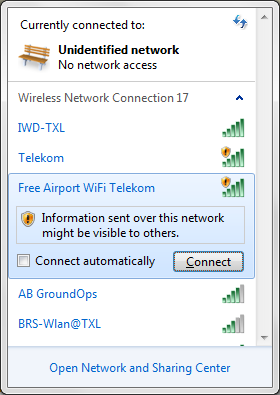
Data transmitted over a wireless network can be either unencrypted or encrypted. While both options are available to users, the use of open, unprotected Wi-Fi networks has become increasingly popular across the globe. In the case of open wireless networks, the transmitted data are unencrypted and might be visible to others, as is shown in the screenshot below. To resolve this issue, many wireless networks use password protection. However, the method and strength of these passwords matter: if a weak encryption method, such as WEP, is used, an attacker can simply crack the password and decrypt the device’s communication. Hence, the use of a strong encryption such as WPA/WPA2 is suggested. The length of a password is another important factor to its strength — a strongly encrypted communication with a short key length can still be cracked by hackers within a short amount of time. Because of this, a key length of longer than 8 characters is strongly recommended.
network

(Figure 1: List of available wireless networks featuring both encrypted and unencrypted options.)


Introduction


In February, we sent several volunteers to 9 cities: Chicago, New York, San Francisco, Berlin, Barcelona, London, Taipei, Hong Kong and Seoul. Our goal was to gather as much information about the use of wireless networks in these cities as possible.


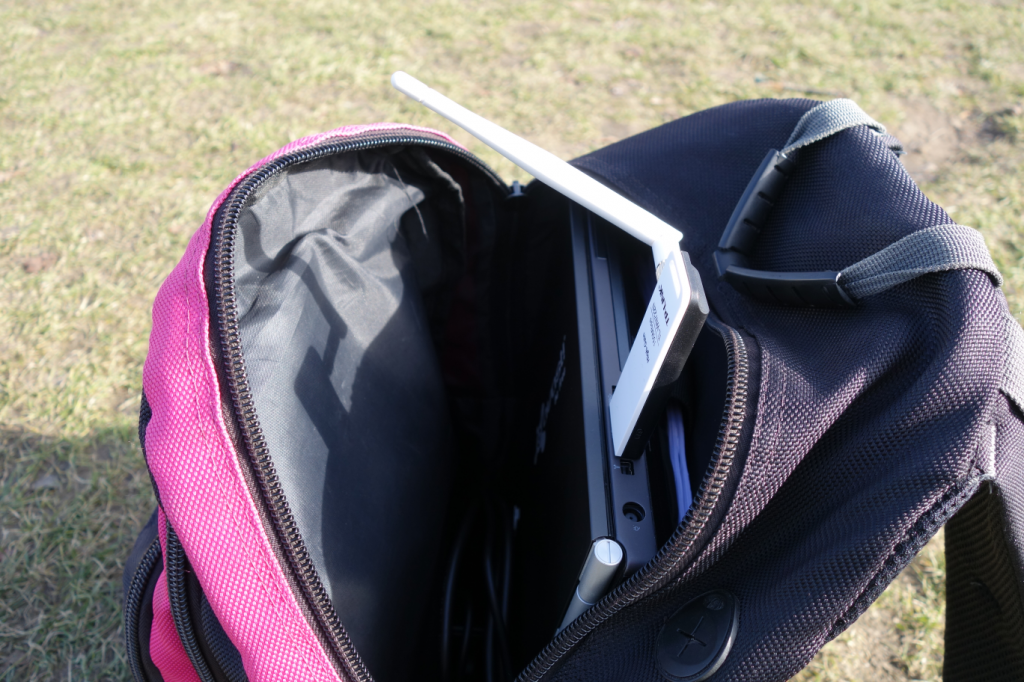
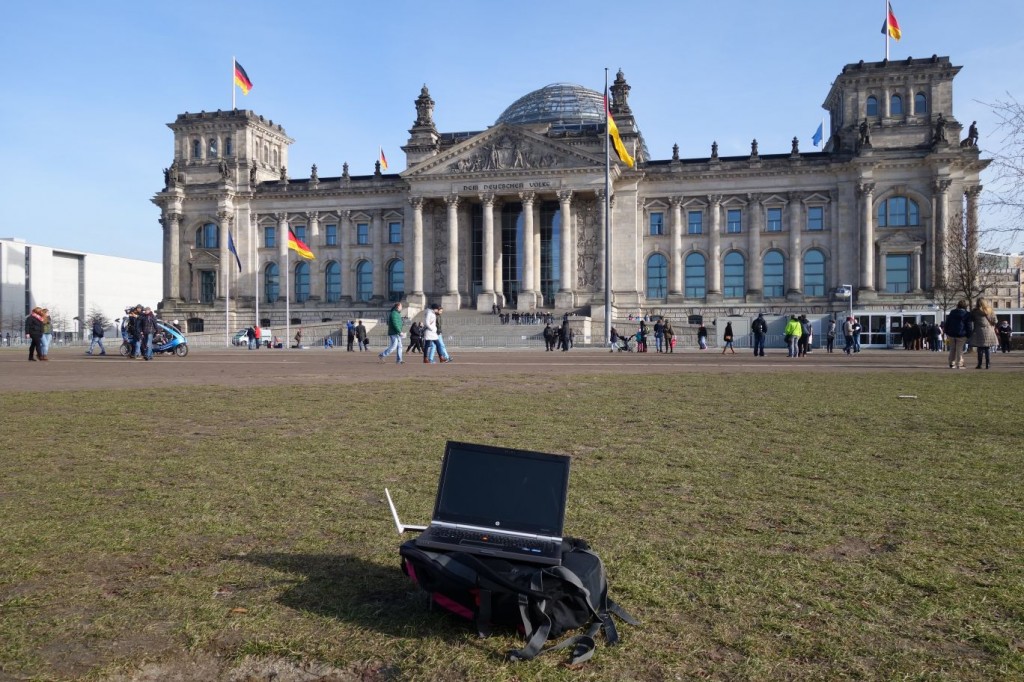
Each volunteer was equipped with a laptop and a WiFi adapter with ability to be switched into monitor mode. This feature allowed us to listen to all wireless communication — even that which wasn’t targeted to our device. This way, we could listen to the data transmitted between the access point and devices receiving it.
DSC01223_

(Figure 2: Laptop and Wi-Fi adapter hidden in the bag. )


Each volunteer walked around a city with an adapter tucked away in his or her bag that constantly listened in on nearby wireless communication.


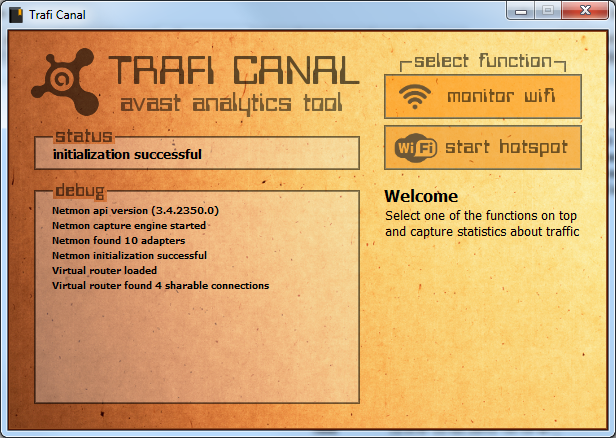
For this experiment, we developed our own application called Trafi Canal, which was based on the free tool Microsoft Network Monitor. This application logged interesting wireless communication data and stored it for later statistical analysis.
tc

(Figure 3: Avast’s traffic analyzing application, Trafi Canal)


This application monitored the wireless traffic at 2.4 GHz frequency and logged the identifiers of hotspots, identifier addresses of devices connected to the hotspots, sources and targets of the communication, and GPS coordinates.

Destinations


The German capital was one of the destinations in our experiment that yielded impressive results. Our volunteer spent one full day walking around the city collecting data.
DSC01220_

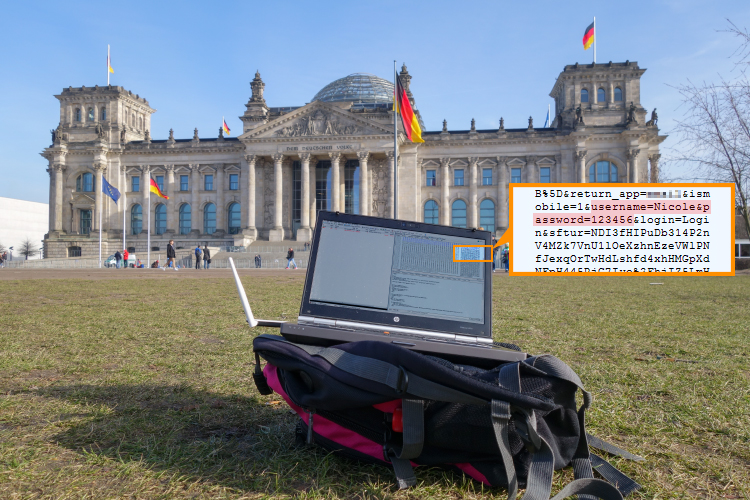
(Figure 4: Monitoring in front of German Bundestag, Berlin. The Wi-Fi adapter can be seen on the left of the laptop.)


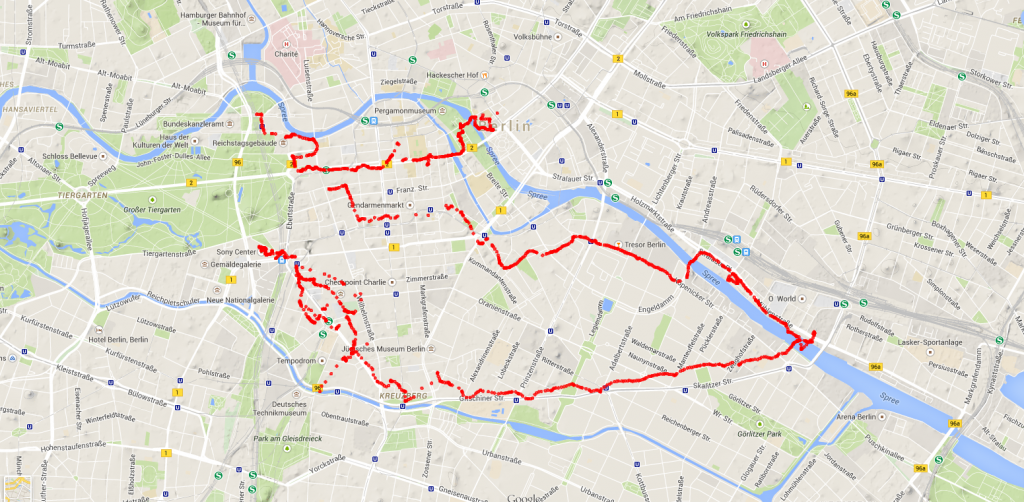
Throughout the day, the Trafi Canal app collected GPS coordinates of our volunteer’s movements. The map below shows the extensive route he took around Berlin’s city center.
ber

(Figure 5: Walking coordinates in Berlin)


Throughout the day, our volunteer encountered more than 8,500 hotspots and came into contact with more than 23,000 devices. If you think our data collected in Berlin is large, imagine the total number of hotspots and devices we encountered throughout all of the 9 metropolitan areas that we visited!


Statistics


After collecting the data in each of the cities, we wrote a script to automatically analyze and process the acquired data. We focused on the most popular channels that hotspots use: encryption types, mostly typical SSIDs, and analysis of communication.


Berlin:


Although there are 14 channels in 2.4 GHz, not all of them are commonly used for communication. To avoid interferences in Wi-Fi networks, channels 1, 6 or 11 are recommended; however, not everyone follows that recommendation. To give you a better idea of the channels’ usage, here’s how it looks with Wi-Fi channels in the center of Berlin:

Channel 1 16%
Channel 2 9%
Channel 6 11%
Channel 11 13%
Channel 13 8%


In addition to hotspots’ channel usage, it’s also interesting to note that while slightly less than one half of hotspots (48%) are encrypted with strong WPA encryption, 3% use weak WEP encryption, and the remaining 26% have no encryption at all. In Berlin, we encountered a total of 8,731 hotspots, 42% of which had devices connected to them. We observed 5% of users communicating — 11% used unencrypted HTTP communication and another 21% encrypted HTTPS communication.


Each hotspot has a unique identifier (BSSID) and a name (SSID). As you might already know, Wi-Fi hotspot names are not unique and are often repeated (e.g. “Free Wi-Fi”). However, not all hotspots broadcast their names (SSID). In Berlin, in 11% of hotspots’ SSIDs are not broadcasted whatsoever.


Most typical hotspot names we encountered.

KD WLAN Hotspot+ 2.40%
HolidayInnExpress 1.48%
Telekom 1.07%
eduroam 0.72%
dlink 0.71%
FRITZ!Box 6360 Cable 0.70%
FRITZ!Box 7362 SL 0.65%
HU-VPN 0.62%
HU-VoIP 0.61%
HotelNET 0.58%


The 5 most visited domains in Berlin are Google, Amazon, Facebook, Akamai and Yahoo:

.1e100.net (Google) 45%
.amazonaws.com 13%
.facebook.com 13%
.akamaitechnologies.com 9%
.yahoo.com 7%


The most popular device manufacturers of connected users were:

Apple 31%
Intel Corporate 8%
TP-LINK TECHNOLOGIES CO.,LTD. 5%
Samsung Electronics Co.,Ltd 5%
LG Electronics 3%
Sony Mobile Communications AB 3%


Additional results


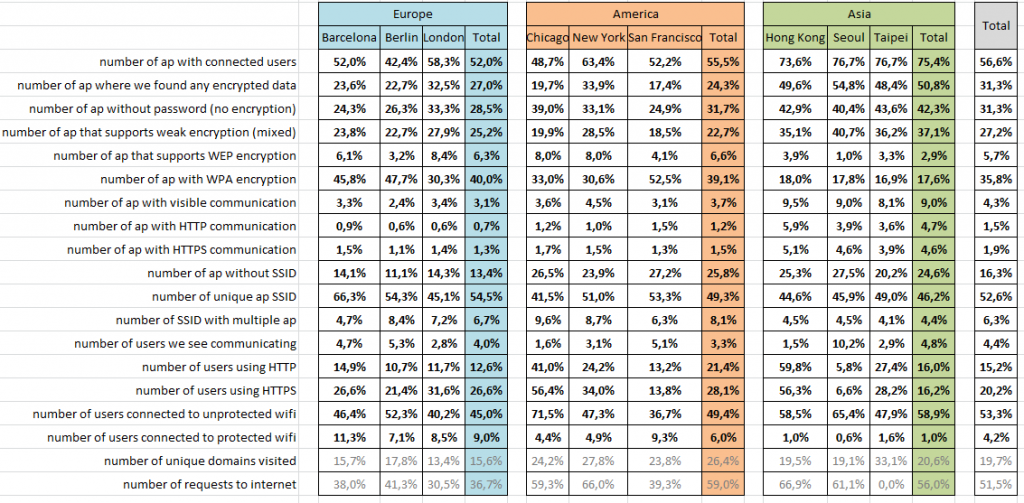
The process of collecting data was similar in all the cities we visited. For the brevity of this report, we will summarize the rest of our findings in the following table:

precentonly

Summary

  • While users in Asia were most likely to join open networks, Europeans and Americans were slightly less so.
  • A significant portion of mobile users browse primarily on unsecured HTTP sites.
  • Nearly one half of the Web traffic in Asia takes place on unprotected HTTP sites, compared with one third in the U.S. and roughly one quarter in Europe.
  • San Francisco and Berlin had the lowest percentage of weakly encrypted hotspots, compared to more than half of hotspots in London and New York and nearly three quarters in Asia.


Conclusion


The data transferred via unencrypted HTTP traffic are transmitted in plain text and may be visible to potential hackers. If a user uses SSL, we cannot read the data which are being transmitted, but we can still determine the domain the user is accessing. For example, we could see that that a user is visiting an email provider, but we cannot decrypt the actual data he or she transmits on the provider.


If user uses a VPN, an attacker is only capable of viewing the encrypted traffic from his or her computer to the VPN server The attacker doesn’t know which websites the user visits nor the content he or she transmits. Due to the fact that the installation and configuration of a virtual private network can be difficult for the average user, Avast offers an easy-to-use VPN solution called Avast SecureLine VPN.


Acknowledgements


The Wi-Fi hack experiment was conducted by the following people:

 Antonín Hýža, Jaromír Hořejší, Jerry Khan, Chun Lin Tu, Alex Grimaldo

 

WhatsSpy Public: The app that spies on WhatsApp users  

whatsapp smartphone

When WhatsApp decided to let users hide or display the ‘Last Seen’ info, many hurried to disable a feature they considered a breach of privacy. However, shortly after came the blue check marks, which caused angry reactions from users who considered it yet another intrusion into their privacy. The new feature proved to be rather unpopular among many, and so, the instant messaging service decided to let users disable the annoying tick marks and breathe a big sigh of relief.

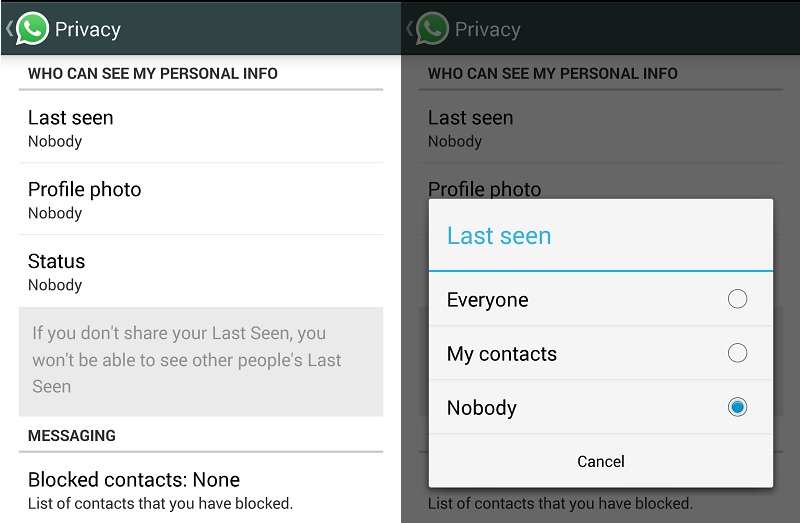
Despite all the measures you may take to hide as many details as you can about your digital life, a lot of that information is still available to third parties. For example, even if you change your WhatsApp privacy settings, any would-be snooper can still see the time when you are online.

WhatsApp is aware of this design flaw since the end of last year; however, they haven’t done anything about it. Users are normally not aware of this bug, so it has been mostly overlooked.

whatsapp privacy

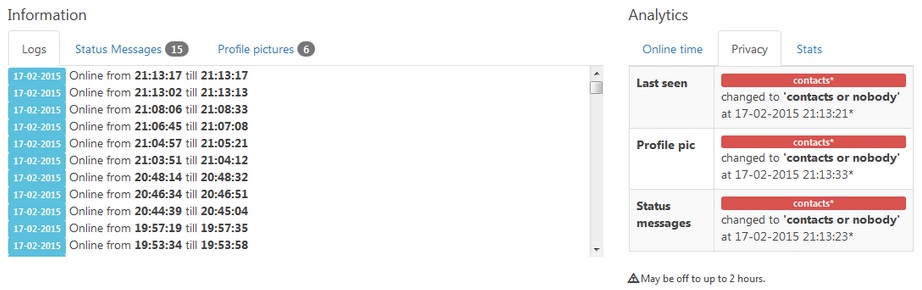
Now, however, Dutch developer Maikel Zweerink has released an application that demonstrates that WhatsApp users’ online status and other information can be monitored, even with the strictest privacy settings: WhatsSpy Public.

The name might ring a bell as it is similar to another tool, WhatsSpy, which claimed to have similar features to WhatsSpy Public (or even more invasive), even though it turned out to be a fraud.

Even if the ‘Last Seen’ option is disabled, WhatsSpy Public can still track the user’s online status, as well as the last time of connection and any changes made to profile photos. Zweerink’s intention is not to provide snoopers with the perfect tool to spy on other people indiscriminately, but highlight the messaging service’s ineffective privacy options.

whatsspy on line

Everything started as an experiment. Zweerink was trying to build a bot for personal use, when he realized that someone could use a similar tool to track other people’s digital footprint. He then decided to develop an app to fully expose and share his discovery with other people.

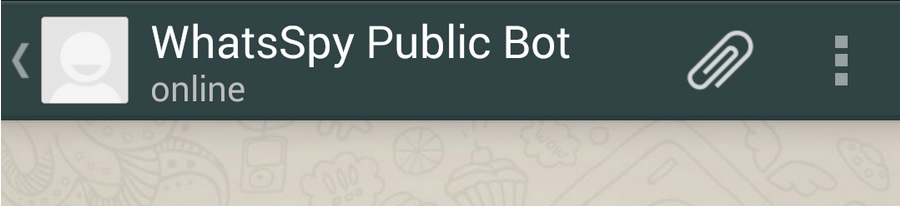
Once the app is installed, all you have to do to retrieve the online status of any telephone number is to add it to your contacts and open a chat window, without alerting the phone number owner or asking for their permission.

The bot displays the victim’s information in the chat window, just as if the snooper had actually subscribed to the other user’s account. Attackers could use the tool to track any WhatsApp user they choose to follow, even though Zweerink explains that the app is not designed to support a large number of requests.

whatsspy public

Maybe it is not too serious that other people may know when you are online or not, but Zweerink believes it is unacceptable that WhatsApp’s privacy settings simply don’t work. In his opinion, the company is giving users a false sense of security by ensuring it protects some private information it actually doesn’t protect.

Zweerink also warns that this information could be used not only by friends or contact but also by companies. Many Internet advertisers use the trace people leave on the Internet (the Web pages they visit, their online activities, etc.) to design custom advertising campaigns; and they could do the same with your WhatsApp information.

A spokesperson for WhatsApp recently denied Zweerink’s accusations that the app’s security settings are broken, explaining that the Dutch researcher’s tool simply gathers publicly available data. And that’s precisely the point that Zweerink is trying to make: the fact that some WhatsApp user information is simply there for anyone to see no matter what you do.

The post WhatsSpy Public: The app that spies on WhatsApp users   appeared first on MediaCenter Panda Security.

Avast Launches Memory Saving Cleaner App for Android

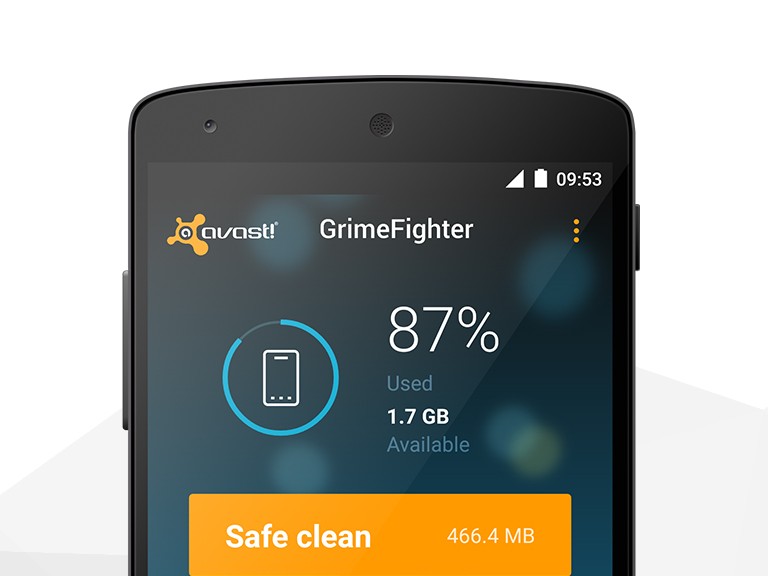
Today, Avast announced the launch of Avast GrimeFighter at the Mobile World Congress in Barcelona. The new application helps Android users free extra memory on their devices with just a few taps so they can save the data that matters to them while enjoying a faster, smoother performance on their devices. 

GrimeFighterHow Avast GrimeFighter works
Avast GrimeFighter begins by scanning all applications on an Android device, identifying unimportant or unnecessary data that could be eliminated without damaging applications’ functionalities. Using GrimeFighter’s easy-to-use interface, users can choose from two modes that allow them to eliminate excess files with ease: Safe Cleaner and Advanced Cleaner. Safe Cleaner is a customizable scanner that quickly identifies unimportant data for instant, one-tap removal. Advanced Cleaner runs in parallel to Safe Cleaner, mapping all of the device’s storage and creating a simple overview of all files and applications that take up space. Advanced Cleaner locates inflated or unused applications and arranges them by file type, size, usage, or name, so users can permanently remove the files and free up storage space.

In addition to cleaning up unwanted data, Avast GrimeFighter helps maximize storage capacity by syncing with personal cloud storage accounts so users can manage their device’s storage without having to delete valuable data. Users can drag files to the cloud icon and GrimeFighter will instantly transfer them to a safe folder in the cloud. Avast GrimeFighter is currently compatible with Dropbox and can assist users in setting up a Dropbox account. Additional popular cloud storage solutions will be added soon.

How does excess data get accumulated?

Bits and pieces of data accumulate on your device, whether you are aware of it or not. GrimeFighter helps you locate excess data that you wouldn’t typically be able to find, such as data left over from initiated app downloads, residual data, thumbnails, and app caches. Popular apps, like Facebook and Instagram, also create excess data on your device as they inflate from their original download size when used regularly. Avast tested some of the most popular Android apps and found that their size can grow exponentially during one week of heavy usage:

                                                                         install size:          additional data accumulated:

1)    Facebook                      36.7MB                        153MB

2)    Flipboard                    12.6MB                        71.1MB

3)    Google Maps            23.21MB                       68.8MB

Avast GrimeFighter will help the more than one billion Android users free up anywhere from 500MB to 1GB of storage per device to enjoy faster performance and is available for download on Google Play.  

New Avast SecureMe app protects iOS and Android users from Wi-Fi Hacking

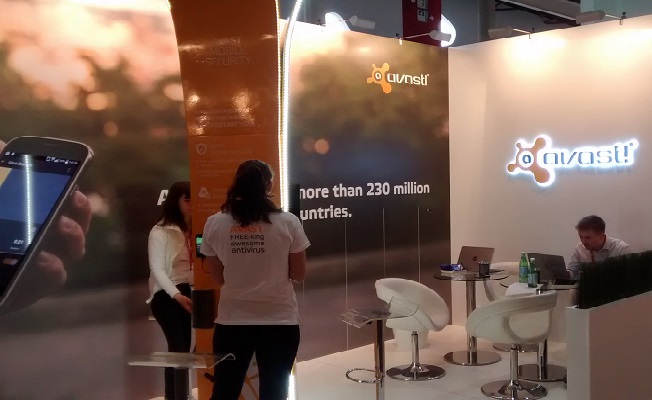
Avast mobile security experts launched a new app today at the Mobile World Congress in Barcelona.

Avast booth at MWC15

Avast launches SecureMe app for iOS and Android at Mobile World Congress 2015

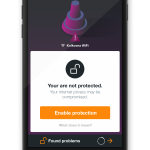
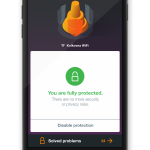
Avast SecureMe is the world’s first application that gives iPhone and iPad users a tool to protect their devices and personal data when they connect to Wi-Fi networks. The free app automatically locates Wi-Fi networks and tells users which of them are safe. Since many users connect without knowing the status of the Wi-Fi network – whether it’s protected or not – Avast SecureMe will create a secure connection in order to keep them safe.

“Public Wi-Fi and unsecured routers have become prime targets for hackers, which presents new risks for smartphones and tablets – even iOS devices aren’t immune,” said Jude McColgan, President of Mobile at Avast.

Avast SecureMe will be available in a invitation-only public beta test within the next few weeks. Check back on our blog, Facebook, and Google+ for more information on signing up coming soon.

The app notifies you if it finds security issues

Avast SecureMe includes a feature called Wi-Fi Security. (This feature is also available for Android users within the Avast Mobile Security app available on Google Play.) People who use open Wi-Fi in public areas such as airports, hotels, or cafes will find this helpful. This feature’s job is to scan Wi-Fi connections and notify you if it finds any security issues including routers with weak passwords, unsecured wireless networks, and routers with vulnerabilities that could be exploited by hackers.

“Avast SecureMe and Avast Mobile Security offer users a simple, one-touch solution to find and choose safe networks to protect themselves from the threat of stolen personal data,” said McColgan.

What’s the risk that my personal data will be stolen?

If you use unsecured Wi-Fi when you log in to a banking site, for example, thieves can capture your log in credentials which can lead to identify theft. On unprotected Wi-Fi networks, thieves can also easily see emails, browsing history, and personal data if you do not use a secure or encrypted connection like a virtual private network (VPN). See our global Wi-Fi hacking experiment to see how widespread the threat really is.

Avast SecureMe checks the security of Wi-Fi networks.
Avast SecureMe notifies you of security problems.
Avast SecureMe is a simple way to find and choose safe networks.

The SecureMe app includes a VPN to protect your privacy

Avast SecureMe features a VPN to secure your connections while you conduct online tasks you want to remain private, especially checking emails, doing your online banking, and even visiting your favorite social network sites. Avast SecureMe automatically connects to the secure VPN when it detects that you have connected to a public Wi-Fi making all transferred data invisible to prying eyes. For convenience, you can disable the protection for Wi-Fi connections you trust, like your home network.

Avast SecureMe for iOS will be available soon in the iTunes Store. Before it’s widespread release, we will conduct an invitation-only public beta test, so check back on our blog, Facebook, and Google+ for more information on signing up.

The Wi-Fi Security feature is now also included in the Avast Mobile Security app for Android, available on Google Play.

What happens to my Facebook account when I die?

facebook tomb

Photos, videos, status updates… Social networking sites store lots of information about you. Just take a look at your Facebook page’s wall. What do you see? Birthday pictures, your ‘Year in Review’ video, and hundreds of other things that give an idea of your life. What will happen to all these things when you’re gone?

If you are worried about what will happen to your digital life when you are dead, you’ll be happy to learn that Facebook has decided to grant users more control over how their online identities will be handled after death. The social network now lets users give someone they trust the keys to their profile page in case they die.

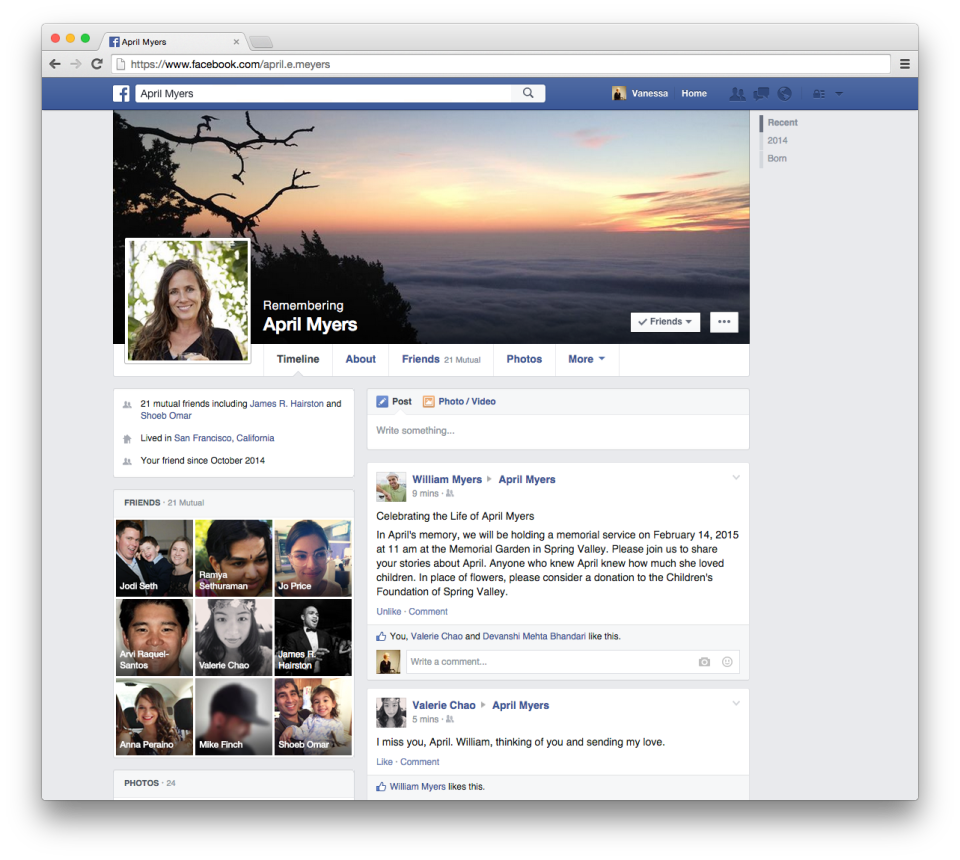
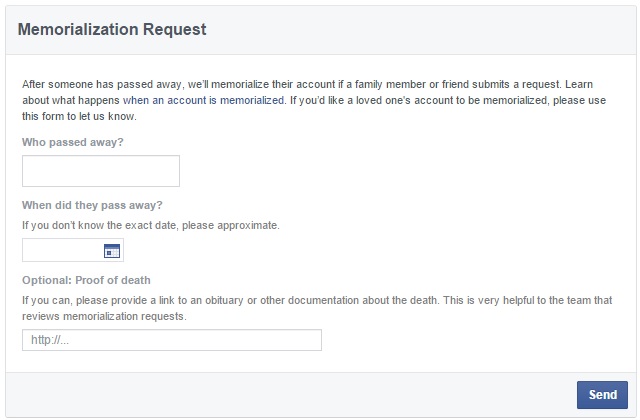
Until now, when someone passed away, Facebook turned the deceased person’s account into a memorialized account, for friends and family to share and celebrate the memories of their loved one. For this to be possible, a user had to report the deceased person or the account that needed to be memorialized through a link.

facebook memorialized accountf

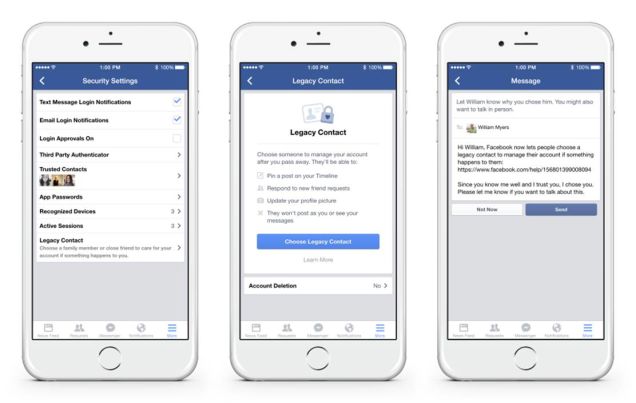
Now, Facebook goes one step further and lets users appoint an heir for their accounts. The new feature, called “Legacy Contact“, allows users to choose someone from their contacts to manage their account after they pass away.

This feature allows the Legacy Contact to write a memorial post on their friend’s profile page, respond to new friend requests, and change the friend’s profile picture. However, they won’t be able to access certain confidential information such as private messages.

facebook memorialization request

As published by Facebook on its blog, the ‘Legacy Contact’ feature is available only in the United States for now, although it will roll out to other countries soon.

How to choose a ‘Legacy Contact’ on Facebook

Now, how do you choose a ‘Legacy Contact’? The steps to take are really simple:

  • Go to ‘Settings’
  • Select ‘Security’
  • Choose ‘Legacy Contact’. There, select the person who will manage your memorialized account and specify the actions that they will be able to take.
  • Finally, send them a message to let them know you have selected them as your digital heir

facebook security settings


In any case, Facebook also gives you the chance to take more drastic measures: you can choose to have your account permanently shut down when you die.

Until the time arrives when this new feature is implemented in your country, it is time for you to think: who will you entrust with the task of managing your account?

The post What happens to my Facebook account when I die? appeared first on MediaCenter Panda Security.

Avast study exposes global Wi-Fi browsing activity

The use of open, unprotected Wi-Fi networks has become increasingly popular across the globe. Whether you’re traveling around a new city and rely on public Wi-Fi networks to get around or you’re at your favorite coffee shop and connect to its Wi-Fi, you’re left in a vulnerable situation when it comes to protecting your data. Just as you lock the door of your house when you leave, you should also use a security app if using public Wi-Fi.

Couple taking selfie

Using unsecured Wi-Fi can easily expose photos and other personal information to hackers.


Avast’s hack experiment examines browsing habits of people across the globe

The Avast team recently undertook a global hacking experiment, where our mobile security experts traveled to cities in the United States, Europe, and Asia to observe the public Wi-Fi activity in nine major metropolitan areas. Our experiment revealed that most mobile users aren’t taking adequate steps to protect their data and privacy from cybercriminals. In the U.S., the Avast mobile experts visited Chicago, New York, and San Francisco; in Europe, they visited Barcelona, Berlin, and London; and in Asia, they traveled to Hong Kong, Seoul, and Taipei. Each of our experts was equipped with a laptop and a Wi-Fi adapter with the ability to monitor the Wi-Fi traffic in the area. For this purpose, we developed a proprietary app, monitoring the wireless traffic at 2.4 GHz frequency. It’s important to mention that there are commercial Wi-Fi monitoring apps like this available in the market that are easy-to-use, and available for free.

wifi experiment Bundestag

In front of the German Bundestag, Berlin: On public Wi-Fi, log in details can easily be monitored.

The study revealed that users in Asia are the most prone to attacks. Users in San Francisco and Barcelona were most likely to take steps to protect their browsing, and users in Europe were also conscious about using secure connections. While mobile users in Asia were most likely to join open networks, Europeans and Americans were slightly less so; in Seoul, 99 out of 100 users joined unsecured networks, compared with just 80 out of 100 in Barcelona.

1)      Seoul: 99 out of 100

2)      Hong Kong: 98 out of 100

3)      Taipei: 97 out of 100

4)      Chicago: 96 out of 100

5)      New York: 91 out of 100

6)      Berlin: 88 out of 100

7)      London: 83 out of 100

8)      Barcelona: 80 out of 100

9)      San Francisco: 80 out of 100

Our experiment shed light on the fact that a significant portion of mobile users browse primarily on unsecured HTTP sites.  Ninety-seven percent of users in Asia connect to open, unprotected Wi-Fi networks. Seven out of ten password-protected routers use weak encryption methods, making it simple for them to be hacked. Nearly one half of the web traffic in Asia takes place on unprotected HTTP sites, compared with one third U.S. traffic and roughly one quarter of European traffic. This can most likely be attributed to the fact that there are more websites in Europe and the U.S. that use the HTTPS protocol than in Asia.

So, how much of your browsing activity can actually be monitored?

Because HTTP traffic is unprotected, our team was able to view all of the users’ browsing activity, including domain and page history, searches, personal log in information, videos, emails, and comments. Before the start of any communication, there is always a communication with the domain name server (DNS). This communication is not encrypted in most cases, so on open Wi-Fi it is possible for anybody to see which domains a user visits. This means, for example, that somebody who browses products on eBay or Amazon and is not logged in can be followed around. Also, it is visible if people read articles on nytimes.com or CNN.com, and users who perform searches on Bing.com, or who visit certain adult video streaming sites can be monitored.

Beware of weak encryption

The majority of Wi-Fi hotspots were protected, but we found that often their encryption methods were weak and could be easily hacked. Using WEP encryption can be nearly as risky as forgoing password-protection altogether, as users tend to feel safer entering their personal information, but their data can still be accessed.

San Francisco and Berlin had the lowest percentage of weakly encrypted hotspots, while more than half of password-protected hotspots in London and New York and nearly three quarter of the Asian hotspots were vulnerable to attack.

1)      Seoul: 70.1%

2)      Taipei: 70.0%

3)      Hong Kong: 68.5%

4)      London: 54.5%

5)      New York: 54.4%

6)      Chicago: 45.9%

7)      Barcelona: 39.5%

8)      Berlin: 35.1%

9)      San Francisco: 30.1%

Our goal is not to discourage you from visiting HTTP sites, but instead, encourage you to protect yourself on public Wi-Fi. If you install protection that allows a secure Internet connection while accessing public networks, public Wi-Fi is harmless. But when you go unprotected, hackers can follow your way around the Internet. Even if the user accesses a HTTPS site, the domain visited is still visible to hackers.


PandaLabs neutralized 75 million new malware samples in 2014, twice as many as in 2013

PandaLabs, the anti-malware laboratory of Panda Security detected and neutralized 75 million malware samples in 2014. This figure more than doubles the number recorded in 2013: nearly 30 million new malware strains.

In all, the total number of malware specimens detected by PandaLabs throughout its history has reached 220 million, which means that 34 percent of all malware ever created was coded in 2014. In fact, last year Panda Security recorded an average of 200,000 new malware strains per day. The year 2014 can be considered the year of massive cyber-attacks, with some of the world’s biggest corporations falling victim to large-scale data breaches.


Trojans continue to account for most new malware

Trojans are still the most common type of malware way ahead of other malware specimens. In fact, in 2014 Trojans accounted for almost 70 percent of all new malware created, followed by viruses (12.33 percent), other malware (10 percent), worms (6 percent) and adware/spyware (3 percent). In this respect, CryptoLocker was one of the most destructive Trojans unleashed last year. “CryptoLocker is one of the nastiest pieces of malware to have targeted users in 2014. This ransomware encrypts victims’ files and requires a ransom in order to decrypt them. Thousands of computers have fallen victim to it, from home users to businesses and financial institutions”, said Luis Corrons, Technical Director of PandaLabs at Panda Security.


Malware and infections

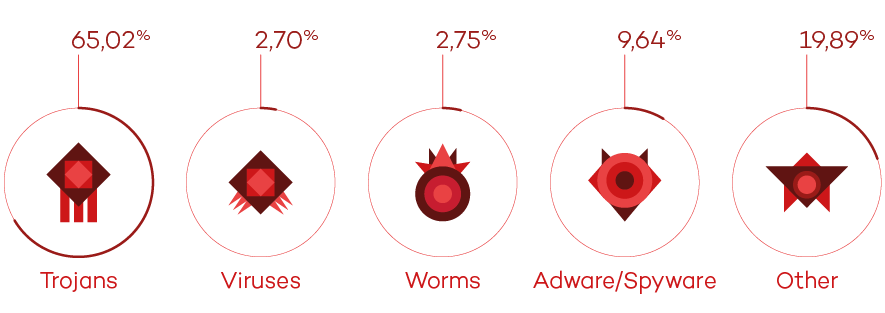
Trojans, once again, accounted for more infections (65 percent) than any other malware, although there was a notable increase in the ‘Other’ category. This category includes PUPs (Potentially Unwanted Programs): applications which, despite not being malicious per se, install unwanted software without properly informing the user.

PandaLabs Annual Report 2014


China tops the list of infections

Despite being one of the worst years for IT security, the global infection rate in 2014 was 30.42 percent, a significant decrease on 2013’s figure. Country by country, China once again had the most infections with a rate of 49 percent, followed by Ecuador (42.33 percent) and Turkey (41.53 percent). Theses countries were also at the top of the infection rankings last year, although in a different order: China, Turkey and Ecuador.

Other countries with rates above the global average in 2014 include Colombia (33 percent), Uruguay (33 percent) and Chile (31 percent).


Sweden the safest country

Europe was the area with the lowest infection rate, with nine countries ranked among the ten least infected nations, whereas Japan was the only non-European country to appear in the ranking. The list was topped by Scandinavian countries: Sweden (20 percent), Norway (20 percent) and Finland (21 percent).


“We live in an Internet-connected world, and as such we are exposed to cyber-attacks now more than ever before. Security threats will increase in 2015, and both companies and home users must prepare themselves to respond to them. It is not a question of whether their security will be compromised but rather when and how, so in this case prevention is key”, concluded Corrons.


The full report is available here.

The post PandaLabs neutralized 75 million new malware samples in 2014, twice as many as in 2013 appeared first on MediaCenter Panda Security.