Multiple cross-site scripting (XSS) vulnerabilities in OpenMRS 2.1 Standalone Edition allow remote attackers to inject arbitrary web script or HTML via the (1) givenName, (2) familyName, (3) address1, or (4) address2 parameter to registrationapp/registerPatient.page; the (5) comment parameter to allergyui/allergy.page; the (6) w10 parameter to htmlformentryui/htmlform/enterHtmlForm/submit.action; the (7) HTTP Referer Header to login.htm; the (8) returnUrl parameter to htmlformentryui/htmlform/enterHtmlFormWithStandardUi.page or (9) coreapps/mergeVisits.page; or the (10) visitId parameter to htmlformentryui/htmlform/enterHtmlFormWithSimpleUi.page.
Monthly Archives: October 2014
Shopping safely with Amazon
Online shopping can be risky even if you use world renowned websites such as Amazon. Take a look at our top tips for how to shop safely with the online store.
The post Shopping safely with Amazon appeared first on We Live Security.

How to speed up your computer
A slow computer can be both frustrating and time consuming, so we’ve provided a few basic tips to help give your computer its speed back.
The post How to speed up your computer appeared first on We Live Security.

Yahoo, Match and AOL hit by ransomware
Cybercriminals taking advantage of a ‘malvertising’ attack on big name sites including Yahoo!, Match.com and AOL were making in the region of $25,000 per day, according to Forbes.
The post Yahoo, Match and AOL hit by ransomware appeared first on We Live Security.

[ MDVSA-2014:202 ] php
-----BEGIN PGP SIGNED MESSAGE-----
Hash: SHA1

 _______________________________________________________________________

 Mandriva Linux Security Advisory                         MDVSA-2014:202
 http://www.mandriva.com/en/support/security/
 _______________________________________________________________________

 Package : php
 Date    : October 23, 2014
 Affected: Business Server 1.0
 _______________________________________________________________________

 Problem Description:

 A vulnerability has been discovered and corrected in php:

 A heap corruption issue was reported in PHP's exif_thumbnail()
 function. A specially-crafted JPEG image could cause the PHP
 interpreter to crash or, potentially, execute arbitrary code
 (CVE-2014-3670).

 The updated php packages have been upgraded to the 5.5.18 version
 resolve this security flaw.

 Additionally, php-apc has been rebuilt against the updated php
 packages.
 _______________________________________________________________________

 References:

 ht

How to boost security on your Facebook account with two-step verification

No doubt you’ve heard about two-step verification used on various social networks.
Having this option enabled lets you increase security on your account and helps prevent unauthorized and potentially malicious access.
In the case of Facebook, the process is simple, and all you need is your cell phone handy to confirm access from a new device. In Facebook, a new device is one that you haven’t used previously to connect to the platform.
This way, what you have to do is approve logins to prevent others from accessing your account.
Here we explain step-by-step how to enable login approvals.
How to boost security on your Facebook account with two-step verification
In your Facebook account, go to Settings.
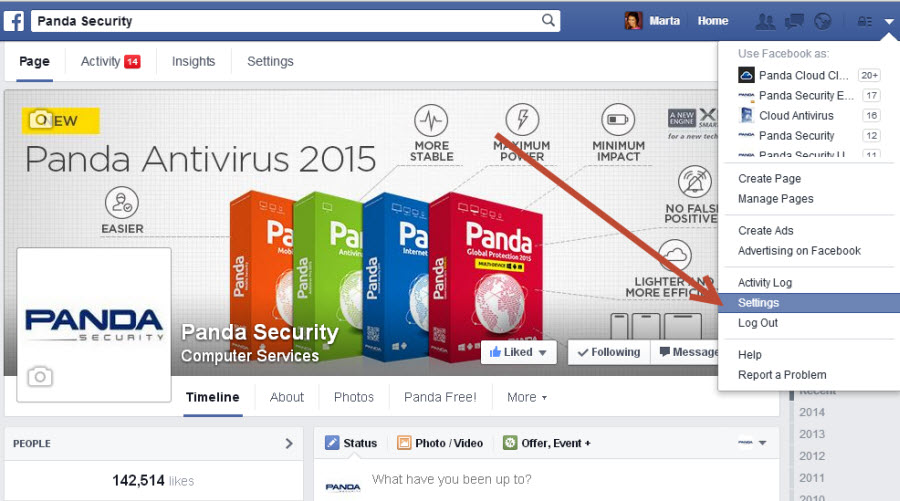
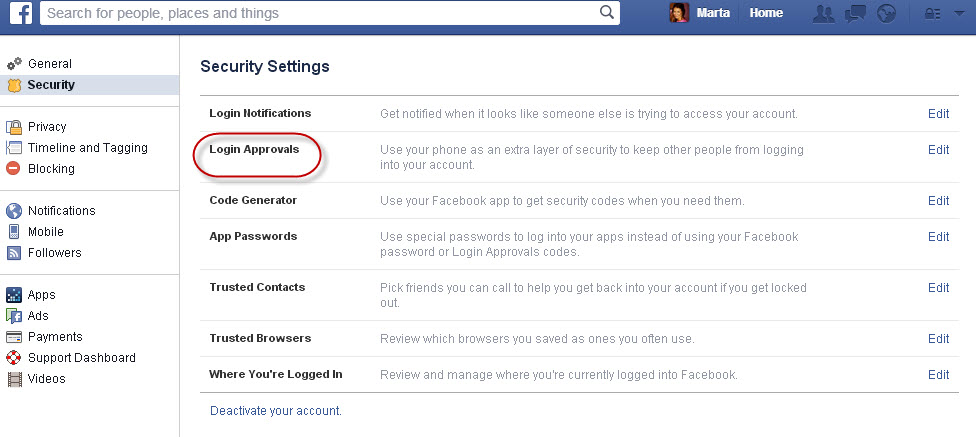
Go into Account Settings and select Security. There you will see “Login Approvals”.
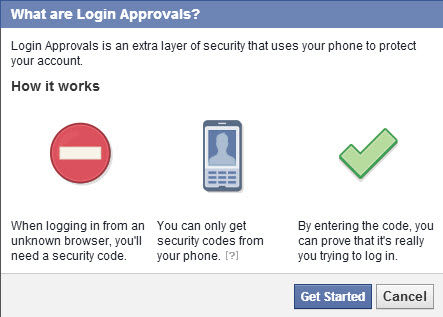
From there click “Require a security code to access my account from unknown browsers”.
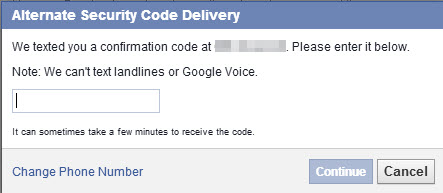
When you enter the code that they send to your phone, you will have to enter your Facebook account password.
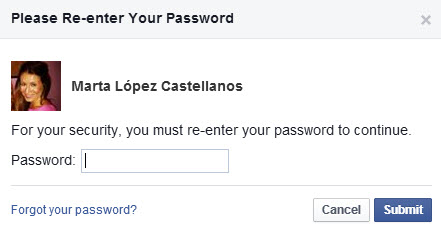
Now you have enabled login approvals.
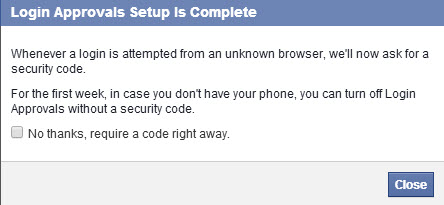
Facebook also gives you the option to print security codes in case at some time you don’t have your phone handy. It’s easy, right?
The post How to boost security on your Facebook account with two-step verification appeared first on MediaCenter Panda Security.
Spam in September: Financial Phishing Accounts for Highest Percent of Detections
Cisco Patches Three-Year-Old Telnet Remote Code Execution Bug in Security Appliances
There is a severe remote code execution vulnerability in a number of Cisco’s security appliances, a bug that was first disclosed nearly three years ago. The vulnerability is in Telnet and there has been a Metasploit module available to exploit it for years. The FreeBSD Project first disclosed the vulnerability in telnet in December 2011 […]
Avira HR Team @Top Employers Job Fair
Software engineering: from everyday challenges to real world solutions
The second day of event, our colleague Radu Calin (Web Backend Software Engineer) gave a presentation about Distributed computing during the workshop we organized. We were happy to learn that this session raised unexpected interest among the candidates attending the fair: more than 120 people had registered for what we designed as a workshop with 40 participants.
Radu talked about how we managed to build a product that makes life easier for millions of users worldwide, all the while solving some of the most difficult problems of the cloud era. He went more in-depth, showing the attendees how the Avira team managed to create a scalable distributed system with pure fun and passionate engineering. Towards the end, he did not forget to give some details about what makes “life at Avira†so special and the audience was really impressed.
All in all, the event was a great success for our HR team:Â 2 days, over 500 applicants, almost 1400 flyers taken home by the candidates, 1 workshop with 58 participants, and over 5000 participants to attend the fair in search of their next Top Employers.
If you missed the event but you also want to†join the battleâ€, you can also check the current job opportunities and apply directly on our career page. A virtual job fair is also organized to follow up with Top Employers attendees, check it out here.
The post Avira HR Team @Top Employers Job Fair appeared first on Avira Blog.
File Manager v4.2.10 iOS – Code Execution Vulnerability
Posted by Vulnerability Lab on Oct 23
Document Title:
===============
File Manager v4.2.10 iOS – Code Execution Vulnerability
References (Source):
====================
http://www.vulnerability-lab.com/get_content.php?id=1343
Release Date:
=============
2014-10-21
Vulnerability Laboratory ID (VL-ID):
====================================
1343
Common Vulnerability Scoring System:
====================================
9
Product & Service Introduction:…