Monthly Archives: December 2014
ICANN HACKED: Intruders Poke Around Global DNS Innards

Uber considers biometrics in bid to improve safety
The ride-sharing app Uber has unveiled new security plans to screen drivers, helping ensure passenger safety, Engadget reports.
The post Uber considers biometrics in bid to improve safety appeared first on We Live Security.
Before you initiate a “docker pullâ€
In addition to the challenges that are inherent to isolating containers, Docker brings with it an entirely new attack surface in the form of its automated fetching and installation mechanism, “docker pull”. It may be counter-intuitive, but “docker pull” both fetches and unpacks a container image in one step. There is no verification step and, surprisingly, malformed packages can compromise a system even if the container itself is never run. Many of the CVE’s issues against Docker have been related to packaging that can lead to install-time compromise and/or issues with the Docker registry.
One, now resolved, way such malicious issues could compromise a system was by a simple path traversal during the unpack step. By simply using a tarball’s capacity to unpack to paths such as “../../../” malicious images were able to override any part of a host file system they desired.
Thus, one of the most important ways you can protect yourself when using Docker images is to make sure you only use content from a source you trust and to separate the download and unpack/install steps. The easiest way to do this is simply to not use “docker pull” command. Instead, download your Docker images over a secure channel from a trusted source and then use the “docker load” command. Most image providers also serve images directly over a secure, or at least verifiable, connection. For example, Red Hat provides a SSL-accessible “Container Images”. Fedora also provides Docker images with each release as well.
While Fedora does not provide SSL with all mirrors, it does provide a signed checksum of the Docker image that can be used to verify it before you use “docker load”.
Since “docker pull” automatically unpacks images and this unpacking process itself is often compromised, it is possible that typos can lead to system compromises (e.g. a malicious “rel” image downloaded and unpacked when you intended “rhel”). This typo problem can also occur in Dockerfiles. One way to protect yourself is to prevent accidental access to index.docker.io at the firewall-level or by adding the following /etc/hosts entry:
127.0.0.1 index.docker.io
This will cause such mistakes to timeout instead of potentially downloading unwanted images. You can still use “docker pull” for private repositories by explicitly providing the registry:
docker pull registry.somewhere.com/image
And you can use a similar syntax in Dockerfiles:
from registry.somewhere.com/image
Providing a wider ecosystem of trusted images is exactly why Red Hat began its certification program for container applications. Docker is an amazing technology, but it is neither a security nor interoperability panacea. Images still need to come from sources that certify their security, level-of-support, and compatibility.
SEC Consult SA-20141218-2 :: Multiple high risk vulnerabilities in NetIQ Access Manager
Posted by SEC Consult Vulnerability Lab on Dec 18
SEC Consult Vulnerability Lab Security Advisory < 20141218-2 >
=======================================================================
title: Multiple high risk vulnerabilities
product: NetIQ Access Manager
vulnerable version: 4.0 SP1
fixed version: 4.0 SP1 Hot Fix 3
CVE number: CVE-2014-5214, CVE-2014-5215, CVE-2014-5216,
CVE-2014-5217
impact: High…
SEC Consult SA-20141218-1 :: OS command execution vulnerability in GParted
Posted by SEC Consult Vulnerability Lab on Dec 18
SEC Consult Vulnerability Lab Security Advisory < 20141218-1 >
=======================================================================
title: OS Command Execution
product: GParted – Gnome Partition Editor
vulnerable version: <=0.14.1
fixed version: >=0.15.0,
<=0.14.1 with fix for CVE-2014-7208 applied
CVE number: CVE-2014-7208
impact: medium…
SEC Consult SA-20141218-0 :: Multiple critical vulnerabilities in VDG Security SENSE (formerly DIVA)
Posted by SEC Consult Vulnerability Lab on Dec 18
SEC Consult Vulnerability Lab Security Advisory < 20141218-0 >
=======================================================================
title: Multiple critical vulnerabilities
product: VDG Security SENSE (formerly DIVA)
vulnerable version: 2.3.13
fixed version: unknown – no vendor confirmation
impact: critical
homepage: https://vdgsecurity.com/
found: 2014-10-01…
Red Hat Security Advisory 2014-2010-01
Red Hat Security Advisory 2014-2010-01 – The kernel packages contain the Linux kernel, the core of any Linux operating system. A flaw was found in the way the Linux kernel handled GS segment register base switching when recovering from a #SS fault on an erroneous return to user space. A local, unprivileged user could use this flaw to escalate their privileges on the system.
Should businesses worry about wearables?
In the last few years, businesses have been tackling a new set of privacy and security issues thanks to the Bring Your Own Device (BYOD) trend where employees are increasingly using their personal devices for business use.
But what about the new device trend; wearables? How will wearable devices in the workplace affect a business? Will Wear Your Own Device (WOYD) be an issue?
Forrester, among other analysts, is predicting that 2015 will be the “year of the wearable.” IdTechEx predicts growth from $14 billion in 2014 to over $70 billion in 2024. But the market is just ramping up, and experts are predicting it to be huge, and ubiquitous –while feeding into the larger Internet of Things.
Part of the enthusiasm being generated for wearables is attributed to the much-heralded release of the Apple Watch. And part of it is that these devices are becoming mainstream. This has been brought to the forefront by developments with Google Glass.
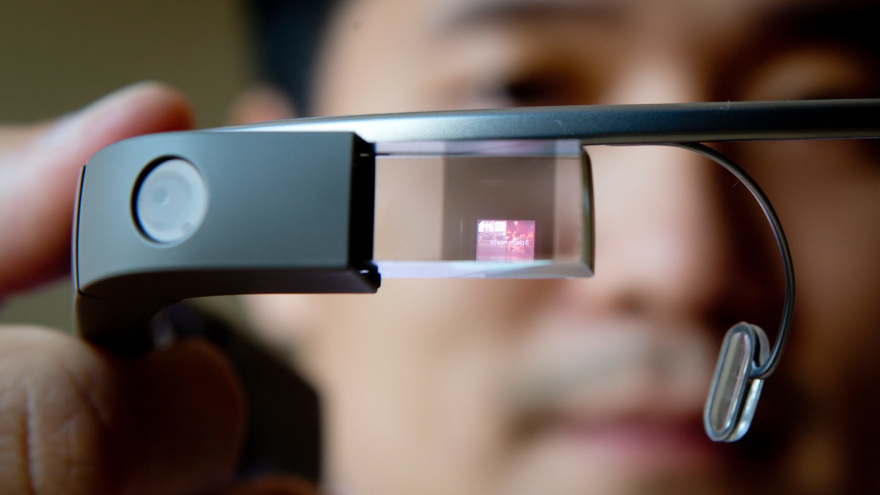
Image courtesy of Sensory Motor
Early issues surrounding Google Glass go to the very heart of the wearable debate: there are real concerns that the person talking to you and wearing the Glass could be recording everything. Taken into the workplace, Glass could be used to look at valuable corporate information or record a private conference meeting. Not to mention the company workout room and locker room!
My husband Bob, who was an early Samsung X watch adopter, likes to amuse dinner guests with demos of how he can video them with his watch without them having a clue… While his and the first “smart watches” were clunky, increasingly they are being designed to be smaller, cooler, and…well, look like any other watch.
Google and Apple are just two examples of the first wave of wearable tech; there’s also the Moto 360, Samsung Gear, and start-up players like Pebble with plenty more in development. In the next wave, experts envision devices being woven into clothing, placed in jewelry and bracelets, available as a skin patch, and other weird and wonderful ideas.
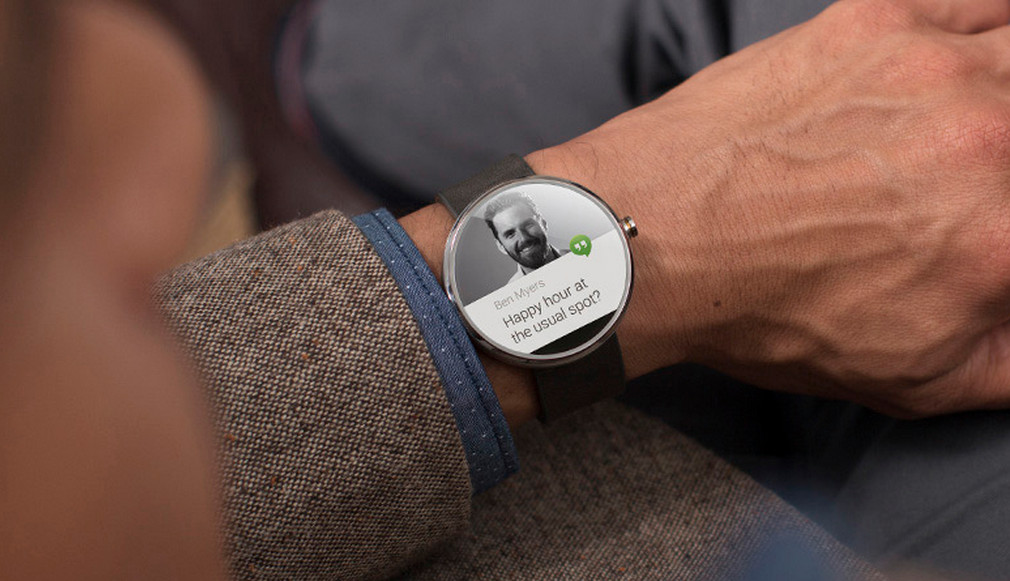
Image courtesy of Independent
Privacy issues aside, there’s security to consider as well. Wearables run on software and software can be vulnerable to attack. In the case of Glass, you could foresee an attack that grants the hacker with a view of everything you’re seeing. Scary, right? For these and other reasons, some government agencies and other high-security-risk workplaces have banned Glass.
Of course, everyone can see if you’re wearing Google Glass. But as wearable devices get harder to spot, privacy risks go up. So as an employer, manager, enterprise expert, or small business owner, what can you do to maintain security and safety? Banning WYOD all together doesn’t appear to be a sensible option, and as a matter of fact may put your business at a disadvantage.
So, it’s a good idea to start putting policies in place. If you develop a good BYOD policy you’ll be in good shape for WYOD.
Here are a few areas to consider in expanding your BYOD policy for WYOD:
- The types and acceptable use of personal devices by employees — whether wearable or not
- How these personal devices will be monitored while in the office
- Stipulation for use of company-owned BYOD/WYOD devices outside the office
- Enhanced/expanded social media policy to include BYOD/WYOD
- Details on penalties for violating the device policy
For more help creating a device policy for your business, check out our Small Business Digital Policy eBook.
I certainly don’t want to be all gloom and doom about wearable devices. I believe they can do great things in the workplace. For example, Boston’s Beth Israel Deaconess Medical Center has developed a custom retrieval system for Google Glass, which allows an ER doctor to look up specific information about patients by using Google Glass to scan a Quick response (QR) code on the wall of each room.
Salesforce this summer announced the Salesforce Wear Developer Kit, a set of resources designed to help developers build apps that integrate with Salesforce service for such wearable devices as smart watches, smart glasses, smart armbands and biometric authenticators. Clearly we’re at the cusp of a WYOD evolution (I hesitate to call it a revolution).
It’s only natural that wearables are bleeding into the workplace.
And like any new technology in the workplace, it’s all about preparing for it and using it in the right way.
Title image courtesy of edudemic

Cybercrime Trends & Predictions for 2015
As regular readers will know, every year we publish our predictions on cybercrime attacks for the year ahead. Well, our South American research team has spent the last few weeks putting together our predictions for 2015.
The post Cybercrime Trends & Predictions for 2015 appeared first on We Live Security.