
Delegates were left red-faced after connecting to an open Wi-Fi network set up to protest mass digital surveillance.
The post Politicians and journalists stung by fake open Wi-Fi protest appeared first on We Live Security.
Delegates were left red-faced after connecting to an open Wi-Fi network set up to protest mass digital surveillance.
The post Politicians and journalists stung by fake open Wi-Fi protest appeared first on We Live Security.
The function CryptProtectMemory allows an application to encrypt memory for one of three scenarios, process, logon session and computer. When using the logon session option (CRYPTPROTECTMEMORY_SAME_LOGON flag) the encryption key is generated based on the logon session identifier, this is for sharing memory between processes running within the same logon. As this might also be used for sending data from one process to another it supports extracting the logon session id from the impersonation token. The issue is the implementation in CNG.sys doesn’t check the impersonation level of the token when capturing the logon session id (using SeQueryAuthenticationIdToken) so a normal user can impersonate at Identification level and decrypt or encrypt data for that logon session. This might be an issue if there’s a service which is vulnerable to a named pipe planting attack or is storing encrypted data in a world readable shared memory section. This is the proof of concept code that demonstrates the issue. This affects Windows 7, 8.1 Update 32/64 bit.
Two thoughts come to mind when I read reports about data security and the protection of personal data: the responsibility of those who collect and store our data but also everyone’s duty to handle their own data responsibly.
Let’s start with the first thought:
Anyone storing someone else’s data must ensure that this data is protected against unauthorized access and that the owner of the data knows what is happening to it. In plain English: Why and for what purpose is data being stored and used? Technical countermeasures can be taken against many of the threats mentioned above. Among them, companies can ensure servers, networks, and data are reliably protected. While no security solution will ever be perfect, options and technologies exist which make it extremely difficult for hackers to achieve their objective.
To me, however, the second thought is the more fascinating of the two as the media pay considerably less attention to it than the first one. Many people now protect their devices by using antimalware software and keeping their apps and programs updated on all their devices. It’s a good start, but is it enough?
How responsibly do we handle our own sensitive data?
This question alone is so fascinating as everyone has his or her own take on where the boundaries lie between private and public data. While some people won’t even allow their name to be listed in a telephone directory, others put their whole lives on show for all to see on social networks. In addition, when it comes to protecting their own data the majority of people only think about the data stored someplace else other than on their devices. But just how carelessly do we give away our information?
I witnessed something interesting a few days back. On a regular flight I had chance of being allocated the middle seat of the row. The biggest disadvantage of the middle seat is that you sit squashed between two other travelers. That being said, the seat also has also a really entertaining plus-point: you can easily see what the travelers are reading to the left and right of you in the row in front. They often read the usual magazines and newspapers – in other words, completely harmless reading matter. However, this time, I saw the person to my left in the row in front going through emails on a notebook. Normally an incredibly boring activity to strangers were it not for a few key terms in an email that grabbed my attention. What I saw caused my eyes to momentarily stay glued to the email. How should I put it: I now know who this person is, which company the person works for, the person’s position there, that the person is advising a major German corporation on behalf of this company, who the person’s points of contact are at this corporation, that the person is working on a still secret project with this German corporation, and what this project is about. I gathered this huge amount of information all within 30 seconds at most. It’s a good thing I’m not interested in using such information and that I had forgotten most of it by next day anyway.
Things got even more astonishing on the return flight. I saw the person to my right checking recent bank balances. The statements had been downloaded to a notebook and the person spent the entire flight going through each account and transaction. Without any effort at all I could not only see the names of his contacts, but also the names of the banks, sort codes, account numbers, account balances, and additional payment details. This is nothing short of sheer carelessness!
On the one hand, there are now infinite options for users to publish, view, and manipulate data on a wide range of devices. On the other hand, there are countless, smart options to protect devices, networks, and data. Certainly, some allegations levied at companies and organizations which handle our data carelessly are completely justified. But nobody can absolve us of our obligation to handle our own data responsibly.
Think about this the next time you’re sitting in an airplane reading highly confidential emails or checking your bank statements. Or at least make sure nobody’s sitting in the middle seat of the row behind you.
The post The easiest way to get your hands on sensitive data appeared first on Avira Blog.
Park ‘N Fly and OneStopParking are the latest companies to reveal data breaches, potentially exposing the card details of customers who used either service
The post Park ‘N Fly and OneStopParking suffer card breaches appeared first on We Live Security.
In November, we called on our awesome advanced mobile beta testers to test the latest version of Avast Mobile Security. We listened to their feedback carefully and are proud to announce that the latest version of Avast Mobile Security is now available to everyone!
What’s new in Avast Mobile Security?
First and foremost, we have completely redesigned the virus scanner, making it faster than ever (up to 50% faster!). Then we improved support for Intel-based devices, optimizing the virus scanner for the best performance possible.
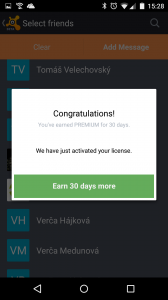
Finally, we added a referral program, so you can recommend Avast Mobile Security to your friends and family. Not only can you recommend the best mobile security app available on Google Play, but you will be rewarded for doing so; you can earn up to three months of Avast Mobile Premium for free!
Here is how it works: For every five friends you send an SMS to recommending Avast, you get one free month of Avast Mobile Premium.
In summary:
The new features in Avast Mobile Security are:
How can I get the latest version of Avast Mobile Security?
If you don’t already have Avast Mobile Security, what are you waiting for?! Download it on Google Play now! Already have Avast Mobile Security? If you have enabled automatic updates in your Google Play settings, you are all set  If you don’t have automatic updates enabled in your Google Play settings, you can visit our app on Google Play and upgrade manually!
Have fun using Avast Mobile Security – we look forward to hearing your feedback!
We would like to extend a special thanks to our beta testers, your feedback plays an extremely important role in developing our products!
Avast Software’s security applications for PC, Mac, and Android are trusted by more than 200-million people and businesses. Please follow us on Facebook, Twitter and Google+.
Google Project Zero has disclosed a pair of unpatched Windows vulnerabilities after the expiration of its 90-day deadline. Microsoft said it will patch one bug in February, and both sides agree the second does not merit a security bulletin.
Posted by Vulnerability Lab on Jan 16
Document Title:
===============
Facebook Bug Bounty #19 – Filter Bypass Web Vulnerability
References (Source):
====================
http://www.vulnerability-lab.com/get_content.php?id=1381
Facebook Security ID: 221374210
Vulnerability Magazine:
http://magazine.vulnerability-db.com/?q=articles/2015/01/14/facebook-bug-bounty-restriction-filter-bypass-vulnerability-id-221374210
Release Date:
=============
2015-01-14
Vulnerability Laboratory ID…
Posted by Vulnerability Lab on Jan 16
Document Title:
===============
File Pro Mini v5.2 iOS – Multiple Web Vulnerabilities
References (Source):
====================
http://www.vulnerability-lab.com/get_content.php?id=1403
Release Date:
=============
2015-01-15
Vulnerability Laboratory ID (VL-ID):
====================================
1403
Common Vulnerability Scoring System:
====================================
6.9
Product & Service Introduction:…
Posted by Vulnerability Lab on Jan 16
Document Title:
===============
WiFi File Browser Pro v2.0.8 – Code Execution Vulnerability
References (Source):
====================
http://www.vulnerability-lab.com/get_content.php?id=1406
Release Date:
=============
2015-01-14
Vulnerability Laboratory ID (VL-ID):
====================================
1406
Common Vulnerability Scoring System:
====================================
7.1
Product & Service Introduction:…
Posted by Vulnerability Lab on Jan 16
Document Title:
===============
VeryPhoto v3.0 iOS – Command Injection Vulnerability
References (Source):
====================
http://www.vulnerability-lab.com/get_content.php?id=1401
Release Date:
=============
2015-01-13
Vulnerability Laboratory ID (VL-ID):
====================================
1401
Common Vulnerability Scoring System:
====================================
5.6
Product & Service Introduction:…
