
IT teams’ time is always limited, and it doesn’t help when other things get in the way. Here’s seven things that waste your IT team’s time.
The post 7 tasks that waste your IT team’s time appeared first on We Live Security.
IT teams’ time is always limited, and it doesn’t help when other things get in the way. Here’s seven things that waste your IT team’s time.
The post 7 tasks that waste your IT team’s time appeared first on We Live Security.
A hacker going by the name of ‘Bitcoin Baron’ has issued a threat to the city of Detroit after a Wayne County Circuit Court Judge dismissed a police manslaughter charge.
The post Hacker threatens cyberattacks against Detroit over court decision appeared first on We Live Security.
Yoast addressed a cross-site scripting vulnerability in its Google Analytics WordPress plugin that allows a hacker to store code in the WordPress administrator dashboard that executes upon viewing.
All users of OpenSSL 1.0.2 should upgrade immediately to version 1.0.2a. In the advisory published on their website the OpenSSL vulnerability is called “ClientHello sigalgs DoS (CVE-2015-0291)”. If a client connects to an OpenSSL 1.0.2 server and renegotiates with an invalid signature algorithms extension, a NULL pointer dereference will occur. This can be exploited in a DoS attack against the server.
According to OpenSSL’s Security Policy, a “high severity issue” includes issues affecting common configurations which are also likely to be exploitable. Examples include a server DoS (like this one), a significant leak of server memory (Heartbleed), and remote code execution.
OpenSSL promises that such issues “will be kept private and will trigger a new release of all supported versions”. They will attempt to keep the time these issues are private to a minimum, but the goal would be “no longer than a month” where this is something that can be controlled, and significantly quicker if there is a significant risk or we are aware the issue is being exploited.
The OpenSSL vulnerability has been reported on February 26th and the fix was released yesterday (March 19th), so well within the limit.
If this was no surprise, this advisory comes with something everyone was expecting: the FREAK vulnerability, which was initially categorized as “low severity”, has been reclassified as “high severity”. This was initially classified low because it was originally thought that servers with RSA export cipher suite support were rare: a client was only vulnerable to a MITM attack against a server which supports an RSA export cipher suite. Recent studies have shown that RSA export cipher suites support is far more common.
The patch comes also with fixes for a dozen or so vulnerabilities categorized as “moderate” and “low” severity.
Our recommendation is to update to version 1.0.2a immediately. Now that the vulnerability is public, it is to be expected that cybercriminals will try to exploit it.
The post The mysterious OpenSSL vulnerability has been patched appeared first on Avira Blog.
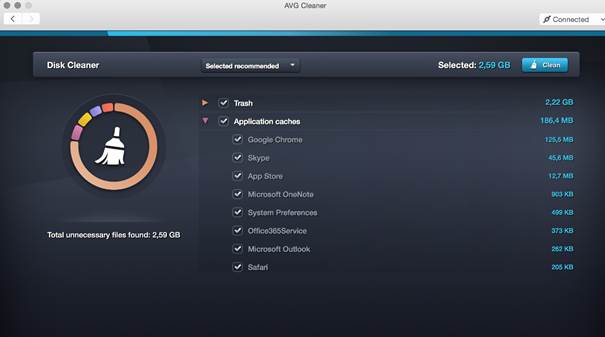
Just as Windows and all applications tend to collect temporary files, log and so called “cache” files in order to function properly, so do applications on your iMac, MacBook or Mac Mini – and in many cases they leave those files behind.
AVG is happy to announce a brand-new version of AVG Cleaner for Mac, which helps remove leftover files from your Mac. Click here to download it right away!
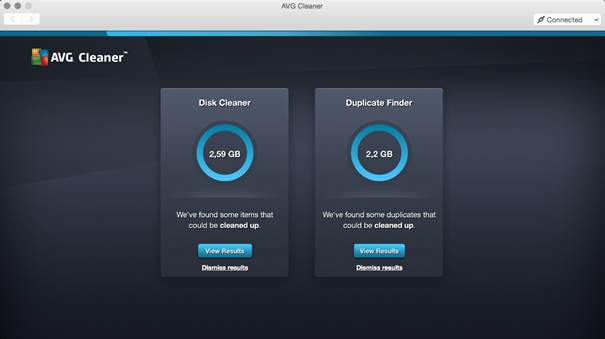
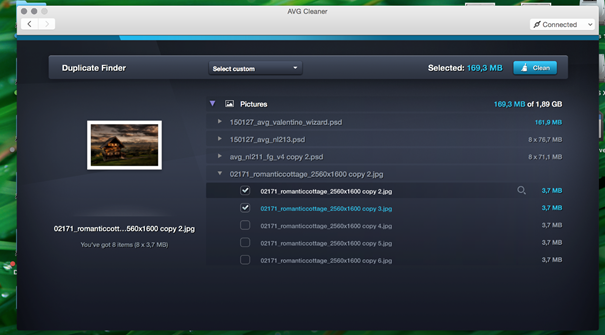
AVG Cleaner for Mac analyzes invisible data trash and unwanted duplicate files that gather on Mac computers through everyday usage, helping to disk space for storing precious photos, music and other important files. The new Cleaner for Mac app sports a new user interface, too, which helps makes the cleaning easier. Here’s what we actually help you remove:
Thank you for all your questions, if there’s something you’d like to ask me, please let me know by getting in touch via Twitter @JudyatAVG.
Sometimes, Google Chrome tells us to distrust a website and warns us that that site can be dangerous. But instead of listening to it, we ignore it. We are so obsessed on quickly reaching the neck click, that we don’t even read the message.
A study published by Google’s Chrome team stated that only one in four users pays attention to the SSL security certificate warnings and takes their advice. That’s why they decided to redesign them, reducing and simplifying the text, and adding more graphic information. Hoping, this will make users read the information before taking risks.
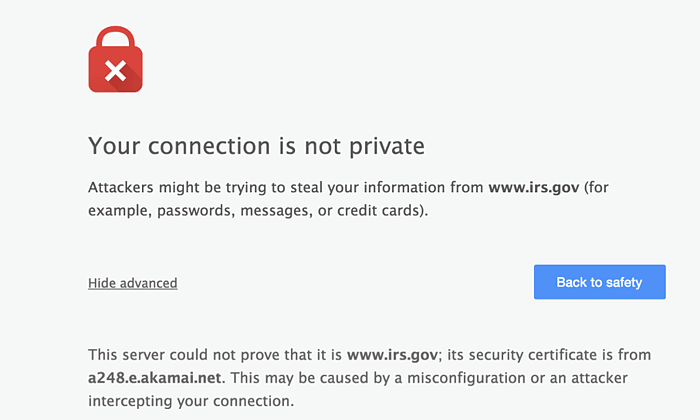
But what does SSL stands for? This acronym refers to “Security Sockets Layer”, a secure connection protocol that enables you to browse the Internet with maximum guarantees. When a browser visits a webpage, it checks the site’s identity and its SSL. It informs you when something goes wrong, the site’s certificate is not from a trusted organization, it has expired, or the connection between the browser and the website is not secure. What’s the objective? The main objective is to prevent the users, letting them know that the site could threaten their safety. For example, if you were making a purchase, someone could steal your credit card information.
Many users may not take into account their browser’s opinion. If their browser simply tells them that the SSL is out of date, likely they won’t understand what this means or the risk this entails. Nevertheless, if they, like Chrome already does, point out that an attacker could steal your information, you would be more vigilant.
“Even though we prefer that the user decides things, in some cases, it simply doesn’t make sense. It’s simply impossible to explain something as complex as cryptography to many users,” says Andreas Gal, chief technology officer at Mozilla. Gal refers in this way to the difficulty of transferring and translating information about privacy to those users who should worry about it.
Lujo Bauer, Associate Research Professor CyLab at Carnegie Mellon University, published a paper in which recommended that web browsers present the information in a comprehensible and concise way, and offer the top options to users. This is why Chrome decided to reduce the text and make the warning signal more visible, even highlighting in blue the “Go Back” option and diminishing the “Advanced Options” that allows access to the not safe site.
Would these measures be useful? Or, are we so lazy that we will continue to ignore the information about our own security? The underlying problem is still there: we stop paying attention after viewing new sites several times. According to a research by Brigham Young University, in which after analyzing a variety of 40 different warnings – like anti-virus, software updates, or SSL– the results showed that after seeing them more than once, we stop noticing them.

Communicating security problems is complicated if we don’t read the warnings, and the only thing we want is to keep on browsing without being disturbed. “The immediate cost of heeding the warning is high, because I will not be able to achieve my immediate goal, which is to reach the site and complete the bill payment or the status update that I had in mind,” says Raluca Budiu, senior researcher at usability consulting firm Nielsen Norman Group.
Can they steal our information if we dismiss the warnings? The answer is yes.
Do we have a lack of education about Internet? What else can browsers do to draw our attention in order to stop us from entering untrusted sites? Should they block the accss? Or, it is better that they keep letting us choose? You can reflect on it, or look up your browsers security options, so next time it warns you not to enter a site, you’ll pay more attention.
The post Browsers security: Why do we ignore their warnings? appeared first on MediaCenter Panda Security.
A command injection vulnerability in Citrix NITRO SDK’s xen_hotfix page was discovered. The attacker-supplied command is executed with elevated privileges (nsroot). This issue can be used to compromise of the entire Citrix SDX appliance along with all underlying applications and data.
It was discovered that the help pages of Citrix VPX are vulnerable to cross site scripting.
OpenSSL is a robust, fully featured Open Source toolkit implementing the Secure Sockets Layer (SSL v2/v3) and Transport Layer Security (TLS v1) protocols with full-strength cryptography world-wide.

