The X509_to_X509_REQ function in crypto/x509/x509_req.c in OpenSSL before 0.9.8zf, 1.0.0 before 1.0.0r, 1.0.1 before 1.0.1m, and 1.0.2 before 1.0.2a might allow attackers to cause a denial of service (NULL pointer dereference and application crash) via an invalid certificate key.
Monthly Archives: March 2015
CVE-2015-0289
The PKCS#7 implementation in OpenSSL before 0.9.8zf, 1.0.0 before 1.0.0r, 1.0.1 before 1.0.1m, and 1.0.2 before 1.0.2a does not properly handle a lack of outer ContentInfo, which allows attackers to cause a denial of service (NULL pointer dereference and application crash) by leveraging an application that processes arbitrary PKCS#7 data and providing malformed data with ASN.1 encoding, related to crypto/pkcs7/pk7_doit.c and crypto/pkcs7/pk7_lib.c.
CVE-2015-0290
The multi-block feature in the ssl3_write_bytes function in s3_pkt.c in OpenSSL 1.0.2 before 1.0.2a on 64-bit x86 platforms with AES NI support does not properly handle certain non-blocking I/O cases, which allows remote attackers to cause a denial of service (pointer corruption and application crash) via unspecified vectors.
CVE-2015-0291
The sigalgs implementation in t1_lib.c in OpenSSL 1.0.2 before 1.0.2a allows remote attackers to cause a denial of service (NULL pointer dereference and daemon crash) by using an invalid signature_algorithms extension in the ClientHello message during a renegotiation.
CVE-2015-0292
Integer underflow in the EVP_DecodeUpdate function in crypto/evp/encode.c in the base64-decoding implementation in OpenSSL before 0.9.8za, 1.0.0 before 1.0.0m, and 1.0.1 before 1.0.1h allows remote attackers to cause a denial of service (memory corruption) or possibly have unspecified other impact via crafted base64 data that triggers a buffer overflow.
CVE-2015-0293
The SSLv2 implementation in OpenSSL before 0.9.8zf, 1.0.0 before 1.0.0r, 1.0.1 before 1.0.1m, and 1.0.2 before 1.0.2a allows remote attackers to cause a denial of service (s2_lib.c assertion failure and daemon exit) via a crafted CLIENT-MASTER-KEY message.
CVE-2015-1787
The ssl3_get_client_key_exchange function in s3_srvr.c in OpenSSL 1.0.2 before 1.0.2a, when client authentication and an ephemeral Diffie-Hellman ciphersuite are enabled, allows remote attackers to cause a denial of service (daemon crash) via a ClientKeyExchange message with a length of zero.
How to use the Avast Virus Chest
The Avast Virus Chest is a safe place to store potentially harmful files. These files are completely isolated from the rest of the operating system, meaning that they are not accessible for any outside process or software application. Files cannot be run while stored in the Virus Chest.
How to open the Avast Virus Chest
To open the Virus Chest, right click on Avast’s little orange ball icon in the system tray in the bottom right hand corner of your computer. Select Open Avast user interface from the menu. Another way to open the user interface is to double click the desktop icon.
From the main menu, select Scan, then Scan for viruses, and then click the Quarantine (Virus Chest) button at the bottom of the screen to open the Virus Chest window.
If Avast 2015 detects an infected or suspicious file, it will try to repair it at first. Unfortunately, some files cannot be repaired so Avast will try to move the file to the Virus Chest. If the infected file refuses to move to the Virus Chest, it will be automatically deleted from your computer.
How to set up quick access to the Virus Chest
For quick access to the Virus Chest, you can assign it to one of the four shortcut squares in the Avast user interface. To change which function you see, click on the drop-down menu icon in the top right hand corner of the square. There you will find a choice to place the Virus Chest right on the Overview of your Avast product.
Once you have the shortcut on the user interface, then simply click it to open the Virus Chest.
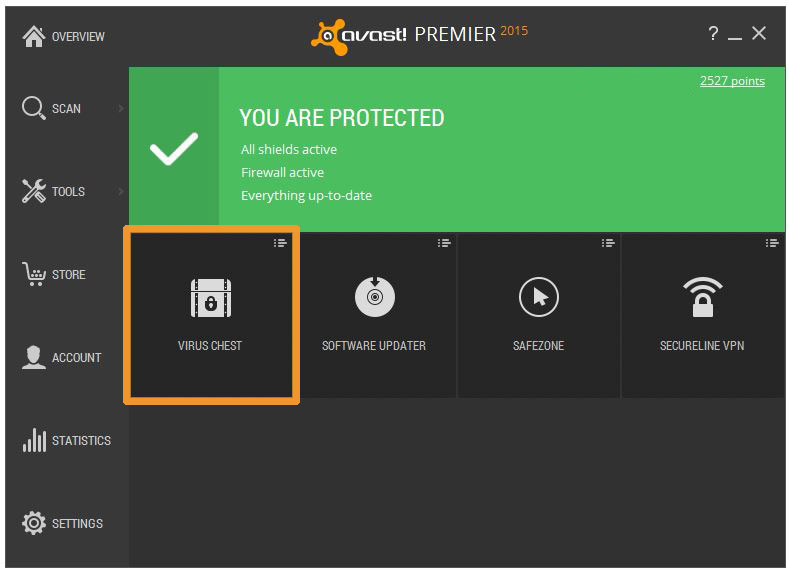
Set the shortcuts that you want in the Avast user interface.
You can perform different actions while in the Virus Chest
You can perform different actions on the file inside the Virus Chest by right clicking. For example, you can
- Restore a file
- Exclude it from scanning
- Report it to the virus lab
- Delete the file
Once you have made the decision on which action to take, you will be asked to confirm your choice. When you have finished, close the Virus Chest to exit.
NOTE: Exercise extreme caution when restoring a file from the Virus Chest as it may still be infected. This is a high security risk action that requires advanced skills and experience handling infected files to avoid further potential infection of your computer.
How to manually move a file to the Virus Chest
If you need to move a file manually into the Virus Chest, right click anywhere on the contents table on the Virus Chest screen and select Add from the menu. A navigation dialog will open so all you need to do is locate the desired file that you want to move. Then click the Open button. The desired file will then appear in the contents table on the Virus Chest screen.
How to restore files from the Avast Virus Chest
When you open the Virus Chest, you will see a list of files contained within it. Right click on the file that you want to restore and the drop-down menu will appear. Select the Extract option, then select the location to save the file and click OK to close your window.
Drupal Releases Security Updates
Original release date: March 19, 2015
Drupal has released updates to address multiple vulnerabilities, one of which could allow a remote attacker to gain access to a system account.
Available updates include:
* Drupal core 6.35 for 6.x users
* Drupal core 7.35 for 7.x users
US-CERT encourages users and administrators to review Drupal’s Security Advisory and apply the necessary updates.
This product is provided subject to this Notification and this Privacy & Use policy.
[CFP] BSides Las Vegas August 2015
Posted by BSidesLV Info on Mar 19
CFP: https://bsideslv.org/cfp/
First Round CFP closes April 15th. Round two opens May 25th and closes June
8th.
BSidesLV 2015 will consist of seven main speaking tracks and one workshop
track.
It will also include Passwords, however they have a separate CFP.
Look for that at https://passwordscon.org/
Proving Ground – First-time speaker* mentor-ship and scholarship program.
Get matched with a great mentor who will help you craft your talk and…