Monthly Archives: November 2015
Traffic CMS 1.4.x Local File Inclusion
Traffic CMS version 1.4.x suffers from a local file inclusion vulnerability.
USN-2815-1: libpng vulnerabilities
Ubuntu Security Notice USN-2815-1
19th November, 2015
libpng vulnerabilities
A security issue affects these releases of Ubuntu and its
derivatives:
- Ubuntu 15.10
- Ubuntu 15.04
- Ubuntu 14.04 LTS
- Ubuntu 12.04 LTS
Summary
libpng could be made to crash or run programs as your login if it
opened a specially crafted file.
Software description
- libpng
– PNG (Portable Network Graphics) file library
Details
Mikulas Patocka discovered that libpng incorrectly handled certain large
fields. If a user or automated system using libpng were tricked into
opening a specially crafted image, an attacker could exploit this to cause
libpng to crash, leading to a denial of service. This issue only affected
Ubuntu 12.04 LTS. (CVE-2012-3425)
Qixue Xiao discovered that libpng incorrectly handled certain time values.
If a user or automated system using libpng were tricked into opening a
specially crafted image, an attacker could exploit this to cause libpng to
crash, leading to a denial of service. (CVE-2015-7981)
It was discovered that libpng incorrectly handled certain small bit-depth
values. If a user or automated system using libpng were tricked into
opening a specially crafted image, an attacker could exploit this to cause
a denial of service or execute code with the privileges of the user
invoking the program. (CVE-2015-8126)
Update instructions
The problem can be corrected by updating your system to the following
package version:
- Ubuntu 15.10:
-
libpng12-0
1.2.51-0ubuntu3.15.10.1
- Ubuntu 15.04:
-
libpng12-0
1.2.51-0ubuntu3.15.04.1
- Ubuntu 14.04 LTS:
-
libpng12-0
1.2.50-1ubuntu2.14.04.1
- Ubuntu 12.04 LTS:
-
libpng12-0
1.2.46-3ubuntu4.1
To update your system, please follow these instructions:
https://wiki.ubuntu.com/Security/Upgrades.
After a standard system update you need to restart your session to make
all the necessary changes.
References
Facebook Safety Check feature allows users to connect with loved ones during a disaster
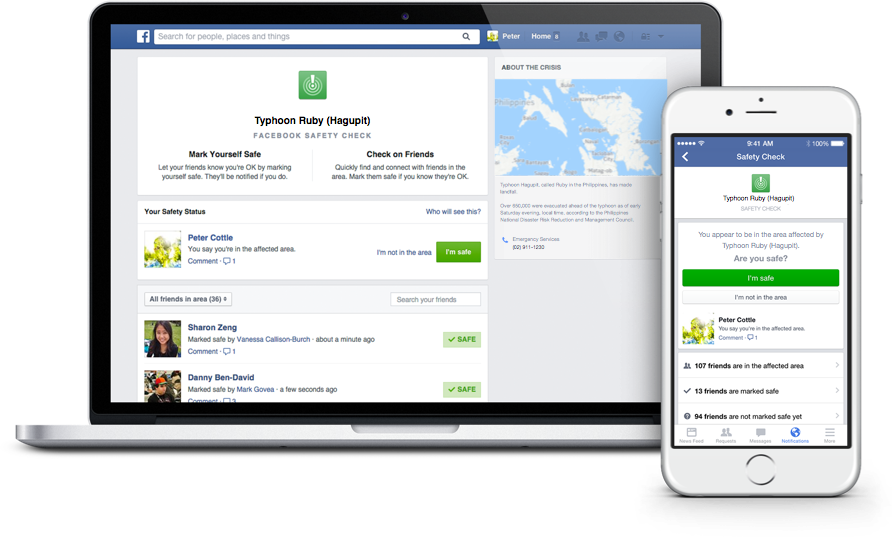
Facebook’s Safety Check feature allows users to connect with friends and loved ones during a disaster.
Facebook’s Safety Check feature was created in October 2014 in response to the devastating earthquake and tsunami that struck Japan in March 2011. In a Facebook post about the feature, Mark Zuckerburg described the mission of the feature:
Over the last few years there have been many disasters and crises where people have turned to the Internet for help. Each time, we see people use Facebook to check on their loved ones and see if they’re safe. Connecting with people is always valuable, but these are the moments when it matters most.
This is how it works:
1. Facebook will prompt users that might be in the area of a natural disaster to inform others about their status using the Safety Check feature.
2. Users can click the “I’m safe“ button to let their Facebook friends know that they are safe.
3. Facebook will alert you of friends that used Safety Check and allow you to look over the list of friends who could potentially be affected by the disaster.
Safety Check is only offered to individuals that are located in a disaster area. Although the feature was originally created to respond to natural disasters, it has recently been utilized to help users connect with others in the wake of social crises. Zuckerberg told CNET that Facebook is still developing the policy to determine exactly when Safety Check will be activated. He was also quoted saying that he won’t post each time Safety Check is activated because “unfortunately, these kinds of events are all too common.”
For more information about Safety Check, you can read through Facebook’s page about the feature.
Follow Avast on Facebook, Twitter, YouTube, and Google+ where we keep you updated on cybersecurity news every day.

Universal Children’s Day: 7 Tips to Protect Your Child on the Internet
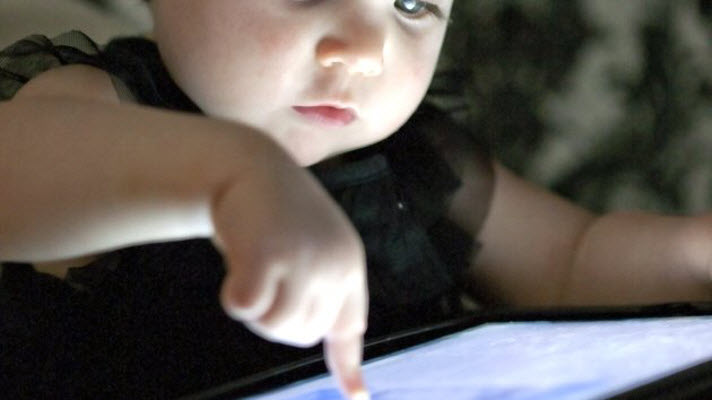
Today is Universal Children’s Day, a day set aside for everyone to protect and defend the rights of children. But do we know how to protect children from the dangers involving the Internet and new technologies? It’s important to defend their rights and their innocence in the online world.
The internet is a world known by the children and they must know how to handle it perfectly. Its domain of social networks, search engines, forums… In many instances children have a stronger understanding than that of their parents; therefore they sail along them without excessive parental control. There are many cybercriminals and stalkers who take advantage of this situation to take advantage of children, who are unaware of the dangers they face on almost all occasions.
Pornography, harassment, theft of data and identity… There are many threats facing children online. Through the computer, tablet, online games or mobile phone, children should know how to recognize and react to these situations.
How to Protect a Child’s Online Enviroment

1. Education
It is the cornerstone for training minors, but the dynamic growth of the online world makes it even more essential in this case. However, the little knowledge that parents know about the network causes education to be poor. What is Facebook? What is Tuenti? Should my child chat online with strangers? These are the questions that are asked on several occasions by parents who do not understand this new kind of social environment 2. 0.
Parents must teach their children how to create their online personality, just as they teach them how to behave in real life. There are some values that they should maintain in both worlds: do not to speak with strangers, do not to show an image of you that could be later used against you, do not to give personal details to people you don’t know … Web education and teachers are great the resources that parents who feel lost in this world can use.
2. Control the Hours Spent Online
In today’s work, the social relationships online compete against offline social relationships. All children should learn to disconnect, so they can continue to enjoy a conversation or a real life experience, away from the world 2.0.
3. Show Network Hazards
Sometimes overprotection hinders children from really knowing the threats that face them. Actual cases of harassment, espionage, identity theft, blackmail, etc will happen to those that are less aware threatening situations.
4. Who Does My Child Talk To?
Parents try to preserve the privacy of their children, but the truth is that you we need to know whose talking and what they’re saying. Just as in real life, a child must know to distrust a stranger who approaches them, they must also learn that these type of people exist and are duplicated within the online world.
5. Which Photos Should Be Uploaded to the Network?
It’s easy to control the clothing and appearance of children in real life, but do we know what pictures up of them are up on the network? We must remind them of the danger of over-exposure on the Internet. This issue is complicated because in many cases, not even the parents themselves are aware of the consequences of particular photographs up on a social network.
6. Where Does My Child Go Online?
There is certain web content that a minor does not have to see. Since it is impossible to control which pages your child is browsing on the Internet, or what places can be reached via banners and ads, you should install parental control. Through this, the parent may decide which sites are appropriate for their child.
7. Use Common Sense
Like always, if we teach our children to at least to use common sense, it can used within 2.0 world.
Have you ever faced an online situation complicated with a minor?
The post Universal Children’s Day: 7 Tips to Protect Your Child on the Internet appeared first on MediaCenter Panda Security.
CVE-2015-7771
Cross-site scripting (XSS) vulnerability in the runtime engine in the Newphoria applican framework before 1.13.0 for Android and iOS allows remote attackers to inject arbitrary web script or HTML via a crafted SSID that is encountered by an applican application, a different vulnerability than CVE-2015-7772.
CVE-2015-7772
Cross-site scripting (XSS) vulnerability in the runtime engine in the Newphoria applican framework before 1.13.0 for Android and iOS allows remote attackers to inject arbitrary web script or HTML via a crafted URL that triggers WebView anchor attachment in an applican application, a different vulnerability than CVE-2015-7771.
CVE-2015-7773
Unrestricted file upload vulnerability in the Panel component in Bastian Allgeier Kirby before 2.1.2 allows remote authenticated users to execute arbitrary PHP code by uploading a file that lacks an extension, and then renaming this file to have a .php extension.