CVE-2016-5399: php: out-of-bounds write in bzread()
Monthly Archives: July 2016
RHBA-2016:1472-1: Red Hat Enterprise Linux OpenStack Platform 6 Bug Fix and Enhancement Advisory
Red Hat Enterprise Linux: Updated packages that resolve various issues are now available for Red Hat
Enterprise Linux OpenStack Platform 6.0 (Juno) for RHEL 7.
RHBA-2016:1469-1: Red Hat Enterprise Linux OpenStack Platform 5 Bug Fix and Enhancement Advisory
Red Hat Enterprise Linux: Updated packages that resolve various issues are now available for Red Hat
Enterprise Linux OpenStack Platform 5.0 (Icehouse) for RHEL 7.
RHBA-2016:1461-1: Red Hat Enterprise Linux OpenStack Platform Bug Fix and Enhancement Advisory
Red Hat Enterprise Linux: Updated packages that resolve various issues are now available for Red Hat
Enterprise Linux OpenStack Platform 5.0 (Icehouse) for RHEL 6.
RHBA-2016:1459-1: openstack-ceilometer bug fix advisory
Red Hat Enterprise Linux: Updated OpenStack Telemetry packages that resolve various issues are now
available for Red Hat Enterprise Linux OpenStack Platform 6.0 (Juno) for
RHEL 7.
RHBA-2016:1411-2: nfs-utils bug fix update
Red Hat Enterprise Linux: Updated nfs-utils packages that fix two bugs are now available for Red Hat
Enterprise Linux 6.
Analyzing Mr. Robot: S02E01
One of the surprises of last year for everyone working in IT security was, without a doubt, the hit TV show Mr. Robot, explains ESET’s Josep Albors.
The post Analyzing Mr. Robot: S02E01 appeared first on We Live Security.

AVG Reveals Which of the World’s Favorite Apps Cache in on Your Phone—or Don’t
Latest AVG Technologies App Performance and Trend Report ranks newcomers Snapchat, YouTube and Google Maps among the top 10 Android ‘resource hog’ list, while Netflix is listed as ‘most improved’.
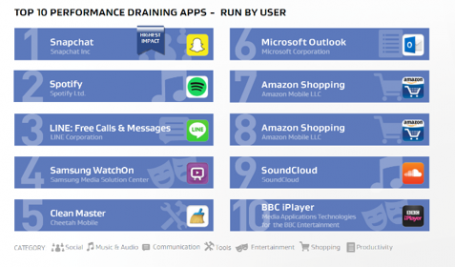
Today, AVG® Technologies (NYSE: AVG), the leading provider of software services to secure devices, data and people, revealed that Snapchat, YouTube and Google Maps are the top 3 apps most likely to drain Android device resources. The AVG Android App Performance and Trend Report H1 2016 outlines, for the period of January through April, 2016, which of the most popular apps had the most pronounced effect on battery, storage and data, highlighting that photo, video and location apps likely contribute most to draining device battery life, in particular.
The H1 2016 report also recognizes ‘most improved’ apps, such as Netflix, previously a top ‘resource hog,’ but which did not make our top 10 charts this time around. Similarly, AppLock, a password protector for smart phones that showed up among the current report’s top 10 battery-draining apps, has improved its performance since this April, indicating that the app’s latest update may have addressed the problem.
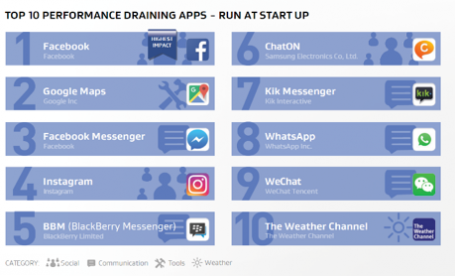
In our internal testing of most-used apps’ behaviors, it appears that while Snapchat removes images and videos from conversations, the app’s cache is only partially deleted. We also found that YouTube stores a fair amount of cached files, as much as 270 MB. The remaining apps on AVG’s top 10 lists for H1 comprise mostly similar messaging, video, music and shopping apps—unsurprising inclusions on lists of resource-taxing apps. However, an interesting exception to this pattern is The Weather Channel app, which initiates at start-up (which users likely do not realize), immediately drawing on your network plan.
“Our latest report exposes some quirky app behavior. For instance, I question why a weather app needs to be constantly connected rather than updating on demand,” said Tony Anscombe, senior security evangelist for AVG Technologies. “You could also say that Snapchat’s keeping cached files around undermines its Mission Impossible-esque ‘self-destruct’ approach to messaging. Ultimately, if you have more than a few of these apps or types of apps on your phone or tablet, they could be to blame for those annoyingly regular low battery or low storage notifications.”
The report also highlighted other interesting general app usage trends, including:
- Today’s average Android smartphone and tablet user has 33 apps installed on their device.
- The 50 most-used apps include obvious entries, like Android’s own Google Search box or YouTube, but also surprises, such as TripAdvisor, which has increasingly started pushing users from its website to the mobile app.
- Seven of the top 10 most-used smartphones are 2-4-year-old Samsung Galaxy S phones. Sony Xperia devices make up the remainder of this list.
An all-in-one cleaner and optimizer like AVG CleanerTM for AndroidTM can help keep tabs on the top mobile resource-hogging apps on your devices.
The full report can be downloaded here.
Methodology
The AVG App Report was gathered from a sample of aggregated and anonymized data from more than 3 million Android users around the globe. The app data included in this report covers a time period of January 2016 through April 2016 and only includes Google Play applications where AVG observed a minimum sample size of 50,000 usage incidents.
About AVG Technologies
AVG is the leading provider of software services to secure devices, data and people. AVG’s award-winning consumer portfolio includes internet security, performance optimization, location services, data controls and insights, and privacy and identity protection, for mobile devices and desktops. The award-winning AVG Business portfolio, delivered through a global partner network, provides cloud security and remote monitoring and management solutions that protect small and medium businesses around the world. For more information visit www.avg.com.
All trademarks are the property of their respective owners.
Media Contacts
Stephanie Kane, Senior PR Director, AVG Technologies
+44 7817 631016
Julie Noble, Inner Circle Labs for AVG Technologies
+1 (415) 684-9564


What’s Killing Your Phone’s Performance? Probably 1 (or More) of These 20 Apps
Have unlimited storage, data, battery? Then resume cat videos. But if you get “storage full” messages just before your kid’s solo or a smartphone that dies before lunch, read on.
If you feel like your phone poops out every time you really need it, don’t worry—it’s not you.
We hate to break it to you, but … It’s your apps.
We know, you love them. But it might be time to … take a break, from at least a few.
How can you know, though, which ones are sucking your battery life at the speed of light, devouring your bandwidth, and hogging every inch of space on your Android? AVG’s latest Android App Performance & Trend Report lines up the worst of the worst … and points out who’s cleaned up their act.
By analyzing anonymized data from 3 million AVG AntiVirus for Android users, we’ve done the hard work for you, and now all you need to do to get the most from your phone’s resources is compare your app roster to the lists below (Get the full report).
Top 10 user-run performance-draining apps
This rogues’ gallery highlights those which overall have the highest impact, meaning a combination of all 3 factors: battery life, data use, and storage.
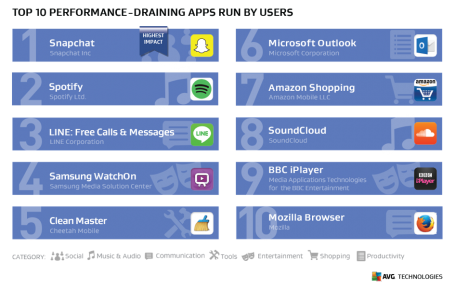
Notice anything? Spotify, Snapchat, and Outlook, apps that millions of people likely use every day, are in top spots. If you’re nowhere near a power outlet, our advice is simple: avoid using these apps for long periods of time. I myself notice that if I’m using Spotify, in particular, while browsing the web and checking email, that my Android barely makes it though a half-day before shutting down.
Snapchat’s top position was also no surprise. What was surprising was our discovery, during testing, that though the app appears to remove images and videos from conversations, Snapchat actually cached quite a few files. YouTube was also guilty of this, reaching 270 MB just after a couple of days.
Top 10 performance-draining apps that run at start-up
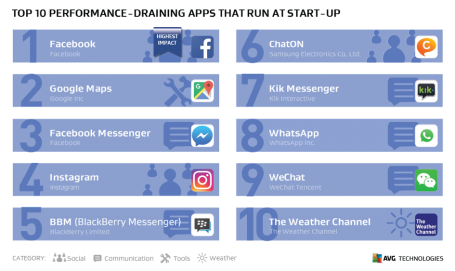
Tops spots are held by Facebook and Facebook Messenger, because they continuously check for updates and send notifications. Our advice: Uninstall Facebook apps and use your browser and the web version (www.facebook.com), instead. You may notice that manually checking your feed only when you need to can make all the difference … and not leave you with a useless phone.
The last word … for now
It’s almost funny how the performance of our pocket-sized smartphones has exceeded that of PCs considered high-end just 5 years ago. Yet we’re still bound by 16 and 32 GB built-in storage, data caps, and battery technology that hasn’t improved in ages. Until the smartphone world resolves these issues, we’ll keep on keeping you informed about how you can get the most from your devices, without missing out on what’s so vital (and fun!) about them in the first place.



The Top 5 Pokémon Go Woes … and How to Defeat Them
Are you in danger of not reaching your full monster-snaring potential because of technical glitches? Never fear, fair gamer. I’ve battled the worst problems for you and bring you solutions.
While Pokémon Go is clearly a huge (and well deserved) success for Nintendo (and app maker Niantic), with well-thought-out gameplay mechanics, the experience isn’t as smooth as it is with many other Nintendo titles. Users have been complaining of outages, crashes, and frozen screens.
But never fear—you’re not alone. I, too, have encountered Pokémon Woes, and here’s how I fixed them.
1 – “No internet connectivity.”
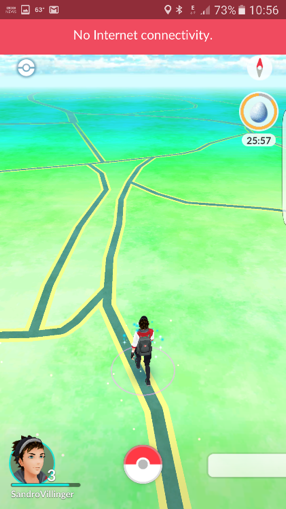
You can’t play if you’re not connected. Simple as that. So what’s happening when you get this message? Chances are, Niantic’s servers are at that moment literally being overrun by the millions of users worldwide. With the game’s daily use starting to exceed Tinder’s and Twitter’s (in the US … so far!), no wonder Niantic’s struggling to meet these monstrous traffic demands.
Usually when you get the above message, you just have to wait it out. But you may also have luck with closing and reopening the app. It worked for me many times (I’m not known for my patience). Easy as that.
And if you’re having connection problems while catching a Pokémon, try turning WiFi (or 3G/4G/LTE) off and on again—also worked for me, more than once.
2 – “Lost GPS connectivity.”
I literally see this message every hour I play. Again, closing and reopening the app or turning GPS off and on again works wonders. In some cases, a little waiting helps, too, as the GPS problem may disappear on its own.
3 – FREEZE!
The game has frozen on me several times, in particular right after I’ve caught a monster. This is especially troubling, since my first thought was, “Wait, did I not actually catch that Pokémon???” But not to worry. Simply restart the app and check your journal. In every case where the game froze on me, once I restarted, I found that the game’s state was successfully saved. Whew!
4 – “Server unavailable. Please try again later.”
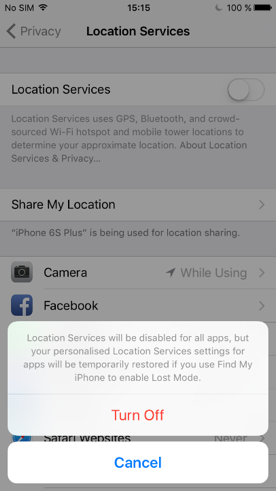
If you get this message when your connection is 100% working, then turn off your phone’s GPS, and then try logging in to Pokémon Go. After the game has loaded, turn GPS back on, which should fix the issue.
HOW TO DO IT
- Android: Swipe down from the top to get quick actions and notification bar. Tap on Location to turn it off (and later on again).
- iOS: Go to Settings, Privacy, Location Services and switch to Off.
5 – Missing or incorrect map data
If your avatar is constantly in the middle of nowhere, or streets are displaying as … streets, then you should either delete the app or its cache.
HOW TO DO IT (FOR ANDROID)
- Open AVG Cleaner for Android (no worries, it’s free!) and go to Cache.
- Tap the CLEAR ALL CACHE
- Restart the app!
If that doesn’t work, or if you’re on iOS, uninstall the app, then download it again from Google Play or the App Store to get rid of all leftover (and potentially corrupt) data.
What’s your worst app issue? How’d you fix it? Let us know in the comments!

