Misys FusionCapital Opics Plus does not verify X.509 certificates from SSL servers, which allows man-in-the-middle attackers to obtain sensitive information via a crafted certificate.
Monthly Archives: July 2016
CVE-2016-2775
ISC BIND 9.x before 9.9.9-P2, 9.10.x before 9.10.4-P2, and 9.11.x before 9.11.0b2, when lwresd or the named lwres option is enabled, allows remote attackers to cause a denial of service (daemon crash) via a long request that uses the lightweight resolver protocol.
CVE-2016-5080
Integer overflow in the rtxMemHeapAlloc function in asn1rt_a.lib in Objective Systems ASN1C for C/C++ before 7.0.2 allows context-dependent attackers to execute arbitrary code or cause a denial of service (heap-based buffer overflow), on a system running an application compiled by ASN1C, via crafted ASN.1 data.
CVE-2016-5653
Multiple SQL injection vulnerabilities in Misys FusionCapital Opics Plus allow remote authenticated users to execute arbitrary SQL commands via the (1) ID or (2) Branch parameter.
CVE-2016-5654
Misys FusionCapital Opics Plus allows remote authenticated users to gain privileges via a man-in-the-middle attack that modifies the xmlMessageOut parameter.
CVE-2016-5655
Misys FusionCapital Opics Plus does not verify X.509 certificates from SSL servers, which allows man-in-the-middle attackers to obtain sensitive information via a crafted certificate.
Bart’s Shenanigans Are No Match for AVG
AVG has decrypted Bart. No, not that Bart—there’s one that’s much worse. AVG Virus Lab researchers have created an easy fix for restoring files that fell victim to Bart ransomware.
Ransomware, like mouthy, slingshot-wielding grade-schoolers, just won’t stop popping up. One of the latest, appropriately called Bart, spreads primarily through emails with subject lines about photos and images. Though relatively new, Bart’s already wrought havoc, encrypting and demanding payment for files’ release far beyond Springfield—in fact, all over the world. And just like the world-famous “The Simpsons” character, Bart creates chaos using simply effective tools, locking users’ files in password-protected ZIP files.
But you don’t have to be at Bart’s mercy any longer. AVG has created a decryption tool for current Bart versions to add to our growing list of decryptors, which you can easily use to foil hackers and keep yourself and your information safe.
How Will You Know Bart if You See It?
Bart ransomware appears to be the work of the same criminals behind Dridex and Locky. Rather than rewriting files with their encrypted versions, as Dridex and Locky do, Bart moves each file to a separate password-protected archive (ZIP file), then deletes the originals. But the results for the unwitting computer user are the same: no access to their own files … unless they pay a ransom.
Fortunately, Bart’s easy to identify. Infected machines include the bart.zip extension on original file names—for example, thesis.docx.bart.zip. Furthermore, the desktop wallpaper is usually changed to an image like this one:
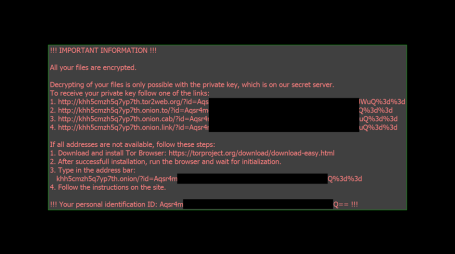
The text on this image can also be used to help identify Bart, as it ‘s stored in files called “recover.bmp” and “recover.txt” on the victim’s desktop.
You Can Get Your Files Back—Easy as 1, 2, 3!
The encrypted files are also easy to recognize, because they’re ZIP archives, denoted by .zip extensions. The trick is they’re password-protected, by a unique (and looong) password.
But never fear, AVG’s Bart decryptor works by comparing a single encrypted file with its unencrypted original. So before you download and run the tool, select an available original file for comparison, then follow these simple instructions:
- Select the file you want to compare. If all your files have been encrypted, you can often find an original in one of these places:
- A backup from the cloud or on a flash drive or other external drive.
- standard Windows sound or picture (e.g. wallpaper), which you can download from the web.
- A document, picture, or video you received in an email.
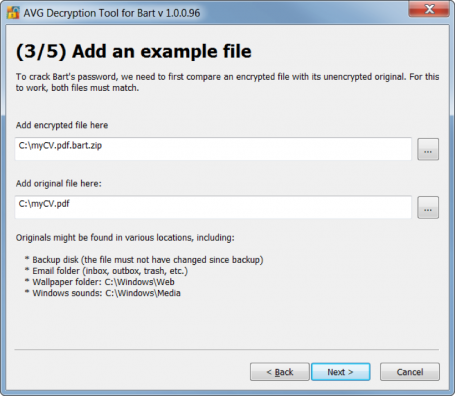
- Copy the file to your desktop (Bart no longer encrypts files after asking you for money, so you should be okay) and download and run the Bart decryptor.
- A window will open asking you to add the encrypted file and the original (see Figure 2). The encrypted file should be in its original folder, the only difference being the “.bart” extension, as below.
- Once you’ve selected both files, click <NEXT>, and the tool does the rest, just as do all our decryptors.
Acknowledgement
We would like to thank Peter Conrad, author of PkCrack, who hereby granted permission to use his library in Bart decryptor. It takes a village.


Oracle Releases Security Bulletin
Original release date: July 19, 2016
Oracle has released its Critical Patch Update for July 2016 to address 276 vulnerabilities across multiple products. Exploitation of some of these vulnerabilities may allow a remote attacker to take control of an affected system.
US-CERT encourages users and administrators to review the Oracle July 2016 Critical Patch Update and apply the necessary updates.
This product is provided subject to this Notification and this Privacy & Use policy.
Nmap Port Scanner 7.25BETA1
Nmap is a utility for port scanning large networks, although it works fine for single hosts. Sometimes you need speed, other times you may need stealth. In some cases, bypassing firewalls may be required. Not to mention the fact that you may want to scan different protocols (UDP, TCP, ICMP, etc.). Nmap supports Vanilla TCP connect() scanning, TCP SYN (half open) scanning, TCP FIN, Xmas, or NULL (stealth) scanning, TCP ftp proxy (bounce attack) scanning, SYN/FIN scanning using IP fragments (bypasses some packet filters), TCP ACK and Window scanning, UDP raw ICMP port unreachable scanning, ICMP scanning (ping-sweep), TCP Ping scanning, Direct (non portmapper) RPC scanning, Remote OS Identification by TCP/IP Fingerprinting, and Reverse-ident scanning. Nmap also supports a number of performance and reliability features such as dynamic delay time calculations, packet timeout and retransmission, parallel port scanning, detection of down hosts via parallel pings.
WordPress Video Player 1.5.16 SQL Injection
WordPress Video Player plugin version 1.5.16 suffers from multiple remote SQL injection vulnerabilities.