
007 Software

Search
Skip to content
Avast

What happens to your Facebook account when you pass away?

February 26, 2016 007admin

We leave a huge digital footprint on Facebook. Did you ever think about what will happen with your data when you pass away?


Facebook profile


The social giant Facebook has existed long enough to realize that it is part of a human’s life events. We announce the most important milestones on our timelines by sharing with our Facebook friends the joy of getting married, having babies, or moving abroad. But what will happen with all that data when we pass away? Discussing your digital legacy isn’t pleasant, but it’s important is our reality. Don’t leave it up to your family member, friends, or even worse: Facebook itself. In this article I will guide you through all the options you have, so you can make a conscious decision about your data, using the tools that Facebook offers to its users.

Decide what to do with your data!

In short you have two options: To delete your account or agree to memorialize your person within the social network. In case you decide on the second option, it is recommended to set up a Legacy Contact: A person who will take care of your account, if something happens to you.
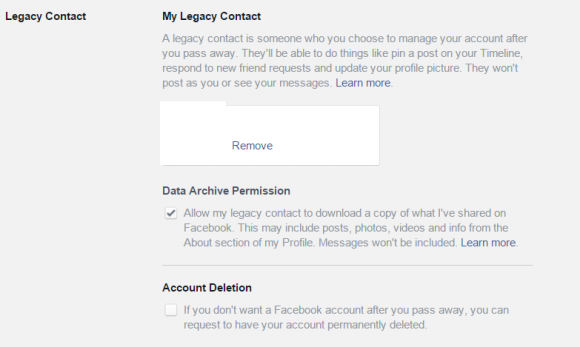
Legacy contact settings

Delete your account

Deleting an account is the easier and more radical option. All your data – pictures, posts, comments, connections, messages, apps you have ever installed – simply everything, will be permanently removed.

Here are the steps you have to take first, to set this option in your profile:

  • From the top right of Facebook, click and select Settings
  • From the left menu, click Security
  • Click Legacy Contact
  • Click have your account permanently deleted and follow the on-screen instructions.

This is however only an initial step to remove your account. If something happens to you, Facebook still needs to be notified. Your immediate family member needs to contact Facebook to inform about the lose. There is a Special Request for Deceased Person’s Account where all the information, including a death certificate needs to be sent. Only after that will Facebook permanently remove the profile.

Setting up a Legacy Contact

A Legacy Contact is a trusted person, a friend or a family member, that will make sure your profile is memorialized and that will take care of it afterwards. According to Facebook, the Legacy Contact will be able to:

  • Write a post to display at the top of the memorialized Timeline (for example, to announce a memorial service or share a special message)
  • Respond to new friend requests from family members and friends who were not yet connected on Facebook
  • Update the profile picture and cover photo
  • Archive your data (Only if you check this option in the settings): Photos and videos you uploaded, wall posts, profile and contact info, events, and friends list. The following data can’t be downloaded: Messages, ads you clicked, pokes, security and settings info, photos you automatically synced but didn’t post.

How to set up a Legacy Contact?

Select the person first and talk about it in advance. You can always change your selection and chose another person, but it is always better to discuss this responsibility in person ahead. It is also important to educate your Legacy Contact what to do.

Here is how to add a legacy contact:

  • Click in the top right of Facebook and select Settings
  • In the left menu, click Security
  • Click Legacy Contact
  • Type in a friend’s name and click Add
  • To let your friend know they’re now your legacy contact, click Send
  • Your friend will be notified with the following message
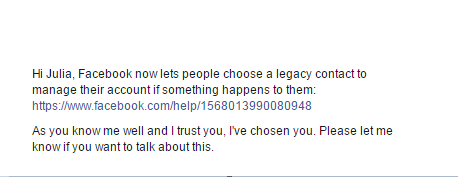
Legacy message

What to do, if you are appointed to be a Legacy Contact?

Respecting your deceased friend or family member is a responsibility. The first thing you will have to do is request memorialization of the profile. Once it is set up as a memorial, the profile will receive the “Remembering” label just above the name, next to the deceased person’s  profile picture. Memorialized profiles don’t appear in public spaces such as in suggestions for People You May Know, ads, or birthday reminders. As a Legacy Contact you can manage a profile in a limited way. To do it you have to go to the profile, in the bottom right of the cover photo click Manage and than you can:

  • Add a pinned post to announce to the circle of the friends what has happened
  • Respond to new friend requests
  • Change the profile picture and cover photo

Please visit our blog often  for more updates on security and privacy on Social Media.


Follow Avast on Facebook, Twitter, YouTube, and Google+ where we keep you updated on cybersecurity news every day.

deleting accountFacebookfeatured1Generalmemorial accountmemorilization on FacebookPrivacySocial Mediawhat to do when someone dies

Post navigation

Previous PostCVE-2016-1297Next PostGIMP For Windows DLL Hijacking

Software and Security Information

Categories

  • Antivirus Vendors
    • Avast
    • AVG
    • Avira
    • ESET
    • Kaspersky
    • Panda Security
    • Symantec
  • Firewall Vendors
    • WatchGuard
  • Hackers News
  • Security
    • Apache
    • Apple
    • CentOS
    • Checkpoint
    • Cisco
    • Debian
    • Django
    • Drupal
    • Fedora
    • FreeBSD
    • Full Disclosure
    • Gentoo
    • Hadoop
    • IBM
    • Joomla
    • Lighttpd
    • Mandriva
    • Microsft
    • Nagios
    • NetBSD
    • Nginx
    • NVD
    • Oracle
    • Perl
    • Python
    • Redhat
    • Security Focus
    • Sun JDK
    • Typo3
    • Ubuntu
    • US-CERT
    • VMWare
    • Wordpress
  • Software reviews
  • Uncategorized

Tags

About Us Android Android corner Antivirus Apple Business Company Cryptography Cybercrime Cybersecurity data breach Encryption Facebook featured1 General google Government Hacking hacking news Hacks highlighted Internet of Things Internet Security Lifestyle Malware Microsoft Mobile Mobile Security News Panda Security Password Press Center Press Releases Privacy ransomware Scams Security Security News Social Media Technology Threats Tips Vulnerabilities Vulnerability Web Security

Recent Posts

  • Hoverwatch Phone Tracker
  • Vuln: Dell iDRAC6 CVE-2015-7274 Arbitrary Command Execution Vulnerability
  • Vuln: Dell iDRAC6 CVE-2015-7274 Arbitrary Command Execution Vulnerability
  • mupdf-1.10a-5.fc26
  • qemu-2.7.1-6.fc25

Recent Comments

    Archives

    • May 2017
    • April 2017
    • March 2017
    • February 2017
    • January 2017
    • December 2016
    • November 2016
    • October 2016
    • September 2016
    • August 2016
    • July 2016
    • June 2016
    • May 2016
    • April 2016
    • March 2016
    • February 2016
    • January 2016
    • December 2015
    • November 2015
    • October 2015
    • September 2015
    • August 2015
    • July 2015
    • June 2015
    • May 2015
    • April 2015
    • March 2015
    • February 2015
    • January 2015
    • December 2014
    • November 2014
    • October 2014
    • September 2014
    • August 2014
    • July 2014
    • June 2014
    • May 2014
    • April 2014
    • March 2014
    • February 2014
    • January 2014
    • December 2013
    • November 2013
    • October 2013
    • September 2013
    • August 2013
    • July 2013
    • June 2013
    • May 2013
    • April 2013
    • March 2013
    • February 2013
    • January 2013
    • December 2012
    • November 2012
    • October 2012
    • September 2012
    • August 2012
    • July 2012
    • June 2012
    • May 2012
    • April 2012
    • March 2012
    • February 2012
    • January 2012
    • December 2011
    • November 2011
    • October 2011
    • September 2011
    • August 2011
    • July 2011
    • June 2011
    • May 2011
    • April 2011
    • March 2011
    • February 2011
    • January 2011
    • December 2010
    • November 2010
    • October 2010
    • September 2010
    • August 2010
    • July 2010
    • June 2010
    • May 2010
    • April 2010
    • March 2010
    • February 2010
    • January 2010
    • December 2009
    • November 2009
    • October 2009
    • September 2009
    • August 2009
    • July 2009
    • June 2009
    • May 2009
    • April 2009
    • March 2009
    • February 2009
    • January 2009
    • December 2008
    • November 2008
    • October 2008
    • September 2008
    • August 2008
    • July 2008
    • June 2008
    • May 2008
    • April 2008
    • March 2008
    • February 2008
    • January 2008
    • December 2007
    • October 2007
    • September 2007
    • July 2007
    • April 2007
    • March 2007
    • January 2007
    • December 2006
    • October 2006
    • May 2006
    • April 2006
    • March 2006
    • February 2006
    • January 2006
    • November 2005
    • October 2005
    • July 2005
    • May 2005
    • March 2005
    • February 2005
    • May 2004
    • December 2003
    • December 2002
    • August 2002
    • December 2001
    • May 2001
    • May 2000
    • December 1
    Proudly powered by WordPress