
007 Software

Search
Skip to content
Avast

Facebook privacy basics – 3 areas to look at

January 9, 2015 007admin

howto2_enPosting a privacy notice on your Facebook feed does nothing to keep your updates, photos, or videos private. You need to tweak the settings yourself.


You may have noticed a legal-sounding statement being shared on people’s Facebook  News Feed lately. As we explained in the blog, Posting a privacy notice on Facebook is useless, this statement does nothing to protect users’ privacy. However, it’s great that Facebook users are concerned about these things – it demonstrates a leap forward in awareness and a desire to protect yourself. That’s why we are sharing the three major areas you need to be aware of when it comes to protecting your privacy:

  1. 1. Your posts
  2. 2. Your profile
  3. 3. Your apps

Your posts control who can see what you share when you post from the top of your News Feed or your profile. This tool remembers the audience you shared with the last time you posted something and uses the same audience when you share again unless you change it.
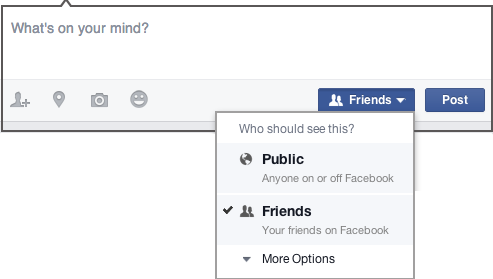
FB privacy 1If you need to delete a post go to your Timeline and find the status update, photo, or video you want to remove. Open the menu in the upper right corner of the post and select Delete.

Your profile includes information about you like Work and Education, Places You’ve Lived, Family and Relationships, etc. To see how others view your profile, go to your profile and select View As… on the menu in the lower right corner of your cover photo. If there is information that you don’t want the world to see, then click Update Info at the bottom of the cover photo of your profile to make sure it’s up-to-date and shared with who you want.

Your apps are what you’ve logged into with your Facebook identity. More and more websites and applications, including Avast, are allowing you to do that, because it’s more convenient than creating a new username and password.

When you choose to use your Facebook information to log in, you are also sharing personal information from your Facebook account with the other website. Third party websites can also sometimes post updates to your wall on your behalf. You can edit who sees each app you use and any future posts the app makes for you, or delete the apps you no longer use. Edit your apps by going to your App Settings.

You can view other settings at any time in your Privacy Settings. Or click the padlock icon located in the top right corner.


Use Social Media Security in your Avast account

Every Avast customer has access to our Social Media Security check via your MyAvast account. You can secure your Facebook profile with:

  • 24/7 check of all posts
  • Protection from dangerous links and viruses
  • Monitoring of all photos, friends, and activities
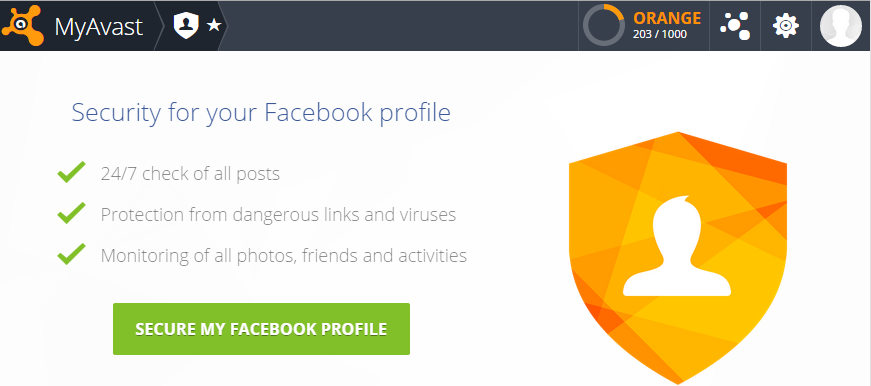
Avast Social Media Security checks your Facebook profile privacy settings

Here’s what you do:

  1. 1. Go to your my.avast.com account. Your Avast Account is created automatically from the email account entered for any Avast GrimeFighter purchase or Avast Free Antivirus registration. Here’s instructions on our FAQ if you don’t have an account.
  2. 2. On the bottom left side of the main screen, you will see Social Media Security. Click the blue button to begin a scan. (You may need to connect your Facebook account first.)
  3. 3. After the scan is complete, Social Media Security will show you all the issues that it found. You can choose to review each of those issues and disregard if it’s OK, or manage the settings within Facebook.


Facebookfeatured1MyAvast accountPrivacySocial MediaSocial Media Security

Post navigation

Previous PostThoughts from CES: The physical world is becoming digitalNext PostChristmas gadgets could cause corporate security issues says Ernst & Young

Software and Security Information

Categories

  • Antivirus Vendors
    • Avast
    • AVG
    • Avira
    • ESET
    • Kaspersky
    • Panda Security
    • Symantec
  • Firewall Vendors
    • WatchGuard
  • Hackers News
  • Security
    • Apache
    • Apple
    • CentOS
    • Checkpoint
    • Cisco
    • Debian
    • Django
    • Drupal
    • Fedora
    • FreeBSD
    • Full Disclosure
    • Gentoo
    • Hadoop
    • IBM
    • Joomla
    • Lighttpd
    • Mandriva
    • Microsft
    • Nagios
    • NetBSD
    • Nginx
    • NVD
    • Oracle
    • Perl
    • Python
    • Redhat
    • Security Focus
    • Sun JDK
    • Typo3
    • Ubuntu
    • US-CERT
    • VMWare
    • Wordpress
  • Software reviews
  • Uncategorized

Tags

About Us Android Android corner Antivirus Apple Business Company Cryptography Cybercrime Cybersecurity data breach Encryption Facebook featured1 General google Government Hacking hacking news Hacks highlighted Internet of Things Internet Security Lifestyle Malware Microsoft Mobile Mobile Security News Panda Security Password Press Center Press Releases Privacy ransomware Scams Security Security News Social Media Technology Threats Tips Vulnerabilities Vulnerability Web Security

Recent Posts

  • Hoverwatch Phone Tracker
  • Vuln: Dell iDRAC6 CVE-2015-7274 Arbitrary Command Execution Vulnerability
  • Vuln: Dell iDRAC6 CVE-2015-7274 Arbitrary Command Execution Vulnerability
  • mupdf-1.10a-5.fc26
  • qemu-2.7.1-6.fc25

Recent Comments

    Archives

    • May 2017
    • April 2017
    • March 2017
    • February 2017
    • January 2017
    • December 2016
    • November 2016
    • October 2016
    • September 2016
    • August 2016
    • July 2016
    • June 2016
    • May 2016
    • April 2016
    • March 2016
    • February 2016
    • January 2016
    • December 2015
    • November 2015
    • October 2015
    • September 2015
    • August 2015
    • July 2015
    • June 2015
    • May 2015
    • April 2015
    • March 2015
    • February 2015
    • January 2015
    • December 2014
    • November 2014
    • October 2014
    • September 2014
    • August 2014
    • July 2014
    • June 2014
    • May 2014
    • April 2014
    • March 2014
    • February 2014
    • January 2014
    • December 2013
    • November 2013
    • October 2013
    • September 2013
    • August 2013
    • July 2013
    • June 2013
    • May 2013
    • April 2013
    • March 2013
    • February 2013
    • January 2013
    • December 2012
    • November 2012
    • October 2012
    • September 2012
    • August 2012
    • July 2012
    • June 2012
    • May 2012
    • April 2012
    • March 2012
    • February 2012
    • January 2012
    • December 2011
    • November 2011
    • October 2011
    • September 2011
    • August 2011
    • July 2011
    • June 2011
    • May 2011
    • April 2011
    • March 2011
    • February 2011
    • January 2011
    • December 2010
    • November 2010
    • October 2010
    • September 2010
    • August 2010
    • July 2010
    • June 2010
    • May 2010
    • April 2010
    • March 2010
    • February 2010
    • January 2010
    • December 2009
    • November 2009
    • October 2009
    • September 2009
    • August 2009
    • July 2009
    • June 2009
    • May 2009
    • April 2009
    • March 2009
    • February 2009
    • January 2009
    • December 2008
    • November 2008
    • October 2008
    • September 2008
    • August 2008
    • July 2008
    • June 2008
    • May 2008
    • April 2008
    • March 2008
    • February 2008
    • January 2008
    • December 2007
    • October 2007
    • September 2007
    • July 2007
    • April 2007
    • March 2007
    • January 2007
    • December 2006
    • October 2006
    • May 2006
    • April 2006
    • March 2006
    • February 2006
    • January 2006
    • November 2005
    • October 2005
    • July 2005
    • May 2005
    • March 2005
    • February 2005
    • May 2004
    • December 2003
    • December 2002
    • August 2002
    • December 2001
    • May 2001
    • May 2000
    • December 1
    Proudly powered by WordPress